


A shopper is halfway through your product page, comparing two sizes and looking for one simple answer: Will this fit, and when will it arrive? The size chart is vague, the delivery estimate is buried, and the customer leaves to search Google. Your support team may answer the same question later, but the sale has already become harder.
A useful FAQ online store experience catches that hesitation before it turns into a bounce. It also answers cart-level delivery concerns and post-purchase questions about tracking, changes, returns, or lost packages. The important shift is to treat the FAQ as a measurable product feature, not a policy page added at the bottom of the footer.
Global retail e-commerce sales reached about $6.42 trillion in 2025 and are projected to exceed $8.9 trillion by 2030, while online purchases represented about 20.5% of worldwide retail sales in 2025. Mobile devices generated roughly 74% of online shopping traffic, so the answers must be visible, readable, and useful on a phone. (Online shopping statistics and market data)
The Storefront Moment Every FAQ Solves
The first FAQ failure happens on the product detail page. A shopper wants to know whether the fabric stretches, whether a replacement filter fits a particular model, or whether a gift can be returned. If the answer isn't near the product information, the customer must hunt through a policy page, open a chatbot, or leave the store.
That creates three distinct leakage points:
- Product hesitation: The shopper can't resolve a fit, material, compatibility, or care objection.
- Cart uncertainty: The shopper sees a shipping charge or delivery window and worries about timing.
- Order confusion: The customer wants to change an address, track a parcel, or understand a delivery exception.
A well-built FAQ gives each moment a clear next action. It can link to the size guide, explain the delivery method, identify the carrier, or tell the customer exactly how to contact support when self-service ends.
Why written answers often outperform a chatbot
A chatbot can be useful for account-specific questions, but it isn't the right first layer for every objection. Written answers remain available after the shopper closes a session, can be indexed by search engines, and give support agents a consistent answer to reuse. They also work without requiring the customer to phrase a question in a way the bot understands.
The FAQ should therefore sit across the storefront, not exist as an isolated archive. A central page can house broad policies, while contextual questions appear on product pages, the cart, and order-status screens. ECORN's FAQ page examples show this distinction clearly, with central answers for store-wide policies and contextual answers for product-specific concerns.
Practical rule: Put the answer beside the decision it influences. A return explanation belongs near the add-to-cart decision, not only in the footer.
The same principle applies outside traditional retail. A hospitality operator, for example, can use the ScanStay complete host guide to see how persistent written information can reduce repeated guest questions across the customer journey. For an online store, the equivalent is a searchable, crawlable knowledge layer that supports conversion before the ticket exists.
Mining Real Tickets to Build Your Question List
Start with the inbox, not a blank document. The most reliable FAQ backlog comes from the language customers already use when they're confused, uncertain, or blocked from completing an order.
The methodology is straightforward: extract the last 90 days of support tickets, tag each ticket by theme, cluster similar questions, then publish the highest-demand answers first. This ticket-driven approach is recommended in practical ecommerce FAQ guidance from Zipchat's FAQ methodology, which also recommends reviewing the page monthly and measuring support deflection, search visibility, and contact-rate changes.
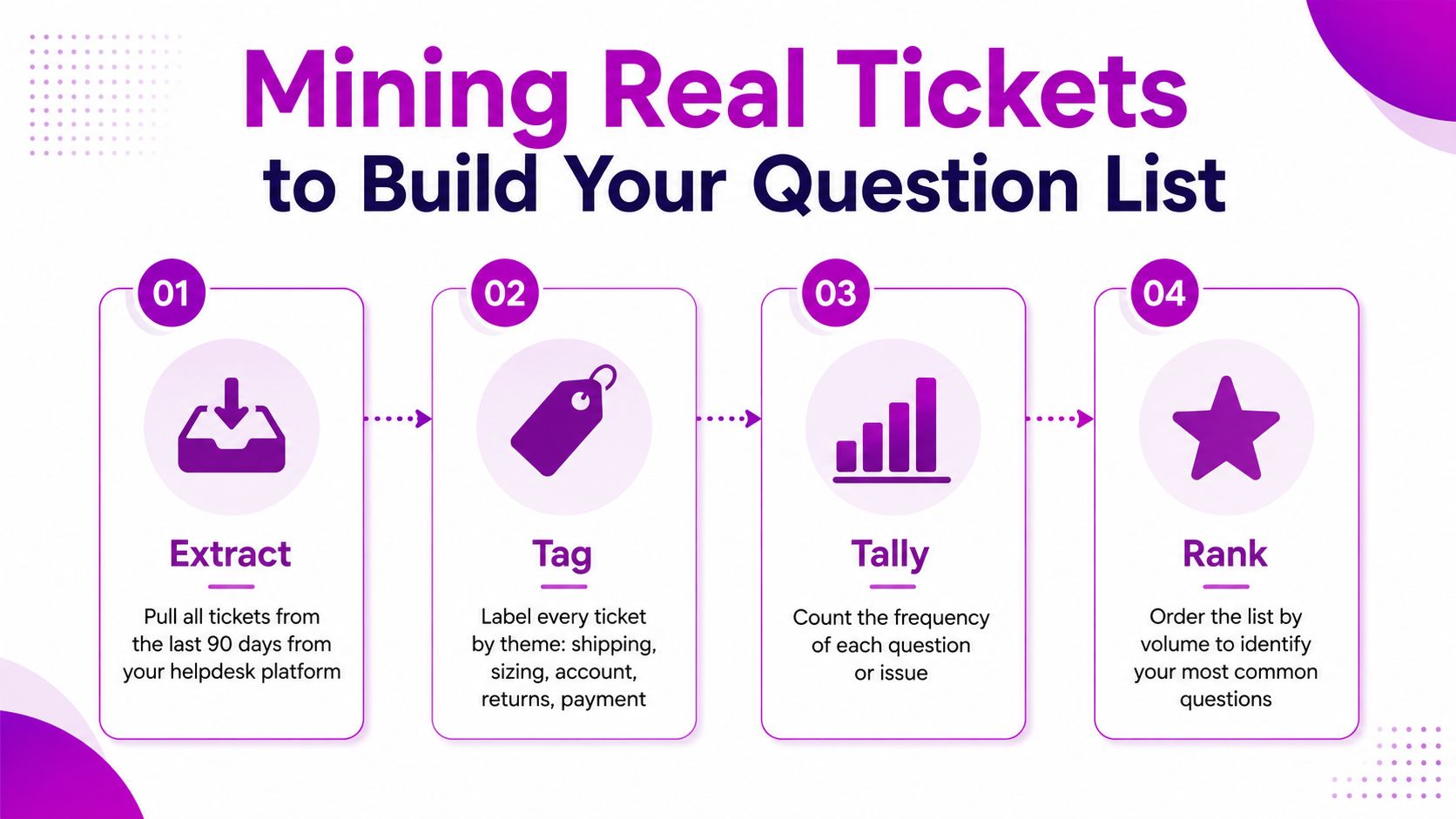
Build the backlog from customer language
Export the ticket subject, message body, order context, tags, customer type, and resolution. Don't rely only on existing tags. Agents often apply inconsistent labels, and customers use different wording for the same issue.
Use a working sheet with one row per proposed FAQ entry:
- Question: The phrasing a shopper would recognize.
- Theme: Shipping, sizing, returns, billing, account, inventory, or another operational category.
- Ticket IDs: The evidence behind the question.
- Draft answer: A plain-language response based on the current policy.
- Owner: The person responsible for confirming and maintaining it.
- Placement: Product page, cart, account area, or central FAQ.
Three versions of “where is my order?” should become one entry such as “How do I track my order?” Another cluster might combine “Can I update my address?”, “I entered the wrong apartment number,” and “Can you redirect my parcel?” Keep the question unified only when the answer and workflow are materially the same.
Rank objections by volume and buying friction
Sort the clusters by frequency, then apply a second filter. Questions that block checkout deserve priority even if they don't dominate ticket volume. A sizing concern may occur less often than a delivery query but still prevent a shopper from adding an item to the cart.
The requested operating threshold can be above 2% of total contacts, but use it as a prioritization signal rather than a universal rule. Remove legal-only language from the first release unless customers need it to make a decision, and separate seasonal issues from evergreen questions so a temporary promotion doesn't distort the core page.
A Shopify apparel store might discover that 18% of its tickets concern sizing rather than shipping. In that case, the FAQ should lead with a fit guide, garment measurements, and advice on choosing between sizes. Delivery information still matters, but it shouldn't dominate the page because the internal team assumes shipping is the primary concern.
For stores rebuilding their help operation, a structured support ticket system guide can help establish the tagging and ownership needed for this process. The FAQ becomes much easier to maintain when every published answer has a clear source and an accountable owner.
Questions Worth Answering Beyond Shipping and Returns
Most ecommerce FAQ pages cover shipping, returns, payment methods, and sizing. Those topics deserve attention, but they aren't the full support burden. Operational edge cases often generate the repeat contacts that frustrate customers after they've already decided to buy.
The strongest answers don't merely state a restriction. They tell the shopper what to do, by when, and what happens next. “Email us within two hours of ordering and we'll check whether fulfillment has started” is more useful than “Address changes aren't guaranteed.”
| Question Cluster | Customer Moment | Conversion Logic |
|---|---|---|
| Address changes before fulfillment | The shopper notices an error after checkout | A clear cutoff and contact route reduces anxiety about ordering |
| Lost packages and delivery exceptions | Tracking stops updating or shows delivery without receipt | Separating carrier delays from lost-package steps prevents repeat contacts |
| Pickup versus ship-to-home | The shopper compares fulfillment options | Specific eligibility and collection instructions remove location uncertainty |
| Gift receipts and gift wrap | The buyer is purchasing for someone else | Explaining presentation and documentation supports gifting decisions |
| Split shipments | Products may leave from different locations | Setting expectations prevents customers from treating separate parcels as a missing order |
| Pre-orders and backorders | Inventory isn't immediately available | A clear fulfillment window helps shoppers judge whether waiting is acceptable |
| Subscription pause or skip | A recurring order is approaching | Self-service controls make recurring purchasing feel safer |
| Customization limits | The product has personalization or production constraints | Concrete examples prevent an order from being placed with impossible instructions |
| Loyalty point redemption | The shopper is ready to apply rewards | Eligibility, exclusions, and checkout steps remove last-minute friction |
Turn exceptions into commitments
For each cluster, write the answer around a customer action. If the customer can change an address only before fulfillment, say how to request the change and what information support needs. If a package is marked delivered but can't be found, give the investigation path instead of repeating the carrier's status.
Use policy nuance where it changes the decision. A pre-order answer should distinguish the product's estimated dispatch timing from the timing of other items in the same basket. A subscription answer should state whether the customer can pause, skip, or cancel from the account area, and whether support can do it on the customer's behalf.
The FAQ research from EasyFAQ's ecommerce question guide also highlights the need to move beyond basic policy categories into logistics exceptions and operational detail. Those questions may appear less frequently, but they often sit closer to the moment when confusion turns into a complaint.
A useful rule is simple: if a support representative can answer the question in under 60 seconds, it probably belongs in the FAQ, even if it occurs only weekly. The exception is content that requires private order data. Put the general process in the FAQ, then hand the individual case to authenticated support.
UX Patterns Shoppers Actually Use
FAQ design should follow question volume and shopper intent. A short list doesn't need a search engine, while a technical catalog with dozens of compatibility questions becomes painful when every answer sits in one long accordion.
| Pattern | Best For | Where to Place | Mobile Caveat |
|---|---|---|---|
| Stacked Q&A | Short lists with fewer questions | Central FAQ or a compact product information area | Keep questions visually distinct and avoid dense paragraphs |
| Accordion groups | Longer lists divided by category | Product pages, cart support blocks, and category sections | Make the whole question tappable and expose a clear open-state icon |
| Searchable FAQ widget | Large catalogs and broad support libraries | Dedicated FAQ page or help center | Search must tolerate natural wording and show useful empty states |
Match the interface to the decision
For a product page, show a small group of relevant questions below the description. Two to four items covering fit, materials, compatibility, delivery, or returns are usually easier to use than a full help center embedded beneath the product. A “View all FAQs” link can lead to the central page without forcing every shopper through unrelated policy content.
The cart needs a lighter intervention. A collapsible shipping and returns block can answer the final objections without pushing the checkout button out of view. On checkout, a compact “Need help?” link or support trigger is safer than a large FAQ module that distracts from payment.
A dedicated FAQ page can support category tiles such as Orders, Products, Shipping, Returns, and Subscriptions, followed by search. The categories provide orientation, while search helps customers who arrive with a precise question.
Protect the mobile interaction
Mobile shoppers shouldn't have to tap a tiny plus icon. Make the full question row the tap target, provide a clearly visible open and closed state, and ensure the text remains legible without zooming. Avoid nested accordions, because hiding an answer two interactions deep makes the customer work harder precisely when they need reassurance.
Use a chat handoff only where the FAQ reaches the limit of generic information. “Where is my order?” can require order-specific access, so the answer should include tracking instructions and a route to authenticated support. The handoff should preserve the question or order context instead of making the customer repeat it.
Stores evaluating a broader information architecture can find top ecommerce UX partners for help with placement, navigation, and mobile interaction design. The FAQ itself doesn't need visual complexity. It needs to appear at the right point, answer the right objection, and make the next step obvious.
SEO and Schema for FAQ Pages
An FAQ can rank when its questions match the language shoppers use and when the page is easy for search engines to crawl. Start with the visible page structure. Use an H2 or H3 for each real question, then place the answer directly beneath that heading rather than hiding the entire content in a modal or inaccessible interaction.
Keep answers concise enough to scan and specific enough to resolve the objection. A practical range is 50 to 120 words per answer, while the infographic guidance recommends 50 to 90 words for readability. These ranges are not ranking guarantees. They're editing constraints that help teams avoid both one-line non-answers and policy essays.
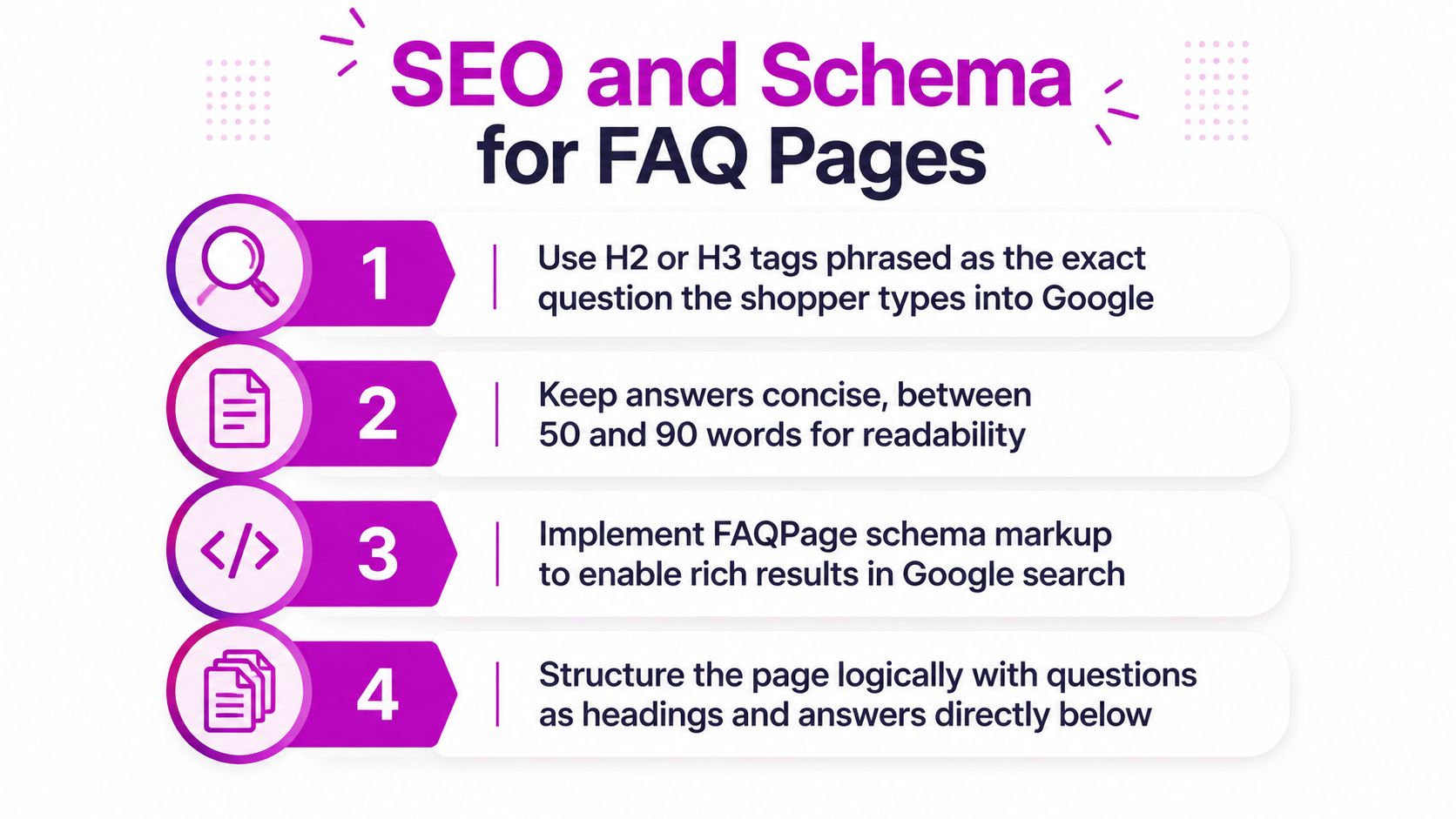
Build structured data from visible content
FAQPage schema should describe the questions and answers users can see. In JSON-LD, create one Question node for each entry, with an acceptedAnswer containing the same answer text displayed in the HTML. Don't add questions that exist only in the markup, and don't use schema to make a vague policy look more complete than it is.
The markup can support search presentation, but it doesn't replace useful content. Google may not show a rich result even when the implementation is technically valid, so treat schema as eligibility support rather than a guaranteed traffic mechanism.
A clean page structure also helps internal discovery:
- Link relevant product templates to product-specific FAQ anchors.
- Link collection pages to category-level questions.
- Link shipping and returns policy pages to the central FAQ where answers overlap.
- Keep one canonical location for each evergreen answer when possible.
Avoid the implementation traps
Duplicate answers across multiple URLs can make maintenance difficult and create conflicting versions of the same policy. Schema that doesn't match visible HTML is another avoidable problem. So are answers that are too thin to help, too long to scan, or written in internal language customers wouldn't search.
Use the Google Rich Results Test to check the structured data, then inspect indexing and performance in Google Search Console. Validate the final page on mobile, confirm every answer is visible to users, check canonical handling, and watch for errors after theme or app changes.
For a practical implementation walkthrough, this video covers FAQ SEO and schema considerations:
Implementing and Placing the FAQ on Shopify
Shopify gives you several workable implementation paths. The right choice depends on how often the content changes, whether answers need product-level targeting, and how much control your team needs over markup and performance.
Choose the simplest path that meets the requirement
Native theme blocks are the fastest option. Use the theme's page template, rich-text block, or collapsible-content group for a small central FAQ. This works well when a merchandiser needs to edit answers without developer support, but native blocks may not provide search, detailed analytics, or advanced filtering.
A Shopify App Store solution makes sense when the store needs search, reporting, multilingual content, or a reusable question library. Tools such as Helpify, Searchanise FAQ, and Helpful can reduce custom development, but review their output before launch. Check whether the app injects visible HTML, supports the schema you need, adds unnecessary scripts, or creates duplicate URLs.
Custom Liquid with metaobjects or article-backed content offers the most control. A developer can conditionally render questions by product tag, collection, or metafield, and can shape the schema output around the exact visible content. The trade-off is editorial complexity. Someone must own the data model, templates, validation, and fallback behavior when a product has no assigned questions.
Host the main resource at a stable /pages/faq route, link it from the footer, and connect relevant policy pages to it. On product pages, use a section block below the description for shared questions, then add a metafield-driven block for product-specific answers. A running shoe might inherit shipping and returns questions while rendering a separate fit or terrain section.
Before replacing a static page, confirm that the new version preserves useful URLs, retains policy accuracy, exposes answer text in the rendered HTML, and passes structured-data validation. Netco Design LLC's answers to common questions provide a useful reference for organizing a clear FAQ experience, even when your Shopify implementation uses different components.
A migration checklist should include:
- Export the existing questions and remove duplicates.
- Map each answer to an owner and review date.
- Create canonical question IDs for measurement.
- Test desktop, mobile, keyboard, and screen-reader behavior.
- Validate schema against the visible page.
- Add links from products, collections, cart, and policy templates.
- Compare ticket topics before and after publication.
Measuring Impact and Running the Monthly Review
A useful FAQ has three jobs, and each needs its own measurement. Support deflection shows whether customers are finding answers before opening tickets. Search visibility shows whether the FAQ attracts impressions and clicks. Contact rate per FAQ entry reveals which answers still fail to resolve the underlying problem.
Define support deflection as the number of tickets containing questions that match an existing FAQ entry, divided by total tickets. Tag the matched question ID, not just the broad topic. “Shipping” is too vague to diagnose whether the problem is delivery timing, tracking, address changes, or a lost parcel.
Search visibility should combine FAQ URL performance and Search Console data. Watch impressions and clicks for relevant FAQ queries, then compare those signals with organic entrances to the FAQ page. Search traffic is useful, but it isn't the primary success criterion if customers are finding the answer on a product page and support contacts are falling.
Use a repeatable monthly review
Pull the last 30 days of tickets and map them against the current question list. Cluster anything new, flag entries that continue to generate contacts, and review answers where customers repeatedly ask for clarification. For pruning, look at entries with no matched contacts across 90 days, but don't delete an answer solely because it hasn't generated a ticket. Search demand, product changes, and seasonal needs can justify keeping it.
| Metric | Source | Target | Action if Missed |
|---|---|---|---|
| Support deflection | Helpdesk tags and ticket topics | Set a store-specific baseline, then improve it | Rewrite the matching answer or move it closer to the decision point |
| Search visibility | Search Console and analytics | Establish a baseline for FAQ queries and landing pages | Improve question wording, internal links, and page structure |
| Contact rate per FAQ entry | Ticket IDs matched to question IDs | Reduce repeat contacts for high-volume questions | Add specifics, examples, timelines, or a clearer escalation route |
Keep the review meeting short and operational. Decide what to add, what to rewrite, and what to retire, then assign an owner and due date for each decision. Don't judge the page by its length, accordion-open counts, or total visits alone. A small answer that prevents a repeat sizing or delivery ticket can be more valuable than a popular page that leaves customers unresolved.
A ticket-driven FAQ also exposes process problems. If the same question keeps returning after several rewrites, the issue may be the policy, checkout copy, tracking flow, or fulfillment communication rather than the FAQ itself. Fix the source experience and use the FAQ to reinforce the change.
ECORN helps Shopify brands design, develop, and optimize FAQ experiences that connect product-page content with support deflection and conversion goals. Visit ECORN to discuss a ticket-driven FAQ build, Shopify implementation, or a broader CRO and ecommerce optimization project.



Shopify Plus Automation: A Guide for 2026

10 Social Selling Platforms for Shopify Merchants

Shopify Website Design Examples: 7 Stores Worth Studying

7 Ecommerce Newsletter Examples for Shopify Brands

One Product Shopify Store: Build and Scale

Mobile Pop Up Strategy for Shopify Stores That Converts

Sitemap for Shopify: How to Find, Optimize, and Submit It

7 Single Product Websites Worth Emulating

Product Variants Shopify: The Complete 2026 Guide

Ecommerce Analytics Consulting for Growth

What Is AI Integration for eCommerce

How to Choose the Right eCommerce Website Development Firm

E Business Strategy Implementation

Conversion Tracking Setup for Shopify Stores

BigCommerce vs Shopify Plus Which Enterprise Wins in 2026

Shopify Theme Kit: Setup, Commands, and Migration Guide

Shopify Extension Development: A Practical 2026 Guide

Shopify Speed Score Explained and How to Improve It

Shopify Mobile Optimization: The 2026 Playbook

How to Add Subcategory in Shopify for Better UX

How to Implement Structured Data for Ecommerce in 2026

SEO App Mobile: Shopify Store Optimization Guide

Shopify Plus Support: What It Includes and How to Choose

Google Ads for Shopify: The Complete 2026 Playbook

Shopify New York: How to Find and Hire the Right Agency

Google Search Console for Shopify: The Complete Setup

First Party Data Collection for eCommerce Growth

Do FB Ads Work for eCommerce in 2026?

One Page Checkout for Shopify: Design and Implementation

Shopify GraphQL vs REST: The 2026 Developer Decision

Shopify Ecommerce Consulting: Strategy, Pricing &

Are Reddit Ads Worth It for eCommerce Brands

Shopify Title and Meta Description: A Practical 2026 Guide

Product Video Best Practices for Shopify Brands

Real-Time Inventory Management: A 2026 Guide

AI Chatbot Integration for Shopify Stores

Affiliate Program Management: A Shopify Guide

10 Best Performance Monitoring Tools for Shopify in 2026

Digital Asset Management for eCommerce Brands in 2026

Every Type of Facebook Ads Explained for eCommerce Growth

Product Information Management Explained for Shopify Brands

Support Ticket System: A Guide for Shopify Stores

10 Best Customer Service Tools for Shopify in 2026

Can I Start a Business with No Money? a 2026 Blueprint

What Sells Good on Etsy: Best Niches for 2026

Shopify Add to Cart Button: A Practical 2026 Guide

Customer Feedback Automation: A Practical eCommerce Guide

Critical Rendering Path: A Guide for Shopify Stores

How to Promote on TikTok for eCommerce in 2026

B2B eCommerce Consulting That Drives Real Revenue

10 Best Practices for Site Navigation in 2026

Return vs Refund for Shopify Stores: A Practical Guide

What Is Customer Lifetime Value and Why It Matters

What Is Voice of Customer Research for eCommerce

SMS Marketing for Ecommerce That Actually Converts

Master How to Improve Email Deliverability in 2026

Top 7 eCommerce Partners NYC for Shopify Brands in 2026

Machine Learning for Ecommerce: Boost Your Shopify Store

Beauty Market Research: Your 2026 Growth Guide

Shopify International Expansion: A 2026 Roadmap

What Does CRO Stand for in Business: Understanding CRO

Shopify Visual Merchandising: A Playbook for Higher Sales

Shopify Landing Page Design: Master Conversion in 2026

10 Best AI SEO Optimization Tools for Shopify in 2026

Agentic AI for Ecommerce: Boost Your Sales in 2026
Mastering Email Marketing Data for eCommerce Growth

Conversion Rate Optimisation Australia: Boost Your Sales

Conversion Rate Optimization AI: Your Shopify Store Guide

10 Product Bundling Strategies for Shopify in 2026

How to Increase Customer Lifetime Value: A Shopify Playbook

AI Customer Service Automation: Shopify Guide 2026

Clean Website Design: A Shopify Conversion Playbook

Omnichannel Retail Strategy: A Shopify Playbook

Product Data Enrichment: A Guide for Shopify Brands

Instagram Shopping Features a Guide for Shopify Stores

What Is Revenue Optimization: A Holistic RevOps Guide

Benefits of Conversion Rate Optimization: Boost Your

WordPress to Shopify Migration: Your 2026 Seamless Switch

Boost Sales: Ecommerce Payment Processing Guide 2026

Unified Commerce Platform: Benefits, KPIs & Shopify Guide

How to Reduce Bounce Rate eCommerce: Your 2026 Guide

Shopify API Integration: A Practical End-to-End Guide

How to Implement Data Governance: A 2026 Guide

Shopify Store Development Cost: A 2026 Breakdown

What Is Server Side Tracking: The Shopify Guide 2026

Marketing Automation Workflows: A Shopify Guide for 2026

Shopify: How to Reduce Technical Debt

Shopify UX Design Change: A Playbook for Growth

User Generated Content Strategy: Shopify Playbook

Shopify Pause and Build Plan Cost: A Complete 2026 Guide

Compare at Price on Shopify: A Complete Guide for 2026

Where Can I Sell My Prints? 10 Best Platforms for 2026
Shopify Order Management System: The Ultimate Guide 2026
What Is Marketing Attribution? an eCommerce Guide for 2026

10 Best Black Friday Sales Sheets for 2026

Discover the Top Social Media Marketing Agencies For
Consumer Confidence Definition for eCommerce in 2026
What Is Social Commerce? Your 2026 Guide to Boosting Sales

A Social Ad Campaign Playbook for eCommerce Growth

7 Best FAQ Page Examples for SaaS & eCommerce


newsletter in your inbox