
AI Integration Platform: What It Is and How to Choose One
Right now, someone on your team is probably copying an order number out of Shopify, pasting it into a chat window to draft a customer reply, and pasting that reply back into Gorgias or Zendesk. It feels fast for one ticket. Across a busy week, those manual handoffs turn into copy-paste errors, inconsistent answers, and zero audit trail.
When you start shopping for an AI integration platform to fix that bottleneck, most vendor demos steer you toward connector counts. One sales deck promises hundreds of apps; another shows a flashy customer-facing chatbot built in five minutes. Neither metric tells you whether the tool will protect customer data, obey your refund limits, or pay back its monthly bill.
A better way to choose starts in the opposite order. Before you score a single vendor, you pick one low-risk workflow, map where data moves, and decide how you'll prove the integration earned its keep.
What an AI Integration Platform Does for Your Business
Picture a store manager at a growing apparel brand. She wants AI to draft new product descriptions, answer "where is my order?" tickets, and flag SKUs about to run out of stock. Her language model sits open in one browser tab, while the actual business data lives across four separate systems: product specs in Shopify, inventory counts in the ERP, customer threads in the helpdesk, and campaign triggers in Klaviyo.
An AI integration platform is the operational layer that sits between AI models and those business systems. Instead of asking staff to ferry text back and forth, the platform manages system connections, formats incoming data into structured prompts, enforces access permissions, logs every request, retries failed API calls, and routes sensitive outputs to human review.
Think of an AI model like a kitchen appliance. You don't wire an oven, a mixer, and a freezer straight into raw mains power with loose cables. You install a distribution board with circuit breakers, load limits, and a meter. The integration platform is that distribution board: it lets several models work across your store systems safely, while giving your team breakers to trip and meters to read when something behaves oddly.
That infrastructure layer matters because basic AI adoption is already mainstream. In McKinsey's 2025 State of AI report, 88% of surveyed organizations reported regular AI use in at least one business function, while roughly one-third said they'd begun scaling those programs across the company. Most eCommerce teams have moved past asking whether to test AI. Their real problem is wiring models into live catalogs, customer records, and back-office rules without creating chaos.
How It Differs From Plugins and General Middleware
A single chatbot widget or Shopify app plugin connects one model to one narrow surface. It works fine for an isolated task, but it breaks down once you need the same customer context across support, merchandising, and warehouse operations.
General iPaaS (integration platform as a service) tools such as Zapier, Make, or MuleSoft solve a different problem. They move structured records between apps on fixed triggers, such as copying a new order row into an ERP table. An AI integration platform handles probabilistic model calls on top of those data pipes. It builds and versions prompts, runs policy checks before a model sees sensitive fields, records which exact model version produced an output, and pauses execution for human approval when confidence drops or financial stakes rise.
Weekly friction test: If anyone on your team copies data between two tools by hand just to get one usable AI answer more than once a week, you already have an integration problem worth solving.
How AI Connects to Store and Business Systems
To see what happens under the hood, trace one ordinary support request from start to finish: a customer writes in asking why a delayed shipment hasn't arrived. The condensed diagram below shows the core path a grounded inquiry takes across your store systems before we break down the seven operational stages behind it.
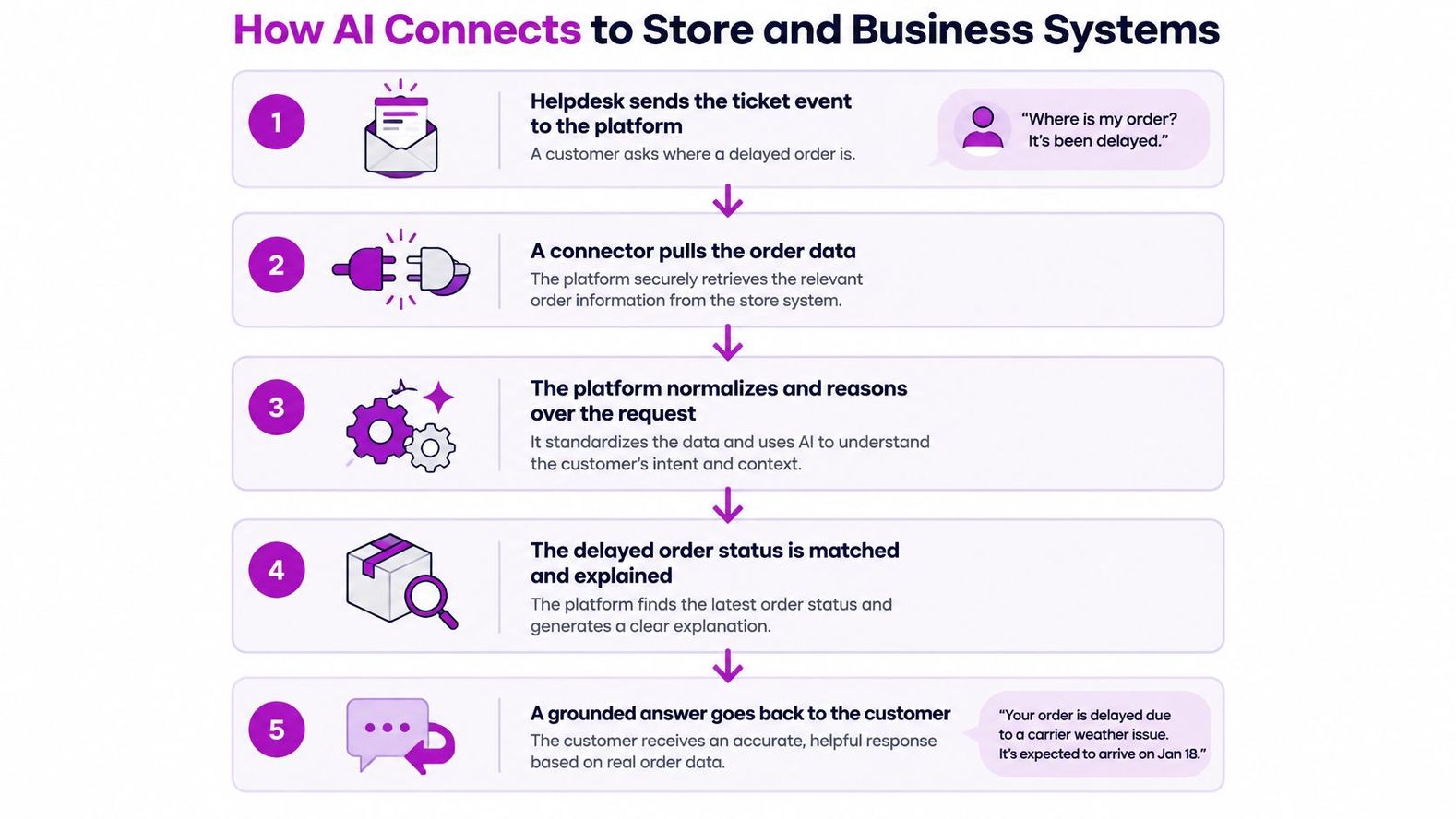
In production, a reliable integration platform splits that single ticket into seven controlled stages so no step runs blind.
- Event capture: Your helpdesk fires a webhook when the customer submits the delayed-order message, handing the ticket ID and customer email to the integration platform.
- Context retrieval: A store connector pulls the matching order record from Shopify, while a carrier connector queries the logistics API for the latest tracking scan and estimated delivery window.
- Data transformation: A mapping layer strips out irrelevant fields, standardizes dates and currency formats, and assembles a structured prompt that gives the model only the facts it needs.
- Pre-execution policy check: Before the payload leaves your network, a policy gate checks whether the request complies with regional privacy rules, masks payment tokens or unnecessary personal details, and confirms the workflow is allowed to call an external model.
- Model invocation: The platform sends the approved prompt to the chosen model endpoint, applying timeout limits and fallback routing if the primary provider slows down or returns an error.
- Output validation and logging: When the model returns a draft reply, the platform verifies that the text follows your required schema (such as checking that the quoted tracking number matches the carrier API response) and writes a permanent log entry containing the inputs, model version, and response.
- Approval or delivery: Low-risk replies, such as sharing a verified carrier link, can be sent automatically if your policy allows it, while anything involving a refund, replacement, or upset VIP customer lands in a support agent's queue for one-click approval.
Why API Scale Demands More Than Simple Connectors
Every stage in that seven-step chain runs over APIs (application programming interfaces), the structured contracts that let software tools exchange data without human clicks. Modern commerce stacks already rely on sprawling networks of these connections, and AI is multiplying them quickly.
According to DreamFactory's 2025 API integration statistics report, AI-related APIs surged by 807% since 2023, and the average organization now maintains more than 1,000 APIs. At that scale, stitching a model directly to a storefront with a quick script is fragile. API providers change schemas, throttle traffic during holiday peaks, and expire authentication tokens without warning.
That operational reality is why an integration platform needs token management, rate limiting, version control, observability dashboards, and automated retry queues rather than just a long directory of logos. Connecting customer profiles cleanly across your storefront, helpdesk, and CRM requires disciplined customer data integration solutions so the AI reads one consistent version of the truth instead of conflicting fragments.
Before moving on, grab a notepad and sketch those same seven stages for one repetitive workflow in your own store. Draw a bold red line at the exact stage where customer or order data leaves your internal systems. That line shows you where your security and governance work begins.
Use Cases Ranked by Measurement Difficulty
Many eCommerce leaders assume their first AI project should be a customer-facing storefront chatbot. It sounds logical on the surface: deflect support tickets, answer sizing questions, and convert browsers around the clock. In practice, a live chatbot is one of the hardest first workflows to get right.
A storefront chatbot pulls from multiple data sources at once (catalog specs, stock status, order history, return rules) and puts its mistakes straight in front of paying customers. Worse, proving whether a chatbot increased revenue is murky when seasonal sales, paid ad spend, and site promotions shift every week.
That measurement trap shows up across industries. Research in Futurum Group's enterprise AI readiness analysis found that uncertainty about measuring business value remains a major adoption challenge for 43% of organizations, while reliability and hallucination management affected 55%. Starting with a workflow where errors are public and attribution is fuzzy invites both problems on day one.
Comparing common eCommerce workflows by measurement difficulty and failure cost reveals a much safer starting order.
| Workflow | Systems connected | Measurement difficulty | Cost of a failure |
|---|---|---|---|
| Product-data enrichment | PIM or Shopify product records, supplier feed | Low | Low, caught in review before publishing |
| Support-ticket triage | Helpdesk, order data | Low to medium | Medium, misrouted tickets slow replies |
| Merchandising alerts | Shopify, analytics, ERP stock levels | Medium | Medium, missed or false stock signals |
| CRO experiments | Shopify, analytics platform | Medium to high, confounded by seasonality | Low to medium, wasted test traffic |
| Customer-facing chatbot | Store catalog, order data, CRM, helpdesk | High | High, wrong answers reach customers directly |
| Automated refunds or discounts | Shopify, payments, ERP | Medium | High, direct financial loss per error |
Sequencing Your Rollout From Safe Drafts to Money-Moving Actions
Look at the top two rows of the table. Product-data enrichment and support-ticket triage have clear, verifiable inputs and human checkpoints built into the workflow. If a model misreads a supplier spreadsheet and writes an odd fabric blend, your merchandiser catches it in draft status before it ever hits Shopify. You can measure hours saved and edit rates within weeks.
Middle-tier tasks like merchandising alerts and CRO experiments bring noisier signals. A sudden spike in conversion rate might come from an AI-generated variant, or it might come from a weekend newsletter or an influencer mention. Separating the AI's contribution takes disciplined control groups.
At the bottom sit customer-facing chatbots and automated refunds or discounts. A misfired discount rule or hallucinated return policy drains margin immediately and erodes buyer trust. Sequence your rollout from the top of the table downward: prove your baseline metrics, error handling, and human approval workflow on an internal drafting or triage task first, then graduate to customer-facing and money-moving automation once those guardrails hold under real traffic.
Evaluation Criteria Scorecard for eCommerce Teams
Once you know which workflow goes first, you're ready to compare platforms. Resist the urge to sort vendors by the total number of integrations on their marketing page. A platform with 500 thin webhook wrappers won't help you if it lacks permission scoping or audit trails.
Governance lag is already a widespread operational blind spot. In the Thoughtworks Global CIO Survey 2026, 88% of CIOs reported that AI adoption is moving faster than governance structures can adapt, and 31% named data quality and integration as the single greatest challenge to scaling AI. Scoring platforms on operational controls prevents your store from inheriting that gap.
Use the ten-point scorecard below during vendor demos and trial builds. Have your operations lead and technical lead rate each candidate from 1 to 5 on every row, paying close attention to the red flags.
| Criterion | What to check | Red flag |
|---|---|---|
| Connectors | Native Shopify, ERP, helpdesk and email connectors plus documented custom API support | Only generic webhooks with no maintained connectors |
| Authentication and permissions | Least-privilege scopes per connector and per model | One shared admin key used by every tool |
| Provider abstraction | Add or swap a model without rebuilding workflows | Workflows hard-coded to a single model vendor |
| Logging and traceability | Every call logged with input, context, output and model version | No request history or only aggregate counts |
| Data handling | Field-level filtering, regional storage options and consent-aware routing | Full customer records sent to the model by default |
| Approval and rollback | Human gates on refunds, pricing and publishing, plus a kill switch | No way to pause a live workflow without a developer |
| Monitoring | Error alerts, latency and cost per completed workflow | Only a monthly invoice to judge performance |
| Multi-storefront support | Multi-store and multi-currency handling from one setup | Separate duplicated configuration for each store |
| Testing environment | Sandbox and production tenants with replayable test cases | Changes tested directly on live customer data |
| Vendor lock-in | Exportable prompts, policies, logs and workflow definitions | Proprietary formats with no export path |
Weighting Criteria by Workflow Risk
Not every criterion deserves the same multiplier. Match your scorecard weights to the risk profile of the workflows on your 12-month roadmap, not just your day-one pilot.
- Low-risk drafting pilots: Give extra weight to connectors, provider abstraction, and monitoring so your team can test models quickly and track cost per product record or triaged ticket.
- Customer-data workflows: Double the weight on data handling, authentication and permissions, and logging and traceability so no personally identifiable information slips into prompts unmasked.
- Money-moving workflows: Put the heaviest weight on approval and rollback, testing environment, and vendor lock-in, because pausing a broken refund rule in ten seconds matters far more than saving two hours during initial setup.
- Multi-region Shopify Plus stores: Treat multi-storefront support and regional data storage as pass-or-fail gates rather than nice-to-have bonuses.
Score every platform against a live test case from your own store before signing an annual contract. A ten-minute slide walkthrough hides permission flaws that show up immediately inside a sandbox.
Build, Buy or Extend Your Current Stack
Buying a standalone AI integration platform isn't always the right answer. Depending on your team's engineering capacity and existing software, you have three realistic routes: buy a dedicated AI platform, extend an iPaaS or middleware tool you already run, or build custom API integrations in-house or with a partner.
A clear decision rule keeps the choice grounded. Buy a dedicated platform when you need to govern multiple models, teams, or storefronts from one control plane. Extend your existing middleware when it already maintains reliable connectors to Shopify and your ERP, and you only need to add scoped model steps with logging on top. Build custom integrations when your competitive edge depends on proprietary pricing, fulfillment, or catalog logic that off-the-shelf connectors can't express cleanly.
Whichever route you examine, compare total cost across four distinct budget lines rather than looking only at software pricing:
- Licence and usage fees: Monthly platform subscriptions, per-task or per-token charges, and enterprise add-ons required for SSO or audit log exports.
- Initial integration build time: Engineering and operations hours spent mapping schemas, testing edge cases, and wiring approval queues before launch.
- Ongoing maintenance: The recurring work of updating field mappings whenever Shopify, a carrier, or an ERP ships an API version change.
- Monitoring and audit staff time: Weekly hours spent reviewing error logs, tuning prompts, checking permissions, and answering compliance questions.
To see how those costs trade off, consider a hypothetical merchant running three regional storefronts connected to an ERP such as 1C. Paying for a dedicated platform makes financial sense only if its maintained ERP connector and built-in governance save more engineering and maintenance hours over twelve months than the annual platform fee. Reviewing how each tool fits into your broader eCommerce tech stack helps you spot overlap before you add another recurring bill.
Custom builds give you complete ownership of prompts, schemas, and logs, yet your team carries 100% of the maintenance burden forever. Dedicated platforms cut build time sharply, provided they pass the exportability check on your scorecard so you don't trade maintenance work for vendor lock-in.
Before procurement signs anything, apply one practical test: which route lets your team swap an underlying AI model or upgrade an ERP connector without rebuilding every downstream workflow?
Governance Controls at the Point of Action
Autonomy should be earned by workflow risk, never granted by default.
An integration becomes risky at the exact moment an AI stops merely summarizing data and starts taking actions inside your live systems. Putting tiered boundaries around those actions lets your team move quickly on safe tasks while locking down high-stakes operations. The visual below illustrates how permissions step up in layers, keeping sensitive actions behind progressively stricter controls.
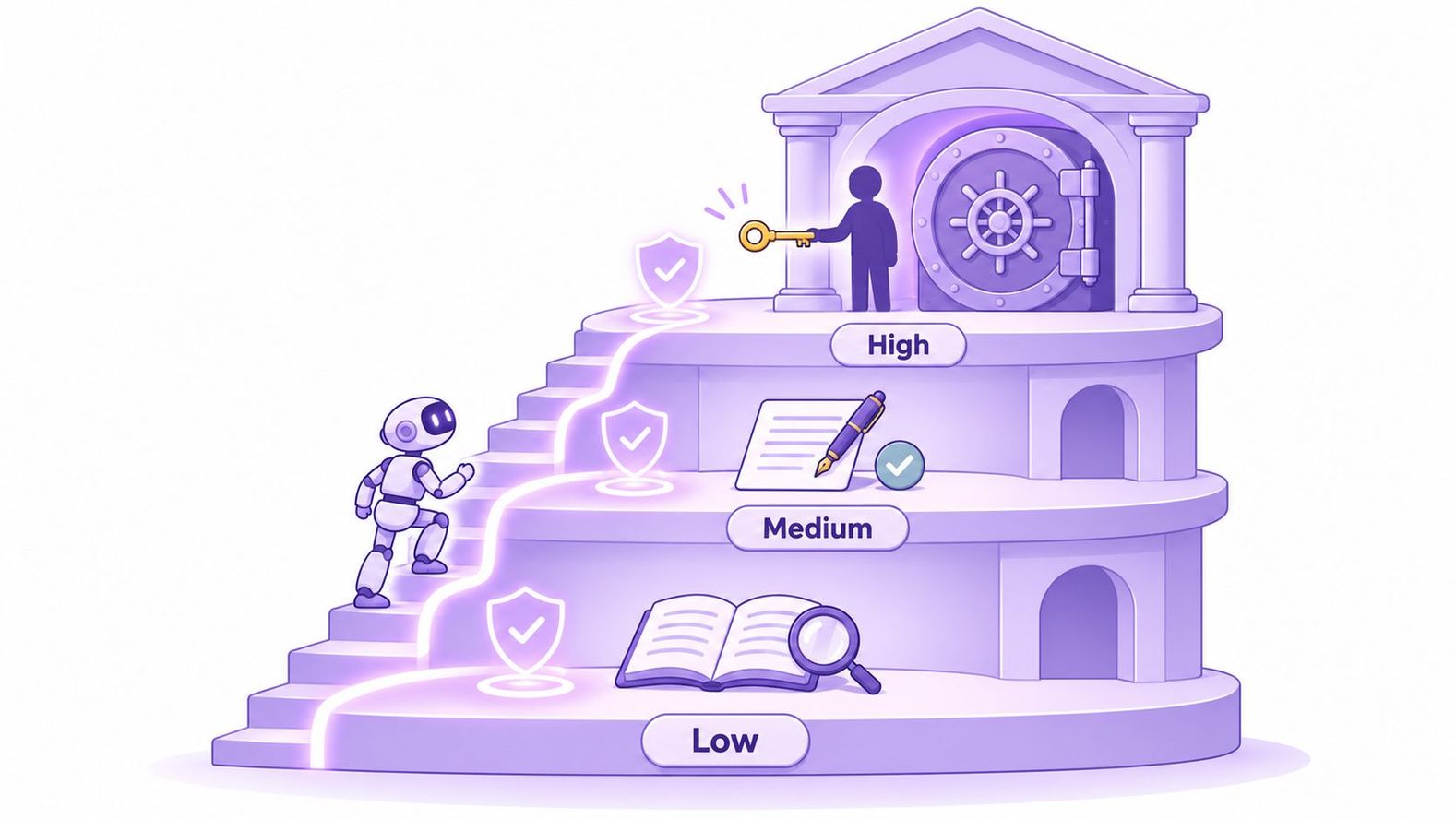
Sort every planned workflow into one of three risk tiers, and bind technical controls directly to each tier:
- Tier 1 (Low risk): Read-only lookups, internal summaries, and draft text that never touches a live storefront or customer inbox. Require data classification, read-only API tokens, and full request logging.
- Tier 2 (Medium risk): Writes to internal systems, such as tagging helpdesk tickets, updating draft catalog attributes, or flagging reorder quantities in an ERP. Add least-privilege write scopes, confidence thresholds that escalate uncertain outputs, and a mandatory human review step before anything becomes public.
- Tier 3 (High risk): Actions that move money, expose customer personal data, or publish content directly to shoppers. Enforce hard monetary caps, dual approval gates, automated anomaly alerts, a tested kill switch, and a documented incident response owner.
Anchoring Controls in the NIST AI Risk Management Framework
Ad-hoc rules scribbled in a wiki break down as soon as a second team launches a workflow. Treat governance as a continuous system function by anchoring your integration layer to NIST's Generative AI Profile for the AI Risk Management Framework, which organizes operational controls into four connected functions:
- GOVERN: Assign clear policy ownership so every live workflow has a named business owner, written permission boundaries, and defined escalation rules.
- MAP: Document every use case, its data sources, where customer records travel, and which third-party models or APIs touch the payload.
- MEASURE: Track accuracy, policy adherence, and error rates continuously, rather than running a single pre-launch check and forgetting about it.
- MANAGE: Run dynamic risk monitoring, vulnerability checks against third-party providers, automated regression tests, and fast rollback playbooks when a model update degrades performance.
For an online store, applying those four functions means logging which exact model generated a product description, support reply, or pricing suggestion, capturing the retrieved context alongside the output, enforcing policy checks before execution, and keeping a kill switch ready to halt misbehaving workflows immediately.
For a closer look at how engineering teams structure guardrails, tool permissions, and execution boundaries for AI agents in production, watch the walkthrough below.
Putting Guardrails Into a Discount Workflow
Imagine a customer-service agent workflow authorized to issue goodwill discounts on delayed orders. Without point-of-action controls, a prompt-injected ticket or a network retry could hand out steep codes or apply the same credit twice.
With proper controls in place, the integration platform enforces three hard rules before touching Shopify: a strict cap per order, an idempotency key (a unique transaction token ensuring a retried API call can never trigger the same discount twice), and a mandatory human approval gate above a fixed threshold. Just as important, one named operations lead owns that workflow. If an incorrect refund ever goes out, anyone on the team can trace the exact log entry, inspect the rule that fired, and know who approved the threshold.
Measuring Whether the Integration Pays Off
Connecting systems cleanly means little if the integration costs more to maintain than the manual work it replaced. Proving value starts before launch day by recording clean baseline metrics for your chosen workflow: average handling time per support ticket, product-page completion rate per week, or manual merchandising hours logged each month.
Pair those baseline figures with a control group or holdout slice. If you deploy AI-assisted product descriptions across 200 SKUs, hold back a matched set of 200 similar SKUs on your existing manual process. Without a holdout, it's impossible to separate the AI's true impact from seasonal traffic swings, paid campaign changes, or site-wide promotions.
Count the full operating cost, not just the model's token bill. Include platform subscription fees, API call charges, monitoring tools, and the staff hours spent reviewing flagged outputs and updating broken field mappings. Then lock three structured checkpoints into your pilot calendar.
| Review point | What to measure | Decision rule |
|---|---|---|
| Day 30 | Pilot runs as designed, human override rate, error rate against baseline | Continue if errors fall and overrides keep decreasing, otherwise tighten thresholds |
| Day 60 | Time saved per task, cost per completed workflow, valid-action rate | Expand only if cost per workflow is below the manual cost |
| Day 90 | Conversion or margin change against the control group, payback period, unauthorized-action count | Scale if payback is reached and no unauthorized actions occurred, otherwise roll back |
Pairing Operational Safety Metrics With Financial Returns
Revenue lift and hours saved tell only half the story. An integration that trims support costs while occasionally firing unauthorized discounts or leaking restricted fields is a liability waiting to surface.
As recent benchmark work on cross-application AI orchestration highlights, evaluating automated agents purely on model accuracy misses the operational risks of multi-system execution. Track five operational metrics right beside your payback calculation: valid-action rate (how often the platform selects the right API and schema), unauthorized-action rate (any attempt to act outside scoped permissions), recovery success after API failures, end-to-end latency, and cost per completed workflow.
When Day 90 arrives, your decision becomes objective. If the integration beats your control group, clears payback after full operating costs, and posts zero unauthorized actions, scale it to the next workflow on your list. If it misses those marks, tighten the scope or roll it back cleanly using the kill switch you tested before launch.
Confirm Your First Integration Before You Commit
Moving from manual copy-paste routines to a governed AI workflow works best when you treat the first deployment like a disciplined pilot rather than a sweeping transformation. Run through these six steps before signing a multi-year platform contract:
- Pick one low-risk workflow: Choose a drafting or triage workflow from the top of the measurement-difficulty table where human review catches errors before shoppers see them.
- Record your baseline and holdout: Write down current manual hours, error rates, and the control group you'll measure against before turning on any automation.
- Score two or three shortlisted platforms: Run each candidate through the ten-point scorecard, weighting governance, logging, and rollback higher whenever customer data or money is involved.
- Test real connectors in a sandbox: Verify storefront and back-office connections using realistic order and catalog payloads in an isolated test tenant, never on live customer records.
- Lock in controls and ownership: Configure approval gates, monetary caps, rollback procedures, and one named business owner before allowing production traffic.
- Schedule your 30-, 60-, and 90-day reviews: Put all three review checkpoints on the team calendar before launch so the pilot ends in a clear scale-or-rollback decision.
Keep a sharp eye on your back-office system during step four, because it usually dictates the true timeline. If your store runs an ERP such as NetSuite, Sage, Microsoft Dynamics, or 1C, verify that the connector is actively maintained and supports your exact custom fields rather than merely appearing as a logo on a landing page. At ECORN, we integrate ERP systems including AWS, NetSuite, Sage, Dynamics, and 1C with eCommerce stores, and our custom development covers API integrations, custom app development, and Headless CMS implementations if you'd rather bring in outside engineering to shape a clean pilot.
Your next move doesn't require a vendor demo or a software budget. Open a blank sheet today, pick the one repetitive workflow costing your team the most manual copy-pasting each week, and write down its current baseline numbers.
Planning your first governed AI integration on Shopify or Shopify Plus and need reliable connectors between your storefront, ERP, and back-office tools? Our team handles custom API integrations, ERP connections, and scalable Shopify development built around clear baselines and measurable outcomes. Visit ECORN to explore how we can help you scope and launch a low-risk pilot.
[Related Media]