

A successful Shopify A/B testing program is all about making data-driven decisions, not just throwing spaghetti at the wall to see what sticks. At its core, you’re creating two versions of something on your site—a headline, a button, a product image—and showing each one to a different group of visitors. The goal is simple: see which one performs better to drive more conversions and, ultimately, more revenue.
Building a Test-Driven Shopify Strategy

Before you even dream of changing a button color, the real work begins. The most effective A/B testing programs aren't built on random “what if” ideas. They’re built on a solid foundation of data and a genuine curiosity about how your users behave. This is the part where you stop guessing what might work and start digging into the real problems that need solving. We’re moving beyond simple cosmetic tweaks to target the actual friction points costing you sales.
Uncovering Opportunities in Your Data
Believe it or not, your Shopify store is already a goldmine of clues. The first step is to become a detective and figure out where your customers are getting stuck or dropping off. This isn't just about glancing at your main dashboard; it's about connecting the dots to find meaningful patterns.
Here's where I always start:
- Shopify Analytics: Get comfortable in your funnel reports. Where’s the biggest leak? Is it from the product page to the cart? Or from the cart to checkout? Finding where people abandon the journey is your first major clue.
- Heatmaps and Session Recordings: Tools like Hotjar or Microsoft Clarity are non-negotiable for me. Heatmaps give you a visual on where people are clicking (and where they aren't). But session recordings are the real magic—you get to watch real user journeys, seeing their confusion and frustration unfold in real-time. It’s humbling and incredibly insightful.
- Customer Support Tickets & Live Chat Logs: Your support team is on the front lines. What are the same questions or complaints they hear over and over? These are direct signals that something on your site is unclear, whether it’s about shipping costs, return policies, or product details.
Key Takeaway: The best test ideas are born from combining quantitative data (the what, from analytics) with qualitative data (the why, from session recordings and support tickets).
Crafting a Powerful Hypothesis
Once you’ve spotted a problem, it’s time to form a hypothesis. This is the engine of your A/B test. A strong hypothesis isn’t just a random idea; it’s a structured, testable statement that connects a change you want to make with a result you expect. It gives your test purpose and a clear finish line.
A simple framework that never fails is:
Because we see [data/insight], we believe that changing [element X] for [user segment Y] will achieve [desired outcome Z].
Let’s put it into practice. Say your analytics show that 70% of your mobile visitors are bouncing from product pages without adding anything to their cart. You watch a few session recordings and notice they keep scrolling up and down, as if they’re looking for something. Shipping info, perhaps?
- Hypothesis: *Because we see a high mobile drop-off on product pages and users appear to be hunting for shipping information, we believe that adding a clear 'Free Shipping on Orders Over $50' banner right below the 'Add to Cart' button for mobile users will increase add-to-carts by 10%.*
See how that works? It’s specific, measurable, and directly tackles a problem you discovered in your data. It’s one of the most actionable conversion rate optimization tips, including A/B testing, to always start with a solid, data-backed hypothesis.
Prioritizing Your Test Ideas
You’re going to come up with a lot of ideas. More than you can possibly test. That's a good thing! But you need a way to decide what to work on first to get the biggest bang for your buck. A classic prioritization framework in the CRO world is PIE:
- Potential: How big of an improvement do we think this change could actually make?
- Importance: How valuable is the traffic to this page? A test on your checkout page is way more important than one on your About Us page.
- Ease: How difficult will this be to build and launch? Be honest about the technical and design resources required.
Score each idea from 1-10 across these three categories, and you’ll have a clear, prioritized list of experiments. This data-first approach to A/B testing for Shopify ensures you’re always focused on the things that actually move the needle.
We've seen it work wonders. For instance, a fashion retailer we know tested different product image styles. By switching to more dynamic, lifestyle-focused visuals, they saw a 23% increase in conversion rate. That simple change also led to a 15% jump in time on page and an 8% lift in average order value.
Choosing the Right Tools for Your Shopify Store
Once you’ve got a solid, data-backed hypothesis, it’s time to pick your A/B testing toolkit. This isn't just a small technical detail; the platform you choose fundamentally dictates the kinds of tests you can run, how accurate your results will be, and your site’s overall health.
Figuring out the best way to handle A/B testing on Shopify can feel like a maze, but it really comes down to a few key things: your store’s needs, your technical chops (or your team's), and your budget.
Let’s walk through the three main ways you can approach this, each with its own quirks and best-case scenarios.
Client-Side Testing with Shopify Apps
For most Shopify store owners, especially those just dipping their toes into conversion optimization, starting with an app is the way to go. These tools are often called client-side (or browser-side) solutions, and they work by using JavaScript to make changes to your live pages for a slice of your visitors.
Here’s how it works in practice: your store loads the original page, and then—in a flash—the testing app’s script kicks in to make the changes you’ve defined. It could be tweaking a headline, swapping an image, or changing a button color, all happening right inside the user's browser. This method is incredibly popular because it’s so easy to get started with.
- Best For: Quick visual tweaks and simple experiments. Think testing CTA button colors, headline copy, product images, and trust badges.
- Examples: Popular tools like VWO, Optimizely, and Shogun have visual editors that let you build test variations without touching a line of code.
- Pros: They’re user-friendly, generally affordable, and let you launch simple tests in minutes instead of days.
- Cons: The biggest tradeoff is a potential hit to site performance. This can sometimes lead to a "flicker effect," where a visitor sees the original page for a split second before the new version loads.
Pro Tip: Whenever you're using a client-side tool, make a habit of running a speed test before and after you install the script. Modern tools are pretty slick, but you have to make sure your experiments aren't accidentally dragging down your site speed and hurting the very conversions you're trying to improve.
Server-Side Testing for Shopify Plus
As your testing program gets more sophisticated and your hypotheses become more ambitious, you'll eventually bump up against the limits of client-side tools. That’s when it’s time to look at server-side testing. This is a much more powerful method, typically reserved for Shopify Plus merchants who have access to developer resources.
Instead of changing things in the browser, the server decides which version of the page to show before it even gets sent to the visitor. The result is a clean, flicker-free experience and the power to test much deeper, more complex functionality.
With server-side, you can experiment with things that are just impossible on the client side, like:
- Pricing strategies and different discount logic.
- Complex shipping logic and delivery options.
- Product recommendation algorithms.
- Major changes to the full checkout flow.
Because it requires actual code changes, server-side testing is a heavier lift from a development standpoint. But for high-traffic stores looking to optimize core business logic, the investment is almost always worth it. Digging into different conversion optimization tools can help you figure out when you're ready to make the jump to this more advanced approach.
The Manual Theme Duplication Method
So what if you're on a tight budget but still itching to run a simple, one-off test? The manual theme duplication method is a cost-effective, if a bit clunky, way to get a basic split test running on Shopify.
Here’s the gist of the process:
- Duplicate Your Live Theme: Head into your Shopify admin and make a copy of your current theme.
- Make Your Change: Jump into the code of the duplicated theme and implement your variation. This could be anything from a new product page layout to a different navigation structure.
- Use a Split-Testing App: Find and install an app designed to split traffic between two different themes. It'll send a percentage of your visitors to the original theme and the rest to your new, modified one.
- Track Results Manually: This part is on you. You'll need to use Shopify Analytics or Google Analytics to compare the conversion rates and other key metrics between the two traffic segments.
This method is really only practical for simple, high-impact tests where you feel comfortable editing theme code. It’s not built for running a continuous testing program, but it's a fantastic way for stores to prove the value of A/B testing on Shopify before committing to more powerful tools.
Shopify A/B Testing Method Comparison
To help you decide, let's put these three methods side-by-side. Each has its place, and the "best" one truly depends on your specific goals and resources.
Ultimately, starting with a client-side app is often the most logical first step. As you prove the value of testing and your needs become more complex, you can then graduate to the more powerful, but resource-intensive, server-side approach.
Mastering the Math Behind Your A/B Tests
Making decisions on shaky data is often worse than not testing at all. We’ve all been there—jumping to conclusions after a small handful of conversions looks promising, only to find out later it was a fluke. This is where a little bit of math (don't worry, it's the simple kind) becomes the most important tool in your Shopify A/B testing kit.
Understanding the core principles of sample size and statistical significance is what separates professional-grade testing from just guessing. These concepts are your safeguard against false positives. They ensure that when you declare a "win," it's a real win, not just a random blip in user behavior. It’s all about building the confidence that the changes you roll out will actually lead to sustainable growth.
Calculating Your Test's Required Sample Size
Before you even think about launching an experiment, the very first question to answer is: "How many people actually need to see this test?" This is your sample size, and getting it right is non-negotiable. Calling a test too early is probably the most common mistake in the book, and it almost always leads to declaring a winner based on nothing more than statistical noise.
Your required sample size isn't just a number you pull out of thin air. It’s calculated based on a few key factors:
- Baseline Conversion Rate: This is your starting point—how the original page (your control) is performing right now. A lower baseline rate means you'll need more traffic to detect a meaningful change.
- Minimum Detectable Effect (MDE): This is the smallest improvement you actually care about. Are you hunting for a massive 20% lift, or would a more subtle 5% increase still be a huge win for your business? The smaller the MDE, the larger the sample size you'll need.
- Statistical Significance: Think of this as your confidence level. It's typically set at 95%, which means you can be 95% sure that your results aren't just a coincidence.
You don't need a degree in statistics to figure this out. There are plenty of fantastic, free online sample size calculators that do all the heavy lifting. Just plug in these three numbers, and the calculator will spit out exactly how many visitors you need for each variation to get a reliable result.
The Real-World Numbers Behind a Confident Test
Let's get practical for a second. The amount of traffic needed for a truly trustworthy test can be surprisingly large, which really shines a light on why having decent traffic volume is a prerequisite for A/B testing on Shopify.
For instance, imagine a store with a baseline 3% conversion rate. If you're hoping to detect a 10% uplift (which would push the rate to 3.3%), the math shows you'd need about 9,671 conversions per variant. That translates to a staggering total of roughly 293,060 visitors for a simple A/B test. As you can see, testing for those smaller, incremental improvements requires a lot of eyeballs. The experts at Wisepops have some great insights on how these numbers impact how long your tests need to run.
A good rule of thumb is to aim for at least 1,000 conversions per variation to get solid, dependable results. For big, bold changes where you expect a massive impact, you might get away with a bare minimum of 200 conversions, but you're definitely playing with fire.
This is where your choice of testing tool comes into play, as different methods can influence how you approach gathering enough data.
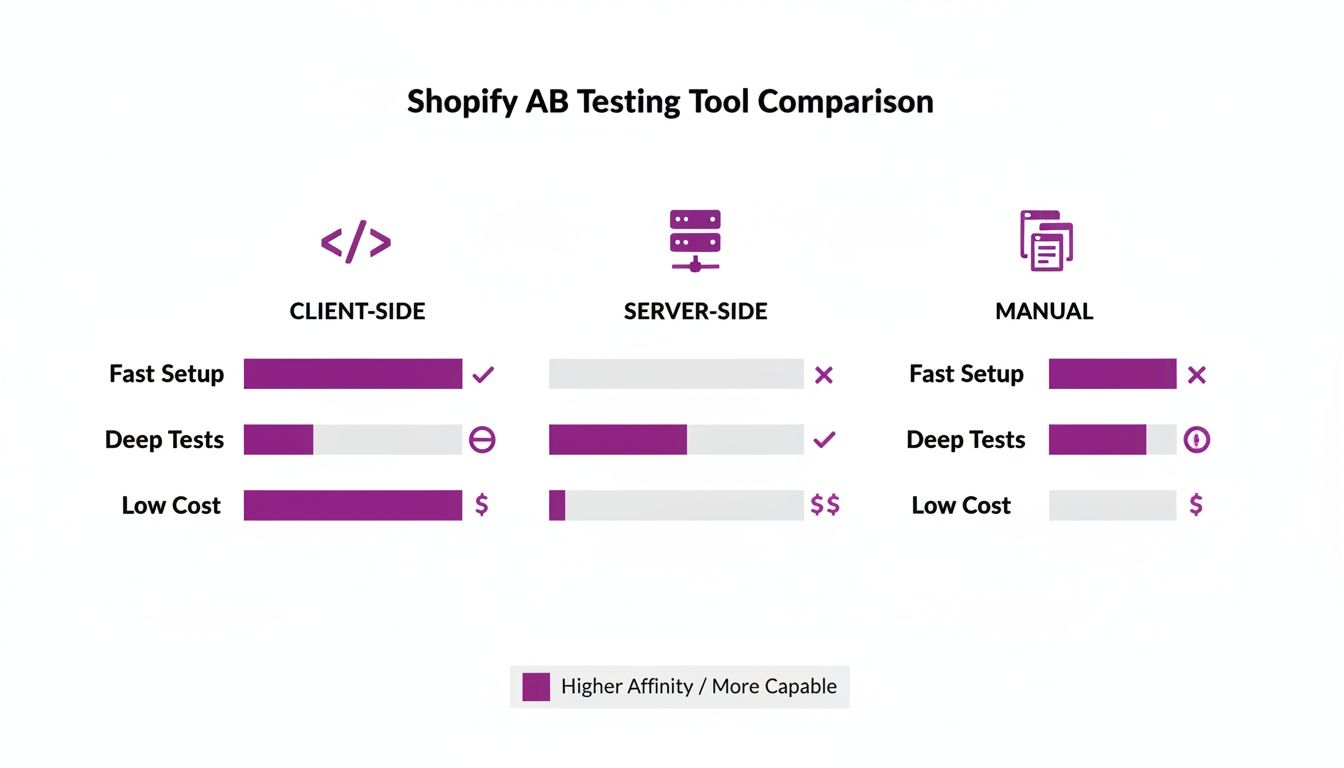
As the chart shows, there's a clear trade-off. Client-side tools are fast and easy for simple changes, but server-side solutions give you the power and performance needed for more complex tests without slowing down your site.
How Long Should Your A/B Test Run?
Once you know your target sample size, the next logical question is how long to leave the test running. The answer is simple: it depends entirely on your store's traffic. If your calculator says you need 20,000 visitors per variation and your page gets 10,000 visitors a week, you'll need to run the test for at least four weeks. Simple as that.
It is incredibly tempting to peek at the results and stop the test the second one version pulls ahead. Resist this urge at all costs. Early results are notoriously misleading.
To account for the natural ebbs and flows of user behavior, you should always run a test for at least two full business cycles. For most stores, that means a minimum of two weeks. This helps smooth out any weirdness caused by weekend shoppers versus weekday commuters, or the timing of a specific email campaign. Patience is the virtue that ensures your final decision is based on a complete and accurate picture of how your customers actually behave.
Launching and Monitoring Your Shopify Experiment
You've got a solid hypothesis and the math checks out. Now for the fun part: setting your experiment live. But launching an A/B test on Shopify is more than just flipping a switch. It's a delicate process where a little upfront paranoia—in the form of rigorous quality assurance (QA)—is your best friend.
Getting this wrong means your data will be garbage from the get-go.
Whether you're using a slick visual editor in an app like Shogun or VWO, or you're deep in the code of a duplicated theme, the pre-launch phase is absolutely critical. I've seen weeks of effort invalidated by a single broken link, a layout bug on iPhones, or an improperly tracked goal. Rushing this step is just a fast-track to wasted traffic and misleading results.
The Pre-Launch Quality Assurance Checklist
Before a single real customer lays eyes on your variation, you need to become its harshest critic. The mission is simple: hunt down and destroy any issue that could mess with the user experience or contaminate your test data.
Run through this battle-tested checklist for both your control and your variation. Don't skip a single step.
- Cross-Browser Compatibility: Open it up in Chrome, Safari, Firefox, and Edge. What looks pixel-perfect in one browser can be a complete train wreck in another.
- Device Responsiveness: This one’s a biggie. Check it on an iPhone, an Android phone, a tablet, and a couple of different desktop resolutions. With mobile often driving 70% of traffic or more, this is non-negotiable.
- Core Functionality: Go on a clicking spree. Hit every link, add products to the cart, and walk through the entire user path. Make sure all the interactive bits—dropdowns, image carousels, pop-ups—are working exactly as they should.
- Page Load Speed: Run your variation through a tool like Google PageSpeed Insights. A variant that’s significantly slower will almost always lose, but not because your idea was bad—it will lose because the experience was sluggish.
Think of QA as your last line of defense. Catching a bug here saves you from polluting your experiment and, more importantly, from frustrating thousands of your actual customers.
Configuring and Verifying Your Goals
An experiment is pointless if you're not measuring the right thing. This sounds obvious, but you’d be surprised how often it gets botched. Your primary goal in the testing tool must directly map back to the "desired outcome" in your hypothesis—whether that's clicks on "Add to Cart," email signups, or completed checkouts.
But don't just stop at one. Always track secondary goals to get the full story. For instance, a change that lifts add-to-carts (primary goal) but tanks average order value (a secondary goal) tells a much more nuanced, and potentially negative, story.
Crucial Tip: Once you've set your goals, run a test transaction. Seriously. Go through the entire funnel in preview mode, use a test credit card, and complete a purchase. Then, check your testing platform to confirm it registered the conversion. Cross-reference this with your Shopify analytics to make sure the numbers are lining up perfectly.
Monitoring Health Without Peeking at Results
Once you hit "launch," the urge to check the results every five minutes is almost unbearable. You have to fight it. Peeking at early data is the number one way optimizers fool themselves, ending tests prematurely based on what is almost always just statistical noise.
Instead of obsessing over which variation is "winning," shift your focus to monitoring the health of the experiment. For the first 24-48 hours, keep an eye on your main analytics for any wild, unintended consequences. Look for red flags: a sudden spike in bounce rate, a nosedive in your site-wide conversion rate, or a surge of 404 errors.
This approach lets you confirm the test is running without any technical disasters, all without biasing your own judgment. The A/B test dashboard is officially off-limits until your pre-calculated sample size is hit. Trust your math, let the data cook, and wait for the complete picture to emerge.
All your hard work has paid off. Your Shopify A/B test has finished running, the data is in, and now comes the moment of truth. This is where you find out if your hypothesis was on the mark. But just declaring a winner isn't the finish line—the real gold is in understanding why a variation won or lost. Those insights are what will fuel your next great idea.
When you pull up your testing tool’s dashboard, you’ll see the headline numbers you've been waiting for. These are the primary metrics you defined way back in the planning stage.
- Conversion Rate: This is the big one. It's the percentage of users who took the action you wanted them to take.
- Uplift: This tells you the percentage difference in conversion rate between your new variation and the original control. A positive number means you're onto something.
- Confidence Level (or Statistical Significance): This is your gut check. You're aiming for 95% or higher, which tells you the result is real and not just a random fluke.
Think of these three as your green light. If your variation shows a healthy positive uplift with a confidence level over 95%, pop the champagne. You’ve got a statistically significant winner.
Don't Stop at the Headline Metric
It's tempting to see a winning conversion rate and call it a day, but that’s a rookie mistake. A seasoned pro knows the real story of an A/B test on Shopify is often buried in the secondary metrics. These numbers reveal the true, full-circle impact of your change on user behavior.
Let's imagine you tested a flashier, more aggressive discount banner on your product pages. Your primary goal, add-to-carts, might shoot through the roof. Success, right? Maybe not. What if the secondary metrics tell a different story?
- Average Order Value (AOV): Did that big, flashy discount just convince people to buy lower-priced items, tanking your AOV?
- Revenue Per Visitor (RPV): This is the ultimate health check for your store. If your conversion rate climbs but RPV drops, the test wasn't a genuine win for the business.
- Bounce Rate: Did the new banner feel too desperate or "salesy" and cause more people to hit the back button immediately?
These supporting numbers provide critical context. A change that lifts one metric while crushing another isn't an improvement. Getting comfortable with these figures is crucial, and our guide to the Shopify analytics dashboard can help you get a better handle on them.
Key Takeaway: A true "win" in A/B testing improves both the customer experience and the bottom line. If a variation lifts conversions but hurts overall revenue or key engagement metrics, it's back to the drawing board.
What to Do When a Test Fails (or Goes Nowhere)
What happens when there’s no clear winner? Or worse, when your brilliant new idea gets absolutely smoked by the control? Don’t sweat it. This isn’t a failure; it’s a gift. An inconclusive or losing test is a learning opportunity that just saved you from rolling out a change that would have actively harmed your business.
An inconclusive result is valuable feedback. It tells you the change you made simply didn't move the needle on user behavior. Great! Now you know you can stop pouring resources into that idea and pivot to your next hypothesis.
A losing test is even more powerful. It’s a loud, clear signal about what your customers don’t like. Dig into the why. Did the new design create confusion? Did your clever new copy actually introduce friction? Segment the results by device or traffic source—you might discover the variation bombed on desktop but was actually a winner on mobile, giving you a whole new path to explore.
Rolling Out the Winner and Building Your Playbook
Once you’ve confirmed a clear winner with positive movement across both primary and secondary metrics, it's time to make it official. Don't just wing it; follow a clear process.
- Deploy the Winning Variation: Head into your testing tool, end the experiment, and push the winning version live to 100% of your traffic.
- Monitor Post-Launch Performance: Keep a close eye on your analytics for the next week. You want to make sure the lift you saw in the test holds up when exposed to your entire audience.
- Document Everything: This is arguably the most important step for long-term growth. Create a central knowledge base—a simple spreadsheet or a dedicated tool like Notion works great—and log every single test you run.
Your test log should become your team's CRO bible. For each experiment, make sure you record:
- The original hypothesis (the "why" behind the test).
- Screenshots of the control and the variation(s).
- The final numbers: uplift, confidence, and the impact on key secondary metrics.
- Your key takeaways—what did you learn about your customers from this test?
This archive prevents you from re-running failed tests months later and ensures that every single experiment, win or lose, makes your entire team smarter.
Common Questions About Shopify A/B Testing
Even with a solid game plan, stepping into the world of A/B testing on Shopify can feel like opening a can of worms. Let's tackle some of the most common questions that pop up. Getting these sorted out first helps clear the path so you can set up your experiments for success right from the get-go.
How Much Traffic Do I Need to Start A/B Testing?
There's no single magic number here, but a good rule of thumb I've always used is to aim for at least 1,000 conversions per month on the specific page you want to test. This gives you enough data to see a real, statistically significant result in a reasonable amount of time.
If your numbers are lower, you could be running a test for months just to see if changing a button color makes a difference. For stores with less traffic, your time is much better spent on qualitative research first. Think user surveys, watching session recordings, and just talking to your customers. These methods often uncover major points of friction you can fix without needing a split test to prove it.
Can A/B Testing Slow Down My Shopify Site?
Yes, it absolutely can. This is especially true if you're using client-side testing tools. These tools work by loading your original page first, then applying your changes with JavaScript. This often creates a "flicker" effect, where a visitor sees the original for a split second before it swaps to the new version. It's jarring and can hurt trust.
To keep your site snappy:
- Pick a tool that loads asynchronously. This means the testing script won't hold up the rest of your page while it does its thing.
- Keep your changes simple. The more complicated the test, the longer the script has to work.
- Look into server-side testing. If site speed is a top priority, server-side testing is the way to go. This is a common route for Shopify Plus merchants because it sends the correct version directly from the server, completely wiping out any flicker.
What Are the Best Elements to Test on a Product Page?
Product pages are a goldmine for A/B testing because they're so close to the finish line—the purchase. Tiny improvements here can have a massive impact on your revenue.
You want to focus on changes that directly answer a customer's biggest questions and fears: "Is this product for me?", "Can I trust this store?", and "Is it really worth the price?".
Some of the highest-impact elements to start testing on your Shopify product pages include:
- Call-to-Action (CTA): Play with the button text ("Add to Cart" vs. "Buy Now"), its color, size, and where it sits on the page.
- Product Images: Test lifestyle shots against clean studio photos. What about adding a product video? Or just rearranging the order of your image gallery?
- Social Proof: Try moving customer reviews around. Add trust badges for secure payments or feature some user-generated content from Instagram.
- Shipping & Return Info: This needs to be impossible to miss. Test adding an "estimated delivery by" date or a bold "Free Returns" banner right next to the CTA.
What Should I Do If My Test Results Are Inconclusive?
First off, don't chalk it up as a failure. An inconclusive test is actually a valuable piece of information: the change you made didn't have a significant impact on what users did. That's a win! It just saved you from sinking development resources into an update that doesn't actually move the needle.
If you're looking for a broader understanding beyond just Shopify, a complete guide on What Is A/B Testing in Marketing can provide foundational knowledge on these core concepts.
When a test comes back flat, the next move is to document what you learned and move on to your next hypothesis. It's also smart to peek at your secondary metrics. Maybe the change didn't boost sales, but did it reduce the bounce rate or increase the average time on page? These little signals can spark the idea for your next big winning test.



Shopify Theme Kit: Setup, Commands, and Migration Guide

Shopify Extension Development: A Practical 2026 Guide

Shopify Speed Score Explained and How to Improve It

Shopify Mobile Optimization: The 2026 Playbook

How to Add Subcategory in Shopify for Better UX

How to Implement Structured Data for Ecommerce in 2026

SEO App Mobile: Shopify Store Optimization Guide

Shopify Plus Support: What It Includes and How to Choose

Google Ads for Shopify: The Complete 2026 Playbook

Shopify New York: How to Find and Hire the Right Agency

Google Search Console for Shopify: The Complete Setup

First Party Data Collection for eCommerce Growth

FAQ Online Store Guide: Build and Measure It Right

Do FB Ads Work for eCommerce in 2026?

One Page Checkout for Shopify: Design and Implementation

Shopify GraphQL vs REST: The 2026 Developer Decision

Shopify Ecommerce Consulting: Strategy, Pricing &

Are Reddit Ads Worth It for eCommerce Brands

Shopify Title and Meta Description: A Practical 2026 Guide

Product Video Best Practices for Shopify Brands

Real-Time Inventory Management: A 2026 Guide

AI Chatbot Integration for Shopify Stores

Affiliate Program Management: A Shopify Guide

10 Best Performance Monitoring Tools for Shopify in 2026

Digital Asset Management for eCommerce Brands in 2026

Every Type of Facebook Ads Explained for eCommerce Growth

Product Information Management Explained for Shopify Brands

Support Ticket System: A Guide for Shopify Stores

10 Best Customer Service Tools for Shopify in 2026

Can I Start a Business with No Money? a 2026 Blueprint

What Sells Good on Etsy: Best Niches for 2026

Shopify Add to Cart Button: A Practical 2026 Guide

Customer Feedback Automation: A Practical eCommerce Guide

Critical Rendering Path: A Guide for Shopify Stores

How to Promote on TikTok for eCommerce in 2026

B2B eCommerce Consulting That Drives Real Revenue

10 Best Practices for Site Navigation in 2026

Return vs Refund for Shopify Stores: A Practical Guide

What Is Customer Lifetime Value and Why It Matters

What Is Voice of Customer Research for eCommerce

SMS Marketing for Ecommerce That Actually Converts

Master How to Improve Email Deliverability in 2026

Top 7 eCommerce Partners NYC for Shopify Brands in 2026

Machine Learning for Ecommerce: Boost Your Shopify Store

Beauty Market Research: Your 2026 Growth Guide

Shopify International Expansion: A 2026 Roadmap

What Does CRO Stand for in Business: Understanding CRO

Shopify Visual Merchandising: A Playbook for Higher Sales

Shopify Landing Page Design: Master Conversion in 2026

10 Best AI SEO Optimization Tools for Shopify in 2026

Agentic AI for Ecommerce: Boost Your Sales in 2026
Mastering Email Marketing Data for eCommerce Growth

Conversion Rate Optimisation Australia: Boost Your Sales

Conversion Rate Optimization AI: Your Shopify Store Guide

10 Product Bundling Strategies for Shopify in 2026

How to Increase Customer Lifetime Value: A Shopify Playbook

AI Customer Service Automation: Shopify Guide 2026

Clean Website Design: A Shopify Conversion Playbook

Omnichannel Retail Strategy: A Shopify Playbook

Product Data Enrichment: A Guide for Shopify Brands

Instagram Shopping Features a Guide for Shopify Stores

What Is Revenue Optimization: A Holistic RevOps Guide

Benefits of Conversion Rate Optimization: Boost Your

WordPress to Shopify Migration: Your 2026 Seamless Switch

Boost Sales: Ecommerce Payment Processing Guide 2026

Unified Commerce Platform: Benefits, KPIs & Shopify Guide

How to Reduce Bounce Rate eCommerce: Your 2026 Guide

Shopify API Integration: A Practical End-to-End Guide

How to Implement Data Governance: A 2026 Guide

Shopify Store Development Cost: A 2026 Breakdown

What Is Server Side Tracking: The Shopify Guide 2026

Marketing Automation Workflows: A Shopify Guide for 2026

Shopify: How to Reduce Technical Debt

Shopify UX Design Change: A Playbook for Growth

User Generated Content Strategy: Shopify Playbook

Shopify Pause and Build Plan Cost: A Complete 2026 Guide

Compare at Price on Shopify: A Complete Guide for 2026

Where Can I Sell My Prints? 10 Best Platforms for 2026

Shopify Order Management System: The Ultimate Guide 2026

What Is Marketing Attribution? an eCommerce Guide for 2026

10 Best Black Friday Sales Sheets for 2026

Discover the Top Social Media Marketing Agencies For

Consumer Confidence Definition for eCommerce in 2026

What Is Social Commerce? Your 2026 Guide to Boosting Sales

A Social Ad Campaign Playbook for eCommerce Growth

7 Best FAQ Page Examples for SaaS & eCommerce

Market Research in Fashion Industry: A Guide for Shopify

Shopify Migration Services: Expert Guide for 2026

Mastering FB Retargeting Ads for Shopify in 2026

What Is Omnichannel Ecommerce

Master Your Shopify Plus Migration: The 2026 Guide

Shopify Integration Services: A Merchant's 2026 Guide

Shopify Collection Description: A Guide to SEO & Sales

Shopify Plus Contact: Reach Sales & Support Effectively

Top Luxury Shopify Stores: Design & UX Strategies

How to Improve Customer Experience: A Shopify Roadmap

Creative Facebook Ads: 10 Examples for Shopify Brands

Remarketing with Facebook Ads: A Shopify Guide for 2026

SEO Linking Strategies for Shopify Stores
Top 7 Statistics YouTube Channels for eCommerce in 2026


newsletter in your inbox