


Connecting your Shopify store to dedicated accounting software is the secret to unlocking accurate financial insights and setting yourself up for scalable growth. This isn't just a "nice to have"; it's how you move beyond messy spreadsheets to create a single source of truth for your finances. It automates the grunt work of data entry, makes reconciliation a breeze, and gives you a real-time pulse on your business's financial health.
Why Integrated Accounting Is a Non-Negotiable for Shopify Stores
As your Shopify store grows, so does the financial chaos. What starts as a manageable trickle of sales, refunds, and fees quickly turns into a tangled mess of data. If you’re still relying on manual spreadsheets or just the basic reports from Shopify, you’re setting yourself up for a headache. It's a recipe for wasted hours and costly errors that quietly chip away at your profits.
The biggest problem with doing things by hand is human error. It’s inevitable. A single misplaced decimal or a forgotten transaction can throw off an entire month's reporting. This isn’t just an inconvenience—it means you’re making critical business decisions with faulty information. How can you confidently invest in a new marketing campaign, set profitable prices, or manage your cash flow when you can't trust the numbers in front of you?
The True Cost of Disconnected Financials
When your sales data lives in Shopify and your financial records are somewhere else entirely, you create a ton of friction in your operations. The time you spend manually exporting CSVs, categorizing transactions, and trying to match Shopify payouts to your bank deposits is time you could have spent growing the business. Plain and simple.
This disconnect also means you're always looking in the rearview mirror. You might not realize a certain product line is tanking or that your payment processing fees are creeping up until weeks after it's too late. An integrated shopify and accounting software system closes that gap, giving you immediate clarity.
An integrated system turns accounting from a reactive, historical chore into a proactive, strategic tool. It's the difference between trying to drive using only your rearview mirror and having a full dashboard to navigate the road ahead.
Let's quickly compare what daily life looks like with manual methods versus an integrated system.
Manual vs Integrated Accounting: A Shopify Store Snapshot
The difference is stark. One path leads to operational bottlenecks and guesswork, while the other paves the way for efficient, data-driven growth.
Creating a Single Source of Truth
Ultimately, the goal is to have a reliable, automated flow of information from your storefront straight to your books. This ensures every sale, refund, tax, and fee is captured and categorized correctly without you having to lift a finger.
This level of automation and accuracy lets you:
- Trust Your Numbers: Make decisions with confidence, knowing your reports reflect reality.
- Get Your Time Back: Stop spending hours on tedious data entry and reconciliation.
- Scale Without Breaking: Build a financial foundation that can handle growth effortlessly.
- Gain Real Insight: Easily track key metrics like gross profit margin, customer lifetime value, and cost of goods sold (COGS).
The good news is the ecosystem for this has exploded. Major platforms like QuickBooks Online, Xero, Sage, and NetSuite all offer powerful connections to Shopify. Whether through a direct integration or specialized middleware, professional-grade financial management is more accessible than ever. You can explore a variety of accounting tools that work well with Shopify to find the perfect setup for your store.
Choosing the Right Accounting Software for Your Store
Picking the right accounting software isn't just another item on your to-do list; it’s about finding a financial partner that can actually keep up with your Shopify store. The simple tool that works when you're shipping 50 orders a month will become a massive bottleneck when you hit 5,000. You need to choose based on where you are and where you're going.
First thing to look at: your transaction volume. A store with a high number of daily orders needs a system that can handle all that data without turning your books into a cluttered mess. This one factor is often what separates basic tools from the more robust platforms built for high-growth ecommerce.
Next up, your global footprint. If you're selling internationally, multi-currency support is completely non-negotiable. You need software that can juggle exchange rates, foreign transaction fees, and give you clean reports in your home currency. Without it, you’re just guessing at your international profitability.
Key Criteria for Shopify Merchants
Beyond those basics, a few specific features will make or break your day-to-day financial sanity. Ignore these now, and you’ll pay for it later with hours of manual work.
Your software has to handle sales tax complexity. As you grow, you'll inevitably have to collect and remit sales tax in different places. The right tool simplifies this by tracking what you owe by state or region, turning tax season into less of a nightmare.
Inventory management is the other huge piece of the puzzle. Sure, Shopify tracks your stock levels, but your accounting software needs to handle the money side—specifically, your Cost of Goods Sold (COGS). A good system syncs with your inventory data to accurately calculate your profit margins on every single sale.
Finally, you need to think about how the software actually connects to Shopify. This is a critical fork in the road.
Direct Connectors vs. Middleware
How you link Shopify to your accounting software will have a massive impact on your efficiency. There are really only two ways to go, and they are worlds apart.
- Direct Connectors: These are often the built-in integrations or simple apps that push every single Shopify order into your accounting software as a separate entry. For a brand-new store with a handful of orders, this seems fine. But it quickly creates a disaster. A hundred orders a day means a hundred new invoices cluttering your books, making bank reconciliation a nearly impossible task.
- Third-Party Middleware (like A2X or Link My Books): This is the gold standard for any scaling Shopify store. These tools act as a smart bridge. Instead of dumping in every order, they group all the transactions from a single Shopify payout—sales, refunds, shipping income, and all those fees—into one neat, summarized journal entry. This summary perfectly matches the lump-sum deposit that lands in your bank account, making reconciliation a simple, one-click job.
For a growing store, middleware isn't an optional add-on; it's a necessity. It keeps your financial records clean, accurate, and manageable, saving you dozens of hours in manual reconciliation every single month.
Think about a Shopify Plus merchant with multiple storefronts. A direct connector would flood their books with thousands of individual entries, creating total chaos. Middleware, on the other hand, delivers a clean, summarized report for each store, giving them clarity and control.
Accounting is a core pillar of your business operations. To see how it fits into your larger toolkit, check out our complete guide to building an effective ecommerce tech stack.
Matching the Software to Your Growth Stage
The right shopify and accounting software pair depends entirely on where you are right now and your ambitions for the future. There’s no one-size-fits-all answer here.
- For New & Small Stores (Under $20k/month): Simplicity is everything at this stage. Solutions like QuickBooks Online or Xero are perfect starting points. They have user-friendly interfaces, they're affordable, and they work well with middleware when you're ready to make that jump. They cover all the core accounting needs without overwhelming you.
- For Growing Businesses ($20k - $250k/month): Once your order volume picks up, the pain of direct connectors becomes very real. This is the point where investing in middleware becomes a no-brainer. Your focus should shift to automating reconciliation and getting deeper insights into your profitability. QuickBooks Online and Xero are still great choices, but their real power is unlocked with an app like A2X.
- For Large & Enterprise Stores (Shopify Plus): At this level, you’re dealing with advanced needs like multi-store reporting, complex inventory valuation (maybe across several warehouses), and foreign entities. While massive systems like NetSuite offer enterprise-level features, they come with a hefty price tag and a complicated setup. Honestly, many large businesses still find that a well-configured Xero or QuickBooks Online, paired with the right middleware and reporting apps, gives them a more agile and cost-effective solution.
Comparing Top Accounting Software for Shopify Merchants
To help you visualize the differences, here’s a quick breakdown of how the top contenders stack up for ecommerce merchants.
Ultimately, the goal is to find a system that supports your current needs without holding you back as you grow.
For more perspective, it can be useful to look at regional guides, like this one on the top accounting software for small business in Australia, to see how different platforms are reviewed. The right choice gives you a solid financial foundation, letting you focus on growth instead of getting buried in manual bookkeeping.
A Walkthrough of the Integration and Setup Process
Connecting your Shopify store to your accounting software is where the real magic happens. This is the moment you turn two separate platforms into a single, powerful financial engine for your business. But it's not just about clicking "install"—a thoughtful setup is what prevents future headaches and ensures your data is clean, accurate, and genuinely useful from day one.
The whole thing starts long before you even touch a single setting in the Shopify App Store. The biggest mistake I see merchants make is diving straight into the technical setup with messy books. A clean start is absolutely essential for a clean integration.
Pre-Integration Housekeeping: Your Financial Checklist
Before you link anything, you have to tidy up your existing financial records. If your books are disorganized, the integration will only amplify the chaos, pulling in messy data and creating reconciliation nightmares. Think of it as laying a clean foundation before you build a house.
Start by making sure all your previous transactions are categorized and reconciled right up to the day before you plan to go live with the new system. This creates a clear cut-off point, making it easy to distinguish between your old manual data and the new automated entries.
Next, you need to define your Chart of Accounts (CoA). This is the blueprint for your bookkeeping, a complete list of all the categories you'll use to track your money. A well-structured CoA built specifically for ecommerce is non-negotiable.
A generic Chart of Accounts just won't cut it. You need specific accounts for things like 'Shopify Sales Revenue,' 'Shopify Payments Fees,' 'Shipping Income,' and different liability accounts for sales tax collected in various regions. Getting this right is fundamental to generating reports that actually mean something.
Once you've picked your software, it's critical to know how to set up QuickBooks correctly (or whichever platform you chose) to ensure a smooth connection with your store. This initial groundwork is what separates an easy, automated system from a frustrating, error-prone one.
The Technical Setup: Connecting Your Store
With your financial house in order, you can confidently move on to the technical side. For this, the Shopify App Store is your home base. The Shopify ecosystem has seen some incredible expansion, with the app marketplace growing by 27% from early 2024 to May 2025, hitting a total of 12,320 available applications.
This isn't just trivia; it shows a bigger trend. The average Shopify store now uses between 6 and 8 apps to run its operations. And get this: 60% of Shopify app installs come from customers actively searching the marketplace. This tells us that merchants are deliberately seeking out solutions like accounting software to solve specific problems.
This simple diagram shows the high-level process of choosing and integrating your accounting software, from the initial assessment all the way to the final setup.
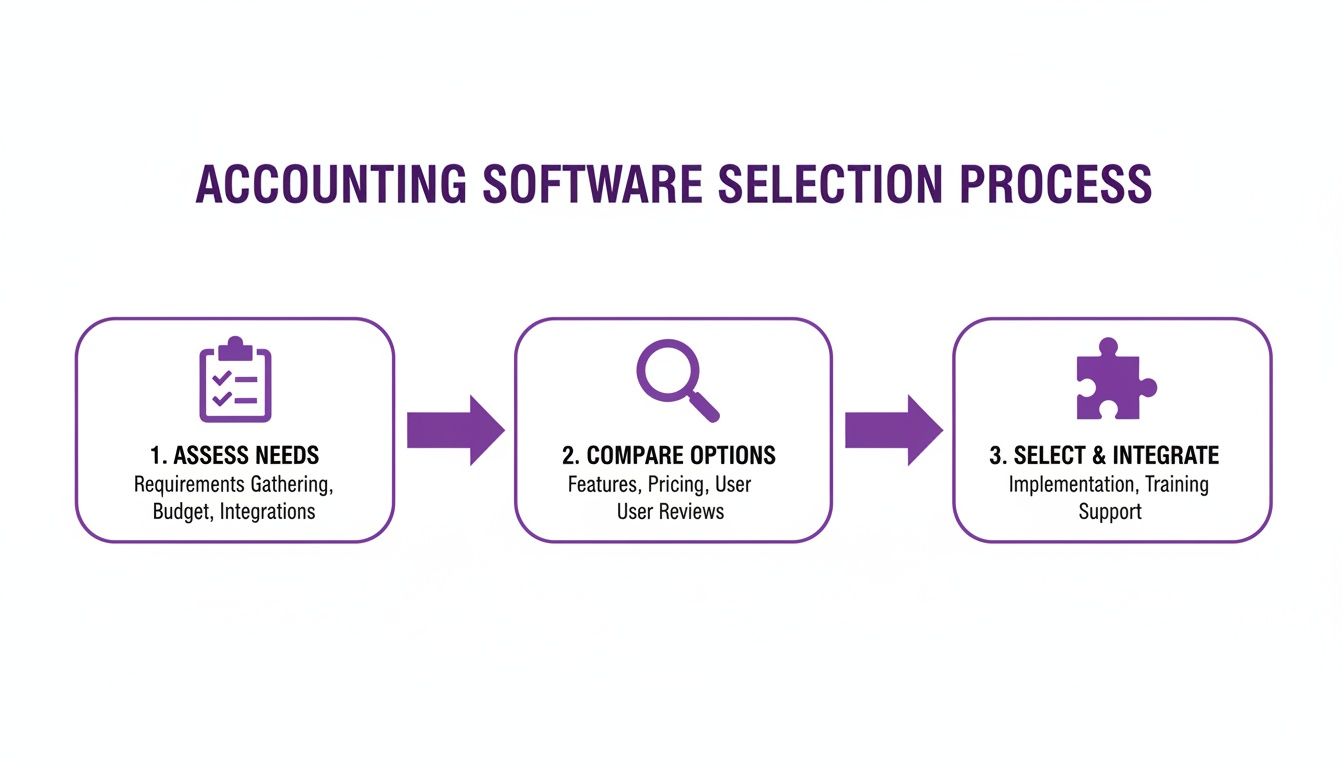
As you can see, a successful integration is the final step in a strategic process, not the starting point.
The actual connection process usually involves a few key actions:
- Authorize the Connection: You'll install the accounting app from the Shopify App Store and give it permission to access your store's data. This creates the secure link between the two systems.
- Configure Sync Settings: This is where you decide what data to sync and how often. Do you want it to sync daily? Only when a payout occurs? You'll also set a "sync from" date here to avoid pulling in old, already-reconciled data.
- Map Your Accounts: This is the most critical step of all. You'll tell the integration app exactly where to post each type of transaction in your Chart of Accounts.
Mapping Data for Flawless Accuracy
Account mapping is where you connect the dots between your Shopify transactions and your accounting software. If you map things incorrectly, your financial reports will be completely useless.
Here’s a practical look at what you’ll need to map:
- Sales Revenue: Map your product sales to an income account like "Shopify Sales." If you sell different types of products, you might even create separate income accounts for each to get a better handle on profitability.
- Shopify Payments Fees: These are an expense. They must be mapped to an expense account, often called "Payment Processor Fees" or "Bank Fees." Never let these fees get lost in your net deposit amount; they need to be tracked on their own.
- Sales Tax: Any tax you collect must be mapped to a liability account, like "Sales Tax Payable." This isn't your revenue; it's money you're holding for the government.
- Shipping Income: What you charge customers for shipping should be mapped to an income account like "Shipping & Handling Income."
- Refunds and Chargebacks: These should be mapped to a contra-revenue account, often called "Sales Returns and Allowances." This lets you track refunds separately from your gross sales, giving you much better insight into your return rate.
Let's say you receive a Shopify Payout of $950. That single deposit doesn't tell the full story. A proper integration breaks it all down for you.
The actual transactions behind that deposit might look like this:
- Total Sales: $1,000
- Shopify Payments Fees: -$25
- Refunds Processed: -$25
Your accounting software should record $1,000 in sales, $25 in fee expenses, and $25 in returns, with a final bank deposit of $950. This detailed breakdown is vital for understanding your true performance. Without it, you're just flying blind.
Mastering Your Daily Financial Workflows
Connecting Shopify to your accounting system is a milestone, but the real magic happens when you turn that integration into a daily habit. Suddenly, you’re not stuck entering numbers; you’re interpreting them. With tidy data at your fingertips, every decision—from marketing budgets to restocking—gets smarter.
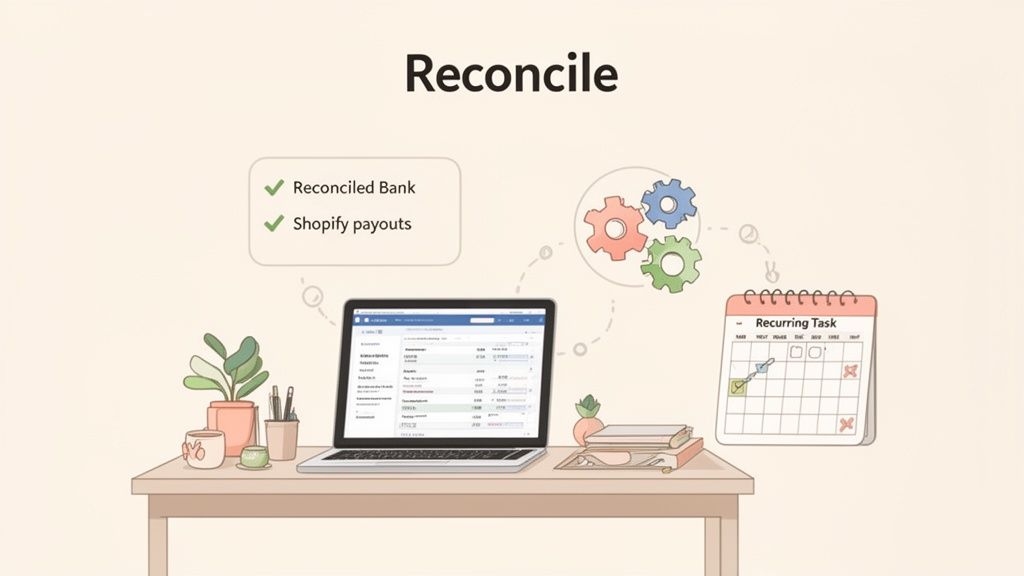
Retailers often hit a wall here: your Shopify payout drops a lump sum into your bank, but that number almost never lines up with your daily sales. Why? Shopify deducts fees before money lands in your account. Without a clear process, you end up guessing which fees belong to which sale.
The Art Of Reconciling Shopify Payouts
Reconciling means confirming that what Shopify reports matches what your bank records—fee by fee, refund by refund. In my experience, middleware tools shine here. They generate a summarized journal entry after each payout that outlines:
- Gross Sales: Total revenue from orders
- Shopify Fees: Platform and payment processing costs
- Taxes & Refunds: All adjustments in one place
Once that entry exists, your only job is verification. Open your accounting software’s bank feed, locate the Shopify deposit, and ensure it mirrors your summary. That quick check replaces hours of spreadsheet gymnastics with a handful of clicks.
Here’s a quick comparison of time savings:
To keep momentum, choose a cadence that fits your store’s volume—daily if you’re moving hundreds of orders, weekly if you’re smaller. Consistency here is critical. Catching errors early prevents a snowball effect of missing fees and unexpected accounting surprises.
By automating reconciliation, you shift from reactive book-closing to proactive financial management. You’re not just tying up loose ends—you’re validating the data that drives every growth decision.
Automating Expense Categorization
Reconciling sales is just the start. Your next move is getting expenses sorted automatically. Most accounting platforms let you build bank rules that learn your recurring charges over time.
For instance:
- Advertising Spend: All transactions from Facebook and Google flow into Marketing & Advertising without manual tagging.
- Software Subscriptions: Monthly SaaS bills land directly in Software & Subscriptions.
- Shipping Costs: Carriers like USPS, FedEx, and DHL map straight to Shipping & Fulfillment Costs.
By letting these workflows run daily, you’ll spot cost spikes before they become holes in your budget. During a flash sale, bank rules will auto-flag a surge in ad spend so you can adjust your CPC targets in real time.
Leveraging Reports For Strategic Insights
With clean data streaming in, your accounting software becomes a decision-making engine. Instead of a shallow glance at Shopify’s revenue chart, you dive into reports that answer real questions.
Monitor these on a regular basis:
- Profit & Loss (P&L) Statement – Pinpoints your profitability by showing revenue against cost of goods sold and expenses.
- Cash Flow Statement – Tracks incoming and outgoing cash to forecast lean periods or fund big purchases.
- Balance Sheet – Offers a snapshot of assets, liabilities, and equity so you can judge overall financial health.
A frequent hang-up for merchants is unpacking payment processing costs. For a detailed breakdown, our guide to decoding Shopify credit card charges and merchant fees lays it all out.
When these routines become second nature, you free up precious time—and gain the insights you need to scale confidently.
Advanced Strategies and Common Pitfalls to Avoid
As your Shopify store starts to really take off, the financial complexity doesn't just grow—it multiplies. What worked for a single storefront becomes a tangled mess when you're juggling multiple stores, currencies, and warehouses. To stay on top, you have to move beyond the basics and adopt strategies that give you a crystal-clear view of your entire operation.
This is also the stage where small, hidden mistakes can start doing real damage. Simple slip-ups, like mapping sales tax incorrectly or not accounting for Shopify Payment fees, can quietly eat away at your profit margins. Getting this right requires a sharp eye and the right financial setup.
Tackling Multi-Store Financial Management
Running multiple Shopify stores is a common growth strategy, whether for different regions, brands, or wholesale channels. The big challenge? Consolidating the financials. If you're trying to stitch together separate reports, you'll never get a true picture of your overall business health. The goal is to see how each store is performing on its own and the combined profitability of your entire enterprise.
This is where your Shopify and accounting software integration becomes non-negotiable. Using features like tracking categories in Xero or classes in QuickBooks, you can tag every single transaction to its specific store.
For example, you could set up categories like:
- Store A - US Retail
- Store B - Canada Retail
- Store C - B2B Wholesale
With this simple tagging system, you can instantly filter your Profit & Loss statement to see how the Canadian store is doing, or pull a consolidated report for total company revenue. This turns your accounting software from a simple ledger into a powerful business intelligence tool, showing you exactly where to focus your resources.
Navigating Foreign Currency and International Sales
Selling globally is a massive opportunity, but it adds a whole new layer of financial complexity that can easily trip up even seasoned merchants. When a customer in the UK buys from your US-based store, you're suddenly dealing with currency conversion, foreign transaction fees, and exchange rates that change by the minute.
If you don't handle this properly, your international sales can look way more or less profitable than they actually are. A common rookie mistake is to just record the sale in your home currency using that day's exchange rate and call it good.
The right way to do this is to have your system record the sale in its native currency and track the realized and unrealized gains or losses from currency fluctuations. This gives you a much more accurate picture of your international performance and stops hidden currency costs from silently draining your margins.
Common Pitfalls and How to Sidestep Them
Even with the best systems, small oversights can snowball into big headaches. I've seen merchants make the same few mistakes over and over again when connecting Shopify to their accounting software. Knowing what they are is half the battle.
One of the biggest culprits is improper sales tax mapping. A store owner will lump all collected sales tax into one generic liability account. Come tax time, it's an absolute nightmare trying to figure out how much you owe to each state or jurisdiction. Always, always create separate liability accounts for each state, province, or region where you collect tax.
Another classic error is failing to account for Shopify Payment fees correctly. Those fees are skimmed off the top before the payout ever hits your bank. If you just record the net deposit, you're understating your true revenue and your expenses. This messes up all your profitability metrics and can cause major issues if you get audited.
Three Common Mistakes to Watch For
- Ignoring Gift Card Liability: Selling a gift card isn't revenue—it's a liability. You owe that customer a product down the line. You should only recognize the revenue when the gift card is actually used.
- Mishandling COGS: If you're not syncing your Cost of Goods Sold (COGS) with every sale, you have no idea what your gross profit margin is. This is arguably one of the most important metrics for understanding which products are actually making you money.
- Forgetting App and Theme Costs: Your monthly Shopify subscription is just the beginning. The costs for all those third-party apps, themes, and one-off transaction fees need to be tracked meticulously to get a real handle on your operating expenses.
When to Upgrade Your Tools or Call a Professional
The system that got you to six figures might not get you to seven or eight. For Shopify Plus merchants or any brand with complex operations, the signs that it's time for an upgrade or professional help are usually pretty clear.
It might be time for a change if:
- You're spending more than a few hours every week on manual reconciliation.
- Your inventory management across multiple locations has become a chaotic mess.
- You can't generate the consolidated, multi-store reports you need to make confident, strategic decisions.
If this sounds familiar, it could be time to look at a more robust ERP-style system. More often, though, it's the right time to bring in an ecommerce accounting agency. These pros live and breathe this stuff. They specialize in building and maintaining the financial backbone for high-growth Shopify stores, which frees you up to focus on what you do best: running the business.
Got Questions? We’ve Got Answers.
When you're trying to get Shopify and your accounting software to play nicely, a few questions always seem to pop up. Let's walk through some of the most common ones we hear from merchants.
Can I Switch My Accounting Software Later?
The short answer is yes, absolutely. But it’s not a simple swap. Think of it less like unplugging a lamp and more like a minor surgery—it requires careful planning to avoid making a mess of your financial data.
First, you need to set a hard cut-off date. Get everything in your old system fully reconciled right up to that day before you even think about turning off the sync. The biggest headache is usually migrating historical data. Most folks don't bother moving every single transaction. Instead, they just import summary balances for things like accounts receivable and payable into the new software. Once you’re reconciled and ready, disconnect the old app and start fresh with the new one.
How Do I Handle Sales Tax Correctly?
Getting sales tax right is non-negotiable in ecommerce. It starts inside Shopify. Make sure your tax settings are dialed in for every single state or region where you have nexus (which is just a fancy way of saying you have to collect tax there).
When you set up the integration, you have to be meticulous about mapping. Tax collected from California sales, for example, needs to go into a specific "CA Sales Tax Payable" account in your books, not a generic catch-all account.
A dedicated middleware app can be a lifesaver here, automatically breaking down the tax by jurisdiction. Before you ever remit payments to the tax authorities, always reconcile the liability numbers in your accounting software against your Shopify tax reports. This one final check can save you from costly mistakes.
What’s the Difference Between a Direct Integration and a Middleware App?
Understanding this is huge for building a financial tech stack that can actually grow with you. The two connection methods offer completely different experiences, especially as your order volume picks up.
Direct Integration: This is your basic app connection. It usually syncs every Shopify order as a separate invoice or sales receipt in your accounting platform. It sounds simple, but for a high-volume store, it’s a recipe for disaster. Just imagine trying to match a single $5,000 bank deposit against 200 individual sales entries. It’s a reconciliation nightmare.
Middleware App: This is a smarter way to do it. A tool like A2X or Link My Books acts as a bridge. It bundles up all the transactions from a single Shopify payout—sales, fees, taxes, refunds, the works—into one clean, summarized journal entry. That entry perfectly matches the lump-sum deposit that lands in your bank account, turning reconciliation into a one-click affair. For any business looking to scale, this is the only way to go. It keeps your books clean and manageable.
At ECORN, we build scalable Shopify solutions that don't just work for today, but are ready for tomorrow's growth. If you're ready to get your store's operations and performance dialed in, our team is here to help. Explore our services to see how we can work together.


Multi Store Inventory Management: A Practical Guide

SEO Consulting for Ecommerce: A Practical Guide

Shopify Theme Updater App: A Safe Update Playbook

Shopify Git Integration: A Developer's Guide to 2026
Headless Ecommerce Development Services Explained

How to Build a Shopify Clothing Website That Converts

How to Launch a Box Subscription Business in 2026

Luxury Skincare Branding Playbook That Converters

10 Best Podcast Ecommerce Shows for Store Growth in 2026

Shopify Developer Hourly Rate: What to Pay in 2026

Critical Shopify Setup Errors That Are Secretly Sabotaging Your Store

Ecommerce Conversion Tracking: The Complete How-To Guide

Shopify Design Agency: How to Pick the Right Partner

Mastering Multi Store Management on Shopify

Scale Shopify Store

10 Shopify App Ideas Worth Building in 2026

Conversion Rate Optimization for Landing Pages: The Playbook

Shopify Plus Automation: A Guide for 2026

10 Social Selling Platforms for Shopify Merchants

Shopify Website Design Examples: 7 Stores Worth Studying

7 Ecommerce Newsletter Examples for Shopify Brands

One Product Shopify Store: Build and Scale

Mobile Pop Up Strategy for Shopify Stores That Converts

Sitemap for Shopify: How to Find, Optimize, and Submit It

7 Single Product Websites Worth Emulating

Product Variants Shopify: The Complete 2026 Guide

Ecommerce Analytics Consulting for Growth

What Is AI Integration for eCommerce

How to Choose the Right eCommerce Website Development Firm

E Business Strategy Implementation

Conversion Tracking Setup for Shopify Stores

BigCommerce vs Shopify Plus Which Enterprise Wins in 2026

Shopify Theme Kit: Setup, Commands, and Migration Guide

Shopify Extension Development: A Practical 2026 Guide

Shopify Speed Score Explained and How to Improve It

Shopify Mobile Optimization: The 2026 Playbook

How to Add Subcategory in Shopify for Better UX

How to Implement Structured Data for Ecommerce in 2026

SEO App Mobile: Shopify Store Optimization Guide

Shopify Plus Support: What It Includes and How to Choose

Google Ads for Shopify: The Complete 2026 Playbook

Shopify New York: How to Find and Hire the Right Agency

Google Search Console for Shopify: The Complete Setup

First Party Data Collection for eCommerce Growth

FAQ Online Store Guide: Build and Measure It Right

Do FB Ads Work for eCommerce in 2026?

One Page Checkout for Shopify: Design and Implementation

Shopify GraphQL vs REST: The 2026 Developer Decision

Shopify Ecommerce Consulting: Strategy, Pricing &

Are Reddit Ads Worth It for eCommerce Brands

Shopify Title and Meta Description: A Practical 2026 Guide

Product Video Best Practices for Shopify Brands

Real-Time Inventory Management: A 2026 Guide

AI Chatbot Integration for Shopify Stores

Affiliate Program Management: A Shopify Guide

10 Best Performance Monitoring Tools for Shopify in 2026

Digital Asset Management for eCommerce Brands in 2026

Every Type of Facebook Ads Explained for eCommerce Growth

Product Information Management Explained for Shopify Brands

Support Ticket System: A Guide for Shopify Stores

10 Best Customer Service Tools for Shopify in 2026

Can I Start a Business with No Money? a 2026 Blueprint

What Sells Good on Etsy: Best Niches for 2026

Shopify Add to Cart Button: A Practical 2026 Guide

Customer Feedback Automation: A Practical eCommerce Guide

Critical Rendering Path: A Guide for Shopify Stores

How to Promote on TikTok for eCommerce in 2026

B2B eCommerce Consulting That Drives Real Revenue

10 Best Practices for Site Navigation in 2026

Return vs Refund for Shopify Stores: A Practical Guide

What Is Customer Lifetime Value and Why It Matters

What Is Voice of Customer Research for eCommerce

SMS Marketing for Ecommerce That Actually Converts

Master How to Improve Email Deliverability in 2026

Top 8 eCommerce Partners NYC for Shopify Brands in 2026

Machine Learning for Ecommerce: Boost Your Shopify Store

Beauty Market Research: Your 2026 Growth Guide

Shopify International Expansion: A 2026 Roadmap

What Does CRO Stand for in Business: Understanding CRO

Shopify Visual Merchandising: A Playbook for Higher Sales

Shopify Landing Page Design: Master Conversion in 2026

10 Best AI SEO Optimization Tools for Shopify in 2026

Agentic AI for Ecommerce: Boost Your Sales in 2026
Mastering Email Marketing Data for eCommerce Growth

Conversion Rate Optimisation Australia: Boost Your Sales

Conversion Rate Optimization AI: Your Shopify Store Guide

10 Product Bundling Strategies for Shopify in 2026

How to Increase Customer Lifetime Value: A Shopify Playbook

AI Customer Service Automation: Shopify Guide 2026

Clean Website Design: A Shopify Conversion Playbook

Omnichannel Retail Strategy: A Shopify Playbook

Product Data Enrichment: A Guide for Shopify Brands

Instagram Shopping Features a Guide for Shopify Stores

What Is Revenue Optimization: A Holistic RevOps Guide

Benefits of Conversion Rate Optimization: Boost Your

WordPress to Shopify Migration: Your 2026 Seamless Switch

Boost Sales: Ecommerce Payment Processing Guide 2026

Unified Commerce Platform: Benefits, KPIs & Shopify Guide

How to Reduce Bounce Rate eCommerce: Your 2026 Guide

Shopify API Integration: A Practical End-to-End Guide


newsletter in your inbox