

Making the jump from Magento to Shopify is a huge business decision, not just a tech swap. It’s usually driven by a deep desire to escape the endless cycle of high maintenance costs, constant developer dependency, and operational headaches.
Ultimately, it’s about freeing up your team to focus on growing the business and delighting customers, not just keeping the lights on. It’s a move toward agility and a much lower total cost of ownership.
Why Smart Brands Are Migrating From Magento To Shopify
The whole Magento vs. Shopify debate really boils down to one thing: control versus simplicity. Magento gives you immense power to customize absolutely everything, but that freedom comes with some serious strings attached. We see brands all the time getting tangled in a web of security patches, complex updates, and a never-ending need for specialized developers.
That technical baggage hits your P&L hard. The real cost of running a Magento store goes way beyond your hosting bill. You're actually paying for:
- Developer Retainers: Good Magento devs don't come cheap, and you'll need them on speed dial.
- Emergency Fixes: When something breaks—and it will—it’s an all-hands-on-deck, expensive fire drill.
- Extension Licensing: Many of the features you rely on are paid extensions with annual fees that stack up.
- Performance Tuning: Keeping a heavy Magento site running fast is a constant, resource-draining battle.
The Shift Toward Business Agility
For any brand trying to grow, speed is everything. Launching a new campaign, testing a new product, or just tweaking the homepage shouldn't require a development ticket and a week-long wait. This is where Shopify really shines. Its interface is built for marketing and ops teams, letting them make changes in minutes, not days.
This agility is probably the biggest reason we see for the migration trend. When you're choosing the best e-commerce platform, the goal is to find a tech stack that fuels your growth, not one that acts like an anchor.
The move from Magento isn't about ditching a "bad" platform. It's about choosing a completely different way to operate. You're trading infinite backend tinkering for front-end speed, marketing freedom, and predictable costs.
A quick look at how these two platforms stack up can make the operational differences crystal clear.
Magento vs Shopify Plus At a Glance
Here’s a high-level comparison to help you see where the value lies for your business.
This table simplifies it, but the core takeaway is that Shopify Plus is built to remove technical barriers, while Magento is built for teams who want—and can afford—to manage every technical detail themselves.
A Look At The B2B Migration Wave
This shift is hitting the B2B world particularly hard. Magento has traditionally been the go-to for complex B2B setups, but the tide is turning fast. We're seeing projections that by 2026, the migration wave to Shopify Plus will be in full force for enterprise B2B brands.
Why? It’s the same old story: skyrocketing maintenance costs and the developer bottleneck. Magento currently powers over 250,000 stores generating a mind-boggling $173 billion in annual GMV, but B2B merchants are getting tired of the complexity and are actively looking for simpler, more scalable alternatives. If you're stuck in this debate, our deep dive into Magento or Shopify can help you weigh the pros and cons for your specific needs.
The Pre-Migration Audit: Your Blueprint for Success
Jumping straight into a migration without a proper audit is like trying to build a house without a blueprint. You're setting yourself up for failure. This pre-migration audit is your strategic roadmap, and honestly, it’s a non-negotiable first step. This is where you get brutally honest about your current Magento setup to prevent those nasty, expensive surprises down the line.
Trust me, rushing this part is the single biggest mistake we see merchants make. It almost always leads to missing features, a broken user experience, and a direct hit to your revenue.
The whole point here is to create a complete inventory of what your Magento store actually does. This goes way beyond just listing products and orders. You need to catalog every piece of custom code, every third-party extension, and every single integration that keeps your business running. This detailed blueprint ensures nothing critical gets left behind in the move from Magento to Shopify.
Cataloging Your Functionality and Integrations
Kick things off by creating a spreadsheet of every single extension running on your Magento store. Don’t just list their names; write down the exact business problem each one solves. For example, that extension for "Advanced Product Options" might be handling complex product configurations that Shopify doesn't support out of the box. Knowing this upfront is critical.
Once you have that list, it's time to map out the Shopify equivalents. Your inventory should sort each function into one of three buckets:
- Native Shopify Feature: Can this be done with Shopify or Shopify Plus's built-in tools? For instance, Magento’s customer groups can often be mapped directly to B2B company profiles in Shopify Plus.
- Shopify App Replacement: Is there a solid app in the Shopify App Store that can do the job? Look for apps with tons of great reviews, responsive support, and a history of consistent updates.
- Custom Development Needed: If there's no native feature or app, you're looking at custom work. Pinpointing these gaps early is the key to creating an accurate budget and a realistic timeline.
This process has to include your backend systems, too. Document every connection to your ERP, CRM, PIM, or 3PL provider. Each of these integration points needs a clear migration plan to keep the business running smoothly after you go live.
Performing a Data Health Check
Let’s be real: your Magento database is probably a bit of a mess. Over the years, stores accumulate duplicate customer accounts, old product info, and weird order statuses. Moving all that clutter over to your new Shopify store is a classic "garbage-in, garbage-out" mistake that will haunt you later.
A data health check isn't just about deleting old records. It’s about making sure the data you bring to Shopify is clean, structured, and ready to power a better customer experience from day one.
Focus your cleanup crew on these key areas:
- Customer Data: Merge those duplicate accounts and scrub incomplete profiles. You’ll also want to standardize address formats to cut down on future shipping headaches.
- Product Data: Go through your product catalog with a fine-tooth comb. Fix inconsistent naming, find missing images, and clean up incorrect attributes. This is also the perfect time to rethink your category structure, which will become your Collections in Shopify.
- Order History: You’ll want to keep historical order data for customer service, but you need to decide on a cutoff point. Migrating 10 years of irrelevant orders will bog down the process and add a ton of unnecessary complexity. Decide what's essential to bring over and what can be archived.
Building Your SEO Preservation Plan
This might be the most important part of the entire audit. A poorly planned migration can obliterate years of hard-earned search rankings in a single day. The URL structure difference between Magento and Shopify is a major landmine here; Magento has flexible URLs, while Shopify uses a fixed format like /products/ and /collections/.
To protect your organic traffic, you absolutely must create a comprehensive 301 redirect map. This means crawling your entire Magento site to capture every single URL—product pages, category pages, CMS pages, the works. Each old URL has to be carefully mapped to its new Shopify equivalent. No exceptions.
And it’s not just about the redirects. You also have to catalog all of your existing metadata—title tags, meta descriptions, and image alt text. All of this info needs to be exported and prepped for import into Shopify to make sure you don't create any SEO gaps. Skipping this step is a surefire way to watch your organic traffic graph nosedive. Don't let that happen.
Mastering Your Data Migration Strategy
With the audit behind you, it's time to roll up your sleeves and get into the technical heart of the migration. This is all about moving your core business data—products, customers, and orders—from Magento’s famously complex architecture into Shopify’s more streamlined environment.
Get this right, and you're building your new store on a rock-solid foundation. Get it wrong, and you risk corrupting your data and creating a mess that will haunt you for months. The process is far more than a simple copy-paste; it demands careful extraction, thoughtful mapping, and a clean import process.
Choosing Your Migration Method
Your approach to moving the data will hinge on your budget, timeline, and in-house technical chops. There's no single "best" way—only the best way for your specific business. Each option comes with its own trade-offs in cost, speed, and the level of control you have.
Here are the main paths you can take:
- Manual CSV Import: This is the most hands-on route. You export data from Magento into CSV files and then manually reformat them to match Shopify’s templates. It's really only viable for very small stores with simple catalogs. For anything larger, it’s brutally time-consuming and a breeding ground for human error.
- Automated Migration Apps: Tools like LitExtension or Matrixify are built to do the heavy lifting. You connect them to your Magento and Shopify stores, map your data fields through a user-friendly interface, and let the app manage the transfer. This is a popular middle-ground solution that works well for many businesses.
- Full-Service Agency Migration: For complex stores, especially those with tons of custom data or deep B2B requirements, bringing in a migration specialist is the smartest move. An agency handles the entire process, including writing custom scripts for unique data structures and performing rigorous post-migration validation.
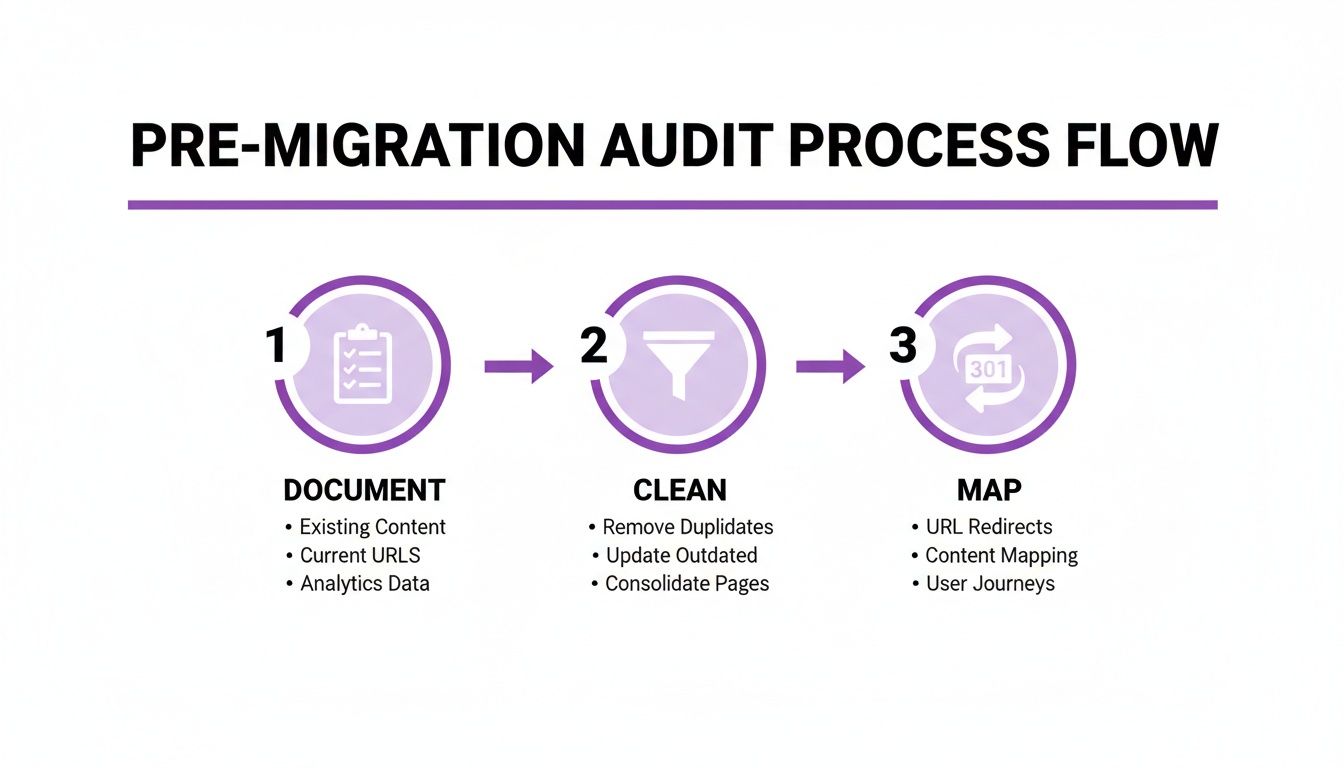
This process flow visualizes the foundational steps—documentation, cleaning, and mapping—that absolutely must happen before you move a single piece of data.
To give you a clearer picture of what to expect, here’s a breakdown of the typical costs and timelines associated with each approach.
Migration Approach Cost and Timeline Estimates
Ultimately, this decision comes down to balancing cost against risk and expertise. Don't be tempted to cut corners here; a botched data migration can cost far more to fix than getting it right the first time.
The Art of Data Mapping
This is the step where most migrations either succeed or fail spectacularly. Data mapping is the meticulous process of telling your new Shopify store how to understand the data coming from your old Magento store.
Magento’s Entity-Attribute-Value (EAV) model is famously flexible, which means you probably have countless custom product attributes. Shopify, while powerful, uses a more defined structure. The key is translating Magento’s custom complexity into a format Shopify can work with.
The goal isn’t a 1:1 replica of your Magento data structure. It's about translating the intent of that data into a format that works powerfully within the Shopify ecosystem.
Here are a few common mapping challenges you'll almost certainly face:
- Product Attributes to Metafields: Any custom information on your Magento products—things like "material type," "care instructions," or "technical specs"—will need to be mapped to Shopify’s metafields. This is how you preserve all that rich product data you’ve built up over the years.
- Customer Groups to B2B Profiles: If you’re a B2B business, your Magento customer groups that dictate special pricing or terms must be migrated into Shopify Plus’s Company profiles. This ensures your wholesale clients keep their unique purchasing conditions without a hitch.
- Product Categories to Collections: Magento’s nested categories translate directly into Shopify’s Collections. You’ll want to use product tags to recreate any complex hierarchy, which allows for the same level of filtering and organization your customers are used to.
Handling Critical Data With Care
Some data is more sensitive than others and requires special attention. Your customer and order data, in particular, must be handled with surgical precision to ensure business continuity and maintain customer trust.
When migrating customer accounts, you’ll hit a major security constraint: you cannot transfer passwords. Magento's encryption is incompatible with Shopify's. After the migration, you must invite your customers to activate their new accounts. This is a critical communication moment—plan your messaging carefully.
Order history is another vital asset for customer service and analysis. However, migrating years of historical orders can be incredibly complex and slow down the whole project. A practical approach is to decide on a cutoff point—say, migrating the last two years of order data and archiving the rest for internal reference. Many businesses are also exploring more advanced ways to manage this information, and our guide on customer data integration solutions offers some great insights.
Finally, a test migration isn't optional; it's mandatory. Before committing to the full process, run a "delta" migration with a small but representative sample of your data. This is your chance to spot and fix mapping errors, data corruption, or formatting issues in a low-risk environment.
Rebuilding Your Storefront on Shopify

Moving your data over is just the first step. The real magic in a Magento to Shopify migration happens when you rebuild the customer experience. This is your golden opportunity to shed the bloat of an old Magento build and create a storefront that’s faster, cleaner, and built to convert.
Don't think of this as just picking a new theme. Treat it like a ground-up strategic redesign. Your goal is to engineer a storefront that not only looks fantastic but is fine-tuned for performance and sales. This is where you finally get to fix those lingering UX headaches and build an experience for today's shopper.
Choosing Your Theme Foundation
Your Shopify theme is the absolute backbone of your store's user experience. It’s easy to get distracted by flashy designs, but your top priorities have to be performance and flexibility. A beautiful theme that loads like molasses will kill your conversion rates, guaranteed.
You should only be looking at themes built on Shopify's Online Store 2.0 (OS 2.0) architecture. This is a massive leap from the old ways. OS 2.0 gives you "sections everywhere," which means you get drag-and-drop control over your entire site—not just the homepage. For anyone coming from the rigid structure of Magento, this level of control is a total game-changer.
When you're vetting potential themes, keep these points in mind:
- Performance Scores: Pop the theme's demo store URL into Google PageSpeed Insights. A well-built theme should have strong scores right out of the box.
- Mobile-First Design: With over 60% of e-commerce sales now happening on mobile devices, your theme has to be flawless on a small screen. Don't just trust the sales page; test the demo on your own phone.
- Built-in Features: Does the theme already include features you need, like a mega menu, product quick view, or advanced collection filtering? Leveraging native theme features is always a better bet than bloating your store with another app.
Replacing Extensions with a Strategic App Stack
One of the biggest mental shifts from Magento to Shopify is moving from complex, often conflicting extensions to a curated ecosystem of apps. Your pre-migration audit should have produced a clear list of must-have functionalities. Now it’s time to find the right apps for the job.
The key here is to be deliberate. Avoid the rookie mistake of installing an app for every little feature you think you need. Each app adds code to your store, and that code can slow things down. Focus on apps that solve major business challenges.
Migrating your front-end isn't about finding a 1:1 replacement for every Magento extension. It’s about achieving the same business outcome, often with a simpler, more elegant Shopify solution.
For instance, that clunky Magento extension you used for subscriptions can be replaced by a proven Shopify powerhouse like ReCharge or Skio. For advanced search, an app like Searchanise will deliver a much slicker user experience than what you were likely used to.
Embracing Custom Solutions When Needed
Even with thousands of apps in the Shopify App Store, you'll eventually run into a unique business need that an off-the-shelf solution can't handle. This is where custom development comes in, but it's a completely different animal than in the Magento world.
Instead of deep, risky modifications to the core code, Shopify development typically involves:
- Theme Customizations: Tweaking your theme’s Liquid, CSS, and JavaScript to create unique layouts or custom UX features.
- Custom App Development: Building a private app that uses Shopify’s robust APIs to interact with your store's data and introduce truly bespoke functionality.
- Shopify Functions: A major perk for Shopify Plus merchants. This lets you write your own backend logic for things like complex discounts, shipping rules, and payment options—all without touching Shopify’s core code.
This modern approach keeps your store stable and makes future upgrades painless, a welcome relief from the constant anxiety of maintaining a heavily customized Magento instance.
Ultimately, the front-end rebuild is where your migration project delivers tangible results. As you piece together your new storefront, remember that every design choice is an opportunity to boost conversions. You can find some excellent Shopify conversion rate optimization tips that will help guide your decisions. By obsessing over site speed, a clean mobile experience, and an intuitive user journey, you're not just launching a new site—you're building a powerful engine for growth.
Executing a Flawless Launch and Post-Launch Plan
After all the weeks of planning, auditing, and building, you've finally arrived at the most critical phase of your Magento to Shopify migration. The launch is where every piece of the puzzle clicks into place. A flawless execution means a seamless transition for your customers and zero dips in revenue, while a solid post-launch plan sets you up for real growth.
This is absolutely not the time to rush. A disciplined, checklist-driven approach is the only way to handle these final steps. The entire goal is to catch problems before they happen, making sure your new Shopify store hits the ground running.
The Ultimate Pre-Launch Quality Assurance Checklist
Before you even think about flipping the switch, a comprehensive quality assurance (QA) process is mandatory. This is your final shot to find and squash bugs in a safe staging environment. Don't just click around—you need to methodically test every single part of the customer journey, from homepage to the "thank you" page.
Your QA checklist should be exhaustive, but here are the absolute non-negotiables:
- Data Integrity Verification: Take a random sample of products, customers, and orders. Do the prices, images, and descriptions match what you had on Magento? Are customer addresses and their order histories correct? This is tedious but critical.
- B2B Workflow Validation: If you're on Shopify Plus, this is huge. Test your B2B company profiles inside and out. Can your wholesale customers log in? Do they see their special pricing? Can they use their assigned payment terms?
- Payment Gateway Testing: You have to run actual transactions with every single payment method you offer. Use both real and test credit cards to confirm that payments go through, orders are created in the admin, and all the notification emails fire off correctly.
- 301 Redirect Validation: Get a crawling tool and run it against your list of redirects. You need to confirm that your top-ranking, highest-traffic Magento URLs are correctly pointing to their new Shopify counterparts. One broken link on a key page can be an SEO disaster.
Your Launch Day Game Plan
Launch day itself should feel controlled, even a little boring. That’s a good thing. The process involves taking your old site down for a short period, pointing your domain to the new server, and then running one last series of checks on the live site. Always schedule your launch during a low-traffic window, like late at night or super early in the morning, to minimize any customer disruption.
Here’s a step-by-step plan for a smooth go-live:
- Final Data Sync: Run one last "delta" migration. This is a smaller sync to pull over any new orders or customer sign-ups that happened since your last big data import.
- Enable Maintenance Mode on Magento: Put your old store into maintenance mode. This acts as a hard stop, preventing any last-minute orders from slipping through the cracks while you make the switch.
- Point Your DNS to Shopify: Time to get technical. Update your domain’s A record and CNAME record to point to Shopify’s servers. Just remember, DNS changes can take some time to propagate across the internet—sometimes up to a few hours. Be patient.
- Disable Storefront Password: Once the DNS has propagated and you can see your Shopify store load at your main domain, it's time to remove the password protection. Your new store is officially live!
- Run Live Environment Tests: Don't celebrate just yet. Quickly run through your most critical QA checks again, but this time on the live site. Place a real test order, check a few key redirects, and make absolutely sure your analytics tracking is active and recording data.
The launch isn't the finish line; it's the starting pistol. The real work of growing on a new platform begins now, and your ability to monitor performance from day one is what separates a good migration from a great one.
Post-Launch Monitoring and Optimization
The first few weeks on Shopify are all about monitoring and stabilizing. You need to keep a very close eye on your key performance indicators (KPIs) to confirm the migration was a success and to spot any immediate opportunities for improvement.
I recommend setting up a dedicated dashboard to track these critical metrics:
- Site Speed and Core Web Vitals: Is the new site as fast as you expected? Use Google PageSpeed Insights to monitor load times and user experience scores. Don't let your new theme slow you down.
- Conversion Rate: Compare your conversion rate to your pre-migration benchmarks. If you see a significant drop, it could point to a hidden problem in the checkout flow or an issue with a specific payment gateway.
- 404 Errors: Live in Google Search Console for the first few weeks. Watch the "Not Found" error report like a hawk. This is the fastest way to catch any redirects you might have missed.
- Organic Traffic and Rankings: Monitor your SEO performance closely. Some minor fluctuations are normal after a replatform, but any sustained downward trend needs to be investigated immediately.
Challenges like URL changes are unavoidable when migrating from Magento to Shopify. Magento’s flexible structure (e.g., shop.com/category/product) has to shift to Shopify's rigid format (/products/product). This reality makes a bulletproof 301 redirect strategy absolutely essential for preserving your SEO. Be sure to plan for a total project timeline of 3-6 months to get this right.
With 60% of new Magento developments going headless while migrations to platforms like Shopify surge every quarter, the agility you gain is huge. Shopify's App Store and APIs let you experiment with things like AI much faster, which is perfect for ECORN clients looking to maximize their market reach. You can explore more about this trend and its implications and see why so many are making the switch.
Once your new store is stable, the real fun begins. Now you can start leveraging Shopify's strengths to actually drive growth. This is the time to explore new apps, A/B test your product pages, and kick off a real conversion rate optimization (CRO) program to make the most of your powerful new platform.
Common Questions About Migrating from Magento to Shopify
Even with a detailed playbook in hand, moving from Magento to Shopify can feel like a big leap. It’s completely normal to have questions about what this all means for your budget, your hard-earned search rankings, and your launch timeline.
Let's get straight to it and tackle the questions we hear every single day from merchants weighing this exact decision. The specifics always depend on your store's complexity, but we can give you some solid benchmarks to work with.
How Much Does It Really Cost to Migrate?
The cost to migrate from Magento to Shopify is all over the map. For a tiny store with simple data, you might get away with an automated tool for $800 to $2,000. But let's be realistic—that's rarely the case for an established business.
A more typical budget for a mid-sized store with thousands of products and complex customer data is anywhere from $8,000 to $20,000. If you're running a larger B2B or enterprise-level operation with deep integrations into an ERP or PIM, you should be planning for $15,000 to over $50,000. The biggest factors driving the price are always the volume of your data, the number of custom features that need to be rebuilt, and the complexity of your integrations.
Will I Lose My SEO Rankings After Migrating?
No, you absolutely do not have to lose your SEO rankings. But you will if you don't plan for it.
The single biggest risk comes from changing URL structures. Shopify has a set format for its URLs (like /products/ and /collections/), which is different from the flexibility you had with Magento. To protect your organic traffic, you need to map out a comprehensive list of 301 redirects. This involves cataloging every last Magento URL and pointing it to its new home on Shopify. A thorough SEO audit before you even start the migration isn't just a good idea—it's non-negotiable.
Here's something that surprises a lot of merchants: when done right, many actually see an SEO boost after migrating. This usually comes down to Shopify's incredible site speed, mobile-first design, and clean code, which are all huge ranking factors for Google.
How Long Does a Typical Migration Take?
Just like cost, the timeline is tied directly to your store's complexity. A small store using an automated tool could be live in 1-2 weeks. A more standard, mid-sized store that needs some theme customization and app configuration usually takes about 3-4 weeks.
For a full-blown, agency-led migration of a complex B2B site or a project requiring significant custom development, you're looking at a timeline of 4 to 8 weeks, sometimes longer. The best way to shrink that timeline? Invest heavily in your pre-migration audit and data cleanup. An extra week of prep can easily save you three weeks of headaches during the build.
Can I Migrate My Magento B2B Features?
Yes, you can, and this is one of the main reasons so many brands are moving to Shopify Plus. The platform has incredibly robust, native B2B functionality that can replicate—and often improve upon—what you're used to in Magento.
You can successfully migrate your core B2B features by:
- Mapping your old Magento customer groups to Shopify’s Company profiles.
- Assigning unique payment terms, price lists, and tax exemptions to each company account.
- Setting up the self-serve portal where your B2B customers can manage their own accounts and reorder easily.
The underlying tech is different, of course, but nearly every standard Magento B2B feature has a powerful counterpart in Shopify Plus. Your wholesale customers will feel right at home.
Navigating a complex migration requires a partner who has been there before. At ECORN, we specialize in transforming Magento stores into high-growth Shopify powerhouses. Book a call with our Shopify experts today to build your custom migration roadmap.


Shopify Git Integration: A Developer's Guide to 2026
Headless Ecommerce Development Services Explained

How to Build a Shopify Clothing Website That Converts

How to Launch a Box Subscription Business in 2026

Luxury Skincare Branding Playbook That Converters

10 Best Podcast Ecommerce Shows for Store Growth in 2026

Shopify Developer Hourly Rate: What to Pay in 2026

Critical Shopify Setup Errors That Are Secretly Sabotaging Your Store

Ecommerce Conversion Tracking: The Complete How-To Guide

Shopify Design Agency: How to Pick the Right Partner

Mastering Multi Store Management on Shopify

Scale Shopify Store

10 Shopify App Ideas Worth Building in 2026

Conversion Rate Optimization for Landing Pages: The Playbook

Shopify Plus Automation: A Guide for 2026

10 Social Selling Platforms for Shopify Merchants

Shopify Website Design Examples: 7 Stores Worth Studying

7 Ecommerce Newsletter Examples for Shopify Brands

One Product Shopify Store: Build and Scale

Mobile Pop Up Strategy for Shopify Stores That Converts

Sitemap for Shopify: How to Find, Optimize, and Submit It

7 Single Product Websites Worth Emulating

Product Variants Shopify: The Complete 2026 Guide

Ecommerce Analytics Consulting for Growth

What Is AI Integration for eCommerce

How to Choose the Right eCommerce Website Development Firm

E Business Strategy Implementation

Conversion Tracking Setup for Shopify Stores

BigCommerce vs Shopify Plus Which Enterprise Wins in 2026

Shopify Theme Kit: Setup, Commands, and Migration Guide

Shopify Extension Development: A Practical 2026 Guide

Shopify Speed Score Explained and How to Improve It

Shopify Mobile Optimization: The 2026 Playbook

How to Add Subcategory in Shopify for Better UX

How to Implement Structured Data for Ecommerce in 2026

SEO App Mobile: Shopify Store Optimization Guide

Shopify Plus Support: What It Includes and How to Choose

Google Ads for Shopify: The Complete 2026 Playbook

Shopify New York: How to Find and Hire the Right Agency

Google Search Console for Shopify: The Complete Setup

First Party Data Collection for eCommerce Growth

FAQ Online Store Guide: Build and Measure It Right

Do FB Ads Work for eCommerce in 2026?

One Page Checkout for Shopify: Design and Implementation

Shopify GraphQL vs REST: The 2026 Developer Decision

Shopify Ecommerce Consulting: Strategy, Pricing &

Are Reddit Ads Worth It for eCommerce Brands

Shopify Title and Meta Description: A Practical 2026 Guide

Product Video Best Practices for Shopify Brands

Real-Time Inventory Management: A 2026 Guide

AI Chatbot Integration for Shopify Stores

Affiliate Program Management: A Shopify Guide

10 Best Performance Monitoring Tools for Shopify in 2026

Digital Asset Management for eCommerce Brands in 2026

Every Type of Facebook Ads Explained for eCommerce Growth

Product Information Management Explained for Shopify Brands

Support Ticket System: A Guide for Shopify Stores

10 Best Customer Service Tools for Shopify in 2026

Can I Start a Business with No Money? a 2026 Blueprint

What Sells Good on Etsy: Best Niches for 2026

Shopify Add to Cart Button: A Practical 2026 Guide

Customer Feedback Automation: A Practical eCommerce Guide

Critical Rendering Path: A Guide for Shopify Stores

How to Promote on TikTok for eCommerce in 2026

B2B eCommerce Consulting That Drives Real Revenue

10 Best Practices for Site Navigation in 2026

Return vs Refund for Shopify Stores: A Practical Guide

What Is Customer Lifetime Value and Why It Matters

What Is Voice of Customer Research for eCommerce

SMS Marketing for Ecommerce That Actually Converts

Master How to Improve Email Deliverability in 2026

Top 8 eCommerce Partners NYC for Shopify Brands in 2026

Machine Learning for Ecommerce: Boost Your Shopify Store

Beauty Market Research: Your 2026 Growth Guide

Shopify International Expansion: A 2026 Roadmap

What Does CRO Stand for in Business: Understanding CRO

Shopify Visual Merchandising: A Playbook for Higher Sales

Shopify Landing Page Design: Master Conversion in 2026

10 Best AI SEO Optimization Tools for Shopify in 2026

Agentic AI for Ecommerce: Boost Your Sales in 2026
Mastering Email Marketing Data for eCommerce Growth

Conversion Rate Optimisation Australia: Boost Your Sales

Conversion Rate Optimization AI: Your Shopify Store Guide

10 Product Bundling Strategies for Shopify in 2026

How to Increase Customer Lifetime Value: A Shopify Playbook

AI Customer Service Automation: Shopify Guide 2026

Clean Website Design: A Shopify Conversion Playbook

Omnichannel Retail Strategy: A Shopify Playbook

Product Data Enrichment: A Guide for Shopify Brands

Instagram Shopping Features a Guide for Shopify Stores

What Is Revenue Optimization: A Holistic RevOps Guide

Benefits of Conversion Rate Optimization: Boost Your

WordPress to Shopify Migration: Your 2026 Seamless Switch

Boost Sales: Ecommerce Payment Processing Guide 2026

Unified Commerce Platform: Benefits, KPIs & Shopify Guide

How to Reduce Bounce Rate eCommerce: Your 2026 Guide

Shopify API Integration: A Practical End-to-End Guide

How to Implement Data Governance: A 2026 Guide

Shopify Store Development Cost: A 2026 Breakdown

What Is Server Side Tracking: The Shopify Guide 2026


newsletter in your inbox