


Choosing to migrate from Magento to Shopify isn't really a tech decision. It’s a business one, pure and simple. For a lot of growing brands, Magento’s initial promise of endless customization eventually sours, turning into a major operational headache that eats up time and money.
This isn't about which platform has more features on a checklist. It's about agility. It's about growth. It’s about pivoting to a smarter, more efficient eCommerce ecosystem that doesn’t require a team of developers just to keep the lights on.
Why Smart Brands Are Making the Move From Magento to Shopify
Does this sound familiar? Your brand is taking off, but your platform feels like it’s actively working against you. Every new marketing idea, every simple site update, every feature you want to add gets stuck in a long, expensive development queue.
On top of that, the site is slow, security patches are a constant worry, and the total cost of ownership just keeps climbing. This isn't a made-up scenario; it’s the reality for thousands of businesses stuck on Magento.
The root of the problem is almost always complexity. Magento is incredibly powerful, no doubt. But that power comes at a steep price in technical overhead. Brands end up burning through their budget on maintenance instead of what actually moves the needle: creating a better customer experience and driving sales.
The Clear Business Case for Shopify Plus
This is where switching to Shopify Plus changes everything. You’re not just changing platforms; you're fundamentally changing how you operate. You stop managing infrastructure and start focusing on results. Shopify is built to handle all the heavy lifting—the security, the hosting, the updates—so your team can finally get back to innovating.
The benefits are real, and they hit the bottom line hard:
- Lower Total Cost of Ownership (TCO): You swap unpredictable server and maintenance bills for a clear, predictable subscription. That freed-up cash can go straight into marketing and other growth-focused activities.
- Seriously Better Site Speed: Shopify’s global infrastructure is built for speed. Faster load times mean a better customer experience and a nice little boost for your SEO.
- Move Faster, Get More Done: The Shopify admin is so intuitive that your marketing team can launch campaigns, update products, and manage content without needing a developer. This slashes the time it takes to get new ideas live.
This isn't just about saving money—it's about making more of it. Shopify's entire architecture is engineered for conversion, providing a slick, fast, and secure checkout that customers instinctively trust.
The Real-World Impact on Sales and Efficiency
The numbers don't lie. Brands that jump from Magento to Shopify often cut their total cost of ownership by 38% while simultaneously growing revenue. Why? Because Shopify stores, on average, convert 5% more than those on Adobe Commerce.
Look at Spanx. After their migration, they saw a 10% jump in their conversion rate, managed their content 30% more efficiently, and cut customer-facing technical problems in half (50%). It's a powerful combination of cost savings and performance gains.
To help you see the bigger picture, we've put together a quick comparison.
Magento vs Shopify Plus at a Glance for Growing Brands
This table breaks down the core differences between Magento (Adobe Commerce) and Shopify Plus, focusing on what matters most to ambitious brands making a decision.
Ultimately, the choice comes down to where you want to invest your time, money, and energy. Do you want to manage a complex piece of software, or do you want to grow a business?
For a deeper analysis of the platforms, our breakdown of Magento or Shopify lays out even more detail. For most growing brands, making the switch isn't just an upgrade—it's one of the smartest moves you can make to unlock real, sustainable growth.
Building Your Pre-Migration Blueprint
A successful migration from Magento to Shopify is 90% planning and 10% execution. I’ve seen it time and time again: the single biggest mistake brands make is jumping straight into data exports without a clear strategy. This upfront work isn’t just about dodging disaster; it’s about setting the stage for a more powerful, efficient, and profitable online store from day one.
Think of this phase as drawing up the architectural blueprint for your new eCommerce home. You wouldn't start pouring a foundation without knowing exactly what you're building, right? Rushing this step almost always leads to costly rework, missed deadlines, and a final product that just doesn't hit the mark.
Your first move should be a deep, honest audit of your current Magento setup. This isn't a quick glance. It’s a full-on forensic investigation into every corner of your store. The goal here is to create a complete inventory of everything that makes your store tick today so you can decide what to keep, what to improve, and what to leave behind.
Conduct a Comprehensive Magento Store Audit
Your Magento store is probably a complex ecosystem. It's got core functionality, a bunch of third-party extensions, and custom code that’s been added over the years. Every single piece needs to be identified and accounted for. A thorough audit is what prevents that dreaded "oh no, we forgot about that feature" conversation after you've already launched.
Start by cataloging these key areas:
- All Installed Extensions: Make a list of every single Magento extension you're using. For each one, write down its purpose (like a loyalty program, advanced search, or subscriptions) and figure out how important it is. Is it absolutely critical, or just a "nice-to-have"?
- Custom Code and Features: Document any unique functionality that was custom-built for your store. This could be anything from a special product configurator to a complex integration with your ERP system. Don't leave anything out.
- Third-Party Integrations: Map out every external service your Magento store talks to. This includes payment gateways, shipping providers, your email platform, analytics tools, and any other API connections.
- Data and Content: Take a hard look at your product catalog, customer data structure, order history, and all your CMS pages (like "About Us" or privacy policies). Make a note of any custom attributes or weird data fields that will need a new home in Shopify.
This visual process flow really brings to life the journey from a complex, often costly Magento setup to a streamlined, growth-focused Shopify store.
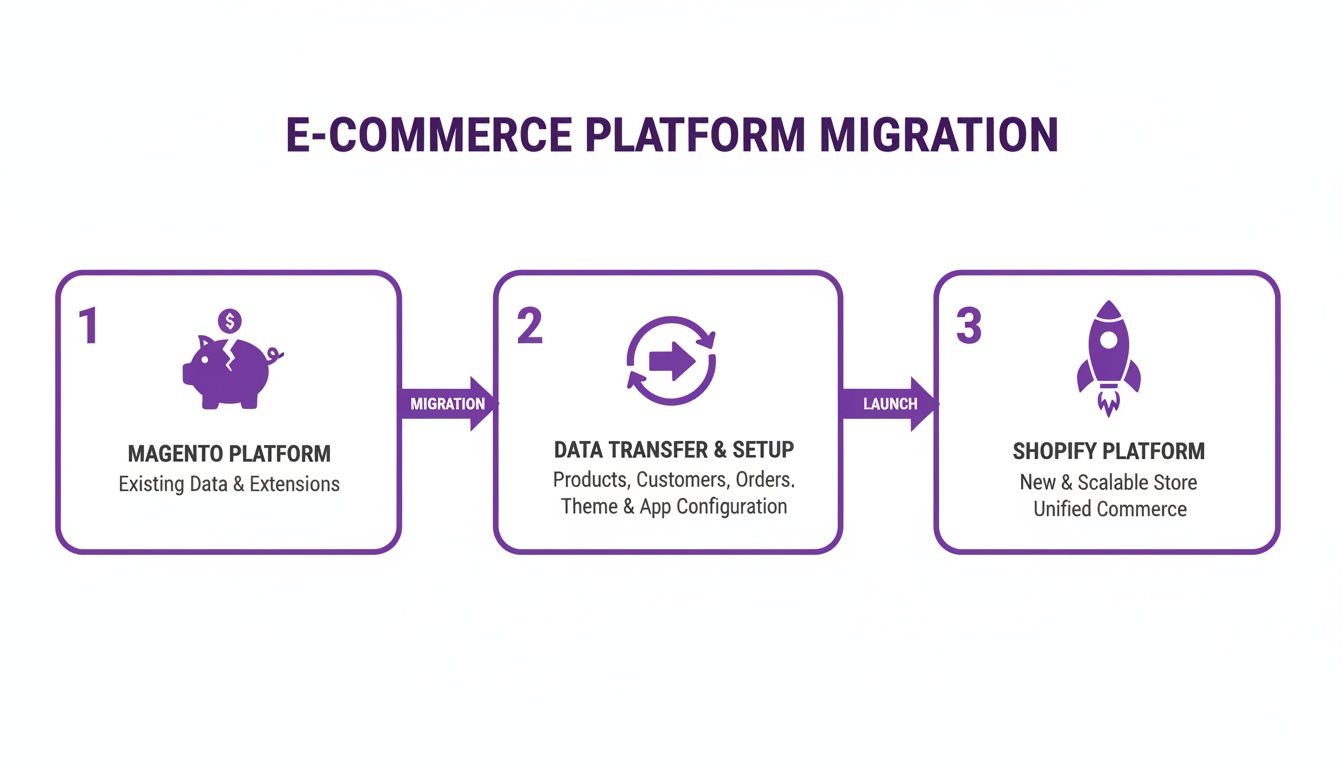
The real takeaway here is that the migration itself is a bridge between two fundamentally different ways of doing business—one that’s high maintenance and one that’s built for agility.
Defining Scope and Assembling Your Team
Once your audit is done, you can define a realistic project scope. This document becomes your North Star for the entire migration from Magento to Shopify. It needs to clearly outline what’s included in the project, what's explicitly out of scope, and what success looks like.
A solid scope document should answer these questions:
- What is the absolute must-have functionality for the new Shopify store at launch?
- Which features from Magento will be replicated, and which ones are we retiring?
- What new features or improvements are we adding to the mix?
Your scope document is your best defense against "scope creep"—that slow trickle of new requests that can completely derail your timeline and blow up your budget. Get every stakeholder to sign off on this before any technical work starts.
Next, figure out who’s going to run this project. You've really got two main options: an in-house team or a specialized migration agency. An in-house team knows your product inside and out, but an agency brings priceless experience from hundreds of similar projects, helping you sidestep common traps. Many brands find a hybrid approach works best, pairing their internal team with an expert agency for guidance.
Finally, set your Key Performance Indicators (KPIs). How will you actually measure success? Don't just focus on flipping the switch. Your goals need to be tied to real business outcomes.
Consider tracking metrics like:
- Conversion Rate: Aim for an increase after launch.
- Site Speed: Measure page load times before and after the move.
- Average Order Value (AOV): Look for opportunities to bump this up with Shopify's built-in features.
- Operational Efficiency: How much time is your team saving on daily tasks?
By meticulously planning your audit, scope, team, and success metrics, you create a solid blueprint that transforms a potentially chaotic project into a predictable, strategic move. For more help organizing this phase, our complete Shopify migration checklist provides an even more detailed breakdown.
Navigating the Core Data Migration
Alright, this is where the rubber meets the road—moving your store's most valuable assets. The technical side of a migration from Magento to Shopify can feel a bit overwhelming, but a successful data transfer really just comes down to having a solid process. You’re methodically moving your products, customers, and orders, making absolutely sure no critical information gets left behind.
The entire foundation for this is data mapping. Think of it as creating a translation guide. You're essentially teaching your new Shopify store how to understand all the data coming from your old Magento setup.
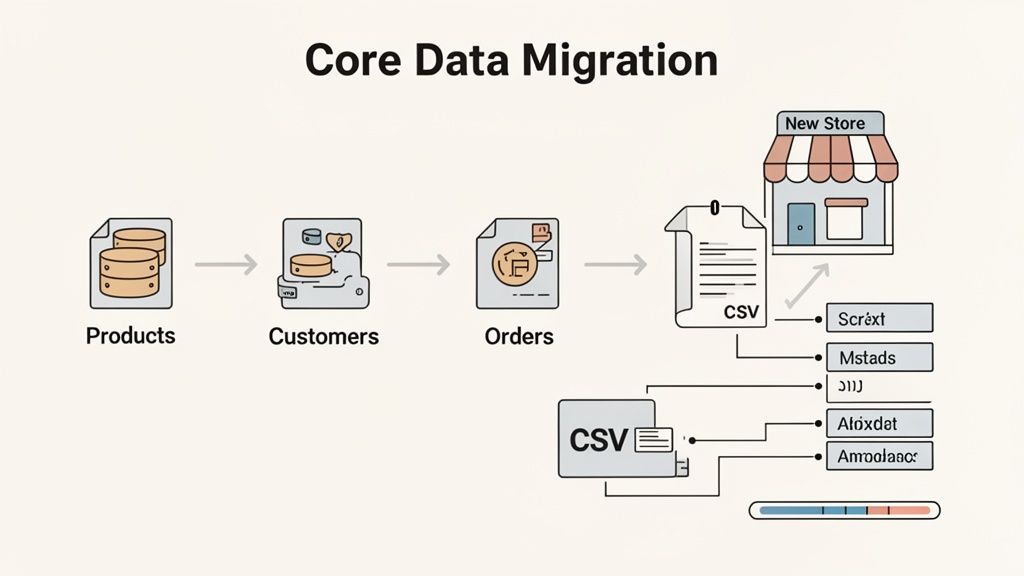
Don't even think about skipping this. Magento's flexible attribute system means almost every store has a unique data structure. A simple export-import job without proper mapping is a recipe for disaster, and you’ll likely end up with a messy, unusable catalog in Shopify.
Translating Magento Attributes into Shopify Fields
At its heart, data mapping is all about matching Magento's product attributes, customer fields, and order data points to their correct homes in Shopify. For example, a Magento product might have a custom attribute you created called "Material." That needs to be mapped to a Shopify product option or perhaps a metafield.
Here’s a more practical look at how this translation plays out for your key data:
- Products: This is usually the most time-consuming piece of the puzzle. You'll be mapping standard fields like SKU, title, and price, but the real work comes in converting Magento’s configurable products into Shopify’s variant system. Any custom attributes you had will likely become product tags or dedicated metafields, which will power the filtering and search on your new site.
- Customers: You’ll be moving over names, email addresses, and shipping/billing info. But here's a critical detail: customer passwords cannot be migrated. It’s a security thing due to encryption. You'll need a clear plan to invite customers to create new passwords on the Shopify store after you go live.
- Orders: Bringing over order history is essential for both customer service and your own reporting. This includes order statuses, what was purchased, and who bought it. While Shopify doesn't natively display historical orders in its main dashboard, migration tools can store this data so you can still access it.
The goal of data mapping isn't just to shovel data from one place to another. It's to structure it intelligently so it works perfectly within Shopify's ecosystem. Good mapping ensures your product filters, search, and customer segments work flawlessly from day one.
Choosing Your Data Migration Method
Once your map is drawn, it’s time to decide how you’re going to move everything. You've got three main paths, and each has its own trade-offs when it comes to cost, complexity, and how much control you have.
Manual CSV Export and Import: This is the totally hands-on approach. You export data from Magento into CSV files, manually reformat them to match Shopify's required structure, and then upload them. It's the cheapest option (it's free!), but it's also incredibly time-consuming and prone to human error. This is really only a viable option for tiny stores with very simple catalogs.
Using a Migration App: This is the go-to for most businesses. The Shopify App Store is full of powerful tools like Matrixify or Cart2Cart built specifically for this. These apps automate a huge chunk of the mapping and transfer process, giving you a user-friendly interface to work with. It's the best balance of cost, speed, and reliability.
Hiring an Agency or Developer: If you're running a highly complex Magento store with tons of custom code, unique data structures, or a massive catalog, a custom migration script is often the only way to go. This gives you total control and can handle any weird edge cases, but it's also the most expensive route. An experienced agency will quarterback the entire process, ensuring a seamless transfer.
Here’s a quick breakdown to help you pick the right path.
Handling Tricky Data Scenarios
Some types of data just need a little extra care. Overlooking these can lead to a rough customer experience and a lot of post-launch headaches.
- Product Variants: Double and triple-check that Magento’s configurable products—with all their sizes, colors, and other options—are mapped correctly to Shopify’s variant system. This is a common failure point; incorrect mapping can completely break your product pages.
- Customer Accounts: As mentioned, passwords aren't coming along for the ride. Get an email campaign ready to go that smoothly prompts customers to activate their new accounts. Frame it as a positive security upgrade for them.
- Order History: While apps can store old orders, think about what your CS team actually needs to see. Sometimes, the simplest solution is the best: just keep your old Magento admin accessible in a read-only state for a few months. It's an easy and effective way to look up old order details.
Putting in the effort to plan around these core data sets is what separates a smooth transition from a chaotic launch. If you take the time to map correctly and choose the right method, you're setting your new Shopify store up for success right out of the gate.
Rebuilding Your Storefront and Functionality
Once you’ve wrestled with the technical side of data migration, it’s time for the fun part: bringing your store's look, feel, and features to life on Shopify. This isn't just about making a perfect replica of your old Magento site. Think of it as a golden opportunity to upgrade, simplify, and build a customer experience that’s faster and more intuitive.
The migration from Magento to Shopify is your chance to ditch the technical debt and clunky design limitations that might have been holding you back. You can finally focus purely on creating a storefront that truly sells your brand and makes customers happy.

Crafting Your New Shopify Look and Feel
Your store’s design is your digital handshake. The decision between a pre-built theme or a completely custom build really boils down to your budget, timeline, and just how unique your brand needs to be.
For most brands, starting with a premium theme from the Shopify Theme Store is the smartest path forward. These themes are already optimized for speed, mobile-responsive right out of the box, and give you a ton of customization options without needing a developer. My advice? Look for themes with features that match your business goals, whether that’s rich visual storytelling or a layout built for massive product catalogs.
If your brand demands a one-of-a-kind user experience or has very specific design needs, then a custom theme might be the answer. This route gives you total creative freedom but, naturally, comes with a higher price tag and a longer development cycle. It's a solid choice for established brands aiming to create a truly iconic online presence.
Translating Magento Functionality into Shopify Apps
One of the biggest mental shifts is moving from Magento's complicated extension system to the Shopify App Store. That audit you did before the migration? It's your roadmap now. Go down your list of Magento extensions and find a Shopify equivalent for each one.
This is a cleanup exercise. Don't just find a one-to-one replacement for every old extension. Instead, ask if the functionality is still essential. This is your chance to simplify your tech stack and remove unnecessary bloat.
The process of getting your features over—and often upgrading them—usually looks something like this:
- Pinpoint Core Needs: What did that old Magento extension actually do? Was it running a loyalty program, handling advanced search, or managing subscriptions?
- Dive into the Shopify App Store: Search for top-rated apps that solve those problems. Pay close attention to recent reviews, how responsive the developer support is, and whether it plays nicely with your chosen theme.
- Prioritize and Consolidate: You'll often find that one really good Shopify app can replace two or three of your old extensions. For example, a powerful loyalty app might also handle product reviews and customer referrals.
This streamlined approach is a huge reason why so many merchants are making the switch. The market data tells a clear story: Shopify is pulling away as the leader in both market share and merchant growth. As of 2025-2026, Shopify holds a 17.30% market share with over 492,707 customers, leaving Magento's 8% share far behind. This trend highlights a broad industry consensus on Shopify's superior ecosystem and ease of use. You can see more on this e-commerce platform shift by checking out the full market share statistics.
Real-World Examples of Feature Migration
Let's walk through a common scenario. Say your Magento store used a clunky extension for product subscriptions. On Shopify, you can integrate with best-in-class apps like ReCharge or Skio. These are built from the ground up to manage recurring revenue perfectly within the Shopify environment.
Or maybe you had a custom-coded B2B portal on Magento. Now, you can tap into Shopify Plus's powerful wholesale channel or use dedicated B2B apps. These tools provide robust, ready-to-go features for managing company accounts, net terms, and custom pricing—all without the constant maintenance headache.
And once you're settled on Shopify, don't stop there. A natural next step for scaling your business is to explore a Shopify Amazon integration to expand your reach. Rebuilding your storefront is all about making smart choices that not only replicate what you had but actively improve upon it for a more scalable and profitable future.
Protecting Your SEO and Launching with Confidence
Let’s be honest: the single biggest fear in any platform migration is watching years of hard-earned SEO authority vanish overnight. It’s a completely valid concern. A botched launch can absolutely decimate your search rankings. But with a methodical, battle-tested approach, you can not only protect that SEO equity but actually set the stage for stronger organic growth on Shopify’s faster, more robust platform.
Think of your existing SEO strategy as the digital life support for your business. During the move from Magento to Shopify, your primary job is to make sure that system never gets unplugged. This whole process really hinges on one of the most critical, painstaking tasks in the entire project: URL redirects.
Mastering the Art of 301 Redirects
Your Magento store has a unique URL for every single product, category, and CMS page. Search engines have spent years crawling and indexing these URLs, assigning them authority and trust. When you move to Shopify, those URLs will change. This is where the 301 redirect comes in—it's a permanent instruction that tells search engines and browsers, "Hey, this page has moved forever. Go over here instead."
Without proper redirects, anyone clicking an old link from Google will smack into a dreaded 404 "Page Not Found" error. This is a dead end for your customers and a massive red flag for search engines, signaling that your site is broken and unreliable.
To pull this off without a hitch, you need a comprehensive URL map.
- First, crawl your current Magento site to get a complete list of every live URL. Don't miss anything.
- Next, map each old URL to its new Shopify equivalent side-by-side in a spreadsheet. This is your master plan.
- Finally, implement the redirects. You can do this with Shopify’s built-in URL Redirects tool, but for larger catalogs, an app like Transportr is a lifesaver.
This mapping process is tedious, but it is absolutely non-negotiable. Missing even a handful of your key pages can cause a major drop in traffic.
Preserving On-Page SEO and Content
Beyond just the URLs, you have to migrate all the on-page SEO elements that tell Google what your pages are about. This means bringing over all the metadata that provides that crucial context.
- Meta Titles and Descriptions: Make sure these are transferred for every single product, collection, and blog post. These are what people see in the search results and they have a direct impact on whether someone clicks through to your site.
- CMS Page Content: Don't forget about your "About Us," "Contact," and policy pages. All that content needs to be moved over and properly formatted.
- Canonical Tags: Shopify handles canonicals pretty well right out of the box, but you have to double-check that they are configured correctly. This is your main defense against duplicate content issues, especially with product variants.
The effort here pays off, big time. Take Dusk, a home goods brand that saw a massive 154% increase in organic revenue within just eight months of their migration from Magento to Shopify. Sure, they saw a temporary, expected dip right after launch, but their rankings quickly recovered and then soared, expanding their share of voice from 0.8% to 2.3%. Their story is a perfect example of how a strategic migration can be a powerful catalyst for SEO growth. You can read more about their successful Magento to Shopify migration.
Your Go-Live Checklist: Before and After
A confident launch comes down to one thing: rigorous testing. Before you even think about flipping the switch, your team needs to run through a detailed checklist to hunt down any potential showstoppers. This isn't just about finding broken links; it’s about stress-testing the entire customer journey from start to finish.
Don’t just test for what might go wrong—test what must go right. The checkout process, key promotional codes, and transactional emails are mission-critical. A failure in any of these areas directly impacts revenue and customer trust on day one.
Break down your plan into two clear phases: pre-launch and post-launch.
The Pre-Launch Final Check
- Payment Gateway Testing: Run several test orders. Use different credit cards, PayPal, and any other payment methods you offer. Make sure the money flows.
- Transactional Email Verification: Are order confirmations, shipping updates, and account creation emails actually being sent? Do they have the right branding?
- Mobile Responsiveness: Grab different phones and tablets. Go through the entire site, from the homepage to the final checkout confirmation page.
- Third-Party App Functionality: Check your essential apps. Do the reviews show up? Does the loyalty program work? Is your site search configured?
- Analytics and Tracking: Use browser developer tools to verify that Google Analytics, Facebook Pixel, and any other tracking scripts are firing correctly on all key pages.
The Post-Launch Monitoring Plan
- Real-Time Monitoring: Keep your analytics dashboard open on a second monitor. Watch for any sudden traffic drops or spikes in 404 errors.
- Crawl the New Site: Once you're live, use a tool like Screaming Frog to crawl your new Shopify site. This will help you catch any broken links or redirect chains you might have missed.
- Submit New Sitemap: Head over to Google Search Console and submit your new sitemap. This gives Google a fresh roadmap to encourage faster indexing of your new URLs.
- Monitor Customer Feedback: Keep a close eye on your support inbox, social media mentions, and live chat. Your customers will often be the first to spot a bug.
Once you’re successfully launched, the real work of optimization begins. Leveraging data to drive continuous improvement is what separates good stores from great ones. Exploring something like an analytics maturity model can help you move from guesswork to truly data-driven decisions. By meticulously planning your SEO preservation and executing a thorough launch checklist, you ensure your migration is not a risk, but a confident step toward greater success.
Common Questions About Migrating From Magento to Shopify
Making the jump from Magento to Shopify is a huge decision for any business, and it’s totally normal to have a long list of questions. This isn't just about switching software; it’s a strategic move that touches every part of your business—operations, marketing, and your bottom line. Let's tackle some of the most common things we hear from brands getting ready to make the switch.
How Long Will the Migration Take?
Honestly, there’s no one-size-fits-all answer. For a typical mid-sized business, we usually see projects land in the 6 to 12-week range. But that timeline can stretch or shrink depending on a few big variables.
- Data Complexity: A store with 1,000 simple products is a world away from one with 50,000 configurable products and a decade of order history. The more complex your data, the longer it will take.
- Design and Customization: Are you picking a great Shopify theme and just tweaking the colors? Or are you aiming for a completely custom, bespoke design? A custom build is a bigger project and naturally takes more time.
- Feature Parity: The more custom features and third-party apps you need to replicate from your Magento store, the more time you'll need for development, integration, and testing on Shopify.
A smaller store could be live in a month, while a massive enterprise project might take six months or even longer. The real key is putting in the work upfront to map everything out and set a timeline that makes sense for your specific needs.
Can I Keep My Customer Passwords?
This is a big one, and the answer is a hard no. For very good security reasons, you absolutely cannot migrate customer passwords. Magento and Shopify use entirely different and incompatible encryption standards to keep that data safe. Trying to move them would be a massive security breach.
The proper way to handle this is to migrate every other piece of customer data—name, email, shipping addresses, order history—and then kick off a password reset campaign as soon as you go live. You’ll send a nicely branded email letting everyone know about the shiny new website and prompting them to create a new password to access their account.
Will I Lose My SEO Rankings?
Losing your hard-earned organic traffic is a legitimate fear, but it's also entirely avoidable with the right game plan. The absolute cornerstone of protecting your SEO is a meticulous 301 redirect strategy. This means mapping every single URL from your old Magento site to its new home on Shopify.
A successful SEO migration isn’t just about redirects. It's about preserving every piece of on-page equity—meta titles, descriptions, H1 tags, and page content—to ensure search engines see the new site as a seamless continuation of the old one, not a completely new entity.
As long as you nail the redirects and migrate all your content and metadata properly, you should only see a small, temporary dip in rankings while Google gets to work crawling and indexing the new site. In fact, many brands we’ve worked with actually see a boost in organic traffic after moving, thanks to Shopify's much faster site speed and overall performance.
How Much Does a Migration Cost?
The cost to migrate from Magento to Shopify can swing from a few thousand dollars to well into the six-figure range. There's no single price tag because the final number is tied directly to the scope and complexity of your project.
- DIY with Apps: If you have a small, simple store, you might get away with spending just a few hundred dollars on a good migration app and a premium theme.
- Agency-Led Migration: For a standard mid-sized business, working with an agency for data transfer, theme setup, and app configuration will likely land somewhere between $15,000 and $50,000.
- Shopify Plus & Custom Development: Enterprise-level projects that involve custom design, tricky integrations, and massive amounts of data often start at $50,000 and go up from there.
Try to think of it less as a cost and more as an investment. The goal is to pay back that initial outlay through a lower total cost of ownership, higher conversion rates, and a much more efficient way to run your business day-to-day.
Ready to make your migration a strategic success? At ECORN, we specialize in seamless Shopify and Shopify Plus migrations that protect your assets and unlock new growth. Explore our expert migration services and let's build your future on Shopify.



How to Choose a Shopify Plus Web Design Agency in 2026
Shopify Plus Ecommerce Agency: How to Pick the Right One

Shopify Themes Retina: How to Serve 2x Images

How to Cross Sell on Shopify Without Friction

Best Shopify Theme for Custom Products Compared
Multi Store Inventory Management: A Practical Guide

SEO Consulting for Ecommerce: A Practical Guide
Shopify Theme Updater App: A Safe Update Playbook
Shopify Git Integration: A Developer's Guide to 2026
Headless Ecommerce Development Services Explained

How to Build a Shopify Clothing Website That Converts

How to Launch a Box Subscription Business in 2026

Luxury Skincare Branding Playbook That Converters

10 Best Podcast Ecommerce Shows for Store Growth in 2026

Shopify Developer Hourly Rate: What to Pay in 2026

Critical Shopify Setup Errors That Are Secretly Sabotaging Your Store

Ecommerce Conversion Tracking: The Complete How-To Guide

Shopify Design Agency: How to Pick the Right Partner

Mastering Multi Store Management on Shopify

Scale Shopify Store

10 Shopify App Ideas Worth Building in 2026

Conversion Rate Optimization for Landing Pages: The Playbook

Shopify Plus Automation: A Guide for 2026

10 Social Selling Platforms for Shopify Merchants

Shopify Website Design Examples: 7 Stores Worth Studying

7 Ecommerce Newsletter Examples for Shopify Brands

One Product Shopify Store: Build and Scale

Mobile Pop Up Strategy for Shopify Stores That Converts

Sitemap for Shopify: How to Find, Optimize, and Submit It

7 Single Product Websites Worth Emulating

Product Variants Shopify: The Complete 2026 Guide

Ecommerce Analytics Consulting for Growth

What Is AI Integration for eCommerce

How to Choose the Right eCommerce Website Development Firm

E Business Strategy Implementation

Conversion Tracking Setup for Shopify Stores

BigCommerce vs Shopify Plus Which Enterprise Wins in 2026

Shopify Theme Kit: Setup, Commands, and Migration Guide

Shopify Extension Development: A Practical 2026 Guide

Shopify Speed Score Explained and How to Improve It

Shopify Mobile Optimization: The 2026 Playbook

How to Add Subcategory in Shopify for Better UX

How to Implement Structured Data for Ecommerce in 2026

SEO App Mobile: Shopify Store Optimization Guide

Shopify Plus Support: What It Includes and How to Choose

Google Ads for Shopify: The Complete 2026 Playbook

Shopify New York: How to Find and Hire the Right Agency

Google Search Console for Shopify: The Complete Setup

First Party Data Collection for eCommerce Growth

FAQ Online Store Guide: Build and Measure It Right

Do FB Ads Work for eCommerce in 2026?

One Page Checkout for Shopify: Design and Implementation

Shopify GraphQL vs REST: The 2026 Developer Decision

Shopify Ecommerce Consulting: Strategy, Pricing &

Are Reddit Ads Worth It for eCommerce Brands

Shopify Title and Meta Description: A Practical 2026 Guide

Product Video Best Practices for Shopify Brands

Real-Time Inventory Management: A 2026 Guide

AI Chatbot Integration for Shopify Stores

Affiliate Program Management: A Shopify Guide

10 Best Performance Monitoring Tools for Shopify in 2026

Digital Asset Management for eCommerce Brands in 2026

Every Type of Facebook Ads Explained for eCommerce Growth

Product Information Management Explained for Shopify Brands

Support Ticket System: A Guide for Shopify Stores

10 Best Customer Service Tools for Shopify in 2026

Can I Start a Business with No Money? a 2026 Blueprint

What Sells Good on Etsy: Best Niches for 2026

Shopify Add to Cart Button: A Practical 2026 Guide

Customer Feedback Automation: A Practical eCommerce Guide

Critical Rendering Path: A Guide for Shopify Stores

How to Promote on TikTok for eCommerce in 2026

B2B eCommerce Consulting That Drives Real Revenue

10 Best Practices for Site Navigation in 2026

Return vs Refund for Shopify Stores: A Practical Guide

What Is Customer Lifetime Value and Why It Matters

What Is Voice of Customer Research for eCommerce

SMS Marketing for Ecommerce That Actually Converts

Master How to Improve Email Deliverability in 2026

Top 8 eCommerce Partners NYC for Shopify Brands in 2026

Machine Learning for Ecommerce: Boost Your Shopify Store

Beauty Market Research: Your 2026 Growth Guide

Shopify International Expansion: A 2026 Roadmap

What Does CRO Stand for in Business: Understanding CRO

Shopify Visual Merchandising: A Playbook for Higher Sales

Shopify Landing Page Design: Master Conversion in 2026

10 Best AI SEO Optimization Tools for Shopify in 2026

Agentic AI for Ecommerce: Boost Your Sales in 2026
Mastering Email Marketing Data for eCommerce Growth

Conversion Rate Optimisation Australia: Boost Your Sales

Conversion Rate Optimization AI: Your Shopify Store Guide

10 Product Bundling Strategies for Shopify in 2026

How to Increase Customer Lifetime Value: A Shopify Playbook

AI Customer Service Automation: Shopify Guide 2026

Clean Website Design: A Shopify Conversion Playbook

Omnichannel Retail Strategy: A Shopify Playbook

Product Data Enrichment: A Guide for Shopify Brands

Instagram Shopping Features a Guide for Shopify Stores

What Is Revenue Optimization: A Holistic RevOps Guide

Benefits of Conversion Rate Optimization: Boost Your


newsletter in your inbox