

Using Facebook Ads for ecommerce is hands down one of the most reliable ways to drive scalable, profitable growth for your Shopify store. It's how you can methodically combine laser-focused audience targeting with creative that actually connects, turning your ad spend into predictable revenue and reaching customers at every point in their shopping journey.
Setting Up a Bulletproof Technical Foundation
Before you even think about spending a single dollar on ads, getting your technical setup right is non-negotiable. I can't stress this enough. Think of it as pouring the foundation for a skyscraper; if you cut corners here, everything you build on top is destined to crumble. This initial setup is the single biggest factor that separates successful ad accounts from the ones that just burn cash.
So many Shopify stores get excited and jump straight into making ads, only to wonder why their campaigns are bleeding money and their data is a complete mess. The problem almost always traces back to a rushed Business Suite configuration, a broken pixel, or an unverified domain. These aren't just technical checkboxes; they are the very things that let your ads find the right people and tell you what’s actually working.
Business Manager and Ad Account Configuration
Your first port of call is to properly set up your Meta Business Manager. This is your command center for everything—ad accounts, pages, pixels, people. Seriously, don't rush this part. I’ve seen stores get locked out or even suspended for sloppy setup, and recovering from that is a nightmare.
Take the extra ten minutes to fill out all your business information accurately. And turn on Two-Factor Authentication for everyone with access. It’s a simple click that adds a vital layer of security.
Pro Tip: Always, and I mean always, create a backup admin for your Business Manager. If your personal profile gets flagged or locked (it happens!), having a second admin is a lifesaver. It’s the difference between a minor headache and a full-blown business shutdown.
Installing the Meta Pixel and Conversions API
The Meta Pixel is that little snippet of code on your Shopify store that watches what your visitors do—viewing a product, adding to cart, and hopefully, making a purchase. This data is the absolute lifeblood of your advertising. A correct Facebook Pixel setup is the cornerstone of any campaign that has a chance of being profitable.
But in a world of iOS updates and ad blockers, the Pixel by itself just doesn't cut it anymore. That's where the Conversions API (CAPI) steps in.
- Meta Pixel: This is a browser-side tool. It sends data from a visitor's web browser straight to Meta. The catch? It can be easily blocked by privacy settings or ad-blocking software.
- Conversions API (CAPI): This is a server-side tool. It sends data directly from your Shopify server to Meta's server. It’s far more reliable because it bypasses the browser entirely.
Using both the Pixel and CAPI together gives you a redundant, robust, and much more accurate data feed. For anyone on Shopify, this is a piece of cake. Just use the official Facebook & Instagram app in the Shopify App Store and crank the data sharing setting to "Maximum." This ensures Meta gets the most complete picture possible, which translates directly into better targeting, smarter optimization, and reporting you can actually trust.
Domain Verification and Event Measurement
Last but not least, there are two crucial steps inside Business Manager you have to complete to avoid tracking blackouts: Domain Verification and Aggregated Event Measurement.
Domain Verification is simply you proving to Meta that you own your store’s domain. It's a quick process, and it unlocks your ability to control and prioritize your conversion events.
Aggregated Event Measurement (AEM) is Meta's answer to Apple's big privacy changes. It lets you rank up to eight standard events (like Purchase, Add to Cart, Initiate Checkout) in order of importance. You must set this up. For any ecommerce store, the "Purchase" event should always be at the very top of that list. If you don't do this, your ability to optimize for actual sales will be shot.
Structuring Campaigns for Predictable Profitability
A messy ad account is the quickest way to blow your budget. Just tossing a bunch of ads out there and hoping for the best isn't a strategy—it's a surefire way to lose money. The Shopify stores you see with consistent, predictable profits aren’t just lucky. They’re built on a methodical, structured campaign framework. It’s less about magic and more about smart math and understanding how people buy.
The secret is building your campaigns around the classic three-stage marketing funnel. When you segment your campaigns this way, you can deliver the right message to the right person at exactly the right time. This is how you take someone who’s never heard of you and turn them into a loyal, repeat customer with Facebook ad ecommerce strategies.
The Three-Stage Funnel Breakdown
The idea is refreshingly simple. You'll create separate campaigns for each stage of the customer journey, each with its own specific goal, audience, and budget.
- Top of Funnel (TOFU): This is your cold audience—people who probably have no idea who you are. The goal isn't an immediate sale. It’s about making a great first impression, grabbing their attention, and sparking some initial interest in your brand.
- Middle of Funnel (MOFU): These are your warm prospects. They’ve interacted with you in some way, maybe by visiting your site, watching a video, or liking a post. Now, you need to build trust, answer their questions, and keep them engaged.
- Bottom of Funnel (BOFU): This is your hot audience, the people who are right on the edge of buying. They might have added products to their cart or even started the checkout process. Your job is to give them that final, compelling reason to click "buy now."
By keeping these efforts separate, you avoid common mistakes like asking for the sale too early or showing introductory ads to someone who's already got their credit card out.
Aligning Objectives with Funnel Stages
Matching the right campaign objective to each funnel stage is absolutely critical. This is how you tell Meta's algorithm exactly what you want it to do.
An optimized campaign structure doesn't just organize your work; it feeds Meta's algorithm the precise data it needs to find your customers efficiently. Each stage informs the next, creating a self-sustaining system for growth.
For TOFU campaigns, you're hunting for new customers. Your best bet is usually the "Sales" objective aimed at broad audiences or high-value Lookalike Audiences. Advantage+ Shopping Campaigns (ASC) are also fantastic here, as they let Meta’s AI do the heavy lifting to find new buyers for you.
When you get to MOFU, your objective is still "Sales," but you'll be targeting specific custom audiences of people who have engaged but haven't purchased yet. This is where you can really start to segment and get personal.
BOFU is all about sealing the deal. You’ll use the "Sales" objective to retarget your highest-intent users, like people who abandoned their cart in the last 7-14 days. These small, highly motivated audiences almost always deliver the highest Return on Ad Spend (ROAS).
Before you can build this funnel, you need to have your technical foundation locked in. The infographic below shows the essential setup steps.
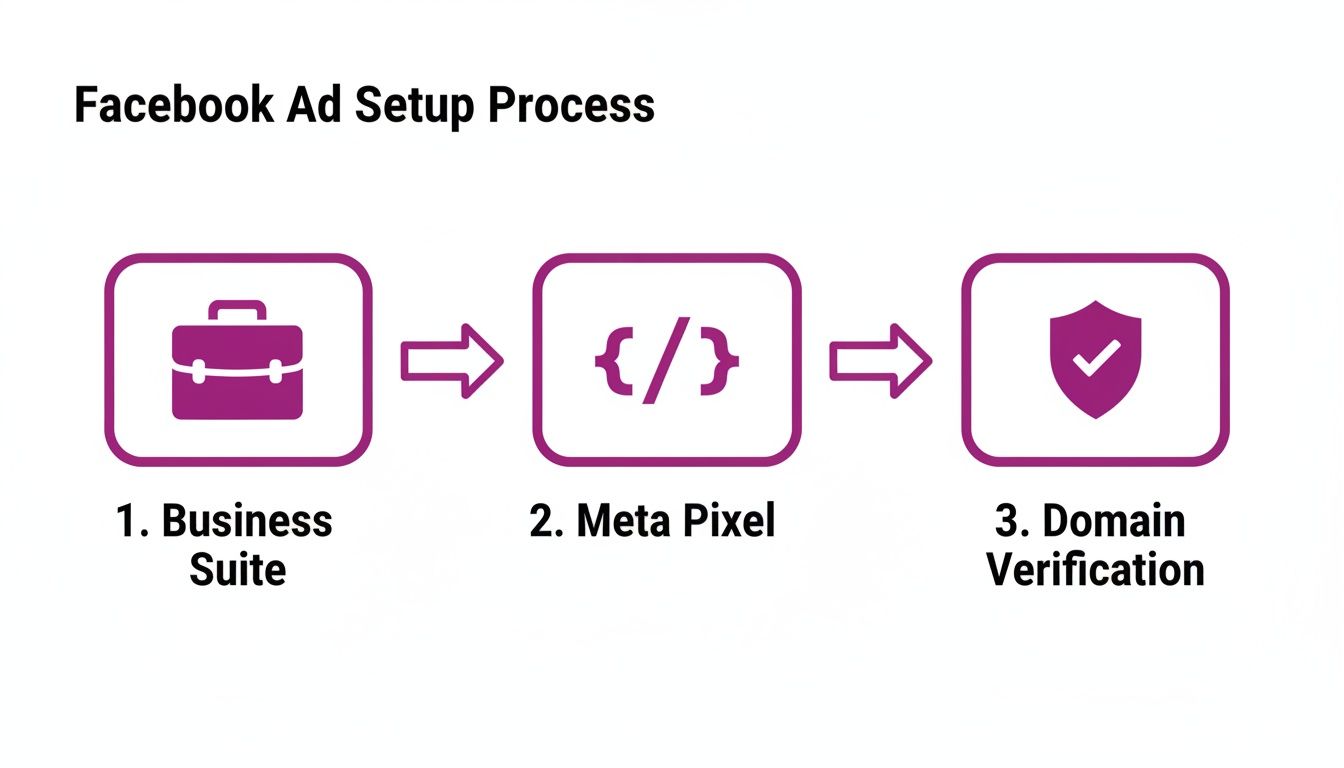
This flow—from setting up Business Suite to getting your Pixel and Domain Verification handled—is the non-negotiable backbone for a profitable funnel structure.
Budgeting Strategies and Audience Segmentation
How should you split your budget? My go-to recommendation is a split that heavily favors customer acquisition. A solid starting point is 70% for TOFU, 20% for MOFU, and 10% for BOFU. This ensures a constant stream of new prospects is flowing into your funnel.
The platform's dominance speaks for itself. Facebook's ad revenue is on track to blow past $230 billion globally in 2026, with retail and ecommerce campaigns seeing conversion rates climb as high as 14.29%. With the average CPC holding steady at $1.14, it remains a cost-effective powerhouse for Shopify brands.
Audience segmentation is where the real magic happens. For your MOFU campaigns, for instance, you could create separate audiences for:
- Video Viewers: People who watched 75% or more of your main product video.
- Social Engagers: Anyone who has liked, commented, or shared one of your posts.
- Website Visitors: Users who browsed a product page but didn’t add anything to their cart.
Each of these micro-audiences can get a slightly different ad, perfectly tailored to their level of interest and where they are in their journey. You can find more creative targeting strategies in our guide to social media advertising ideas.
By structuring your campaigns this way, you stop guessing and start building a predictable, profitable system for growth.
Creating Ad Creative That Actually Sells
Let's be blunt: you can have the most dialed-in technical setup and a perfect funnel, but if your ad creative is weak, you're just lighting money on fire. The Meta feed is a relentless, fast-scrolling environment. Your ad is the single most crucial factor that decides if someone stops to look or just keeps on scrolling.
I've seen countless brands make the same mistake: creating ads that feel like ads. Think polished, corporate, and way too slick. Users have a sixth sense for this stuff and tune it out instantly. The real secret is to make content that feels at home on the platform—something that entertains or teaches first, and sells second. That's how you earn attention.
Mastering Different Ad Formats
Not all ad formats are built the same, and knowing which tool to use for which job can be a game-changer for your results. For a winning facebook ad ecommerce strategy, you need to understand the main formats and where they really shine.
- Image Ads: The original, and still a powerhouse, especially for retargeting. A single, high-impact lifestyle shot or a clean graphic with a strong call-to-action can be incredibly effective at the bottom of the funnel.
- Video Ads (Reels & In-Feed): This is where the magic happens for reaching new people. Short-form video, especially in the 9:16 vertical format, is king for grabbing the attention of cold audiences. Think quick tutorials, behind-the-scenes moments, or, best of all, user-generated content (UGC).
- Carousel Ads: These are your best friend for showcasing multiple products or walking a customer through different features. I love using carousels for middle-of-funnel audiences who’ve shown interest, letting them explore a collection or see various angles of a product.
- Advantage+ Shopping Ads: Think of these as Meta’s AI-powered campaign managers. You feed the algorithm your product catalog and some creative assets, and it goes to work, dynamically testing and finding the most profitable ad combinations and audiences for you. They’re fantastic for both prospecting and retargeting.
To help you decide where to focus your creative energy, here's a quick breakdown of how these formats typically perform for eCommerce brands.
Facebook Ad Format Performance Comparison
| Ad Format | Best For (Funnel Stage) | Average CTR | Key Advantage |
|---|---|---|---|
| Video (Reels/Stories) | Top of Funnel (Prospecting) | 1.5% - 2.5% | Grabs attention, builds brand awareness |
| Image | Bottom of Funnel (Retargeting) | 2.0% - 3.5% | Simple, clear, high-intent conversions |
| Carousel | Middle/Bottom of Funnel | 2.5% - 4.0%+ | Showcases multiple products/features |
| Advantage+ Shopping | Full Funnel (AI-Driven) | Varies (Highly Optimized) | Automated, efficient, and highly targeted |
While these numbers are a great starting point, always remember to test what works for your specific audience and products.
The data for 2026 is impossible to ignore. Product-focused formats like carousels have seen shopping campaign click-through rates hit a staggering 4.13%. With the average cost-per-click in the shopping vertical dropping to just $0.34, it’s clear that visual, product-centric ads are incredibly efficient at turning scrollers into shoppers.
Writing Copy That Connects and Converts
A stunning visual might stop the scroll, but it's the copy that closes the deal. Your words need to speak directly to your customer's problems and aspirations, positioning your product as the clear solution. One of the most reliable frameworks I've used for years is the classic AIDA model.
- Attention: Kick things off with a hook. A provocative question, a surprising fact, or a direct statement about a common pain point works wonders.
- Interest: You've got their attention. Now, build on it by diving deeper into the problem. Show them you truly get what they're going through.
- Desire: This is your moment to present your product as the hero. Don't just list features; sell the transformation. How will their life improve? Focus on that feeling.
- Action: Finish with a simple, direct, and low-friction call-to-action (CTA). Tell them exactly what to do next—"Shop Now," "Get Your 20% Off," "Learn More." Be specific.
My Personal Insight: Don't get stuck in a rut with copy length. I’ve seen long, story-driven ads absolutely crush short, punchy copy, especially for products with a higher price tag or a complex story. The only way to know is to test. Test short vs. long, test different hooks, test everything.
The Power of Authentic Creative
If there’s one type of creative that consistently delivers, it’s User-Generated Content (UGC). These are the photos and videos from real, happy customers using your product in their day-to-day lives. Nothing builds trust and social proof faster.
Getting your hands on UGC doesn't have to be complicated. You can run a contest, reach out to customers who tag you in their posts, or collaborate with micro-influencers who already love what you do.
When you strike gold with a great piece of UGC, get permission and put some ad spend behind it. I’ve personally witnessed a single, raw customer video outperform a professionally shot campaign by a factor of 10. If you want a closer look at what makes an ad stand out, check out our breakdown of the best ads on Facebook. That raw authenticity is what truly sells.
So, you've launched your campaign, and the first few sales are trickling in. That’s a great feeling, isn't it? But here's the thing: launching is just the first lap. The real money and sustainable growth for your Shopify store are made in what comes next.
This is where you shift from just spending money to making intelligent, data-driven decisions that turn a promising campaign into a predictable revenue machine. It’s less about guesswork and more about a steady rhythm of reading the data, understanding the story it tells, and taking calculated next steps.
Reading the Numbers That Actually Matter
Before I even think about my first coffee, I’m in Ads Manager. You have to know which numbers tell the truth about your facebook ad ecommerce performance and which ones are just noise.
Here’s my daily go-to checklist:
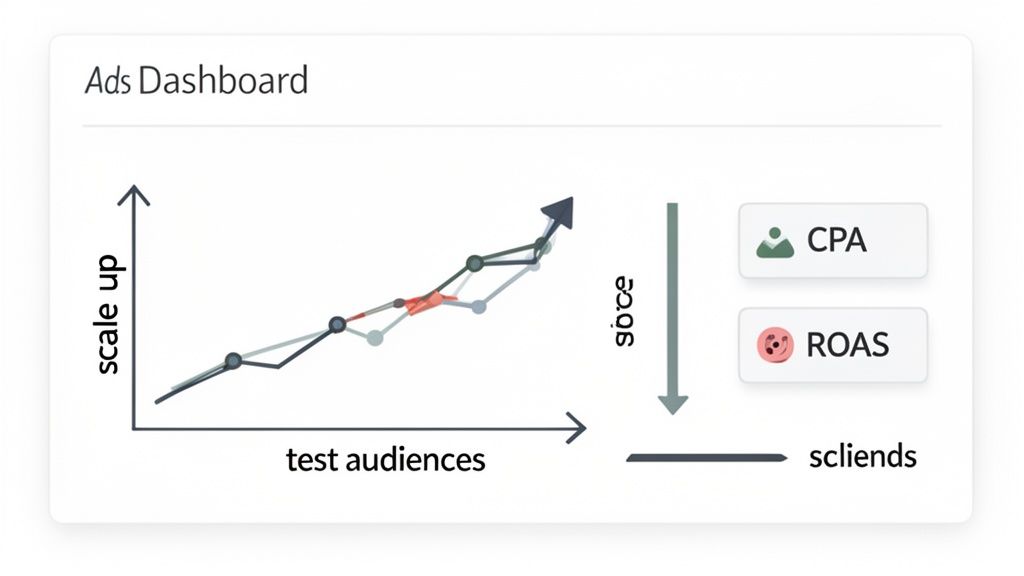
- Cost Per Acquisition (CPA): This is your bottom line. What does it cost you to get a new customer? You absolutely must know your target CPA—the max you can pay and still be profitable. If your actual CPA is creeping up past that number, it's your first red flag.
- Return on Ad Spend (ROAS): How much revenue are you making for every dollar spent? A 3x ROAS is a solid benchmark for many eCommerce brands, but it all depends on your margins.
- Click-Through Rate (CTR): This tells you if your creative is hitting the mark. When CTR starts to drop, it’s usually the first sign of ad fatigue setting in.
- Frequency: How many times has the average person seen your ad? If this gets too high—I usually watch for anything over 5-7 on cold audiences—performance almost always takes a nosedive.
Pro tip: If your ROAS suddenly tanks, don't just kill the campaign. Your first move should be to check your landing page and checkout flow. The ad isn't always the problem; sometimes it's a broken link or a glitchy payment processor on your Shopify site.
Mastering these metrics is more important than ever. Projections for 2026 show that a massive 38.5% of U.S. Facebook users will make a purchase right on the platform. And when you factor in that retargeting can deliver up to 10x better conversions, the opportunity is huge for brands that know what they're doing.
Smart Ways to Scale Your Winners
Once you've got an ad set that's consistently hitting your CPA and ROAS goals for at least 3-5 days, it’s time to give it more gas. But you can't just floor it. Scaling is a delicate process—do it wrong, and you’ll shock Meta's algorithm right back into the learning phase, killing your momentum.
I stick to two main scaling methods with my clients: vertical and horizontal.
Vertical Scaling: The Budget Bump
This is the most straightforward way to scale. You simply take a winning ad set and slowly increase its daily budget. The keyword here is slowly.
- Follow the 20% Rule: As a rule of thumb, only increase the budget by about 20% every 2-3 days. Big, sudden jumps in spend almost always lead to a spike in CPA as the algorithm scrambles to find new customers.
So, if an ad set is humming along at $50/day, bump it to $60. Let it run for a couple of days. If it's still profitable, you can give it another 20% increase. Easy does it.
Horizontal Scaling: Finding New Pockets of Customers
This strategy is about duplicating what works and showing it to new people. This lets you expand your reach without messing with the finely-tuned performance of your original winning ad set.
Here are a few ways to do it:
- Lookalike Expansion: Is your 1% Lookalike audience crushing it? Duplicate the ad set and test a broader 1-3% or 3-5% Lookalike audience.
- Interest Stacking: Identify your top 3-5 performing interest audiences from testing. Then, combine them into a single "super audience" in a new ad set to broaden your reach.
- Go Global (Carefully): If you're seeing great results in the US, try duplicating the campaign to target other English-speaking markets like Canada, the UK, and Australia.
As you get into the rhythm of testing and scaling, guides on launching profitable Facebook Ads for dropshipping can offer some great foundational knowledge, especially for new product tests. By combining both vertical and horizontal scaling, you build a resilient campaign structure that can drive serious, long-term growth for your store.
Troubleshooting Common Ecommerce Ad Issues
Let's be real: every advertiser, no matter how seasoned, eventually hits a wall. One day your ads are firing on all cylinders, and the next, your metrics take a nosedive for no clear reason. It’s a frustrating part of the game, but it’s absolutely not a reason to panic.
These performance slumps are almost always fixable. The key is to troubleshoot like a seasoned detective, not make frantic, emotional changes to your campaigns. This is our playbook for diagnosing and fixing the most common roadblocks we see with Shopify ad accounts.
Diagnosing Sudden Ad Fatigue
Ad fatigue is probably the most common reason a great campaign starts to fizzle out. It’s simple: your audience has seen your ad so many times that they’ve just started to ignore it. The first warning sign is almost always a declining Click-Through Rate (CTR), which is quickly followed by a rising Cost Per Acquisition (CPA).
If you see your ad frequency creeping above 5-7 for your cold audiences, it's time to take action. Simply tweaking a headline won't cut it. You need to make a significant change to shake things up and reset how people perceive your ad.
- Swap the Format: Been running static images? Switch to a short-form video or a carousel ad. A completely different format can feel like a brand-new campaign to your audience.
- Change the Angle: Try a totally new value proposition. If you’ve been hammering on product features, create a new ad that tells a story, shows a user-generated review, or highlights an emotional benefit.
- Introduce New Visuals: This is the quickest fix. Use entirely new imagery or video clips. Sometimes, just a different background, model, or product shot is all it takes to grab attention again.
When Your CPA Skyrockets
A sudden spike in your CPA can feel like your budget is being set on fire. Before you slam the pause button on everything, take a breath and start investigating. In my experience, the problem usually falls into one of a few predictable buckets.
My first rule when CPA goes haywire: check outside of Ads Manager first. I’ve seen more advertisers blame Meta for a problem that was actually a broken link, a faulty discount code, or a slow-loading landing page on their Shopify store.
Here's the checklist I run through:
- Check Your Website: Is the product page loading correctly on both mobile and desktop? Is the checkout flow working smoothly? Run a test purchase yourself to be sure.
- Review Recent Changes: Did you just change your audience targeting, creative, or budget? Try reverting any major changes made right before the spike to see if performance levels out.
- Analyze Audience Overlap: Are you running multiple ad sets that target very similar audiences? This can force you to bid against yourself, driving up costs. Use Meta’s Audience Overlap tool to see if your campaigns are competing for the same eyeballs.
Reversing a Tanking ROAS
A declining Return on Ad Spend (ROAS) is a critical problem—it means you're making less money for every dollar you invest. This often points to a disconnect between the people clicking your ad and the people who are actually buying.
Start by digging into your funnel metrics inside Ads Manager. Make sure you have columns for "Adds to Cart," "Initiated Checkouts," and "Purchases" visible. The goal is to find where the biggest drop-off is happening.
- High CTR, Low Adds to Cart: This tells me your ad is compelling, but the landing page isn't sealing the deal. The price, shipping costs, or product description might be causing sticker shock or confusion.
- High Adds to Cart, Low Purchases: You’ve got them right to the finish line, but they're not completing the purchase. This is a classic cart abandonment problem. You can fight this with strong bottom-of-funnel retargeting ads that offer a small incentive, like free shipping or a 10% discount, to push them over the edge.
Dealing With Ad Disapprovals
Nothing kills momentum like that dreaded "Ad Rejected" notification. Meta's ad policies can feel complex and, at times, a bit arbitrary. If your ad gets disapproved, don't just try to run it again—that's a quick way to get your entire ad account flagged.
First, read the specific policy they cited. Often, it's an unintentional mistake, like using "before and after" images for a beauty product or making an exaggerated claim in your ad copy. Edit the ad to make it compliant and then resubmit it.
If you genuinely believe the disapproval was an error, you can request a manual review. When you do, be polite and concise in your explanation of why you think your ad follows the rules. A little bit of courtesy can go a long way.
Common Questions & Quick Answers
Let's cut to the chase. These are the questions that land in my inbox most often from Shopify store owners trying to crack the Facebook ads code. Here are some straight-up answers from years of experience to help you navigate the Meta ecosystem with a bit more confidence.
How Much Should I Spend On Facebook Ads For My Shopify Store?
This is the million-dollar question, isn't it? A good starting point, and what I recommend to most new advertisers, is a budget you're comfortable experimenting with. Think $20-$50 per day for each campaign you're testing.
Honestly, the exact starting dollar amount isn't what matters most. What's crucial is your ability to analyze the Return on Ad Spend (ROAS). In these early days, you're buying data, not necessarily immediate profit. Never invest more than you can truly afford to lose.
Once a campaign proves it can be profitable (a 3x ROAS is a solid benchmark to aim for), you can start to scale. My method is to increase the budget by a conservative 20-30% every few days. This gradual approach lets you grow without shocking the algorithm and resetting its hard-won learning.
My Two Cents: Your first goal is always to find a profitable ROAS, even if it's on a tiny budget. Only then should you think about scaling. Pouring money into an unprofitable campaign just gets you to a negative ROI a lot faster.
Why Are My Facebook Ads Not Converting?
When your ads are firing but no one's buying, the problem almost always boils down to a mismatch in one of three places: your audience, your offer, or your creative. Your job is to play detective and figure out which one is the culprit.
First, look at your audience targeting. Are you really sure you're getting in front of the right people? If you're confident in your audience, the next place to look is your offer. Is the combination of your product, price, discount, and shipping cost actually compelling enough to make someone pull out their wallet?
If your audience and offer seem solid, the creative is the last piece of the puzzle. Does your ad copy and your visual actually stop the scroll and clearly spell out your product's value? Try testing a completely different angle. Sometimes a raw, behind-the-scenes video shot on a phone will crush a polished studio graphic. You never know until you test.
How Long Does It Take For Facebook Ads To Become Profitable?
Running new Facebook ads requires a healthy dose of patience. Meta's algorithm needs time to do its thing—gathering data and figuring out who your best customers are. This is called the "learning phase," and it typically takes about 3-7 days. It’s not just common to be unprofitable during this time; it's expected.
You can really start making smart judgments about a campaign’s potential after about 7-14 days of consistent data. This gives the algorithm time to stabilize and gives you a much clearer picture of your actual metrics. Some campaigns strike gold right away, but most need a few rounds of tweaking audiences and creatives. The biggest mistake is making drastic changes too early. Let the data tell you what to do next.
At ECORN, we don't just troubleshoot—we build and scale profitable advertising systems for Shopify brands like yours. If you're tired of guessing and ready to build a predictable engine for growth, explore our services.



Mobile Pop Up Strategy for Shopify Stores That Converts

Sitemap for Shopify: How to Find, Optimize, and Submit It

7 Single Product Websites Worth Emulating

Product Variants Shopify: The Complete 2026 Guide

Ecommerce Analytics Consulting for Growth

What Is AI Integration for eCommerce

How to Choose the Right eCommerce Website Development Firm

E Business Strategy Implementation

Conversion Tracking Setup for Shopify Stores

BigCommerce vs Shopify Plus Which Enterprise Wins in 2026

Shopify Theme Kit: Setup, Commands, and Migration Guide

Shopify Extension Development: A Practical 2026 Guide

Shopify Speed Score Explained and How to Improve It

Shopify Mobile Optimization: The 2026 Playbook

How to Add Subcategory in Shopify for Better UX

How to Implement Structured Data for Ecommerce in 2026

SEO App Mobile: Shopify Store Optimization Guide

Shopify Plus Support: What It Includes and How to Choose

Google Ads for Shopify: The Complete 2026 Playbook

Shopify New York: How to Find and Hire the Right Agency

Google Search Console for Shopify: The Complete Setup

First Party Data Collection for eCommerce Growth

FAQ Online Store Guide: Build and Measure It Right

Do FB Ads Work for eCommerce in 2026?

One Page Checkout for Shopify: Design and Implementation

Shopify GraphQL vs REST: The 2026 Developer Decision

Shopify Ecommerce Consulting: Strategy, Pricing &

Are Reddit Ads Worth It for eCommerce Brands

Shopify Title and Meta Description: A Practical 2026 Guide

Product Video Best Practices for Shopify Brands

Real-Time Inventory Management: A 2026 Guide

AI Chatbot Integration for Shopify Stores

Affiliate Program Management: A Shopify Guide

10 Best Performance Monitoring Tools for Shopify in 2026

Digital Asset Management for eCommerce Brands in 2026

Every Type of Facebook Ads Explained for eCommerce Growth

Product Information Management Explained for Shopify Brands

Support Ticket System: A Guide for Shopify Stores

10 Best Customer Service Tools for Shopify in 2026

Can I Start a Business with No Money? a 2026 Blueprint

What Sells Good on Etsy: Best Niches for 2026

Shopify Add to Cart Button: A Practical 2026 Guide

Customer Feedback Automation: A Practical eCommerce Guide

Critical Rendering Path: A Guide for Shopify Stores

How to Promote on TikTok for eCommerce in 2026

B2B eCommerce Consulting That Drives Real Revenue

10 Best Practices for Site Navigation in 2026

Return vs Refund for Shopify Stores: A Practical Guide

What Is Customer Lifetime Value and Why It Matters

What Is Voice of Customer Research for eCommerce

SMS Marketing for Ecommerce That Actually Converts

Master How to Improve Email Deliverability in 2026

Top 7 eCommerce Partners NYC for Shopify Brands in 2026

Machine Learning for Ecommerce: Boost Your Shopify Store

Beauty Market Research: Your 2026 Growth Guide

Shopify International Expansion: A 2026 Roadmap

What Does CRO Stand for in Business: Understanding CRO

Shopify Visual Merchandising: A Playbook for Higher Sales

Shopify Landing Page Design: Master Conversion in 2026

10 Best AI SEO Optimization Tools for Shopify in 2026

Agentic AI for Ecommerce: Boost Your Sales in 2026
Mastering Email Marketing Data for eCommerce Growth

Conversion Rate Optimisation Australia: Boost Your Sales

Conversion Rate Optimization AI: Your Shopify Store Guide

10 Product Bundling Strategies for Shopify in 2026

How to Increase Customer Lifetime Value: A Shopify Playbook

AI Customer Service Automation: Shopify Guide 2026

Clean Website Design: A Shopify Conversion Playbook

Omnichannel Retail Strategy: A Shopify Playbook

Product Data Enrichment: A Guide for Shopify Brands

Instagram Shopping Features a Guide for Shopify Stores

What Is Revenue Optimization: A Holistic RevOps Guide

Benefits of Conversion Rate Optimization: Boost Your

WordPress to Shopify Migration: Your 2026 Seamless Switch

Boost Sales: Ecommerce Payment Processing Guide 2026

Unified Commerce Platform: Benefits, KPIs & Shopify Guide

How to Reduce Bounce Rate eCommerce: Your 2026 Guide

Shopify API Integration: A Practical End-to-End Guide

How to Implement Data Governance: A 2026 Guide

Shopify Store Development Cost: A 2026 Breakdown

What Is Server Side Tracking: The Shopify Guide 2026

Marketing Automation Workflows: A Shopify Guide for 2026

Shopify: How to Reduce Technical Debt

Shopify UX Design Change: A Playbook for Growth

User Generated Content Strategy: Shopify Playbook

Shopify Pause and Build Plan Cost: A Complete 2026 Guide

Compare at Price on Shopify: A Complete Guide for 2026

Where Can I Sell My Prints? 10 Best Platforms for 2026

Shopify Order Management System: The Ultimate Guide 2026

What Is Marketing Attribution? an eCommerce Guide for 2026

10 Best Black Friday Sales Sheets for 2026

Discover the Top Social Media Marketing Agencies For

Consumer Confidence Definition for eCommerce in 2026

What Is Social Commerce? Your 2026 Guide to Boosting Sales

A Social Ad Campaign Playbook for eCommerce Growth

7 Best FAQ Page Examples for SaaS & eCommerce

Market Research in Fashion Industry: A Guide for Shopify

Shopify Migration Services: Expert Guide for 2026

Mastering FB Retargeting Ads for Shopify in 2026

What Is Omnichannel Ecommerce


newsletter in your inbox