

To really optimize your Shopify store, you need a clear strategy that gets right to the point, focusing on performance and getting rid of what’s slowing you down. It all starts with figuring out your baseline, auditing what you’ve got, and then tackling fixes based on what will make the biggest difference. This way, you’re making changes that actually matter, not just spinning your wheels.
Your Foundational Shopify Optimization Strategy
Before you start messing with complex code or throwing money at new apps, the most important first step is building a solid foundation. This means getting a crystal-clear picture of where your store stands today and clearing out any dead weight holding you back.
It’s all about making smart, strategic moves right now that will pave the way for future growth.
This initial phase isn't based on guesswork; it's all about data. You need to know your starting line before you can even begin to track your progress. Getting this right lays the groundwork for everything else, from shaving seconds off your load time to boosting your conversion rate.
Establish a Performance Baseline
First things first, you need to get an objective look at your store's health. You can't improve what you don't measure. The best place to start is with a tool like Google PageSpeed Insights. It’ll analyze your site and give you scores for Core Web Vitals—the exact metrics Google uses to judge user experience.
These vitals are the big three:
- Largest Contentful Paint (LCP): How fast the main, visible content loads on a page.
- First Input Delay (FID): How quickly your page reacts when a user first clicks or taps something.
- Cumulative Layout Shift (CLS): How much the page layout unexpectedly jumps around while it's loading.
These scores are your reality check. They show you exactly where your customers are hitting snags, giving you a data-backed starting point for your entire optimization plan.
Conduct a Ruthless App Audit
Once you have your performance baseline, it's time to turn your attention to your apps. Shopify apps can be fantastic, but they’re also one of the biggest reasons for a slow store. Over time, it's easy to accumulate apps that are old, unused, or just plain inefficient, all of them secretly dragging down your performance.
I once worked with a store whose load time dropped by over three seconds simply by removing three outdated apps they weren't even using. It was the single biggest performance win we achieved, and it cost nothing.
Go through your app list with a critical eye. For every single app, ask yourself:
- Is this app absolutely essential to how we run our business or to our customer experience?
- What is the real, measurable return on investment (ROI) we get from this?
- Is there a lighter, more modern alternative that could do the same job better?
If the answer is "no" or you can't even remember, just disable it and see what happens to your speed scores. Be ruthless here. Every single app you can live without is a potential speed boost waiting to happen.
Prioritize Fixes with an Impact vs. Effort Framework
Okay, so now you have a performance report full of issues and a much cleaner app list. Don't try to tackle everything at once—that’s a recipe for burnout. The smart move is to prioritize. A simple Impact vs. Effort matrix is your best friend here.
This helps you categorize every potential fix, making it easy to spot the low-hanging fruit—those quick wins that give you the most bang for your buck. For a deeper dive into building a strong foundation, check out this essential upgrade guide for your Shopify store for more strategies.
This simple flow is incredibly powerful. It’s all about getting your baseline, auditing your setup, and then making a smart plan.
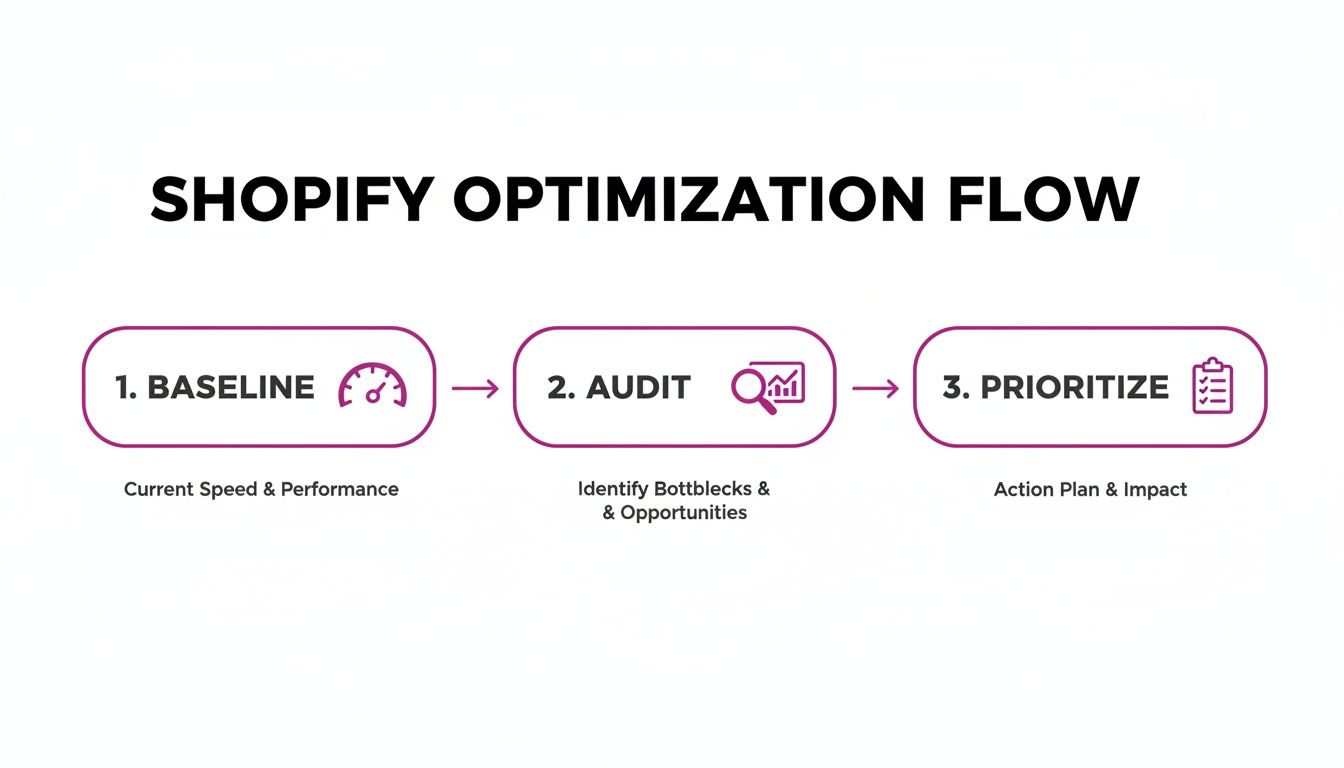
Stick to this sequence, and you’ll ensure your optimization efforts are focused, driven by real data, and set up for maximum impact right from the start.
Mastering Shopify Performance And Page Speed
Let's be blunt: speed is money. In eCommerce, a slow site doesn't just create a bit of friction; it actively pushes paying customers away. Every single second a page takes to load is another opportunity for a shopper to abandon their cart and go straight to your competitor.
This isn't about chasing a perfect score on a tool like Google PageSpeed Insights. It’s about creating an experience so fluid and fast that the technology disappears, letting your brand and products shine. The goal is a seamless journey from the moment they land on your site to that final, satisfying click on the checkout button.
Here’s how we get there.
Tame Your Images Without Sacrificing Quality
High-quality images are non-negotiable for selling online, but they’re also the number one cause of sluggish load times. Huge, unoptimized image files can single-handedly bring your store to a grinding halt. The key is to reduce their file size without making your product shots look like a pixelated mess.
Here’s the right way to handle image optimization:
- Choose the Right Format: Use JPEG for your product photography and other complex images. For anything with simple colors and a need for transparency, like your logo or icons, PNG is your best bet. Even better, Shopify automatically serves modern WebP formats to browsers that support them, giving you the best of both worlds.
- Implement Advanced Compression: Before you even think about uploading an image, run it through a compression tool. Services like TinyPNG or ImageOptim can slash file sizes—often by over 70%—with virtually no visible drop in quality.
- Enable Lazy Loading: This technique is a massive win for perceived performance. Lazy loading tells the browser to only load images as the user scrolls them into view. Instead of trying to load every single media file at once, it prioritizes what’s visible, making the initial page load feel lightning-fast. Most modern Shopify themes have this ready to go out of the box.
A common mistake is uploading massive, high-resolution images straight from a professional camera. A 5000-pixel-wide image is overkill for a product thumbnail that will only ever display at 500 pixels. Resize images to their intended display dimensions before uploading.
Getting your image strategy right is a huge first step to optimize your Shopify store and fix what’s holding you back.
Minify And Defer Code For Faster Rendering
After images, the next performance bottleneck is usually your site’s code. All that CSS and JavaScript from your theme and apps can add up, blocking the page from rendering quickly for your visitors.
Minification is a straightforward fix. It’s the process of stripping out all the unnecessary characters from your code files—things like spaces, comments, and line breaks. This makes the files smaller and quicker for the browser to download.
While many apps can minify code for you, the real magic is in deferring non-critical scripts.
Think of it this way: some code is essential for the page to function, like what powers your cart. Other scripts, like a live chat widget or a review app, can afford to wait a few seconds. By deferring these non-essential scripts, you're telling the browser to load all the important, visible stuff first. This makes the site feel much faster to the user and is a major factor in boosting your Core Web Vitals.
To dig even deeper into this, you can check out a detailed guide on comprehensive Shopify page speed optimization that breaks these concepts down further.
Choose A Performance-First Theme
Your Shopify theme is the foundation of your entire store. If it’s bloated and poorly coded, no amount of tweaking will ever make it truly fast. When starting a new store or planning a redesign, choosing your theme based on performance is the single biggest lever you can pull.
Keep an eye out for themes marketed as "performance-focused" or "fast." These themes are almost always built with clean code, have minimal dependencies, and include key performance features right out of the box.
Here’s what to check for in a fast theme:
| Feature | Why It Matters |
|---|---|
| Clean Codebase | Fewer scripts and styles mean faster processing by the browser. |
| Minimal App Dependencies | Avoids relying on heavy third-party code that can slow your store down. |
| Built-in Performance Features | Native lazy loading and image optimization reduce the need for extra apps. |
| Mobile-First Design | Ensures a fast and smooth experience for the majority of shoppers. |
Putting your money into a premium, performance-first theme is an investment that pays for itself. It saves you endless headaches and sets the right foundation for a fast, high-converting Shopify store from day one.
Boosting Sales With Conversion Rate Optimization
Getting traffic to your store is just the first part of the puzzle. While a blazing-fast site keeps visitors from bouncing, it doesn't automatically convince them to buy. This is where Conversion Rate Optimization (CRO) comes into play—the art and science of turning your casual browsers into loyal customers.
CRO isn't about some secret bag of tricks or flashy gimmicks you can just switch on. It’s a methodical process of understanding what your customers are really doing on your site and methodically removing every little bit of friction that stops them from pulling out their credit card. Even a tiny bump in your conversion rate can have a massive impact on your bottom line, squeezing more revenue from the exact same traffic you're already getting.
Just look at the numbers. The gap between an average Shopify store and a genuinely optimized one is staggering. Most stores just aren't converting like they could be.
Shopify Conversion Rate Benchmarks 2026
The data from 2026 shows a huge opportunity for stores willing to invest in CRO. The difference between average and top-tier performance is night and day.
| Metric | Average Shopify Store | Top 10% Optimized Store | Key Takeaway |
|---|---|---|---|
| Overall Conversion Rate | 1.4% | 4.7% or higher | Top stores convert over 3x more visitors. |
| Mobile Conversion Rate | 1.2% | 2.7% – 3.8% | With 79% of traffic on mobile, this is where you win or lose. |
As you can see, leaving your store unoptimized is like leaving money on the table. The top performers aren't just lucky; they're strategically focused on making the buying journey as smooth as possible.
Anatomy Of A High-Converting Product Page
Your product page is your final sales pitch before a customer hits "Add to Cart." This is your moment. It’s where you have to be at your most persuasive, informative, and trustworthy. Every single element needs to work in harmony to answer questions, build desire, and dissolve any lingering doubt.
Think of your product page as your best salesperson, working 24/7. It has to do more than just list off features; it needs to tell a compelling story and connect directly with the shopper's problems and aspirations.
Here are the non-negotiables:
- Compelling Visuals: High-quality images and, increasingly, video are your most powerful selling tools. Show the product from every angle, show it in context, and show people using it. Lifestyle shots help customers imagine it in their own lives, while sharp close-ups highlight the quality and details they can't touch.
- Persuasive Copy: Your product description needs to speak directly to your customer. Forget the spec sheet—focus on the benefits. How will this product make their life better, easier, or more fun? Use scannable bullet points for the key wins.
- Clear Call-to-Action (CTA): Your "Add to Cart" button should be impossible to miss. Use a bold, contrasting color that pops off the page and stick with clear, action-oriented text. Don't make people hunt for it.
By getting these core elements right, you create a product page that doesn’t just inform—it persuades. It makes the decision to buy feel natural and obvious.
Building Unshakeable Trust And Social Proof
People are naturally skeptical when shopping online. They need constant reassurance that your store is legit, your products are good, and their money is safe. Building this trust is a non-negotiable part of any effort to optimize a Shopify store.
Social proof is your secret weapon here. When potential customers see that others have bought from you and had a great experience, it short-circuits their doubt and validates their own decision to purchase.
A famous study found that displaying customer reviews can increase conversion rates by as much as 270%. People trust other people far more than they'll ever trust slick marketing copy.
You need to sprinkle these trust signals throughout your site, especially on product pages and at checkout:
- Customer Reviews and Ratings: Display star ratings and written reviews prominently. Don't be shy about asking for them, either. A simple post-purchase email follow-up can work wonders.
- User-Generated Content (UGC): Showcase photos and videos from real customers using your products. This is authentic social proof at its best and helps shoppers see your product in a real-world setting.
- Clear Guarantees and Policies: Make your return policy, shipping details, and any satisfaction guarantees dead simple to find. This reduces the perceived risk of buying and shows that you stand behind what you sell.
These elements work together to break down hesitation and build the confidence a shopper needs to finally click "buy." To really dig in and maximize your revenue, it's essential to master the practical strategies that increase your e-commerce conversion rate.
Streamlining The Path To Purchase
Even with incredible product pages and rock-solid trust, you can still lose customers if your site is a maze to navigate. The goal is to create a totally frictionless path from your homepage to the final checkout screen, guiding visitors effortlessly toward what they’re looking for.
Start by taking a hard look at your homepage and main navigation menu. Can a first-time visitor understand exactly what you sell within five seconds? Is your navigation simple and logical, organized by how your customers think, not how you categorize products internally?
A clean, intuitive user experience (UX) is the backbone of conversions. Every click should have a purpose, moving the user one step closer to their goal. A well-structured site not only helps people find products but also reinforces the professionalism of your brand, building even more of that crucial trust.
Advanced SEO Tactics For Shopify Stores
To get customers who are actually ready to buy, you need to show up where they're already looking. If you want to see serious organic traffic, you have to move beyond the basics like keyword stuffing. Advanced SEO is about taking a much more precise approach to attract high-intent visitors and make it incredibly easy for search engines to understand—and love—your store.
This really means digging deeper than surface-level tactics. It's about understanding Shopify's specific structure and learning how to turn its quirks, like those tricky product variant URLs, into genuine SEO strengths. When you dial in your focus on user intent, site architecture, and technical details, you build a powerful engine for organic growth that runs on its own.
Uncovering High-Intent Keywords
The goal isn't just to get any traffic; it’s about getting the right traffic. Chasing generic keywords like "running shoes" is a tough, expensive game that mostly attracts window shoppers. Instead, you should be focusing your energy on long-tail keywords that signal a clear intent to buy.
Think about the difference. Someone searching for "yoga pants" is just browsing. But someone searching for "high-waisted black yoga pants with pockets" knows exactly what they want and is much, much closer to making a purchase.
You can uncover these goldmines by:
- Digging into your own Shopify site search data to see the exact phrases customers are using.
- Checking out Google's "People Also Ask" and "Related Searches" for the queries that pop up around your products.
- Lurking in forums like Reddit or Quora where your target audience hangs out and talks about what they're looking for.
This research gives you the actual language your customers use, which is exactly what you need to create product pages and content that truly resonate and start to rank.
I’ve seen stores double their conversion rate from organic traffic just by shifting their focus from broad, high-volume keywords to these specific, long-tail phrases. It’s a classic case of quality winning out over quantity.
Building A Smart Internal Linking Structure
Think of your internal linking strategy as a roadmap for both your customers and for search engines. It guides them through your site, showing them what's important and how everything is connected. A solid structure helps spread "link equity"—or authority—from powerful pages like your homepage to the product and category pages that actually make you money.
Without a deliberate plan, your most important pages can get buried, making it difficult for Google to find them, let alone rank them. For example, if you just published a great blog post on "10 Ways to Style a Leather Jacket," you absolutely need to link from that post back to your main "Leather Jackets" category page and a few of your best-selling jackets. This sends a clear signal to Google that those pages are highly relevant to the topic.
This simple act of connecting your content creates a logical flow. It not only helps crawlers discover all your pages efficiently but also helps them understand the relationships between different pieces of content. For those who want to build an ethical and powerful SEO foundation, we have a guide on effective white hat SEO techniques that you might find valuable.
Tackling Shopify-Specific Technical SEO
Shopify is a fantastic platform, but it isn't perfect out of the box. It comes with a few technical SEO challenges you need to manage proactively. One of the most common headaches is duplicate content, which often pops up from product variants and collection tag pages.
For instance, Shopify might create separate, indexable URLs for each color of the same t-shirt. To a search engine, this can look like you have several pages with nearly identical content, which can dilute your ranking power and confuse Google.
The fix for this is using canonical tags. A rel="canonical" tag is a small snippet of code that points search engines to the "master" version of a page. While most modern Shopify themes handle this automatically for product variants, it’s absolutely crucial to double-check that it’s working correctly. You can use a tool like Google Search Console to verify this. Cleaning up these technical hiccups ensures all your hard-earned SEO effort isn't going to waste.
Streamlining Your Checkout For Maximum Conversions
The checkout is the finish line. After all the work you've poured into driving traffic, polishing your product pages, and earning trust, this is the most critical step in the entire customer journey. It's also, unfortunately, where an astonishing number of sales completely fall apart.
Getting this final stage right isn't just about minor tweaks; it’s a core part of any real strategy to optimize your Shopify store. Every bit of friction you remove here directly translates into fewer abandoned carts and more revenue in your bank. The goal is a payment process so smooth, fast, and reassuring that hitting "Pay Now" feels like the most natural thing to do.
It’s a bit scary, but with an average checkout completion rate of just 45%, a massive 55% of eager shoppers are abandoning their carts in 2026. On the flip side, optimized stores using one-tap solutions like Shop Pay see checkout speeds that are 4x faster, giving their conversion rates a huge lift. This is non-negotiable, especially when 79% of all store traffic comes from mobile. You can dig into more Shopify conversion rate optimization insights and see the full data for yourself.
Eliminate Friction With Express Payment Options
The single biggest win you can get for your checkout is offering express payment options. Shoppers expect speed, particularly on mobile, where punching in card details and shipping addresses is a major chore. If you’re not offering one-click solutions, you're just making it harder for people to give you money.
Make these a top priority:
- Shop Pay: This is Shopify's own accelerated checkout. It securely saves a customer's payment and shipping info, letting them fly through future purchases on any Shopify store with a single tap.
- Apple Pay & Google Pay: These are absolute table stakes today. They use biometrics like Face ID or a fingerprint for an unbelievably fast and secure payment flow right from the device.
- PayPal: As one of the most recognized and trusted digital wallets on the planet, offering PayPal gives customers a familiar, reliable option that can make all the difference in their confidence to buy.
By putting these options front and center, you’re meeting modern buying habits head-on and slashing the number of steps it takes to complete a sale.
Simplify The Path To Payment
Beyond express checkouts, your standard process needs to be ruthlessly simple. Every extra field, every confusing step, and every moment of hesitation is another reason for a customer to second-guess their purchase and bail.
I once worked with a store that saw a 12% increase in checkout completions just by removing the optional "Company Name" field and defaulting the shipping address to be the same as the billing address. Small changes, big impact.
Take a hard look at your checkout flow and ask these questions:
- Are you forcing account creation? Always offer a guest checkout option. Forcing someone to create a password before they can pay is a notorious conversion killer.
- How many form fields do you have? Get rid of anything that isn't absolutely necessary. Use features like address autocomplete to minimize typing.
- Are shipping costs a surprise? Unexpected costs are the number one reason for cart abandonment, hands down. Show shipping fees or a calculator as early as you can, not just on the final payment screen.
Your checkout shouldn't feel like an interrogation; it should feel like an express lane.
Build Last-Minute Trust And Reassurance
Even as a customer is pulling out their credit card, a flicker of doubt can send them running. This is your last chance to reassure them they're making a smart choice and that their details are safe. Placing trust signals strategically on the checkout page is your best tool to squash that last-minute hesitation.
Reinforce their confidence by displaying:
- Security Badges: Include familiar logos like Visa and Mastercard, along with a clear "Secure SSL Checkout" badge. This signals that the transaction is encrypted and safe.
- Clear Return Policy: A simple, reassuring line like "Easy 30-Day Returns" linked to your full policy can dramatically lower the perceived risk of the purchase.
- Support Access: Provide an obvious link to your contact page or live chat. If a customer has a last-second question, they need to know that help is just a click away.
These small additions build a final layer of trust, giving that shopper the final nudge they need to hit the "Pay Now" button and complete their order.
Frequently Asked Questions About Shopify Optimization
Once you decide to optimize your Shopify store, it's easy to get overwhelmed. The questions start piling up fast: Where do I even begin? What actually matters? And how will I know if any of it is working?
We get it. We hear these questions all the time from store owners. This section gives you clear, no-fluff answers to the most common concerns, so you can start making changes that have a real impact.
What Is The First Thing I Should Do To Optimize My Shopify Store?
Your best first move is a two-pronged attack. You need to tackle two things at the same time for the quickest wins. First, get a clear picture of your technical performance. Run your store through a tool like Google PageSpeed Insights to get a baseline score and a specific list of technical hang-ups.
While that's running, open up your Shopify admin and do a ruthless app audit. Go through every single app you have installed. If you aren't using it daily or it provides very little value, uninstall it. Unused and bloated apps are hands-down one of the most common reasons for a slow Shopify store.
Starting with performance benchmarks and an app cleanup is the fastest way to see improvement. You're hitting major speed issues from two different angles, which clears the way for all the more detailed optimizations later.
How Much Does It Cost To Optimize A Shopify Store?
This is the classic "it depends" answer, but it's true. The cost can range from $0 to thousands of dollars, depending entirely on how much you want to do yourself versus outsourcing.
Plenty of high-impact tasks are completely free and just require your time and effort. This includes things like:
- Compressing your images before you upload them.
- Deleting unused apps from your store.
- Rewriting product descriptions and meta titles for better SEO.
- Building a smart internal linking structure between your products and blog posts.
Paid options usually save you time or unlock more advanced features. A premium, performance-built theme can cost $200 to $400, and specialized apps might run $20 to $50 a month. For a ground-up rebuild or deep dive, hiring a Shopify expert is a bigger investment but typically yields the biggest and most permanent gains.
Can I Optimize My Shopify Store For SEO Without An App?
Absolutely. You can achieve huge SEO gains without spending a dime on an app. Shopify's built-in features give you all the fundamental tools you need to build a strong foundation.
Think of it this way: the real work of SEO happens with your content and strategy, not a piece of software. You can do your own keyword research with free tools, write unique and compelling product descriptions, manually edit your image alt text, and create a strong linking strategy.
SEO apps are accelerators. They automate tedious tasks like bulk editing or help with more complex things like structured data. They're helpful, but they aren't a substitute for doing the core work. A focused, manual approach is often way more effective than an app you don't fully understand.
How Do I Know What's Slowing Down My Site?
You have to play detective, but you have some excellent tools to help. Your first stop should always be a performance analyzer like Google PageSpeed Insights or GTmetrix. These tools generate a "waterfall" chart, which is a visual breakdown of every single element loading on your page.
This chart is your treasure map. It shows you what loads, in what order, and exactly how long each piece takes. You might immediately see a massive, uncompressed banner image taking 3 seconds to load. Or you might find a cluster of JavaScript files from one specific app that's holding up everything else.
Keep an eye out for these usual suspects:
- Large, high-resolution image files
- Excessive JavaScript from third-party apps
- A bloated or poorly coded theme
- Too many custom fonts being loaded
Analyzing the waterfall chart turns guesswork into a clear action plan. You'll know exactly what to fix first.
Ready to stop guessing and start implementing optimizations that drive real results? The team at ECORN specializes in turning Shopify stores into high-performing conversion machines. Whether you need expert development, CRO, or strategic consulting, we have a solution for you. Start your project with us today!



Ecommerce Analytics Consulting for Growth

What Is AI Integration for eCommerce

How to Choose the Right eCommerce Website Development Firm

E Business Strategy Implementation

Conversion Tracking Setup for Shopify Stores

BigCommerce vs Shopify Plus Which Enterprise Wins in 2026

Shopify Theme Kit: Setup, Commands, and Migration Guide

Shopify Extension Development: A Practical 2026 Guide

Shopify Speed Score Explained and How to Improve It

Shopify Mobile Optimization: The 2026 Playbook

How to Add Subcategory in Shopify for Better UX

How to Implement Structured Data for Ecommerce in 2026

SEO App Mobile: Shopify Store Optimization Guide

Shopify Plus Support: What It Includes and How to Choose

Google Ads for Shopify: The Complete 2026 Playbook

Shopify New York: How to Find and Hire the Right Agency

Google Search Console for Shopify: The Complete Setup

First Party Data Collection for eCommerce Growth

FAQ Online Store Guide: Build and Measure It Right

Do FB Ads Work for eCommerce in 2026?

One Page Checkout for Shopify: Design and Implementation

Shopify GraphQL vs REST: The 2026 Developer Decision

Shopify Ecommerce Consulting: Strategy, Pricing &

Are Reddit Ads Worth It for eCommerce Brands

Shopify Title and Meta Description: A Practical 2026 Guide

Product Video Best Practices for Shopify Brands

Real-Time Inventory Management: A 2026 Guide

AI Chatbot Integration for Shopify Stores

Affiliate Program Management: A Shopify Guide

10 Best Performance Monitoring Tools for Shopify in 2026

Digital Asset Management for eCommerce Brands in 2026

Every Type of Facebook Ads Explained for eCommerce Growth

Product Information Management Explained for Shopify Brands

Support Ticket System: A Guide for Shopify Stores

10 Best Customer Service Tools for Shopify in 2026

Can I Start a Business with No Money? a 2026 Blueprint

What Sells Good on Etsy: Best Niches for 2026

Shopify Add to Cart Button: A Practical 2026 Guide

Customer Feedback Automation: A Practical eCommerce Guide

Critical Rendering Path: A Guide for Shopify Stores

How to Promote on TikTok for eCommerce in 2026

B2B eCommerce Consulting That Drives Real Revenue

10 Best Practices for Site Navigation in 2026

Return vs Refund for Shopify Stores: A Practical Guide

What Is Customer Lifetime Value and Why It Matters

What Is Voice of Customer Research for eCommerce

SMS Marketing for Ecommerce That Actually Converts

Master How to Improve Email Deliverability in 2026

Top 7 eCommerce Partners NYC for Shopify Brands in 2026

Machine Learning for Ecommerce: Boost Your Shopify Store

Beauty Market Research: Your 2026 Growth Guide

Shopify International Expansion: A 2026 Roadmap

What Does CRO Stand for in Business: Understanding CRO

Shopify Visual Merchandising: A Playbook for Higher Sales

Shopify Landing Page Design: Master Conversion in 2026

10 Best AI SEO Optimization Tools for Shopify in 2026

Agentic AI for Ecommerce: Boost Your Sales in 2026
Mastering Email Marketing Data for eCommerce Growth

Conversion Rate Optimisation Australia: Boost Your Sales

Conversion Rate Optimization AI: Your Shopify Store Guide

10 Product Bundling Strategies for Shopify in 2026

How to Increase Customer Lifetime Value: A Shopify Playbook

AI Customer Service Automation: Shopify Guide 2026

Clean Website Design: A Shopify Conversion Playbook

Omnichannel Retail Strategy: A Shopify Playbook

Product Data Enrichment: A Guide for Shopify Brands

Instagram Shopping Features a Guide for Shopify Stores

What Is Revenue Optimization: A Holistic RevOps Guide

Benefits of Conversion Rate Optimization: Boost Your

WordPress to Shopify Migration: Your 2026 Seamless Switch

Boost Sales: Ecommerce Payment Processing Guide 2026

Unified Commerce Platform: Benefits, KPIs & Shopify Guide

How to Reduce Bounce Rate eCommerce: Your 2026 Guide

Shopify API Integration: A Practical End-to-End Guide

How to Implement Data Governance: A 2026 Guide

Shopify Store Development Cost: A 2026 Breakdown

What Is Server Side Tracking: The Shopify Guide 2026

Marketing Automation Workflows: A Shopify Guide for 2026

Shopify: How to Reduce Technical Debt

Shopify UX Design Change: A Playbook for Growth

User Generated Content Strategy: Shopify Playbook

Shopify Pause and Build Plan Cost: A Complete 2026 Guide

Compare at Price on Shopify: A Complete Guide for 2026

Where Can I Sell My Prints? 10 Best Platforms for 2026

Shopify Order Management System: The Ultimate Guide 2026

What Is Marketing Attribution? an eCommerce Guide for 2026

10 Best Black Friday Sales Sheets for 2026

Discover the Top Social Media Marketing Agencies For

Consumer Confidence Definition for eCommerce in 2026

What Is Social Commerce? Your 2026 Guide to Boosting Sales

A Social Ad Campaign Playbook for eCommerce Growth

7 Best FAQ Page Examples for SaaS & eCommerce

Market Research in Fashion Industry: A Guide for Shopify

Shopify Migration Services: Expert Guide for 2026

Mastering FB Retargeting Ads for Shopify in 2026

What Is Omnichannel Ecommerce

Master Your Shopify Plus Migration: The 2026 Guide

Shopify Integration Services: A Merchant's 2026 Guide

Shopify Collection Description: A Guide to SEO & Sales

Shopify Plus Contact: Reach Sales & Support Effectively


newsletter in your inbox