


If you're looking at your Shopify analytics and seeing decent traffic, rising acquisition costs, and a conversion rate that feels stuck, the shopping experience is usually where the leak is. Not in one dramatic failure, but in dozens of small ones. A slow search result. A product page that doesn't answer a basic question. A mobile cart that asks for too much too soon.
That’s why improving the online shopping experience has to be treated like a CRO roadmap, not a design refresh. The highest-impact stores don’t just look polished. They remove friction in the order customers feel it: discovery, evaluation, checkout, delivery, and return.
For growing Shopify brands, the priority isn’t adding more apps and hoping for the best. It’s deciding what deserves attention first, what can wait, and what creates measurable movement in conversion and repeat purchase behavior.
Refine Your Digital Storefront and Product Pages
Your product page is the most valuable real estate in the store. A customer lands there with intent, and the page either helps them buy or gives them reasons to leave.
The biggest mistake I see is treating the PDP like a brochure. It needs to function more like a sales conversation. It should answer the customer’s next question before they have to hunt for it.

Fix the basics before adding anything clever
Start with the elements that directly affect buying confidence:
- Use sharp, useful media: One clean hero image isn’t enough. Show angle changes, scale, texture, packaging, and real-world use. If the product has movement or setup complexity, add a short video or GIF-style walkthrough. You can use a video to gif converter for that purpose.
- Write for decision-making: Replace generic feature lists with copy that explains fit, feel, use case, and limitations. If a shopper has to guess whether a product is right for them, they delay.
- Show total buying context: Put shipping expectations, return terms, delivery windows, and payment options close to the add-to-cart area. Hidden costs create doubt fast.
- Make the CTA obvious: The add-to-cart button should dominate the action area. Competing buttons, weak contrast, or cluttered variant selectors dilute intent.
A strong PDP reduces support questions because it does the support work upfront.
Practical rule: If a customer has to scroll, expand an accordion, and then open a policy page just to understand shipping or returns, the page is underperforming.
Build pages around the objections customers already have
The highest-converting product pages usually do three jobs in sequence. They attract attention, reduce uncertainty, and justify the purchase.
A simple way to structure the page is this:
PDP areaWhat it should doAbove the foldConfirm product, price, variants, and primary CTAMid-page contentExplain benefits, use cases, and differentiationLower-page trust layerAdd reviews, FAQs, shipping details, and return clarity
For Shopify, this often means extending the default theme product template rather than replacing it entirely. Apps like Judge.me, Loox, Okendo, and Yotpo can add review blocks and user-generated content, but placement matters more than the tool itself. Reviews buried below unrelated cross-sells won’t do much.
What usually hurts conversion
There are a few patterns that consistently drag down PDP performance:
- Overdesigned pages: Heavy animations, sticky widgets everywhere, and oversized lifestyle sections can bury the purchase path.
- Thin copy: Minimalist branding sounds nice until customers need specifics.
- Bad variant UX: Color swatches with unclear naming, size selection without fit guidance, and unavailable options shown poorly create friction.
- Mismatched merchandising: Recommending random accessories on the PDP can make the store feel careless.
Social proof works best when it supports the product decision, not when it overwhelms the page. Put review summaries near the price. Add customer photos where they answer fit or quality concerns. Keep the page focused on one outcome: helping the shopper feel ready to buy now.
Optimize Site Search and Navigation for Discovery
Search isn’t a utility. It’s a buying signal.
When someone uses your search bar, they’re telling you what they want in their own words. If your store fails there, you’re not dealing with a minor UX flaw. You’re wasting some of the highest-intent traffic on the site.
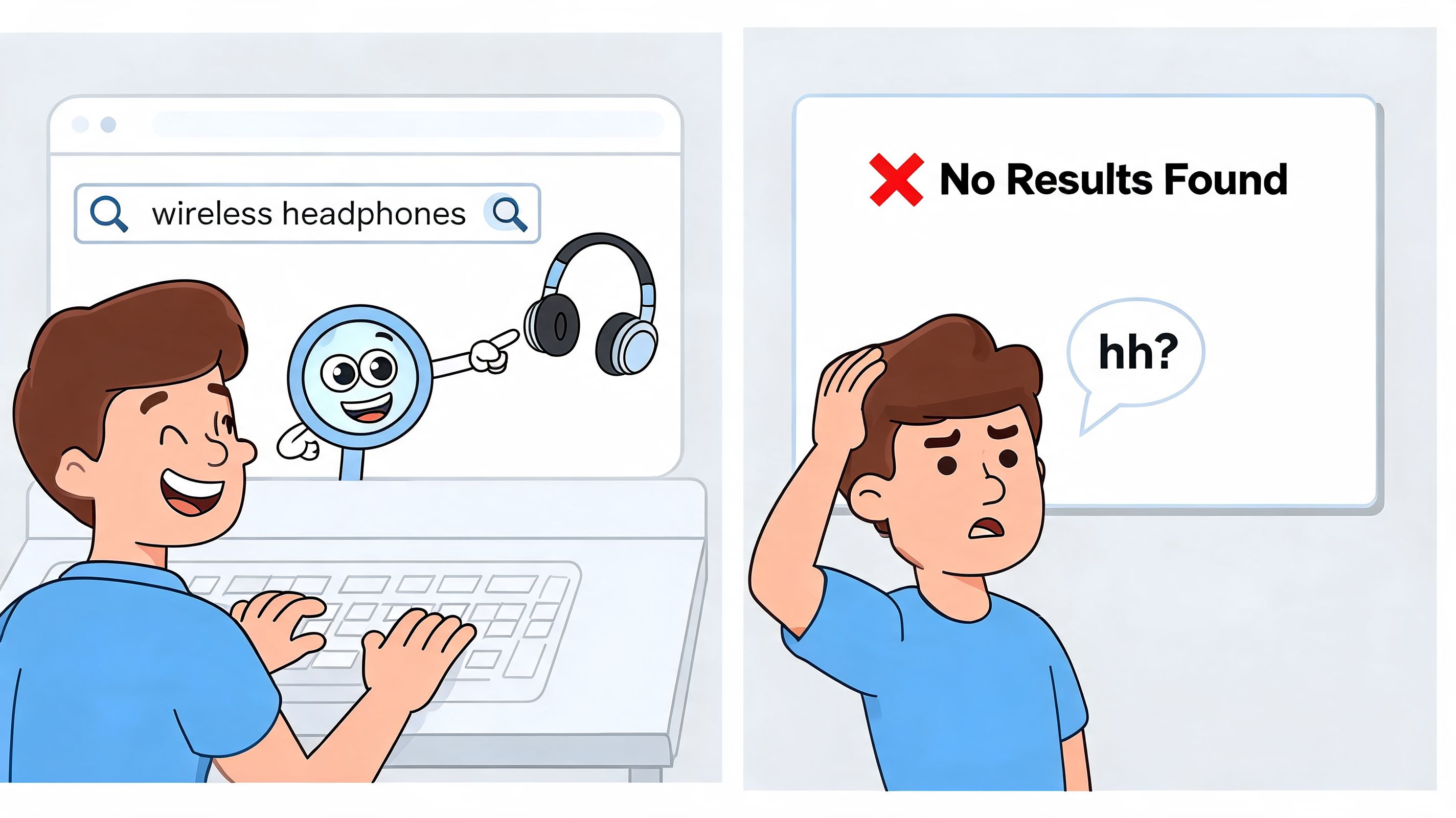
According to RingCentral’s breakdown of online shopping experience improvements, optimized site search can boost conversion rates by 15-30%. The same source notes that 20-30% of searches yield no results, which can lead to abandonment rates as high as 50%. It also states that a quality predictive search experience should respond in under 100ms, especially since 60% of searches are mobile.
That’s why I push brands to stop treating search as a default theme feature and start treating it like a merchandising system.
Audit what customers are trying to find
Before changing tools, inspect your search behavior.
Look for:
- Zero-result queries: These expose missing synonyms, naming mismatches, and catalog gaps.
- Repeated product-type searches: If shoppers keep searching for a category that should be obvious in navigation, your information architecture is weak.
- Misspellings and shorthand: Customers won’t search using your internal naming conventions. Your system needs to adapt to their language.
Shopify’s built-in analytics can give you a starting point, and many brands pair that with GA4 event tracking to see search refinements, exits, and product click-through from results.
Upgrade from keyword matching to intent matching
For larger catalogs, Shopify’s native setup often needs help. Tools like Algolia and Searchspring are common upgrades because they support predictive search, synonym mapping, typo tolerance, and better faceting.
The difference is practical. A shopper who types “trainers” should still see running shoes. A shopper searching on mobile after typing three or four letters should get relevant autocomplete suggestions fast. A shopper who searches for an out-of-stock product shouldn’t hit a dead end if close alternatives exist.
Poor search teaches shoppers that browsing is safer than searching. That’s the opposite of what you want on a large catalog.
This walkthrough gives a useful visual reference for how search experience affects product discovery:
Navigation should narrow choices, not multiply them
Search and navigation need to work together. If search captures intent directly, navigation should help uncertain shoppers narrow the field without feeling lost.
A useful way to review collection pages is to ask whether the filters match buying criteria or internal catalog logic.
Weak filter logicStrong filter logicVendor names customers don’t knowUse case or product typeInternal collection tagsSize, fit, material, compatibilityLong unstructured menusClear top-level paths with meaningful subcategories
Good faceting reduces effort. Great faceting reduces regret. On Shopify, that often means refining collection templates, standardizing product tags or metafields, and making sure mobile filter drawers are usable with one hand instead of feeling like a spreadsheet.
Streamline Your Mobile and Checkout Experience
Mobile and checkout aren’t separate projects. They’re one continuous buying flow.
A shopper discovers a product on mobile, evaluates it in fragments, adds to cart with partial attention, and decides whether to finish the purchase in a small window of patience. If your store asks for too much precision, too much reading, or too much trust too early, the sale drops.
Remove mobile friction before it reaches checkout
A lot of brands work on checkout optimization while leaving the mobile storefront clumsy. That’s backwards. Checkout only gets a chance if the rest of the journey stays easy.
Focus first on these issues:
- Thumb-friendly interaction: Buttons, variant swatches, and quantity controls need enough space to tap accurately.
- Readable content: Product titles, pricing, delivery messaging, and reviews should scan cleanly without zooming.
- Lean page structure: Cut pop-ups that interrupt navigation, especially on entry and cart.
- Fast decision support: FAQs, sizing, and shipping highlights should be visible without sending the shopper into separate pages.
If your mobile cart feels dense, simplify it. Remove distractions that pull the customer back into browsing when they’ve already shown purchase intent.
Make checkout feel predictable
Checkout friction usually comes from uncertainty more than effort. People will complete forms when the process feels clear. They hesitate when costs, timing, or next steps are vague.
That means your checkout flow should do a few things very well:
- Offer accelerated payment options like Shop Pay and major digital wallets so returning customers can move quickly.
- Reduce unnecessary fields and don’t ask for information that isn’t needed to fulfill the order.
- Support guest checkout if your customer base includes first-time buyers who aren’t ready to create an account.
- Show shipping costs and delivery expectations early so checkout doesn’t introduce an unpleasant surprise.
For brands that want a deeper operational checklist, ECORN has a useful guide to eCommerce checkout optimization that maps common checkout friction points to practical fixes.
The cleanest checkout experiences don’t feel short because they have fewer screens. They feel short because each step feels obvious.
Keep the flow consistent
One hidden conversion problem is inconsistency between the product page, cart, and checkout. If a shopper sees one delivery message on the PDP, another in cart, and a vague estimate later, confidence drops. The same applies to promo code behavior, returns language, and subscription terms.
Use a simple review process:
- Compare messaging across devices
- Test the full flow with and without discount codes
- Run checkout on weak mobile connections
- Check error handling on forms and payment failures
Many stores lose orders through avoidable polish issues. A field that clears after an error. A promo box that dominates the cart. A shipping estimator that appears too late. None of these problems look dramatic in isolation, but together they make the experience feel risky.
Build Lasting Trust with Clear Policies and Fulfillment
Trust isn’t built by badges alone. It’s built when the store behaves the way the customer expects before and after payment.
A lot of brands think trust is primarily a design problem. Better colors, cleaner layouts, more premium photography. Those help, but they don’t replace operational clarity. Customers trust stores that explain what will happen, then follow through.
Policies should reduce hesitation, not create legal fog
Most policy pages are written to protect the business. That’s understandable, but if the customer can’t quickly understand shipping, returns, exchanges, or delivery timing, those policies are hurting conversion.
The better approach is to write plain-language summaries where decisions happen:
- On the product page: shipping timing, key return conditions, and exceptions
- In the cart: delivery expectations and cost clarity
- In the footer and help center: the full detailed policy for anyone who wants it
Keep the legal version if needed, but pair it with human-readable copy. “Final sale on marked items” is clear. A paragraph of conditions and caveats is not.
Fulfillment communication is part of the shopping experience
Once the order is placed, silence creates anxiety. Customers don’t separate fulfillment from brand experience. They judge the purchase as one continuous journey.
That makes these messages critical:
Post-purchase momentWhat the customer needsOrder confirmationConfirmation that payment worked and what was orderedShipment notificationTracking access and expected movementDelay or issueClear explanation and next stepDelivery confirmationClosure and a prompt for support if needed
If your support team keeps answering “Where is my order?” or “When will this ship?”, that’s usually a communication design issue, not just a volume issue.
Clear fulfillment updates do more than reduce tickets. They protect the customer’s confidence while they wait.
Trust compounds after the sale
Repeat business starts at this stage. A customer who had a smooth post-purchase experience is more likely to come back because the brand feels predictable. That matters even more for stores selling products that require sizing, replenishment, or gifting.
The stores that earn loyalty usually do a few simple things well. They state timelines clearly. They make returns understandable. They don’t hide exceptions. And when something goes wrong, they explain it plainly instead of forcing the customer to decode templated support language.
Leverage Personalization and AI for Higher Conversions
Most Shopify stores don’t have a traffic problem. They have a relevance problem.
Generic merchandising forces every visitor through the same experience. That might work for a tiny catalog, but it breaks down quickly once you have returning shoppers, multiple product categories, or distinct buying intents. Personalization fixes that by making the store more responsive to context.
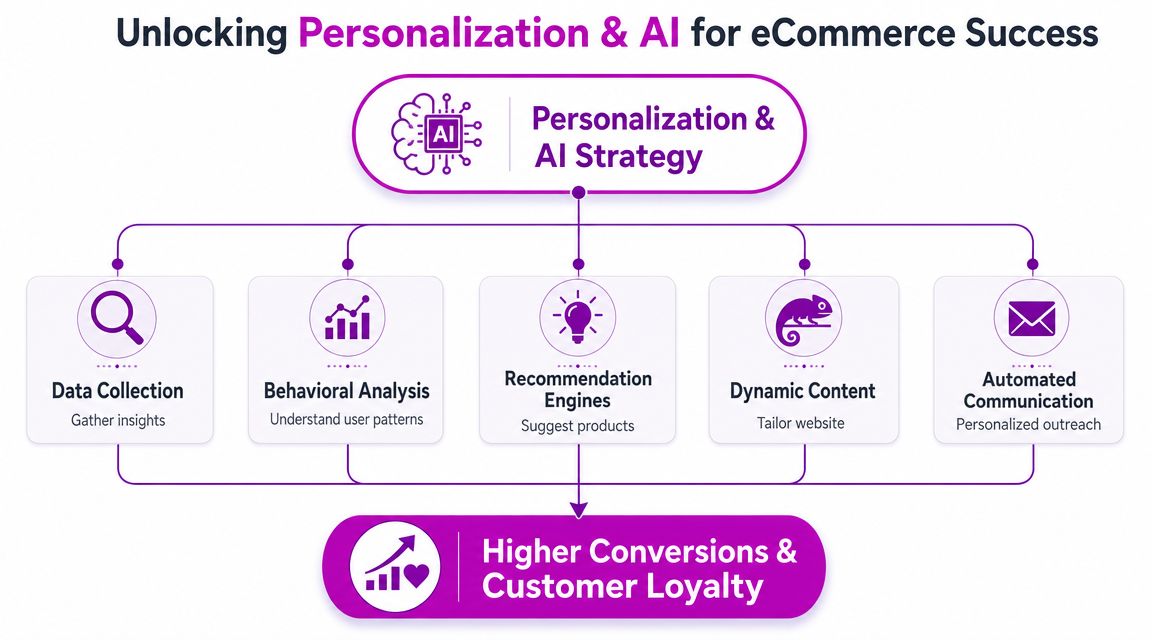
According to MetricsCart’s summary of personalization data, 80% of shoppers are more likely to purchase from brands offering personalized features. The same source reports that 92% of consumers who used AI for shopping said it enhanced the experience, and that AI-driven predictive personalization can reduce checkout friction by up to 20%.
Start with first-party data, not fancy outputs
A lot of teams jump straight to recommendation widgets. That’s usually too early. If your product data is inconsistent or your event tracking is patchy, the AI layer just produces polished nonsense.
The sequence that works is simpler:
- Capture clean first-party behavior
Track product views, cart adds, purchases, and category interest consistently. On Shopify, many teams use server-side event setups and connect behavior into tools like Klaviyo or Triple Whale. - Clean up product data
Product titles, tags, metafields, imagery, and descriptions need to be structured well enough for recommendation logic to use them. - Choose a narrow use case first
Start with cart recommendations, reorder prompts, or recently viewed items. Don’t try to personalize every surface on day one.
Use AI where it removes decision fatigue
For most brands, the strongest applications are practical rather than flashy:
- Product recommendations: Rebuy and Fera.ai can help surface complementary products, recently viewed items, and cart-based upsells.
- Dynamic bundles: Useful when customers benefit from guided combinations instead of building a set manually.
- Personalized content blocks: Homepage banners, collection ordering, or category tiles can reflect known interests.
- Behavior-triggered messaging: Email, SMS, or onsite prompts tied to viewed products or purchase stage often outperform broad campaigns because they match current intent.
If your team is evaluating more advanced architectures, this overview of implementing bespoke AI solutions is useful because it frames personalization as a systems decision, not just a widget decision.
Watch the trade-offs
Personalization can easily become intrusive, inaccurate, or operationally messy.
Here’s where stores get into trouble:
What helpsWhat backfiresRelevant product suggestionsRepeating the same irrelevant products everywhereDynamic merchandising by behaviorHiding core navigation behind over-personalizationTriggered lifecycle messagesOver-messaging after a single weak signalAI-assisted support flowsChat experiences that block access to a real answer
A shopper shouldn’t feel surveilled. They should feel understood.
For Shopify operators exploring where AI fits beyond recommendations, ECORN’s article on AI applications in eCommerce is a practical reference because it connects personalization to merchandising, support, and operational efficiency instead of treating AI as a standalone tactic.
Personalization should sharpen merchandising judgment
This is the key point. AI doesn’t replace merchandising taste, customer knowledge, or CRO discipline. It makes those things more scalable.
Better personalization doesn’t mean more variation. It means more relevance at the moments that affect purchase confidence.
When brands ask how to improve online shopping experience without rebuilding the entire storefront, personalization is usually one of the most impactful answers. Not because it sounds advanced, but because it helps the store stop behaving like a generic catalog.
Measure and Iterate for Continuous Improvement
A lot of stores treat optimization like a project with an endpoint. Audit the site, implement changes, move on. That mindset is one of the main reasons experience improvements plateau.
Shopping behavior changes. Product mixes change. Traffic quality changes. The store that converted well three months ago might already have new friction points today.
Stop redesigning from opinion
The usual internal debate sounds familiar. Someone wants a cleaner PDP. Someone else wants a bigger upsell section. Another person wants to move reviews higher. None of those ideas are automatically wrong. They’re just unhelpful until tied to observed behavior.
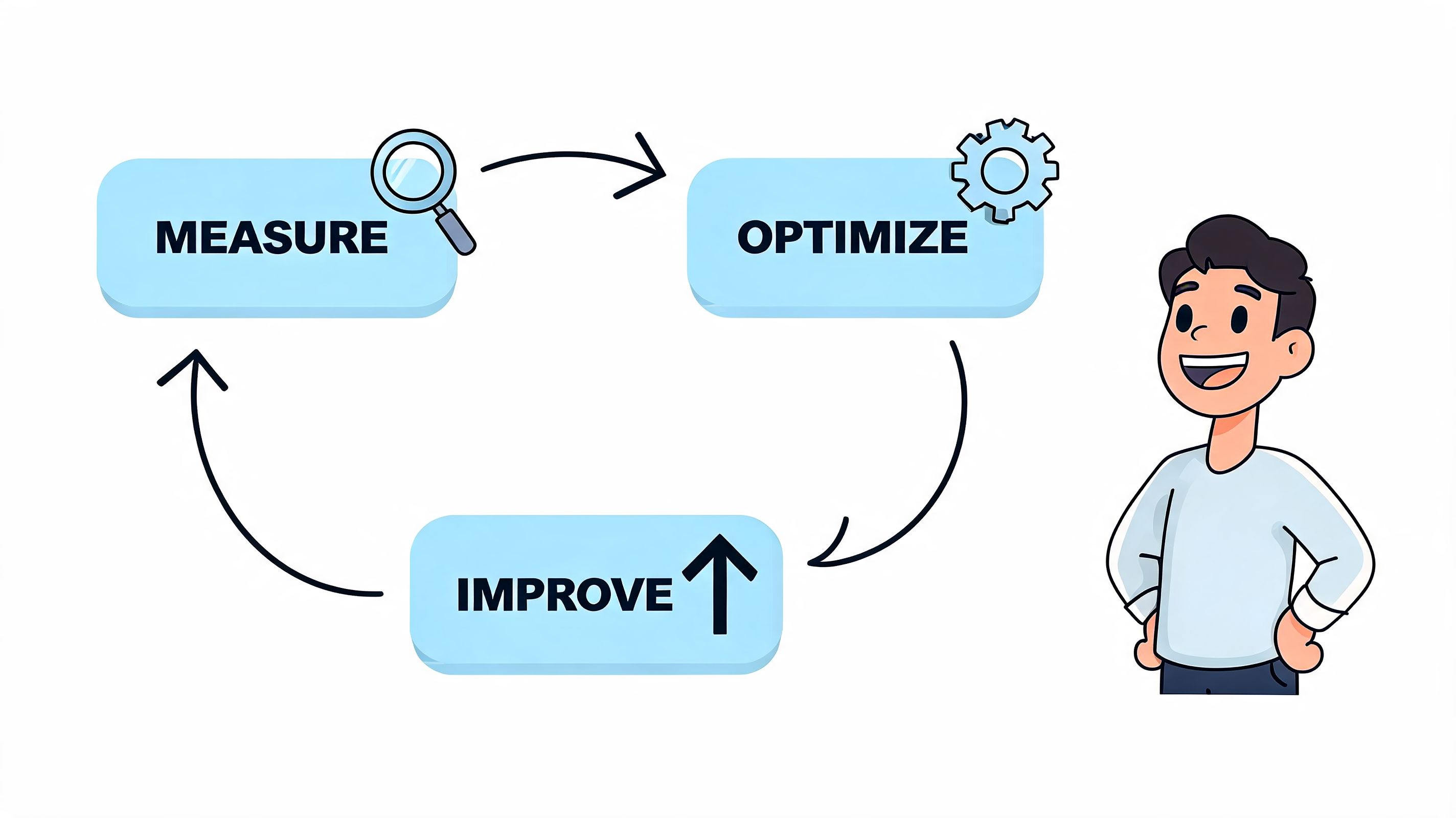
The better approach is a repeatable loop:
- Measure: Use Shopify reporting, GA4, heatmaps, session recordings, and search logs to identify friction.
- Diagnose: Find the page, step, or interaction where intent drops.
- Form a hypothesis: Example, simplifying variant selection will reduce hesitation on mobile.
- Test: Compare one meaningful change against the current version.
- Roll out and review: Keep winners, archive losers, and document the learning.
That process sounds basic because it is. What matters is consistency.
Track the metrics that map to customer behavior
Don’t overload the team with dashboards. Focus on metrics that reveal movement in the buying journey:
KPIWhat it helps you understandConversion rateWhether the store turns visits into ordersAverage order valueWhether merchandising and offers increase basket sizeCart abandonment behaviorWhere purchase intent stallsSearch-to-purchase behaviorWhether discovery is helping or hurting revenueRepeat purchase patternsWhether the post-purchase experience supports loyalty
The point isn’t to watch numbers constantly. The point is to spot where customer effort is exceeding customer motivation.
Small tests beat big launches
Most meaningful gains come from focused changes, not sweeping redesigns. A tighter delivery message near add to cart. Better collection filters. Fewer distractions in cart. Cleaner review placement. These changes are easier to test, easier to learn from, and less likely to create new problems.
If your team needs a structured reference, Figr’s guide to A/B testing best practices is useful because it keeps the emphasis on hypothesis quality and test design instead of treating experimentation like button-color theater.
Stores improve faster when teams stop asking, “What should the site look like?” and start asking, “Where is the customer hesitating, and why?”
Build a cadence, not a backlog
A healthy CRO process doesn’t require endless experimentation. It requires rhythm. Review findings weekly. Prioritize a short list monthly. Test what matters first. Keep records of what changed and what happened.
That’s how experience improvement becomes operational instead of aspirational. It stops being a pile of ideas and starts becoming a discipline.
Frequently Asked Questions
What should a Shopify brand fix first to improve online shopping experience
Start with the pages and steps closest to purchase: product pages, search, cart, and checkout. Those usually affect revenue faster than homepage redesigns or brand-level cosmetic work.
Which app should I install first
Don’t choose by popularity alone. Pick the tool that solves the clearest bottleneck. If discovery is weak, improve search. If basket building is weak, test recommendations. If you need a broader optimization plan, this framework for conversion rate improvement is a useful way to prioritize.
How often should I test changes
Run optimization as an ongoing operating habit. Review behavior regularly, test one meaningful change at a time, and document what you learn.
If your Shopify store has traffic but too much friction between product discovery and completed purchase, ECORN can help you prioritize the fixes that move conversion. Their work spans Shopify design, development, and CRO, so you can improve the shopping experience without treating every issue like a full rebuild.


Why Is Conversion Rate Optimization Important
Ecommerce Loyalty Program Software How to Choose and Launch
Shopify Plans Comparison for Every Business Stage
How to Improve User Experience for eCommerce Growth
Shopify Checkout Optimization That Converts More
Shopify Inventory Sync: A Practical Setup Guide
Shopify App Integration Playbook That Scales
Shopify CMS Integration: Your 2026 Guide to Options
Shopify Store Audit: Find Hidden Conversion Leaks

Shopify Plus Experts: How to Hire the Right Team
Chargeback Protection Shopify: A Practical 2026 Guide
8 Examples of Conversion Rate Optimization
How to Conversion Rate Optimization for Shopify Stores
Shopify Design Essentials Every Store Owner Needs
Ecommerce Terms of Service: How to Draft and Implement

How to Implement Structured Data for Ecommerce in 2026

SEO App Mobile: Shopify Store Optimization Guide

Shopify Plus Support: What It Includes and How to Choose

Google Ads for Shopify: The Complete 2026 Playbook

Shopify New York: How to Find and Hire the Right Agency

Google Search Console for Shopify: The Complete Setup

First Party Data Collection for eCommerce Growth

FAQ Online Store Guide: Build and Measure It Right

Do FB Ads Work for eCommerce in 2026?

One Page Checkout for Shopify: Design and Implementation

Shopify GraphQL vs REST: The 2026 Developer Decision

Shopify Ecommerce Consulting: Strategy, Pricing &

Are Reddit Ads Worth It for eCommerce Brands

Shopify Title and Meta Description: A Practical 2026 Guide

Product Video Best Practices for Shopify Brands

Real-Time Inventory Management: A 2026 Guide

AI Chatbot Integration for Shopify Stores

Affiliate Program Management: A Shopify Guide

10 Best Performance Monitoring Tools for Shopify in 2026

Digital Asset Management for eCommerce Brands in 2026

Every Type of Facebook Ads Explained for eCommerce Growth

Product Information Management Explained for Shopify Brands

Support Ticket System: A Guide for Shopify Stores

10 Best Customer Service Tools for Shopify in 2026

Can I Start a Business with No Money? a 2026 Blueprint

What Sells Good on Etsy: Best Niches for 2026

Shopify Add to Cart Button: A Practical 2026 Guide

Customer Feedback Automation: A Practical eCommerce Guide

Critical Rendering Path: A Guide for Shopify Stores

How to Promote on TikTok for eCommerce in 2026

B2B eCommerce Consulting That Drives Real Revenue

10 Best Practices for Site Navigation in 2026

Return vs Refund for Shopify Stores: A Practical Guide

What Is Customer Lifetime Value and Why It Matters

What Is Voice of Customer Research for eCommerce

SMS Marketing for Ecommerce That Actually Converts

Master How to Improve Email Deliverability in 2026

Top 7 eCommerce Partners NYC for Shopify Brands in 2026

Machine Learning for Ecommerce: Boost Your Shopify Store

Beauty Market Research: Your 2026 Growth Guide

Shopify International Expansion: A 2026 Roadmap

What Does CRO Stand for in Business: Understanding CRO

Shopify Visual Merchandising: A Playbook for Higher Sales

Shopify Landing Page Design: Master Conversion in 2026

10 Best AI SEO Optimization Tools for Shopify in 2026

Agentic AI for Ecommerce: Boost Your Sales in 2026
Mastering Email Marketing Data for eCommerce Growth

Conversion Rate Optimisation Australia: Boost Your Sales

Conversion Rate Optimization AI: Your Shopify Store Guide

10 Product Bundling Strategies for Shopify in 2026

How to Increase Customer Lifetime Value: A Shopify Playbook

AI Customer Service Automation: Shopify Guide 2026

Clean Website Design: A Shopify Conversion Playbook

Omnichannel Retail Strategy: A Shopify Playbook

Product Data Enrichment: A Guide for Shopify Brands

Instagram Shopping Features a Guide for Shopify Stores

What Is Revenue Optimization: A Holistic RevOps Guide

Benefits of Conversion Rate Optimization: Boost Your

WordPress to Shopify Migration: Your 2026 Seamless Switch

Boost Sales: Ecommerce Payment Processing Guide 2026

Unified Commerce Platform: Benefits, KPIs & Shopify Guide

How to Reduce Bounce Rate eCommerce: Your 2026 Guide

Shopify API Integration: A Practical End-to-End Guide

How to Implement Data Governance: A 2026 Guide

Shopify Store Development Cost: A 2026 Breakdown

What Is Server Side Tracking: The Shopify Guide 2026

Marketing Automation Workflows: A Shopify Guide for 2026

Shopify: How to Reduce Technical Debt

Shopify UX Design Change: A Playbook for Growth

User Generated Content Strategy: Shopify Playbook

Shopify Pause and Build Plan Cost: A Complete 2026 Guide

Compare at Price on Shopify: A Complete Guide for 2026

Where Can I Sell My Prints? 10 Best Platforms for 2026

Shopify Order Management System: The Ultimate Guide 2026

What Is Marketing Attribution? an eCommerce Guide for 2026

10 Best Black Friday Sales Sheets for 2026

Discover the Top Social Media Marketing Agencies For

Consumer Confidence Definition for eCommerce in 2026

What Is Social Commerce? Your 2026 Guide to Boosting Sales

A Social Ad Campaign Playbook for eCommerce Growth

7 Best FAQ Page Examples for SaaS & eCommerce

Market Research in Fashion Industry: A Guide for Shopify

Shopify Migration Services: Expert Guide for 2026

Mastering FB Retargeting Ads for Shopify in 2026

What Is Omnichannel Ecommerce


newsletter in your inbox