


You’re usually here for one of three reasons. Sales have stalled, the brand is moving to a new model, or the store was built for a test and that test is over.
At that point, “close the Shopify store” sounds simple. In practice, operators make expensive mistakes. They click deactivate before exporting data, assume app billing will stop on its own, or leave a domain attached and discover the cleanup later when the card is still being charged.
The safest way to handle how to deactivate Shopify store is to treat it like an operational shutdown, not a settings change. The admin steps are short. The risk sits in everything around them.
Before You Hit Deactivate A Strategic Pause
Store closure feels final because Shopify presents it that way. That is useful, but it also pushes some founders into a decision they have not fully thought through.
Shopify tightened this process after the platform saw a 62% surge in new stores and a 25% spike in closures in 2020, which led to stronger reminders around exports and alternatives to full shutdown, according to Nudgify’s deactivation guide. That same source says the protocol gives 1.7 million active stores a clearer path to end billing cleanly.
Ask what you are closing
A founder may say “we’re done,” but the underlying situation is often more specific:
- The offer is changing: You are dropping one category, one market, or one channel.
- The economics broke: Ad costs, margin pressure, or operational complexity made the current setup unattractive.
- The stack got messy: Too many apps, too many workarounds, and no confidence in what can be safely turned off.
- The business is pausing: The team needs time to redesign, reposition, or regroup.
Those are different scenarios. They should not all end with the same action.
Historical store data is often more valuable than the current storefront
The products and theme matter, but the primary loss usually sits in your operating history. Past orders, customer lists, merchandising patterns, and performance snapshots are often what help a team relaunch intelligently.
If you shut the store too early, you are not just removing a website. You are cutting off context.
If there is any chance the brand comes back, pause the decision long enough to preserve the data first. A rushed deactivation is usually regretted for operational reasons, not emotional ones.
A practical decision test
Use this quick filter before you go anywhere near the Plan settings:
Will this brand, domain, or customer list be useful again?
If yes, do not act until exports are complete.Is the problem the business, or the current store setup?
If the issue is execution, a pause or transfer may make more sense than full closure.Are there active subscriptions outside Shopify itself?
If you are not sure, you are not ready to deactivate.
That is the right mindset for how to deactivate Shopify store properly. First decide whether deactivation is the right exit, then prepare for a clean break.
The Pre-Closure Checklist Every Store Owner Needs
Most shutdown problems happen before the store is closed. The admin click is not the hard part. The hard part is leaving no loose ends behind.
A strong checklist matters because the gap between a casual closure and a clean one is large. According to the referenced YouTube tutorial, following an advanced pre-deactivation checklist can raise clean closure success from 75% to over 99%, and 60% of solo operators skip these steps (YouTube guide).
Export the data you will wish you kept
Start with the assets that disappear from your working environment once access is gone.
- Products: Export the catalog from the Products area.
- Orders: Export order history for finance, support, and future analysis.
- Customers: Keep your customer records for lawful retention and future planning.
- Themes and custom assets: Save any custom theme work, copy, and configuration notes.
- Analytics snapshots: If certain reports matter to your team, preserve them while you still have access.
This is basic operational hygiene. Many teams also fail here because they assume they can “come back later.”
If you have a complicated exit with compliance, liabilities, or account closure steps across platforms, a legal-style pre-closure checklist can help you think more systematically about what must be documented before you shut anything down.
Reconcile billing before you close
Do not deactivate a store while payments and liabilities are still floating around.
Check:
- Outstanding Shopify invoices
- Pending refunds
- Open disputes or chargebacks
- Any internal notes on unresolved customer service cases
A clean exit is easier when the account balance is settled and the team knows exactly what is still in motion.
Audit every app and integration
Free guides are usually weakest here. They mention “cancel apps” as a footnote. For a real store, that is not enough.
Go through your app stack line by line. Look at anything connected to email, reviews, subscriptions, bundles, search, feeds, reporting, loyalty, page building, or automation. Then check external tools that may still be linked through APIs or webhooks.
Use a written inventory. Include:
| Item | What to check |
|---|---|
| App name | Is it billed through Shopify or externally |
| Purpose | What business process breaks when it is removed |
| Owner | Who on the team installed or manages it |
| Cancellation status | Cancelled, removed, or still active |
| Data dependency | Whether it stores data you still need |
A proper audit is not glamorous. It is what prevents a “closed” store from still costing money.
Handle the domain before it becomes a problem
If the domain matters, decide its destination before closure. If you are keeping the brand, transfer or remove the domain first. If you are retiring the brand, document where domain renewal is managed and who owns it.
Teams often remember the storefront and forget the domain relationship. That creates preventable confusion later, especially when the same domain is needed for a relaunch or migration.
Final pre-close signoff
Before deactivation, someone should confirm all of the following in writing:
- Exports completed
- Apps reviewed
- Billing reviewed
- Domain handled
- Open support items resolved
- Internal stakeholders informed
That is the professional version of closing a store. Anything less is guesswork.
Pause Deactivate or Transfer Choosing Your Exit
Not every store should be deactivated. In many cases, deactivation is the worst option because it solves today’s frustration by destroying tomorrow’s flexibility.
Recent guidance points to that pattern. Around 40% of paused stores reactivate within six months, which is why Pause & Build can be the better move for brands still testing strategy or design direction, according to Coursera’s Shopify closure overview.
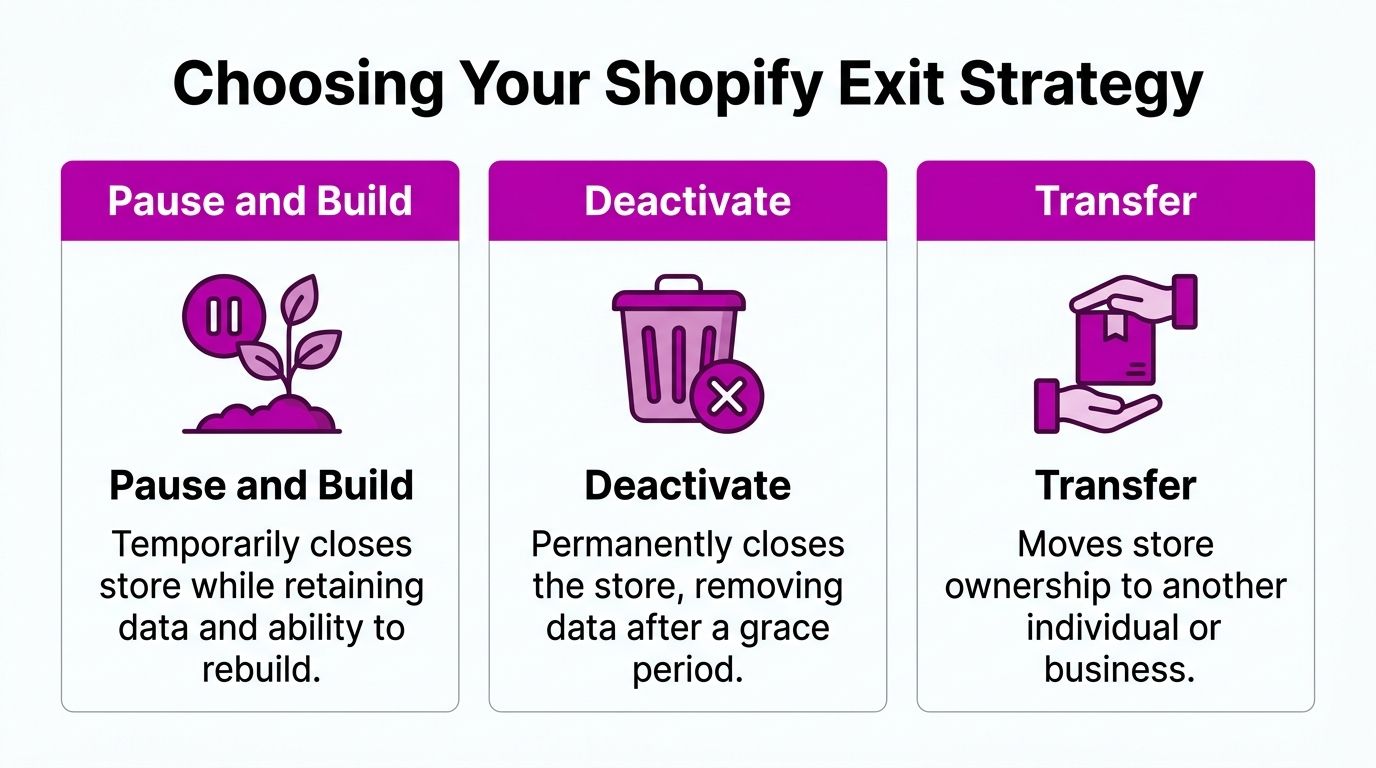
What each path is really for
Pause and Build suits teams that are not selling right now but still need backend access. It works well when the brand may return, the team wants to keep building, or a relaunch is likely.
Full deactivation suits stores that are being shut down. No relaunch planned. No need to keep the operating environment active. No reason to preserve the store as a working workspace.
Transfer suits brands changing hands. That might mean a buyer, a new internal operator, or a move into a different business entity. If the business still has value, transfer is often cleaner than closure.
For brands moving platforms rather than shutting down entirely, a migration plan matters more than a deactivation plan. If that is your situation, this Shopify migration checklist is a better operational starting point.
Shopify Plan Options Pause vs. Deactivate
| Attribute | Pause and Build Plan | Full Deactivation |
|---|---|---|
| Core use case | Temporary stop with ongoing backend work | Permanent store closure |
| Cost | $9/month | Zero cost after closure is completed |
| Backend access | Retained for ongoing work | Ends after closure |
| Best for | Redesigns, strategy resets, testing | Brand shutdowns and true exits |
| Data continuity | Better for future relaunches | Risky if exports are incomplete |
| Team flexibility | Lets the team keep working | Requires all prep to be done in advance |
What works and what does not
What works:
- Choosing Pause and Build when the business is uncertain, not dead
- Choosing transfer when the asset still has value
- Choosing deactivation only after export, cancellation, and domain decisions are already finished
What does not:
- Deactivating because the current month was bad
- Deactivating while debating a redesign
- Deactivating before deciding what happens to the domain, customer records, and app stack
If the store still has usable traffic history, customer intent data, or a brand you may revive, a pause is often the more disciplined move.
A founder usually wants certainty at this stage. The decision rule is simple. If you may need the store again, do not close it like you never will.
The Step-by-Step Deactivation Process in Shopify Admin
Once the prep is complete and full deactivation is clearly the right choice, the process inside Shopify is straightforward. The key is doing it in the right environment and expecting the right prompts.
One point matters immediately. You must do this on a desktop browser because the Shopify mobile app does not support store deactivation. Reports cited by ecomm.design note that 20% to 30% of mobile attempts fail or remain incomplete in this workflow (ecomm.design guide).
Use the desktop admin only
Open Shopify Admin in a desktop browser and log in with the store owner account. If you are not the owner, stop there and resolve ownership access first.
Do not try to work around this through the mobile app. It is one of the easiest ways to create confusion during closure.
Click path inside Shopify
Follow this path exactly:
- Log in to Shopify Admin on desktop
- Go to Settings
- Select Plan
- Choose Deactivate store
- Continue past any prompts that present alternatives
- Enter a reason if prompted
- Confirm with the owner password
Shopify may show alternative paths before final confirmation. Read them carefully. If you still intend to close, keep moving only after confirming your backups and cancellations are already done.
Here is a walkthrough video if you want to see the interface flow before doing it live:
What to expect during confirmation
The confirmation step is intentionally restrictive. Shopify wants to ensure the closure is deliberate and owner-authorized.
Expect a few things:
- A reminder that alternatives exist
- A prompt for a closure reason
- A final password confirmation
- An account state change that blocks normal admin access after closure
This is not the moment to “check one last thing.” By the time you are on the final prompt, the store should already be fully prepared for shutdown.
A note for complex stores
If you run a larger operation with multiple storefronts, custom integrations, or a Shopify Plus setup, treat deactivation as a controlled operational event. Confirm what needs to be preserved before acting, especially if there are theme assets, app logic, or migration dependencies that live outside the obvious parts of admin.
The admin steps stay simple. The consequences do not.
Aftermath and Cleanup Managing Your Digital Assets
Deactivation ends the store subscription. It does not automatically clean up your wider commerce stack.
This is the stage where operators discover what they forgot. Usually it is an app. Sometimes it is a domain. Occasionally it is content or indexed pages still sitting online in places the team did not think about.
A key warning from closure guidance is that third-party app subscriptions are not automatically canceled, and some brands keep paying $50 to $200 per month in forgotten fees when those apps are left active (Shopping Cart Migration guide).
Check app billing after closure
Do not assume deletion from the store view equals cancellation at the vendor level.
Review:
- Your Shopify Apps area before closure
- Any external app billing portals
- Credit card statements after closure
- Team-owned SaaS accounts connected to the store
Common problem categories include page builders, email tools, automation platforms, review systems, and analytics add-ons. If a tool billed externally, your Shopify closure may have no effect on that subscription.
The safest post-close habit is simple. Watch the card used for commerce tools for the next billing cycle and verify that each expected charge has stopped.
Secure the domain and redirects
If the domain still has value, move it deliberately. A good domain can outlive the store that used it.
If you are relaunching somewhere else, think about the redirect plan before traffic starts hitting dead URLs. Redirect mapping becomes a practical asset for this, especially if brand equity still exists. If you need a reference point, this guide to Shopify URL redirects is useful when planning what should happen to old URLs after closure or migration.
Think beyond Shopify when removing old traces
Store shutdown is only part of digital cleanup. Product pages may still appear in search results, cached copies may remain visible, and third-party mentions may linger after the store is gone.
If your closure includes reputational cleanup, outdated listings, or personal information concerns, this guide on how to get something removed from the internet gives a broader framework for what can and cannot be removed after a brand or page goes offline.
Keep the records you still need
After closure, retain whatever records your finance, legal, and support teams may still need. Order history, tax documentation, customer service notes, and exported reports should be stored somewhere accessible to the right people.
Closure should reduce risk. It should not create a record-keeping problem later.
Common Pitfalls and Frequently Asked Questions
Even when the deactivation path is clear, a few edge cases cause most of the support pain. These are the questions that come up most often in real store closures.
Can I reactivate the store later
Possibly, but do not build your plan around that possibility. If you think a return is likely, a pause is usually the cleaner route than full deactivation.
The better approach is to make the decision based on business intent, not on optimism that a future reactivation will solve today’s missing prep work.
What happens to my data after closure
Anything you did not export becomes the risk. That includes operational history your team may care about later, not just product information.
If the store has meaningful order history, customer context, or merchandising learnings, preserve that before closing. Once the environment is gone, your options narrow fast.
Do themes and custom work stay safe
Only if you saved them. Purchased assets, custom code, and configuration logic should be documented and downloaded before closure if they matter to the future business.
This is especially important when multiple freelancers, agencies, or internal developers have touched the theme over time.
Will deactivation stop all charges
It should stop the Shopify store billing itself once the process is properly completed. What it does not guarantee is the end of every related charge in your stack.
That is why app audits and post-close billing checks matter so much. Hidden cost rarely comes from Shopify core at this stage. It usually comes from the surrounding tools.
What about gift cards, refunds, or chargebacks
Handle customer liabilities before closing where possible. If there are unresolved obligations, document them and assign ownership internally.
A store can be “closed” while the business still has customer responsibilities. The operator who forgets that usually pays for it later in disputes and manual cleanup.
Will I receive a final invoice or confirmation
You should expect closure confirmation as part of the process. Save every closure email and billing document connected to the shutdown.
Keep those records in the same folder as your exports, cancellation screenshots, and domain notes. When questions appear later, documentation is what saves time.
What is the biggest mistake people make
They treat deactivation as the first step instead of the last one.
The right order is simple:
- Decide whether closure is the right move
- Export what matters
- Cancel what bills
- Move what you need to keep
- Deactivate only after the above is finished
That sequence prevents most of the expensive mess.
If your team is closing, pausing, migrating, or untangling a complex Shopify setup, ECORN can help you handle the technical and operational side cleanly. We support brands with Shopify development, CRO, redesigns, migrations, and high-stakes store changes where data, billing, and growth history all matter.



Conversion Rate Optimization for Landing Pages: The Playbook

Shopify Plus Automation: A Guide for 2026

10 Social Selling Platforms for Shopify Merchants

Shopify Website Design Examples: 7 Stores Worth Studying

7 Ecommerce Newsletter Examples for Shopify Brands

One Product Shopify Store: Build and Scale

Mobile Pop Up Strategy for Shopify Stores That Converts

Sitemap for Shopify: How to Find, Optimize, and Submit It

7 Single Product Websites Worth Emulating

Product Variants Shopify: The Complete 2026 Guide

Ecommerce Analytics Consulting for Growth

What Is AI Integration for eCommerce

How to Choose the Right eCommerce Website Development Firm

E Business Strategy Implementation

Conversion Tracking Setup for Shopify Stores

BigCommerce vs Shopify Plus Which Enterprise Wins in 2026

Shopify Theme Kit: Setup, Commands, and Migration Guide

Shopify Extension Development: A Practical 2026 Guide

Shopify Speed Score Explained and How to Improve It

Shopify Mobile Optimization: The 2026 Playbook

How to Add Subcategory in Shopify for Better UX

How to Implement Structured Data for Ecommerce in 2026

SEO App Mobile: Shopify Store Optimization Guide

Shopify Plus Support: What It Includes and How to Choose

Google Ads for Shopify: The Complete 2026 Playbook

Shopify New York: How to Find and Hire the Right Agency

Google Search Console for Shopify: The Complete Setup

First Party Data Collection for eCommerce Growth

FAQ Online Store Guide: Build and Measure It Right

Do FB Ads Work for eCommerce in 2026?

One Page Checkout for Shopify: Design and Implementation

Shopify GraphQL vs REST: The 2026 Developer Decision

Shopify Ecommerce Consulting: Strategy, Pricing &

Are Reddit Ads Worth It for eCommerce Brands

Shopify Title and Meta Description: A Practical 2026 Guide

Product Video Best Practices for Shopify Brands

Real-Time Inventory Management: A 2026 Guide

AI Chatbot Integration for Shopify Stores

Affiliate Program Management: A Shopify Guide

10 Best Performance Monitoring Tools for Shopify in 2026

Digital Asset Management for eCommerce Brands in 2026

Every Type of Facebook Ads Explained for eCommerce Growth

Product Information Management Explained for Shopify Brands

Support Ticket System: A Guide for Shopify Stores

10 Best Customer Service Tools for Shopify in 2026

Can I Start a Business with No Money? a 2026 Blueprint

What Sells Good on Etsy: Best Niches for 2026

Shopify Add to Cart Button: A Practical 2026 Guide

Customer Feedback Automation: A Practical eCommerce Guide

Critical Rendering Path: A Guide for Shopify Stores

How to Promote on TikTok for eCommerce in 2026

B2B eCommerce Consulting That Drives Real Revenue

10 Best Practices for Site Navigation in 2026

Return vs Refund for Shopify Stores: A Practical Guide

What Is Customer Lifetime Value and Why It Matters

What Is Voice of Customer Research for eCommerce

SMS Marketing for Ecommerce That Actually Converts

Master How to Improve Email Deliverability in 2026

Top 7 eCommerce Partners NYC for Shopify Brands in 2026

Machine Learning for Ecommerce: Boost Your Shopify Store

Beauty Market Research: Your 2026 Growth Guide

Shopify International Expansion: A 2026 Roadmap

What Does CRO Stand for in Business: Understanding CRO

Shopify Visual Merchandising: A Playbook for Higher Sales

Shopify Landing Page Design: Master Conversion in 2026

10 Best AI SEO Optimization Tools for Shopify in 2026

Agentic AI for Ecommerce: Boost Your Sales in 2026
Mastering Email Marketing Data for eCommerce Growth

Conversion Rate Optimisation Australia: Boost Your Sales

Conversion Rate Optimization AI: Your Shopify Store Guide

10 Product Bundling Strategies for Shopify in 2026

How to Increase Customer Lifetime Value: A Shopify Playbook

AI Customer Service Automation: Shopify Guide 2026

Clean Website Design: A Shopify Conversion Playbook

Omnichannel Retail Strategy: A Shopify Playbook

Product Data Enrichment: A Guide for Shopify Brands

Instagram Shopping Features a Guide for Shopify Stores

What Is Revenue Optimization: A Holistic RevOps Guide

Benefits of Conversion Rate Optimization: Boost Your

WordPress to Shopify Migration: Your 2026 Seamless Switch

Boost Sales: Ecommerce Payment Processing Guide 2026

Unified Commerce Platform: Benefits, KPIs & Shopify Guide

How to Reduce Bounce Rate eCommerce: Your 2026 Guide

Shopify API Integration: A Practical End-to-End Guide

How to Implement Data Governance: A 2026 Guide

Shopify Store Development Cost: A 2026 Breakdown

What Is Server Side Tracking: The Shopify Guide 2026

Marketing Automation Workflows: A Shopify Guide for 2026

Shopify: How to Reduce Technical Debt

Shopify UX Design Change: A Playbook for Growth

User Generated Content Strategy: Shopify Playbook

Shopify Pause and Build Plan Cost: A Complete 2026 Guide

Compare at Price on Shopify: A Complete Guide for 2026

Where Can I Sell My Prints? 10 Best Platforms for 2026

Shopify Order Management System: The Ultimate Guide 2026

What Is Marketing Attribution? an eCommerce Guide for 2026

10 Best Black Friday Sales Sheets for 2026

Discover the Top Social Media Marketing Agencies For

Consumer Confidence Definition for eCommerce in 2026

What Is Social Commerce? Your 2026 Guide to Boosting Sales


newsletter in your inbox