


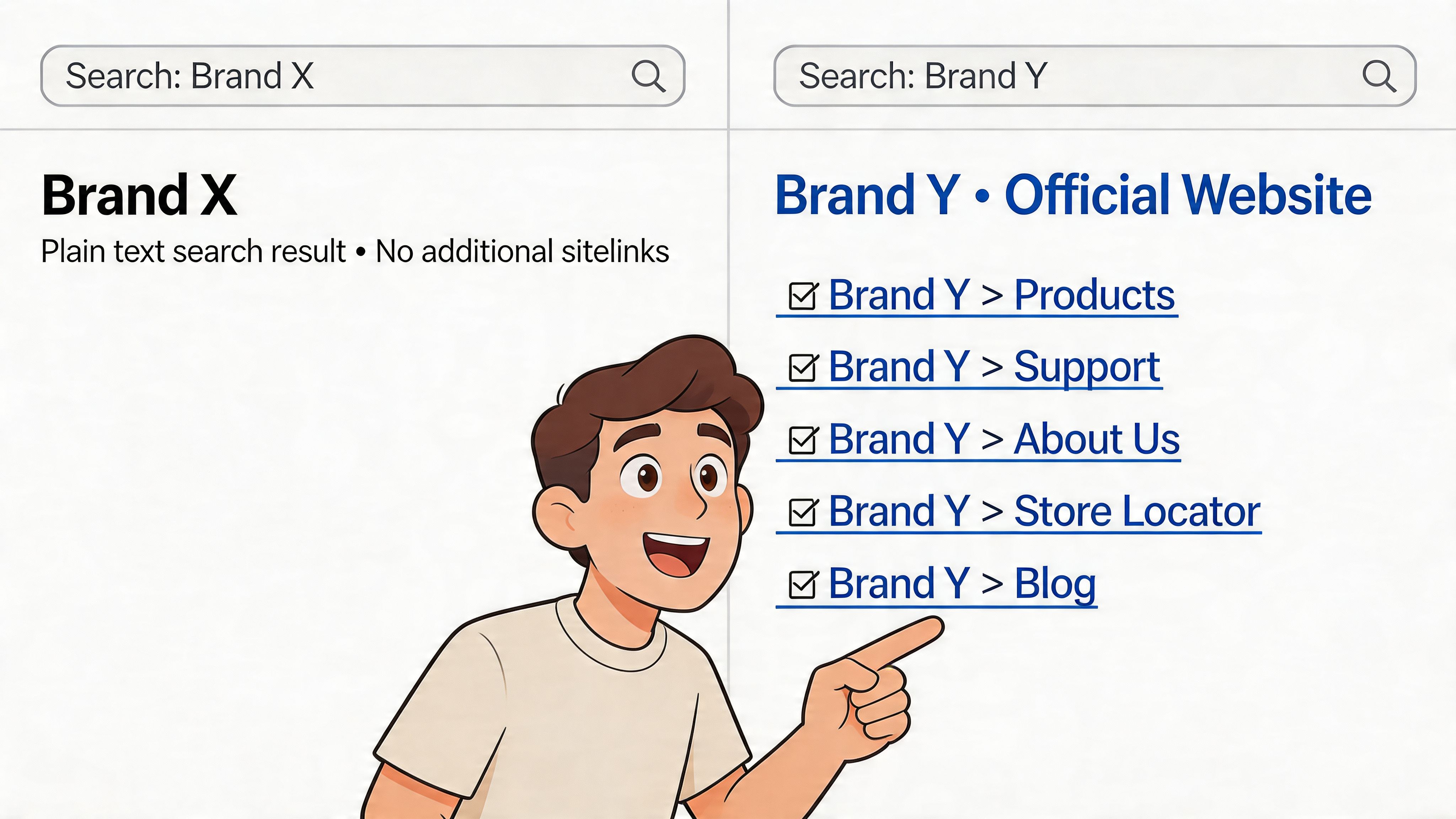
You search your brand name and Google shows a plain blue link, one short description, and not much else. Meanwhile, a competitor gets the deluxe version. Their result takes more space, shows direct links to collections, shipping info, and contact pages, and makes your listing look unfinished.
That gap matters more on Shopify than many realize. Brand searches are often high intent. These are people who already know you, saw an ad, got mentioned by a creator, or are returning to buy. If Google gives them shortcuts into the right parts of your store, you remove friction. If it doesn’t, you make them work.
This is what site link seo is really about. Not gaming Google into showing something it controls, but building a Shopify store that makes the right pages obvious, trusted, and easy to surface.
Why Sitelinks Are a Must-Have for Your Brand
When someone searches your brand, Google may show sitelinks, which are extra links under your main result that point to key pages on the same domain. Google generates them automatically based on how it understands your site structure and internal relationships.
For a Shopify brand, those links often become your real storefront in search. Instead of sending everyone to the homepage, Google can expose pages like Collections, Best Sellers, About, FAQs, or Contact.
They change the click decision fast
The practical value is simple. A result with sitelinks looks more established and easier to use.
Search results with sitelinks achieve an average 46.9% CTR, significantly higher than standard organic results. The top organic result already gets nearly 28% CTR, and sitelinks push that advantage higher, according to Lumar’s SEO statistics roundup.
That matters most on branded searches, where users often want one of a few predictable actions:
- Browse products: They want a collection page, not your homepage hero banner.
- Check policies: They’re looking for shipping, returns, or warranty details.
- Validate trust: They want About, Reviews, or Contact before buying.
- Re-enter the funnel: They saw you on Instagram, email, or paid search and want a fast path back in.
Practical rule: If branded search traffic lands on your homepage and has to hunt for basic paths, your structure is doing extra work that sitelinks could have solved.
Google controls the display, you control the inputs
This is the part too many guides blur. You can't force sitelinks. Google decides whether to show them and which pages deserve the spots.
What you can influence is strong enough to make this worth treating like a core SEO task:
| What Google controls | What you control on Shopify |
|---|---|
| Whether sitelinks appear | Menu structure |
| Which pages are chosen | Internal links |
| How often they change | Collection hierarchy |
| Search result layout | Redirect hygiene |
| Query-specific behavior | Page titles and canonical signals |
A lot of brands chase snippets, rich results, and other SERP features before they’ve earned basic branded dominance. That’s backwards. Sitelinks are often the cleanest signal that your store architecture makes sense.
If you want a wider view of where these enhancements fit, this guide to SERP feature opportunities is useful context. But for Shopify brands, sitelinks usually deserve priority because they improve the branded search result you already have a right to own.
Laying the Foundation with Smart Site Architecture
Most sitelink problems start before internal linking, schema, or backlinks. They start with a messy store structure.
On Shopify, architecture gets distorted easily. A theme adds oversized mega menus. An app creates extra landing pages. Merchants duplicate collection logic through tags, filters, and promotional pages. Google ends up seeing too many competing paths to the same content.
Build the store like a department map
Your homepage is the entrance. Collections are departments. Products are shelves. Support pages are service counters.
If a customer walks into a physical store and every sign points in three directions, they don't trust the layout. Google reacts the same way.
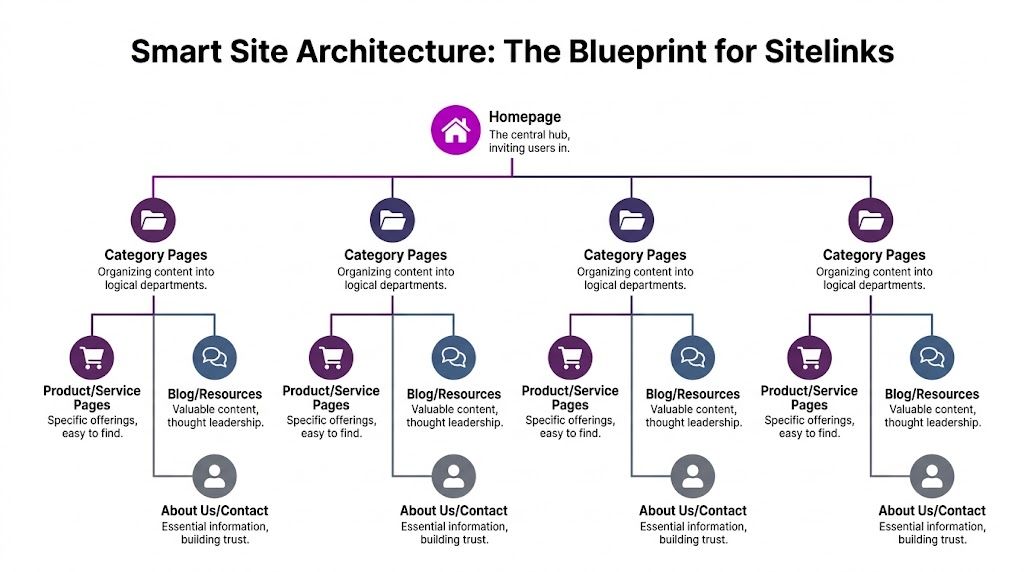
Google tends to prioritize sitelinks from pages close to the homepage. In the technical SEO guidance summarized by SEOSherpa, pages at shallow depth are more likely candidates, while deeper pages rarely appear. That’s why your key Shopify collections should be easy to reach from the homepage and main navigation.
What a strong Shopify hierarchy looks like
A workable structure usually looks like this:
- Primary collections such as /collections/mens, /collections/womens, /collections/new-arrivals
- Support pages such as /pages/shipping, /pages/contact, /pages/faqs
- Content hub such as /blogs/journal or /blogs/guides
The mistake is letting every campaign page compete with those core destinations.
For example, if your menu rotates between “Summer Drop,” “Staff Picks,” “Festival Edit,” and “Back In Stock,” Google gets weak signals about which pages are permanently important. Those promo pages can still exist. They just shouldn’t dominate the store’s structural cues.
Clean URLs help reinforce hierarchy
Shopify limits some URL patterns. Products live under /products/, collections under /collections/, blog content under /blogs/, and standard pages under /pages/. You can’t rewrite that system away, so the win comes from clean handles and clear parent-child relationships.
Use URLs that make sense without context:
- Good:
/collections/running-shoes - Weak:
/collections/ss25-edit-4 - Good:
/pages/shipping-returns - Weak:
/pages/help-center-new
Keep collection naming stable. If you rename a core collection every quarter because merchandising language changes, you weaken consistency.
Flat beats deep for most Shopify catalogs
A lot of brands over-categorize too early. They create a maze:
- Home
- Shop
- Men
- Footwear
- Trainers
- Neutral
- Product
That may reflect internal merchandising logic, but it’s poor sitelink logic. The pages you want Google to feature should sit close to the homepage and receive obvious links.
A flatter structure works better for most stores:
| Better approach | Riskier approach |
|---|---|
| Link directly to primary collections in main nav | Hide key collections under multiple hover layers |
| Use permanent category pages | Use campaign pages as top nav staples |
| Keep support pages accessible | Bury policies in footer-only paths |
| Consolidate overlapping collections | Split similar products into too many thin collections |
The stores that earn better sitelinks usually don't have more pages. They have clearer priorities.
Architecture decisions that usually work
Three patterns hold up well on Shopify:
- Make core collections permanent. “Best Sellers,” “New Arrivals,” and a few commercial category pages often deserve stable placement.
- Separate structural pages from seasonal pages. Put promo links in banners or secondary menus, not in your core hierarchy.
- Protect your trust pages. Contact, shipping, returns, and FAQs often make strong sitelink candidates because branded searchers want reassurance as much as products.
If your architecture is unstable, sitelinks won't stabilize either.
Mastering Internal Linking to Guide Google
If architecture is the blueprint, internal linking is the routing system. Most Shopify stores typically underperform in this area.
I don’t mean they lack links. They usually have plenty. The issue is that the links are repetitive, automated, or commercially noisy. Google can crawl them, but it doesn’t get a clean message about which pages matter most.
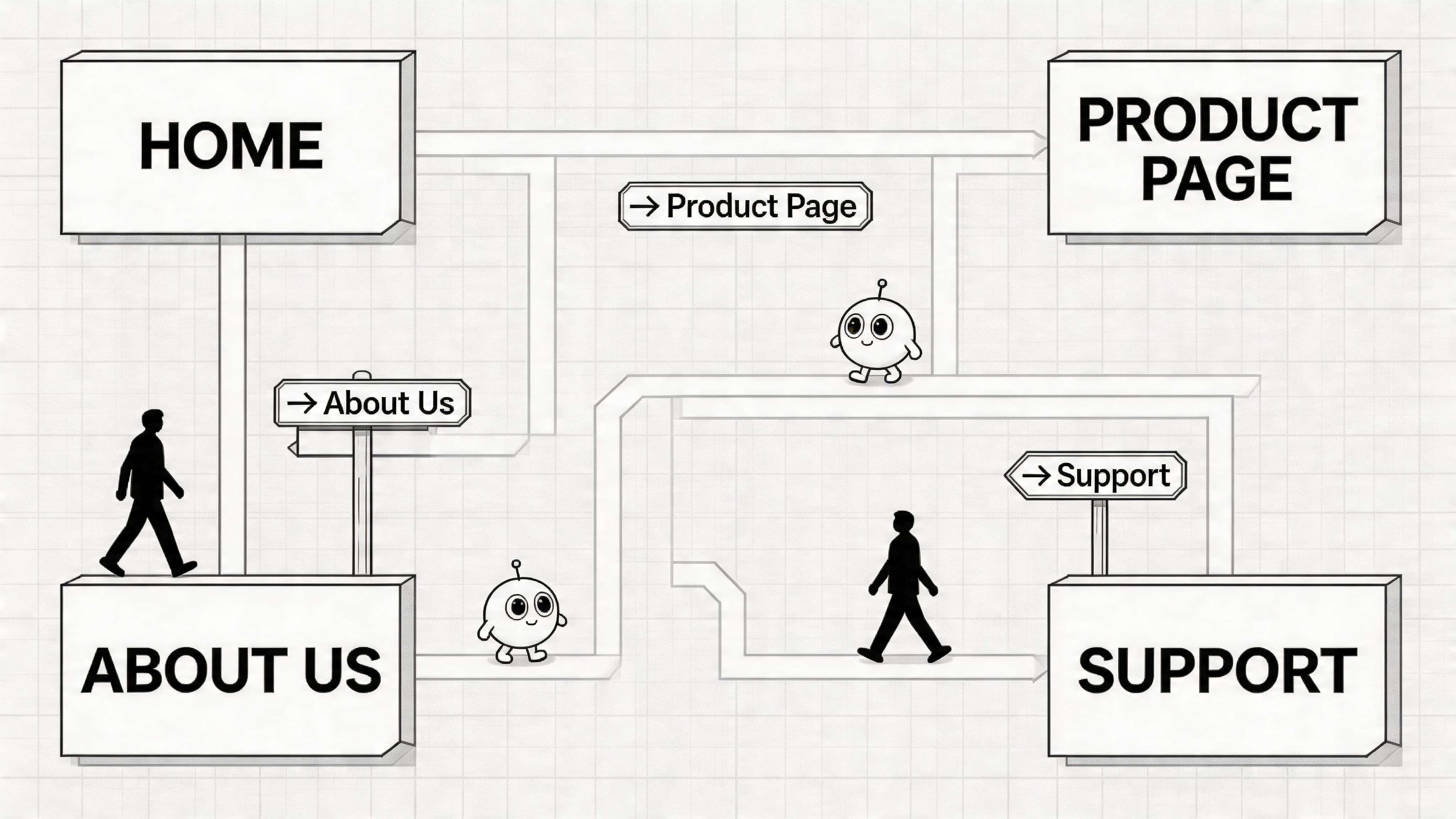
Navigation links and contextual links do different jobs
Your main menu tells Google which destinations are globally important.
Your contextual links inside collection copy, blog posts, support content, and buying guides tell Google how topics relate and where authority should flow.
That second layer is where Shopify brands often leave value on the table.
The top Google ranking position earns 3.8x more backlinks than positions 2 to 10 on average, according to AIOSEO’s SEO statistics. The same source notes that businesses with blogs secure 97% more backlinks. For eCommerce teams, that’s the clue. Your blog and resource content shouldn’t sit in a separate content silo. It should feed authority into the collections and key pages you want Google to trust.
Where to place links on Shopify pages
A few examples work well in practice.
On a collection page
Don’t leave the page as a product grid plus filters.
Add short collection copy that naturally links to:
- complementary collections
- a size guide
- a shipping or returns page
- a related buying guide from the blog
If you run a skincare store, /collections/cleansers might link to /collections/moisturizers, /pages/shipping-returns, and a blog article on routine order. That helps users and reinforces relevance.
On a product page
Most product pages only link outward through breadcrumbs and product recommendations. That’s not enough.
Use product page content blocks to link to:
- the parent collection
- a care guide or FAQ page
- a comparison article
- a compatible accessory or bundled collection
If you sell coffee gear, a grinder product should link back to the grinder collection, to a brew guide, and to related accessories. Those are useful links. They aren’t SEO decoration.
Inside blog content
In this context, internal linking can become intentional instead of incidental.
A post about “how to choose the right weighted blanket” should point to:
- the weighted blanket collection
- the shipping page
- the returns page if sizing confidence matters
- a comparison or FAQ page
For teams working on authority building outside the site too, this primer on link building for SEO is worth reading because it complements internal authority flow. External links help you earn trust. Internal links decide where that trust lands.
What doesn’t work
A few patterns look helpful but usually create noise:
| Weak pattern | Better move |
|---|---|
| Footer with dozens of duplicate keyword links | Footer with a small set of real destination pages |
| Blog posts linking only to other blog posts | Blog posts linking to collections and trust pages |
| Auto-generated “related” links with no logic | Hand-placed links in buying guides and collection copy |
| Every anchor saying “shop now” | Anchors that name the destination clearly |
Field note: If every page links to everything, Google has no reason to treat any destination as especially important.
Use descriptive anchors. “Men’s waterproof jackets” is stronger than “see more.” “Shipping and returns” is stronger than “learn more.”
A simple linking model for Shopify
This is the model I’d use before touching anything fancy:
- Homepage links to core collections and trust pages.
- Core collections link to sub-collections, support pages, and selected guides.
- Blog posts link back into collections and commercial pages.
- Products link to the parent collection and useful support content.
Keep the routes obvious. Avoid stuffing.
This walkthrough adds useful context on crawl flow and site navigation in practice:
Internal linking is where sitelinks become more likely
Google chooses sitelinks, but it looks for consistency. The pages that earn them tend to receive repeated, sensible links from prominent parts of the site.
That means your likely sitelink candidates should be easy to find from:
- the main menu
- the homepage body
- blog content
- support content
- collection copy
- breadcrumbs where relevant
When brands say they’ve “done internal linking,” I usually find they added links. They didn’t create a hierarchy of importance. Site link seo needs the hierarchy.
Sending the Right Technical Signals to Google
Strong structure and internal links do most of the heavy lifting. Technical signals confirm the message.
On Shopify, this part usually breaks in quieter ways. A migration leaves redirect chains behind. An app injects duplicate paths. A theme update strips useful structured data. The site still works for shoppers, but Google gets fuzzier signals.
Use schema to clarify the site
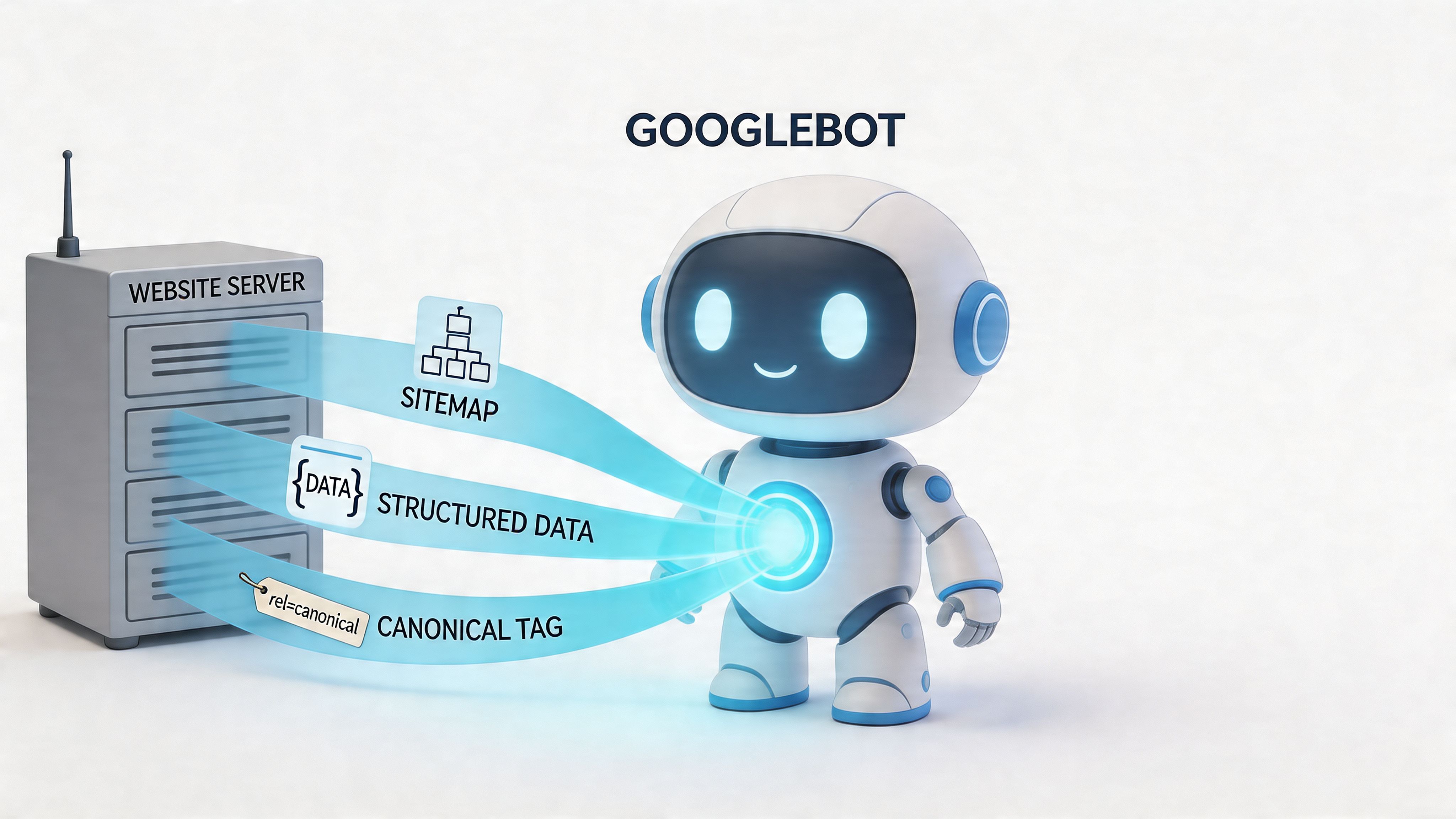
For sitelinks, the most relevant schema layer is usually your WebSite markup and the overall consistency of your page-level structured data.
The most discussed enhancement here is the sitelinks search box, often associated with potentialAction. Google still decides whether to use it, but the markup helps define your site as a searchable entity rather than just a set of pages.
On Shopify, check whether your theme already outputs:
WebSiteOrganization- product schema on PDPs
- breadcrumb schema
Many themes include some of this, but not always cleanly. Apps can also duplicate schema blocks, which creates confusion rather than clarity.
If you use a custom theme, inspect the rendered code and verify one coherent implementation instead of assuming the app stack handles it well.
Keep your sitemap useful, not theoretical
Shopify generates sitemap files automatically. That’s helpful, but not sufficient.
A sitemap helps Google discover URLs, yet it shouldn’t become a dumping ground for low-priority pages competing with your real sitelink candidates. If app-created pages, duplicate blog tag paths, or thin utility URLs are indexable, they can muddy the picture.
Use Google Search Console to review what’s being indexed and compare that against what should represent the brand in search.
A clean sitemap plus clear indexation signals tells Google, “these are the pages we stand behind.”
Redirect chains quietly damage sitelink eligibility
This is one of the most common Shopify problems after redesigns, migrations, collection renames, and seasonal cleanups.
Advanced sitelink SEO depends on technical authority. 85% of SEO experts affirm link building’s major impact, and redirect chains can dilute link equity by 15% per hop. For Shopify migrations, 40% of sites lose 30% of traffic before fixing such issues, based on the data compiled by Sure Oak.
That has a direct sitelink implication. If your key collection used to be /collections/all-shoes, now redirects to /collections/shoes, which then redirects again to /collections/mens-shoes, you’re weakening one of the pages you may want Google to trust most.
Clean redirects are boring work. They also decide whether your old authority still reaches the pages that matter now.
For a practical Shopify-specific walkthrough, this guide on Shopify URL redirects covers the cleanup process well.
What to check in Search Console
Google Search Console won’t give you a “sitelink score,” but it does reveal the inputs.
Review these areas regularly:
- Search results report: Watch branded queries and which landing pages receive impressions.
- Pages indexing report: Spot low-value pages getting indexed when they shouldn’t.
- Links report: Check which internal pages receive the most internal links.
- Sitemaps: Confirm current submissions and crawl recency.
A good companion resource here is this breakdown of ecommerce SEO best practices, especially if you’re aligning technical cleanup with broader category and product SEO work.
Technical hygiene is mostly subtraction
The biggest wins are rarely exotic.
| Keep | Remove or reduce |
|---|---|
| One preferred URL path per important page | Chains of old redirects |
| Consistent canonicals | Duplicate indexable paths |
| Stable collection handles | Frequent renames with layered redirects |
| Valid structured data | Overlapping schema from multiple apps |
When technical clutter is gone, Google has a clearer view of your actual site structure. That’s what supports sitelinks. Not tricks. Not toggles. Clarity.
Shopify-Specific Strategies for Sitelink Success
Generic sitelink advice tends to assume a normal website. Shopify isn’t a normal website. It’s a commerce platform with opinionated URL patterns, Liquid templates, app dependencies, and merchandising changes happening in real time.
That’s why broad SEO advice often sounds correct but fails in execution.
Only 22% of Shopify sites display expanded sitelinks, compared with 45% for static WordPress sites, according to Big Orange Planet. The article ties that gap to Shopify’s Liquid templating and app integrations diluting crawl signals. That aligns with what shows up in audits. The issue usually isn’t that Shopify can’t earn sitelinks. It’s that merchants accidentally blur their strongest pages.
Control app-driven navigation before it controls you
Apps often add links in places you didn’t intend to emphasize:
- wishlist pages
- quiz flows
- loyalty dashboards
- hidden landing pages
- filtered or faceted URL variations
Those pages may be useful for users, but they usually shouldn’t compete with your core collection and trust pages as structural signals.
Audit your theme output, not just the Shopify admin menu. Some links are hard-coded in sections, snippets, app blocks, or injected scripts.
A practical review looks like this:
- check header and mobile drawer menus
- inspect footer blocks
- inspect app embeds on product and collection templates
- crawl the site with Screaming Frog or Ahrefs to see which pages are linked sitewide
If an app-created URL appears in global navigation, ask whether it deserves sitewide importance. Usually it doesn’t.
Edit for signal strength, not just design
Shopify teams often optimize menus for aesthetics first. That’s understandable. But sitelinks don’t come from clean spacing and pretty dropdowns. They come from repeated structural cues.
In Liquid themes, pay close attention to your navigation output and collection templates. You want key links to appear consistently in crawlable HTML, with stable labels.
A few examples:
| Weak Shopify pattern | Stronger Shopify pattern |
|---|---|
| Main nav prioritizes campaigns | Main nav prioritizes permanent collections |
| Mobile menu hides support pages deep | Mobile menu exposes shipping, contact, FAQs |
| Collection grids have no intro copy | Collection pages include concise linked context |
| Variant links create URL clutter | Canonicals point to the main product URL |
Make collections the stars, not tag pages
A common Shopify mistake is letting tag-like pages, filtered states, or thin subpaths soak up internal attention.
If your real commercial priority is /collections/linen-shirts, don’t dilute that by heavily linking to temporary or filter-based alternatives that add little standalone value.
Use your:
- homepage tiles
- featured collection sections
- blog links
- comparison content
- navigation labels
to reinforce the canonical collection destination.
The page you want as a sitelink should also be the page your merchandising team treats as the permanent home for that topic.
Handle variants and duplicate paths carefully
Shopify can create confusion around variants and collection-based product paths.
You may see the same product accessible from its main product URL and from collection-context paths. If canonicals are inconsistent or templates differ too much, Google’s understanding of your internal structure gets weaker.
The fix is usually not dramatic. Keep one primary version of the product URL, maintain consistent canonical signals, and avoid building internal links that spray authority across alternate versions of the same destination.
This also applies when apps generate duplicate landing pages for bundles, subscriptions, or translated experiences. If those pages deserve indexation, support them properly. If they don’t, don’t let them clutter the hierarchy.
Sitelinks on Shopify come from restraint
The strongest Shopify stores for site link seo tend to share one trait. They resist the urge to turn every commercial idea into a top-level structural signal.
That means:
- fewer permanent menu items
- more stable collection architecture
- clearer support page access
- less app noise in navigation
- stronger collection and content relationships
You don’t need a bigger store for better sitelinks. You need a store that communicates priority cleanly despite Shopify’s moving parts.
Auditing and Fixing Common Sitelink Issues
A lot of merchants assume sitelinks aren’t showing because Google “just hasn’t done it yet.” Sometimes that’s true. Often the site is giving mixed signals.
The fastest audit starts with uncomfortable questions.
Ask these before blaming Google
- Are your key pages orphaned or weakly linked? SEOSherpa notes that 38% of SEOs overlook weak internal linking, which leads to orphan pages and scattered signals. If your primary collection only appears in one menu layer, fix that.
- Are redirect chains sitting on core pages? The same source notes that each hop can lose about 15% of link equity. If an old collection path still chains through multiple redirects, flatten it.
- Do your anchor labels change constantly? If one page is linked as “New In,” “Fresh Drop,” “Latest,” and “Shop New,” you’re reducing consistency.
- Are irrelevant pages getting sitewide links? App pages, account utilities, and thin promo pages often take up far more internal prominence than they deserve.
Quick fixes that usually help
- Promote key candidate pages. Add them to the main nav, homepage body, and supporting content.
- Remove noisy links. Demote low-value URLs from headers, footers, and template sections.
- Clean redirect logic. Update internal links to point directly to the final URL, not to redirected versions.
- Review branded search behavior in GSC. If Google keeps surfacing the wrong landing pages, check what internal prominence those pages are receiving.
Google has historically offered ways to influence unwanted sitelinks indirectly through Search Console and stronger structural signals, but the direct controls are limited. In practice, the better move is almost always to improve architecture rather than trying to suppress symptoms.
If Google keeps choosing the wrong page as a sitelink, the page is usually receiving the wrong kind of importance from your own site.
If your Shopify store has the right products but the wrong search presentation, ECORN can help clean up the architecture, internal linking, redirects, and on-site CRO decisions that influence sitelinks. See how the team approaches Shopify growth at ECORN.



10 Best Podcast Ecommerce Shows for Store Growth in 2026

Shopify Developer Hourly Rate: What to Pay in 2026

Ecommerce Conversion Tracking: The Complete How-To Guide

Shopify Design Agency: How to Pick the Right Partner

Mastering Multi Store Management on Shopify

Scale Shopify Store

10 Shopify App Ideas Worth Building in 2026

Conversion Rate Optimization for Landing Pages: The Playbook

Shopify Plus Automation: A Guide for 2026

10 Social Selling Platforms for Shopify Merchants

Shopify Website Design Examples: 7 Stores Worth Studying

7 Ecommerce Newsletter Examples for Shopify Brands

One Product Shopify Store: Build and Scale

Mobile Pop Up Strategy for Shopify Stores That Converts

Sitemap for Shopify: How to Find, Optimize, and Submit It

7 Single Product Websites Worth Emulating

Product Variants Shopify: The Complete 2026 Guide

Ecommerce Analytics Consulting for Growth

What Is AI Integration for eCommerce

How to Choose the Right eCommerce Website Development Firm

E Business Strategy Implementation

Conversion Tracking Setup for Shopify Stores

BigCommerce vs Shopify Plus Which Enterprise Wins in 2026

Shopify Theme Kit: Setup, Commands, and Migration Guide

Shopify Extension Development: A Practical 2026 Guide

Shopify Speed Score Explained and How to Improve It

Shopify Mobile Optimization: The 2026 Playbook

How to Add Subcategory in Shopify for Better UX

How to Implement Structured Data for Ecommerce in 2026

SEO App Mobile: Shopify Store Optimization Guide

Shopify Plus Support: What It Includes and How to Choose

Google Ads for Shopify: The Complete 2026 Playbook

Shopify New York: How to Find and Hire the Right Agency

Google Search Console for Shopify: The Complete Setup

First Party Data Collection for eCommerce Growth

FAQ Online Store Guide: Build and Measure It Right

Do FB Ads Work for eCommerce in 2026?

One Page Checkout for Shopify: Design and Implementation

Shopify GraphQL vs REST: The 2026 Developer Decision

Shopify Ecommerce Consulting: Strategy, Pricing &

Are Reddit Ads Worth It for eCommerce Brands

Shopify Title and Meta Description: A Practical 2026 Guide

Product Video Best Practices for Shopify Brands

Real-Time Inventory Management: A 2026 Guide

AI Chatbot Integration for Shopify Stores

Affiliate Program Management: A Shopify Guide

10 Best Performance Monitoring Tools for Shopify in 2026

Digital Asset Management for eCommerce Brands in 2026

Every Type of Facebook Ads Explained for eCommerce Growth

Product Information Management Explained for Shopify Brands

Support Ticket System: A Guide for Shopify Stores

10 Best Customer Service Tools for Shopify in 2026

Can I Start a Business with No Money? a 2026 Blueprint

What Sells Good on Etsy: Best Niches for 2026

Shopify Add to Cart Button: A Practical 2026 Guide

Customer Feedback Automation: A Practical eCommerce Guide

Critical Rendering Path: A Guide for Shopify Stores

How to Promote on TikTok for eCommerce in 2026

B2B eCommerce Consulting That Drives Real Revenue

10 Best Practices for Site Navigation in 2026

Return vs Refund for Shopify Stores: A Practical Guide

What Is Customer Lifetime Value and Why It Matters

What Is Voice of Customer Research for eCommerce

SMS Marketing for Ecommerce That Actually Converts

Master How to Improve Email Deliverability in 2026

Top 8 eCommerce Partners NYC for Shopify Brands in 2026

Machine Learning for Ecommerce: Boost Your Shopify Store

Beauty Market Research: Your 2026 Growth Guide

Shopify International Expansion: A 2026 Roadmap

What Does CRO Stand for in Business: Understanding CRO

Shopify Visual Merchandising: A Playbook for Higher Sales

Shopify Landing Page Design: Master Conversion in 2026

10 Best AI SEO Optimization Tools for Shopify in 2026

Agentic AI for Ecommerce: Boost Your Sales in 2026
Mastering Email Marketing Data for eCommerce Growth

Conversion Rate Optimisation Australia: Boost Your Sales

Conversion Rate Optimization AI: Your Shopify Store Guide

10 Product Bundling Strategies for Shopify in 2026

How to Increase Customer Lifetime Value: A Shopify Playbook

AI Customer Service Automation: Shopify Guide 2026

Clean Website Design: A Shopify Conversion Playbook

Omnichannel Retail Strategy: A Shopify Playbook

Product Data Enrichment: A Guide for Shopify Brands

Instagram Shopping Features a Guide for Shopify Stores

What Is Revenue Optimization: A Holistic RevOps Guide

Benefits of Conversion Rate Optimization: Boost Your

WordPress to Shopify Migration: Your 2026 Seamless Switch

Boost Sales: Ecommerce Payment Processing Guide 2026

Unified Commerce Platform: Benefits, KPIs & Shopify Guide

How to Reduce Bounce Rate eCommerce: Your 2026 Guide

Shopify API Integration: A Practical End-to-End Guide

How to Implement Data Governance: A 2026 Guide

Shopify Store Development Cost: A 2026 Breakdown

What Is Server Side Tracking: The Shopify Guide 2026

Marketing Automation Workflows: A Shopify Guide for 2026

Shopify: How to Reduce Technical Debt

Shopify UX Design Change: A Playbook for Growth

User Generated Content Strategy: Shopify Playbook

Shopify Pause and Build Plan Cost: A Complete 2026 Guide

Compare at Price on Shopify: A Complete Guide for 2026


newsletter in your inbox