


Most advice about filters in Shopify is too shallow to help a growing brand. It treats filtering like a theme checkbox. Turn it on, pick color and size, move on.
That works until the catalog gets wider, the assortment gets messier, and collection pages stop helping shoppers narrow anything down. At that point, filters don't just fail to help. They actively create friction. Shoppers click into dead ends, irrelevant products stay visible, and high-intent visitors leave because the store makes comparison harder than it should be.
The core problem isn't whether Shopify has filters. It does. The problem is whether your filter architecture matches your catalog, your merchandising logic, and the way customers typically shop.
Why Your Product Filters Are Hurting Your Sales
A lot of brands assume poor collection performance means they need better products, more traffic, or a cleaner theme. Often the issue is simpler. Their discovery layer is weak.
On smaller stores, weak filtering can hide for a while. A shopper can still brute-force their way through a limited catalog. On a larger catalog, that stops working. Collection pages become broad catch-alls. Search results become noisy. The customer does more sorting work than the merchandiser.
That's why the usual setup tutorials fall short. They show where to click, but they don't address scale. A common question in the Shopify community is whether native collection filters can even support collections with over 1,000 products in a useful way, which tells you exactly where mainstream advice breaks down for growing merchants (Shopify Community discussion on filters for large collections).
Practical rule: If a shopper has to understand your internal catalog mess before they can find a product, the filters are failing.
Here's what usually goes wrong:
- Too many low-value filters: Brands expose every possible attribute, including fields that don't help decisions.
- Wrong data source: Teams use tags for jobs that require structured data.
- Inconsistent values: “Navy,” “Dark Blue,” and “Blue Navy” become separate filter options.
- No merchandising logic: Every collection gets the same facet set, whether it fits or not.
The result isn't just a cluttered sidebar. It's a weak buying experience. Filters should reduce uncertainty. Many stores use them in a way that increases it.
Good filters in Shopify are part UX, part data modeling, part merchandising discipline. If any one of those breaks, the storefront feels bigger than it should and less useful than it ought to be.
The Evolution of Shopify Product Filtering
Shopify filtering used to be a workaround-heavy part of the stack. It often depended on theme logic, fragile tag conventions, or third-party apps doing the heavy lifting.
That changed with Online Store 2.0. Shopify introduced a native storefront filtering system built on actual product data, and Shopify's developer documentation recommends this storefront filtering approach for collections and search results (Shopify storefront filtering documentation). That shift matters because it moved filters from a theme trick to a platform capability.
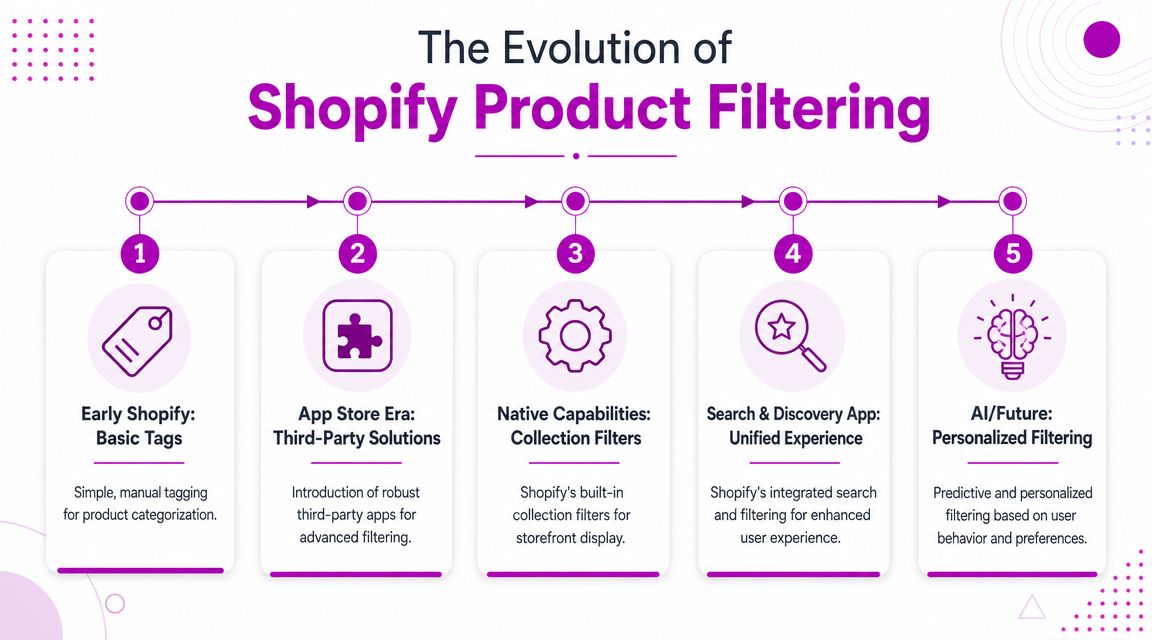
From tags to structure
The old tag-based model was convenient because it was easy to start. Add a tag, expose it in the theme, and you had something that looked like filtering.
But tags behave like a messy filing cabinet. They're easy to stuff full of labels and hard to govern over time. Naming drifts. Teams apply tags differently. A merchandising shortcut turns into a maintenance problem.
Structured filtering is closer to a database. Shopify can use attributes like availability, price, variant options, and metafields because the data has clearer meaning and better consistency. That's what makes the newer system more scalable across themes and easier to maintain as the catalog grows.
Why this shift matters for growing brands
For a small catalog, the difference between tags and structured filtering may feel minor. For a growth-stage store, it becomes architectural.
A brand with expanding product lines needs filtering that can survive:
- Catalog growth: More SKUs means more opportunities for inconsistency.
- Team changes: New merchandisers need guardrails, not tribal knowledge.
- Theme changes: Filters shouldn't break every time the storefront is redesigned.
- International expansion: Product discovery has to stay usable across markets and assortments.
A store with mature filtering feels organized before the customer even clicks anything.
Shopify still allows merchants to use tags to create smaller subsets, but the modern recommendation is clear. Native storefront filtering built on structured product data is the path that scales. If you're still treating filters as a cosmetic theme feature, you're designing around yesterday's Shopify.
Understanding Your Three Core Filter Sources
Every filtering setup in Shopify depends on where the data comes from. In practice, most brands work with product tags, product options, and product metafields. They aren't interchangeable.
Choosing the wrong source creates maintenance headaches fast. Choosing the right one makes the storefront easier to manage, easier to scale, and easier for customers to use.
Product tags are fast but brittle
Tags are still useful. They're simple, flexible, and easy for quick merchandising tasks. If you need to create a temporary grouping or carve out a subset for a campaign, tags can do the job.
They're weak as a long-term filter architecture because they don't enforce structure. Teams end up with duplicate naming, mixed capitalization, and labels that mean different things in different categories.
Tags are fine for lightweight merchandising. They're poor as the foundation for complex product discovery.
Product options work well for variant-led shopping
Product options are best when the customer is choosing among variant attributes already tied to the product, such as size or color. These are natural storefront filters because they reflect choices buyers already understand.
The limitation is scope. Options work best when the attribute is a variant dimension. They're not a great place to store broader specs, compatibility data, or technical details that don't belong in the variant model.
For many apparel, footwear, and beauty stores, options carry a lot of the filtering load. For technical catalogs, they usually don't go far enough.
Metafields are the scalable choice
For complex catalogs, structured metafields are the strongest foundation. Practitioner guidance for industrial-style catalogs recommends storing product specifications in defined metafields with consistent data types, so attributes like operating temperature or thread pitch can support precise faceted filtering instead of relying on free-form text (guidance on precision filters for complex product specs).
That principle applies far beyond industrial supply. It matters anywhere a shopper needs to narrow by meaningful product attributes that don't fit neatly into tags or variant options.
A few examples:
- Home and furniture: material, finish, room type, assembly type
- Beauty: skin concern, ingredient profile, scent family
- Auto or parts: fitment, thread type, connector style
- B2B catalogs: compliance class, operating range, compatibility notes
If your team has ever optimized my listings on Amazon, the mindset is similar. Better structured attributes create better discovery. Shopify just uses a different data model.
For a deeper look at implementation patterns, this guide on Shopify metafields is a useful reference.
| Attribute | Product Tags | Product Options | Product Metafields |
|---|---|---|---|
| Best use case | Quick groupings and temporary merchandising | Variant-driven attributes like size and color | Persistent product specs and custom attributes |
| Scalability | Low for large catalogs | Moderate | High |
| Data consistency | Weak, depends on team discipline | Stronger within variant structure | Strong when definitions are enforced |
| Bulk management | Easy to start, messy to govern | Manageable if variants are clean | Strong if taxonomy is planned upfront |
| Ideal for technical filtering | Poor fit | Limited | Strong fit |
| Theme independence | Often fragile in legacy setups | Better | Best in modern setups |
What works: define metafields before you design the filter UI.
What doesn't: design the UI first, then try to force messy catalog data into it.
The sequence matters. The frontend only looks smart if the product data underneath it is disciplined.
How to Configure Filters with Search & Discovery
Once the data model is right, Shopify's Search & Discovery app is where the strategy turns into a storefront experience. The mechanics are straightforward. The judgment is where teams often stumble.
A strong setup starts with restraint. Don't begin by turning on everything available. Start with the attributes that help a shopper make a decision fastest.
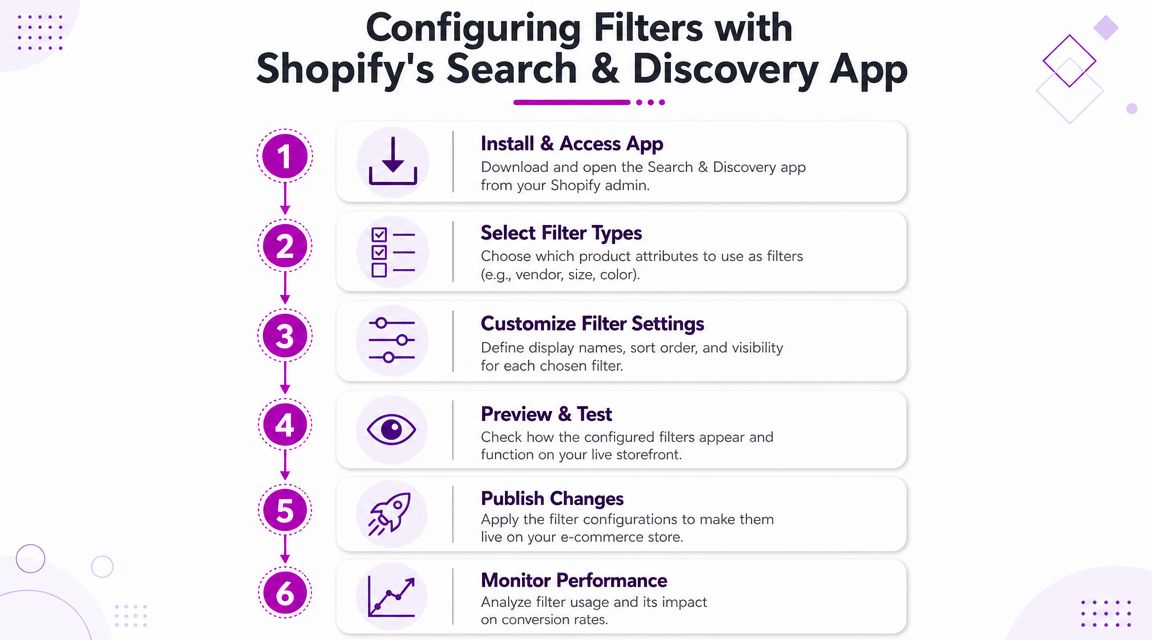
Start with the buyer's decision path
Inside Search & Discovery, select filter types based on how customers narrow products in real life. Price and availability are obvious. Product options like size and color often belong there too. Metafield-based filters should only appear if the underlying values are clean and meaningful.
A good rule is to ask one question for each filter: does this help a customer eliminate wrong products quickly?
If the answer is no, leave it out.
Configure labels and value logic carefully
Filter labels should use buyer language, not internal naming. A customer-facing label like “Material” is better than an internal field name that only your ops team understands.
Grouping matters too. If your catalog contains overlapping values such as “Navy” and “Dark Blue,” group them under a clearer customer-facing option when appropriate. That prevents the filter list from becoming a catalog audit trail instead of a buying tool.
Shopify's Search & Discovery guidance supports practical controls such as grouping values, hiding empty values, and using visual swatches, which are especially useful when the goal is cleaner product discovery rather than raw data exposure (Shopify search best practices for ecommerce teams).
This walkthrough is worth watching before you configure anything in production:
Test by collection, not just globally
A filter can be technically correct and still be wrong for a collection. “Heel height” may be useful on women's shoes and pointless elsewhere. “Connector type” may matter on one industrial collection and confuse shoppers on another.
Use a practical review process:
- Open the target collection and look at the first screenful of products.
- List the top disqualifiers a buyer would use to narrow choices.
- Match filters to those disqualifiers instead of exposing every possible attribute.
- Check for empty or sparse values before publishing.
- Test combinations that a real shopper would click.
If a filter exists mainly because the data is available, not because the customer needs it, it probably shouldn't be visible.
That's the difference between a configured filter set and a merchandised one.
Advanced Filtering Strategies for Scale and Conversion
At scale, filters stop being a UI detail and become a merchandising system. The challenge is balancing customer choice with platform constraints, catalog reality, and search behavior.
Shopify's Search & Discovery app has hard limits that matter here. A store can have a maximum of 25 filters total, up to 200 unique values in a filter, and up to 1,000 filter groups across all selected settings according to Shopify's help documentation on storefront search and discovery filters. If your catalog is broad, those limits force prioritization.
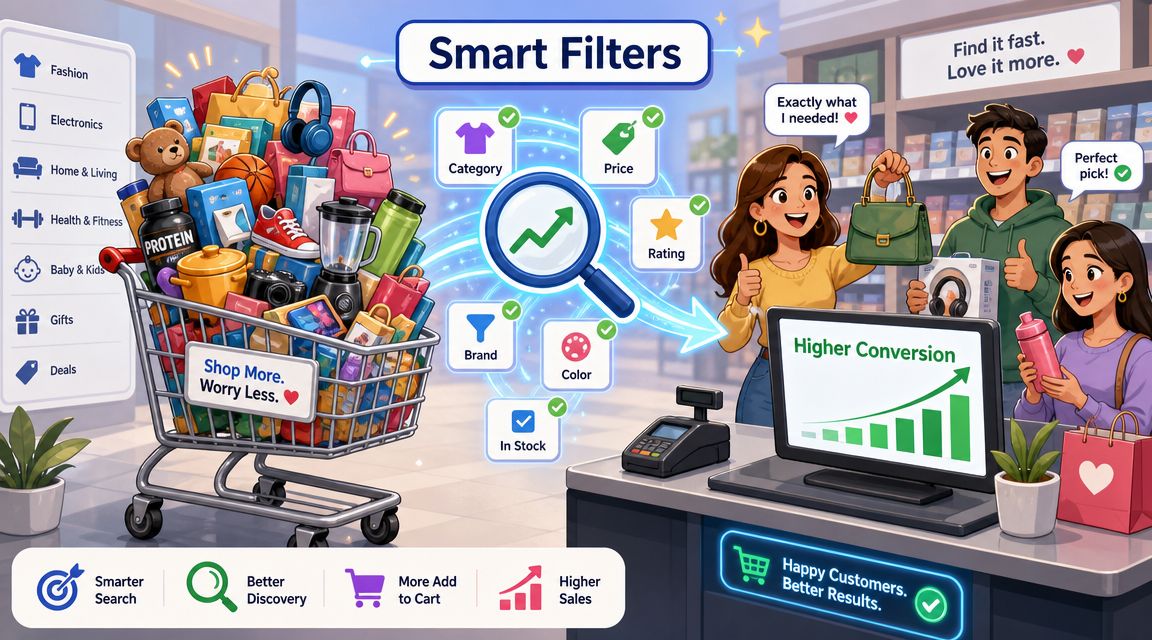
Prioritize filters that remove doubt
The highest-performing filters usually do one of three jobs:
- Disqualify quickly: availability, fit, compatibility, size
- Support preference: color, material, finish
- Control budget or range: price, pack size, usage context
A low-value filter is one shoppers rarely think about before they've already narrowed the set. Those attributes may belong on product pages, not collection sidebars.
For teams working on broader merchandising and UX cleanup, this roundup of profitable Shopify optimization strategies is a useful companion to filtering work because it forces the same discipline around friction reduction.
Use ordering and presentation as CRO tools
Filter order influences behavior. Lead with the criteria customers use to rule products out, then move into preference-based attributes.
A practical sequence often looks like this:
| Priority | Filter type | Why it belongs early |
|---|---|---|
| First | Availability or in-stock status | Stops shoppers wasting time |
| Early | Price | Helps people self-segment fast |
| Early | Core fit attribute | Size, compatibility, product type |
| Middle | Preference filters | Color, material, finish |
| Later | Nice-to-have attributes | Secondary specs and niche details |
Swatches can improve scanability for color or finish. Hiding empty values prevents dead ends. Grouping similar values keeps long lists from becoming noise.
The best filter panel doesn't show the most data. It shows the shortest path to a confident choice.
Design within the limits, not against them
When teams hit Shopify's native limits, the wrong reaction is usually to cram in more filters. The better move is to tighten the taxonomy.
That often means:
- Merging near-duplicate values: combine internal variations into a buyer-friendly bucket
- Reducing sparse facets: remove attributes that apply to only a tiny slice of products unless they are mission-critical
- Splitting broad collections: create tighter merchandising contexts so each filter set can stay relevant
- Standardizing units and terms: avoid separate values that should be one concept
If your catalog is especially complex, this is also where custom frontend logic or an external indexing layer starts to make sense. Native Shopify filters can handle a lot. They can't solve bad product data or weak merchandising structure.
When to Upgrade Beyond Native Shopify Filters
Native filters in Shopify are good enough for many brands. They're often the right starting point. But there's a point where “good enough” becomes expensive because the storefront can't express the way customers shop.
The clearest signal is when your catalog logic is more advanced than the native faceting model.
Trigger points that justify an upgrade
Consider an app or custom build when you need capabilities like these:
- Hierarchical filtering: parent-child relationships such as category to subcategory to specification
- Context-sensitive facets: filters that change more dynamically based on collection intent or customer path
- Advanced range controls: slider-style filtering on attributes beyond price
- Richer spec combinations: technical catalogs where buyers narrow through multiple intersecting requirements
- Custom frontend behavior: interfaces that need more than standard theme rendering can comfortably support
Those needs show up often in B2B, parts catalogs, industrial supply, health and wellness catalogs with nuanced attributes, and large multi-brand stores.
Stay native when the job is mostly merchandising
You probably don't need to upgrade if the issue is one of these:
- inconsistent product data
- duplicate attribute values
- poor filter ordering
- irrelevant facets on broad collections
- overuse of tags where metafields would be better
In those cases, a new app won't fix the core problem. It will just give you a more expensive interface on top of the same bad structure.
Upgrade when the architecture demands it
The right time to move beyond native filtering is when your team has already cleaned the data model and still can't support the discovery experience customers need.
That may mean a third-party search and filtering app. It may mean custom theme work. It may mean external indexing and a customized storefront layer. ECORN is one example of an agency that works on Shopify development and CRO for brands that need custom storefront behavior, but the decision should come from requirements, not from a desire to add more tooling.
If the native layer is constraining discovery after the data is clean, that's a legitimate architectural problem. Treat it like one.
Common Shopify Filter Questions Answered
What's the difference between filters and facets
This distinction matters more than most Shopify guides admit. Facets are the structured categories shown to the user, such as Brand, Color, or Material. Filters are the actual values a shopper selects within those facets.
That difference affects UX. A store can have the right filter values and still perform poorly if the facet design is confusing. Good faceting reduces dead ends by hiding empty values, simplifying choices, and using visual treatment like swatches when that helps shoppers compare faster. The UX framing in this guide to Shopify search facets and filters is useful because it focuses on discovery, not just admin configuration.
Do filters in Shopify work well on very large collections
They can, but “large collection” problems are usually merchandising problems disguised as technical ones. If a collection is too broad, the filter panel has to carry too much cognitive load. That's when shoppers start seeing long lists of weak or inconsistent values.
A better fix is usually to tighten collection logic, reduce low-value facets, and make sure the data model is structured before asking the native filter layer to do more.
Why isn't my metafield filter appearing
Most of the time, one of three things is wrong:
- The definition is weak: the metafield isn't set up in a way that supports clean filtering
- The values are inconsistent: similar data has been entered in multiple forms
- The attribute is too sparse: not enough relevant products in the collection use that field
If the storefront still feels clumsy after cleanup, reviewing broader implementation choices can help. This list of dos and don'ts for Shopify stores is a good reminder that discovery issues are often part of a wider storefront structure problem, not an isolated filter bug.
If your store has outgrown basic setup advice, ECORN can help you audit your catalog structure, rethink filters around real buying behavior, and translate that into Shopify design, development, and CRO work that fits a growing brand.



10 Social Selling Platforms for Shopify Merchants

Shopify Website Design Examples: 7 Stores Worth Studying

7 Ecommerce Newsletter Examples for Shopify Brands

One Product Shopify Store: Build and Scale

Mobile Pop Up Strategy for Shopify Stores That Converts

Sitemap for Shopify: How to Find, Optimize, and Submit It

7 Single Product Websites Worth Emulating

Product Variants Shopify: The Complete 2026 Guide

Ecommerce Analytics Consulting for Growth

What Is AI Integration for eCommerce

How to Choose the Right eCommerce Website Development Firm

E Business Strategy Implementation

Conversion Tracking Setup for Shopify Stores

BigCommerce vs Shopify Plus Which Enterprise Wins in 2026

Shopify Theme Kit: Setup, Commands, and Migration Guide

Shopify Extension Development: A Practical 2026 Guide

Shopify Speed Score Explained and How to Improve It

Shopify Mobile Optimization: The 2026 Playbook

How to Add Subcategory in Shopify for Better UX

How to Implement Structured Data for Ecommerce in 2026

SEO App Mobile: Shopify Store Optimization Guide

Shopify Plus Support: What It Includes and How to Choose

Google Ads for Shopify: The Complete 2026 Playbook

Shopify New York: How to Find and Hire the Right Agency

Google Search Console for Shopify: The Complete Setup

First Party Data Collection for eCommerce Growth

FAQ Online Store Guide: Build and Measure It Right

Do FB Ads Work for eCommerce in 2026?

One Page Checkout for Shopify: Design and Implementation

Shopify GraphQL vs REST: The 2026 Developer Decision

Shopify Ecommerce Consulting: Strategy, Pricing &

Are Reddit Ads Worth It for eCommerce Brands

Shopify Title and Meta Description: A Practical 2026 Guide

Product Video Best Practices for Shopify Brands

Real-Time Inventory Management: A 2026 Guide

AI Chatbot Integration for Shopify Stores

Affiliate Program Management: A Shopify Guide

10 Best Performance Monitoring Tools for Shopify in 2026

Digital Asset Management for eCommerce Brands in 2026

Every Type of Facebook Ads Explained for eCommerce Growth

Product Information Management Explained for Shopify Brands

Support Ticket System: A Guide for Shopify Stores

10 Best Customer Service Tools for Shopify in 2026

Can I Start a Business with No Money? a 2026 Blueprint

What Sells Good on Etsy: Best Niches for 2026

Shopify Add to Cart Button: A Practical 2026 Guide

Customer Feedback Automation: A Practical eCommerce Guide

Critical Rendering Path: A Guide for Shopify Stores

How to Promote on TikTok for eCommerce in 2026

B2B eCommerce Consulting That Drives Real Revenue

10 Best Practices for Site Navigation in 2026

Return vs Refund for Shopify Stores: A Practical Guide

What Is Customer Lifetime Value and Why It Matters

What Is Voice of Customer Research for eCommerce

SMS Marketing for Ecommerce That Actually Converts

Master How to Improve Email Deliverability in 2026

Top 7 eCommerce Partners NYC for Shopify Brands in 2026

Machine Learning for Ecommerce: Boost Your Shopify Store

Beauty Market Research: Your 2026 Growth Guide

Shopify International Expansion: A 2026 Roadmap

What Does CRO Stand for in Business: Understanding CRO

Shopify Visual Merchandising: A Playbook for Higher Sales

Shopify Landing Page Design: Master Conversion in 2026

10 Best AI SEO Optimization Tools for Shopify in 2026

Agentic AI for Ecommerce: Boost Your Sales in 2026
Mastering Email Marketing Data for eCommerce Growth

Conversion Rate Optimisation Australia: Boost Your Sales

Conversion Rate Optimization AI: Your Shopify Store Guide

10 Product Bundling Strategies for Shopify in 2026

How to Increase Customer Lifetime Value: A Shopify Playbook

AI Customer Service Automation: Shopify Guide 2026

Clean Website Design: A Shopify Conversion Playbook

Omnichannel Retail Strategy: A Shopify Playbook

Product Data Enrichment: A Guide for Shopify Brands

Instagram Shopping Features a Guide for Shopify Stores

What Is Revenue Optimization: A Holistic RevOps Guide

Benefits of Conversion Rate Optimization: Boost Your

WordPress to Shopify Migration: Your 2026 Seamless Switch

Boost Sales: Ecommerce Payment Processing Guide 2026

Unified Commerce Platform: Benefits, KPIs & Shopify Guide

How to Reduce Bounce Rate eCommerce: Your 2026 Guide

Shopify API Integration: A Practical End-to-End Guide

How to Implement Data Governance: A 2026 Guide

Shopify Store Development Cost: A 2026 Breakdown

What Is Server Side Tracking: The Shopify Guide 2026

Marketing Automation Workflows: A Shopify Guide for 2026

Shopify: How to Reduce Technical Debt

Shopify UX Design Change: A Playbook for Growth

User Generated Content Strategy: Shopify Playbook

Shopify Pause and Build Plan Cost: A Complete 2026 Guide

Compare at Price on Shopify: A Complete Guide for 2026

Where Can I Sell My Prints? 10 Best Platforms for 2026

Shopify Order Management System: The Ultimate Guide 2026

What Is Marketing Attribution? an eCommerce Guide for 2026

10 Best Black Friday Sales Sheets for 2026

Discover the Top Social Media Marketing Agencies For

Consumer Confidence Definition for eCommerce in 2026

What Is Social Commerce? Your 2026 Guide to Boosting Sales

A Social Ad Campaign Playbook for eCommerce Growth

7 Best FAQ Page Examples for SaaS & eCommerce


newsletter in your inbox