


You're probably already feeling the friction.
A customer signs up for your list. Someone else abandons a cart with two high-margin products in it. A returning buyer places an order and should get a cross-sell follow-up, but nobody on the team has built it yet. Support asks for a post-purchase email that reduces repeat questions. Paid traffic is working, but the handoff from first click to repeat purchase still depends on manual campaign sends and memory.
That setup holds for a while. Then the store grows, channels multiply, and manual follow-up starts leaking revenue in places you can't easily see.
For Shopify brands, marketing automation workflows aren't just a way to save time. They're the operating layer that connects browsing, checkout, retention, and repeat purchase. Built well, they turn store activity into timely action. Built badly, they create noise, duplicate messages, and dashboards full of metrics that don't translate into profit.
Why Automation Is Your Ecom Superpower
The old pitch for automation was simple: save your team from repetitive tasks. That's still true, but it's too small a frame for what growing Shopify brands need.
Control provides value. When your catalog expands, traffic comes from more channels, and retention matters as much as acquisition, you need systems that respond to customer behavior without waiting for someone on the team to notice what happened. That's what strong marketing automation workflows do. They close the gap between intent and response.
Revenue, not just efficiency
This is already mainstream practice. By 2026, research indicates that around 64% of marketers globally already use some form of marketing automation and AI, and organizations can expect an average return of $5.44 for every dollar invested over the first three years, with a payback period of under six months, according to Email Vendor Selection's marketing automation statistics.
That matters for Shopify operators because the basic flows are directly tied to revenue events:
- Welcome journeys move subscribers toward a first purchase
- Cart recovery sequences catch purchase intent before it disappears
- Post-purchase automations improve repeat purchase and reduce buyer hesitation
- Win-back flows reactivate people before they fully churn
If those moments aren't automated, they usually don't happen consistently.
Practical rule: If a customer action happens every day, your response to it shouldn't depend on someone remembering to send a campaign.
Why smaller teams benefit the most
Automation is often framed as enterprise infrastructure. In practice, lean Shopify teams feel the impact faster because they have less room for waste. One marketer can't manually personalize outreach for every new subscriber, every cart abandoner, every first-time buyer, and every lapsed customer across email, SMS, and on-site experience.
That's why a more adaptive setup matters. Resources like Algomizer's AI-first approach are useful because they push the conversation beyond “set up a few emails” and toward systems that use customer behavior and AI to prioritize what should happen next.
The important shift is this: automation shouldn't be treated as a campaign add-on. For a serious Shopify brand, it's part of the revenue engine.
The Building Blocks of a Great Workflow
Most weak automations fail for the same reason. The brand copied a template without understanding the logic behind it.
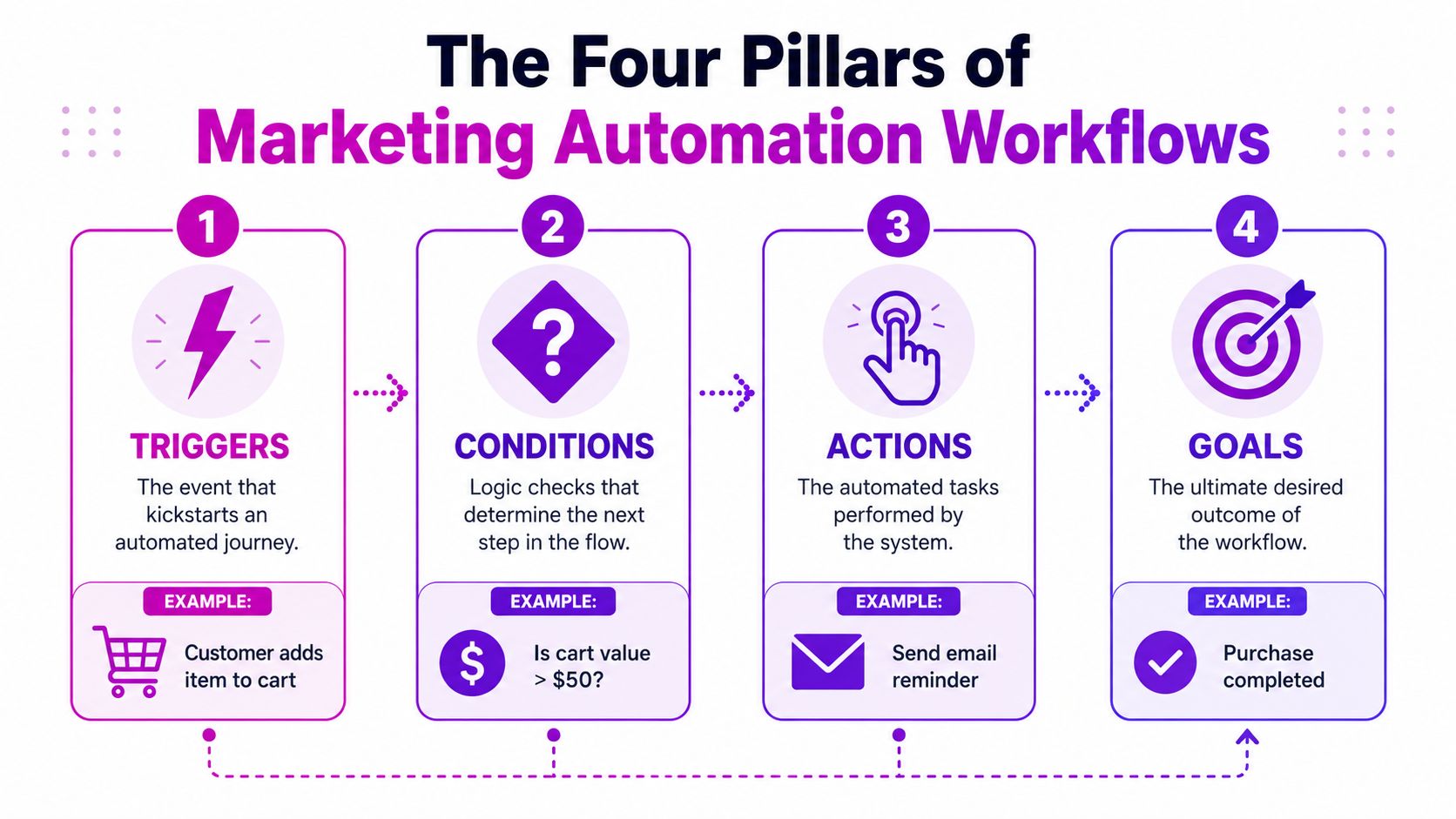
A workflow isn't magic. It's just a sequence built from a few core parts. Once you understand those parts, you stop thinking in terms of “email templates” and start thinking in terms of customer decisions.
Trigger
The trigger is the event that starts the workflow.
In Shopify, that could be:
- a new email signup
- a started checkout
- an order placed
- a product viewed multiple times
- a customer going inactive
For a welcome flow, the trigger is usually straightforward. A visitor joins your list through a footer form, popup, quiz, or checkout opt-in.
The mistake is assuming every signup deserves the same sequence. It doesn't.
Condition
The condition decides who should move down which path.
Let's stay with the welcome example. A customer who subscribed after purchasing should not get the same “meet the brand” flow as someone who has never ordered. A subscriber who came through a discount popup may need a faster purchase-oriented path than someone who downloaded a guide or joined through content.
Conditions are where relevance happens. Good conditions prevent overlap, over-messaging, and awkward sends.
A few useful Shopify conditions:
- Order history checks whether the contact is a first-time buyer or not
- Source filtering separates popup leads from checkout leads
- Product or collection interest tailors content around what they browsed
- Geography or storefront keeps messages aligned with region and inventory
Action
The action is what the platform does after the trigger fires and the conditions are met.
That might include:
| Workflow part | What it means in Shopify | Example |
|---|---|---|
| Trigger | Customer behavior starts the flow | Subscriber joins list |
| Condition | Logic filters the path | Has not purchased yet |
| Action | System responds | Send welcome email |
| Goal | Desired outcome | First order placed |
Actions don't have to be email only. They can also update a profile property, add someone to a segment, remove them from another flow, trigger SMS, or notify a team internally.
The strongest marketing automation workflows combine messaging with data hygiene. If someone buys after email one, the system should know that and stop pushing email two as if nothing happened.
Delay and goal
Timing is where many Shopify brands either recover revenue or irritate customers.
A delay controls when the next step happens. In a welcome flow, that could mean sending the first message immediately, then waiting before delivering product education, social proof, or an incentive reminder. In a cart flow, delay matters even more because urgency fades quickly.
The goal is the outcome that tells the workflow it has done its job. Usually that's a purchase, but it can also be subscription activation, repeat order, or customer re-engagement.
Good workflows don't just send messages. They know when to stop.
Four Essential Workflow Templates for Shopify
You don't need a huge automation library to start driving meaningful revenue. You need a small set of workflows that match high-intent moments in the customer lifecycle and connect cleanly with Shopify data.
These four are the ones I'd build first for most brands.
The fastest wins
The common thread is simple. Each workflow responds to a customer who has already shown intent. That's why they outperform generic calendar campaigns over time.
| Workflow Name | Primary Goal | Trigger | Recommended First Action |
|---|---|---|---|
| Abandoned Cart Recovery | Recover incomplete checkouts | Customer starts checkout but does not purchase | Send a reminder with cart contents |
| Welcome Series | Convert new subscribers into first-time buyers | New subscriber joins list | Send the promised welcome message or offer |
| Post-Purchase Upsell | Increase repeat purchase and average order value | Customer places an order | Send a thank-you plus useful next-step content |
| Customer Win-Back | Reactivate lapsed customers | Customer has not purchased for a defined period | Send a “what's new” re-engagement email |
Abandoned cart recovery
This flow exists to rescue intent that was already there.
A shopper added products to cart, started checkout, or got close enough to signal serious interest. Don't waste that by sending a generic sales email two days later. Send a reminder while the product is still fresh in their mind, then follow up with objection handling.
A strong sequence usually looks like this:
- First message: remind them what they left behind and link directly back to checkout
- Second message: address friction like shipping, returns, sizing, or trust
- Final message: use urgency carefully, and only use an incentive if margin allows it
What works:
- Product images from the cart
- Clear checkout link
- Mobile-friendly layout
- Copy that reduces hesitation
What doesn't:
- Leading with a discount every time
- Sending too many reminders
- Ignoring exclusions for people who already bought
Welcome series
Most welcome flows are too brand-heavy or too offer-heavy.
A better structure balances both. The subscriber should immediately get what was promised, but the flow should also teach them why your store is worth buying from. On Shopify, you can highlight bestsellers, category fit, brand positioning, shipping confidence, or product education.
For many brands, the welcome series should answer four questions:
- What did I sign up for?
- Why should I trust this store?
- What should I buy first?
- Why should I act now?
If your list source is mixed, split the flow by acquisition intent. Popup subscribers, quiz leads, and checkout opt-ins rarely need the same message order.
For a deeper look at execution details, ECORN has a useful guide on ecommerce email marketing automation that covers how these lifecycle flows fit together.
The first email should deliver on the signup promise. Don't make people hunt for the offer or scroll through your brand manifesto to find it.
Post-purchase upsell
This workflow is where a lot of stores get too aggressive.
Right after purchase, the customer doesn't need a hard sell. They need reassurance. Start with a message that confirms they made a good decision, then follow with product education, usage tips, or complementary recommendations that fit what they bought.
Examples on Shopify:
- skincare brands recommend the next step in a routine
- apparel brands show how to style or complete the look
- home brands suggest compatible accessories or refills
This is also the right place to segment based on first order vs repeat order, product type, and expected replenishment pattern.
Customer win-back
A win-back flow should feel like a reintroduction, not a desperate coupon blast.
The customer has gone quiet for a reason. Maybe they already stocked up. Maybe the first purchase didn't create enough momentum. Maybe they forgot you exist. Your sequence should acknowledge the gap and give them a relevant reason to return.
Try a simple pattern:
- Start with relevance: what's new, what changed, what they missed
- Then add motivation: a personalized product suggestion or category reminder
- Use discounting selectively: not every lapsed customer needs to be bribed back
What matters most is defining inactivity around your actual buying cycle. A consumable brand and a furniture brand shouldn't use the same timing logic.
How to Build Your First Automation
Start with one workflow that has clear purchase intent behind it. For most Shopify brands, that means abandoned cart or checkout recovery.
That choice matters because it keeps the build simple and the outcome easy to judge. You're not trying to automate your whole lifecycle in one afternoon. You're trying to get one sequence live, make sure the data is clean, and prove the process works.
Pick the right workflow and define the finish line
Many teams make a mistake when they open Klaviyo, Shopify Flow, or another platform and start dragging blocks onto a canvas before they've defined what success means.
Independent reviews note that organizations that start with one or two high-value, well-defined workflows and then scale systematically report 14–30% productivity gains within the first 3–6 months, while 40-50% of failed deployments stem from unclear goals or over-automation, according to Digital Applied's review of marketing automation workflow strategy.
For your first abandoned cart flow, the finish line is usually simple:
- the customer returns and purchases
- the customer exits because they already purchased elsewhere in the flow
- the customer stops qualifying for follow-up
Write that down before you build anything.
Build the logic before the copy
Inside Shopify or Klaviyo, think through the flow in this order:
Trigger selection
Use a checkout or cart abandonment trigger tied to real commerce behavior, not just site activity.Delay choice
Don't send instantly unless your product category supports it. Give the shopper enough time to self-complete, but not so long that intent cools off.Exit rules
If they buy, they must leave the workflow immediately. This sounds obvious, but plenty of stores miss it.Message path
Decide what each email needs to accomplish before writing it. Reminder first. Friction reduction second. Incentive only if justified.Segment exclusions
Exclude support issues, canceled orders, or customer groups that shouldn't receive the flow.
Write emails that do one job each
Most weak cart flows fail because every email tries to do everything.
The first email should recover memory. The second should reduce hesitation. The third, if you use one, should create a final reason to act. Keep each message narrow.
Useful content blocks include:
- Cart summary: remind them what they selected
- Trust support: shipping, returns, reviews, product guarantees
- Contextual urgency: low inventory, limited timing, or seasonality if accurate
- Strong path back: a direct button to resume checkout
If you want a practical walkthrough from an email-focused angle, How to Build an Automated Email Flow is a solid companion resource.
Don't automate confusion. If the offer, shipping policy, or checkout experience is weak, the workflow will only expose that faster.
Launch narrow, then inspect behavior
Before turning the flow on for everyone, run through obvious failure points:
- does the trigger fire correctly
- are existing customers excluded if needed
- do purchasers exit
- do links return people to the right place
- is mobile rendering clean
After launch, don't obsess over opens first. Watch actual journey behavior. Are people entering the flow as expected? Are they exiting after purchase? Are messages overlapping with campaigns or other automations?
A quick visual overview can help if you're setting this up for the first time:
Once the first workflow is stable, then add the next one. That's how automation becomes an operating system instead of a mess of disconnected flows.
Measuring and Optimizing for True ROI
A workflow can look healthy in-platform and still be over-credited.
That's the measurement problem most brands run into once automation gets more mature. The cart flow gets credit for a sale. Paid social influenced the first visit. Branded search closed the loop. The welcome series also touched the customer. Suddenly every channel is claiming the same order.
Vanity metrics hide bad decisions
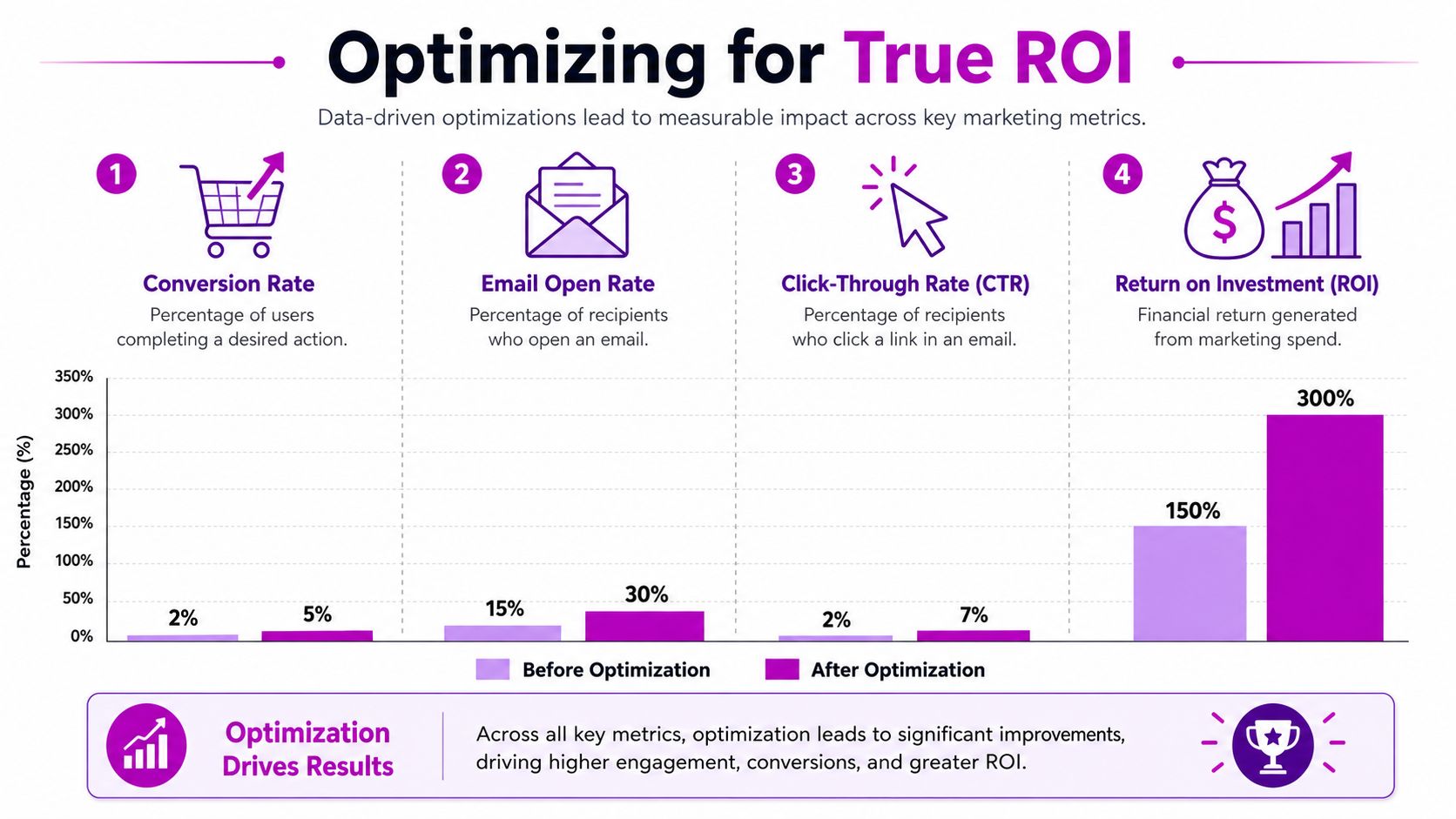
Open rate, click rate, and workflow conversion rate have their place. They tell you whether a message was seen and whether someone interacted with it. They do not, by themselves, tell you whether the workflow generated incremental revenue.
That distinction matters. If someone was going to buy anyway, your automation didn't create the order. It just touched it.
Independent industry reporting notes that only a minority of marketers feel confident in their automation attribution models, and that practical guidance is limited on using holdout groups or multi-touch attribution to measure the incremental revenue from workflows like cart recovery or onboarding, according to Dapta's analysis of essential marketing automation workflows.
Use a holdout group when the stakes are high
The cleanest way to test a workflow's real impact is to keep a small portion of eligible customers out of it and compare outcomes.
That's the basic holdout approach:
| Group | What happens | What you learn |
|---|---|---|
| Workflow group | Receives the automation | Observed revenue with intervention |
| Holdout group | Does not receive the automation | Baseline revenue without intervention |
If the workflow group materially outperforms the holdout group, you have a stronger case that the automation created lift instead of taking unearned credit.
You don't need a perfect attribution lab to start doing this. You need discipline. Pick one workflow with meaningful order volume, define the success window, and compare behavior between exposed and unexposed customers.
What to measure instead
For Shopify brands, I care more about these questions than a top-line flow conversion number:
- Would this order likely have happened without the workflow
- How much revenue is incremental
- Does the workflow improve profit after incentives
- Does it cannibalize another campaign
- Does it increase repeat purchase or just shift timing
That leads to better optimization choices.
For example, if adding a discount to the last cart email increases attributed revenue but lowers contribution margin and doesn't improve incremental lift versus a no-discount version, it's not an improvement. It's more expensive reporting.
Measure workflows at the journey level, not just at the send level.
Practical optimization loop
A sensible review cycle for marketing automation workflows looks like this:
- Check entry quality: are the right people entering the workflow
- Review exit logic: are customers leaving as soon as they convert
- Compare path variants: timing, message order, and incentive use
- Audit overlap: campaign sends, SMS, and other automations
- Test incrementality: use holdouts where revenue justification matters
The brands that get the most from automation don't always have more flows. They usually have cleaner measurement and tighter feedback loops.
Advanced Automation and AI Integration
Once the core lifecycle flows are stable, the next challenge isn't adding more messages. It's making the system smarter without making it messier.
That's where segmentation, AI assistance, and multi-store architecture start to matter. For Shopify brands with more than one region, brand, or storefront, this is usually the point where standard “automation templates” stop being useful.
Where AI actually helps
AI is useful when it improves decision quality or execution speed. It's less useful when it just creates more volume.
Good use cases include:
- Predictive prioritization: identify customers who look likely to lapse and move them into a lighter re-engagement path before they fully disappear
- Content adaptation: vary product recommendations, subject lines, or message emphasis based on customer behavior
- Send-time support: improve delivery timing based on engagement patterns
- Segment maintenance: keep behavioral segments updated without constant manual cleanup
For Shopify teams also thinking about discoverability and product intent, resources on AI-driven search for Shopify are helpful because search behavior and onsite intent signals can feed better lifecycle logic upstream.
Multi-store is where automation gets complicated
A key challenge for growing brands is coordinating workflows across multiple Shopify storefronts. Most public guidance assumes a single-store model, leaving brands without a clear framework for scaling automation across regions or brands without creating inconsistent experiences, as discussed in Samuel J Woods' review of marketing automation workflow examples.
What teams need is an operating model, not another template.
Three decisions matter most:
What should be centralized
Core logic often belongs in one place. Examples include welcome flow architecture, suppression rules, lifecycle stage definitions, and reporting standards.What should be localized
Store-specific variables should usually be separated. Currency, language, shipping rules, legal messaging, product availability, and promotion calendars all vary by storefront.What should be shared as data, not duplicated as campaigns
If a customer buys in one storefront and browses another, you need a consistent profile view or at least a clear rule for how those signals interact.
A practical setup is to centralize lifecycle logic and duplicate only the pieces that require local control. That avoids building five nearly identical cart workflows that drift apart over time.
The scaling path that works
As complexity rises, keep the stack boring. Standard naming conventions. Shared KPI definitions. Clear ownership. Fewer overlapping triggers.
If you're mapping broader AI use cases into commerce operations, AI applications in ecommerce is a useful reference point for where automation fits alongside merchandising, support, and conversion work.
One option for execution is ECORN, which works with Shopify brands on lifecycle automation, conversion-focused flow builds, and multi-store ecommerce operations. That kind of support becomes relevant when the issue isn't “how do we create a welcome email,” but “how do we keep revenue logic consistent across storefronts, teams, and tools.”
If your Shopify brand has reached the point where manual lifecycle marketing is holding back growth, ECORN can help you build marketing automation workflows that are structured around real revenue events, cleaner attribution, and scalable multi-store operations.



BigCommerce vs Shopify Plus Which Enterprise Wins in 2026

Shopify Theme Kit: Setup, Commands, and Migration Guide

Shopify Extension Development: A Practical 2026 Guide

Shopify Speed Score Explained and How to Improve It

Shopify Mobile Optimization: The 2026 Playbook

How to Add Subcategory in Shopify for Better UX

How to Implement Structured Data for Ecommerce in 2026

SEO App Mobile: Shopify Store Optimization Guide

Shopify Plus Support: What It Includes and How to Choose

Google Ads for Shopify: The Complete 2026 Playbook

Shopify New York: How to Find and Hire the Right Agency

Google Search Console for Shopify: The Complete Setup

First Party Data Collection for eCommerce Growth

FAQ Online Store Guide: Build and Measure It Right

Do FB Ads Work for eCommerce in 2026?

One Page Checkout for Shopify: Design and Implementation

Shopify GraphQL vs REST: The 2026 Developer Decision

Shopify Ecommerce Consulting: Strategy, Pricing &

Are Reddit Ads Worth It for eCommerce Brands

Shopify Title and Meta Description: A Practical 2026 Guide

Product Video Best Practices for Shopify Brands

Real-Time Inventory Management: A 2026 Guide

AI Chatbot Integration for Shopify Stores

Affiliate Program Management: A Shopify Guide

10 Best Performance Monitoring Tools for Shopify in 2026

Digital Asset Management for eCommerce Brands in 2026

Every Type of Facebook Ads Explained for eCommerce Growth

Product Information Management Explained for Shopify Brands

Support Ticket System: A Guide for Shopify Stores

10 Best Customer Service Tools for Shopify in 2026

Can I Start a Business with No Money? a 2026 Blueprint

What Sells Good on Etsy: Best Niches for 2026

Shopify Add to Cart Button: A Practical 2026 Guide

Customer Feedback Automation: A Practical eCommerce Guide

Critical Rendering Path: A Guide for Shopify Stores

How to Promote on TikTok for eCommerce in 2026

B2B eCommerce Consulting That Drives Real Revenue

10 Best Practices for Site Navigation in 2026

Return vs Refund for Shopify Stores: A Practical Guide

What Is Customer Lifetime Value and Why It Matters

What Is Voice of Customer Research for eCommerce

SMS Marketing for Ecommerce That Actually Converts

Master How to Improve Email Deliverability in 2026

Top 7 eCommerce Partners NYC for Shopify Brands in 2026

Machine Learning for Ecommerce: Boost Your Shopify Store

Beauty Market Research: Your 2026 Growth Guide

Shopify International Expansion: A 2026 Roadmap

What Does CRO Stand for in Business: Understanding CRO

Shopify Visual Merchandising: A Playbook for Higher Sales

Shopify Landing Page Design: Master Conversion in 2026

10 Best AI SEO Optimization Tools for Shopify in 2026

Agentic AI for Ecommerce: Boost Your Sales in 2026
Mastering Email Marketing Data for eCommerce Growth

Conversion Rate Optimisation Australia: Boost Your Sales

Conversion Rate Optimization AI: Your Shopify Store Guide

10 Product Bundling Strategies for Shopify in 2026

How to Increase Customer Lifetime Value: A Shopify Playbook

AI Customer Service Automation: Shopify Guide 2026

Clean Website Design: A Shopify Conversion Playbook

Omnichannel Retail Strategy: A Shopify Playbook

Product Data Enrichment: A Guide for Shopify Brands

Instagram Shopping Features a Guide for Shopify Stores

What Is Revenue Optimization: A Holistic RevOps Guide

Benefits of Conversion Rate Optimization: Boost Your

WordPress to Shopify Migration: Your 2026 Seamless Switch

Boost Sales: Ecommerce Payment Processing Guide 2026

Unified Commerce Platform: Benefits, KPIs & Shopify Guide

How to Reduce Bounce Rate eCommerce: Your 2026 Guide

Shopify API Integration: A Practical End-to-End Guide

How to Implement Data Governance: A 2026 Guide

Shopify Store Development Cost: A 2026 Breakdown

What Is Server Side Tracking: The Shopify Guide 2026

Shopify: How to Reduce Technical Debt

Shopify UX Design Change: A Playbook for Growth

User Generated Content Strategy: Shopify Playbook

Shopify Pause and Build Plan Cost: A Complete 2026 Guide

Compare at Price on Shopify: A Complete Guide for 2026

Where Can I Sell My Prints? 10 Best Platforms for 2026

Shopify Order Management System: The Ultimate Guide 2026

What Is Marketing Attribution? an eCommerce Guide for 2026

10 Best Black Friday Sales Sheets for 2026

Discover the Top Social Media Marketing Agencies For

Consumer Confidence Definition for eCommerce in 2026

What Is Social Commerce? Your 2026 Guide to Boosting Sales

A Social Ad Campaign Playbook for eCommerce Growth

7 Best FAQ Page Examples for SaaS & eCommerce

Market Research in Fashion Industry: A Guide for Shopify

Shopify Migration Services: Expert Guide for 2026

Mastering FB Retargeting Ads for Shopify in 2026

What Is Omnichannel Ecommerce

Master Your Shopify Plus Migration: The 2026 Guide

Shopify Integration Services: A Merchant's 2026 Guide

Shopify Collection Description: A Guide to SEO & Sales

Shopify Plus Contact: Reach Sales & Support Effectively

Top Luxury Shopify Stores: Design & UX Strategies

How to Improve Customer Experience: A Shopify Roadmap

Creative Facebook Ads: 10 Examples for Shopify Brands

Remarketing with Facebook Ads: A Shopify Guide for 2026

SEO Linking Strategies for Shopify Stores
Top 7 Statistics YouTube Channels for eCommerce in 2026


newsletter in your inbox