


A lot of Shopify teams still treat AI as a nice-to-have layer on top of CRO. That's outdated. Companies that adopt AI-driven conversion rate optimization strategies achieve an average increase of 25% in conversion rates, with top performers reaching 50% or more, while traditional CRO methods typically yield around 10% average improvement, according to this comparative analysis of AI vs traditional CRO.
That gap changes the conversation. This isn't about adding novelty to your stack. It's about whether your store can learn fast enough, personalize well enough, and remove friction before competitors do.
For Shopify brands, the appeal is simple. Better conversion efficiency means more revenue from the traffic you already pay for, and less waste in acquisition. The hard part isn't understanding why AI matters. It's knowing where it helps, where it gets overhyped, and how to implement it without turning your store into an experiment nobody controls.
Why AI Is Reshaping Conversion Rate Optimization
The old CRO playbook still works, but it breaks down under speed pressure. Manual analysis, isolated A/B tests, and broad audience segments can improve a store. They just can't keep pace with how fast product demand, traffic quality, and buying behavior shift in eCommerce.
AI changes that operating model.
Instead of asking a team to review heatmaps, build a hypothesis, launch one test, wait, and then interpret the result, AI systems process behavior continuously and act faster. For a Shopify merchant, that matters most on pages where intent changes quickly. Product detail pages, collection pages, cart, and checkout-adjacent flows all carry micro-frictions that standard reporting often misses.
The real advantage is operational
A lot of founders hear "AI" and think chatbot. In practice, the bigger win is decision velocity. AI can help your team identify what to test, personalize what visitors see, and route traffic toward stronger experiences without waiting for a long manual cycle.
That means you can:
- Improve conversion efficiency by reducing dead clicks, hesitation, and drop-off across key pages
- Protect paid media economics because stronger on-site conversion lowers pressure on acquisition
- Reduce wasted test time by focusing on pages and segments with clearer commercial upside
If you're looking at broader AI applications in eCommerce, conversion optimization is one of the most commercially immediate use cases because it sits so close to revenue.
What Shopify brands often get wrong
They buy an AI app before they define the problem. That usually leads to surface-level personalization, generic recommendations, and dashboards that look advanced but don't change business outcomes.
Practical rule: Don't start with "Which AI tool should we install?" Start with "Where does qualified traffic hesitate, and what would remove that hesitation?"
The stores that get value from conversion rate optimization AI treat it as a system for faster learning. They don't hand the whole store over to automation. They point AI at high-value friction, keep strong measurement in place, and use it to compress the time between insight and action.
Understanding AI-Powered Conversion Optimization
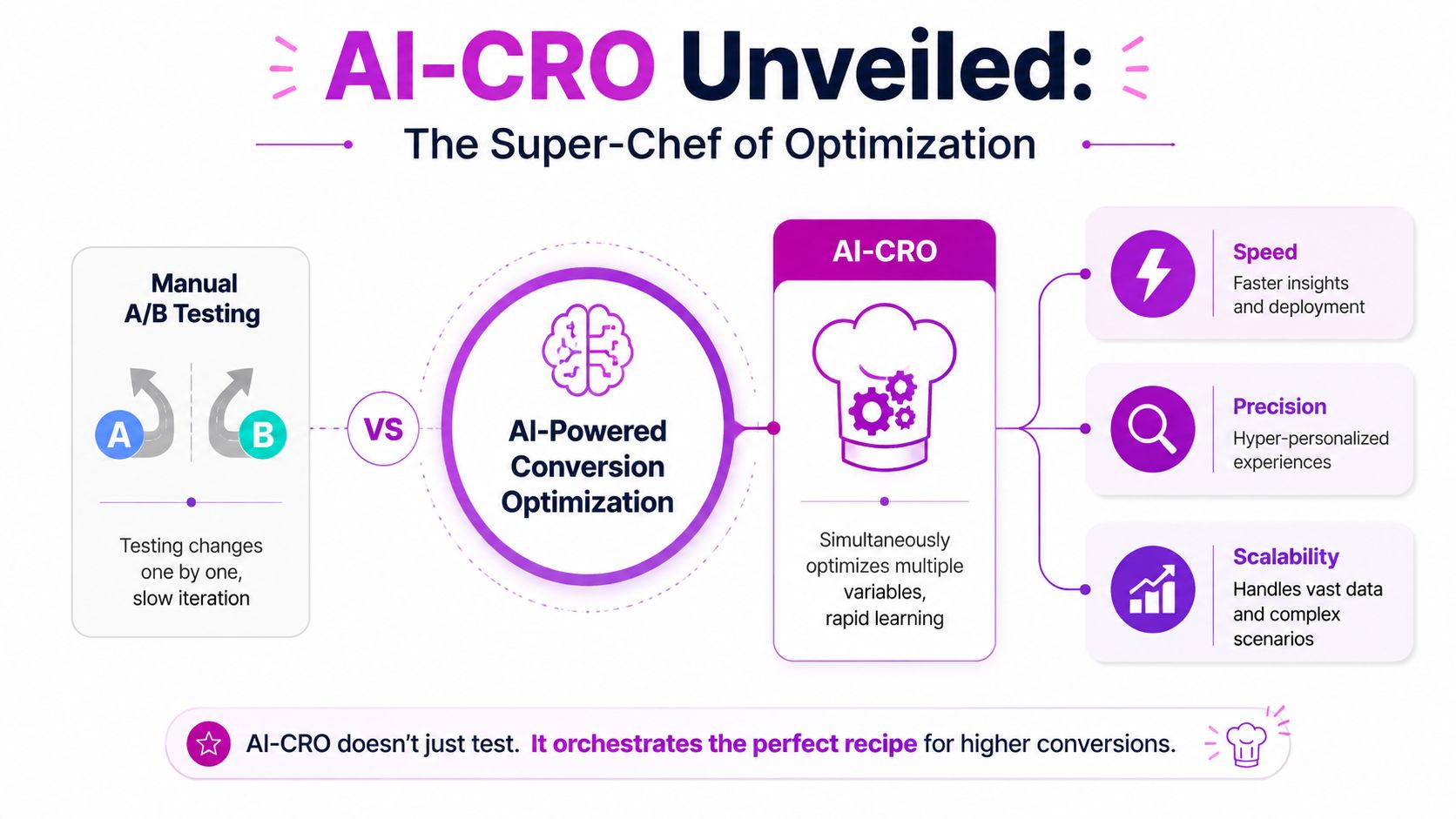
Traditional CRO is like driving with an old paper map. You pick a route, follow it for a while, then stop and check whether you're going the right way. AI-powered CRO works more like a live GPS. It reads what's happening now, adjusts in motion, and improves the route while traffic is still moving.
That distinction matters because many Shopify apps claim to be "AI" when they're really just automation. Automation follows rules you set in advance. AI learns from patterns in behavior and adapts what happens next.
What true AI-CRO is doing
At a practical level, most useful AI-CRO systems do three jobs well:
Collect behavior signals
Not just clicks and purchases. Better systems look at hesitation, repeat interactions, abandonment patterns, and context.Recognize patterns humans miss
A merchandiser might notice low conversion on a product page. AI can spot that mobile users from one channel stall after interacting with a size selector or shipping message.Trigger a better next step
That could be a different recommendation block, a stronger reassurance message, a conversational prompt, or a traffic shift toward a better-performing variation.
The difference isn't academic. It's the gap between "we learned something after the test ended" and "the store adapted while users were still shopping."
What this looks like on a Shopify store
A simple example helps. Say your PDP converts poorly on mobile for first-time visitors. A manual workflow might test one revised hero section against the original and wait. AI-CRO can evaluate multiple combinations at once, such as image order, trust messaging, review placement, and CTA language, then learn which combinations fit which visitor contexts.
That doesn't remove the need for strategy. It raises the value of strategy.
A strong operator still defines the commercial goal, the brand guardrails, and the pages worth prioritizing. AI just reduces the lag between observation and optimization. If you want a broader view of proven conversion rate optimization strategies, it's useful to compare traditional best practices with where AI adds value rather than replacing fundamentals.
The best AI-CRO setups don't replace human judgment. They replace slow loops.
A quick way to separate hype from value
Use this filter when evaluating tools:
| Question | Weak tool | Strong tool |
|---|---|---|
| Data input | Limited to simple events | Uses richer behavioral and contextual signals |
| Actionability | Produces reports | Changes experiences or guides decisions |
| Shopify fit | Generic integration | Works cleanly with Shopify themes, apps, and analytics |
| Control | Black box outputs | Lets your team review, constrain, and measure changes |
If a platform can't explain what it learns from, how it acts, and how you'll validate impact, it's not a serious conversion rate optimization AI solution. It's just software wearing AI branding.
Core AI Techniques Driving Conversions
The easiest way to understand AI-CRO is to look at what changes in the customer experience. Not the model. Not the acronym. The actual moment where a shopper either moves forward or leaves.
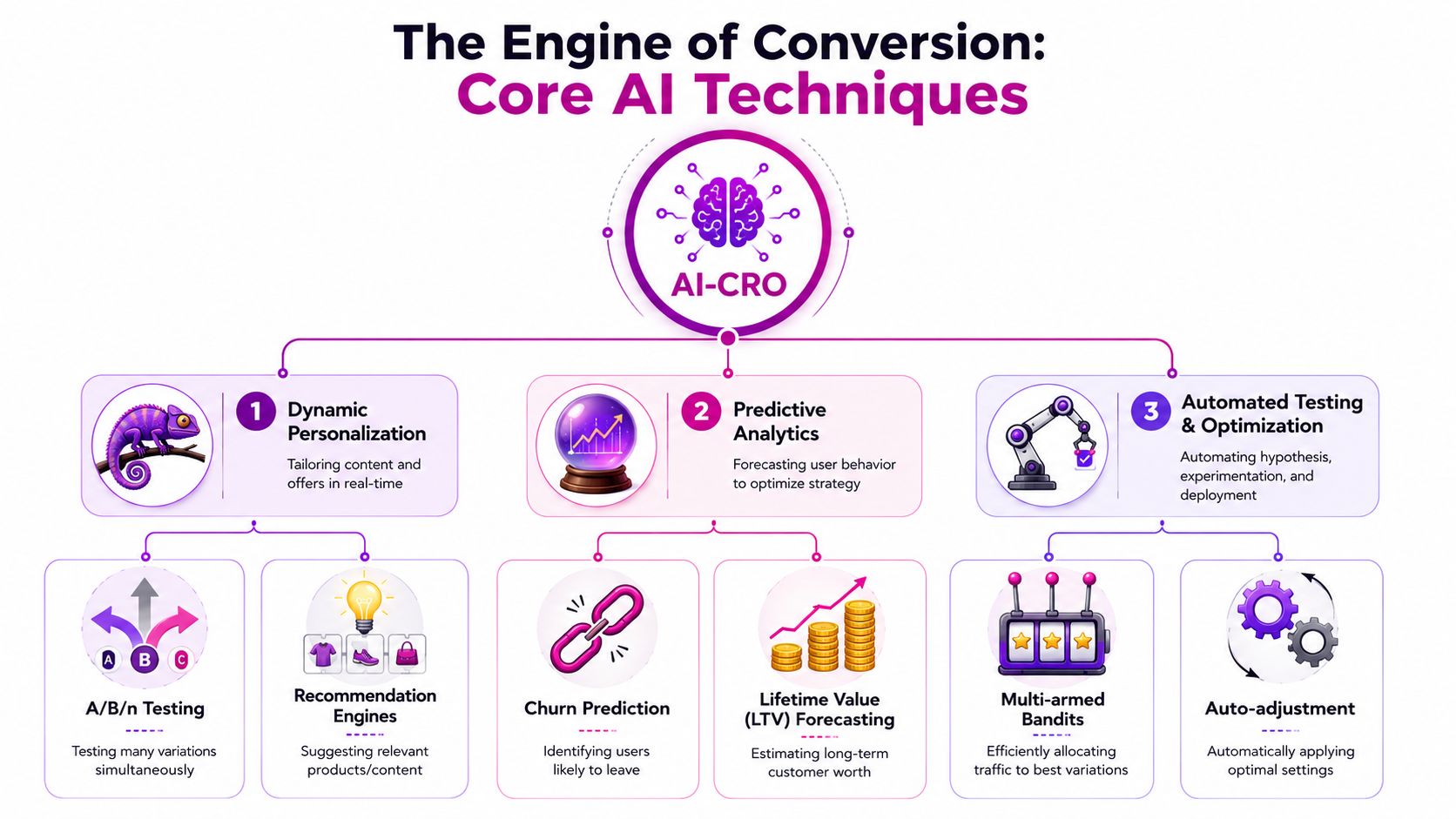
Dynamic personalization
Before AI, many stores personalized in blunt ways. Returning visitor equals one banner. New visitor equals another. That can help, but it's coarse.
AI-driven personalization gets more specific. A first-time shopper landing on a skincare PDP from a paid social ad may need ingredient clarity and reviews near the top. A returning customer from email may respond better to bundle logic, replenishment cues, or loyalty messaging.
The commercial case is already clear. AI-powered chat and conversational assistants have been shown to increase eCommerce conversion rates from 3.1% to 12.3%, and 65% of eCommerce brands report higher conversion rates after deploying personalization strategies, according to this eCommerce conversion optimization analysis.
What works:
- Intent-sensitive recommendations that change based on category behavior
- Message sequencing that reflects shopper familiarity
- Offer timing tied to hesitation rather than shown immediately
What doesn't:
- Fake personalization where every visitor sees a slightly different headline but the core friction remains
- Overlapping widgets that fight for attention and slow the page
Conversational assistance at the point of friction
Many Shopify stores underutilize AI. A good assistant doesn't just answer support questions. It helps shoppers decide.
On a store selling technical products, the assistant can guide visitors toward the right variant, explain compatibility, summarize shipping expectations, and reduce uncertainty while intent is still warm. That's especially useful on mobile, where users don't want to dig through tabs and policy pages.
If you're evaluating ways to automate Shopify customer support, the best use case isn't replacing every human conversation. It's removing buying friction before that friction becomes abandonment.
A support bot that only deflects tickets isn't a CRO asset. A buying assistant that helps the right shopper choose faster is.
Predictive analytics
Some visitors are about to convert. Others are about to disappear. Predictive systems help separate those two groups in time to do something useful.
A practical example. A shopper views multiple products in one collection, returns to a PDP, opens shipping information, then goes idle. A predictive model can classify that session as high intent but high friction. Instead of waiting for cart abandonment, the store can respond with clearer delivery messaging, a contextual prompt, or a relevant comparison.
AI beats static segmentation because it reacts to behavior inside the session, not just attributes from the customer profile.
Automated testing and traffic allocation
This is the technique people usually associate with AI-CRO, and for good reason. Manual A/B testing often forces teams to choose one hypothesis at a time. That creates a queue. AI testing systems can evaluate more combinations and shift traffic toward stronger performers sooner.
The mistake is treating this as "set it and forget it." Automated testing works best when the input is commercially grounded. Start with pages that have enough intent and enough friction to matter. Product pages, cart, collection filters, on-site search results, and post-add-to-cart moments usually beat low-stakes pages like blog templates or generic about pages.
How AI Accelerates the Entire CRO Process
The biggest gain from AI isn't one test result. It's the compression of the whole optimization cycle.
In a conventional workflow, a team finds a problem, builds a hypothesis, designs a variation, launches a test, waits for enough traffic, analyzes the result, and then schedules the next test. That sequence is slow even when the team is good. For most Shopify brands, it means too few meaningful experiments reach production.
Speed changes the economics of optimization
AI-powered conversion rate optimization reduces the testing cycle from months to 2 to 4 weeks by autonomously executing hundreds of simultaneous A/B variations, according to this breakdown of AI-powered testing velocity.
That matters because faster testing doesn't just save time. It changes what your team can learn in a quarter.
A shorter cycle means:
- More hypotheses validated before seasonality shifts
- Less opportunity cost from leaving weak page experiences live
- Earlier detection of winning combinations across layout, copy, merchandising, and messaging
For teams exploring the current options in AI tools for eCommerce, this is the filter I'd use first. Ask which tools effectively reduce the time between identifying friction and shipping a better experience.
Scale reveals interactions humans miss
A human team can test "headline A vs headline B." AI systems can evaluate interactions between headline, social proof placement, CTA wording, product recommendation logic, and offer timing. That's not just more volume. It's a different level of pattern recognition.
Here's the trade-off. More automation can create the illusion that every output is equally trustworthy. It isn't. Low-quality data, poor event definitions, and weak page strategy still produce weak optimization.
So the process that works is usually this:
| Stage | Manual CRO bottleneck | AI-assisted advantage |
|---|---|---|
| Diagnosis | Teams review fragmented reports | Systems detect behavioral patterns continuously |
| Experimentation | One or few tests at a time | Many variations can run and adapt concurrently |
| Analysis | Post-test interpretation takes time | Insights surface while traffic is live |
| Deployment | Changes wait on team bandwidth | Stronger variants can be prioritized faster |
The compound effect is what founders care about. Faster insight leads to faster iteration. Faster iteration gives your store more chances to improve before the market, your assortment, or your traffic mix changes again.
Your AI-CRO Roadmap for a Shopify Store
Most Shopify brands don't need a full AI transformation. They need a disciplined rollout that improves revenue without creating measurement chaos.
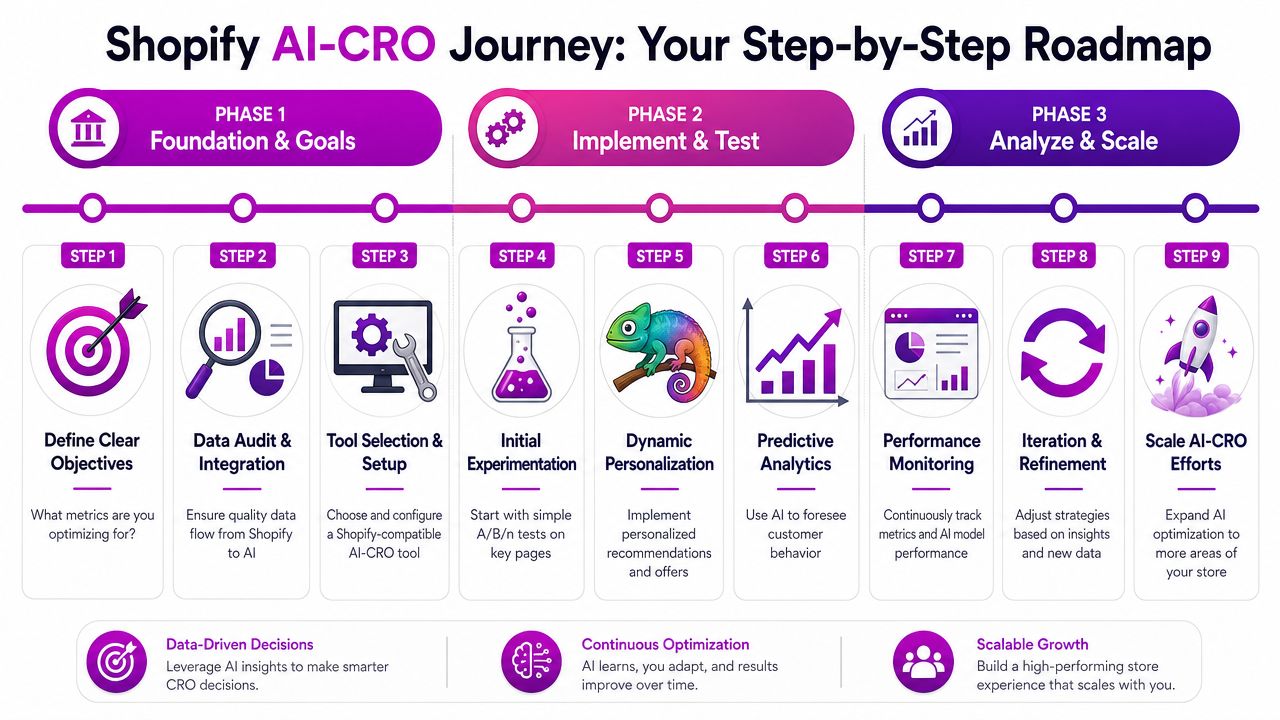
Phase one builds the foundation
Start with your data. If Shopify analytics, GA4, product feed logic, and event tracking don't line up, AI won't rescue the program. It will just automate confusion.
Audit these first:
- Primary conversion events such as product views, add to cart, checkout start, and purchase
- Support signals such as search use, filter interactions, quiz completions, and chat starts
- Merchandising inputs including product tags, inventory status, bundles, and variant structure
- Voice of customer inputs like survey responses, reviews, support themes, and return reasons
Tool selection comes next. For Shopify, the most useful stack usually combines several capabilities rather than one magical platform. You may use one tool for experimentation, another for recommendations or search, and another for conversational assistance. What's important is fit.
Look for tools that:
- Integrate cleanly with Shopify without heavy theme fragility
- Allow segmentation by behavior and context
- Show model logic clearly enough for your team to review outcomes
- Support controlled experimentation, not just blanket automation
A lot of stores make the wrong purchase here. They buy the platform with the longest feature list, not the one that solves their highest-value constraint.
Phase two starts with narrow, high-value use cases
Don't launch AI across the whole storefront. Start where intent is strongest and friction is expensive.
Good first candidates are:
- Product detail pages with strong traffic but inconsistent conversion
- Collection pages where users struggle to narrow choices
- Search results where relevance directly impacts buying momentum
- Cart or pre-checkout moments where reassurance, upsell logic, or support can rescue demand
This is a helpful walkthrough if you want a visual example of implementation pacing:
For early experiments, keep the variables commercially meaningful. Test things like recommendation logic, review placement, benefit-led copy, shipping reassurance, and guided assistance. Don't burn cycles on cosmetic changes unless you've already addressed decision friction.
Field note: The strongest early wins usually come from helping qualified visitors decide faster, not from making the page look more "optimized."
Phase three scales only after measurement is stable
Once the first use cases produce clear learnings, expand carefully. At this stage, teams often overreach.
Use a simple operating rhythm:
- Weekly review: Check whether AI-driven changes are improving the target metric and whether any segment is underperforming
- Monthly model review: Validate recommendations, personalization logic, and page-level changes against brand and margin goals
- Quarterly expansion: Add new templates, new segments, or new AI use cases only after the previous layer is measured and governed
A practical tool-selection lens for Shopify merchants looks like this:
| Store need | What to prioritize in a tool |
|---|---|
| Low mobile PDP conversion | Personalization, content testing, guided product discovery |
| High pre-purchase question volume | Conversational AI tied to catalog and policy knowledge |
| Weak search and collection engagement | AI search relevance, recommendation logic, merchandising controls |
| Slow experimentation velocity | AI-assisted testing, faster variation generation, traffic allocation |
The point isn't to build the most advanced stack. It's to create a repeatable system where data quality, commercial judgment, and AI capability reinforce each other.
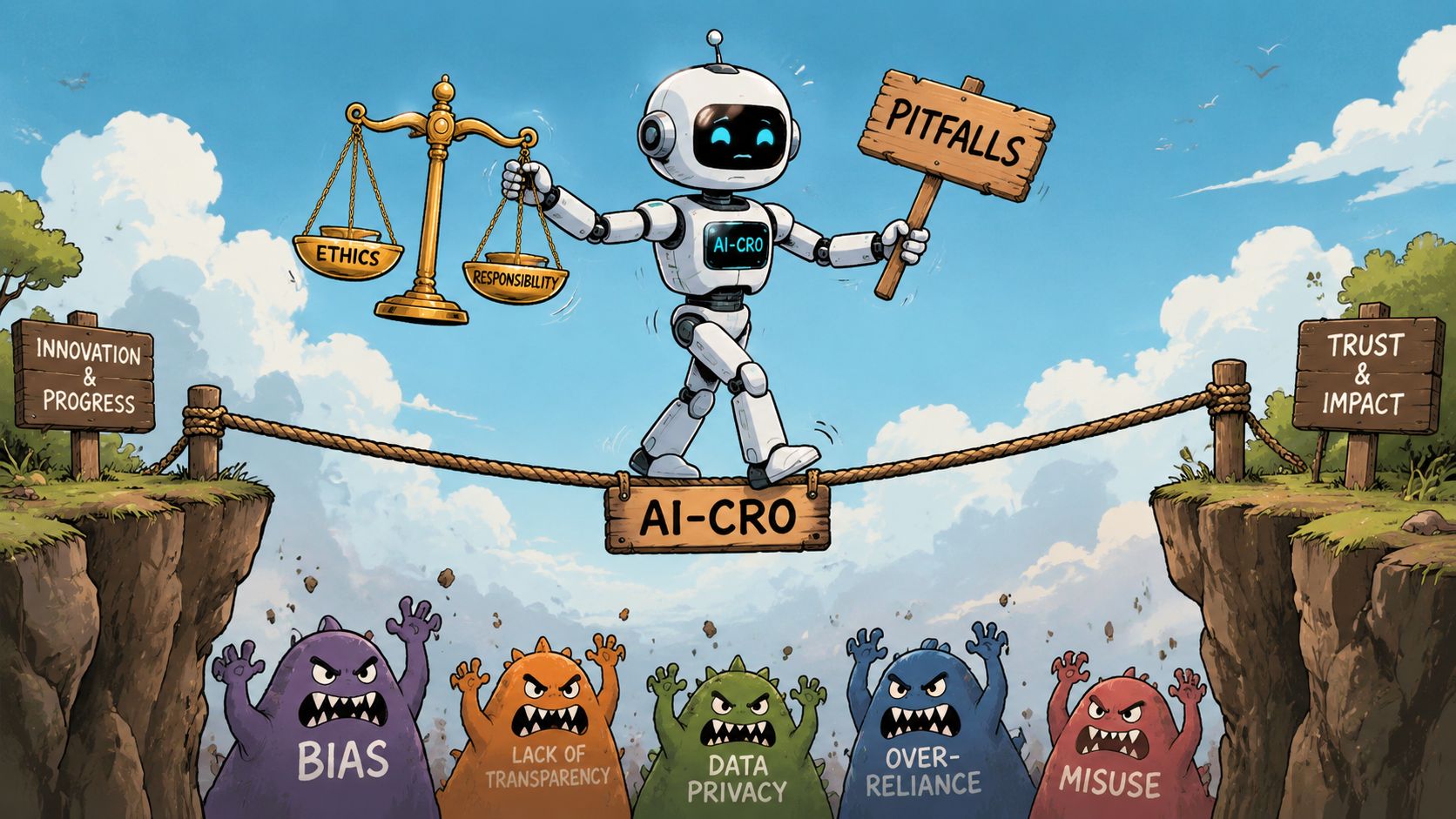
Navigating the Pitfalls and Ethics of AI-CRO
AI can improve a storefront quickly. It can also make bad decisions faster if nobody governs it.
That risk usually shows up in three places. First, teams trust a black-box recommendation because it sounds intelligent. Second, they feed the system weak or incomplete data. Third, they optimize for short-term conversion in ways that damage trust.
Better prediction still needs better judgment
Modern systems are getting better at linking behavioral signals with qualitative feedback. Modern AI CRO systems integrate quantitative behavioral data with qualitative Voice of Customer signals and can anticipate high-value actions or conversions based on contextual data and past behavior, shifting optimization from "what happened?" to "what should we do next?" in seconds, according to Contentsquare's guide to AI in CRO.
That's powerful. It also creates responsibility.
If your survey data is biased, your tracking is inconsistent, or your support data reflects only the loudest customers, the model may optimize toward a distorted picture of reality. Good teams treat AI outputs as decision support, not unquestioned truth.
The main risks to watch
Data quality problems
Missing events, duplicate conversions, poor product tagging, and broken attribution can push AI toward bad recommendations.Over-personalization
Personalization should reduce friction, not make shoppers feel watched or manipulated.Margin-blind optimization
A model may learn that aggressive offers convert. That doesn't mean those offers support profitability.Compliance gaps
If you use behavioral data for personalization, make sure your privacy practices, consent flows, and retention policies are aligned with the regions you sell into.
If your team can't explain why an AI-driven experience changed, you don't have control. You have outsourcing.
Ethical guardrails that actually help
The simplest governance model works best:
- Establish core constraints such as pricing rules, discount limits, and restricted claims.
- Review segment-level outcomes so one audience isn't harmed by a "successful" optimization.
- Keep human approval on sensitive changes involving pricing, urgency messaging, and high-impact product recommendations.
- Document what the system can change and what it can only recommend.
AI-CRO should make the buying experience clearer and more useful. If it starts relying on pressure, opacity, or hidden logic, it may lift short-term conversion while weakening the brand that has to earn the next purchase.
The Future of AI in eCommerce Conversion
Looking ahead, the scope of AI-CRO is expanding beyond page experience and onsite personalization. Shopify teams also need to make their stores easier for software agents to interpret, compare, and recommend.
CXL describes this as AI discoverability in CXL's analysis of AI and conversion strategy. For a practitioner, that translates into a familiar CRO job with a new audience. Human shoppers still need clear value, trust, and low friction. AI systems now need structured product data, explicit pricing logic, readable policies, and consistent availability signals.
This has practical value now.
A Shopify store with messy variant naming, inconsistent metafields, vague shipping language, or hidden promo rules is harder for both machines and people to evaluate. A store with clean feeds, clear return terms, accurate stock status, and standardized product attributes is easier to surface, easier to compare, and easier to buy from. That improves more than discoverability. It also reduces support load, comparison friction, and wasted traffic from poorly qualified visits.
The next phase of AI-CRO will reward brands that treat merchandising data as conversion infrastructure. For Shopify, that means tightening product taxonomy, keeping schema and feed data accurate, making offer logic explicit, and checking that PDP content answers straightforward buying questions without relying on brand-heavy copy to fill the gaps.
The stores that win here will not be the ones using the most AI tools. They will be the ones pairing current conversion gains with cleaner operational data and clearer customer communication.
If you're ready to turn AI-CRO from theory into a measured Shopify growth program, ECORN can help. Their team works with Shopify brands on design, development, and CRO, including practical AI implementation that improves store performance without losing control of the customer experience.



Mastering Multi Store Management on Shopify

Scale Shopify Store

10 Shopify App Ideas Worth Building in 2026

Conversion Rate Optimization for Landing Pages: The Playbook

Shopify Plus Automation: A Guide for 2026

10 Social Selling Platforms for Shopify Merchants

Shopify Website Design Examples: 7 Stores Worth Studying

7 Ecommerce Newsletter Examples for Shopify Brands

One Product Shopify Store: Build and Scale

Mobile Pop Up Strategy for Shopify Stores That Converts

Sitemap for Shopify: How to Find, Optimize, and Submit It

7 Single Product Websites Worth Emulating

Product Variants Shopify: The Complete 2026 Guide

Ecommerce Analytics Consulting for Growth

What Is AI Integration for eCommerce

How to Choose the Right eCommerce Website Development Firm

E Business Strategy Implementation

Conversion Tracking Setup for Shopify Stores

BigCommerce vs Shopify Plus Which Enterprise Wins in 2026

Shopify Theme Kit: Setup, Commands, and Migration Guide

Shopify Extension Development: A Practical 2026 Guide

Shopify Speed Score Explained and How to Improve It

Shopify Mobile Optimization: The 2026 Playbook

How to Add Subcategory in Shopify for Better UX

How to Implement Structured Data for Ecommerce in 2026

SEO App Mobile: Shopify Store Optimization Guide

Shopify Plus Support: What It Includes and How to Choose

Google Ads for Shopify: The Complete 2026 Playbook

Shopify New York: How to Find and Hire the Right Agency

Google Search Console for Shopify: The Complete Setup

First Party Data Collection for eCommerce Growth

FAQ Online Store Guide: Build and Measure It Right

Do FB Ads Work for eCommerce in 2026?

One Page Checkout for Shopify: Design and Implementation

Shopify GraphQL vs REST: The 2026 Developer Decision

Shopify Ecommerce Consulting: Strategy, Pricing &

Are Reddit Ads Worth It for eCommerce Brands

Shopify Title and Meta Description: A Practical 2026 Guide

Product Video Best Practices for Shopify Brands

Real-Time Inventory Management: A 2026 Guide

AI Chatbot Integration for Shopify Stores

Affiliate Program Management: A Shopify Guide

10 Best Performance Monitoring Tools for Shopify in 2026

Digital Asset Management for eCommerce Brands in 2026

Every Type of Facebook Ads Explained for eCommerce Growth

Product Information Management Explained for Shopify Brands

Support Ticket System: A Guide for Shopify Stores

10 Best Customer Service Tools for Shopify in 2026

Can I Start a Business with No Money? a 2026 Blueprint

What Sells Good on Etsy: Best Niches for 2026

Shopify Add to Cart Button: A Practical 2026 Guide

Customer Feedback Automation: A Practical eCommerce Guide

Critical Rendering Path: A Guide for Shopify Stores

How to Promote on TikTok for eCommerce in 2026

B2B eCommerce Consulting That Drives Real Revenue

10 Best Practices for Site Navigation in 2026

Return vs Refund for Shopify Stores: A Practical Guide

What Is Customer Lifetime Value and Why It Matters

What Is Voice of Customer Research for eCommerce

SMS Marketing for Ecommerce That Actually Converts

Master How to Improve Email Deliverability in 2026

Top 7 eCommerce Partners NYC for Shopify Brands in 2026

Machine Learning for Ecommerce: Boost Your Shopify Store

Beauty Market Research: Your 2026 Growth Guide

Shopify International Expansion: A 2026 Roadmap

What Does CRO Stand for in Business: Understanding CRO

Shopify Visual Merchandising: A Playbook for Higher Sales

Shopify Landing Page Design: Master Conversion in 2026

10 Best AI SEO Optimization Tools for Shopify in 2026

Agentic AI for Ecommerce: Boost Your Sales in 2026
Mastering Email Marketing Data for eCommerce Growth

Conversion Rate Optimisation Australia: Boost Your Sales

10 Product Bundling Strategies for Shopify in 2026

How to Increase Customer Lifetime Value: A Shopify Playbook

AI Customer Service Automation: Shopify Guide 2026

Clean Website Design: A Shopify Conversion Playbook

Omnichannel Retail Strategy: A Shopify Playbook

Product Data Enrichment: A Guide for Shopify Brands

Instagram Shopping Features a Guide for Shopify Stores

What Is Revenue Optimization: A Holistic RevOps Guide

Benefits of Conversion Rate Optimization: Boost Your

WordPress to Shopify Migration: Your 2026 Seamless Switch

Boost Sales: Ecommerce Payment Processing Guide 2026

Unified Commerce Platform: Benefits, KPIs & Shopify Guide

How to Reduce Bounce Rate eCommerce: Your 2026 Guide

Shopify API Integration: A Practical End-to-End Guide

How to Implement Data Governance: A 2026 Guide

Shopify Store Development Cost: A 2026 Breakdown

What Is Server Side Tracking: The Shopify Guide 2026

Marketing Automation Workflows: A Shopify Guide for 2026

Shopify: How to Reduce Technical Debt

Shopify UX Design Change: A Playbook for Growth

User Generated Content Strategy: Shopify Playbook

Shopify Pause and Build Plan Cost: A Complete 2026 Guide

Compare at Price on Shopify: A Complete Guide for 2026

Where Can I Sell My Prints? 10 Best Platforms for 2026
Shopify Order Management System: The Ultimate Guide 2026
What Is Marketing Attribution? an eCommerce Guide for 2026

10 Best Black Friday Sales Sheets for 2026

Discover the Top Social Media Marketing Agencies For


newsletter in your inbox