


Your Shopify revenue says one thing. Meta says another. GA4 shows fewer purchases than your finance team closed. You check attribution windows, compare channels, refresh reports, and still don't get a clean answer.
That gap usually isn't a dashboard problem. It's a collection problem.
If you're asking what is server side tracking, the short version is this: it moves measurement away from the browser and into infrastructure you control. For Shopify brands, that changes how conversion data gets captured, filtered, and sent to platforms like GA4 and Meta. It also changes who owns the logic, where privacy controls sit, and which implementation mistakes can discreetly break reporting.
Why Your eCommerce Data Is Inaccurate
Most Shopify merchants first notice the issue in paid media. Spend is climbing, the store is converting, but platform-reported results drift further away from what Shopify shows. That drift often gets blamed on attribution settings or reporting delays. In reality, the root cause is usually browser-side tracking loss.
Marketers globally lose between 10% and 30% of their tracking data because of browser restrictions, ad blockers, and privacy controls like Intelligent Tracking Prevention, as outlined in Osano's overview of server-side tracking. For a Shopify brand running paid acquisition, that isn't a minor reporting nuisance. It changes how you judge campaigns, audiences, and creative.
Where the gap starts
Client-side tracking depends on scripts firing in the customer's browser. That sounds fine until you remember what stands between the user and your data:
- Ad blockers: They can stop pixels and scripts before they fire.
- Browser privacy rules: Safari and other browsers aggressively limit tracking methods.
- Network interruptions: A customer can complete checkout while parts of your tracking stack fail unnoticed.
- Script collisions: Multiple apps and tags on Shopify can interfere with each other.
When that happens, your store still makes the sale. Your analytics stack just doesn't fully see it.
Practical rule: If Shopify is your source of truth for orders, but your media platforms and GA4 regularly undercount, your measurement setup is likely losing signals before they ever reach the platform.
Why this hurts decision-making
Bad collection creates bad attribution. And bad attribution leads to bad budgeting.
Teams pause campaigns that are effective. They overvalue channels that happen to keep more trackable signals. They test landing pages and offers against incomplete conversion data. If you need a refresher on how this affects channel reporting, this guide to marketing attribution models and decision-making is worth reviewing.
There's also a data architecture issue. Once your reporting fragments across Shopify, ad platforms, GA4, and internal dashboards, you need a cleaner structure for analysis. That's where a concept like qué es un datamart becomes useful. A datamart won't fix tracking loss by itself, but it helps organize the data you do trust.
Why server-side tracking enters the conversation
Server-side tracking exists because browser-based measurement has become less reliable. Instead of letting the browser talk directly to every vendor, you route events through a controlled server environment first. That gives you a better chance of preserving important signals, especially high-value events like purchases and checkouts.
For growth-focused brands, the question usually isn't whether data loss exists. It's whether you're still comfortable making budget decisions with it.
Client-Side vs Server-Side Tracking Explained
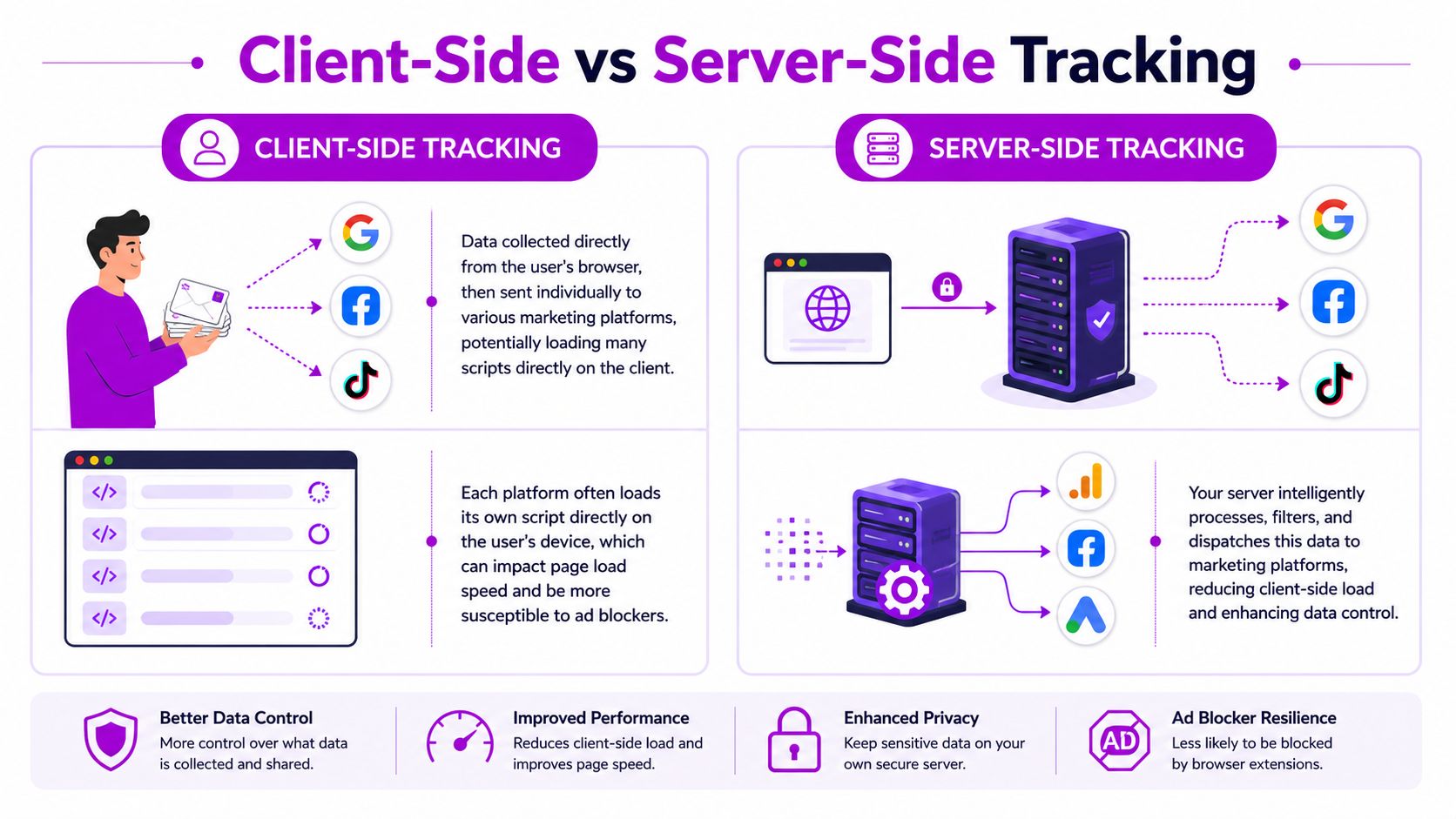
Client-side tracking asks the browser to do most of the work. Server-side tracking moves that work into a system you control. That one change affects reliability, governance, and how much confidence you can place in the numbers.
The simplest way to think about it
With client-side tracking, the customer's browser loads scripts from Google, Meta, TikTok, and whoever else you use. Each script tries to collect data and send it out directly.
With server-side tracking, the browser sends event data to your own controlled endpoint first. Your server or server container then decides what to send, where to send it, and in what format.
That sounds technical, but the business distinction is simple. Client-side gives vendors more direct access to collection. Server-side gives your business more control over the pipeline.
Client-side and server-side side by side
| Feature | Client-Side Tracking | Server-Side Tracking |
|---|---|---|
| Where data is collected | In the user's browser | In a server environment you control |
| How vendors receive data | Browser sends directly to each platform | Your server processes and forwards data |
| Exposure to blockers | Higher | Lower |
| Data governance | Limited | Stronger control before dispatch |
| Privacy handling | Harder to standardize across scripts | Easier to centralize and filter |
| Implementation effort | Faster to launch | More setup and monitoring |
| Shopify app compatibility risk | Often hidden until something breaks | More visible, but requires deliberate planning |
What works well with client-side
Client-side still has a place. It's easier to launch, easy to test for basic analytics, and useful for lightweight front-end interactions. If you need to validate simple click events or deploy marketing tags quickly, it's usually the path of least resistance.
That convenience is why so many Shopify stores stay there longer than they should.
Where server-side wins
Server-side tracking is stronger when the event matters financially or operationally. Purchases, checkout milestones, lead submissions, subscription starts, and post-purchase events all benefit from a more controlled handoff.
It also creates a cleaner governance layer. Instead of asking five different scripts to behave consistently, you set rules once and apply them before any data leaves your environment.
The biggest shift isn't technical. It's operational. Your team stops hoping every browser script behaves and starts owning the rules for data collection.
What doesn't work
What doesn't work is assuming server-side tracking is a magic replacement for everything. It won't automatically fix event naming, broken app logic, duplicate purchases, or poor consent handling. It improves the architecture. You still need disciplined implementation.
How Server-Side Tracking Actually Works
The mechanics matter because server-side tracking isn't just “better tracking.” It's a different flow.
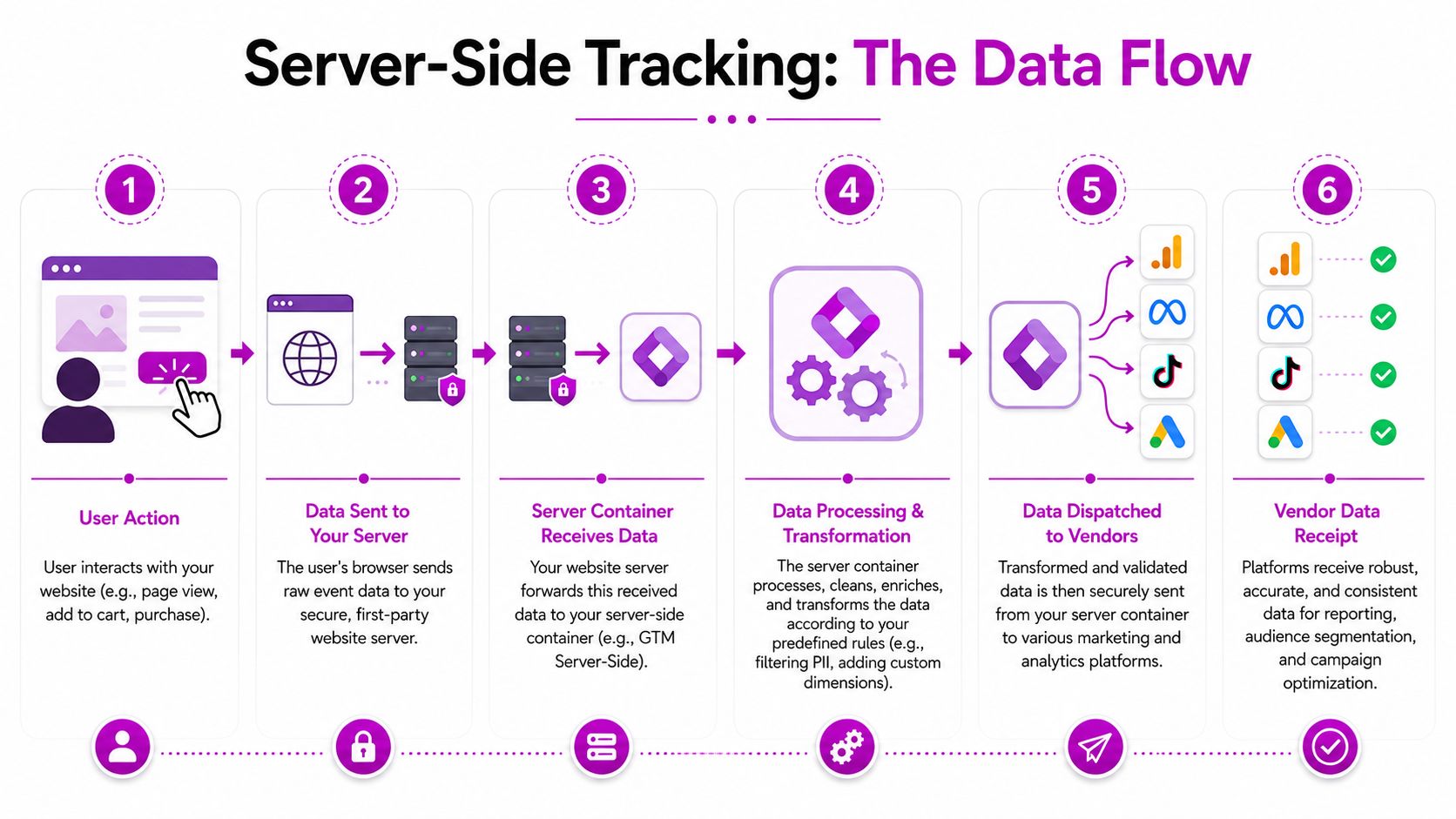
At a practical level, server-side tracking acts as a proxy. Your site sends raw event data to a server container, such as Google Tag Manager Server, and that container processes, transforms, and routes the data to marketing platforms. Benchmarks cited in Elevar's explanation of server-side tracking indicate that server-side setups can recover 15% to 30% of lost conversion data previously affected by browser privacy measures.
The data flow in plain English
- A customer loads a product page, adds an item to cart, or completes a purchase.
- Your store sends that event data to your server endpoint.
- The server container receives it through a client adapter.
- Rules inside the container validate, map, enrich, or strip fields.
- The server sends the cleaned event to GA4, Meta, TikTok, or other tools through their APIs.
- Each destination receives a more consistent payload.
A visual walkthrough helps:
Why the server container matters
The server container is the gatekeeper. It doesn't just relay data. It decides how data should be shaped before it leaves your stack.
That gives you useful controls:
- Validation: Reject malformed or incomplete events.
- Transformation: Convert Shopify event structures into GA4-friendly formats.
- Filtering: Remove fields you don't want to share with vendors.
- Routing: Send different payloads to different destinations.
In this scenario, server-side tracking becomes more than a workaround for ad blockers. It becomes a data operations layer.
Two implementation details brand owners should know
First, server-side setups commonly use a dedicated subdomain, often something like gtm.example.com, as the collection buffer. Second, the server container uses client adapters to ingest incoming requests and understand what kind of data they represent.
Those two details matter because they let teams centralize privacy controls and remove PII before events are forwarded externally.
Clean data beats more data. If your server container forwards every raw field it receives, you've added complexity without adding control.
The Real Benefits and Trade-offs of Going Server-Side
The upside is real. So are the compromises.
What brands gain
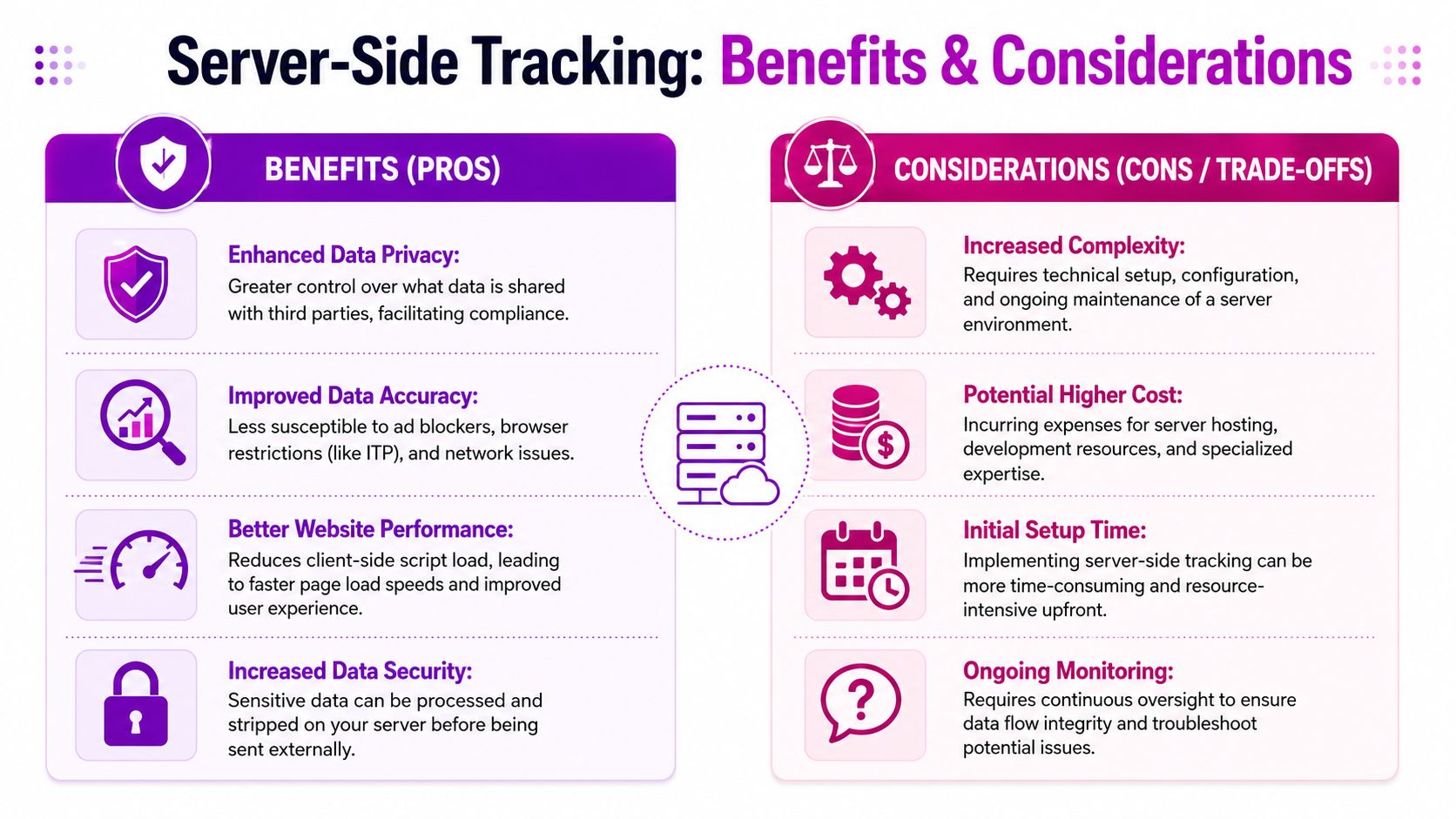
The first gain is better measurement resilience. You're less dependent on browser behavior, which is exactly where modern tracking breaks.
The second is control. You choose what gets sent to vendors, how event names are standardized, and where sensitive fields are removed. For privacy-conscious teams, that's a major operational improvement.
The third is cleaner site performance management. Fewer client-side scripts can reduce front-end clutter. On a Shopify store with many apps and pixels, that matters.
A strong server-side setup can also make your reporting stack more disciplined:
- Purchase events become more dependable
- Platform payloads become more standardized
- Consent logic can be handled more centrally
- Vendor access to raw customer data can be narrowed
What brands underestimate
The ongoing work is often underestimated. Server-side tracking isn't a one-time install. It's infrastructure.
Someone has to monitor event health. Someone has to test app changes. Someone has to check whether GA4, Meta, and Shopify still align after a theme update, checkout extension change, or app install.
There's also a strategic trade-off that many articles ignore. The accuracy paradox is real. A future-dated claim cited in the source material says a 2026 McKinsey report found that 55% of brands using server-side tracking saw a 12% to 18% decline in AI recommendation engine performance because reduced behavioral signal richness made personalization less effective. Treat that as a projection from the cited material, not a current universal outcome.
Why the accuracy paradox matters
Attribution data and personalization data are not always the same thing.
Server-side tracking is excellent for preserving core conversion signals. But some AI and personalization tools rely on richer front-end behavior, such as fine-grained interaction patterns, on-page engagement clues, and device-level context. If your setup becomes too narrow, your ad reporting may improve while your recommendation engine gets less useful input.
That doesn't mean server-side is a bad move. It means you need to decide which signals must remain available and which can be simplified.
Server-side tracking should improve control, not flatten the customer story until your AI stack has nothing meaningful left to work with.
A practical decision filter
Ask three questions before you migrate aggressively:
| Question | If the answer is yes | If the answer is no |
|---|---|---|
| Are paid media decisions suffering from missing conversions? | Prioritize server-side for purchase and checkout events | Keep current setup while auditing gaps |
| Do you have someone who can maintain tracking infrastructure? | Use a more customizable server-side approach | Favor managed tooling |
| Do you depend heavily on AI personalization signals? | Preserve key front-end behavior alongside server-side data | You can optimize harder for attribution control |
For most Shopify brands, the right answer is hybrid. Move critical conversion tracking server-side. Keep selective front-end signals where they add clear value.
Implementing Server-Side Tracking for Shopify and GA4
Shopify makes commerce easy. It does not make data architecture easy.
The biggest mistake merchants make is treating server-side tracking like a plugin choice. It's closer to a systems project. You're working across Shopify events, checkout behavior, app scripts, GA4 mapping, vendor APIs, consent logic, and ongoing QA.
The three realistic paths
Most Shopify brands choose one of these routes.
- Google Tag Manager server-side
This path gives you flexibility and strong control. It suits teams with technical support and a clear analytics plan. You can build more customized routing logic, but you'll need tighter governance around naming, testing, and maintenance.
A specialized implementation partner or managed platform
This is the practical option for brands that want faster deployment and fewer infrastructure headaches. You trade some flexibility for speed, support, and templates that already understand common eCommerce events.
A custom server-to-server setup
This route makes sense when a brand has unusual attribution requirements, strict internal data policies, or a larger engineering function. It also carries the most implementation overhead.
- List every app that touches the storefront: Loyalty, upsell, reviews, subscriptions, quizzes, bundles, and personalization tools all need scrutiny.
- Check event ownership: Decide whether Shopify, the theme, GTM, or an app is responsible for each core event.
- Review checkout dependencies: Identify any logic that depends on legacy scripts or assumptions that no longer hold in modern Shopify setups.
- Map critical destinations: Confirm which events must reach GA4, Meta, and other platforms, and in what format.
- Test deduplication rules: If both browser and server events exist, make sure platforms can reconcile them cleanly.
- Audit consent behavior: Verify that opt-out logic applies consistently before the server forwards anything.
- Event name:
add_to_cart - Product identifier: A stable item or variant ID
- Value fields: Price, currency, and quantity
- Context fields: Page location, session context, or source markers if needed
Confirm the browser sent the event
Check whether the initial request left the storefront.Check the server container received it
If the request never reaches the container, the issue is upstream.Validate the mapped payload
Wrong names, missing parameters, or malformed values can stop useful reporting even when the event technically arrives.Review dispatch logic
The event may be received but not routed to the GA4 tag correctly.Inspect privacy filters
Overly aggressive filtering can remove fields the destination requires.- Audit your current gap: Compare Shopify orders with GA4 and your main ad platform for the same period. Look for consistent undercounting patterns, not one-off anomalies.
- Choose one implementation path: Managed platform, GTM server-side, or custom. Pick based on internal capability, not ambition.
- Migrate one critical event first: Purchase is the right starting point for most brands.
- Run an app conflict review: Don't launch until you know which Shopify apps can alter or interrupt event flow.
- Preserve useful front-end signals selectively: Don't strip your data model so aggressively that downstream personalization suffers.
- Set an owner: Someone must monitor event health after launch.
If you're still evaluating the platform layer under your broader commerce stack, this guide on choosing your 2025 business CMS is a useful comparison point, especially for merchants balancing Shopify simplicity against customization needs.
The Shopify-specific problems most guides skip
Shopify is not a blank-slate environment. Events can be affected by theme code, checkout extensibility, app injectors, post-purchase tools, loyalty systems, subscription apps, and review widgets.
A future-dated source in the provided material says a 2025 study by Streamline Commerce found that 42% of failed Shopify server-side implementations were caused by unaddressed third-party app conflicts. That aligns with what practitioners regularly see. The tracking logic is often fine. The ecosystem around it is not.
Use this compatibility audit before you touch production:
A practical rollout sequence
Start with purchase tracking. If you can't trust purchase events, nothing else matters.
Then move to checkout milestones and add-to-cart. After that, evaluate which marketing destinations deserve server-side dispatch first. For many stores, GA4 and Meta are the highest priority because they influence both reporting and optimization.
If your current analytics setup is still uneven, it helps to revisit the broader migration basics in this guide to GA4 migration and setup planning.
What usually works best
For most growing Shopify brands, the best approach is not “migrate everything.” It's migrate the events that directly affect revenue decisions, prove the flow is stable, then expand.
What usually fails is trying to rebuild the full event ecosystem in one pass while ignoring app conflicts. Shopify stores rarely break because the idea of server-side tracking is wrong. They break because the event chain is more crowded than the implementation plan admits.
Common Event Mapping and Troubleshooting
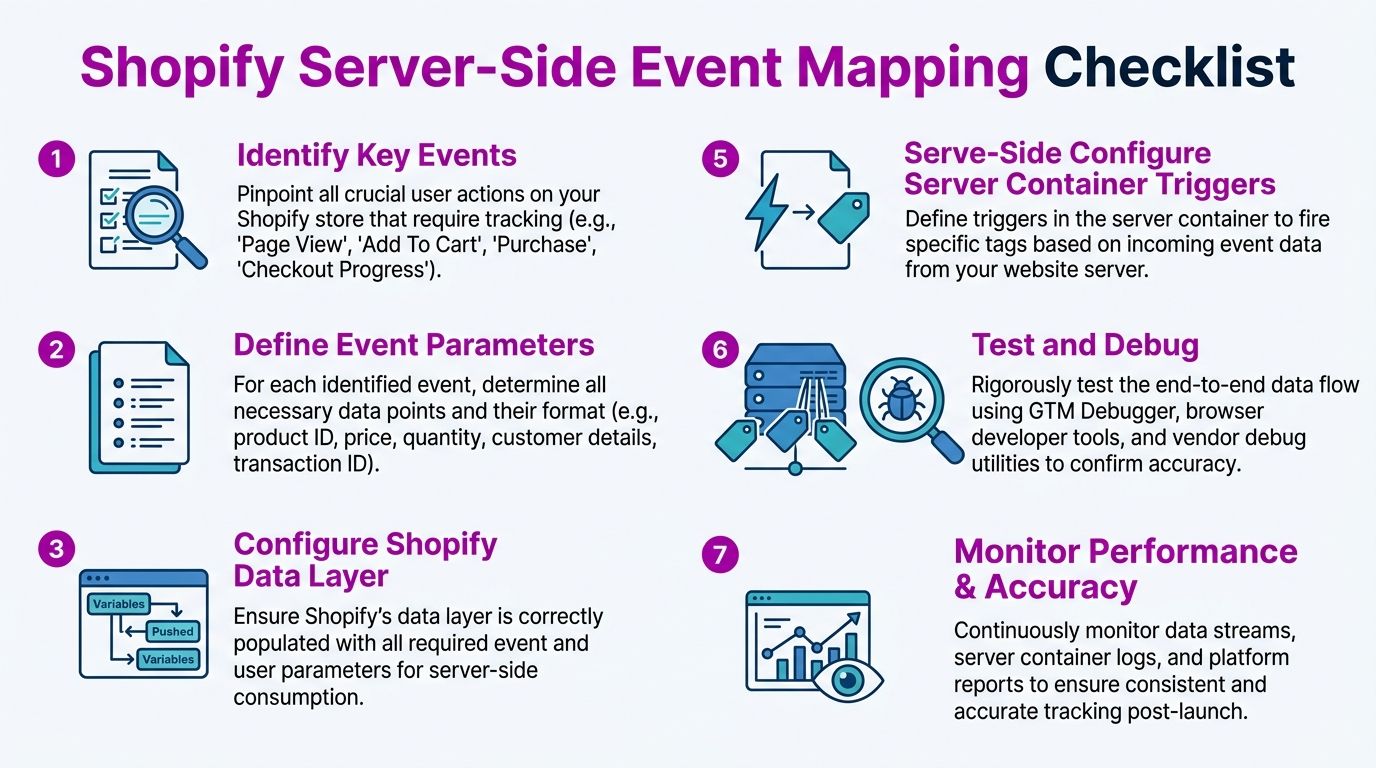
The success of server-side tracking comes down to event mapping. If the payload is wrong, the architecture doesn't save you.
A simple Shopify example
Take an add_to_cart action.
On Shopify, that event may originate from theme logic, a data layer push, or an app interaction. Your server-side setup receives the incoming payload, then maps it into the naming and parameter structure required by GA4 or another destination.
A clean mapping usually needs:
Inside the server container, a client adapter ingests the request. The container then applies rules, strips anything unnecessary, and forwards a normalized event. The same architecture commonly uses a dedicated subdomain as a buffer, which helps with data minimization and keeps PII out of outgoing vendor calls.
What to check when GA4 looks wrong
If events fire but don't appear in GA4 Realtime, don't guess. Follow the chain.
A server container isn't just a pass-through. It can silently improve or silently break your measurement depending on the rules inside it.
Three common failure patterns
| Problem | Likely cause | Best next check |
|---|---|---|
| Purchase totals don't match Shopify | Duplicate or missing purchase dispatch | Compare order IDs across Shopify and destination logs |
| GA4 receives events with missing item data | Bad parameter mapping | Inspect item array formatting in the server payload |
| Meta or other platforms show unstable conversion counts | Deduplication or routing issue | Check whether browser and server events share the required identifiers |
What good troubleshooting looks like
Good debugging is sequential. Don't start in the ad platform. Start at the event source, then verify each handoff.
That means checking the storefront trigger, the incoming server request, the transformed payload, and the final destination response. Teams that skip those steps often spend hours inside dashboards when the actual problem is a broken mapping rule or an app overwriting expected data.
Your Next Steps for Data Accuracy
If your store depends on paid media, server-side tracking is no longer a niche technical upgrade. It's part of modern measurement hygiene.
You don't need to rebuild your stack overnight. You do need a clear order of operations.
Start with this short action plan
The biggest win comes from discipline. Brands that treat tracking as infrastructure usually make better budgeting decisions because they trust the input.
Brands that treat it as a one-off tag project usually end up back where they started, with prettier dashboards and the same uncertainty.
If your Shopify tracking is fragmented, ECORN can help you turn it into an operating system your team can trust. From Shopify development and CRO to measurement planning and implementation support, ECORN works with brands that need cleaner data, better conversion visibility, and a setup that scales with the business.



E Business Strategy Implementation

Conversion Tracking Setup for Shopify Stores

BigCommerce vs Shopify Plus Which Enterprise Wins in 2026

Shopify Theme Kit: Setup, Commands, and Migration Guide

Shopify Extension Development: A Practical 2026 Guide

Shopify Speed Score Explained and How to Improve It

Shopify Mobile Optimization: The 2026 Playbook

How to Add Subcategory in Shopify for Better UX

How to Implement Structured Data for Ecommerce in 2026

SEO App Mobile: Shopify Store Optimization Guide

Shopify Plus Support: What It Includes and How to Choose

Google Ads for Shopify: The Complete 2026 Playbook

Shopify New York: How to Find and Hire the Right Agency

Google Search Console for Shopify: The Complete Setup

First Party Data Collection for eCommerce Growth

FAQ Online Store Guide: Build and Measure It Right

Do FB Ads Work for eCommerce in 2026?

One Page Checkout for Shopify: Design and Implementation

Shopify GraphQL vs REST: The 2026 Developer Decision

Shopify Ecommerce Consulting: Strategy, Pricing &

Are Reddit Ads Worth It for eCommerce Brands

Shopify Title and Meta Description: A Practical 2026 Guide

Product Video Best Practices for Shopify Brands

Real-Time Inventory Management: A 2026 Guide

AI Chatbot Integration for Shopify Stores

Affiliate Program Management: A Shopify Guide

10 Best Performance Monitoring Tools for Shopify in 2026

Digital Asset Management for eCommerce Brands in 2026

Every Type of Facebook Ads Explained for eCommerce Growth

Product Information Management Explained for Shopify Brands

Support Ticket System: A Guide for Shopify Stores

10 Best Customer Service Tools for Shopify in 2026

Can I Start a Business with No Money? a 2026 Blueprint

What Sells Good on Etsy: Best Niches for 2026

Shopify Add to Cart Button: A Practical 2026 Guide

Customer Feedback Automation: A Practical eCommerce Guide

Critical Rendering Path: A Guide for Shopify Stores

How to Promote on TikTok for eCommerce in 2026

B2B eCommerce Consulting That Drives Real Revenue

10 Best Practices for Site Navigation in 2026

Return vs Refund for Shopify Stores: A Practical Guide

What Is Customer Lifetime Value and Why It Matters

What Is Voice of Customer Research for eCommerce

SMS Marketing for Ecommerce That Actually Converts

Master How to Improve Email Deliverability in 2026

Top 7 eCommerce Partners NYC for Shopify Brands in 2026

Machine Learning for Ecommerce: Boost Your Shopify Store

Beauty Market Research: Your 2026 Growth Guide

Shopify International Expansion: A 2026 Roadmap

What Does CRO Stand for in Business: Understanding CRO

Shopify Visual Merchandising: A Playbook for Higher Sales

Shopify Landing Page Design: Master Conversion in 2026

10 Best AI SEO Optimization Tools for Shopify in 2026

Agentic AI for Ecommerce: Boost Your Sales in 2026
Mastering Email Marketing Data for eCommerce Growth

Conversion Rate Optimisation Australia: Boost Your Sales

Conversion Rate Optimization AI: Your Shopify Store Guide

10 Product Bundling Strategies for Shopify in 2026

How to Increase Customer Lifetime Value: A Shopify Playbook

AI Customer Service Automation: Shopify Guide 2026

Clean Website Design: A Shopify Conversion Playbook

Omnichannel Retail Strategy: A Shopify Playbook

Product Data Enrichment: A Guide for Shopify Brands

Instagram Shopping Features a Guide for Shopify Stores

What Is Revenue Optimization: A Holistic RevOps Guide

Benefits of Conversion Rate Optimization: Boost Your

WordPress to Shopify Migration: Your 2026 Seamless Switch

Boost Sales: Ecommerce Payment Processing Guide 2026

Unified Commerce Platform: Benefits, KPIs & Shopify Guide

How to Reduce Bounce Rate eCommerce: Your 2026 Guide

Shopify API Integration: A Practical End-to-End Guide

How to Implement Data Governance: A 2026 Guide

Shopify Store Development Cost: A 2026 Breakdown

Marketing Automation Workflows: A Shopify Guide for 2026

Shopify: How to Reduce Technical Debt

Shopify UX Design Change: A Playbook for Growth

User Generated Content Strategy: Shopify Playbook

Shopify Pause and Build Plan Cost: A Complete 2026 Guide

Compare at Price on Shopify: A Complete Guide for 2026

Where Can I Sell My Prints? 10 Best Platforms for 2026

Shopify Order Management System: The Ultimate Guide 2026

What Is Marketing Attribution? an eCommerce Guide for 2026

10 Best Black Friday Sales Sheets for 2026

Discover the Top Social Media Marketing Agencies For

Consumer Confidence Definition for eCommerce in 2026

What Is Social Commerce? Your 2026 Guide to Boosting Sales

A Social Ad Campaign Playbook for eCommerce Growth

7 Best FAQ Page Examples for SaaS & eCommerce

Market Research in Fashion Industry: A Guide for Shopify

Shopify Migration Services: Expert Guide for 2026

Mastering FB Retargeting Ads for Shopify in 2026

What Is Omnichannel Ecommerce

Master Your Shopify Plus Migration: The 2026 Guide

Shopify Integration Services: A Merchant's 2026 Guide

Shopify Collection Description: A Guide to SEO & Sales

Shopify Plus Contact: Reach Sales & Support Effectively

Top Luxury Shopify Stores: Design & UX Strategies

How to Improve Customer Experience: A Shopify Roadmap

Creative Facebook Ads: 10 Examples for Shopify Brands

Remarketing with Facebook Ads: A Shopify Guide for 2026


newsletter in your inbox