


Your Shopify dashboard says one thing. GA4 says another. Klaviyo segments don't match what your customer support team sees in the CRM. Paid social is optimizing against events your analyst doesn't trust. Meanwhile, someone exported a customer list last month, and nobody can say who still has the file.
That's the point where most eCommerce teams realize they don't have a reporting problem. They have a governance problem.
For a growing brand, data governance isn't an enterprise paperwork exercise. It's the operating system for how customer, product, order, and marketing data gets defined, accessed, cleaned, and used across Shopify, Klaviyo, GA4, Meta, Google Ads, and whatever app stack has grown around them. If you're trying to learn how to implement data governance, start there. Not with theory. With the actual mess in your stack.
Why Your eCommerce Brand Needs Data Governance Now
A familiar scenario plays out every week in scaling brands. The retention lead builds a Klaviyo campaign to target repeat customers. Finance reviews Shopify sales. The growth team checks platform-reported conversion data in Meta and Google Ads. The founder asks a simple question in Monday's meeting: “What's our real customer acquisition performance by channel?”
Nobody answers with confidence.
That lack of trust spreads fast. Merchandising starts questioning product reporting. Lifecycle marketing doubts whether suppression lists are accurate. Support sees customer records that don't match order histories. Teams stop using shared dashboards and build their own versions in spreadsheets. Once that happens, your stack still looks advanced, but the business is running on side calculations and gut calls.
What data chaos looks like in Shopify brands
In eCommerce, governance problems usually show up in practical ways:
- Conflicting order data: Shopify, GA4, and ad platforms all report revenue differently, and nobody has written the official business definition for what counts as a sale.
- Broken customer segmentation: Klaviyo flows fire from outdated tags, duplicate profiles, or inconsistent consent fields.
- Catalog inconsistency: Product titles, variants, bundles, and inventory attributes don't follow a standard, so feeds break across Google Merchant Center and Meta.
- Access sprawl: Too many people have admin access in Shopify or can export data they don't need.
Practical rule: If two departments use the same metric name but mean different things, governance already matters.
This isn't just operational friction. It hits margin, personalization, and compliance. Gartner notes that poor data quality costs businesses an average of $15 million per year, while eCommerce brands using clean, governed data can see up to a 25% increase in conversion rates from personalized marketing in its guidance on building a business case for data quality improvement.
Governance is how brands regain trust
Good governance does three things for a growing Shopify brand.
First, it sets one accepted definition for key entities like customer, order, net sales, subscriber, and active product. Second, it assigns ownership, so someone is accountable when the data is wrong. Third, it creates access and usage rules that fit the way eCommerce teams work.
You don't need a committee of twenty people. You need a workable system that keeps your core data reliable enough for decision-making and controlled enough for privacy and security.
Laying the Foundation Your Governance Framework
Most first-time governance efforts fail because they start too wide. “Govern all our data” sounds ambitious, but it gives nobody a clear starting point. A better approach is to choose the few data domains that create the most operational pain in your current stack.
For most Shopify brands, that means customer data, product catalog data, and order data.
Start with business objectives, not policy documents
Your framework should tie directly to business outcomes. If it doesn't, the team will see it as overhead and ignore it.
Strong objectives usually sound like this:
- Improve customer segmentation: Ensure Shopify and Klaviyo customer fields are consistent enough for reliable targeting and suppression.
- Stabilize product data: Standardize titles, tags, variant attributes, and merchandising fields so feeds and storefront filters behave predictably.
- Reduce reporting disputes: Define one approved source and one approved definition for revenue, orders, refunds, and customer status.
- Support privacy compliance: Make consent, export, deletion, and access workflows clear across your stack.
Weak objectives sound like “improve data maturity” or “create better governance.” Those aren't wrong. They're just too abstract to manage.
Assign the core roles early
You don't need a formal data office. You do need named people.
Here's the simplest role structure that works in eCommerce:
- Data Owner: The business leader accountable for a data domain. For customer data, this might be your Head of Retention or Director of eCommerce.
- Data Steward: The person who keeps definitions, quality rules, and issue resolution moving. Often an operations manager, analyst, or CRM lead.
- Data Custodian: The technical team or partner managing integrations, storage, permissions, and implementation details.
- Business User: The people who rely on the data but don't govern it directly.
A common mistake is assigning ownership to “the data team” or “marketing.” That usually means no ownership at all.
Governance works when one person can say yes, no, or not yet.
Use a simple RACI before you buy software
If you're doing this for the first time, a spreadsheet is enough. Build your governance foundation in a shared document before you touch tooling. This is also where documented process matters. If your team needs a better rhythm for operational handoffs, Million Dollar Sellers has a useful guide on creating standard operating procedures that fits well with governance work.
| Data Domain | Data Owner (Accountable) | Data Steward (Responsible) | Data Custodian (Consulted) | Business User (Informed) |
|---|---|---|---|---|
| Customer Data | [Name] | [Name] | [Name or team] | [Teams] |
| Product Catalog | [Name] | [Name] | [Name or team] | [Teams] |
| Order Information | [Name] | [Name] | [Name or team] | [Teams] |
| Marketing Consent | [Name] | [Name] | [Name or team] | [Teams] |
| Attribution Data | [Name] | [Name] | [Name or team] | [Teams] |
A practical scope for the first 90 days
Don't try to govern every report, app, and data field at once. Start with a narrow operating model:
- Pick three domains that matter most to revenue and customer experience.
- Define ten to fifteen business-critical fields inside those domains.
- Assign one owner and one steward per domain.
- Set an approval rule for any new field, sync, or data export touching those domains.
- Create one place where definitions and rules live.
That's enough to change behavior without slowing the business down.
Cataloging Your eCommerce Data Assets
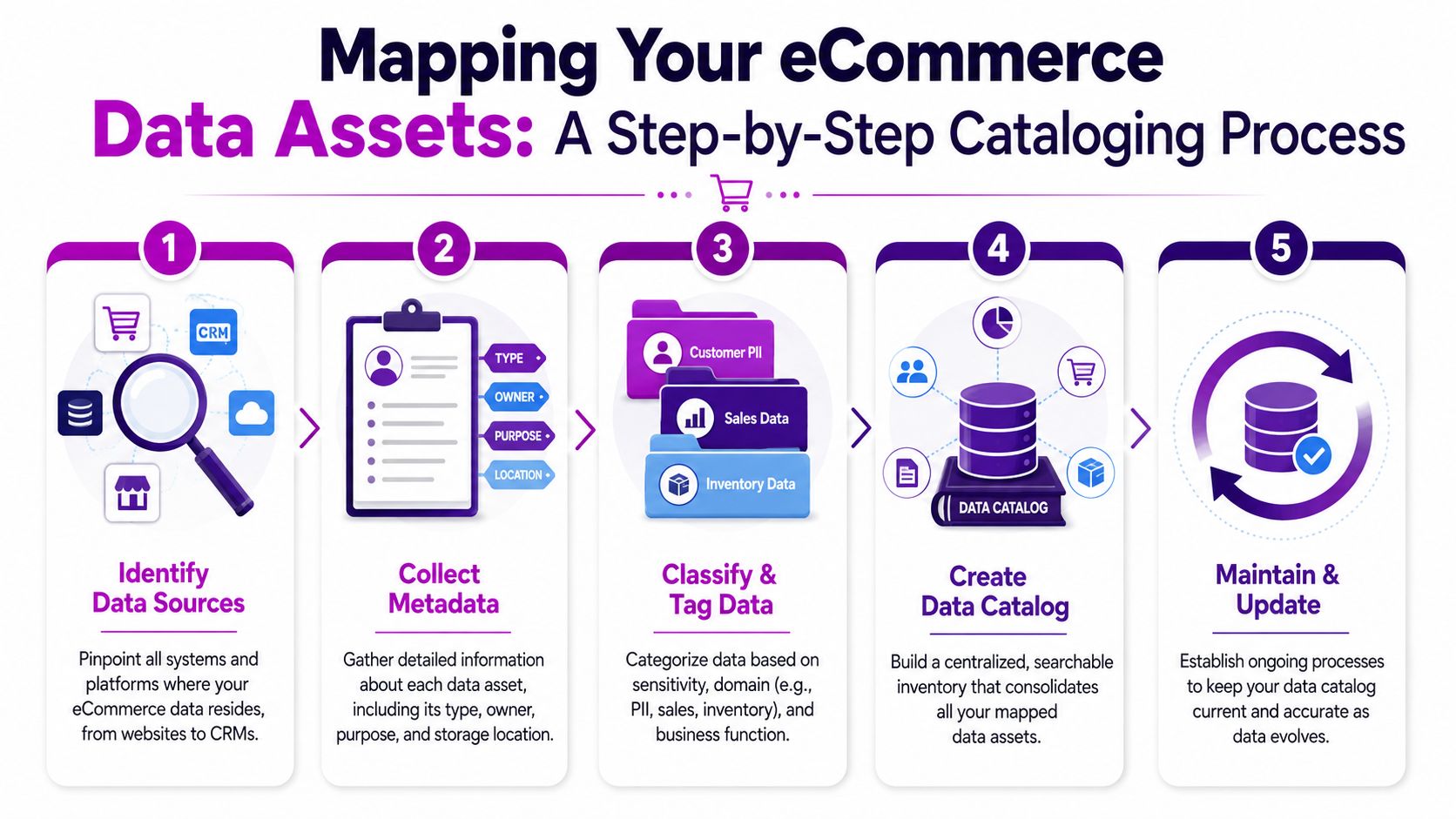
You can't govern what you haven't mapped. Most Shopify brands think they know their data stack until they try to document it. Then they realize customer data lives in Shopify, Klaviyo, GA4, Google Ads, Meta, Gorgias, Recharge, a returns platform, a subscription app, a loyalty tool, and several spreadsheets that nobody officially owns.
A data catalog fixes that by creating one inventory of what data exists, where it comes from, who owns it, and how it's used.
Map the stack from acquisition to retention
Start with movement, not storage. Follow the path data takes through the business.
For a typical eCommerce brand, the flow looks something like this:
- Acquisition sources: Google Ads, Meta Ads, TikTok Ads, affiliates, influencer platforms
- Commerce core: Shopify, Shopify Plus, checkout extensions, subscription apps
- Lifecycle and messaging: Klaviyo, Attentive, Postscript
- Service and operations: Gorgias, returns tools, 3PL systems, inventory apps
- Analytics and reporting: GA4, Looker Studio, Triple Whale, Northbeam, internal spreadsheets
Your first pass doesn't need technical depth. It needs visibility. List every system that creates, stores, transforms, or exports business-critical data.
Build a lightweight data dictionary
At this point, governance becomes useful instead of theoretical. Your data dictionary should answer four questions for every important field or metric:
- What is it called?
- What does it mean in the business?
- Where does it come from?
- Who owns it?
A simple spreadsheet can handle this well at the start.
| Field or Metric | Business Definition | Source System | Downstream Use | Owner |
|---|---|---|---|---|
| Active Subscriber | Customer eligible for marketing messages under your internal rules | Klaviyo and consent source | Campaign targeting, suppression | CRM Lead |
| First Purchase Date | Approved source date for a customer's first completed order | Shopify | Lifecycle flows, cohort reporting | eCommerce Manager |
| Net Sales | The brand's approved definition of post-adjustment sales | Defined source of truth | Finance and reporting | Finance Lead |
| Product Type | Standard merchandising category used across storefront and feeds | Shopify | Navigation, feeds, reporting | Merchandising Lead |
Define your golden record
Not every system should be treated equally. For each critical entity, decide which platform is the golden record, meaning the source your team trusts first when there's a conflict.
For many brands:
- Customer golden record: Shopify for transactional identity, sometimes supported by a CRM or CDP later
- Product golden record: Shopify or a PIM, depending on catalog complexity
- Order golden record: Shopify
- Consent golden record: The platform and field your legal and CRM teams have agreed to use
Teams often blend fields from multiple tools without noticing, resulting in one “customer” in Shopify, another in Klaviyo, and a third in your BI dashboard.
If a field has no owner, no definition, and no approved source, treat it as untrusted until proven otherwise.
Document lineage only where it matters
You don't need enterprise lineage diagrams for every table. Focus on business-critical paths, especially where marketers and analysts make decisions.
Examples worth documenting:
- A UTM parameter captured on landing
- Session and event data flowing into GA4
- Purchase data passing from Shopify into Klaviyo
- Product feed attributes sent from Shopify to ad channels
- Refund or cancellation logic entering BI reports
That level of lineage helps your team answer practical questions quickly. Why did this segment shrink? Why did the paid team's dashboard disagree with finance? Why did a product disappear from a feed?
A first-pass cataloging checklist
- List every platform touching customer, product, and order data
- Name the owner for each platform
- Tag sensitive fields such as PII, consent, and support notes
- Mark approved exports and recurring manual CSV workflows
- Identify duplicate fields with different meanings across tools
- Choose the golden record for each core business entity
You don't need a polished catalog on day one. You need one accurate enough that people stop guessing.
Establishing Policies and Access Controls
Most eCommerce data incidents aren't dramatic hacks. They're routine mistakes. A former agency still has admin access in Shopify. A marketer downloads a full customer export to build a lookalike audience. A support team member can view data they never needed. A contractor creates a private spreadsheet with customer details and no retention policy.
Those aren't edge cases. They're what happens when fast-growing brands run without explicit rules.
Write policies people can actually follow
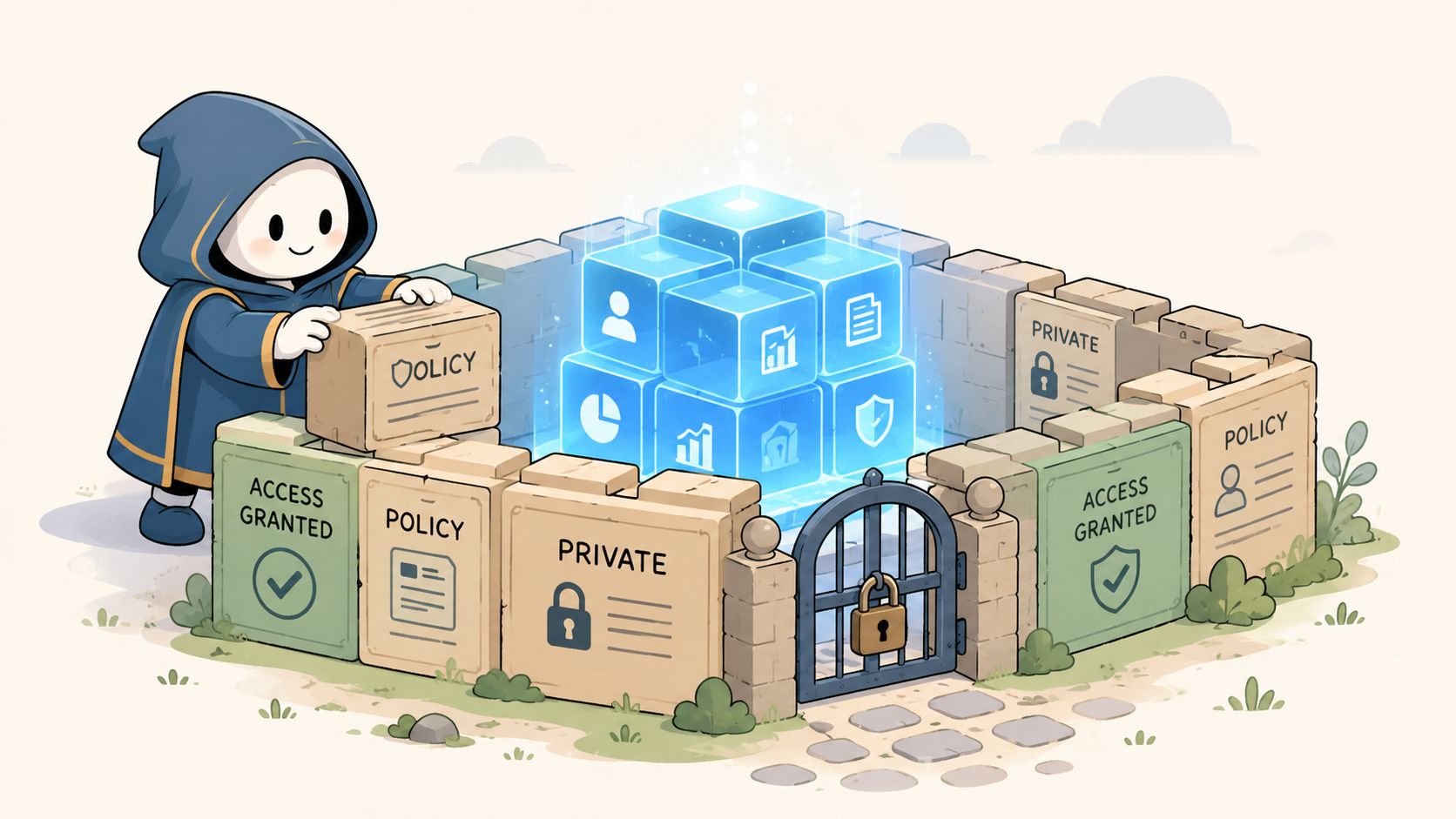
Your policies should fit on one page per topic. If they read like legal memos, your team won't use them.
Start with these policy areas:
- Data access policy: Who gets admin, analyst, marketer, support, and agency access in Shopify, Klaviyo, GA4, and ad platforms
- Data usage policy: What customer and order data can be used for campaign creation, exports, audience syncing, and vendor sharing
- Data quality policy: Which fields are mandatory, who fixes errors, and how issues get escalated
- Retention and deletion policy: Where exports can be stored, how long they stay, and who deletes them
A good policy removes ambiguity. It doesn't try to cover every possible edge case.
Role-based access should be boring and strict
Many brands stay too casual. If someone says, “Give me full access just in case,” the answer should usually be no.
Use a checklist like this across your stack:
- Shopify admin review: Limit full admin rights to the small group that truly needs configuration control.
- Klaviyo permissions: Separate flow editing, list management, and account administration where possible.
- Ad platform access: Keep billing, audience management, and reporting access distinct.
- Shared credentials: Eliminate them. Individual logins are easier to audit and revoke.
- Agency and contractor access: Set expiry dates and review them at offboarding.
- Exports: Restrict who can download customer-level data, and document why each recurring export exists.
The safest export is the one nobody needed to create.
Privacy obligations such as GDPR and CCPA become easier to handle when governance already defines ownership, classification, and access. That's also why brands exploring AI use in support, merchandising, or marketing should read broader policy thinking, including ELECTE Newsletter's AI policy brief. The specific regulations may differ from your daily Shopify operations, but the core lesson holds: set guardrails before usage expands.
Policies need technical reinforcement
Policy without implementation turns into wishful thinking. If you're tightening governance around attribution and consent data, server-side data collection often enters the conversation. This overview of server-side tracking for eCommerce teams is useful because it shows where control improves and where governance still needs human decision-making.
A simple approval workflow helps:
- Request access with business reason.
- Owner approves based on role and domain.
- Custodian implements in the platform.
- Steward records the access and review date.
- Quarterly review removes what's no longer needed.
Before you move on, train managers to treat access reviews as operational hygiene, not a special project.
To ground the team, this walkthrough is worth watching:
Selecting Your eCommerce Governance Tech Stack
Tool choice gets overcomplicated fast. Brands jump from messy spreadsheets to evaluating enterprise governance platforms they won't fully use. That usually ends with low adoption and a bigger software bill.
The better question is simpler: what level of tooling matches your current complexity?
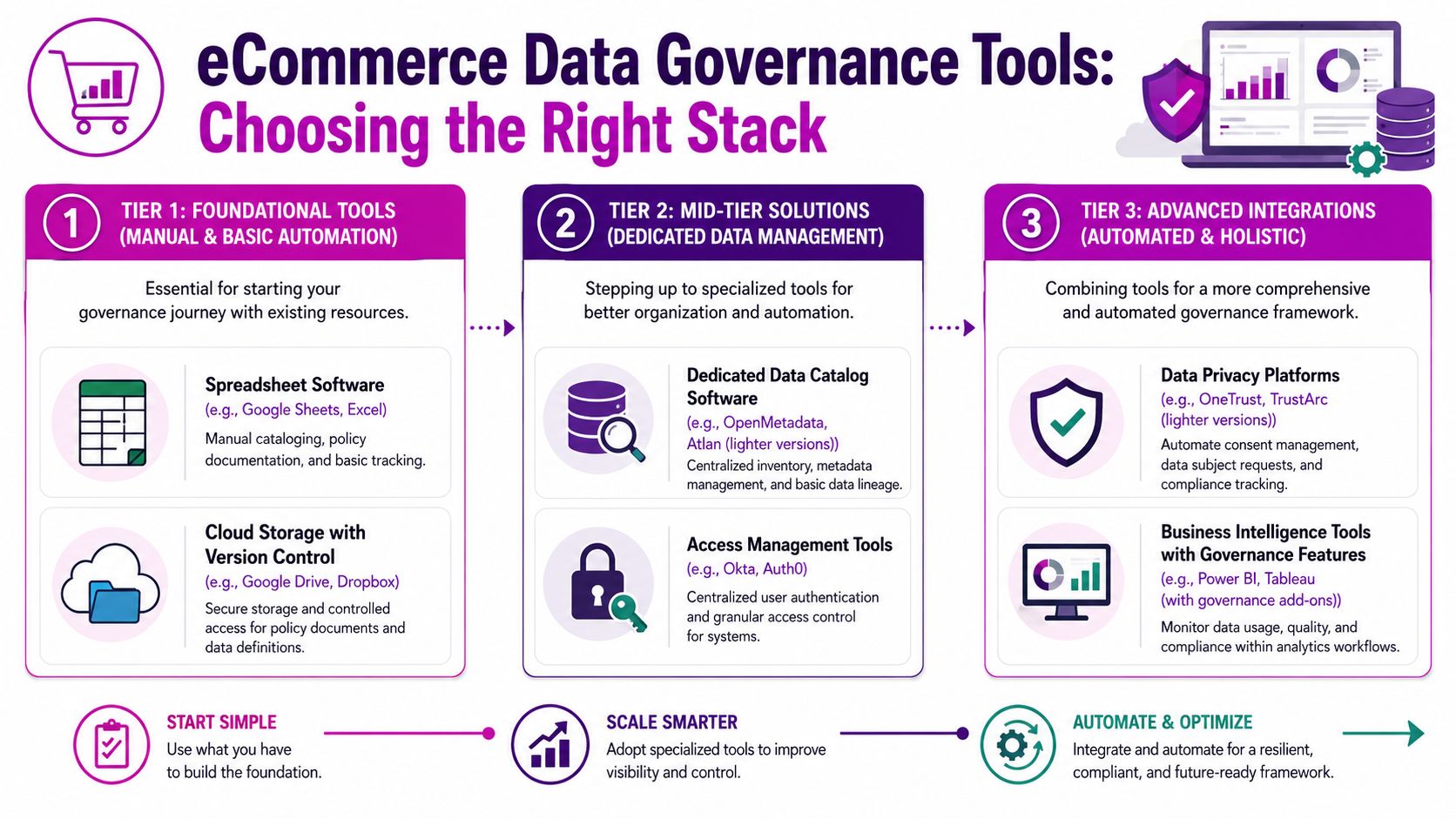
Tier one works for more brands than people admit
If you're in your first governance rollout, the Bootstrap stack is often enough.
It usually includes:
- Shopify native roles and permissions for operational control
- Google Sheets or Excel for the data dictionary and RACI
- Google Drive or Dropbox for policy storage and versioning
- Your current BI tool for monitoring agreed definitions
- Task management tools like Asana, ClickUp, or Jira for issue tracking
This setup is manual, but that's not always bad. Manual work forces the team to clarify definitions before hiding confusion behind software.
Growth brands need organization more than sophistication
Once the stack gets wider and more people touch data, lightweight dedicated tools begin to help.
Good candidates in the Growth tier include:
- Data catalog tools that centralize metadata and ownership
- Access management platforms such as Okta or Auth0 for identity control
- Privacy platforms that help manage consent and requests
- Validation and feed tools for product data quality across channels
A key trigger for this tier isn't company size. It's coordination pain. If your analyst, CRM lead, and Shopify team keep asking where a field came from or which definition is approved, your spreadsheet-only model is getting stretched.
Scale tooling makes sense when unification becomes the problem
The Scale tier is where CDPs, MDM tools, privacy orchestration, and more advanced governance features become relevant.
Typical signs you're there:
- Multiple storefronts or regions
- Complex identity resolution across channels
- Heavy platform integration work
- Frequent conflicts between customer records
- BI and analytics workflows that depend on governed semantic layers
If you're considering a more unified architecture, it helps to review the range of customer data integration solutions for eCommerce before committing to a CDP or similar platform.
A practical good, better, best comparison
| Tier | Best For | Strength | Trade-off |
|---|---|---|---|
| Bootstrap | Early governance rollout | Low cost, fast setup, clear ownership | Manual maintenance |
| Growth | Expanding teams and app stack | Better organization and access control | More process needed |
| Scale | High complexity operations | Automation and unified control | Heavier implementation burden |
What usually doesn't work
A few patterns fail repeatedly:
- Buying software before defining ownership
- Trying to automate undocumented processes
- Letting IT choose the stack without business users
- Assuming a CDP will fix bad source data
- Creating a governance layer nobody in marketing or merchandising can understand
Buy tools for the bottleneck you already have, not the architecture diagram you hope to have later.
If you're serious about how to implement data governance, use tooling to reinforce process, not replace it.
Monitoring KPIs and Driving Adoption
A governance program only matters if people use it when work gets messy. That means you need two things running in parallel: operational metrics and behavioral adoption.
Track a small KPI set your team can influence
Avoid vanity dashboards. Start with measures the team can act on every week or month.
Useful governance KPIs for Shopify brands include:
- Catalog completeness: Share of products with required merchandising fields filled in
- Definition coverage: Whether your critical metrics and fields are documented and approved
- Issue resolution speed: How quickly stewards close data errors that affect reporting or campaigns
- Access review completion: Whether owners are reviewing permissions on schedule
- Report trust: Whether teams are using approved dashboards or rebuilding numbers manually
If a KPI doesn't trigger action, drop it.
Adoption happens in workflows, not slide decks
The biggest mistake I see is treating governance like a launch event. One training session happens, a Notion page gets published, and leadership assumes the job is done. Real adoption comes from making governance part of everyday actions.
That means:
- New app onboarding requires data owner review
- New field creation requires a definition and destination
- New agency access requires an expiry date
- New dashboard metrics require approved business definitions
A one-person center of excellence can handle this at the start. In many brands, that's an operations lead or senior analyst who keeps definitions current, chases ownership, and flags policy gaps.
The first win isn't perfection. It's when teams stop arguing about whose number is right.
A lightweight rollout plan
Week by week, a practical rollout often looks like this:
- Week one: Confirm executive sponsor and choose in-scope domains
- Week two: Assign owners and stewards
- Week three: Publish the first data dictionary and RACI
- Week four: Tighten access in Shopify, Klaviyo, and ad accounts
- Ongoing: Review issues, update definitions, and train new users as they join
Celebrate boring wins. A cleaner customer export process. One approved net sales definition. Fewer Slack debates over campaign audiences. That's how governance starts sticking inside a real eCommerce operation.
If your brand is cleaning up a messy Shopify data stack, aligning Klaviyo and ad-platform reporting, or building stronger governance without slowing growth, ECORN can help you turn those rules into practical execution across store architecture, tracking, and conversion-focused operations.



How to Choose the Right eCommerce Website Development Firm

E Business Strategy Implementation

Conversion Tracking Setup for Shopify Stores

BigCommerce vs Shopify Plus Which Enterprise Wins in 2026

Shopify Theme Kit: Setup, Commands, and Migration Guide

Shopify Extension Development: A Practical 2026 Guide

Shopify Speed Score Explained and How to Improve It

Shopify Mobile Optimization: The 2026 Playbook

How to Add Subcategory in Shopify for Better UX

How to Implement Structured Data for Ecommerce in 2026

SEO App Mobile: Shopify Store Optimization Guide

Shopify Plus Support: What It Includes and How to Choose

Google Ads for Shopify: The Complete 2026 Playbook

Shopify New York: How to Find and Hire the Right Agency

Google Search Console for Shopify: The Complete Setup

First Party Data Collection for eCommerce Growth

FAQ Online Store Guide: Build and Measure It Right

Do FB Ads Work for eCommerce in 2026?

One Page Checkout for Shopify: Design and Implementation

Shopify GraphQL vs REST: The 2026 Developer Decision

Shopify Ecommerce Consulting: Strategy, Pricing &

Are Reddit Ads Worth It for eCommerce Brands

Shopify Title and Meta Description: A Practical 2026 Guide

Product Video Best Practices for Shopify Brands

Real-Time Inventory Management: A 2026 Guide

AI Chatbot Integration for Shopify Stores

Affiliate Program Management: A Shopify Guide

10 Best Performance Monitoring Tools for Shopify in 2026

Digital Asset Management for eCommerce Brands in 2026

Every Type of Facebook Ads Explained for eCommerce Growth

Product Information Management Explained for Shopify Brands

Support Ticket System: A Guide for Shopify Stores

10 Best Customer Service Tools for Shopify in 2026

Can I Start a Business with No Money? a 2026 Blueprint

What Sells Good on Etsy: Best Niches for 2026

Shopify Add to Cart Button: A Practical 2026 Guide

Customer Feedback Automation: A Practical eCommerce Guide

Critical Rendering Path: A Guide for Shopify Stores

How to Promote on TikTok for eCommerce in 2026

B2B eCommerce Consulting That Drives Real Revenue

10 Best Practices for Site Navigation in 2026

Return vs Refund for Shopify Stores: A Practical Guide

What Is Customer Lifetime Value and Why It Matters

What Is Voice of Customer Research for eCommerce

SMS Marketing for Ecommerce That Actually Converts

Master How to Improve Email Deliverability in 2026

Top 7 eCommerce Partners NYC for Shopify Brands in 2026

Machine Learning for Ecommerce: Boost Your Shopify Store

Beauty Market Research: Your 2026 Growth Guide

Shopify International Expansion: A 2026 Roadmap

What Does CRO Stand for in Business: Understanding CRO

Shopify Visual Merchandising: A Playbook for Higher Sales

Shopify Landing Page Design: Master Conversion in 2026

10 Best AI SEO Optimization Tools for Shopify in 2026

Agentic AI for Ecommerce: Boost Your Sales in 2026
Mastering Email Marketing Data for eCommerce Growth

Conversion Rate Optimisation Australia: Boost Your Sales

Conversion Rate Optimization AI: Your Shopify Store Guide

10 Product Bundling Strategies for Shopify in 2026

How to Increase Customer Lifetime Value: A Shopify Playbook

AI Customer Service Automation: Shopify Guide 2026

Clean Website Design: A Shopify Conversion Playbook

Omnichannel Retail Strategy: A Shopify Playbook

Product Data Enrichment: A Guide for Shopify Brands

Instagram Shopping Features a Guide for Shopify Stores

What Is Revenue Optimization: A Holistic RevOps Guide

Benefits of Conversion Rate Optimization: Boost Your

WordPress to Shopify Migration: Your 2026 Seamless Switch

Boost Sales: Ecommerce Payment Processing Guide 2026

Unified Commerce Platform: Benefits, KPIs & Shopify Guide

How to Reduce Bounce Rate eCommerce: Your 2026 Guide

Shopify API Integration: A Practical End-to-End Guide

Shopify Store Development Cost: A 2026 Breakdown

What Is Server Side Tracking: The Shopify Guide 2026

Marketing Automation Workflows: A Shopify Guide for 2026

Shopify: How to Reduce Technical Debt

Shopify UX Design Change: A Playbook for Growth

User Generated Content Strategy: Shopify Playbook

Shopify Pause and Build Plan Cost: A Complete 2026 Guide

Compare at Price on Shopify: A Complete Guide for 2026

Where Can I Sell My Prints? 10 Best Platforms for 2026

Shopify Order Management System: The Ultimate Guide 2026

What Is Marketing Attribution? an eCommerce Guide for 2026

10 Best Black Friday Sales Sheets for 2026

Discover the Top Social Media Marketing Agencies For

Consumer Confidence Definition for eCommerce in 2026

What Is Social Commerce? Your 2026 Guide to Boosting Sales

A Social Ad Campaign Playbook for eCommerce Growth

7 Best FAQ Page Examples for SaaS & eCommerce

Market Research in Fashion Industry: A Guide for Shopify

Shopify Migration Services: Expert Guide for 2026

Mastering FB Retargeting Ads for Shopify in 2026

What Is Omnichannel Ecommerce

Master Your Shopify Plus Migration: The 2026 Guide

Shopify Integration Services: A Merchant's 2026 Guide

Shopify Collection Description: A Guide to SEO & Sales

Shopify Plus Contact: Reach Sales & Support Effectively

Top Luxury Shopify Stores: Design & UX Strategies

How to Improve Customer Experience: A Shopify Roadmap

Creative Facebook Ads: 10 Examples for Shopify Brands


newsletter in your inbox