


The Shopify Pause and Build plan costs $9 USD per month. That's the headline number most merchants want, but it's not the full carry cost if your store still has app charges, domain renewals, or pending fees sitting in the background.
If you're looking at this option, you're probably in one of a few common situations. Sales are seasonal and you're entering a quiet stretch. You're rebuilding the theme and don't want customers landing on a half-finished storefront. Or cash flow is tight and you need to cut software costs without throwing away the store you've already built.
That's where Pause and Build becomes useful. It isn't the same as shutting a store down. It's a low-cost holding state for merchants who want to keep working in Shopify admin while stopping customers from checking out. Used correctly, it buys time and preserves work. Used carelessly, it leads to the classic problem: the store plan drops to $9, but other charges keep hitting the card.
Most articles stop at the subscription fee. That's not enough. The practical question isn't “What does Shopify call this plan?” It's “What will I keep paying while the store is paused, what still works, and what needs to be shut off manually?” Those are the answers that matter when you're trying to avoid surprise bills and preserve momentum for a relaunch.
Introduction
You switch to Pause and Build to cut costs for a few months. The plan drops to $9 USD per month. Then the next statement arrives and the store is still paying for apps, a domain renewal, and a few charges that were already in the pipeline.
That is the part merchants miss.
Pause and Build can be a sensible move if you need time to rebuild, sort out inventory problems, or stop selling during a slow season without losing the store setup. But the subscription fee is only the visible line item. The real question is broader: what keeps billing after checkout is turned off, and what has to be cancelled by hand?
Practical rule: Treat Pause and Build like a cost review, not just a plan change.
A proper pause usually starts with four checks:
- Review active apps: App billing often continues unless the app is removed or the subscription is cancelled inside the app.
- Check domain billing: Domains can still renew through Shopify or through your third-party registrar.
- Look for pending charges: Usage fees and prior app charges can still post after you change the plan.
- Set the goal first: If you still need admin access to work on the store, Pause and Build can fit. If you want billing to stop more completely, another option may be cheaper.
While the Shopify Pause and Build plan cost is simple on paper, understanding the total paused-store cost is what leads to good decisions.
What Is the Shopify Pause and Build Plan
Pause and Build is Shopify's reduced-access plan for stores that need to stop selling for a period without losing the store setup. You keep the admin. You can work on products, collections, themes, pages, and basic store configuration. Customers can still visit the storefront, but they cannot complete a purchase because checkout is turned off.
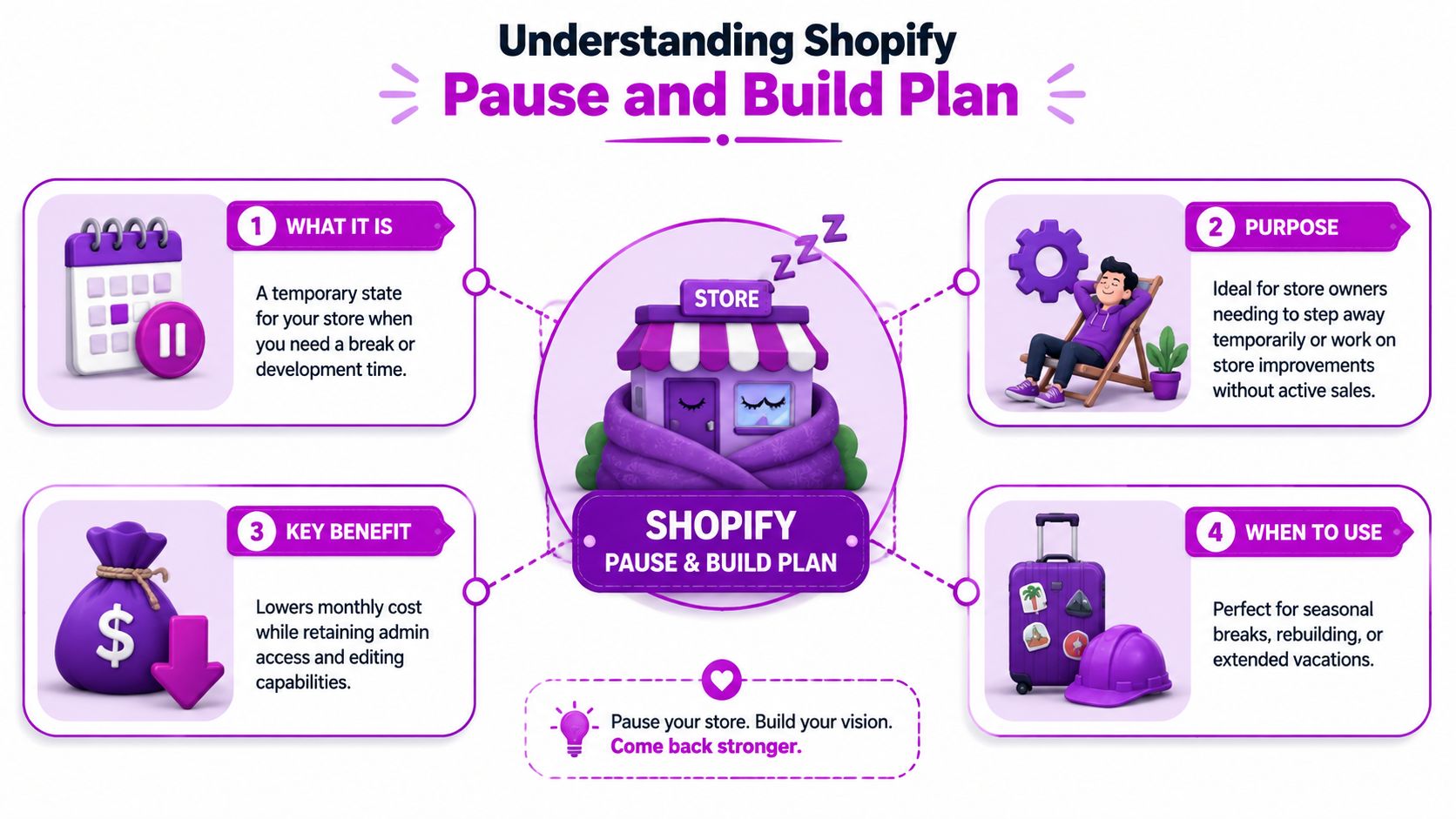
For the right store, that setup solves a specific problem. The business is on hold, but the operating environment still matters. Merchants use it during a redesign, a seasonal shutdown, or a temporary pause caused by inventory, staffing, or fulfillment issues. The plan keeps the store editable without paying for full selling functionality.
The practical appeal is simple. Rebuilding on a live plan costs more each month. Fully closing the store creates more friction if you want to return. Pause and Build sits in the middle.
It also has an eligibility catch. Shopify does not offer this option to every new store immediately. In practice, stores usually need some billing history on a paid plan before the option appears in admin, so it is not a reliable shortcut for brand-new builds trying to avoid normal plan pricing. If you are still comparing standard plan costs before deciding whether a pause makes sense, review Shopify's monthly plan pricing breakdown for active stores.
What the plan is for
Pause and Build fits merchants who expect to come back and still need access while they are paused. Common cases include:
- Seasonal stores: You stop selling in the off-season but want the store ready for the next launch.
- Rebuilds: You need time to change the theme, rewrite product pages, or fix merchandising without taking live orders.
- Operational pauses: Supply chain, staffing, or warehouse issues make a temporary sales stop the safer choice.
What Shopify allows on the plan
The key distinction is operational, not just financial. You can work inside the store. You cannot process new orders through Shopify checkout.
That means the plan is useful if your team still needs to log in regularly and make changes. It is a weaker fit if the store will sit untouched for months, because the monthly fee is only one part of the paused-store cost. App subscriptions, domain renewals, and outside software can continue separately, even while the storefront is no longer selling.
Who should think twice
Merchants who only want to stop all possible charges should be careful here. Pause and Build lowers Shopify subscription cost. It does not automatically shut down every tool connected to the store.
It is also the wrong fit for a permanent closure. If the business is not coming back, keeping a store in a paid maintenance state usually just delays cleanup and leaves more billing points to monitor.
Beyond the $9 Fee The True Pause and Build Cost
The visible number is easy. The hidden costs are where merchants get caught.
The base Shopify Pause and Build plan cost is $9 USD per month, but that's only the platform subscription. It functions like an iceberg: the part above the water is obvious, but the expenses below the waterline are the ones that create surprise charges after you thought you had “paused everything.”
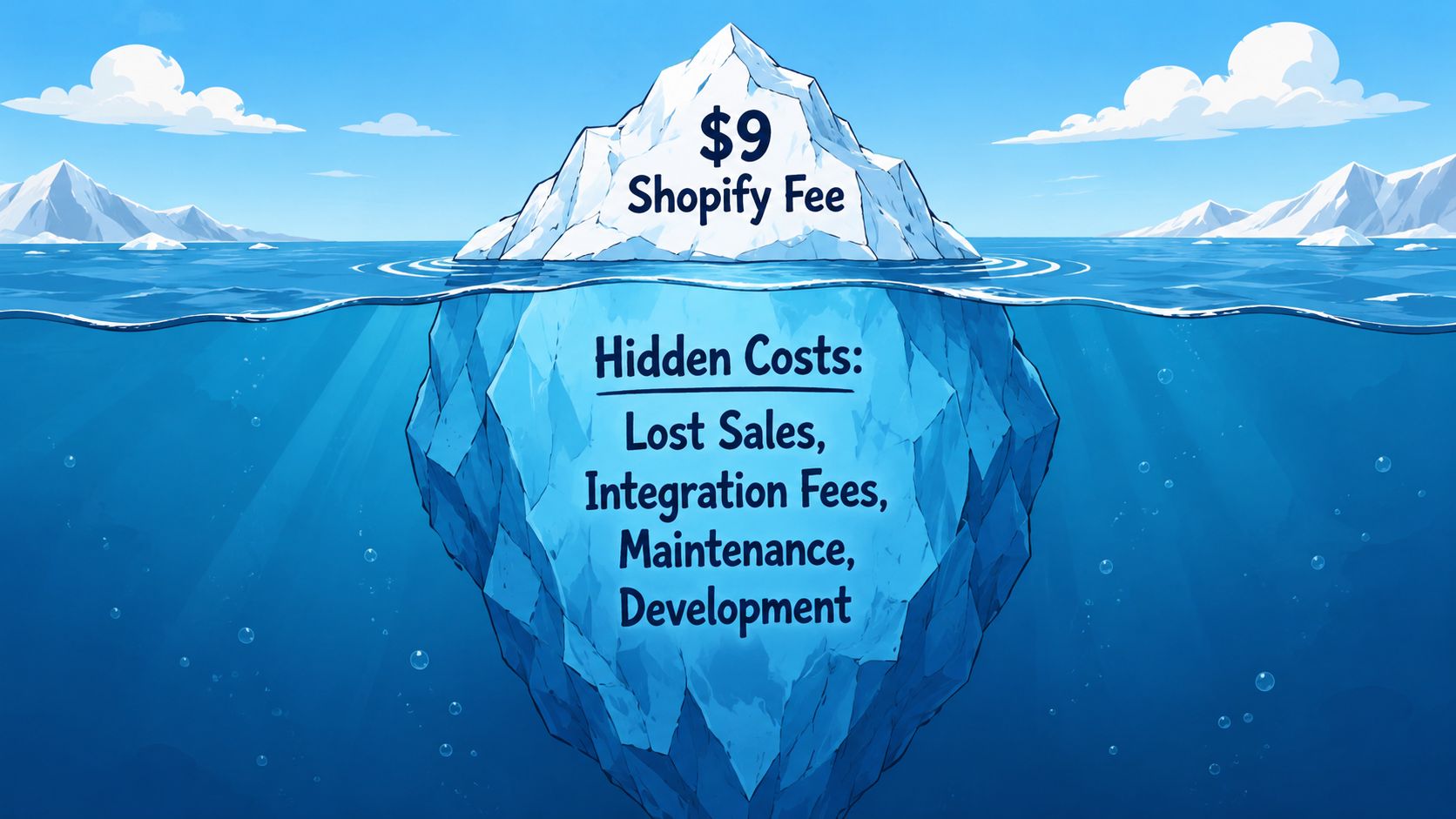
The hidden costs most merchants overlook
Shopify's own deactivation guidance warns merchants to review pending charges and domain renewal fees, and it notes that all apps are automatically uninstalled at cancellation. That distinction matters because a pause isn't the same as a full deactivation, so merchants often need to manage app costs more actively themselves. You can see that warning in Shopify's store deactivation documentation covering pending charges, domains, and app handling.
Here's what I tell clients to audit before pausing:
- Third-party app subscriptions: Some apps bill through Shopify. Others bill externally through their own systems. If you only change the store plan and don't cancel the app arrangement, charges may continue.
- Domain renewal fees: If the domain remains active, renewal timing still matters.
- Pending store charges: Existing balances don't vanish because the sales channel stops.
- Service overlap: Email platforms, search tools, landing page tools, review apps, loyalty tools, and feed managers may keep billing outside Shopify.
How to estimate your real paused-store cost
A useful way to budget this is to separate costs into two buckets.
| Cost bucket | What to check |
|---|---|
| Shopify platform cost | Pause and Build subscription |
| Non-platform carry cost | Apps, domains, pending charges, outside software tied to the store |
That second bucket is where your actual monthly burn lives. If you're trying to benchmark total platform spending before you make the switch, this breakdown of how much Shopify costs per month is a good companion read because it helps frame what's core Shopify cost versus optional software stack cost.
Don't ask, “What does the paused plan cost?” Ask, “What subscriptions still have permission to bill after I pause?”
What works and what doesn't
What works is a full billing audit before the pause. Open every app. Check whether billing runs through Shopify or outside it. Review your domain setup. Look for unresolved charges. Keep a short spreadsheet if you have to.
What doesn't work is assuming Shopify controls every recurring charge connected to your store. It doesn't. Many merchants discover that only after the pause, when invoices keep arriving from tools they forgot they installed.
The cheapest version of Pause and Build is the one where you intentionally keep only what you still need during the rebuild.
What You Can and Cannot Do on the Plan
A paused store can still keep a team busy for weeks. Catalog cleanup, theme work, navigation fixes, content updates, and launch prep all stay on the table. What stops is the part that produces revenue: checkout.
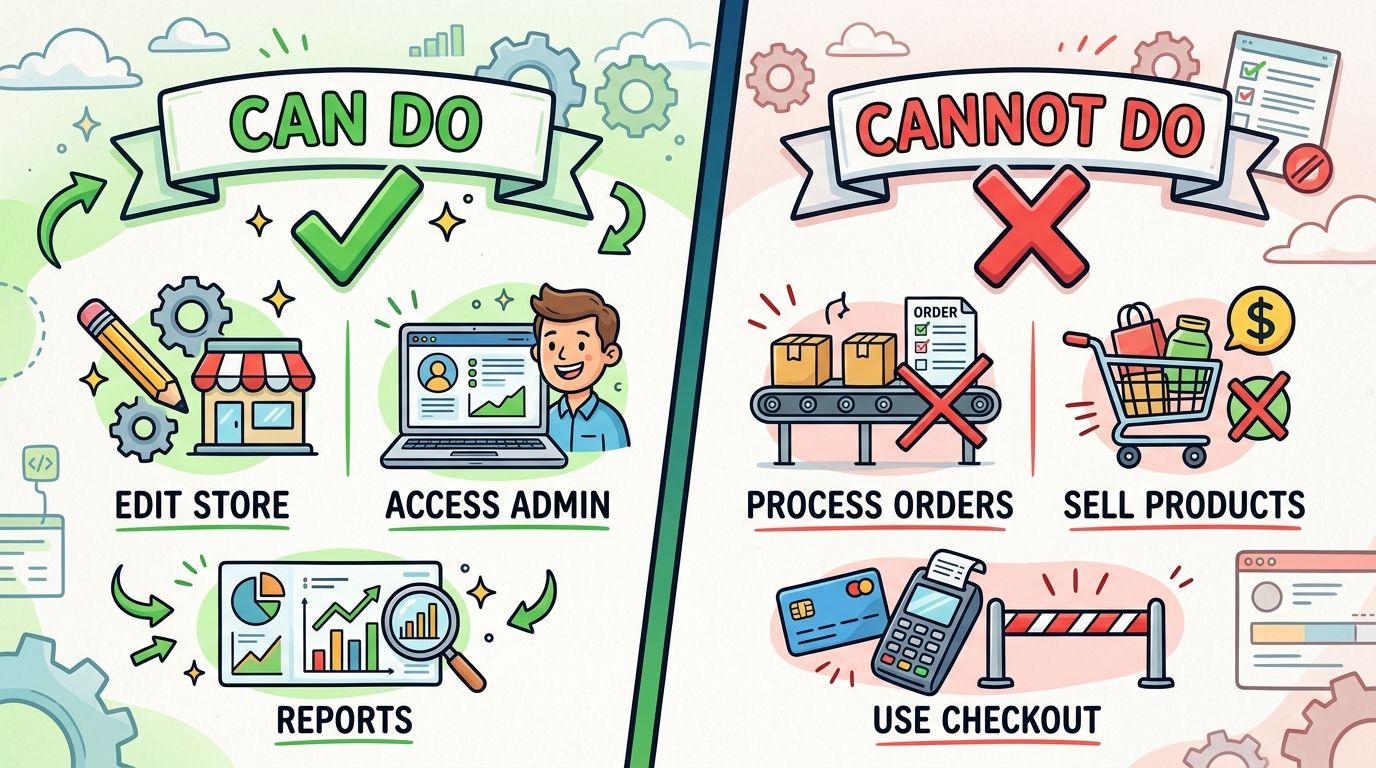
That distinction matters because many merchants treat Pause and Build like a discounted live plan. It is not. You are paying to keep the store environment available while sales activity is switched off. If your real goal is to stop everything, a full Shopify store deactivation path may be the better fit.
What you can still do
Pause and Build is useful if the store still needs work behind the scenes. You keep access to the admin, which means the store can be rebuilt without starting over later.
Typical use cases include:
- Admin access: Log in, review settings, and manage the store from the Shopify admin.
- Product work: Edit product titles, descriptions, media, pricing, tags, and collections.
- Theme changes: Update templates, navigation, content sections, and overall storefront design.
- Store organization: Archive old products, clean up categories, and prepare merchandising for relaunch.
- Planning and prep: Coordinate launch tasks, document changes, and get the store ready for reactivation.
This is the practical value of the plan. You preserve the operating environment, which saves time compared with closing the store and rebuilding later.
What you cannot do
Customers cannot complete purchases. For most merchants, that single restriction answers the bigger question about whether Pause and Build fits.
The operational consequences are straightforward:
- Checkout is disabled: Visitors may still view parts of the storefront, but they cannot place normal orders.
- Sales campaigns lose their purpose: Paid traffic, email promotions, and conversion testing make little sense without checkout.
- Revenue-dependent apps lose value: Upsell tools, cart apps, and conversion-focused software often become dead weight during the pause.
- Team expectations need to change: Staff can build and prepare, but they should not plan around active selling.
Here's a helpful visual walkthrough of the plan and store state in action:
Why these limits matter financially
The lower monthly fee only makes sense because Shopify is no longer supporting a live selling setup. You are retaining access to the store, not paying for an active storefront that can transact.
That distinction affects more than revenue. It also affects software decisions. A store owner might save on the Shopify plan and still waste money by leaving apps active that only matter when checkout is live. Subscription search tools, upsell apps, review platforms, and some email tools may still bill if you do not shut them down yourself. Pause and Build reduces one part of the stack. It does not automatically make the rest of the stack economical.
If the team needs time to rebuild, Pause and Build can work well. If the business still needs to sell, it is the wrong plan.
That sounds obvious, but this is the point where many bad decisions start. Merchants choose the cheaper option, keep paying for sales software, and then realize they bought a non-selling store plus a pile of tools that no longer help.
How to Pause and Reactivate Your Shopify Store
Pausing is straightforward. The part that deserves more care is what you do before you click the button.
Before you pause
Run a short pre-pause checklist first. This prevents most billing mistakes and relaunch headaches.
Audit app subscriptions
Check every installed app and every external tool linked to the store.Review pending charges
Make sure you know what's still due before changing plan status.Check your domain setup
Confirm who bills it and when renewal happens.Save your current store state
Keep a copy of theme work, key settings, and any important operating notes.
If you're weighing a full shutdown instead of a temporary pause, this guide on how to deactivate a Shopify store is the more relevant path.
How to switch to Pause and Build
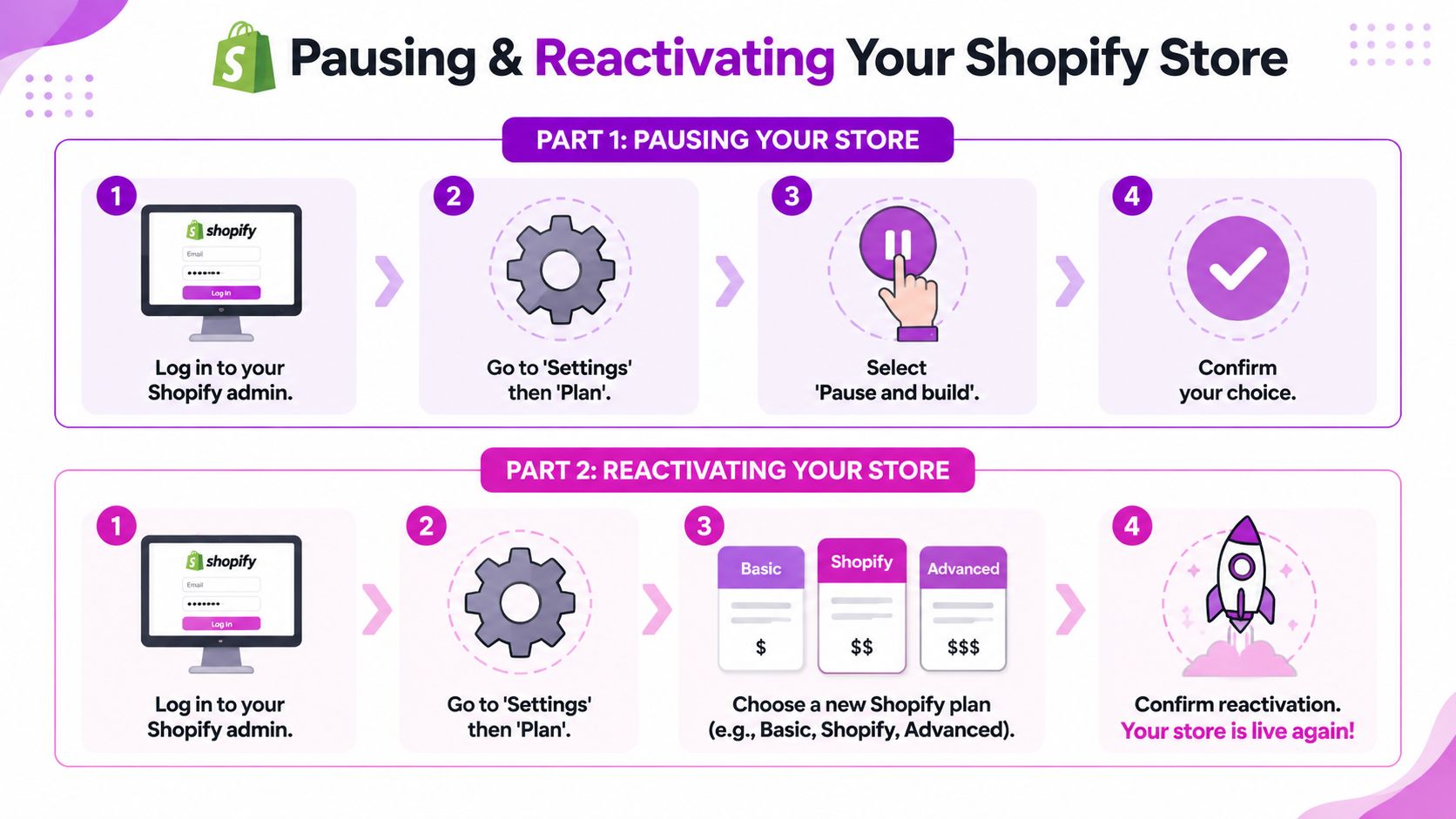
Inside Shopify, the path is simple:
- Log in as the store owner: Owner-level access matters for plan changes.
- Go to Settings and then Plan: Shopify manages store plan status.
- Choose the pause option if eligible: If the store qualifies, Pause and Build should appear.
- Confirm the change: Review the details carefully before final confirmation.
If the option doesn't appear, eligibility is usually the first thing to investigate. In many cases, the issue isn't technical. It's that the store hasn't met Shopify's requirements for showing the plan.
How to reactivate later
Reactivation is usually even simpler than pausing. You log back into the admin, go to the plan area, and choose a new paid plan to put the storefront back into active selling mode.
A practical relaunch checklist helps:
- Test the storefront: Confirm pages, collections, and product templates look right.
- Review apps: Reinstall or reconnect only the tools you still need.
- Check checkout-dependent settings: Make sure sales-critical workflows are restored.
- Update customer messaging: If people saw a paused or reduced storefront before, let them know you're live again.
Reactivation is the easy part. Rebuilding a messy app stack after a careless pause is the hard part.
Pause and Build vs Other Shopify Options
Choosing between Pause and Build, a full pause, and deactivation is really a cost-control decision. The Shopify fee matters, but the bigger mistake is picking an option that leaves you paying for tools, domains, email platforms, or app subscriptions you assumed would stop on their own.
Pause and Build is the best fit if the store is still active behind the scenes. That usually means redesign work, catalog cleanup, theme changes, or prep for a relaunch. You keep admin access and pay a reduced Shopify fee, but you still need to audit everything attached to the store. App charges, external services, and agency retainers can keep running.
A fuller pause makes more sense when the goal is to stop operating for a short period and reduce platform costs as much as possible. Deactivation is the cleaner choice if the business is done, or if you do not need to preserve the store as a working environment.
Shopify Store Status Options Compared
| Attribute | Pause and Build Plan | Full Pause (Up to 3 Months) | Deactivate Store |
|---|---|---|---|
| Subscription cost | Reduced monthly Shopify fee | No Shopify subscription fee during the pause period Shopify references | No active Shopify subscription after deactivation |
| Admin access | Yes, intended for continued backend work | More limited in practice | No normal working admin access after closure |
| Checkout | Disabled | Disabled for selling | Fully closed |
| Best use case | Rebuilds, seasonal prep, temporary slowdown with active store work | Short break where you want lower overhead and minimal backend activity | Permanent closure or a full stop |
| App handling | Requires a manual billing review. Some app and third-party charges may continue | Still requires a manual review of apps and outside services | Shopify app billing may stop, but external software, domains, and service contracts can still require cancellation |
| Operational feel | Store maintenance mode | Temporary shutdown | Exit |
How to choose the right one
Choose Pause and Build if you still need the admin and expect to return with the same store.
Choose a full pause if the priority is reducing Shopify spend for a short break and you do not need to keep working inside the store every week.
Deactivate if the store is finished. That avoids paying reduced fees for months just because closing the store feels like a bigger step.
The practical decision filter
Use these questions before you decide:
- Are you actively rebuilding the store? Pause and Build usually fits that workflow.
- Do you need to cut costs beyond Shopify itself? Then review apps, email platforms, domains, and any third-party tools before assuming a pause will save much.
- Is this a short operational break or a real shutdown? Short breaks and permanent closure should not be handled the same way.
- Will someone still be managing products, content, or theme work? If yes, keeping admin access has value.
- Are you carrying paid apps you no longer need? Canceling unused tools often saves more than the difference between Shopify plan options.
This is the part merchants miss. The listed Pause and Build price looks cheap, but the total cost of pausing can be much higher if subscriptions keep billing in the background.
If you're deciding whether to pause, rebuild, or fully restructure your Shopify setup, ECORN can help you map the cheapest clean path forward. Their team works across Shopify design, development, CRO, and operational consulting, which is exactly what brands need when a “simple pause” turns into a broader store reset.



Shopify Mobile Optimization: The 2026 Playbook

How to Add Subcategory in Shopify for Better UX

How to Implement Structured Data for Ecommerce in 2026

SEO App Mobile: Shopify Store Optimization Guide

Shopify Plus Support: What It Includes and How to Choose

Google Ads for Shopify: The Complete 2026 Playbook

Shopify New York: How to Find and Hire the Right Agency

Google Search Console for Shopify: The Complete Setup

First Party Data Collection for eCommerce Growth

FAQ Online Store Guide: Build and Measure It Right

Do FB Ads Work for eCommerce in 2026?

One Page Checkout for Shopify: Design and Implementation

Shopify GraphQL vs REST: The 2026 Developer Decision

Shopify Ecommerce Consulting: Strategy, Pricing &

Are Reddit Ads Worth It for eCommerce Brands

Shopify Title and Meta Description: A Practical 2026 Guide

Product Video Best Practices for Shopify Brands

Real-Time Inventory Management: A 2026 Guide

AI Chatbot Integration for Shopify Stores

Affiliate Program Management: A Shopify Guide

10 Best Performance Monitoring Tools for Shopify in 2026

Digital Asset Management for eCommerce Brands in 2026

Every Type of Facebook Ads Explained for eCommerce Growth

Product Information Management Explained for Shopify Brands

Support Ticket System: A Guide for Shopify Stores

10 Best Customer Service Tools for Shopify in 2026

Can I Start a Business with No Money? a 2026 Blueprint

What Sells Good on Etsy: Best Niches for 2026

Shopify Add to Cart Button: A Practical 2026 Guide

Customer Feedback Automation: A Practical eCommerce Guide

Critical Rendering Path: A Guide for Shopify Stores

How to Promote on TikTok for eCommerce in 2026

B2B eCommerce Consulting That Drives Real Revenue

10 Best Practices for Site Navigation in 2026

Return vs Refund for Shopify Stores: A Practical Guide

What Is Customer Lifetime Value and Why It Matters

What Is Voice of Customer Research for eCommerce

SMS Marketing for Ecommerce That Actually Converts

Master How to Improve Email Deliverability in 2026

Top 7 eCommerce Partners NYC for Shopify Brands in 2026

Machine Learning for Ecommerce: Boost Your Shopify Store

Beauty Market Research: Your 2026 Growth Guide

Shopify International Expansion: A 2026 Roadmap

What Does CRO Stand for in Business: Understanding CRO

Shopify Visual Merchandising: A Playbook for Higher Sales

Shopify Landing Page Design: Master Conversion in 2026

10 Best AI SEO Optimization Tools for Shopify in 2026

Agentic AI for Ecommerce: Boost Your Sales in 2026
Mastering Email Marketing Data for eCommerce Growth

Conversion Rate Optimisation Australia: Boost Your Sales

Conversion Rate Optimization AI: Your Shopify Store Guide

10 Product Bundling Strategies for Shopify in 2026

How to Increase Customer Lifetime Value: A Shopify Playbook

AI Customer Service Automation: Shopify Guide 2026

Clean Website Design: A Shopify Conversion Playbook

Omnichannel Retail Strategy: A Shopify Playbook

Product Data Enrichment: A Guide for Shopify Brands

Instagram Shopping Features a Guide for Shopify Stores

What Is Revenue Optimization: A Holistic RevOps Guide

Benefits of Conversion Rate Optimization: Boost Your

WordPress to Shopify Migration: Your 2026 Seamless Switch

Boost Sales: Ecommerce Payment Processing Guide 2026

Unified Commerce Platform: Benefits, KPIs & Shopify Guide

How to Reduce Bounce Rate eCommerce: Your 2026 Guide

Shopify API Integration: A Practical End-to-End Guide

How to Implement Data Governance: A 2026 Guide

Shopify Store Development Cost: A 2026 Breakdown

What Is Server Side Tracking: The Shopify Guide 2026

Marketing Automation Workflows: A Shopify Guide for 2026

Shopify: How to Reduce Technical Debt

Shopify UX Design Change: A Playbook for Growth

User Generated Content Strategy: Shopify Playbook

Compare at Price on Shopify: A Complete Guide for 2026

Where Can I Sell My Prints? 10 Best Platforms for 2026

Shopify Order Management System: The Ultimate Guide 2026

What Is Marketing Attribution? an eCommerce Guide for 2026

10 Best Black Friday Sales Sheets for 2026

Discover the Top Social Media Marketing Agencies For

Consumer Confidence Definition for eCommerce in 2026

What Is Social Commerce? Your 2026 Guide to Boosting Sales

A Social Ad Campaign Playbook for eCommerce Growth

7 Best FAQ Page Examples for SaaS & eCommerce

Market Research in Fashion Industry: A Guide for Shopify

Shopify Migration Services: Expert Guide for 2026

Mastering FB Retargeting Ads for Shopify in 2026

What Is Omnichannel Ecommerce

Master Your Shopify Plus Migration: The 2026 Guide

Shopify Integration Services: A Merchant's 2026 Guide

Shopify Collection Description: A Guide to SEO & Sales

Shopify Plus Contact: Reach Sales & Support Effectively

Top Luxury Shopify Stores: Design & UX Strategies

How to Improve Customer Experience: A Shopify Roadmap

Creative Facebook Ads: 10 Examples for Shopify Brands

Remarketing with Facebook Ads: A Shopify Guide for 2026

SEO Linking Strategies for Shopify Stores

Top 7 Statistics YouTube Channels for eCommerce in 2026

Hiring Shopify Plus Designers: A Founder's Guide

Shopify Product Variation: Master Your Variants for 2026

Leverage Ai Solutions Brands: Your 2026 Shopify Growth Guide

Filters in Shopify: A Guide for Growing Brands


newsletter in your inbox