

You're probably looking at Klaviyo, Shopify, or another dashboard right now and seeing a flood of numbers that don't tell you what to do next. Revenue is up in one campaign, down in another. Open rates look fine, but sales don't. A welcome flow seems healthy, yet repeat purchase behavior feels flat.
That's the normal state for most eCommerce teams. The problem isn't a lack of data. It's that most stores collect plenty of email marketing data and still treat it like reporting, not decision-making.
The stores that get real value from email use data to answer practical questions. Who is likely to buy again? Which subscribers are browsing but hesitating? Which campaigns create clicks without creating revenue? Which automations deserve more attention than one-off sends? Once you start using data that way, email stops being a weekly task and becomes a durable revenue system.
Why Email Data Is Your Most Valuable eCommerce Asset
Email data matters because it's one of the few assets you own. Social reach changes. Paid acquisition costs move against you. Platform algorithms shift without warning. Your email list, purchase history, and engagement patterns stay under your control.
That matters even more in eCommerce because the economics are hard to ignore. Email marketing delivers an average return of $36 for every $1 spent, and retail and eCommerce businesses report $45 per dollar spent. Consumers who purchase through email also spend 138% more than those who don't receive email offers, according to Emailchef's email marketing statistics roundup.
Those numbers only become useful when you connect them to behavior. The raw fact that email has strong ROI doesn't help unless you know which messages create that return. A discount blast to your full list and a well-built abandoned cart flow both count as email. They do not perform the same way, and they should not get the same attention.
Data tells you where margin is hiding
A lot of growing Shopify brands think they have an acquisition problem when they have a retention and timing problem. They're spending more on Meta or Google while ignoring signals already sitting inside their list.
Those signals usually look like this:
- Repeat buyers with a slowing purchase cycle who need a replenishment reminder or a product recommendation.
- High-intent browsers who viewed the same collection multiple times but never added to cart.
- First-time buyers who need onboarding, not another generic promotion.
- Inactive subscribers who still buy through other channels and shouldn't be treated as lost.
Practical rule: If your team can't explain why a campaign made money beyond “the offer was strong,” you don't have a creative insight problem. You have a data interpretation problem.
Good email data reduces waste
Most brands waste email volume in two ways. They send too many broad campaigns, and they measure the wrong outcomes. That creates false confidence. A campaign can look active in the dashboard and still train your list to ignore you.
The useful shift is simple. Stop treating your list like one audience. Start treating it like a set of buying states.
When you do that, email marketing data becomes more than reporting. It becomes the clearest record of who is ready to buy, who needs education, who is drifting, and where your store can drive more revenue without paying for another click.
The Four Core Types of Email Marketing Data
Email data is easiest to use when you stop thinking of it as one giant pile of metrics. In practice, it falls into four categories. Together, they form the digital body language of your customer.
The scale of the channel is a big reason this matters. The global email marketing market is projected to grow from $12.33 billion in 2024 to $17.9 billion by 2027, with the worldwide email user base projected to reach 4.73 billion by the end of 2026, according to CodeCrew's email market overview. For eCommerce brands, email isn't a side channel. It's infrastructure.
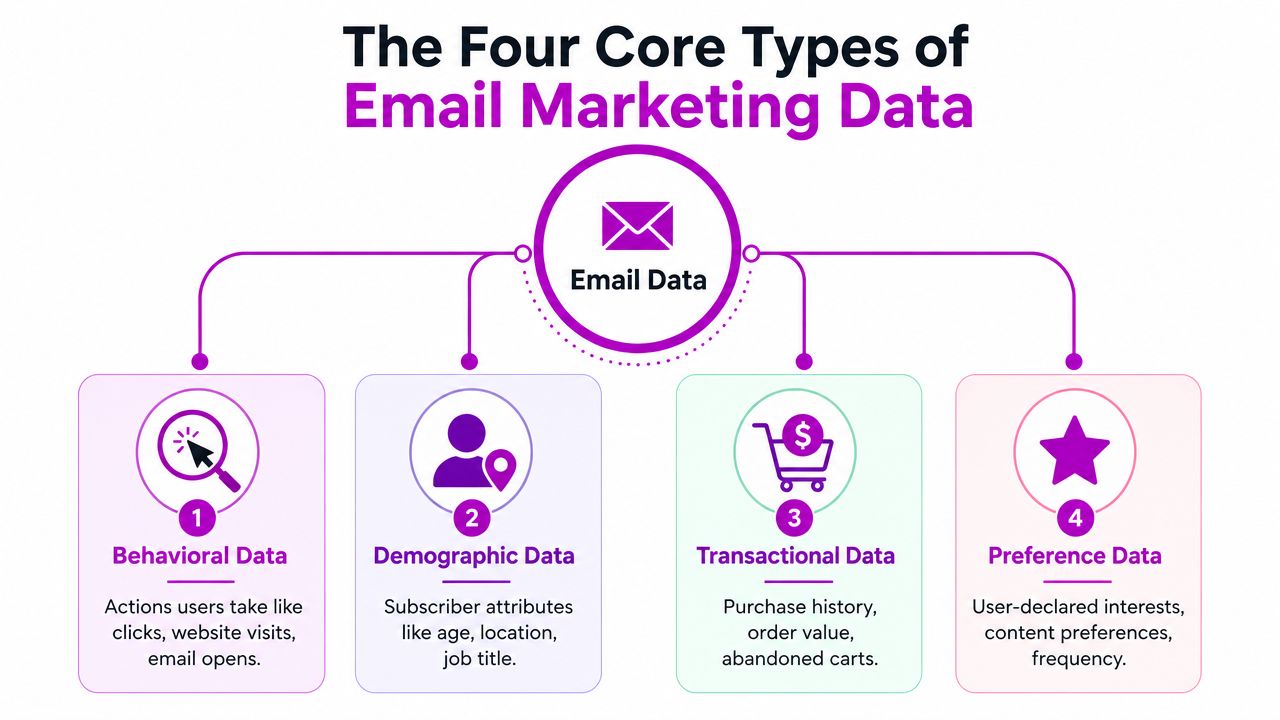
Profile data
This is the basic identity layer. It includes details like name, location, and other subscriber attributes you collect directly.
On a Shopify store, profile data helps with relevance fast. If you sell skincare, location can affect seasonality and messaging. If you sell gifts, a birth month field can support timely offers. If you sell to both wholesale and direct-to-consumer buyers, customer type changes the entire email strategy.
This data is useful, but it's limited on its own. A name in a subject line won't fix weak targeting.
Behavioral data
Behavioral data shows what people do. Most of the insight stems from it.
Examples include:
- Email engagement such as clicks and recent activity
- Site behavior like product views, collection browsing, and cart starts
- Intent signals such as repeated visits to the same product page
Behavioral data is what separates a generic campaign from a timely one. If someone viewed a product three times in two days, that's different from a subscriber who hasn't visited the site in a month. They shouldn't receive the same message.
The most valuable signal in eCommerce usually isn't what a subscriber said. It's what they did right before leaving.
Transactional data
Transactional data is your purchase ledger. It includes order history, average order value, items purchased, discount usage, refunds, and repurchase timing.
For retention work, this is the backbone. You can build logic around first-time buyers, repeat purchasers, high-value customers, and customers who only buy during sales. That gives you a cleaner way to decide who should get product education, cross-sell recommendations, loyalty messaging, or win-back campaigns.
Preference data
Preference data is what customers explicitly tell you they want. Content interests, product categories, message frequency, and communication preferences belong here.
This type is often underused because brands don't ask for it, or they bury it in a one-time signup form and never revisit it. That's a mistake. Preference data can reduce unsubscribes and improve click quality because subscribers help shape what lands in their inbox.
Here's the simple framework:
| Data type | What it tells you | Shopify example |
|---|---|---|
| Profile | Who the subscriber is | Location, customer type |
| Behavioral | What the subscriber is doing | Viewed a collection, clicked a launch email |
| Transactional | What the subscriber has bought | First purchase, repeat purchase, high-value order |
| Preference | What the subscriber wants | Product interests, email frequency |
When these four data types are connected, segmentation becomes far more useful. You stop sending to a list and start communicating with a buying context.
A Practical Guide to Collecting and Integrating Your Data
A subscriber joins your popup for 10% off, browses two product pages, starts checkout, then buys three days later from a branded search ad. If Shopify, your ESP, and your support tools store that activity in separate places, email decisions get sloppy fast. The result is familiar. Weak segments, mistimed automations, and reporting that gives email too much credit in some cases and too little in others.
Instead of adding more tools, the solution is to make sure your current stack passes usable customer data between systems. That matters even more now that open rates are less dependable after privacy changes. If identity, behavior, and purchase data are disconnected, teams fall back on inflated opens and last-click revenue because those numbers are easy to find.
Start with the collection points that matter
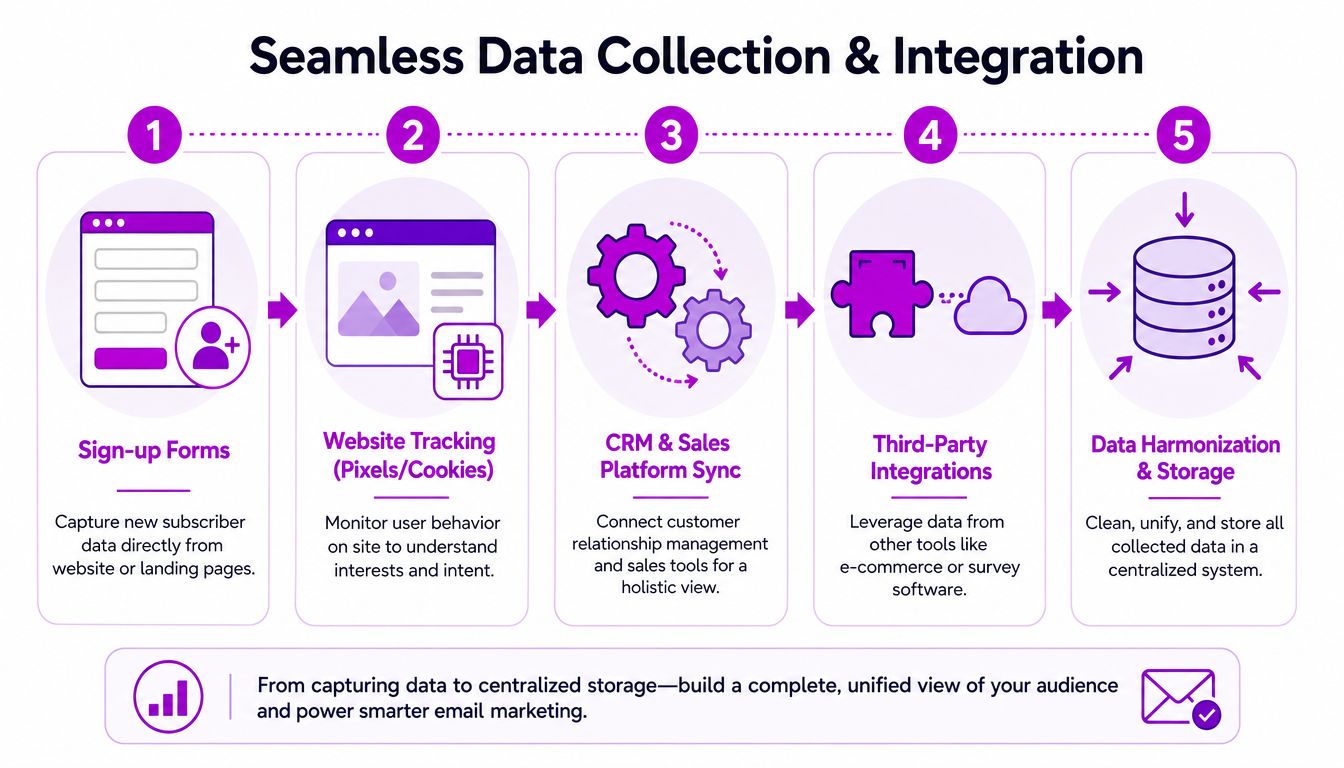
For Shopify brands, the best collection points usually happen at moments of intent. A signup form captures identity. Checkout connects that identity to purchase intent. On-site behavior shows interest before the order. Post-purchase forms add preference data you can use to improve repeat purchase campaigns.
Use a simple rule. Collect one core identifier, usually email, plus one field that changes how you market to that person.
These are the collection points worth setting up first:
- Signup forms and popups that capture email plus one useful context field
- Checkout opt-ins that connect identity to buying intent
- Browse and cart behavior tracking inside your email platform or connected apps
- Post-purchase forms that gather preferences after the first order
Asking for too much on day one hurts form conversion. Asking for too little creates bland segmentation later. For a skincare brand, one extra field like skin concern is useful. For a fashion store, gender expression or preferred category may be more useful. The right field depends on what changes the follow-up email someone receives.
If you are improving list growth at the same time, this guide on how to build an email list is worth reviewing because it focuses on attracting subscribers who are likely to buy, not subscribers who pad the list.
Connect Shopify to your ESP with the right event depth
A proper Shopify integration does more than push contacts into an email platform. It should send product views, add-to-cart events, checkout starts, purchases, refunds, customer tags, and catalog data. Without that event depth, your ESP is just a broadcast tool.
With it, you can run flows that reflect actual buying behavior.
A solid setup usually includes:
- Subscriber capture sync so form signups enter the right lists or segments
- Customer event sync for browse, add-to-cart, checkout started, and purchase activity
- Product catalog sync so recommendation blocks pull in current store inventory
- Order and customer sync for lifecycle segmentation and post-purchase flows
This is also where attribution errors start if the setup is incomplete. A customer might click an email, leave, come back through paid search, and convert later. If your systems are disconnected, the team may either overstate email because it got the click or understate it because another channel closed the sale. Integrated event data gives you a cleaner view of influence across channels.
Build one usable customer record
You do not need a complicated data warehouse to get value from email data. You do need one customer record your retention team can trust. That record should combine identity, engagement history, purchase behavior, and key support or preference signals in one place.
That is why brands that invest in customer data integration solutions usually execute faster. The point is not technical neatness. The point is being able to answer practical questions without exporting three CSVs and guessing which version is correct.
A simple test works well here. Can your team build a segment of first-time buyers from the last 30 days who viewed a complementary product, did not buy again, and have not opened a support ticket? If the answer is no, the problem is usually not collection. It is that your systems are not passing data in a way email can use.
That gap gets expensive. It leads to generic campaigns, weak product recommendations, and bad performance reads, especially when open data is noisy and last-click attribution hides email's role in longer buying journeys.
Measuring What Matters Key KPIs for 2026
A Shopify brand sends a weekend campaign, sees inflated opens, and calls it a win by Monday. Then the click volume is average, conversions come in later through branded search and SMS, and the team still cannot answer a basic question. Did the email create demand, capture existing demand, or just collect credit for a sale that was already on the way?
That reporting gap matters more in 2026 than any subject line test.
Apple's Mail Privacy Protection changed how opens are recorded by prefetching email content, which inflates open activity for senders who rely on Apple Mail. Apple explains the feature in its own Mail Privacy Protection documentation. Open rate still has some directional value inside your own trends, but it is no longer a reliable top-line KPI for judging email quality or commercial impact.
Use CTOR to judge content quality
Click-to-open rate (CTOR) is still useful, even with noisier open data, because it helps isolate what happened after the subject line did its job. If open tracking is inflated across your program, CTOR is not perfect, but it is still a better creative diagnostic than open rate alone.
Mailchimp defines CTOR as the percentage of opened emails that received at least one click in its email marketing KPI reference. For a Shopify store, CTOR answers a practical question. Once a subscriber viewed the email, did the product mix, offer, layout, and call to action create enough interest to earn a visit?
A high open rate with weak CTOR usually points to message mismatch. The subject line got attention. The body copy, product selection, or offer did not carry the sale forward.
Separate campaign KPIs from flow KPIs
Promotional campaigns and automated flows should not share the same scorecard. They do different jobs.
A welcome flow, browse abandonment series, or post-purchase cross-sell email reaches shoppers with recent intent. A batch campaign for a product launch or seasonal push reaches a wider audience with mixed urgency. If a retention team judges both by the same benchmark, it will underinvest in automations and overreact to normal campaign variance.
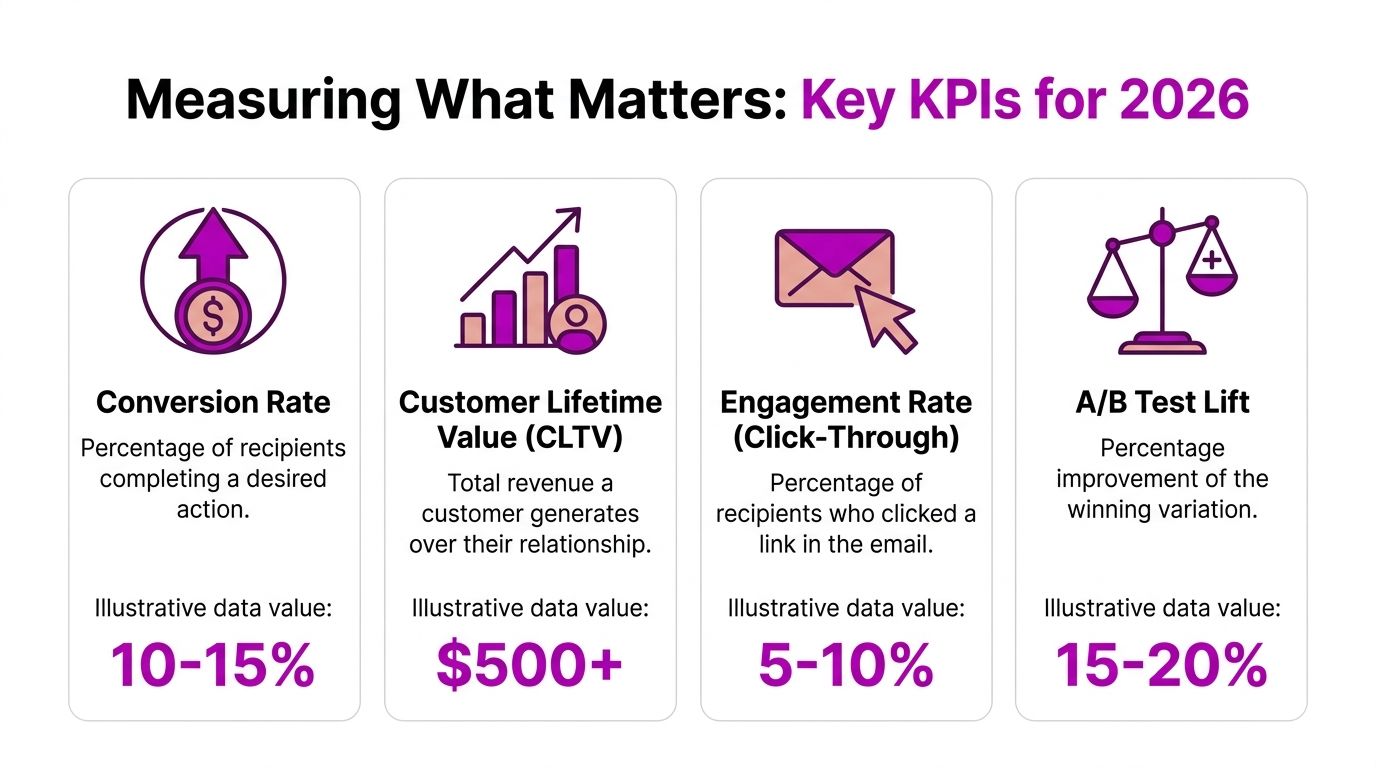
For flows, focus on conversion rate, revenue per recipient, and time to purchase. For campaigns, pay closer attention to revenue per email, click rate, unsubscribe rate, and whether the send generated downstream sessions that converted through other channels.
That last point is where many teams get attribution wrong.
Measure email as a channel that influences, not just closes
Last-click reporting makes email look better in some accounts and worse in others. Both errors are common.
If a customer clicks an email, leaves, sees a retargeting ad two days later, and buys through direct traffic, email may have created the intent without getting final-click credit. The opposite also happens. A customer planned to buy anyway, opened the email on the way to checkout, and email gets too much credit. I treat both cases as attribution problems, not campaign wins or losses.
That is why the strongest KPI set combines direct response metrics with customer value metrics.
Track the KPIs that hold up under privacy changes
If I am reviewing a Shopify retention program, I care about these numbers first:
- Click rate and CTOR to judge whether the message earned action
- Conversion rate to measure post-click performance
- Revenue per email or per recipient to compare sends of different sizes
- Unsubscribe and spam complaint trends to catch fatigue before deliverability slips
- Customer lifetime value by source and segment to see whether email is bringing in better customers, not just cheaper conversions
Customer LTV matters because the best email programs do more than produce one attributed order. They shorten second-purchase time, increase repeat purchase rate, and improve the value of customers acquired elsewhere.
A campaign dashboard that stops at opens and last-click revenue will miss that. A retention dashboard built around clicks, conversions, assisted revenue, and LTV gives a much more honest picture of what email is doing for the business.
Turning Data into Dollars with Segmentation and Personalization
Most brands say they personalize email when what they really mean is they insert a first name. That's not personalization in any meaningful eCommerce sense. Real personalization changes the message, the timing, or the offer based on what the customer has done.
That's where email marketing data starts producing revenue instead of just cleaner reporting.
Build segments around buying situations
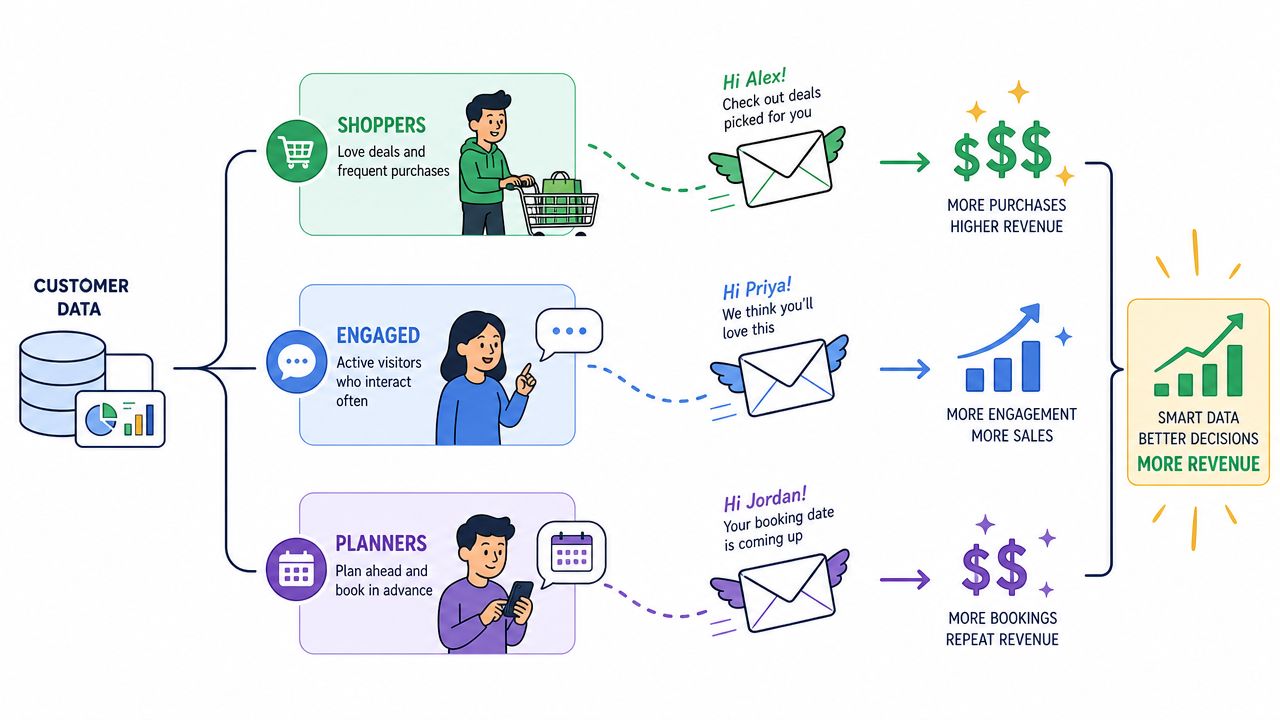
The best-performing segments usually reflect a commercial reality, not a demographic category. Age or location can matter, but buying state matters more.
A few high-value examples:
- First-time customers need onboarding, usage guidance, and a reason to return.
- Repeat buyers need cross-sells, replenishment prompts, or early access.
- High-intent non-buyers need reassurance, social proof, or a sharper product angle.
- Lapsing customers need a reactivation message tied to past purchase behavior.
- Discount-only shoppers need margin-aware strategy so you don't train them to wait for the next sale.
A Shopify apparel store, for example, shouldn't send the same campaign to a subscriber who browsed a new arrivals collection yesterday and a customer who bought three times in the last quarter. One needs conversion pressure. The other may need exclusivity or a bundle suggestion.
Combine signals instead of relying on one field
The strongest segments usually combine at least two kinds of data. Purchase history on its own is useful. Browse behavior on its own is useful. Together, they become actionable.
Examples of stronger segment logic:
| Segment | Data combined | Better message |
|---|---|---|
| Recent buyer browsing again | Transactional + behavioral | Cross-sell or product education |
| Frequent clicker with no purchase | Behavioral + preference | Sharper offer or category-specific recommendation |
| VIP customer going quiet | Transactional + engagement | Early-access or loyalty-style reactivation |
| One-time sale buyer | Transactional + discount behavior | Value framing without constant promo pressure |
This kind of segmentation is where automation gets smarter. A skincare brand can route first-time buyers into education about routines, then move them into replenishment logic later. A home goods brand can follow browse behavior with style-based recommendations instead of repeating the same hero product.
The mechanics matter too, and this walkthrough adds useful context:
Personalization should change decisions, not decoration
There's a simple test for whether your personalization is real. If you remove the subscriber's first name, does the email still feel customized? If the answer is yes, you're doing it right.
Send different emails because customer context is different, not because your ESP can fill in a merge tag.
Useful personalization often looks like:
- Product recommendations based on category interest or recent purchases
- Replenishment timing based on what a customer bought and when
- Content variation for new buyers versus experienced customers
- Offer restraint for loyal full-price buyers who don't need discounting
That's how data turns into dollars. Not through more sends, but through fewer, smarter decisions.
Optimizing Performance and Avoiding the Attribution Illusion
Optimization gets easier when you stop making random changes. Most email programs improve with a simple operating rhythm: form a hypothesis, test one variable, measure downstream behavior, then keep or discard the change.
That sounds obvious, but many teams still test subject lines while leaving the more important questions untouched. They don't test segment logic. They don't test whether the landing page matches the email promise. They don't test whether a flow should carry more revenue responsibility than a batch campaign.
Use a repeatable optimization loop
A practical workflow looks like this:
- Spot the friction. Low click quality, weak conversion after click, or subscriber fatigue.
- Choose one lever. Offer framing, CTA placement, segment rules, send timing, or landing page alignment.
- Measure business impact. Not just clicks, but revenue quality and repeat behavior.
- Document the result. Keep a record so the team doesn't retest the same idea in three months.
If your list management is still lightweight, even basic systems can support cleaner analysis. Something as simple as learning how to segment contacts in Google Sheets can help smaller teams organize testing cohorts before they build more advanced workflows.
Don't let last-click reporting fool you
The harder problem is attribution. A lot of brands think email is declining when the customer journey is just getting split across channels.
CMSWire's analysis of underperforming email programs notes that 75% of marketers still optimize for open rates instead of unified LTV metrics, even though top programs drive over 25% of revenue from triggered emails. That gap matters because last-click reporting often gives the sale to SMS, paid retargeting, or direct traffic after email did the early persuasion.
A customer might open a welcome email, browse later from a paid social retargeting ad, and finally purchase through a branded search. If you only credit the final touch, email looks weak. If you look at influence across the full journey, email may be doing critical work at the consideration stage.
That's why teams need a better grasp of marketing attribution before they cut email budget or overreact to a dashboard dip.
Email isn't always losing impact when reported revenue drops. Sometimes another channel is simply collecting the credit.
The practical fix is to judge email partly through customer lifetime value, triggered flow contribution, and blended retention performance. Channel metrics still matter. They just can't be the whole story.
Your Email Data Action Plan A 30-Day Checklist
A useful email program doesn't start with perfection. It starts with a tighter operating system. If you want better results from your email marketing data in the next month, keep the scope narrow and finish the basics.
Days 1 to 7
Audit what you already collect.
- Review forms and check what fields you capture at signup, checkout, and post-purchase.
- Inspect event tracking to confirm product views, cart starts, purchases, and customer tags are available in your ESP.
- List your current segments and mark which ones are currently used.
Days 8 to 14
Fix the data flow.
- Connect Shopify and your ESP fully so customer and order events sync cleanly.
- Clean up naming conventions for segments, flows, and tags.
- Decide on one source of truth for customer status and lifecycle stage.
Days 15 to 21
Create practical segments.
Start with three groups you can act on immediately:
- First-time buyers
- High-intent browsers
- Lapsing customers
Write one email or one automation adjustment for each segment. Keep the logic simple enough that your team can maintain it.
Days 22 to 30
Change how you measure.
- Move open rate down the dashboard
- Add CTOR, conversion rate, and revenue per email
- Review one automation and one campaign side by side
- Run one controlled test on message, audience, or landing page match
If you do those four weeks properly, you'll have a cleaner data foundation, a more useful segmentation model, and a reporting setup that reflects real commercial performance instead of vanity metrics.
If your Shopify brand needs help turning messy retention data into a clearer growth system, ECORN works with eCommerce teams on Shopify strategy, development, CRO, and scalable optimization. They're a strong fit when you need sharper execution across the store experience and the retention engine behind it.



Ecommerce Conversion Tracking: The Complete How-To Guide

Shopify Design Agency: How to Pick the Right Partner

Mastering Multi Store Management on Shopify

Scale Shopify Store

10 Shopify App Ideas Worth Building in 2026

Conversion Rate Optimization for Landing Pages: The Playbook

Shopify Plus Automation: A Guide for 2026

10 Social Selling Platforms for Shopify Merchants

Shopify Website Design Examples: 7 Stores Worth Studying

7 Ecommerce Newsletter Examples for Shopify Brands

One Product Shopify Store: Build and Scale

Mobile Pop Up Strategy for Shopify Stores That Converts

Sitemap for Shopify: How to Find, Optimize, and Submit It

7 Single Product Websites Worth Emulating

Product Variants Shopify: The Complete 2026 Guide

Ecommerce Analytics Consulting for Growth

What Is AI Integration for eCommerce

How to Choose the Right eCommerce Website Development Firm

E Business Strategy Implementation

Conversion Tracking Setup for Shopify Stores

BigCommerce vs Shopify Plus Which Enterprise Wins in 2026

Shopify Theme Kit: Setup, Commands, and Migration Guide

Shopify Extension Development: A Practical 2026 Guide

Shopify Speed Score Explained and How to Improve It

Shopify Mobile Optimization: The 2026 Playbook

How to Add Subcategory in Shopify for Better UX

How to Implement Structured Data for Ecommerce in 2026

SEO App Mobile: Shopify Store Optimization Guide

Shopify Plus Support: What It Includes and How to Choose

Google Ads for Shopify: The Complete 2026 Playbook

Shopify New York: How to Find and Hire the Right Agency

Google Search Console for Shopify: The Complete Setup

First Party Data Collection for eCommerce Growth

FAQ Online Store Guide: Build and Measure It Right

Do FB Ads Work for eCommerce in 2026?

One Page Checkout for Shopify: Design and Implementation

Shopify GraphQL vs REST: The 2026 Developer Decision

Shopify Ecommerce Consulting: Strategy, Pricing &

Are Reddit Ads Worth It for eCommerce Brands

Shopify Title and Meta Description: A Practical 2026 Guide

Product Video Best Practices for Shopify Brands

Real-Time Inventory Management: A 2026 Guide

AI Chatbot Integration for Shopify Stores

Affiliate Program Management: A Shopify Guide

10 Best Performance Monitoring Tools for Shopify in 2026

Digital Asset Management for eCommerce Brands in 2026

Every Type of Facebook Ads Explained for eCommerce Growth

Product Information Management Explained for Shopify Brands

Support Ticket System: A Guide for Shopify Stores

10 Best Customer Service Tools for Shopify in 2026

Can I Start a Business with No Money? a 2026 Blueprint

What Sells Good on Etsy: Best Niches for 2026

Shopify Add to Cart Button: A Practical 2026 Guide

Customer Feedback Automation: A Practical eCommerce Guide

Critical Rendering Path: A Guide for Shopify Stores

How to Promote on TikTok for eCommerce in 2026

B2B eCommerce Consulting That Drives Real Revenue

10 Best Practices for Site Navigation in 2026

Return vs Refund for Shopify Stores: A Practical Guide

What Is Customer Lifetime Value and Why It Matters

What Is Voice of Customer Research for eCommerce

SMS Marketing for Ecommerce That Actually Converts

Master How to Improve Email Deliverability in 2026

Top 7 eCommerce Partners NYC for Shopify Brands in 2026

Machine Learning for Ecommerce: Boost Your Shopify Store

Beauty Market Research: Your 2026 Growth Guide

Shopify International Expansion: A 2026 Roadmap

What Does CRO Stand for in Business: Understanding CRO

Shopify Visual Merchandising: A Playbook for Higher Sales

Shopify Landing Page Design: Master Conversion in 2026

10 Best AI SEO Optimization Tools for Shopify in 2026

Agentic AI for Ecommerce: Boost Your Sales in 2026

Conversion Rate Optimisation Australia: Boost Your Sales

Conversion Rate Optimization AI: Your Shopify Store Guide

10 Product Bundling Strategies for Shopify in 2026

How to Increase Customer Lifetime Value: A Shopify Playbook

AI Customer Service Automation: Shopify Guide 2026

Clean Website Design: A Shopify Conversion Playbook

Omnichannel Retail Strategy: A Shopify Playbook

Product Data Enrichment: A Guide for Shopify Brands

Instagram Shopping Features a Guide for Shopify Stores

What Is Revenue Optimization: A Holistic RevOps Guide

Benefits of Conversion Rate Optimization: Boost Your

WordPress to Shopify Migration: Your 2026 Seamless Switch

Boost Sales: Ecommerce Payment Processing Guide 2026

Unified Commerce Platform: Benefits, KPIs & Shopify Guide

How to Reduce Bounce Rate eCommerce: Your 2026 Guide

Shopify API Integration: A Practical End-to-End Guide

How to Implement Data Governance: A 2026 Guide

Shopify Store Development Cost: A 2026 Breakdown

What Is Server Side Tracking: The Shopify Guide 2026

Marketing Automation Workflows: A Shopify Guide for 2026

Shopify: How to Reduce Technical Debt

Shopify UX Design Change: A Playbook for Growth

User Generated Content Strategy: Shopify Playbook

Shopify Pause and Build Plan Cost: A Complete 2026 Guide

Compare at Price on Shopify: A Complete Guide for 2026

Where Can I Sell My Prints? 10 Best Platforms for 2026
Shopify Order Management System: The Ultimate Guide 2026
What Is Marketing Attribution? an eCommerce Guide for 2026


newsletter in your inbox