


A lot of Shopify brands are stuck in the same place. Paid social drives attention, email drives some repeat demand, retail events create a spike, and the store team hears customer questions that never make it back to ecommerce. Meanwhile, inventory lives in more than one system, support threads sit in separate inboxes, and the same customer gets treated like three different people depending on where they show up.
That's not a channel problem. It's an operating model problem.
A working omnichannel retail strategy doesn't mean being everywhere. It means a customer can move between touchpoints without hitting a wall. On Shopify, that usually comes down to a few unglamorous things done well: shared inventory, shared customer context, clean system handoffs, and a team that agrees on which journeys matter first.
Why Omnichannel Is More Than a Buzzword
Plenty of brands say they're omnichannel because they sell on a website, answer Instagram DMs, run pop-ups, and maybe use Shopify POS in a store. That's multichannel presence. It's not an omnichannel retail strategy unless those touchpoints work as one system.
Customers notice the gap immediately. They browse on mobile, ask a question in chat, visit a pop-up, then get an email that ignores all of it. They see one product price online and another in person. They try to return something through a different channel and support has no context. The brand thinks it added convenience. The customer feels friction.
The customer decides whether you're omnichannel
From the customer's side, omnichannel is simple. They expect continuity. If they start with an ad, continue on the site, check stock, ask support, and buy later through a store or event, the experience should feel connected.
That's why this isn't a trend label. It's a retention and revenue lever. Customers who shop both online and in-store spend 3 to 4 times more annually than single-channel customers, and omnichannel retailers achieve an 89% customer retention rate compared to 33% for businesses with weak cross-channel programs, according to omnichannel shopping data compiled here.
If you want the broad ecommerce framing before getting tactical, this primer on what omnichannel ecommerce means in practice is useful. The bigger point is operational. The brands that win don't treat retail, support, CRM, and ecommerce as separate departments with separate goals.
Practical rule: If a customer has to repeat themselves when moving from one channel to another, your stack isn't connected enough.
What this looks like on Shopify
On Shopify, the most common failure mode isn't lack of apps. It's too many apps making promises about integration while no one owns the data flow. A brand installs Shopify POS, Klaviyo, Gorgias, a loyalty tool, a reviews app, and an inventory connector. Then each team optimizes its own dashboard.
That setup can still work, but only if you define the system first:
- One inventory truth: Stock availability has to be trusted across storefronts, POS, and fulfillment.
- One customer identity: Orders, sessions, support history, and marketing profiles need a shared identifier.
- One set of channel rules: Promotions, returns logic, and service policies can't change randomly by touchpoint.
- One prioritized journey list: Start with the journeys that create the most friction or the most value.
An omnichannel retail strategy becomes real when operations, data, and customer experience line up. Everything else is just packaging.
Map The Journey Before You Build The Bridge
Most omnichannel projects fail before any integration work starts. The team buys software first, then tries to force customer behavior into the tools they already picked. That's backwards.
A usable plan starts with two moves: segment customers by behavior and channel preference, then map cross-channel journeys to spot drop-off points. That sequence is part of the seven-phase methodology outlined in BigCommerce's omnichannel retail guide.
Start with the real customer paths
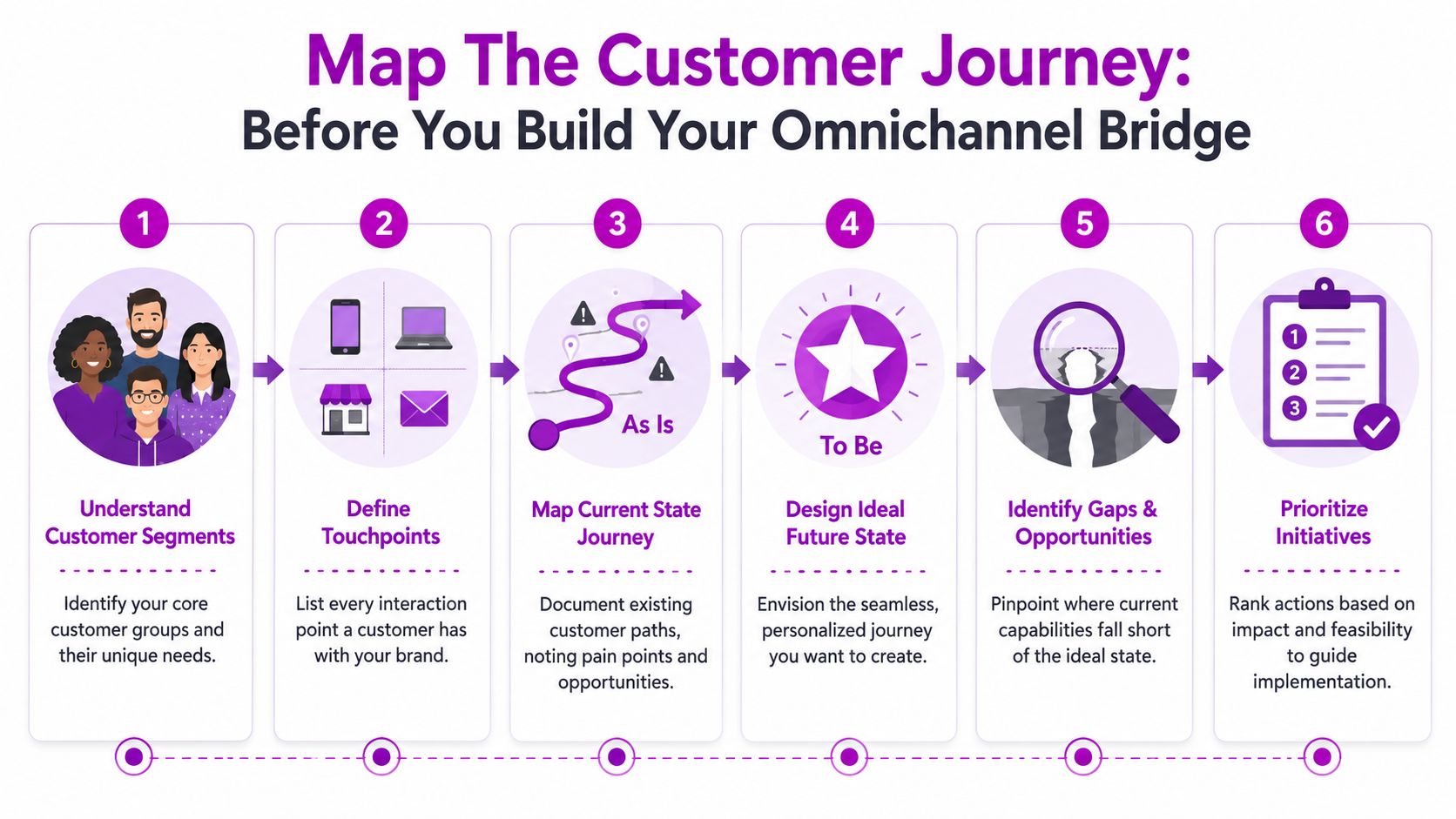
Many organizations already know their channels. What they haven't documented is how buyers move between them.
For a Shopify brand, the touchpoint list usually includes more than the storefront:
- Discovery channels: Meta ads, Google Shopping, TikTok, influencer links, organic social
- Owned channels: Email, SMS, mobile web, Shop app notifications
- Service channels: Shopify Inbox, Gorgias, email support, chat, Instagram DMs
- Offline moments: Pop-ups, wholesale appointments, retail stores, trade shows, community events
- Post-purchase channels: Tracking pages, returns portal, loyalty emails, review requests
The work is to map behavior across them, not just list them.
A practical journey mapping exercise
Use one high-volume journey first. Don't start with ten. For many brands, that's one of these:
- First purchase journey: Paid social click to product page to checkout to post-purchase
- Assisted purchase journey: Product browse to chat question to return visit to order
- Store-influenced journey: Online browse to in-person visit to later ecommerce purchase
- Retention journey: Prior order to replenishment reminder to repeat purchase
For each one, document four things in plain language:
| Step | What to capture |
|---|---|
| Entry point | Where the customer starts and what intent they likely have |
| System dependency | Which tool or team owns that moment |
| Friction | What breaks, delays, or confuses the handoff |
| Recovery option | What should happen if the customer drops or switches channels |
A good map shows operational reality. If support has no access to POS notes, write that down. If store staff can't see online order history, write that down too. Don't sanitize it for leadership.
The goal isn't to produce a beautiful Miro board. The goal is to expose where your systems force the customer to do extra work.
Here's a useful walkthrough on omnichannel planning and journey design:
Choose channels with intent
One of the worst omnichannel decisions a growing brand can make is expanding touchpoints faster than it can support them. More channels create more edge cases, more support complexity, and more bad data if the core system is shaky.
Use a simple filter before investing in another channel:
- Customer fit: Does your best customer use it during consideration or purchase?
- Operational readiness: Can your team support inventory, service, and content there consistently?
- Data capture: Will activity from that channel feed your core customer record?
- Journey value: Does it improve a journey you already know matters?
If the answer is no to two of those, wait.
What to hand to your team
By the end of this stage, a brand should have a working document with:
- Three to five customer segments based on behavior, not vanity demographics
- Two or three priority journeys with known friction points
- A touchpoint inventory across digital, service, and offline interactions
- A ranked initiative list based on impact and feasibility
That document is what should drive your Shopify architecture. Not the other way around.
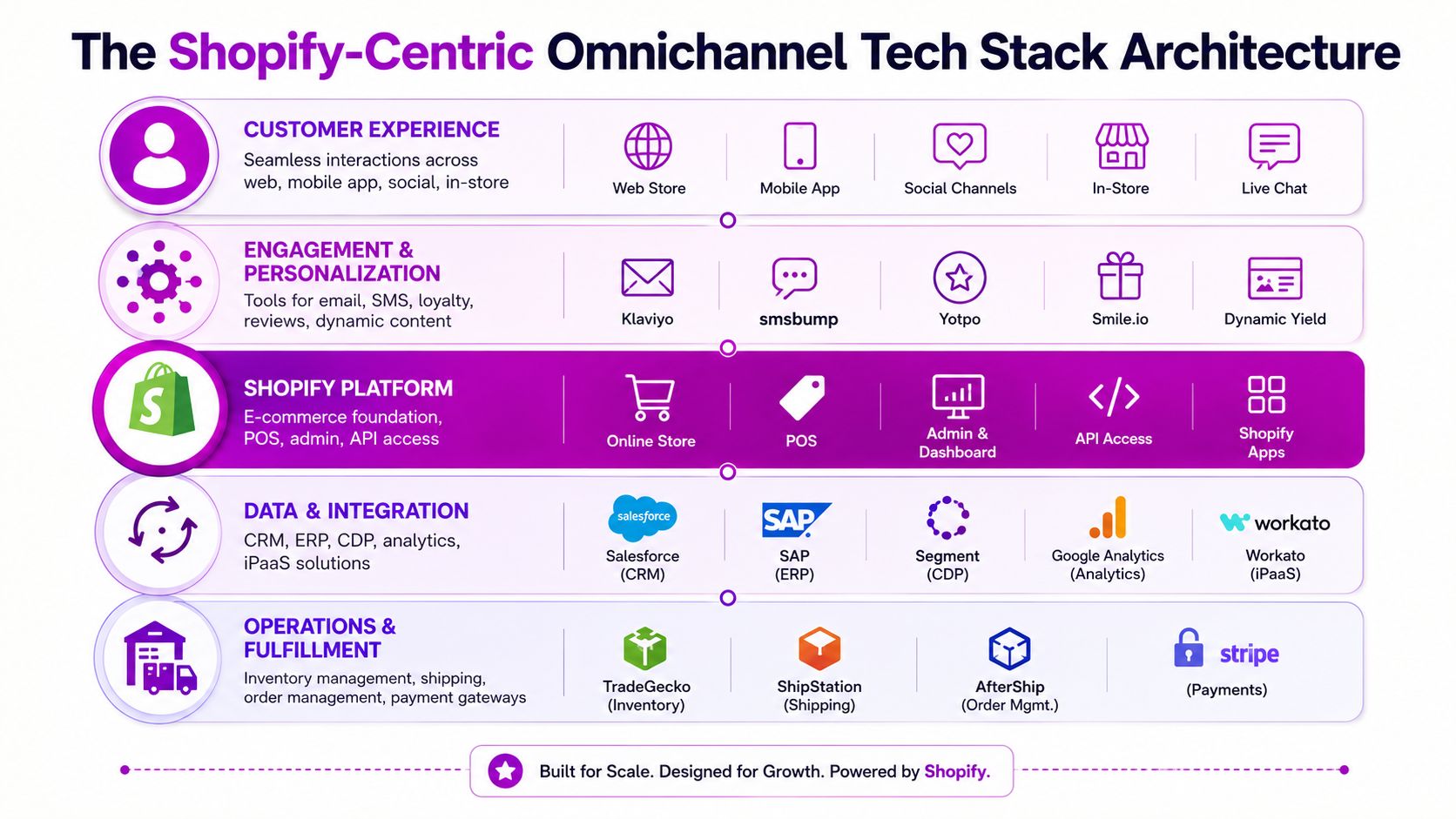
Your Shopify-Centric Omnichannel Tech Stack
The right stack for omnichannel on Shopify is boring in the best way. Data moves where it should. Inventory is trusted. Service teams see context. Marketing tools react to real behavior. Nothing depends on manual exports or someone “checking with the store.”
The wrong stack looks polished in demos and breaks at the seams. The giveaway is usually inventory. Lack of real-time synchronization creates inconsistent pricing and stock availability across channels, and that defect correlates with 42% of retail executives misallocating half their marketing budget to initiatives that fail because backend logic is disconnected, according to Deck Commerce's analysis of omnichannel execution failures.
The core layer you should stabilize first
For most brands, the foundation is still Shopify itself.
Use Shopify Admin as the commerce source of truth for products, orders, and core customer records. Use Shopify POS if you have stores, pop-ups, or showroom environments and want in-person transactions tied back to the same platform. Use Shopify Markets if you're managing regional storefront complexity and need tighter control over localization. Use Shopify Inbox if you want site chat activity close to commerce data rather than buried in a separate messaging silo.
That native layer matters because every extra system adds another identity and sync problem.
A lean starting point often looks like this:
- Commerce core: Shopify, Shopify POS, Shop Pay, Shop app
- Retention layer: Klaviyo for email and SMS
- Support layer: Gorgias or a similar ecommerce helpdesk
- Loyalty and UGC layer: Yotpo, LoyaltyLion, or another tool that connects cleanly
- Search and merchandising: Searchspring, Algolia, or Shopify-native options depending on complexity
- Analytics and reporting: Shopify Analytics first, then a stronger BI layer when cross-channel reporting gets messy
Where brands overbuild
The mistake isn't using third-party tools. The mistake is stacking category leaders without designing how they'll share events and ownership.
A few examples:
| Stack choice | Works when | Breaks when |
|---|---|---|
| Shopify POS + Klaviyo | POS events sync fast enough to trigger relevant lifecycle flows | POS customer records are inconsistent or staff skip email capture |
| Gorgias + Shopify | Support can see order history, tags, and customer context in one view | Teams still route social DMs elsewhere and lose conversation history |
| Loyalty app + Shopify checkout | Rewards logic is consistent online and in-store | Reward balances or redemption rules differ by channel |
| ERP or IMS connector + Shopify | Inventory updates are reliable and conflict rules are clear | Multiple systems can overwrite stock or price data |
A practical architecture for growing brands
Most Shopify brands don't need enterprise architecture on day one. They need a stack that supports a small number of high-value omnichannel journeys without becoming fragile.
Build in layers.
Customer experience layer
This is what the shopper touches directly. Your theme, checkout, POS environment, Shop app presence, loyalty surfaces, and customer account experience all live here. Keep this layer simple enough that merchandising and CX teams can operate it without developers for every change.
Engagement layer
Klaviyo, Attentive, Postscript, Yotpo, and similar tools are found at this layer. These tools should consume behavior from Shopify and other approved systems, then trigger messages based on actual journey state. Don't let this layer invent its own customer truth.
Data and integration layer
Many brands need to get more disciplined. If you use middleware, iPaaS tools, custom webhooks, or a CDP later on, document exactly which system owns each object:
- Product data owner
- Inventory owner
- Customer profile owner
- Order status owner
- Promotion logic owner
If two systems both think they own the same field, you'll get drift.
A clean omnichannel stack isn't the one with the most integrations. It's the one where each integration has a reason to exist.
Operations layer
This covers inventory management, shipping, returns, fulfillment routing, and finance reconciliation. For some brands, Shopify plus a capable 3PL and returns platform is enough. For others, an ERP, OMS, or dedicated inventory tool becomes necessary when store stock, wholesale allocations, and online availability all compete.
The practical test is simple. If your operations team can't explain where inventory truth comes from in one sentence, the stack isn't ready for omnichannel promises.
Unifying Customer Data For a Single Source of Truth
Most brands think they need better personalization. Their actual need is identity resolution.
A customer views products on mobile, signs up for email, buys in-store through Shopify POS, opens a support ticket in Gorgias, and comes back through a paid retargeting ad. If those events sit in separate tools without a durable way to connect them, every downstream decision gets weaker. Campaigns misfire. Service lacks context. Reporting tells conflicting stories.
The single customer record has to be designed
On Shopify, the customer record is the natural anchor, but it usually isn't enough by itself. Email address helps, but it's imperfect. Phone number helps, but it can be missing. Device-level data is useful, but it's not stable enough to carry the system.
A stronger setup uses a unified customer identifier and agrees how each platform contributes to it.
In practice, that means defining rules such as:
- Shopify owns commerce events: orders, refunds, products purchased, checkout milestones
- Klaviyo owns messaging events: opens, clicks, attribution windows inside campaigns
- Helpdesk owns service events: tickets, issue types, sentiment tags, resolution outcomes
- POS enriches offline context: store transactions, associate interactions, local preferences
- CDP or middleware normalizes the feed: only if you've reached the point where direct app syncing creates blind spots
If you're evaluating the broader operating model behind this, this guide to a unified commerce platform is a useful reference point.
When a CDP is worth it
A lot of teams jump to Segment or another CDP too early. Others wait too long and keep patching broken app-to-app syncing with spreadsheets and manual workarounds.
You probably need a CDP when these conditions show up together:
- Customer duplication: the same person exists in multiple platforms with conflicting traits
- Journey complexity: customers regularly move across support, POS, storefront, and retention channels
- Attribution conflict: marketing, retail, and finance each trust different reports
- Activation delay: getting one audience or trigger live requires engineering every time
If those problems are still minor, start with stricter field mapping and event governance. If they're already slowing teams down, a CDP can act as the central routing layer instead of letting each tool talk to every other tool independently.
Why standard KPIs keep misleading omnichannel teams
The biggest reporting mistake in omnichannel is treating channel dashboards as if they describe customer reality. They don't. Standard ecommerce KPIs like conversion rate, ROAS, and CAC systematically undervalue physical stores and upper-funnel digital touchpoints. That gap is described as the Omnichannel Measurement Paradox in this analysis of omnichannel measurement frameworks.
That's why a last-click view often pushes teams toward the wrong decisions. The store looks less important than it is. Brand campaigns look inefficient when they're assisting later purchases. Support looks like a cost center when it may be saving orders.
A more useful model tracks journeys, not isolated sessions.
What a usable data model looks like
Instead of asking which channel “won” the sale, ask better questions:
| Better question | Why it matters |
|---|---|
| What was the first meaningful touchpoint? | It helps separate discovery from conversion capture |
| Which touchpoints assisted the purchase? | It reveals influence that last-click ignores |
| Did the customer switch channels before ordering? | It shows where handoffs are helping or hurting |
| What happened after the first order? | It connects acquisition quality to retention quality |
Don't optimize channels in isolation if customers don't shop in isolation.
For Shopify brands, this usually means building reports around customer cohorts, order paths, assisted journeys, and repeat purchase behavior rather than relying only on session-based dashboard snapshots. Once you do that, personalization gets easier because your data model starts reflecting how people buy.
Personalization Tactics That Actually Work
Most personalization fails because it's decorative. “Recommended for you” blocks, generic browse abandonment emails, and discount popups aren't useless, but they're not what makes omnichannel feel smart.
What works is context. The brand remembers what the customer already did, where they did it, and what should happen next.
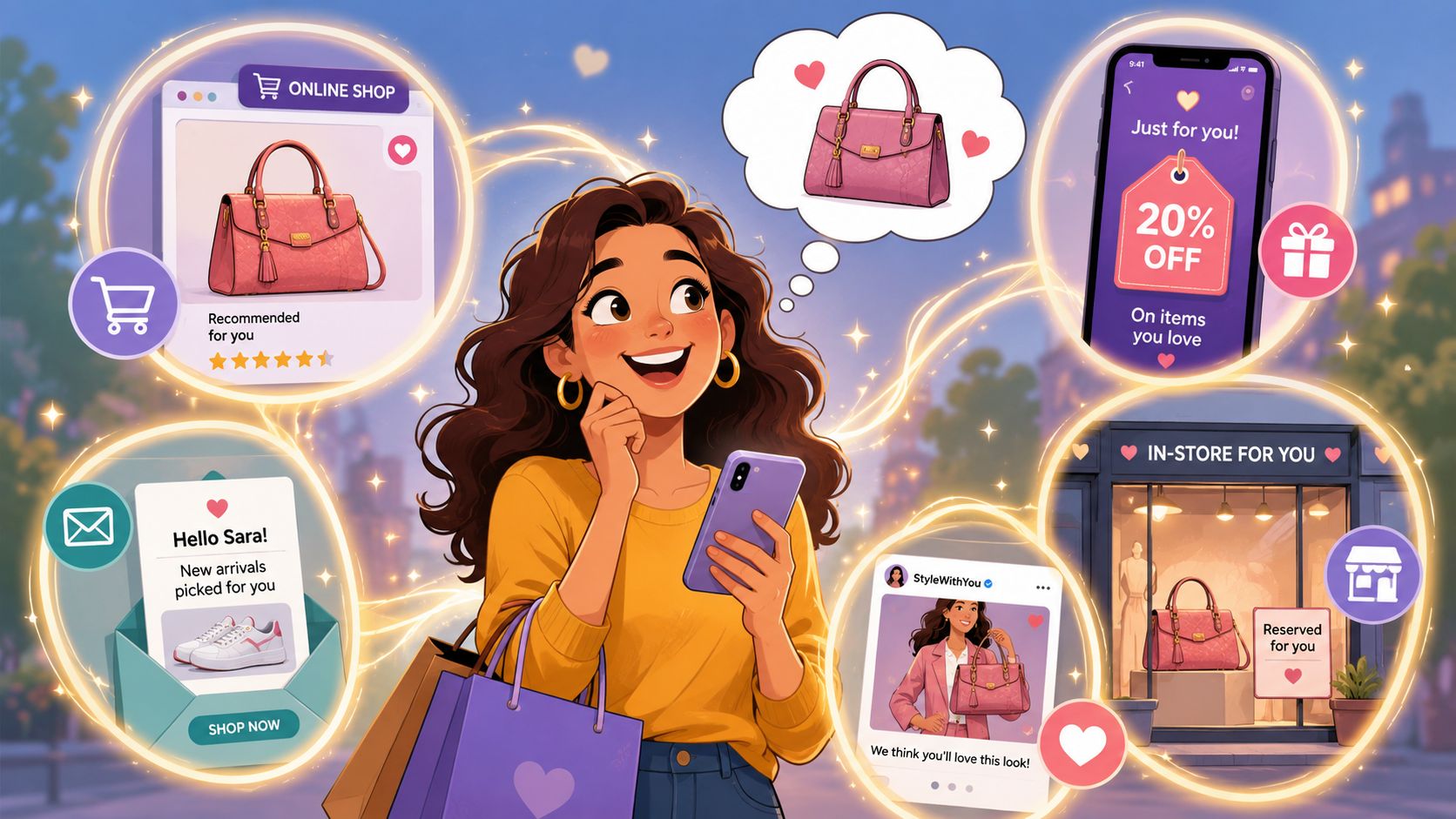
Three plays worth implementing first
Start with a few scenarios that rely on data you can already trust.
Cart continuation from assisted selling
A customer visits a store, showroom, or pop-up. Staff build a cart in Shopify POS, email it to the customer, and the customer doesn't buy on the spot.
A good follow-up flow doesn't send a generic abandoned cart message. It sends a continuation message that reflects the assisted experience. Product names, variant details, and a clean checkout link should carry over. If the customer replies with a question, support should see the original context.
Service-informed retention
A customer opens a support ticket after delivery. The issue gets resolved. Many brands keep treating that customer like a normal promotional recipient.
A better approach changes messaging for a recovery window. Hold back aggressive promotional blasts, then re-enter the customer through a lighter-touch sequence. If they had a sizing issue, recommend fit guidance. If the order involved an exchange, reference the completed resolution rather than pretending nothing happened.
Cross-device and cross-touchpoint recognition
A customer browses through the Shop app or mobile site, returns later on desktop, and logs in or clicks from email. Don't restart the conversation. Surface products they engaged with, but also update merchandising to reflect category intent, stock availability, or prior purchases.
Personalization that uses physical context without being clumsy
Brands often want location-based messaging because it sounds advanced. The risk is doing it in a creepy or irrelevant way.
Useful examples are narrower:
- Pop-up proximity messaging: Send an SMS reminder only to opted-in customers near an active event window
- Store-aware service messaging: Mention pickup readiness, local stock, or appointment availability
- Regional merchandising: Change featured collections based on weather, event schedule, or shipping realities when those signals are operationally reliable
The key is restraint. If the message wouldn't make sense to a customer who knows you have their data, don't send it.
Personalization should answer a customer's next question before they ask it.
Digital-first omnichannel is real
A lot of omnichannel advice assumes you need a store fleet. That's outdated. Digital-first brands can still build connected journeys if customer data and inventory visibility are unified.
There's growing interest in that model, including examples where brands use AI-driven virtual clienteling and unified inventory pools to achieve higher retention without physical stores, as discussed in this video on digital-first omnichannel execution.
For Shopify brands, that can look like:
- Virtual product advice delivered through chat, video consults, or guided quizzes
- Post-consult carts passed into email or SMS for later completion
- Clienteling-style follow-up tied to prior preferences and purchase history
- Inventory-aware recommendations that avoid pushing unavailable products
That's still omnichannel. The channels are just digital and coordinated, not store-based.
Measuring What Matters The Omnichannel Scorecard
Teams commonly still measure omnichannel with channel reports. Paid media owns ROAS. Email owns click rate. Retail owns store sales. Support owns ticket time. None of that tells leadership whether the customer journey is improving.
An omnichannel scorecard fixes that by combining commercial, operational, and customer measures into one view. It's less about inventing new metrics and more about organizing existing ones around the journey.
The scorecard should answer five questions
A practical scorecard for a Shopify brand should help you answer:
- Are customers becoming more valuable over time?
- Are acquisition efforts bringing in the right customers, not just cheap conversions?
- Are more customers moving across channels without added friction?
- Is fulfillment and service supporting the promise we market?
- Can leadership trust one version of performance?
A simple omnichannel scorecard structure
| Scorecard area | What to watch |
|---|---|
| Customer value | Customer lifetime value by acquisition source or first-touch channel |
| Retention health | Overall repeat purchase behavior and retention trend |
| Acquisition efficiency | Blended CAC across channels, not isolated platform reporting |
| Journey performance | Assisted conversions, cross-channel purchase paths, return-to-repurchase behavior |
| Operational trust | Inventory accuracy, fulfillment exceptions, service resolution context |
Often, many Shopify teams outgrow default reporting. Shopify Analytics is useful, but once orders, service, retail, and retention need to be analyzed together, many brands look at tools like Daasity or Triple Whale to consolidate reporting and reduce dashboard conflict.
What not to do
Don't let each department bring a different KPI set to the same meeting and call that omnichannel measurement. That produces local optimization.
A support team may reduce handle time while hurting repeat purchase. A media team may improve platform ROAS while lowering customer quality. A retail team may drive store sales that never get credited because attribution only rewards the last online click.
If your reporting can't show how channels support each other, it will push teams to compete with each other.
The best omnichannel scorecards are boring, consistent, and shared across departments. That's what makes them useful.
The Phased Rollout An Implementation Roadmap
The fastest way to derail omnichannel work is trying to launch everything at once. Brands talk about BOPIS, loyalty unification, store clienteling, cross-channel attribution, AI personalization, and returns modernization in the same kickoff. Then the team spends months in meetings and ships nothing.
A better rollout is phased. Build the spine first. Activate a few journeys second. Scale only after the basics are stable.
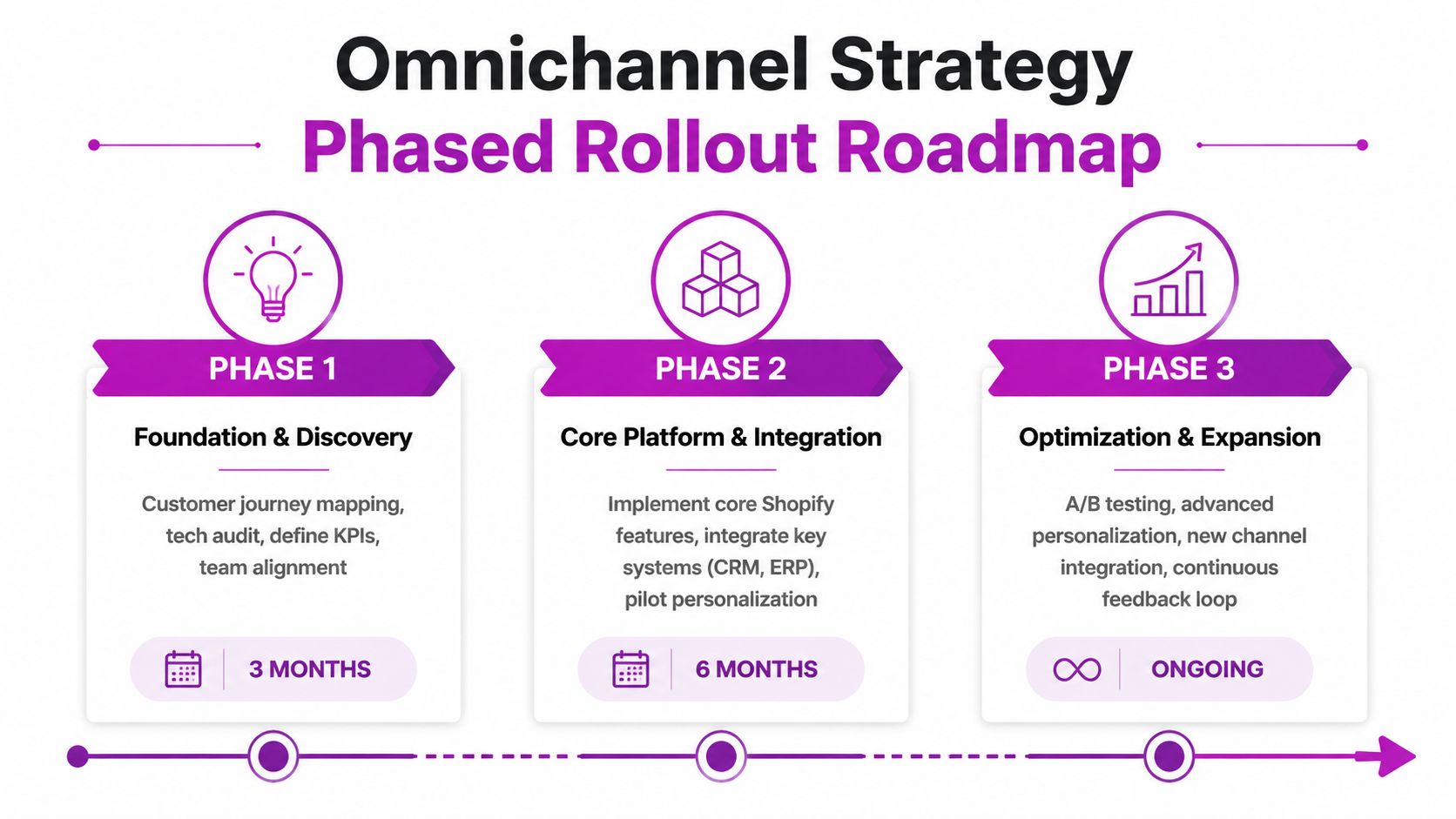
Phase 1 Foundation and discovery
This phase is about clarity, not flashy launches. Audit the current stack, map the priority journeys, define data ownership, and identify where your Shopify setup already supports the experience versus where custom work or app changes are needed.
The deliverables should be tangible:
- Journey maps: especially the highest-friction purchase and support flows
- System map: which tool owns customer, inventory, order, and promotion data
- Data hygiene rules: customer capture standards, POS practices, field mapping, deduping approach
- Scorecard draft: the first shared reporting layer for leadership and operators
If a brand skips this phase, every later workflow inherits the same confusion.
Phase 2 Core platform and pilot programs
Once the foundation is stable, launch a small number of omnichannel plays with clear owners. Don't launch a strategy. Launch a pilot.
Good candidates include:
- Unified support context: connect Shopify, helpdesk, and messaging channels so support sees order history and prior interactions
- Cart continuation flows: especially from POS, pop-up, or clienteling moments
- Inventory visibility improvements: expose stock truth consistently across channels before promoting new fulfillment options
- Loyalty consistency: make sure earn-and-burn logic behaves the same way online and offline
This is also the phase where you find out whether teams can run the process you designed. Training matters here. Store staff, CX agents, marketers, and ecommerce operators need the same playbook.
Phase 3 Optimization and expansion
Only after the first journeys are stable should you widen the program. At this stage, more advanced personalization, deeper reporting, and new channels make sense.
Expansion often includes:
| Expansion area | What changes |
|---|---|
| Personalization | More event-based messaging, smarter audience rules, stronger merchandising logic |
| Measurement | Cohort and journey reporting, assisted revenue views, unified dashboards |
| Fulfillment | More flexible pickup, routing, or local inventory logic where operations can support it |
| Channel growth | New touchpoints added only after data and service readiness are proven |
The roadmap matters because omnichannel isn't a one-time build. Teams change. apps change. Processes drift. The brands that keep winning are the ones that treat omnichannel as an operating discipline, not a campaign theme.
If your team is trying to turn an omnichannel retail strategy into an actual Shopify project plan, ECORN can help with the hard part. That includes Shopify architecture, app integration decisions, CRO, and the operational rollout needed to connect storefront, POS, retention, and customer data without overcomplicating the stack.



Shopify Plus Automation: A Guide for 2026

10 Social Selling Platforms for Shopify Merchants

Shopify Website Design Examples: 7 Stores Worth Studying

7 Ecommerce Newsletter Examples for Shopify Brands

One Product Shopify Store: Build and Scale

Mobile Pop Up Strategy for Shopify Stores That Converts

Sitemap for Shopify: How to Find, Optimize, and Submit It

7 Single Product Websites Worth Emulating

Product Variants Shopify: The Complete 2026 Guide

Ecommerce Analytics Consulting for Growth

What Is AI Integration for eCommerce

How to Choose the Right eCommerce Website Development Firm

E Business Strategy Implementation

Conversion Tracking Setup for Shopify Stores

BigCommerce vs Shopify Plus Which Enterprise Wins in 2026

Shopify Theme Kit: Setup, Commands, and Migration Guide

Shopify Extension Development: A Practical 2026 Guide

Shopify Speed Score Explained and How to Improve It

Shopify Mobile Optimization: The 2026 Playbook

How to Add Subcategory in Shopify for Better UX

How to Implement Structured Data for Ecommerce in 2026

SEO App Mobile: Shopify Store Optimization Guide

Shopify Plus Support: What It Includes and How to Choose

Google Ads for Shopify: The Complete 2026 Playbook

Shopify New York: How to Find and Hire the Right Agency

Google Search Console for Shopify: The Complete Setup

First Party Data Collection for eCommerce Growth

FAQ Online Store Guide: Build and Measure It Right

Do FB Ads Work for eCommerce in 2026?

One Page Checkout for Shopify: Design and Implementation

Shopify GraphQL vs REST: The 2026 Developer Decision

Shopify Ecommerce Consulting: Strategy, Pricing &

Are Reddit Ads Worth It for eCommerce Brands

Shopify Title and Meta Description: A Practical 2026 Guide

Product Video Best Practices for Shopify Brands

Real-Time Inventory Management: A 2026 Guide

AI Chatbot Integration for Shopify Stores

Affiliate Program Management: A Shopify Guide

10 Best Performance Monitoring Tools for Shopify in 2026

Digital Asset Management for eCommerce Brands in 2026

Every Type of Facebook Ads Explained for eCommerce Growth

Product Information Management Explained for Shopify Brands

Support Ticket System: A Guide for Shopify Stores

10 Best Customer Service Tools for Shopify in 2026

Can I Start a Business with No Money? a 2026 Blueprint

What Sells Good on Etsy: Best Niches for 2026

Shopify Add to Cart Button: A Practical 2026 Guide

Customer Feedback Automation: A Practical eCommerce Guide

Critical Rendering Path: A Guide for Shopify Stores

How to Promote on TikTok for eCommerce in 2026

B2B eCommerce Consulting That Drives Real Revenue

10 Best Practices for Site Navigation in 2026

Return vs Refund for Shopify Stores: A Practical Guide

What Is Customer Lifetime Value and Why It Matters

What Is Voice of Customer Research for eCommerce

SMS Marketing for Ecommerce That Actually Converts

Master How to Improve Email Deliverability in 2026

Top 7 eCommerce Partners NYC for Shopify Brands in 2026

Machine Learning for Ecommerce: Boost Your Shopify Store

Beauty Market Research: Your 2026 Growth Guide

Shopify International Expansion: A 2026 Roadmap

What Does CRO Stand for in Business: Understanding CRO

Shopify Visual Merchandising: A Playbook for Higher Sales

Shopify Landing Page Design: Master Conversion in 2026

10 Best AI SEO Optimization Tools for Shopify in 2026

Agentic AI for Ecommerce: Boost Your Sales in 2026
Mastering Email Marketing Data for eCommerce Growth

Conversion Rate Optimisation Australia: Boost Your Sales

Conversion Rate Optimization AI: Your Shopify Store Guide

10 Product Bundling Strategies for Shopify in 2026

How to Increase Customer Lifetime Value: A Shopify Playbook

AI Customer Service Automation: Shopify Guide 2026

Clean Website Design: A Shopify Conversion Playbook

Product Data Enrichment: A Guide for Shopify Brands

Instagram Shopping Features a Guide for Shopify Stores

What Is Revenue Optimization: A Holistic RevOps Guide

Benefits of Conversion Rate Optimization: Boost Your

WordPress to Shopify Migration: Your 2026 Seamless Switch

Boost Sales: Ecommerce Payment Processing Guide 2026

Unified Commerce Platform: Benefits, KPIs & Shopify Guide

How to Reduce Bounce Rate eCommerce: Your 2026 Guide

Shopify API Integration: A Practical End-to-End Guide

How to Implement Data Governance: A 2026 Guide

Shopify Store Development Cost: A 2026 Breakdown

What Is Server Side Tracking: The Shopify Guide 2026

Marketing Automation Workflows: A Shopify Guide for 2026

Shopify: How to Reduce Technical Debt

Shopify UX Design Change: A Playbook for Growth

User Generated Content Strategy: Shopify Playbook

Shopify Pause and Build Plan Cost: A Complete 2026 Guide

Compare at Price on Shopify: A Complete Guide for 2026

Where Can I Sell My Prints? 10 Best Platforms for 2026
Shopify Order Management System: The Ultimate Guide 2026
What Is Marketing Attribution? an eCommerce Guide for 2026

10 Best Black Friday Sales Sheets for 2026

Discover the Top Social Media Marketing Agencies For
Consumer Confidence Definition for eCommerce in 2026
What Is Social Commerce? Your 2026 Guide to Boosting Sales

A Social Ad Campaign Playbook for eCommerce Growth

7 Best FAQ Page Examples for SaaS & eCommerce


newsletter in your inbox