


Your Instagram posts look good. People save them, reply to Stories, and comment asking about colors, sizes, and restocks. But when you open Shopify, the revenue from Instagram rarely matches the attention.
That gap is where most brands get stuck.
In 2026, Instagram still matters for commerce, but not in the way many founders hoped a few years ago. It's no longer smart to treat it as a self-contained storefront and expect the platform to do the hard work for you. The smarter play is to use Instagram shopping features to shorten the path from discovery to product page, while keeping your Shopify store as the place where trust, conversion, and retention are built.
For Shopify brands, that shift is good news. You keep tighter control over merchandising, landing pages, bundles, analytics, and post-purchase flows. Instagram becomes a sales layer, not your whole commerce stack.
From Likes to Sales Unlocking Instagram Commerce
A common Shopify problem looks like this: strong creative, weak commercial structure. A fashion brand posts a styled outfit. A skincare brand posts a routine. A home brand posts a beautifully shot product vignette. Engagement comes in, but shoppers still have to ask where to buy, click your bio, hunt through menus, then find the right SKU.
That friction costs sales.
Instagram still has real buying intent. Brands that tag products in their feed posts increase sales by 37% on average compared to businesses that don't, and 130 million users tap on shoppable posts every month according to Instagram Shopping. Those two numbers matter because they change the role of content. A post isn't just brand storytelling anymore. It can function like a merchandised entry point.
Where the opportunity really sits
For most Shopify stores, the win isn't “sell everything inside Instagram.” The win is simpler. Reduce the number of steps between inspiration and a product page that converts.
That means:
- Tag the exact product shown: Don't tag a parent collection when the post features one hero SKU.
- Match creative to landing experience: If the post shows a black linen shirt, the shopper should land on that shirt, not a general “new arrivals” page.
- Use Instagram as assisted commerce: Content starts demand. Shopify closes it.
If you want a complementary take on the conversion side of this process, the Sup Growth guide on Instagram revenue is worth reading alongside this. It pairs well with a broader view of social commerce strategy for brands trying to connect content performance with actual orders.
Practical rule: If a customer has to ask “where do I buy this?” your post is underbuilt for commerce.
What works and what doesn't
What works is direct merchandising inside content. Product tags, clear visual focus, and consistent tagging habits train your audience to shop from your posts.
What doesn't work is treating every post like a magazine spread and hoping people will figure out the rest themselves. On Shopify stores with wider catalogs, that usually creates leakage. The shopper wanted one thing. You sent them into a maze.
Instagram shopping features work best when they remove uncertainty. Show one product clearly. Tag it correctly. Send traffic to a page that feels like the natural next step.
The Instagram Shopping Ecosystem Explained
Most setup problems happen because brands think Instagram Shopping is one feature. It isn't. It's a system. If one part is misconfigured, the whole experience feels unreliable.
Use a retail-store analogy. Commerce Manager is the back office. Your product catalog is the stockroom. Your Instagram shopfront is the sales floor. Advertising and insights are the merchandiser and store manager deciding what gets seen and what gets moved.
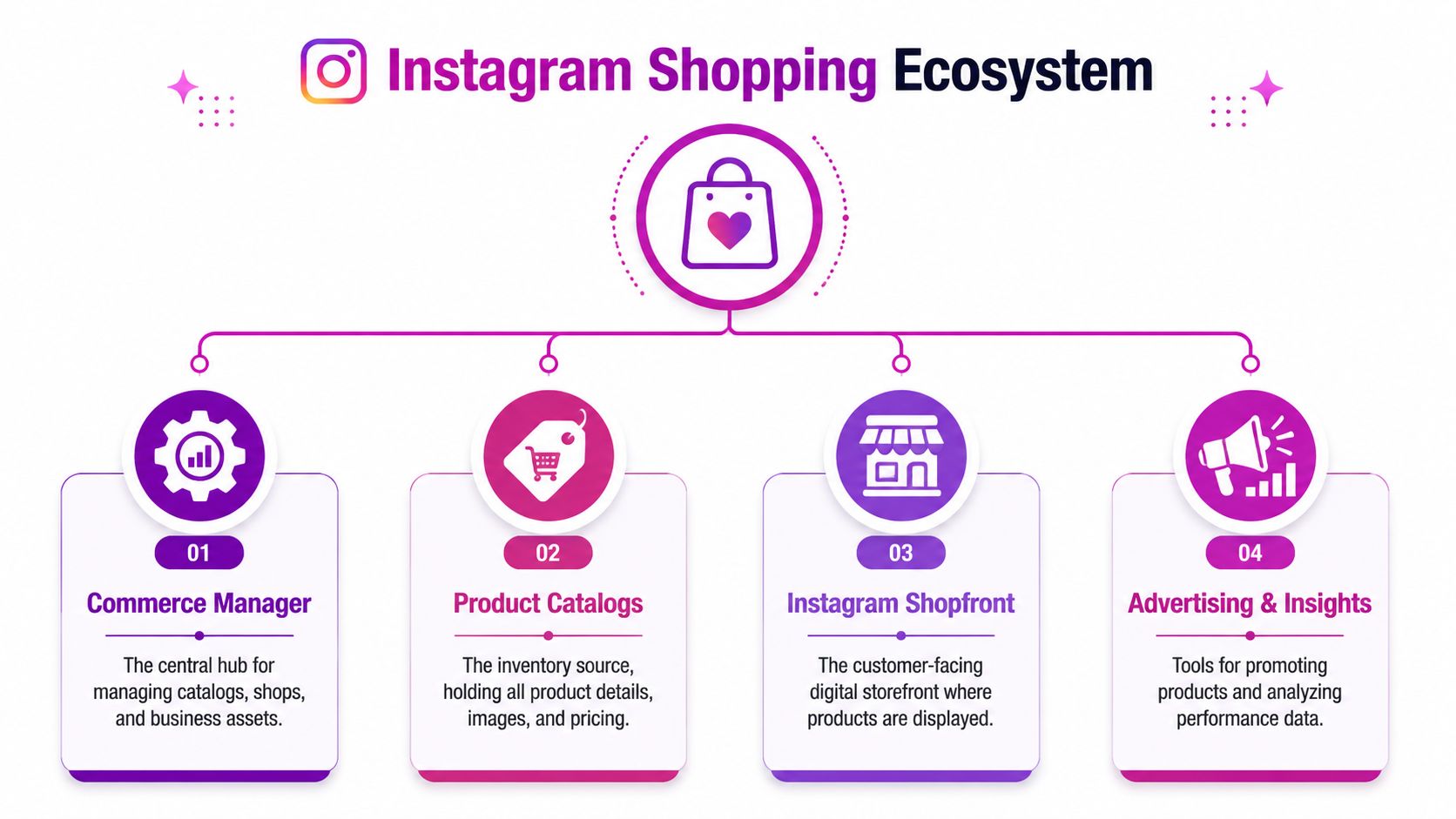
The four parts that matter
Commerce Manager
Here, Meta stores the commercial logic of your setup. Catalog ownership, shop settings, review status, permissions, and product-level issues live here. If your team can't find why a tag isn't available, the answer usually sits here.
Product catalog
Your catalog is the structured feed of titles, images, prices, variants, and availability coming from Shopify. If the catalog is messy, your Instagram shopping features will be messy too.
Bad catalog hygiene creates downstream problems fast:
- Weak product titles: “Summer Drop 04” tells the shopper nothing.
- Variant confusion: If color and size data aren't mapped cleanly, tagged products become harder to trust.
- Poor images: Cropped or inconsistent product imagery lowers click confidence.
Instagram shopfront
This is the customer-facing layer attached to your profile. Shoppers browse here when they want more than the single item in a post. Think of it as a light storefront, not your main store.
That distinction matters. Your Shopify PDP still does the heavier work, especially for reviews, bundles, FAQs, subscriptions, and shipping clarity.
How data flows in practice
In a healthy setup, Shopify acts as the source of truth. Product data passes into Meta's environment, then becomes selectable inside content formats like posts and Stories.
A simple way to think about it:
| Component | Main job | Common failure point |
|---|---|---|
| Shopify | Holds product truth | Weak titles, bad images, variant mess |
| Commerce Manager | Validates and distributes data | Policy or ownership errors |
| Instagram profile/shop | Displays products to shoppers | Missing products or outdated info |
| Ads and insights | Pushes and measures demand | Tracking disconnected from store data |
Your Instagram content can only sell as well as your catalog is organized.
Brands often blame creative first. In practice, catalog quality, permissions, and feed discipline are often the quieter reasons shopping performance stalls.
Activating Your Shop Eligibility and Setup Guide
Approval feels unpredictable when you don't know what Meta is checking. In reality, the setup path is narrower than most brands realize.
Technical approval requires a two-step verification process: first, linking your Instagram account to a verified Facebook Page, and second, passing a Meta Commerce Manager review that validates domain ownership and policy compliance. The typical latency is 24 to 48 hours according to Adsmurai's guide to Instagram Shopping checkout.
The setup sequence that causes the fewest problems
Start with the commercial foundation, not the content side.
Switch to a professional account
Your Instagram profile has to be configured for business use. Personal profiles create avoidable friction later.Link the verified Facebook Page
Many stores often get sloppy at this stage. Teams often connect the wrong Page, an old Page, or a Page controlled by a former agency or employee.Claim and verify your domain
Your domain needs to match the website where products live. If your store operates on Shopify, make sure the live domain and the reviewed domain align.Build the catalog properly in Commerce Manager
Review product titles, images, availability, and links before submitting. Approval doesn't fix messy product data.Check policy risk areas
Restricted categories, exaggerated claims, and mismatched landing pages often create delays.
What commonly blocks approval
The frustrating part is that some accounts appear technically correct and still don't move. In 2026, one of the most overlooked checks is account health.
Watch these areas closely:
- Account Quality: Any unresolved issues can interfere with access to shopping tools.
- Monetization status: Especially relevant for creators and hybrid creator-brand accounts.
- Ownership confusion: If your Facebook Page, Business Manager, domain, and Instagram account are owned by different entities, approvals get messy.
If you're still deciding how your profile should be structured before setup, HarvestMyData on Instagram account decisions is a useful reference for sorting out the account-type side before you push into commerce.
Approval delays usually aren't random. They usually trace back to ownership, policy, or account health.
The no-nonsense troubleshooting move
If a store keeps getting stuck, stop editing ten variables at once. Audit the setup like an operator:
- confirm the exact business assets in use
- confirm domain ownership
- confirm the live Shopify catalog is clean
- confirm no unresolved account-quality issues
- then resubmit
That sequence beats guessing.
A Deep Dive into Key Instagram Shopping Features
Once approval is live, the conversation shifts from eligibility to merchandising. At this stage, many brands underuse Instagram shopping features. They activate tags, then apply them randomly.
The better approach is to match each feature to a buying moment.
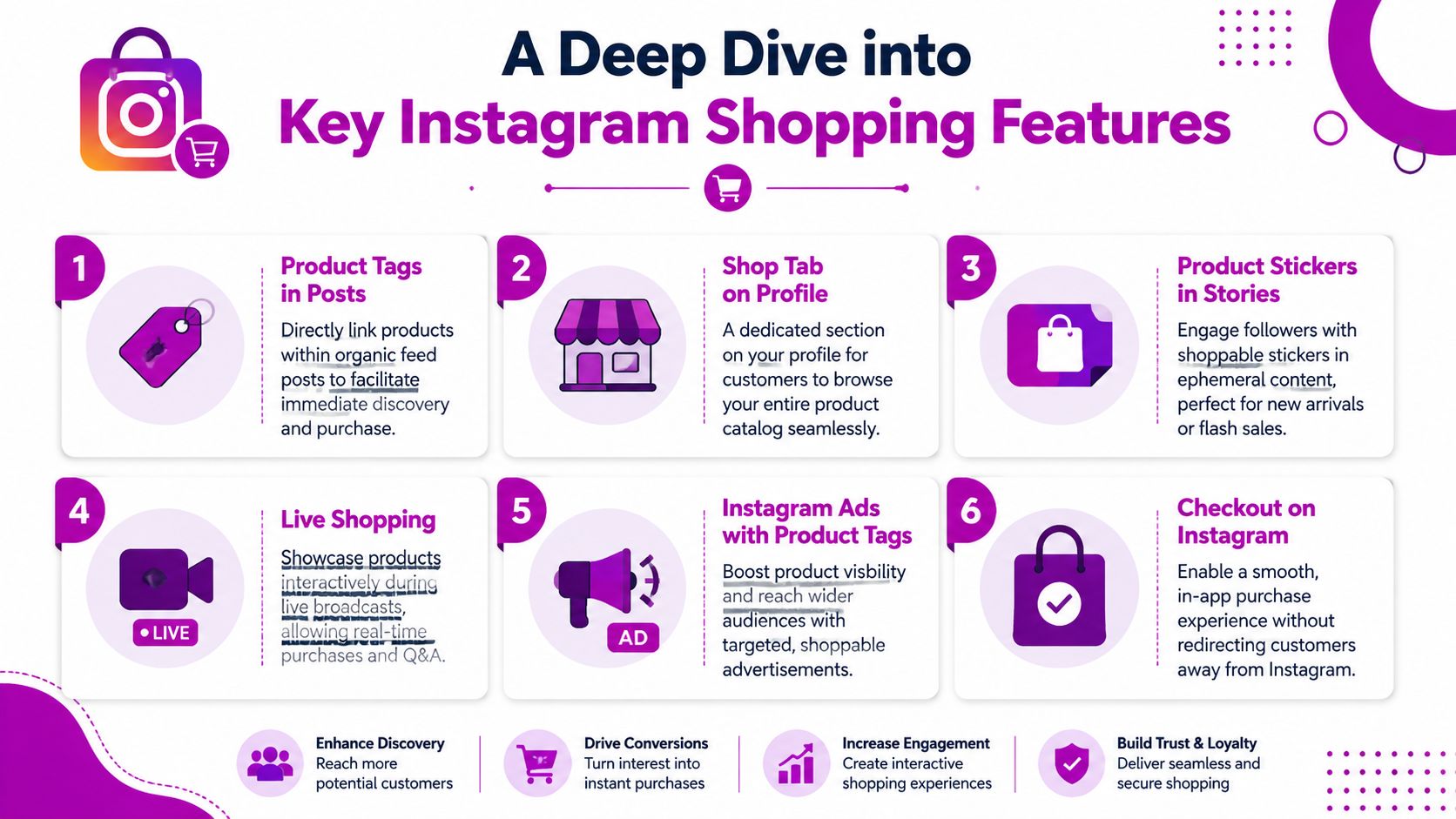
Feed post product tags
These are still the workhorse. They fit best when the content has one obvious commercial focus.
A Shopify apparel brand, for example, might post a single model wearing one jacket, one trouser, and one bag. The temptation is to tag everything visible plus adjacent variants. That usually weakens the click path. Instagram limits single-image posts to five product tags, as outlined in Sked Social's Instagram Shopping guide. That cap forces discipline, which is good.
Use the limit strategically:
- Lead with hero products: Tag the item most likely to carry intent.
- Support the look, don't overload it: Add secondary items only if they help complete the purchase path.
- Avoid low-intent filler: Don't waste tag slots on marginal accessories unless they're central to the post.
Stories and stickers
Stories are better for movement, urgency, and fast decisions. New arrivals, back-in-stock pushes, limited bundles, and founder-led explanations all fit here.
What works in practice is pairing a product sticker with a simple message and a clear visual. What usually fails is overdesigned Story creative where the sticker is hidden under graphics, GIFs, or tiny text.
A Story should feel tappable, not decorated.
Shopfronts, collections, and feature selection
The profile shopfront matters most when your catalog has clear categories and visual consistency. A skincare brand can create a stronger experience by grouping routines. A homeware brand can group by room or material. A fashion brand can group by drop, fit, or fabric story.
A few feature-by-feature realities:
- Shop tab on profile: Useful for warm traffic already checking credibility.
- Ads with product tags: Strong when retargeting catalog-aware visitors.
- Checkout paths: Useful only if they align with your market and operating model.
- Live-led commerce moments: Better used to create demand and send people into a controlled buying flow than to rely on platform-native commerce expectations.
The common mistake is using every feature because it exists. The better move is to use the few that match how your customer buys.
Integrating Shopping Features with Your Shopify Store
If Instagram is the storefront window, Shopify is still the building. That's why the integration layer matters more than most brands think.
A weak integration doesn't just create admin headaches. It creates merchandising errors, pricing mismatches, out-of-stock frustrations, and reporting blind spots. A strong one makes Instagram shopping features behave like an extension of your store instead of a disconnected channel.
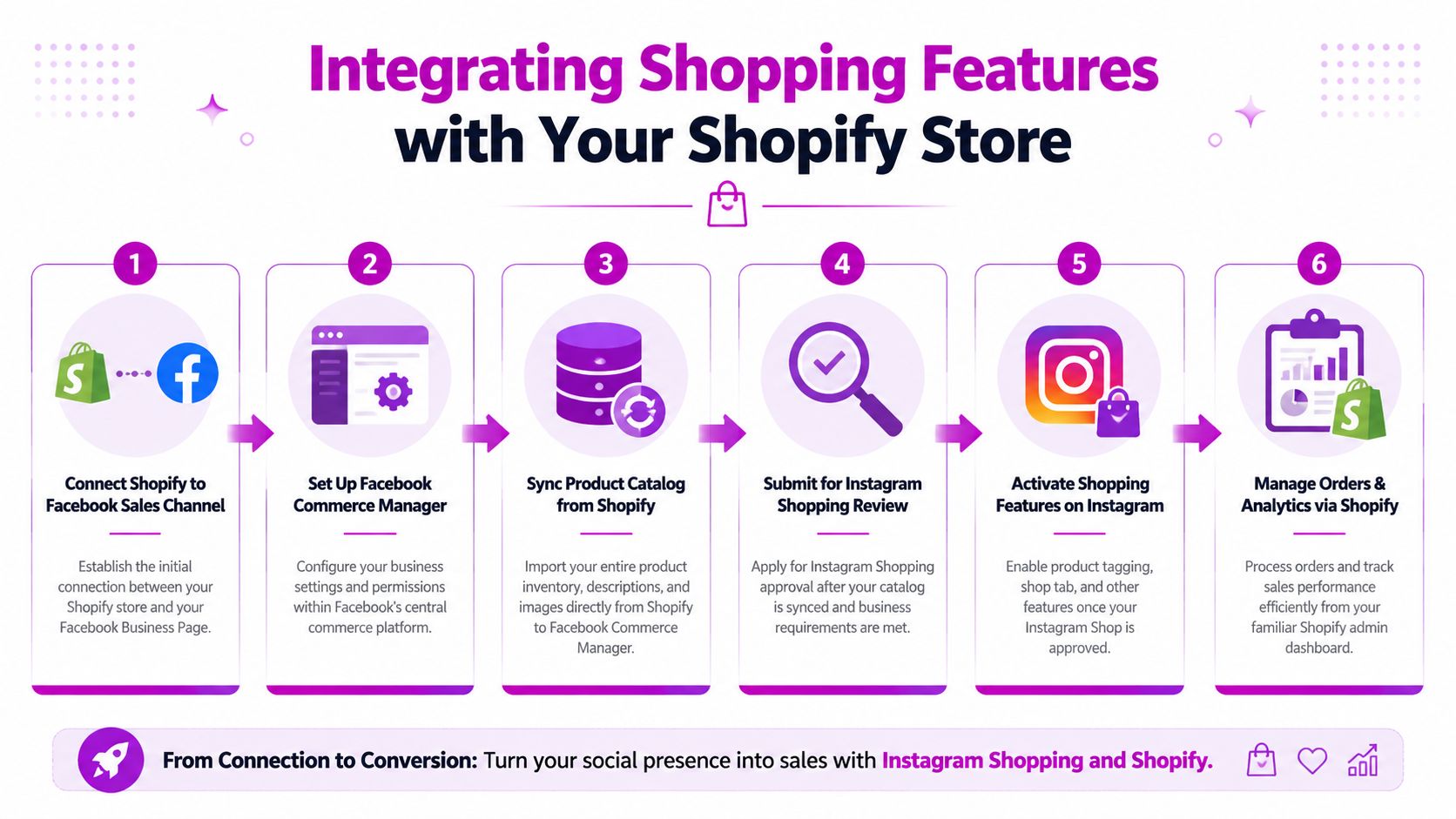
The workflow below is a good baseline for Shopify operators managing Meta sales infrastructure.
Why deep sync matters
When Shopify is connected through the Facebook & Instagram sales channel, product data can stay aligned with the catalog Meta uses for tagging and storefront display. In practice, that means price changes, image swaps, and inventory changes have a cleaner path into Instagram than manual workarounds.
That matters most for brands with:
- Frequent inventory movement: Apparel, beauty drops, and seasonal collections
- Variant-heavy catalogs: Size and color logic needs to stay accurate
- Promotional calendars: Sale pricing and bundle logic need clean customer-facing transitions
If you're comparing social channels, it also helps to look at how this differs from other native commerce models. This breakdown of Shopify and TikTok Shop integration is useful for understanding where Instagram should sit in a wider social selling mix.
Website checkout versus native checkout
Strategy becomes sharper. The architecture is not the same everywhere. For U.S. merchants, in-app checkout support has existed in specific configurations, while international setups often route shoppers to the merchant website, as described in this practical guide on selling on Instagram with shoppable posts.
For a Shopify brand, website checkout often has real advantages:
| Path | Best use case | Trade-off |
|---|---|---|
| In-platform checkout | Lower-friction transaction flow | Less control over on-site merchandising experience |
| Shopify website checkout | Brands that care about CRO, bundling, subscriptions, and data ownership | One more click before purchase |
My bias is simple. If your store relies on upsells, subscriptions, custom PDP content, review depth, or post-purchase retention flows, pushing traffic to Shopify is usually the better commercial setup.
Feed optimization is revenue work
A synced catalog isn't enough. Your Shopify feed content has to sell.
Focus on:
- Titles built for recognition: Product name plus the key differentiator.
- Clean product imagery: The first image should match what the shopper saw on Instagram.
- Useful descriptions: Not keyword stuffing. Clear shopper language.
- Landing page continuity: The tagged product should open to a page that confirms the shopper is in the right place.
This isn't backend housekeeping. It's conversion work.
Tailoring Tactics for Different Brand Growth Stages
The same Instagram playbook doesn't fit a startup, a scaling DTC brand, and a Shopify Plus operator. The platform can support all three, but the tactics should change with your constraints.

Emerging brands
At this stage, consistency beats sophistication. You don't need every commerce feature. You need trust signals and a repeatable posting rhythm tied to actual products.
A practical setup looks like this:
- Tag products in organic posts regularly: Teach your audience that your content is shoppable.
- Use Stories to answer objections: Fabric, fit, ingredients, usage, and shipping questions belong here.
- Keep the catalog tight: Push hero products first, not your entire long tail.
For a small Shopify brand selling handmade candles, that might mean tagging the same bestsellers repeatedly in styled posts, then using Stories to show burn quality, scent notes, and packaging.
Growing brands
At this stage, paid support and content segmentation start to matter. You already know some products sell. Now the job is to turn Instagram into a more reliable acquisition and retargeting channel.
Tactics shift:
| Brand stage | Priority | Best Instagram commerce move |
|---|---|---|
| Emerging | Proof of demand | Organic tagging and Story stickers |
| Growing | Efficient scale | Retargeting, creator content, merchandised drops |
| Established | Margin and system efficiency | Segmentation, PDP alignment, creative testing |
A growing skincare brand might use creator content with product tags for top-of-funnel discovery, then route returning users into product-specific retargeting that lands on optimized Shopify PDPs.
Established and enterprise brands
Larger catalogs create a different problem. You don't need more activity. You need sharper commercial orchestration.
That usually means:
- Merchandising by audience segment: New customer, returning buyer, seasonal buyer, VIP
- Testing content-to-PDP alignment: Which creative formats send the highest-intent traffic
- Using Instagram as one layer in a larger system: Paid social, retention, landing page testing, and merchandising all need to connect
Bigger brands rarely win by posting more. They win by reducing mismatch between the content promise and the landing-page experience.
For enterprise operators, Instagram shopping features are best treated as part of a broader revenue machine, not a standalone social project.
Measuring Success and Navigating Platform Shifts
A lot of brands still evaluate Instagram the wrong way. They look at reach, likes, shares, and saves, then assume sales should follow. Sometimes they do. Often they don't.
That gap matters more in 2026 because the platform has already shown that its commerce priorities can change. Despite 44% of users shopping on Instagram weekly, many brands are re-evaluating their strategy after the platform reportedly reduced its commerce features in 2025 to 2026, highlighting a disconnect between user engagement and conversion ROI for some businesses according to Instagram for Business insights.
What to measure instead of vanity metrics
If Instagram is feeding your Shopify store, the useful questions are operational:
- Are product-tag taps leading to relevant landing pages?
- Are Instagram visitors viewing product pages, adding to cart, and starting checkout?
- Which content themes produce qualified sessions, not just engagement?
- Which tagged products assist conversions later, even if they don't close on first click?
Likes tell you if content is pleasant. Store behavior tells you if content is commercial.
The 2026 strategic shift
The old dream was simple. Build demand, host the storefront, close the sale, all in one app.
That isn't the strongest way to think about Instagram anymore.
A more durable model is this:
Use Instagram for discovery
Visual storytelling, creator content, and social proof still work well here.Use shopping features to shorten the path
Product tags, stickers, and curated shopfronts reduce friction between attention and intent.Use Shopify to convert
Your site handles the heavy lifting. Reviews, bundles, subscriptions, CRO testing, retention capture, and post-purchase all live in a system you control.
The goal isn't to make Instagram your checkout. The goal is to make Instagram your best qualified traffic source outside search.
What smart brands do now
They stop asking whether Instagram can do everything. They ask which part of the buying journey it still does well.
For many Shopify merchants, the answer is clear. Instagram is still one of the best places to make products feel desirable, credible, and close to purchase. It just shouldn't be the only place where your commercial system lives.
That mindset makes your strategy more resilient. If Instagram adds features, you benefit. If it scales them back, your store still owns the customer experience.
If your Shopify store gets attention on Instagram but not enough revenue, ECORN can help you close that gap. The team works across Shopify design, development, CRO, and eCommerce strategy to turn social traffic into stronger product-page performance, cleaner buying journeys, and better conversion outcomes.



Shopify Website Design Examples: 7 Stores Worth Studying

7 Ecommerce Newsletter Examples for Shopify Brands

One Product Shopify Store: Build and Scale

Mobile Pop Up Strategy for Shopify Stores That Converts

Sitemap for Shopify: How to Find, Optimize, and Submit It

7 Single Product Websites Worth Emulating

Product Variants Shopify: The Complete 2026 Guide

Ecommerce Analytics Consulting for Growth

What Is AI Integration for eCommerce

How to Choose the Right eCommerce Website Development Firm

E Business Strategy Implementation

Conversion Tracking Setup for Shopify Stores

BigCommerce vs Shopify Plus Which Enterprise Wins in 2026

Shopify Theme Kit: Setup, Commands, and Migration Guide

Shopify Extension Development: A Practical 2026 Guide

Shopify Speed Score Explained and How to Improve It

Shopify Mobile Optimization: The 2026 Playbook

How to Add Subcategory in Shopify for Better UX

How to Implement Structured Data for Ecommerce in 2026

SEO App Mobile: Shopify Store Optimization Guide

Shopify Plus Support: What It Includes and How to Choose

Google Ads for Shopify: The Complete 2026 Playbook

Shopify New York: How to Find and Hire the Right Agency

Google Search Console for Shopify: The Complete Setup

First Party Data Collection for eCommerce Growth

FAQ Online Store Guide: Build and Measure It Right

Do FB Ads Work for eCommerce in 2026?

One Page Checkout for Shopify: Design and Implementation

Shopify GraphQL vs REST: The 2026 Developer Decision

Shopify Ecommerce Consulting: Strategy, Pricing &

Are Reddit Ads Worth It for eCommerce Brands

Shopify Title and Meta Description: A Practical 2026 Guide

Product Video Best Practices for Shopify Brands

Real-Time Inventory Management: A 2026 Guide

AI Chatbot Integration for Shopify Stores

Affiliate Program Management: A Shopify Guide

10 Best Performance Monitoring Tools for Shopify in 2026

Digital Asset Management for eCommerce Brands in 2026

Every Type of Facebook Ads Explained for eCommerce Growth

Product Information Management Explained for Shopify Brands

Support Ticket System: A Guide for Shopify Stores

10 Best Customer Service Tools for Shopify in 2026

Can I Start a Business with No Money? a 2026 Blueprint

What Sells Good on Etsy: Best Niches for 2026

Shopify Add to Cart Button: A Practical 2026 Guide

Customer Feedback Automation: A Practical eCommerce Guide

Critical Rendering Path: A Guide for Shopify Stores

How to Promote on TikTok for eCommerce in 2026

B2B eCommerce Consulting That Drives Real Revenue

10 Best Practices for Site Navigation in 2026

Return vs Refund for Shopify Stores: A Practical Guide

What Is Customer Lifetime Value and Why It Matters

What Is Voice of Customer Research for eCommerce

SMS Marketing for Ecommerce That Actually Converts

Master How to Improve Email Deliverability in 2026

Top 7 eCommerce Partners NYC for Shopify Brands in 2026

Machine Learning for Ecommerce: Boost Your Shopify Store

Beauty Market Research: Your 2026 Growth Guide

Shopify International Expansion: A 2026 Roadmap

What Does CRO Stand for in Business: Understanding CRO

Shopify Visual Merchandising: A Playbook for Higher Sales

Shopify Landing Page Design: Master Conversion in 2026

10 Best AI SEO Optimization Tools for Shopify in 2026

Agentic AI for Ecommerce: Boost Your Sales in 2026
Mastering Email Marketing Data for eCommerce Growth

Conversion Rate Optimisation Australia: Boost Your Sales

Conversion Rate Optimization AI: Your Shopify Store Guide

10 Product Bundling Strategies for Shopify in 2026

How to Increase Customer Lifetime Value: A Shopify Playbook

AI Customer Service Automation: Shopify Guide 2026

Clean Website Design: A Shopify Conversion Playbook

Omnichannel Retail Strategy: A Shopify Playbook

Product Data Enrichment: A Guide for Shopify Brands

What Is Revenue Optimization: A Holistic RevOps Guide

Benefits of Conversion Rate Optimization: Boost Your

WordPress to Shopify Migration: Your 2026 Seamless Switch

Boost Sales: Ecommerce Payment Processing Guide 2026

Unified Commerce Platform: Benefits, KPIs & Shopify Guide

How to Reduce Bounce Rate eCommerce: Your 2026 Guide

Shopify API Integration: A Practical End-to-End Guide

How to Implement Data Governance: A 2026 Guide

Shopify Store Development Cost: A 2026 Breakdown

What Is Server Side Tracking: The Shopify Guide 2026

Marketing Automation Workflows: A Shopify Guide for 2026

Shopify: How to Reduce Technical Debt

Shopify UX Design Change: A Playbook for Growth

User Generated Content Strategy: Shopify Playbook

Shopify Pause and Build Plan Cost: A Complete 2026 Guide

Compare at Price on Shopify: A Complete Guide for 2026

Where Can I Sell My Prints? 10 Best Platforms for 2026

Shopify Order Management System: The Ultimate Guide 2026

What Is Marketing Attribution? an eCommerce Guide for 2026

10 Best Black Friday Sales Sheets for 2026

Discover the Top Social Media Marketing Agencies For

Consumer Confidence Definition for eCommerce in 2026

What Is Social Commerce? Your 2026 Guide to Boosting Sales

A Social Ad Campaign Playbook for eCommerce Growth

7 Best FAQ Page Examples for SaaS & eCommerce

Market Research in Fashion Industry: A Guide for Shopify

Shopify Migration Services: Expert Guide for 2026


newsletter in your inbox