


You're probably already living with the problem: a founder or CX lead sends post-purchase CSAT emails by hand, the spreadsheet keeps growing, and the response rate stays frustratingly low. By the time someone notices a bad delivery experience or a product issue, the customer's already moved on, support is already buried, and paid traffic is still being pushed into the same leaky experience.
Customer feedback automation fixes that by turning feedback into a triggered system instead of a memory exercise. Mordor Intelligence estimates the customer feedback software market at USD 4.38 billion in 2025, projected to reach USD 10.71 billion by 2031 at a 16.50% CAGR from 2026 to 2031, with retail and e-commerce representing 22.19% of end-user demand in 2025. Mordor Intelligence's customer feedback software market estimate is a good reminder that this is no longer a niche workflow. It's part of the operating stack for serious commerce brands.
What Customer Feedback Automation Does for a Shopify Brand
The first sign you need automation is usually simple. Someone on the team keeps meaning to send the follow-up survey after delivery, or after a support resolution, and it happens two days late, or not at all. Manual outreach turns feedback into a side task, and side tasks do not survive a busy store.
The core loop is simpler than most tools make it look
At its best, the system has five parts. A trigger happens when an order is delivered, a subscription renews, or a ticket closes. An ask goes out through email, SMS, or on-site messaging. Responses get classified, routed to the right team, and then closed once the issue is handled.
Practical rule: if your feedback flow ends at collection, you are just collecting opinions, not improving the business.
That distinction matters in eCommerce because product, CX, and ads are all moving at once. If you learn about shipping issues, size confusion, or checkout friction too late, you end up paying to acquire customers into problems you could have spotted earlier. The category has matured into software that supports that loop, not just survey sending.
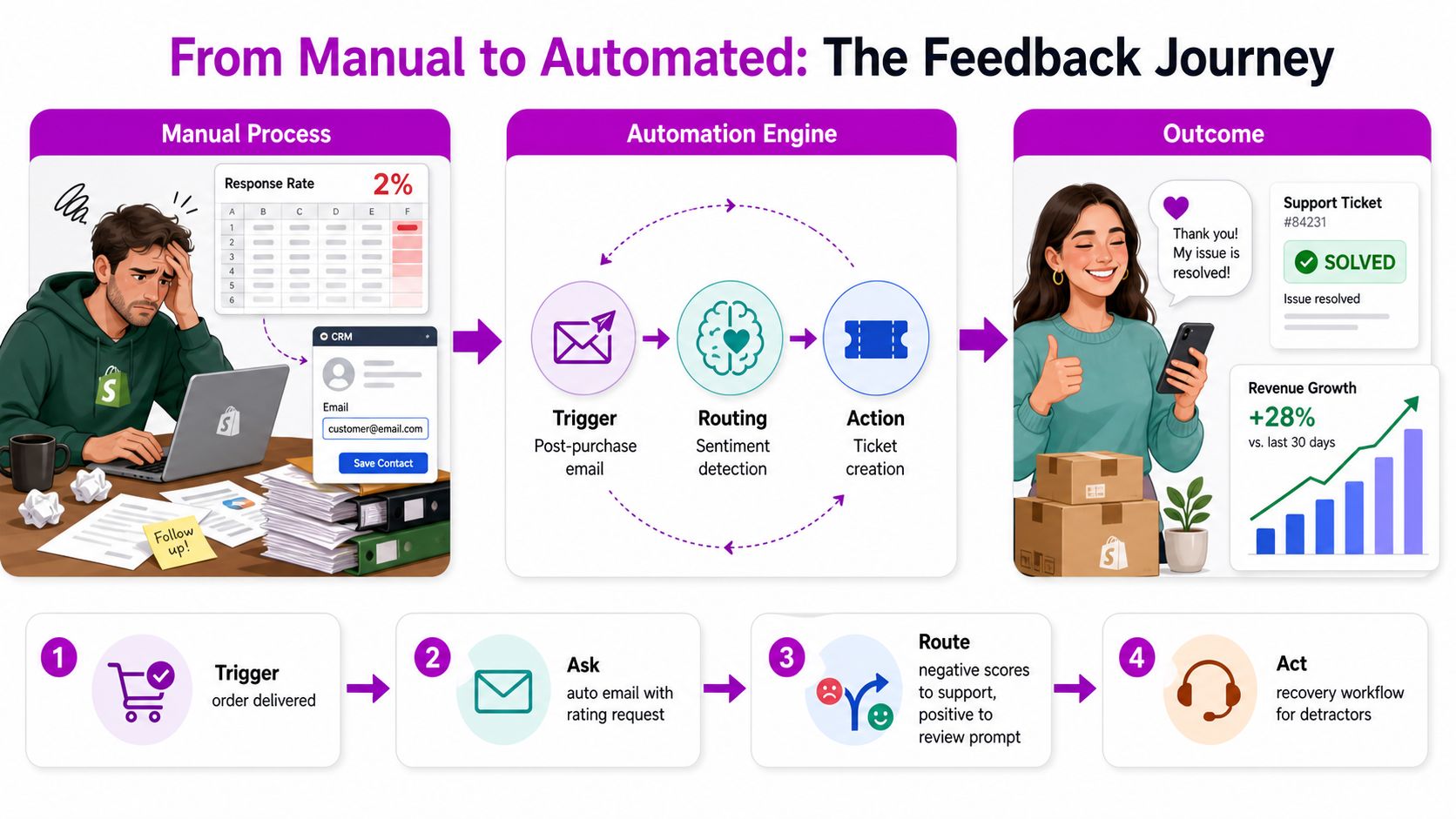
Automation is broader than survey delivery
A lot of teams confuse automation with “send survey after purchase.” That is only collection. Real automation also handles classification, routing, and follow-up, so the customer's response changes something inside the business.
For Shopify brands, that usually means one of two paths. Either the feedback tool handles the loop end to end, or Shopify events feed into a survey platform, then into a helpdesk or CRM. The second option takes more setup, but it is often the better fit when you care about recoveries, tagging, and reporting across channels.
The job is not to automate everything. It is to remove the parts that humans are bad at under load, like timing, assignment, and consistent follow-up. Just as important, the system has to be trustworthy enough that you can act on the output without second-guessing whether the score, theme, or sentiment is noise.
Why the Category Has Shifted From Nice to Have to Operating Layer
Cloud deployment now accounts for most of the customer feedback software market, and the category is heavily tilted toward software used in ongoing operations rather than one-off research projects. That matters for Shopify brands because feedback is no longer a side report for CX teams to review later, it is part of how support, product, and retention decisions get made. An infographic showcasing the benefits of using feedback automation for improved customer experience and business growth.
AI has moved from experiment to default layer
The bigger change is how teams handle the raw comments. A 2026 industry compilation says 61% of enterprises with more than 1,000 employees had deployed AI-powered text analytics for customer feedback, up from 38% in 2023, while 44% of mid-market firms used AI to classify or analyze feedback, versus 22% in 2022. The same source says 78% of CX leaders now treat AI-powered feedback analysis as core infrastructure, even though 34% of organizations still rely mainly on manual or semi-manual coding. AI customer feedback analysis statistics for 2026 shows a market that is moving fast, but not evenly.
That split matters for Shopify operators. Mid-market brands are often the ones moving fastest because they feel the operational pain first, especially when one shipping issue, sizing complaint, or checkout problem starts repeating in support. At that point, feedback automation is not a polish project. It is part of the operating layer that keeps teams from reacting too late.
What to prioritize first
Start with the flows tied to revenue or churn risk. Shipping complaints, product confusion, and post-support dissatisfaction deserve automation before broad brand surveys do, because those are the points where faster routing and clearer visibility change what happens next.
Short, specific feedback beats broad curiosity. A post-purchase survey guide like Ecorn's overview of post-purchase survey setup is useful because it keeps the ask tied to a real moment in the customer journey, which is exactly where Shopify brands get better signal.
Priority lens: automate the feedback that can trigger recovery, product fixes, or campaign changes. Leave the vanity surveys for later.
Designing the Feedback Flow That Survives Real Traffic
The fastest way to waste a good survey is to send it at the wrong moment. A 2025 SMB benchmark cited by SurveyMonkey data shows manually distributed surveys average 4.7% response, while automated event-triggered surveys average 28.3%. The same source says post-service feedback collected within 24 hours can deliver 3–5x higher CSAT response than waiting 48+ hours. Survey automation benchmark for SMBs makes the timing trade-off obvious.
Trigger design beats copywriting
The trigger matters more than clever wording. For Shopify, the cleanest starting points are order fulfilled, support ticket closed, and, for subscription brands, renewal or contract events. The ask should land while the experience is still fresh, not after the buyer has forgotten what happened.
The strongest surveys are short for a reason. Every extra question adds friction, and friction lowers completion. Keep the first pass focused on one core rating plus one open-ended prompt, then route based on that result.
Channel choice should match intent, not personal preference
Different moments call for different channels. Email works well for broad coverage, on-site prompts catch engaged visitors, and SMS can be effective when the trigger is time-sensitive and the customer has already opted in. The mistake is using every channel for every moment, which creates fatigue and makes the brand feel noisy.
| Channel | Typical Response Rate | Best Trigger Moment | Fatigue Risk |
|---|---|---|---|
| Event-triggered flows outperform manual sends, as noted above | After delivery, after support closure, after renewal | Medium | |
| On-site | Best for active browsing or account moments | During logged-in sessions or after checkout actions | Low to medium |
| SMS | Strongest when speed matters and consent is clear | Right after service completion or urgent issue resolution | High |
If you want a practical starting point, use the logic in this post-purchase survey guide and then trim it harder than you think you should. Survey fatigue is real, especially when the same shopper gets hit by multiple automations across lifecycle flows.
Wiring Shopify, Your CRM, and a Feedback Tool Together
A reliable setup starts with Shopify as the event source, a feedback platform as the collector, an ESP like Klaviyo or Omnisend for delivery, and a helpdesk such as Gorgias or Zendesk for action. The cleanest architecture is usually Shopify webhook or native app event to survey tool, then survey result to CRM or helpdesk. That keeps the feedback payload tied to the actual order or support record.
One practical stack that works
In Shopify, subscribe to the events that matter most. orders/fulfilled is the best trigger for product and delivery feedback. refunds/create is useful for recovery and root-cause analysis. subscriptions/contracts_updated matters for recurring revenue brands because churn signals often show up there first.
From there, pass customer and order properties into the survey payload. That should include order ID, product name, channel source, locale, and currency, because the survey has to read naturally and land in the right context. Teams often forget locale and currency, and the result feels generic even when the workflow is technically correct.
For smaller stores, Zapier can bridge the gap between Shopify and the feedback tool. For high-volume stores, don't rely on Zapier tasks as the backbone if you can avoid it, because task limits and lag become real once order flow rises. A direct integration or webhook-based handoff is more durable.
Keep the wiring easy to debug
If you need a useful parallel, the logic is similar to how teams automate candidate screening. The rule is the same in both cases, capture the trigger cleanly, pass enough context, and don't force humans to reconstruct the story later.
A good integration map looks like this:
- Shopify emits the event.
- The feedback tool sends the survey automatically.
- The response lands in the CRM or helpdesk with customer context.
- Negative feedback opens a ticket.
- Positive feedback can flow to review, referral, or testimonial asks.
If your stack already has data fragmentation, customer data integration solutions become more useful than another survey feature. The feedback flow only works when the customer record, order record, and response record can meet each other.
Closing the Loop So Feedback Actually Changes Outcomes
Many teams drop the ball here. They gather responses, tag them, maybe even chart them, then stop before any real recovery work happens. Closed-loop automation is the part that turns feedback from reporting into retention.
The gap between manual and automated handling is large
Industry guidance cited in analysis based on Bain says fewer than 20% of companies running NPS programs achieve full closed-loop handling, and manual programs may only cover 15–30% of the customer base. Automated NPS systems can provide 100% coverage, sub-5-minute detractor escalation, and 100% closed-loop tracking, with detractor recovery rates reported at 34% versus 11–14% for manual programs. Closed-loop NPS automation guidance shows why “we read the survey results” is not enough.
Closed-loop checklist: classify the response, create the ticket, assign an owner, set an SLA, confirm resolution, and log the outcome in the CRM.
That list sounds basic because it is. The hard part is doing it consistently across every response, every time. Manual workflows usually break at the handoff between “someone saw it” and “someone owned it.”
A worked example is better than theory
A 2-star product review should trigger a Gorgias ticket routed to the CX lead, with a 24-hour first-response SLA. If the issue is a shipping miss, support can own it. If it's a product defect, the ticket should also feed product and operations so the root cause doesn't stay hidden inside the support queue.
The win is not the ticket itself. The win is that the customer gets a meaningful response before frustration turns into churn or a chargeback. Positive feedback should also be routed, but into a different path, like testimonial or referral asks.
If you treat automation as collection only, you preserve survey volume and still miss the business outcome. If you treat it as a recovery workflow, the same feedback becomes a retention asset.
Validating That Your AI Tagging Is Accurate Enough to Trust
The part most guides skip is measurement quality. It's easy to say your tool can detect sentiment or themes. It's much harder to know whether those labels are reliable enough to drive decisions, especially when you're using them to escalate service, flag churn risk, or prioritize product work.
Human QA is still the cleanest safeguard
A small team doesn't need a giant validation framework. Sample 50 to 100 responses per month, have a human recode them, and compare the manual label to the AI output. Then track where the model keeps confusing shipping frustration with product dissatisfaction, or where urgency scores are too aggressive.
That routine gives you a realistic trust threshold. For low-stakes routing, like tagging product praise for a marketing review, automation can do most of the work. For high-stakes flows, like refund decisions or churn intervention, a human should still review edge cases before action is taken.
Silent detractors need a different signal
Not every unhappy customer fills out a survey. Some stop buying, stop opening emails, or stop replying to support entirely. That means your feedback system should not only read the responses you receive, it should also watch for behavior that suggests the survey missed someone.
Don't assume a low response rate means low dissatisfaction. Sometimes it means the wrong customers were asked, or the ask came too late.
The goal isn't to distrust AI by default. The goal is to know exactly where it's strong, where it drifts, and where a human checkpoint still protects the business. A model that is “mostly right” can still be dangerous if it steers the wrong customers into the wrong workflow.
KPIs, A/B Tests, and Common Breakages to Watch For
Once the flow is live, the job changes from setup to maintenance. Good feedback automation stays useful because someone keeps checking whether the system is still reaching the right people, at the right time, with the right follow-up. If you don't inspect it monthly, it starts to look healthy while gradually getting worse.
Track the metrics that affect action, not just volume
The core stack is straightforward. Watch response rate, NPS or CSAT trend, time-to-close, detractor recovery rate, and theme frequency. Those tell you whether the system is getting responses, whether sentiment is moving, whether action is happening quickly, and whether the same problems keep resurfacing.
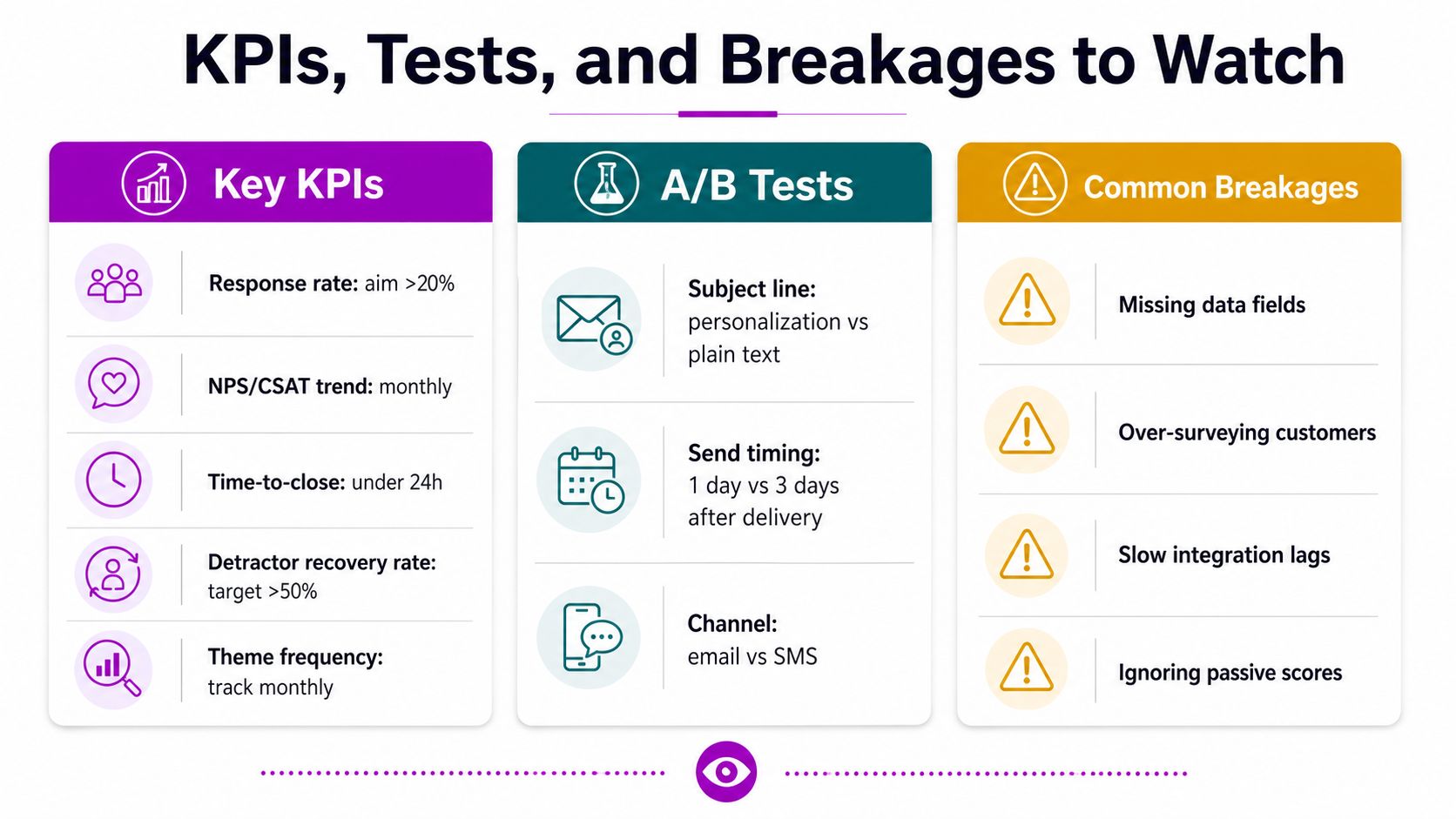
Small tests beat big rewrites
Test one variable at a time. Subject line, send timing, and question order are the easiest levers to compare without breaking the system. If response quality drops when you move a question to the top, that's useful information, not a failed experiment.
Troubleshooting should start with the simplest failure
If response is low, first check whether the ask is landing too late. If messages are going to spam, look at sending setup and authentication before rewriting the survey. If the sample looks biased, check whether only the happiest or angriest customers are being triggered. If webhooks break after a Shopify app update, inspect the event mapping before blaming the survey platform.
- Low response: shorten the survey and move the trigger closer to the event.
- Spam-folder drops: review sender reputation and message formatting first.
- Biased samples: broaden the trigger logic so you're not only hearing from extremes.
- Broken webhooks: verify the Shopify event still matches the downstream field map.
The easiest monthly review is also the most useful. Check the trigger list, compare labels against a human sample, confirm tickets are closing, and look for repeated themes that should have been fixed by now. If your automation isn't changing decisions, it's just creating cleaner dashboards.
ECORN can help you turn customer feedback automation into a Shopify system that survives real traffic, with the right wiring between store events, CRM data, and CRO priorities. If you want a team that can design the flow, tighten the measurement, and build the Shopify-side logic without turning it into a months-long project, visit ECORN and start the conversation.



Shopify Customer Experience: A 2026 Guide

Shopify Plus Expansion Stores: Limits and Setup
Shopify Theme Update: Safe Steps, Backups and Rollback

Shopify Website Design Packages: What You Actually Get

How to Choose a Shopify Plus Web Design Agency in 2026
Shopify Plus Ecommerce Agency: How to Pick the Right One

Shopify Themes Retina: How to Serve 2x Images

How to Cross Sell on Shopify Without Friction

Best Shopify Theme for Custom Products Compared
Multi Store Inventory Management: A Practical Guide

SEO Consulting for Ecommerce: A Practical Guide
Shopify Theme Updater App: A Safe Update Playbook
Shopify Git Integration: A Developer's Guide to 2026
Headless Ecommerce Development Services Explained

How to Build a Shopify Clothing Website That Converts

How to Launch a Box Subscription Business in 2026

Luxury Skincare Branding Playbook That Converters

10 Best Podcast Ecommerce Shows for Store Growth in 2026
Shopify Developer Hourly Rate: What to Pay in 2026
Critical Shopify Setup Errors That Are Secretly Sabotaging Your Store

Ecommerce Conversion Tracking: The Complete How-To Guide

Shopify Design Agency: How to Pick the Right Partner

Mastering Multi Store Management on Shopify

Scale Shopify Store

10 Shopify App Ideas Worth Building in 2026

Conversion Rate Optimization for Landing Pages: The Playbook

Shopify Plus Automation: A Guide for 2026

10 Social Selling Platforms for Shopify Merchants

Shopify Website Design Examples: 7 Stores Worth Studying

7 Ecommerce Newsletter Examples for Shopify Brands

One Product Shopify Store: Build and Scale

Mobile Pop Up Strategy for Shopify Stores That Converts

Sitemap for Shopify: How to Find, Optimize, and Submit It

7 Single Product Websites Worth Emulating

Product Variants Shopify: The Complete 2026 Guide

Ecommerce Analytics Consulting for Growth

What Is AI Integration for eCommerce

How to Choose the Right eCommerce Website Development Firm

E Business Strategy Implementation

Conversion Tracking Setup for Shopify Stores

BigCommerce vs Shopify Plus Which Enterprise Wins in 2026

Shopify Theme Kit: Setup, Commands, and Migration Guide

Shopify Extension Development: A Practical 2026 Guide

Shopify Speed Score Explained and How to Improve It

Shopify Mobile Optimization: The 2026 Playbook

How to Add Subcategory in Shopify for Better UX

How to Implement Structured Data for Ecommerce in 2026

SEO App Mobile: Shopify Store Optimization Guide

Shopify Plus Support: What It Includes and How to Choose

Google Ads for Shopify: The Complete 2026 Playbook

Shopify New York: How to Find and Hire the Right Agency

Google Search Console for Shopify: The Complete Setup

First Party Data Collection for eCommerce Growth

FAQ Online Store Guide: Build and Measure It Right

Do FB Ads Work for eCommerce in 2026?

One Page Checkout for Shopify: Design and Implementation

Shopify GraphQL vs REST: The 2026 Developer Decision

Shopify Ecommerce Consulting: Strategy, Pricing &

Are Reddit Ads Worth It for eCommerce Brands

Shopify Title and Meta Description: A Practical 2026 Guide

Product Video Best Practices for Shopify Brands

Real-Time Inventory Management: A 2026 Guide

AI Chatbot Integration for Shopify Stores

Affiliate Program Management: A Shopify Guide

10 Best Performance Monitoring Tools for Shopify in 2026

Digital Asset Management for eCommerce Brands in 2026

Every Type of Facebook Ads Explained for eCommerce Growth

Product Information Management Explained for Shopify Brands

Support Ticket System: A Guide for Shopify Stores

10 Best Customer Service Tools for Shopify in 2026

Can I Start a Business with No Money? a 2026 Blueprint

What Sells Good on Etsy: Best Niches for 2026

Shopify Add to Cart Button: A Practical 2026 Guide

Critical Rendering Path: A Guide for Shopify Stores

How to Promote on TikTok for eCommerce in 2026

B2B eCommerce Consulting That Drives Real Revenue

10 Best Practices for Site Navigation in 2026

Return vs Refund for Shopify Stores: A Practical Guide

What Is Customer Lifetime Value and Why It Matters

What Is Voice of Customer Research for eCommerce

SMS Marketing for Ecommerce That Actually Converts

Master How to Improve Email Deliverability in 2026

Top 8 eCommerce Partners NYC for Shopify Brands in 2026

Machine Learning for Ecommerce: Boost Your Shopify Store

Beauty Market Research: Your 2026 Growth Guide

Shopify International Expansion: A 2026 Roadmap

What Does CRO Stand for in Business: Understanding CRO

Shopify Visual Merchandising: A Playbook for Higher Sales

Shopify Landing Page Design: Master Conversion in 2026

10 Best AI SEO Optimization Tools for Shopify in 2026

Agentic AI for Ecommerce: Boost Your Sales in 2026
Mastering Email Marketing Data for eCommerce Growth

Conversion Rate Optimisation Australia: Boost Your Sales

Conversion Rate Optimization AI: Your Shopify Store Guide

10 Product Bundling Strategies for Shopify in 2026

How to Increase Customer Lifetime Value: A Shopify Playbook

AI Customer Service Automation: Shopify Guide 2026

Clean Website Design: A Shopify Conversion Playbook

Omnichannel Retail Strategy: A Shopify Playbook

Product Data Enrichment: A Guide for Shopify Brands


newsletter in your inbox