


You're probably seeing quotes that make no sense next to each other. One freelancer says a Shopify store can be done for a few hundred dollars. One agency says the project starts in the five figures. Another article lists only the monthly plan and makes the whole thing sound simple.
That's why budgeting for Shopify feels harder than it should.
The problem isn't just price variation. It's that the wrong question is often asked first. The common query is, “What does a Shopify store cost to build?” when the more useful question is, “What will this store cost me to launch, run, and improve over the first year?”
Why Is It So Hard to Budget for a Shopify Store
The range is wide because people are bundling very different things under the same label. A basic template-based launch is one project. A custom storefront with unique page types, integrations, and operational workflows is a different class of work entirely.
That's why you'll see startup-friendly builds at one end and enterprise budgets at the other. The hard part for founders isn't finding a number. It's figuring out which number applies to their business.
The quote problem
A lot of cost discussions stop at the build fee. That leaves out the expenses that show up as soon as the store goes live: platform subscription, paid apps, maintenance, email tools, payment fees, and support work that no serious brand can ignore for long.
According to Codiant's 2026 Shopify cost analysis, a basic store may start around $29/month in platform fees, but a professionally built store typically lands at $2,000 to $5,000 in development plus $1,200 to $3,600 in recurring first-year operating expenses. The same source notes that businesses often underestimate runway needs by 40 to 60% when they budget only for the build.
Practical rule: If your budget covers launch day but not month three, you don't have a real Shopify budget yet.
Total Cost of Ownership is the better frame
The most useful way to think about Shopify store development cost is Total Cost of Ownership, or TCO. That means adding together:
- The initial build you pay once
- The software stack you pay monthly or annually
- The support layer that keeps the store stable and improving
That last part matters more than many teams expect. Stores rarely fail because Shopify itself is expensive. They struggle because the budget ignored content updates, app sprawl, merchandising changes, and the small fixes that pile up after launch.
If you're planning cash flow, these kinds of actionable financial planning insights help frame the project properly. The point isn't to spend more. It's to avoid buying a store you can't realistically operate.
The Foundational Costs Every Store Must Cover
A store can look affordable in the proposal stage and still become expensive by month six. The reason is simple. The first-year cost is not just development. It is the base operating layer you start paying for the moment the store goes live.
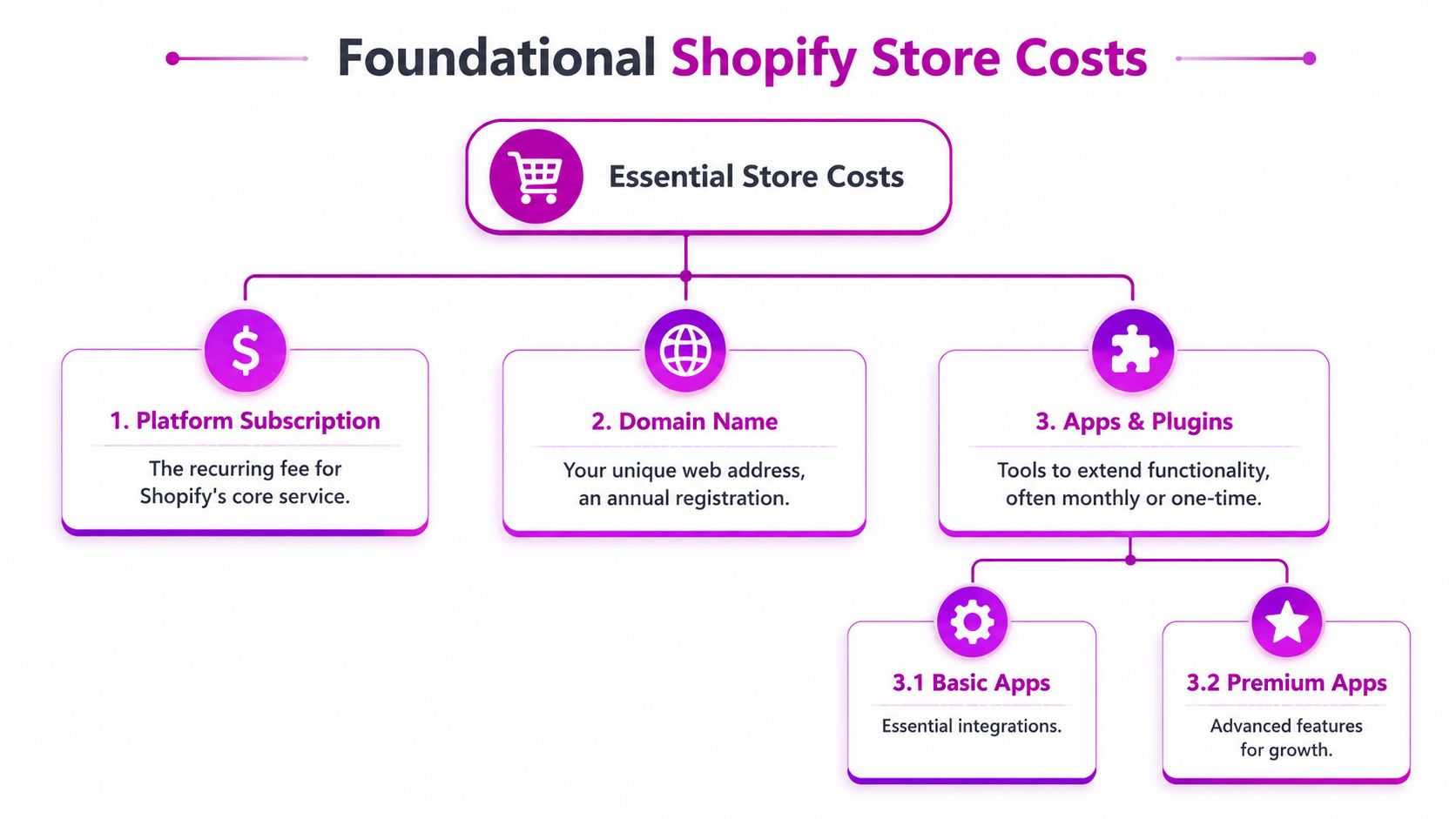
Platform subscription
Every Shopify build sits on a recurring platform plan, and that choice affects more than monthly software spend. It also shapes reporting depth, staff accounts, workflow options, checkout flexibility, and how comfortably the store can handle growth.
In practice, smaller brands usually start with Basic or Shopify while they validate demand and tighten operations. Larger catalogs, multi-market setups, and teams with heavier reporting or process requirements often justify Advanced or Plus. The right plan is the one that fits current operating reality with some room for growth, not the one that looks impressive in a pricing table.
For a more detailed breakdown of recurring platform fees, this guide on how much Shopify costs per month is useful when you are mapping software spend against margin and projected order volume.
Theme and domain choices
A domain is a small line item, but it is still part of the budget from day one. The bigger decision is the theme.
I usually frame theme choice as a cost-control decision, not a design decision alone. A free theme can work for a lean catalog and straightforward merchandising. A premium theme often earns its cost quickly because it gives you more flexible sections, better product page layouts, and fewer custom adjustments after launch.
That matters in first-year TCO. Spending modestly on the right theme can reduce developer hours, app dependence, and revision cycles later.
A paid theme often costs less than the custom fixes teams add after choosing the wrong free one.
Apps are operating costs, not extras
Apps deserve more scrutiny than they usually get. Reviews, subscriptions, search, bundles, email capture, upsells, shipping rules, and inventory workflows often start as small monthly charges, then grow into a meaningful overhead line.
The issue is not one app. It is app accumulation. I have seen stores with acceptable build costs carry bloated monthly software spend because each new requirement was solved by installing another tool without reviewing overlap, support quality, or impact on site speed.
A healthier approach is to treat each app like an operating hire. It should save manual work, improve conversion, protect margin, or support a specific process the team uses. If it does none of those, it should not stay in the stack.
If you are still planning the setup phase, this walkthrough on the critical groundwork for your Shopify store is a useful reference for the early decisions that affect long-term cost.
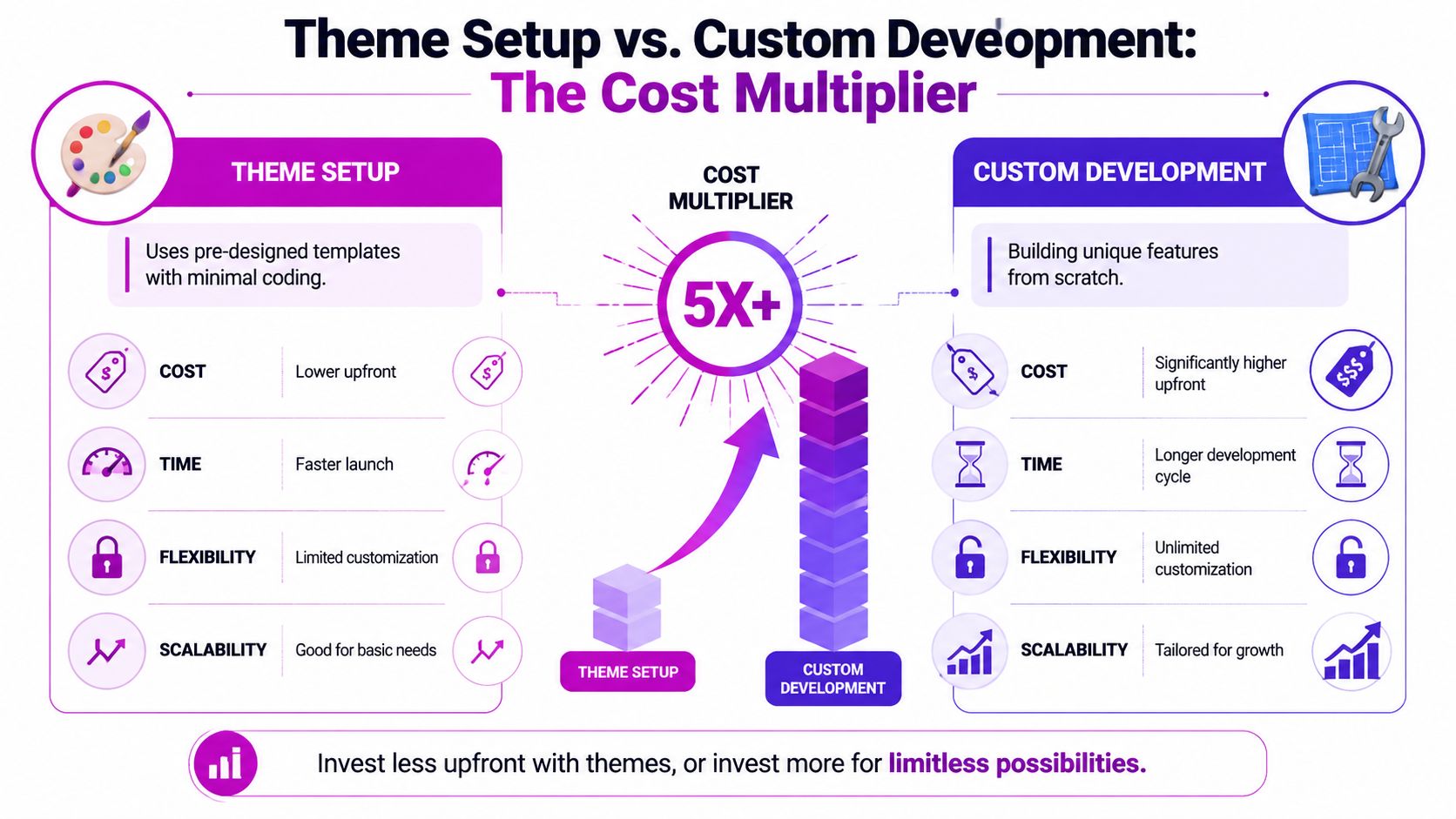
Theme Setup vs Custom Development: The Cost Multiplier
A brand approves a $4,000 Shopify build and feels disciplined. Six months later, the team has paid for extra app workarounds, repeated design edits, and developer time to force the theme into use cases it was never built to handle. The first-year spend ends up much closer to a custom project than anyone expected.
That is why this decision affects total cost of ownership more than almost any other line item in the build.
What theme configuration usually includes
Theme setup means starting from an existing Shopify theme and shaping it to fit the brand. That normally covers brand styling, homepage and collection setup, product page configuration, standard app connections, and a round of UX adjustments.
According to Aureate Labs' Shopify website development cost breakdown, a professionally configured pre-built theme typically falls in the $3,000 to $5,000 range and often involves 50 to 100 developer hours.
For the right business, that is money well spent. A theme-based build is usually the better budget choice when the catalog is straightforward, the customer journey follows familiar ecommerce patterns, and the team does not need custom business logic behind the storefront.
What custom development changes in the budget
Custom development becomes the right path when the business model starts pushing beyond theme limits. That could mean unique landing page structures, advanced merchandising rules, custom filtering behavior, customized subscription flows, or integrations that need more than standard app setup.
Aureate Labs places fully custom theme work at $10,000 to $20,000, with larger Shopify Plus implementations reaching $25,000 to $100,000+. They also note that custom builds often require 300 to 600+ developer hours.
Those extra hours do not come from aesthetics alone. They come from planning, front-end architecture, QA, integration work, edge cases, and post-build revisions once real data and real users hit the store.
Here's a useful visual reference before going deeper:
A practical side by side view
| Build path | Best fit | Typical spend |
|---|---|---|
| Theme configuration | Newer brands, simpler catalogs, standard UX patterns | $3,000 to $5,000 |
| Custom theme development | Brands with tailored workflows or non-standard storefront needs | $10,000 to $20,000 |
| Shopify Plus custom implementation | Enterprise brands with complex integration and operational requirements | $25,000 to $100,000+ |
Where first-year ownership cost usually shifts
The build fee is only part of the decision.
A cheaper theme setup can become more expensive over the first year if the team needs paid apps to fill functional gaps, recurring developer support to work around theme limitations, or repeated redesign work because important templates were never properly planned. I see this often with brands that outgrow their launch setup within a quarter.
Custom development has the opposite risk. The upfront investment is higher, but it can lower first-year operating friction if it replaces app overlap, reduces manual work, and gives the team flexible sections and templates they can use without filing support requests every week.
That is the multiplier. It is not just the initial quote. It is how the architecture affects every change that comes after launch.
How to choose the right path
A theme-led build usually makes sense if you can answer yes to most of these:
- Your product and collection structure is standard
- Your team can work within proven Shopify UX patterns
- Apps can handle the few missing functions without creating stack bloat
- Speed to launch matters more than proprietary storefront behavior
Custom development usually earns its cost when these are true:
- The storefront needs features a theme cannot support cleanly
- Merchandising logic is specific to how the brand sells
- App-based workarounds would create monthly overhead and technical friction
- Internal teams need more control over content blocks, templates, or workflows
If you want to see what that work includes before approving a larger scope, this Shopify custom theme development step-by-step guide gives a practical view of the process.
Choose custom development for operational fit and lower long-term friction, not just for a different visual style.
Budgeting for Ongoing Growth and Maintenance
A common budgeting mistake looks like this. A brand approves a $12,000 Shopify build, launches on time, and feels in control. Three months later, the full first-year cost starts to show up through app subscriptions, payment fees, bug fixes, merchandising requests, CRO tests, and developer time for changes that were never scoped into the build.
That is why I advise clients to budget for total cost of ownership, not just launch cost. The upfront project fee matters, but the first year is usually shaped just as much by what it takes to run, improve, and support the store after go-live.
The recurring costs that usually get missed
Recurring spend tends to land in five categories:
- Platform fees, based on your Shopify plan
- App subscriptions, which often grow faster than expected as teams add tools for reviews, subscriptions, search, upsells, bundles, or B2B workflows
- Payment processing costs, which rise with order volume and payment mix
- Support and maintenance, including fixes, QA, theme updates, and integration checks
- Growth work, such as landing pages, A/B tests, merchandising improvements, and feature refinements
As noted earlier in the article, Shopify's own cost guidance makes the same broader point. Monthly operating costs vary widely, and app spend is usually one of the fastest-growing line items once a store starts adding functionality.
The budgeting issue is rarely that these costs are hidden. It is that they are treated as separate from the store investment, even though they directly affect first-year ROI.
Post-launch work is not optional if the store is expected to grow
A live store creates ongoing work. Collections change. Campaigns need landing pages. Apps conflict. A checkout or cart issue needs a quick fix before it affects revenue. Even a well-built store needs regular attention if the business expects it to convert and scale.
I have seen cheaper builds become expensive operating models for this reason. The initial quote looked efficient, but every small update required outside help, or the internal team kept stacking apps to avoid development. Both paths raise first-year cost.
That trade-off matters more than the headline build price.
Build a first-year budget around three separate buckets
The cleanest way to budget is to split ongoing cost into distinct operating lines:
Software
Shopify plan fees and the app stack.Store support
Bug fixes, small changes, QA, integration monitoring, and technical upkeep.Growth implementation
Conversion work, merchandising updates, campaign support, and iterative improvements.
This structure helps teams protect growth work from getting buried under maintenance tickets. It also makes vendor conversations easier, because you can see whether the store is expensive to run, expensive to improve, or both.
For brands planning around revenue stages rather than isolated line items, Readymerce's scaling framework is a useful reference point.
A realistic Shopify budget covers the build, then reserves enough room to operate and improve the store for the next 12 months. That is the number that matters.
Sample Budgets Startup Growth and Enterprise
A founder approves a $4,000 Shopify build, then spends the next 12 months adding apps, upgrading plans, and paying for fixes that were never in the launch quote. That store did not cost $4,000. It cost whatever the business had to spend to launch, operate, and improve it through year one.
That is the budget number worth using.
The ranges below are practical planning models for three common stages. They combine upfront development with recurring software costs so you can estimate total first-year ownership, not just the initial project fee.
Startup launch
A startup store usually has a focused catalog, simple operations, and a clear goal. Launch fast without creating technical debt in month two.
In this range, the smartest investment is usually a well-chosen theme, disciplined requirements, and a small app stack. Founders often overspend here by asking for custom features before the business has enough sales data to justify them.
A typical startup setup lands around $2,500 to $4,000 in initial development for a small catalog and standard launch scope.
Scaling D2C brand
A growth-stage brand has different pressure points. The store needs better merchandising, stronger collection logic, cleaner operations, and selective custom work that saves time for the team or removes friction for customers.
This is also the stage where budget mistakes get expensive. A brand can spend $8,000 to $12,000 on useful improvements and get a real operational payoff, or spend the same amount across overlapping apps, one-off tweaks, and partial rebuilds that should have been handled in a cleaner architecture.
A reasonable planning range for this stage is $5,000 to $15,000 in initial work. If you're mapping store investment to revenue stage, Readymerce's scaling framework is a useful reference for deciding what the business should solve now versus later.
Enterprise Shopify Plus brand
Enterprise budgets change because the storefront is only part of the cost. Internal approvals, systems integration, B2B requirements, migration complexity, and governance usually matter as much as design and front-end development.
That is why Shopify Plus projects widen so quickly in price. The visible build may look similar to a mid-market redesign, but the effort behind data structure, workflows, and testing is much heavier.
For planning purposes, enterprise Shopify Plus builds often start around $25,000 and can run well past $100,000 depending on scope.
Sample First-Year Shopify Budgets (2026)
| Budget Tier | Initial Development Cost | First-Year Recurring Costs (Plan + Apps) | Total 1st Year Investment |
|---|---|---|---|
| Startup | $2,500 to $4,000 | $648 to $4,200 | $3,148 to $8,200 |
| Growth D2C | $5,000 to $15,000 | $1,188 to $6,588 | $6,188 to $21,588 |
| Enterprise Plus | $25,000 to $100,000+ | $28,200 to $31,800 | $53,200 to $131,800+ |
These recurring ranges assume annual software spend made up of the Shopify plan and a modest to heavy app stack. For example, the startup range uses Shopify Basic at $29/month plus roughly $50 to $350/month in apps. The enterprise range uses Shopify Plus at $2,300/month plus the same app range. Real totals can go higher if the business adds paid support retainers, CRO work, or integration maintenance during the year.
How to use these numbers properly
Use the table to sanity-check your scope against your actual operating model.
Ask:
- Are we still a theme-led startup build, or are we already asking for custom workflow logic?
- Will our app choices stay lean, or are we solving process problems with monthly subscriptions?
- Can the team afford to maintain and improve the store after launch, not just get it live?
That last question usually decides whether the original budget was realistic.
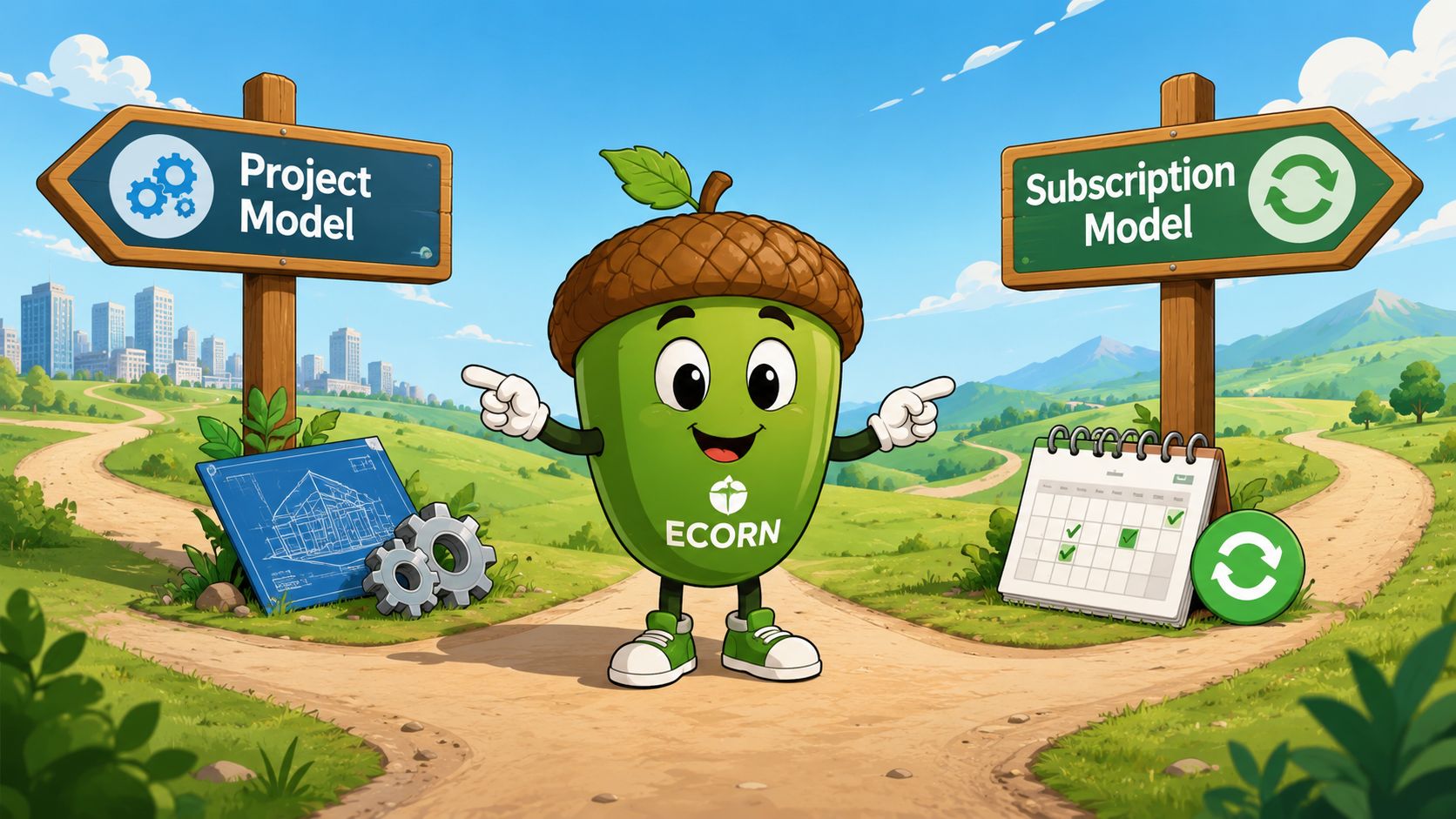
Choosing Your Partnership ECORNs Project vs Subscription Models
The engagement model matters almost as much as the technical scope. A lot of budget waste comes from using the wrong working model for the stage the brand is in.
When a project model fits
A fixed-scope project usually makes sense when the business has a defined outcome. New store launch. Replatform. Major redesign. Specific functionality with a clear start and finish.
That structure works best when requirements are stable and the team can make decisions quickly. It keeps the work bounded and makes approval easier because the deliverable is concrete.
The limitation is what happens after launch. Stores don't stop needing work, so brands often move from a clean project into fragmented ad hoc requests unless they've already planned a support path.
When a subscription model fits better
A monthly development relationship fits brands that are already operating and need continuous iteration. That usually means merchandising support, CRO work, technical changes, app cleanup, content launches, and ongoing theme improvements.
For this kind of work, a subscription model can be easier to manage than repeatedly scoping separate mini-projects. ECORN offers both project work and subscription-based Shopify support, which is useful when a brand wants either a one-time build or ongoing design, development, and CRO capacity without changing partners.
A build partner is for launch. A growth partner is for what happens after customers start using the store.
The right choice depends on your stage
A founder launching a first store usually benefits from a clear project scope. A scaling operator usually needs consistent execution capacity more than another isolated redesign.
What doesn't work is treating every business the same. Some teams need a storefront built. Others need a storefront operated and improved. Those are different budget conversations, and they should be priced differently.
How to Calculate the True ROI of Your Shopify Investment
The smartest way to evaluate Shopify store development cost is to stop treating it as a pure expense line.
A store is a revenue system, an operations tool, and a brand environment. The cheapest option can still be the most expensive one if it launches quickly but creates friction, limits merchandising, or needs to be rebuilt once the business grows.
A better ROI lens
Look at your investment through a few simple questions:
- Does the store help customers buy with less friction?
- Does the backend save your team time on routine tasks?
- Can the storefront support growth without constant patchwork?
- Are your ongoing costs attached to tools and work that matter?
If the answer is yes, then the budget is doing more than buying design files or code. It's funding a better sales and operations engine.
What to avoid
Don't compare proposals only on the upfront build fee. Compare them on first-year ownership, post-launch support, and how well the recommended architecture matches your business.
That's where strong projects separate themselves from expensive ones.
A solid Shopify budget doesn't aim for the lowest number. It aims for the right level of investment for the next stage of growth.
If you want a clearer view of your own first-year Shopify budget, ECORN can help map the build scope, recurring costs, and support model around how your brand operates, so you're evaluating the investment on ownership and ROI, not just the launch quote.



E Business Strategy Implementation

Conversion Tracking Setup for Shopify Stores

BigCommerce vs Shopify Plus Which Enterprise Wins in 2026

Shopify Theme Kit: Setup, Commands, and Migration Guide

Shopify Extension Development: A Practical 2026 Guide

Shopify Speed Score Explained and How to Improve It

Shopify Mobile Optimization: The 2026 Playbook

How to Add Subcategory in Shopify for Better UX

How to Implement Structured Data for Ecommerce in 2026

SEO App Mobile: Shopify Store Optimization Guide

Shopify Plus Support: What It Includes and How to Choose

Google Ads for Shopify: The Complete 2026 Playbook

Shopify New York: How to Find and Hire the Right Agency

Google Search Console for Shopify: The Complete Setup

First Party Data Collection for eCommerce Growth

FAQ Online Store Guide: Build and Measure It Right

Do FB Ads Work for eCommerce in 2026?

One Page Checkout for Shopify: Design and Implementation

Shopify GraphQL vs REST: The 2026 Developer Decision

Shopify Ecommerce Consulting: Strategy, Pricing &

Are Reddit Ads Worth It for eCommerce Brands

Shopify Title and Meta Description: A Practical 2026 Guide

Product Video Best Practices for Shopify Brands

Real-Time Inventory Management: A 2026 Guide

AI Chatbot Integration for Shopify Stores

Affiliate Program Management: A Shopify Guide

10 Best Performance Monitoring Tools for Shopify in 2026

Digital Asset Management for eCommerce Brands in 2026

Every Type of Facebook Ads Explained for eCommerce Growth

Product Information Management Explained for Shopify Brands

Support Ticket System: A Guide for Shopify Stores

10 Best Customer Service Tools for Shopify in 2026

Can I Start a Business with No Money? a 2026 Blueprint

What Sells Good on Etsy: Best Niches for 2026

Shopify Add to Cart Button: A Practical 2026 Guide

Customer Feedback Automation: A Practical eCommerce Guide

Critical Rendering Path: A Guide for Shopify Stores

How to Promote on TikTok for eCommerce in 2026

B2B eCommerce Consulting That Drives Real Revenue

10 Best Practices for Site Navigation in 2026

Return vs Refund for Shopify Stores: A Practical Guide

What Is Customer Lifetime Value and Why It Matters

What Is Voice of Customer Research for eCommerce

SMS Marketing for Ecommerce That Actually Converts

Master How to Improve Email Deliverability in 2026

Top 7 eCommerce Partners NYC for Shopify Brands in 2026

Machine Learning for Ecommerce: Boost Your Shopify Store

Beauty Market Research: Your 2026 Growth Guide

Shopify International Expansion: A 2026 Roadmap

What Does CRO Stand for in Business: Understanding CRO

Shopify Visual Merchandising: A Playbook for Higher Sales

Shopify Landing Page Design: Master Conversion in 2026

10 Best AI SEO Optimization Tools for Shopify in 2026

Agentic AI for Ecommerce: Boost Your Sales in 2026
Mastering Email Marketing Data for eCommerce Growth

Conversion Rate Optimisation Australia: Boost Your Sales

Conversion Rate Optimization AI: Your Shopify Store Guide

10 Product Bundling Strategies for Shopify in 2026

How to Increase Customer Lifetime Value: A Shopify Playbook

AI Customer Service Automation: Shopify Guide 2026

Clean Website Design: A Shopify Conversion Playbook

Omnichannel Retail Strategy: A Shopify Playbook

Product Data Enrichment: A Guide for Shopify Brands

Instagram Shopping Features a Guide for Shopify Stores

What Is Revenue Optimization: A Holistic RevOps Guide

Benefits of Conversion Rate Optimization: Boost Your

WordPress to Shopify Migration: Your 2026 Seamless Switch

Boost Sales: Ecommerce Payment Processing Guide 2026

Unified Commerce Platform: Benefits, KPIs & Shopify Guide

How to Reduce Bounce Rate eCommerce: Your 2026 Guide

Shopify API Integration: A Practical End-to-End Guide

How to Implement Data Governance: A 2026 Guide

What Is Server Side Tracking: The Shopify Guide 2026

Marketing Automation Workflows: A Shopify Guide for 2026

Shopify: How to Reduce Technical Debt

Shopify UX Design Change: A Playbook for Growth

User Generated Content Strategy: Shopify Playbook

Shopify Pause and Build Plan Cost: A Complete 2026 Guide

Compare at Price on Shopify: A Complete Guide for 2026

Where Can I Sell My Prints? 10 Best Platforms for 2026

Shopify Order Management System: The Ultimate Guide 2026

What Is Marketing Attribution? an eCommerce Guide for 2026

10 Best Black Friday Sales Sheets for 2026

Discover the Top Social Media Marketing Agencies For

Consumer Confidence Definition for eCommerce in 2026

What Is Social Commerce? Your 2026 Guide to Boosting Sales

A Social Ad Campaign Playbook for eCommerce Growth

7 Best FAQ Page Examples for SaaS & eCommerce

Market Research in Fashion Industry: A Guide for Shopify

Shopify Migration Services: Expert Guide for 2026

Mastering FB Retargeting Ads for Shopify in 2026

What Is Omnichannel Ecommerce

Master Your Shopify Plus Migration: The 2026 Guide

Shopify Integration Services: A Merchant's 2026 Guide

Shopify Collection Description: A Guide to SEO & Sales

Shopify Plus Contact: Reach Sales & Support Effectively

Top Luxury Shopify Stores: Design & UX Strategies

How to Improve Customer Experience: A Shopify Roadmap

Creative Facebook Ads: 10 Examples for Shopify Brands

Remarketing with Facebook Ads: A Shopify Guide for 2026


newsletter in your inbox