


A lot of teams reach Shopify API integration at the same point. The store is growing, operations are getting messier, and the apps that felt convenient at launch now conflict with each other, duplicate data, or hide critical logic inside brittle automations.
Marketing wants cleaner customer data. Operations wants inventory to stop drifting between Shopify and the ERP. Finance wants orders and refunds to reconcile without manual cleanup. Development is stuck in the middle, trying to turn a stack of apps into a system.
That's where custom integration work stops being a technical nice-to-have and becomes an operating decision. A solid Shopify API integration doesn't just move data. It defines which system owns what, how failures are handled, and what happens after launch when scopes change, traffic spikes, and merchants expect everything to keep syncing without intervention.
When Off-the-Shelf Apps Are No Longer Enough
Most stores start with apps because that's the right move. You can stand up email, reviews, subscriptions, inventory sync, and analytics quickly. The problem starts when those tools become your architecture.
A growing Shopify brand usually feels the pain in familiar places. Product data lives in one system, inventory in another, and order status gets patched across both. Teams create manual workarounds because the apps only solve part of the process. Eventually nobody is sure which number is correct, or which app is responsible when something breaks.
The signs the current stack has hit its limit
A custom Shopify API integration becomes worth serious consideration when you see patterns like these:
- Inventory mismatch across channels because stock updates arrive late or overwrite each other.
- Order operations split across tools so support, warehouse, and finance all see different states.
- Marketing blocked by platform constraints when customer or product data can't move into the systems that need it.
- App overlap and hidden logic where multiple tools listen to the same events and create side effects.
- Manual exception handling that turns your operations team into middleware.
These aren't just developer annoyances. They affect conversion, fulfillment accuracy, reporting trust, and how fast the business can launch new initiatives.
Practical rule: If your team is compensating for software gaps with spreadsheets, Slack messages, and “someone checks this every morning,” the integration design is already part of your growth problem.
What custom integration changes
The value of custom work is control. You decide which system is the source of truth, which events should trigger updates, and which data should flow in real time versus asynchronously.
That opens up capabilities off-the-shelf apps rarely handle cleanly:
- ERP or PIM synchronization built around your actual catalog and fulfillment model.
- Custom operational tooling for merchandising, support, or warehouse workflows.
- Headless or custom frontend experiences that use Shopify where it fits and extend it where it doesn't.
- Long-term maintainability so new features don't require replacing half the stack.
Good integration work isn't about “connecting Shopify.” It's about making Shopify fit into a wider system without turning every future change into a migration project.
Choosing the Right Tool From Shopify's API Toolkit
A team usually feels this decision after the first real scale problem. Orders are flowing, the catalog is growing, and somebody asks for a new channel, a warehouse sync, or a headless frontend. Then the vague instruction to "use the Shopify API" stops being useful. Shopify gives you several API surfaces, and each one carries different trade-offs around data access, latency, permissions, and maintenance.
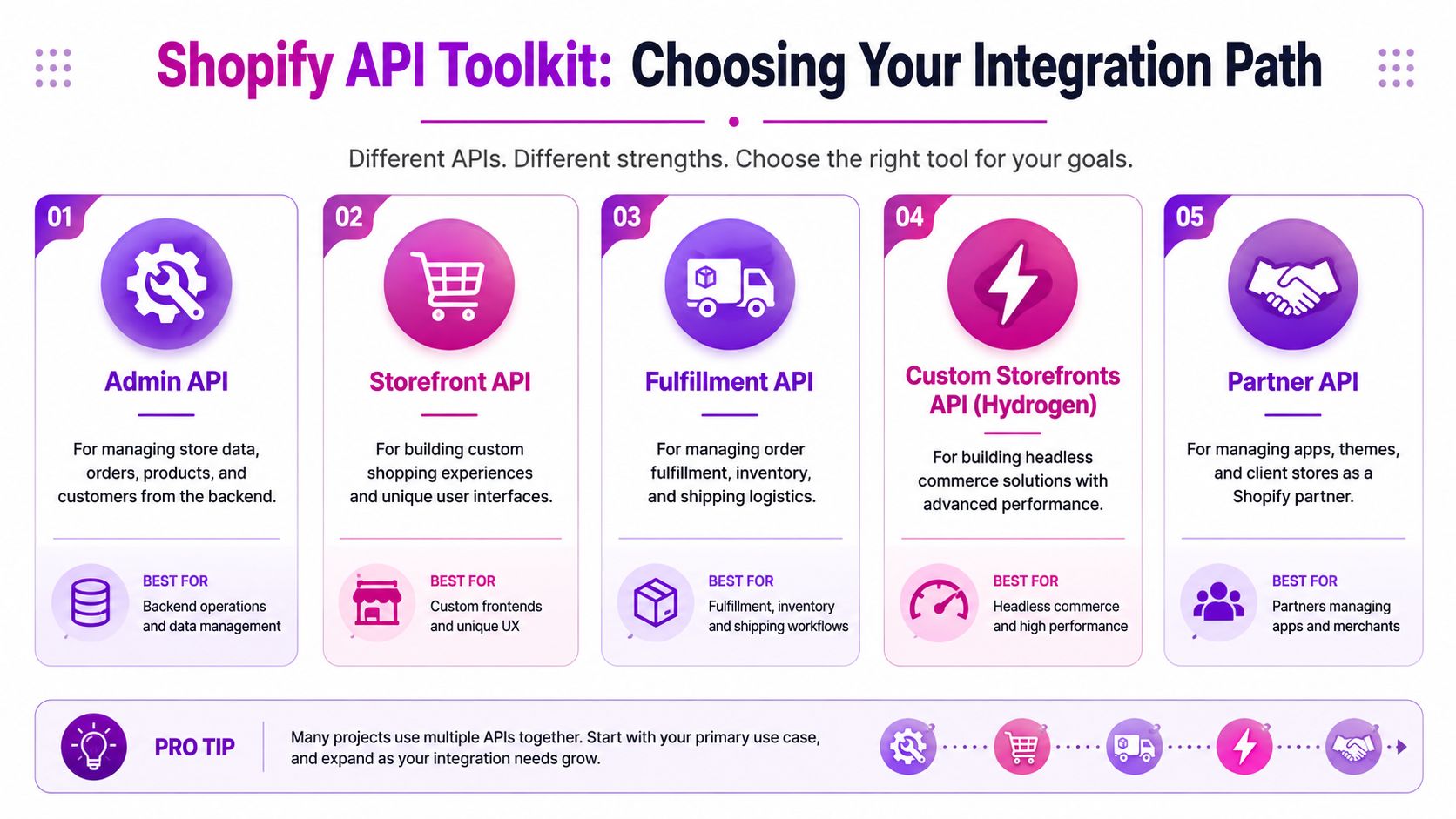
The right question is not which API is best. The right question is which API matches the job, the operator, and the failure mode you can live with six months from now.
Shopify API Decision Matrix
| API | Primary Use Case | Data Access | Common Integration |
|---|---|---|---|
| Admin API | Manage backend commerce data | Products, orders, inventory, customers, app-managed store data | ERP sync, PIM sync, OMS integration, custom dashboards |
| Storefront API | Build custom buying experiences | Catalog, cart, customer-facing commerce data | Headless storefronts, mobile apps, custom shopping flows |
| Webhooks | React to store events | Event payloads for changes in Shopify | Order sync triggers, inventory updates, fulfillment events |
| Bulk operations | Process large datasets efficiently | Large export or sync workloads through asynchronous jobs | Historical catalog imports, audits, reindexing, backfills |
| OAuth | Secure app authorization | Permissioned access to store resources | Public apps, custom apps, multi-store agency deployments |
Admin API versus Storefront API
The Admin API runs operational workflows. Use it when a backend system needs to create, update, or read commerce data that store staff or external systems depend on. Product publishing from a PIM, inventory updates from a WMS, order exports to an ERP, and support tooling all belong here.
The Storefront API serves customer-facing experiences. Use it when shoppers interact with a custom frontend, mobile app, kiosk, or headless build. It is built for browsing, cart actions, and checkout-related experiences, not for internal operational control.
A simple filter helps.
- If the caller is an internal system, use the Admin API first.
- If the caller is the shopper interface, use the Storefront API first.
That sounds obvious, but teams still blur the line. The common mistake is forcing business operations through the Storefront API because a headless build is already in place, or exposing Admin access where a limited customer-facing API would do. Both choices create avoidable security and maintenance problems.
REST, GraphQL, and OAuth
For new Shopify integrations, GraphQL is usually the better default for the Admin API because it lets you request exactly the fields you need and batch related reads into fewer calls. REST can still make sense for specific endpoints, legacy code, or teams that need a faster path for a narrow use case, but it tends to become noisy once the data model gets more complex.
Here is the practical split I use:
- Choose GraphQL Admin API for new builds, bulk reads, and workflows that touch related objects.
- Keep REST only where an existing integration already depends on it or where the endpoint is simpler for the job.
- Use OAuth for public apps or any installation flow where a merchant grants scoped access.
- Use custom app tokens for single-store private operational work, with the understanding that scope changes later require process discipline.
Scope decisions matter more than teams expect. Early on, it is tempting to grant broad access so development moves faster. Later, those wide scopes make security reviews harder, app approvals slower, and change management riskier across multiple stores.
query GetProductForSync($id: ID!) {product(id: $id) {idtitlestatusupdatedAtvariants(first: 50) {nodes {idskuinventoryQuantity}}}}That query pattern is easier to maintain than multiple REST calls when your sync logic needs product, variant, and inventory context together.
Store tokens like production credentials, not convenience variables in a repo or a shared doc. In practice, that means environment-based secret management, token rotation procedures, and an owner for scope approvals.
Where webhooks fit, and where they don't
Webhooks are event triggers. They are not your source of truth, and they are not a good place to run long business logic synchronously.
Use webhooks to detect change and hand work off to a queue or job runner:
- orders/create to start ERP export or fraud checks
- products/update to refresh search indexes or merchandising rules
- inventory_levels/update to notify downstream availability services
- fulfillments/create to update customer comms or warehouse reporting
This is the part many tutorials skip. Webhooks arrive late sometimes. They can arrive more than once. A receiving service can be down when traffic spikes. If the integration only works when every webhook is instant and singular, it is fragile by design.
A safer pattern is simple. Verify the webhook, persist the payload or the resource ID, acknowledge quickly, and process the core work asynchronously. Then add idempotency checks so duplicate deliveries do not create duplicate orders, repeated exports, or inventory drift.
Bulk operations are for catch-up, audits, and recovery
Bulk operations solve a different problem from webhooks. Webhooks tell you what just changed. Bulk operations help you recover state, backfill history, or compare large datasets without burning through normal request capacity.
Use bulk operations when the job sounds like one of these:
- Export the full catalog to seed a PIM or search engine
- Rebuild an external reporting store after a sync failure
- Audit products, variants, or orders across a large dataset
- Reconcile data after scope changes or a broken deployment
If your integration plan includes "loop through every product every night," reconsider the design. That approach works on a small store and becomes expensive to maintain once the catalog, order volume, or market expansion increases.
The practical selection rule
In real projects at ECORN, the stack usually settles into a pattern like this: Admin API for writes and operational reads, Storefront API for custom customer experiences, webhooks for change detection, bulk operations for large recovery jobs, and OAuth or custom app auth depending on who installs and owns the app.
That mix is normal. Good Shopify integrations rarely rely on one API surface alone. They combine the right tools, with clear ownership for scopes, retries, version upgrades, and post-launch support.
Core Integration Architecture Patterns
A Shopify integration usually looks fine in a demo. The critical test comes later, when a campaign spikes order volume, a warehouse system lags for five minutes, or someone adds a new market and the product model stops matching what your ERP expects. Architecture choices made early decide whether that turns into a support ticket or a week of cleanup.
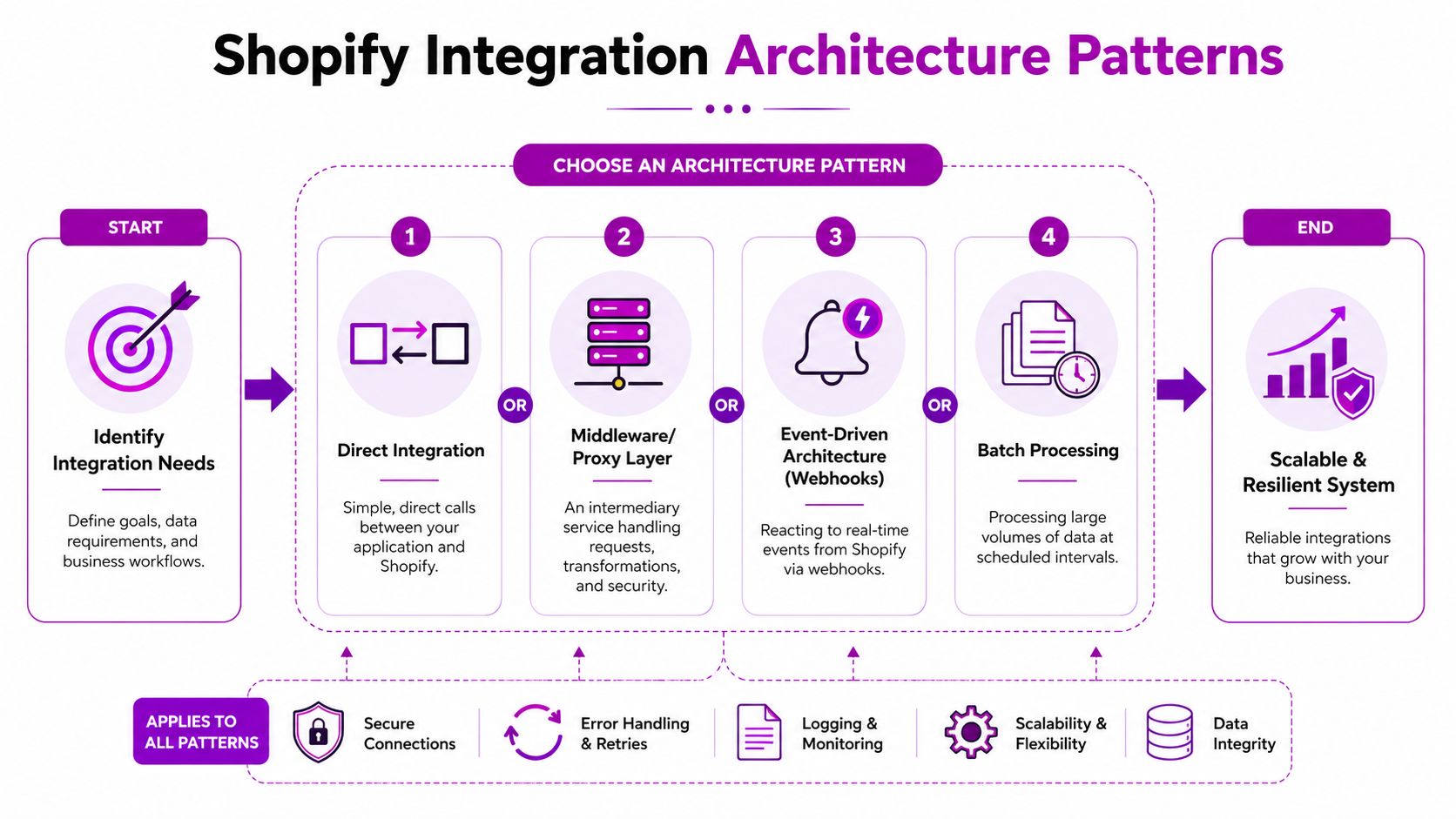
Pattern one for direct system sync
Direct integration is the shortest path from one system to Shopify. An ERP, PIM, WMS, or internal app calls the Admin API and handles its own mapping, retries, and error logic.
It fits a narrow use case:
- One system owns the process
- Data transformation is limited
- The failure path is easy to reason about
- Your team accepts tighter coupling between systems
This pattern is fine for a single catalog feed or a simple stock update service. It starts to break down when different teams need different payloads, different retry rules, or different timing guarantees. A direct sync is quick to ship, but every new requirement tends to add conditional logic in the same service, and that service becomes hard to change safely.
Pattern two for middleware or proxy layers
A middleware layer becomes useful when Shopify is only one part of a larger stack. Instead of letting every downstream platform call Shopify on its own, one service manages auth, transformations, request shaping, observability, retries, and queue handoff.
That changes the operational model.
| Pattern | Best for | Main advantage | Main trade-off |
|---|---|---|---|
| Direct integration | Simple point-to-point sync | Fast to build | Tight coupling |
| Middleware layer | Multi-system orchestration | Centralized control | More services to maintain |
| Event-driven with queues | Reactive workflows | Better resilience under load | Requires disciplined retry design |
| Batch processing | Large volume sync | Efficient for backfills and audits | Not real time |
At ECORN, this is usually the point where a custom app starts making more sense than app glue and automation rules. A dedicated service gives your team one place to manage scopes, API version changes, and data contracts. If your roadmap points in that direction, this guide to developing a Shopify app for long-term integration ownership is the right next reference.
One warning. Middleware helps only if it stays opinionated. If it becomes a generic relay that just forwards payloads without validation, you add infrastructure without getting control.
Pattern three for event-driven flows with job queues
Webhook-first architecture works well only when the webhook endpoint stays thin. Shopify sends the event. Your endpoint verifies the HMAC, records the payload, returns a 200 quickly, and lets background workers do the actual processing.
That design handles the failure mode that shows up most often in production. Flash sales, large imports, and app retries create bursts. If the webhook handler also updates an ERP, writes to a CRM, recalculates inventory, and sends Slack alerts in the same request cycle, latency climbs and duplicate deliveries start to matter.
A safer event-driven flow looks like this:
- Receive webhook
- Verify signature and store the raw event
- Acknowledge immediately
- Push a job to a queue
- Process with idempotency checks
- Retry with backoff if a downstream dependency fails
- Run reconciliation jobs for anything that still misses
This is the pattern I trust for orders, fulfillment updates, and customer state changes. It is less elegant than handling everything inline. It survives real traffic.
A minimal version in Node might look like this:
app.post('/webhooks/orders/create', express.raw({ type: '*/*' }), async (req, res) => {const hmac = req.get('X-Shopify-Hmac-Sha256');const topic = req.get('X-Shopify-Topic');const shop = req.get('X-Shopify-Shop-Domain');const body = req.body;if (!isValidShopifyWebhook(body, hmac, process.env.SHOPIFY_API_SECRET)) {return res.status(401).send('Invalid webhook signature');}const payload = JSON.parse(body.toString('utf8'));const eventId = req.get('X-Shopify-Webhook-Id');await db.webhook_events.upsert({webhook_id: eventId,topic,shop,payload,status: 'received'});await queue.add('process-order-create', { eventId });return res.status(200).send('OK');});The important part is not the framework. It is the sequence. Persist first. Acknowledge fast. Process later. That keeps retries safe and gives you something to replay when a downstream system fails.
Hybrid beats purity
The strongest production setups mix patterns by domain instead of forcing one model across the whole integration.
For example, orders usually justify event-driven processing because speed matters and business actions follow immediately. Inventory often needs both near real-time updates and scheduled reconciliation, because stock mismatches are expensive and external warehouse systems are not always consistent. Catalog syncs often work best with a controlled write pipeline plus periodic bulk validation, especially when multiple systems can change product data.
That hybrid approach also helps when scopes change after launch. If the app loses or gains access to products, orders, or fulfillment data, a well-structured architecture isolates the impact. The queue still accepts events. The middleware can flag scope-related failures clearly. Recovery becomes a targeted re-sync instead of a full integration outage.
Pure real-time architecture sounds good in planning meetings. In production, stores need recovery paths, replay tools, and scheduled checks. That is what keeps the integration stable six months after launch, not on day one.
Building Your First Shopify Integration Step-by-Step
Monday morning, the ERP says a product is in stock, Shopify says it is not, and marketing has already launched the campaign. That is usually when a team learns that the first API call was never the hard part. The hard part is choosing a build path that still works after scope changes, delayed webhooks, and a second system starts writing to the same records.

Set up the app with the minimum access you can justify
For a custom integration, create the app in Settings > Apps and sales channels > Develop apps, then generate the Admin API access token. Store it once, because Shopify will not show it again. For a public or packaged app, use the full OAuth flow and treat scope selection as an architectural choice, not a setup checkbox.
Start narrower than your backlog suggests. If the immediate goal is product enrichment, read_products may be enough for the first pass. Add write_products, read_inventory, or write_inventory only when the ownership rules are settled and the write path is tested. Every extra scope increases blast radius if a job misfires or a token is exposed.
Teams building an app for repeated installs should also account for uninstall handling, reauthorization, and scope upgrades. This guide on developing a Shopify app covers that broader app lifecycle.
Store credentials like production software
Use environment variables, a secret manager, or encrypted deployment settings. Keep tokens out of source control, browser code, and shared chat threads. If the integration needs different permissions by environment, issue separate app credentials for development and production instead of reusing one token everywhere.
A minimal .env style setup looks like this:
SHOPIFY_STORE=my-storeSHOPIFY_ADMIN_TOKEN=shpat_your_token_hereSHOPIFY_API_VERSION=2025-01Prove the connection with one read request
The first request should answer three questions: is authentication valid, are scopes correct, and does the store return the object shape your downstream system expects?
import fetch from "node-fetch";import dotenv from "dotenv";dotenv.config();const store = process.env.SHOPIFY_STORE;const token = process.env.SHOPIFY_ADMIN_TOKEN;const apiVersion = process.env.SHOPIFY_API_VERSION || "2025-01";async function getSingleProduct(productId) {const url = `https://${store}.myshopify.com/admin/api/${apiVersion}/products/${productId}.json`;const response = await fetch(url, {method: "GET",headers: {"X-Shopify-Access-Token": token,"Content-Type": "application/json"}});if (!response.ok) {const errorBody = await response.text();throw new Error(`Shopify API error ${response.status}: ${errorBody}`);}const data = await response.json();return data.product;}getSingleProduct("YOUR_PRODUCT_ID").then(product => {console.log("Product title:", product.title);console.log("Product handle:", product.handle);}).catch(err => {console.error(err.message);});Use this stage to inspect real payloads, especially variant IDs, inventory item IDs, tags, metafields, and publication state. A lot of bad integrations start with correct authentication and wrong assumptions about identifiers.
If the integration will read large catalogs, this is also the point to reconsider REST versus GraphQL. REST is fine for a single-object smoke test. GraphQL usually gives you tighter field selection and fewer calls once you move into catalog syncs, merchandising data, or cross-object lookups.
Test in a development store, but test failure paths too
A dev store is the right place to verify authentication and payloads. It is also the right place to simulate the problems that show up after launch: revoked scopes, stale IDs, duplicate webhook deliveries, and partial writes.
A safe progression looks like this:
- Connect to a development store with a dedicated app install.
- Test read operations in Postman or the Shopify API Explorer.
- Fetch one known product, variant, or inventory item and verify your internal mapping.
- Log the raw response before transforming it.
- Add writes only after you define who owns each field.
- Trigger retries and bad payloads on purpose so your error handling is visible before production.
That last step gets skipped too often. At ECORN, we usually learn more from a forced failure than from a successful first sync. If a token expires or a merchant changes app scopes after launch, the integration should fail loudly, queue affected records, and surface exactly what needs reauthorization.
A walkthrough can help if your team wants a visual reference before wiring the code:
Add writes only after you define system ownership
Before creating or updating anything through Shopify, document the source of truth for each domain.
A practical split looks like this:
- Products: PIM or ERP owns structured attributes. Shopify may own merchandising copy, collections, or channel-specific content.
- Inventory: WMS or ERP usually owns counts. Shopify reflects sellable availability.
- Orders: Shopify often owns order creation. ERP or 3PL may own fulfillment status after ingestion.
That decision changes the code you write. If Shopify is the source of truth for product content, inbound webhook processing matters more than outbound batch updates. If an ERP owns product data, Shopify writes should go through a controlled sync job with idempotency keys and conflict logging.
Two questions prevent a lot of rework:
- Which system owns each field?
- What should happen when the values disagree?
If nobody can answer those clearly, delay the write path. A read-only integration with reconciliation reports is safer than a bidirectional sync built on assumptions.
One more caution. If your project mixes API integration with third-party data collection, scraping vendor portals, or competitor monitoring, keep that workload separate from Shopify app infrastructure. The operational and legal concerns are different, and techniques such as bypassing anti-bot protection belong in isolated pipelines, not inside your storefront or admin integration.
Build the read path first. Then define ownership and reconciliation. Then add writes with rollback or replay options. That order prevents the data conflicts that are expensive to clean up later.
Mastering Rate Limits Security and Production Readiness
A working prototype is easy to overestimate. Production readiness is where most Shopify API integration projects either mature or become a permanent source of support tickets.
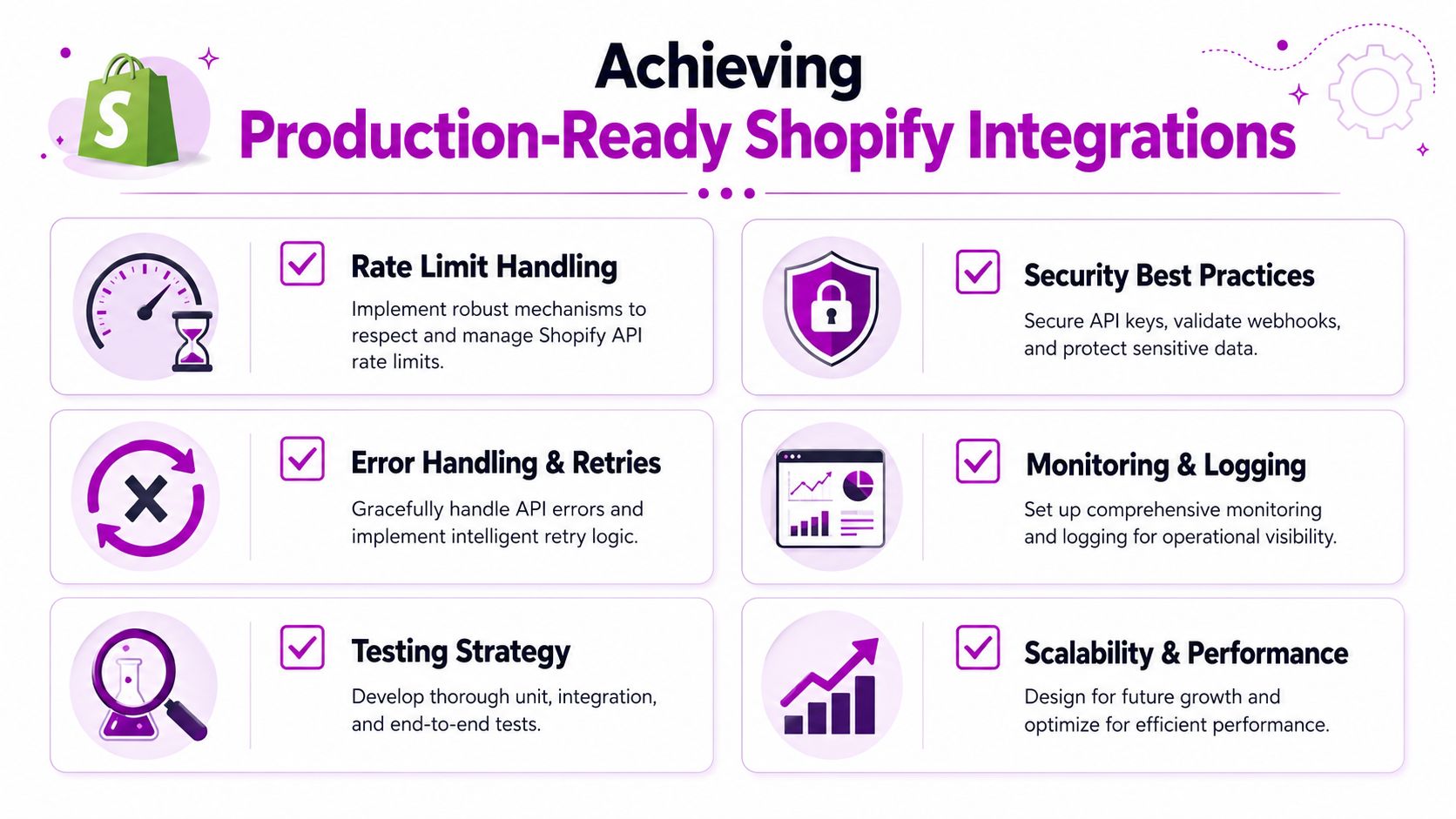
Respect rate limits before Shopify forces you to
Shopify's REST Admin API enforces a rate limit of 40 requests per app per store per minute, replenishing at 2 requests per second, while Shopify Plus stores receive a 10x increased limit of 400 requests per minute, according to LeadCroc's explanation of Shopify API integration limits.
Those limits don't just affect large projects. They shape how you fetch products, retry failed requests, and design sync jobs. If your integration loops through records one by one without caching, field filtering, or queue control, it will eventually hit 429 responses and start drifting.
A practical handling pattern includes:
- Retry with backoff when Shopify returns
429 Too Many Requests - Cache frequently accessed data instead of refetching unchanged records
- Request only necessary fields so each call does less work
- Throttle workers centrally instead of letting multiple jobs burst independently
Here's a simple Node.js retry wrapper:
async function shopifyRequestWithRetry(makeRequest, maxRetries = 5) {let attempt = 0;while (attempt <= maxRetries) {const response = await makeRequest();if (response.status !== 429) {return response;}const waitMs = 1000 * Math.pow(2, attempt);await new Promise(resolve => setTimeout(resolve, waitMs));attempt += 1;}throw new Error("Exceeded retry limit after repeated 429 responses.");}Security is mostly restraint
Most security failures in Shopify integrations aren't exotic. They come from giving the app broader access than it needs, storing credentials badly, or leaving old integrations active after the business has moved on.
Shopify App Store guidance also stresses a few operational requirements that many teams ignore: apps should maintain response times under 500 ms for 95% of requests, avoid reducing store performance beyond a Lighthouse score drop of less than 10%, and use webhook subscriptions instead of constant polling where appropriate, as summarized in Codersy's review of Shopify app guidelines.
That same source notes that 43% of businesses skip proper testing, which is exactly how integrations reach production with rate-limit bugs, missing retries, or unsafe write logic.
Scope changes are a hidden post-launch failure mode
This is one of the most overlooked realities in Shopify work. Many tutorials show how to request scopes during setup but ignore what happens later when the app evolves.
A Shopify Dev Platform update discussed in this video analysis highlighted that when you add new scopes after approval, merchants must manually re-authorize the app. That same source says only 12% of tutorial articles mention this workflow risk. In practice, this means your integration can look healthy while specific sync operations fail without notification because the new permission was never approved on one or more stores.
Your production checklist should include:
- Scope change detection in deployment reviews
- Merchant re-authorization flows that are explicit and trackable
- Feature flags so new capabilities don't automatically assume new access
- Operational alerts when permission-related calls start failing
A scope change is not just a code change. It's an operational event that needs coordination with the merchant.
Webhooks, anti-bot friction, and operational discipline
Webhooks are still better than constant polling for many change events, but they aren't a substitute for resilient processing. Keep handlers short, idempotent, and queue-backed.
If your broader stack also depends on external data capture, product intelligence, or monitoring across systems outside Shopify, your developers may run into anti-bot systems in adjacent workflows. In that context, a technical resource on bypassing anti-bot protection can help teams understand the constraints and design compliant collection pipelines more realistically.
Production readiness usually comes down to discipline more than cleverness. Logging, retries, queue visibility, alerting, and clear source-of-truth rules beat “smart” architecture every time.
The Final Decision DIY vs Hiring an Expert Agency
By this stage, the build-versus-buy question usually looks different. It's not “can someone on our team call the Shopify API?” It's “who should own an integration that affects operations, revenue flow, and future system changes?”
When DIY makes sense
An internal build is reasonable when the scope is contained and your team already has strong backend habits.
DIY tends to work well for:
- Small internal tools with limited write access
- Single-store use cases where workflows are stable
- Teams with real integration experience across queues, retries, auth, and observability
- Projects where slower delivery is acceptable because the team is learning while building
The hidden requirement is maintenance maturity. Someone has to own API versioning, scope changes, webhook reliability, and post-launch support. If nobody clearly owns that, “in-house” often means “unowned.”
When an agency is the safer decision
Agency support starts making sense when the integration touches multiple systems, carries operational risk, or has to launch on a business deadline.
That usually includes:
| Scenario | DIY risk | Agency advantage |
|---|---|---|
| ERP or PIM integration | Data mapping and reconciliation errors | Faster architecture decisions and cleaner system ownership |
| Multi-store rollout | Repeated auth and config drift | Standardized rollout process |
| Headless commerce | Frontend and backend complexity collide | Cross-functional delivery |
| Post-migration stabilization | Hard-to-diagnose sync issues | Dedicated debugging and production hardening |
For brands that need implementation help, middleware, or API connectors tied into a broader Shopify stack, Shopify integration services are one practical route to evaluate alongside internal hiring and independent contractors.
The real cost is operational risk
A cheap build that fails during a catalog push or a peak sales event isn't cheap. The actual cost shows up in delayed fulfillment, manual cleanup, broken reporting, and engineers getting pulled into emergency support instead of roadmap work.
A strong in-house team can absolutely do this well. But if your developers are primarily product-focused, asking them to become integration specialists mid-project can slow both tracks at once.
The cleanest decision framework is simple:
- How critical is this integration to daily operations?
- How many systems need to stay in sync?
- How costly is failure during a busy trading period?
- Who owns the integration after launch?
- Is speed or internal capability-building the bigger priority?
If the answers point toward high complexity, low tolerance for failure, and limited internal ownership, bringing in specialists is usually the more responsible choice.
If your team needs help planning or implementing a Shopify API integration, ECORN works with brands that need custom connectors, operational architecture, and Shopify builds that hold up after launch, not just during the demo.



What Is AI Integration for eCommerce

How to Choose the Right eCommerce Website Development Firm

E Business Strategy Implementation

Conversion Tracking Setup for Shopify Stores

BigCommerce vs Shopify Plus Which Enterprise Wins in 2026

Shopify Theme Kit: Setup, Commands, and Migration Guide

Shopify Extension Development: A Practical 2026 Guide

Shopify Speed Score Explained and How to Improve It

Shopify Mobile Optimization: The 2026 Playbook

How to Add Subcategory in Shopify for Better UX

How to Implement Structured Data for Ecommerce in 2026

SEO App Mobile: Shopify Store Optimization Guide

Shopify Plus Support: What It Includes and How to Choose

Google Ads for Shopify: The Complete 2026 Playbook

Shopify New York: How to Find and Hire the Right Agency

Google Search Console for Shopify: The Complete Setup

First Party Data Collection for eCommerce Growth

FAQ Online Store Guide: Build and Measure It Right

Do FB Ads Work for eCommerce in 2026?

One Page Checkout for Shopify: Design and Implementation

Shopify GraphQL vs REST: The 2026 Developer Decision

Shopify Ecommerce Consulting: Strategy, Pricing &

Are Reddit Ads Worth It for eCommerce Brands

Shopify Title and Meta Description: A Practical 2026 Guide

Product Video Best Practices for Shopify Brands

Real-Time Inventory Management: A 2026 Guide

AI Chatbot Integration for Shopify Stores

Affiliate Program Management: A Shopify Guide

10 Best Performance Monitoring Tools for Shopify in 2026

Digital Asset Management for eCommerce Brands in 2026

Every Type of Facebook Ads Explained for eCommerce Growth

Product Information Management Explained for Shopify Brands

Support Ticket System: A Guide for Shopify Stores

10 Best Customer Service Tools for Shopify in 2026

Can I Start a Business with No Money? a 2026 Blueprint

What Sells Good on Etsy: Best Niches for 2026

Shopify Add to Cart Button: A Practical 2026 Guide

Customer Feedback Automation: A Practical eCommerce Guide

Critical Rendering Path: A Guide for Shopify Stores

How to Promote on TikTok for eCommerce in 2026

B2B eCommerce Consulting That Drives Real Revenue

10 Best Practices for Site Navigation in 2026

Return vs Refund for Shopify Stores: A Practical Guide

What Is Customer Lifetime Value and Why It Matters

What Is Voice of Customer Research for eCommerce

SMS Marketing for Ecommerce That Actually Converts

Master How to Improve Email Deliverability in 2026

Top 7 eCommerce Partners NYC for Shopify Brands in 2026

Machine Learning for Ecommerce: Boost Your Shopify Store

Beauty Market Research: Your 2026 Growth Guide

Shopify International Expansion: A 2026 Roadmap

What Does CRO Stand for in Business: Understanding CRO

Shopify Visual Merchandising: A Playbook for Higher Sales

Shopify Landing Page Design: Master Conversion in 2026

10 Best AI SEO Optimization Tools for Shopify in 2026

Agentic AI for Ecommerce: Boost Your Sales in 2026
Mastering Email Marketing Data for eCommerce Growth

Conversion Rate Optimisation Australia: Boost Your Sales

Conversion Rate Optimization AI: Your Shopify Store Guide

10 Product Bundling Strategies for Shopify in 2026

How to Increase Customer Lifetime Value: A Shopify Playbook

AI Customer Service Automation: Shopify Guide 2026

Clean Website Design: A Shopify Conversion Playbook

Omnichannel Retail Strategy: A Shopify Playbook

Product Data Enrichment: A Guide for Shopify Brands

Instagram Shopping Features a Guide for Shopify Stores

What Is Revenue Optimization: A Holistic RevOps Guide

Benefits of Conversion Rate Optimization: Boost Your

WordPress to Shopify Migration: Your 2026 Seamless Switch

Boost Sales: Ecommerce Payment Processing Guide 2026

Unified Commerce Platform: Benefits, KPIs & Shopify Guide

How to Reduce Bounce Rate eCommerce: Your 2026 Guide

How to Implement Data Governance: A 2026 Guide

Shopify Store Development Cost: A 2026 Breakdown

What Is Server Side Tracking: The Shopify Guide 2026

Marketing Automation Workflows: A Shopify Guide for 2026

Shopify: How to Reduce Technical Debt

Shopify UX Design Change: A Playbook for Growth

User Generated Content Strategy: Shopify Playbook

Shopify Pause and Build Plan Cost: A Complete 2026 Guide

Compare at Price on Shopify: A Complete Guide for 2026

Where Can I Sell My Prints? 10 Best Platforms for 2026

Shopify Order Management System: The Ultimate Guide 2026

What Is Marketing Attribution? an eCommerce Guide for 2026

10 Best Black Friday Sales Sheets for 2026

Discover the Top Social Media Marketing Agencies For

Consumer Confidence Definition for eCommerce in 2026

What Is Social Commerce? Your 2026 Guide to Boosting Sales

A Social Ad Campaign Playbook for eCommerce Growth

7 Best FAQ Page Examples for SaaS & eCommerce

Market Research in Fashion Industry: A Guide for Shopify

Shopify Migration Services: Expert Guide for 2026

Mastering FB Retargeting Ads for Shopify in 2026

What Is Omnichannel Ecommerce

Master Your Shopify Plus Migration: The 2026 Guide

Shopify Integration Services: A Merchant's 2026 Guide

Shopify Collection Description: A Guide to SEO & Sales

Shopify Plus Contact: Reach Sales & Support Effectively

Top Luxury Shopify Stores: Design & UX Strategies

How to Improve Customer Experience: A Shopify Roadmap


newsletter in your inbox