


You're probably in the same spot most growing Shopify brands hit at some point. Traffic is coming in from Meta, Google, email, influencers, or organic social, but most visitors leave without buying. Product pages get views. Carts fill up. Checkouts start. Then the session ends and that paid click you worked hard to earn disappears.
That's where remarketing with Facebook Ads stops being a nice extra and starts being basic operating discipline. If you already paid to get attention, the next job is to recover as much of that intent as possible. For many Shopify stores, that's the difference between ads that feel expensive and ads that produce a durable return.
Why Your Shopify Store Needs Facebook Remarketing
The first major mistake I see is treating every visitor like they're brand new. They're not. Someone who viewed a product, added to cart, or started checkout is in a completely different state of mind than someone seeing your brand for the first time.
That difference shows up in performance. Industry benchmarks cited by SQ Magazine's retargeting ad performance statistics report that retargeting ads are 76% more likely to be clicked than standard display ads, retargeted visitors are 70% more likely to convert, and average retargeting CTR is about 0.7% versus 0.07% for standard display. For a Shopify brand, that's the practical case for remarketing with Facebook Ads. You're not trying to create intent from scratch. You're reconnecting with intent that already exists.
Where the missed revenue usually sits
Most stores don't have a traffic problem. They have a recovery problem.
A customer visits from an Instagram ad, checks a product page, gets distracted, and leaves. Another customer adds an item to cart on mobile and plans to finish later. A third compares your product with a competitor and never makes it back. If you're not running structured remarketing, those users often vanish even though they were far closer to purchase than your cold audiences.
Practical rule: Prospecting creates demand. Remarketing captures the demand you already paid to generate.
That's why I usually frame remarketing as part of a broader operating model, not a standalone tactic. If you're working through your full growth stack, this guide on a system for boosting ecommerce sales is a useful companion because it helps place remarketing inside the bigger conversion system instead of isolating it as “just another campaign.”
What Facebook remarketing does well
Meta is strong when you need to segment people by behavior and show them the right message based on where they dropped off. Shopify stores benefit because the buying journey is usually event-driven:
- Viewed product pages
- Added products to cart
- Initiated checkout
- Purchased recently
- Browsed but showed only light interest
That lets you stop serving generic “shop now” ads to everyone. Instead, you can show product reminders to product viewers, urgency or reassurance to cart abandoners, and exclusions for recent buyers.
If you're serious about efficiency, this isn't optional. Remarketing with Facebook Ads helps you extract more value from traffic you already own. That's often the fastest win available to a growing Shopify store.
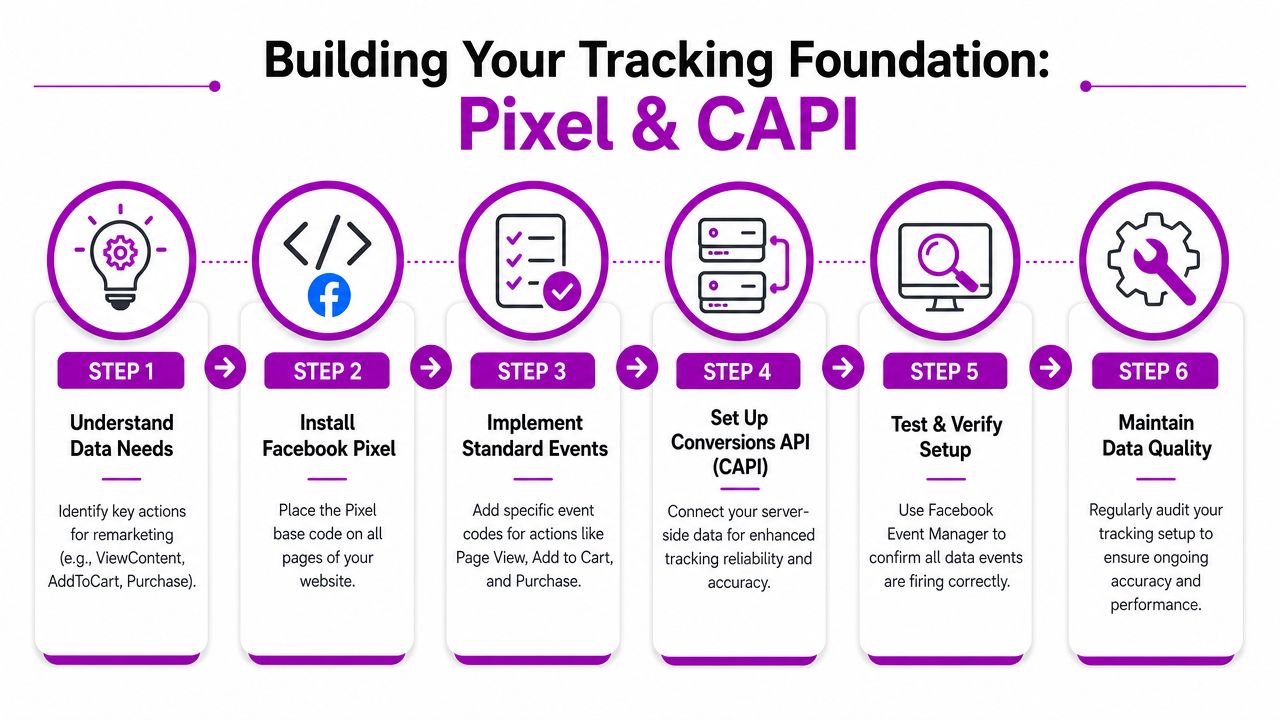
Building Your Tracking Foundation with Pixel and CAPI
Before you build audiences or launch a single remarketing campaign, you need clean event data. Without that, Meta can't reliably tell the difference between a casual visitor and a high-intent shopper.
The core setup starts with the Meta Pixel. It's the tool that turns on-site behavior into audience data. Industry reporting summarized by Uproas' Facebook Ads statistics describes the pixel as the foundation for remarketing and notes that retargeting can reduce cost per acquisition by 40%–70% compared with cold traffic, with CPA reported as 32% lower than search ads in some cases. The business takeaway is simple. better tracking improves your ability to build efficient audiences and optimize for purchases.
What Pixel and CAPI each do
Think of the setup in two layers.
The Pixel captures browser-side actions. On Shopify, that usually includes page views, product views, add-to-cart activity, checkout events, and purchases.
The Conversions API, usually called CAPI, sends server-side signals. That matters because browser-based tracking can miss events due to privacy settings, browser restrictions, or ad blockers. For Shopify brands, a Pixel-only setup often leaves blind spots. A Pixel plus CAPI setup gives Meta a better chance of matching key actions back to ad interactions.
If your tracking is weak, your remarketing audiences look larger than they should in some places and smaller than they should in others. Both problems waste money.
How to set it up in Shopify
For most stores, the cleanest route is Shopify's native Facebook and Instagram integration.
Connect your Meta assets
In Shopify, open the Facebook and Instagram sales channel. Connect the correct Business Manager, ad account, Facebook Page, and pixel.Confirm data sharing settings
Shopify's integration is built to support event sharing, including server-side support through CAPI. Pick the highest data-sharing level available that fits your compliance setup and consent model.Map the events that matter
For eCommerce remarketing, your must-watch events are:- ViewContent
- AddToCart
- InitiateCheckout
- Purchase
Check Events Manager
Open Meta Events Manager and verify that events are firing. Test from a real browsing session on your store, not just from setup screens.Audit product IDs and catalog sync
If you plan to run dynamic product ads later, your catalog and event parameters need to line up properly. If they don't, the ads won't show the right products.- Audience quality improves because you can separate broad visitors from true buying signals.
- Exclusions work properly so recent purchasers don't keep seeing generic conversion ads.
- Optimization gets sharper because Meta receives stronger purchase-path feedback.
- Correct pixel selected: Make sure your store is connected to the right business assets.
- Events firing in sequence: Product view should happen before add to cart, then checkout, then purchase.
- Duplicate events reviewed: Pixel and CAPI should complement each other, not create inflated reporting.
- Catalog connected: Required for dynamic product remarketing.
- Consent flow checked: Your compliance setup should reflect how your store handles tracking permissions.
- View Content audience: exclude AddToCart, InitiateCheckout, and Purchase
- Add to Cart audience: exclude Purchase
- Initiate Checkout audience: exclude Purchase
- All Visitors audience: exclude all deeper-intent audiences if you want cleaner messaging
- Apparel store: segment by product category if your catalog is broad. Someone who viewed dresses shouldn't necessarily get the same reminder as someone browsing outerwear.
- Skincare brand: split by routine step or product family so remarketing reflects how customers shop.
- Home goods store: separate high-consideration products from impulse items, because the message and timing shouldn't be identical.
- UGC or lifestyle video showing the product in use
- Customer reviews that reduce trust friction
- Value proposition ads focused on materials, fit, shipping, or guarantees
- Dynamic Product Ads featuring the exact item they added
- Simple reminder copy tied to what they already considered
- Offer framing only if needed, especially if margin can support it
- checkout confidence
- shipping clarity
- return policy
- payment flexibility
- trust and ease
- Ad 1: Product-focused reminder
- Ad 2: Social proof or testimonial
- Ad 3: Brand value proposition
- Ad 4: Offer-led version, if your economics allow it
- Generic “Shop Now” ads that ignore prior behavior
- Over-designed brand ads that look polished but say nothing useful
- Discount-first remarketing for every audience, which conditions buyers to wait
- Website visitors
- Viewed content
- Added to cart
- Initiated checkout
- Purchasers for exclusion or specific upsell logic
- Prospecting funds audience creation
- Remarketing monetizes that audience
- Retention channels handle people Meta shouldn't keep chasing
- One purchase-focused campaign: Keep structure readable.
- Separate ad sets by intent: Don't mix casual browsers with checkout abandoners.
- Use exclusions aggressively: Avoid overlap and wasted impressions.
- Load multiple ads per ad set: Give Meta options.
- Protect prospecting budget: Don't starve the campaigns that refill the funnel.
Check top-line performance by audience tier
Which ad sets are driving purchases efficiently?Review frequency and creative age
If an ad set is still spending but results are softening, fatigue is often the first suspect.Compare recency windows
Shorter windows usually carry stronger intent. If longer windows are dragging, tighten them.Inspect exclusions
Purchasers should not keep falling into your general remarketing pools.Look at the site experience
Sometimes the ad isn't the issue. If product-page friction or checkout confusion exists, remarketing will only magnify the bottleneck.- If ROAS drops: review whether the audience is too broad or too stale.
- If cost per purchase climbs: trim lower-intent segments before touching high-intent ones.
- If frequency rises fast: rotate creative or reduce budget.
- If click quality looks fine but conversions weaken: audit the landing page and checkout path.
- Audit exclusions first: purchasers, recent converters, and deeper funnel users should be removed where needed.
- Tighten recency by intent: stronger behavior gets shorter windows.
- Refresh creative by audience: don't let one ad carry the whole system.
- Check catalog health: dynamic product campaigns fail unnoticed when feeds or IDs break.
- Coordinate with email and SMS: don't pay Meta to recover customers your owned flows can reach better.
- Watch audience size before raising budget: if the pool is small, higher spend often just increases repetition.
- Review message sequence: broad visitors need education, cart users need reminders, checkout users need reassurance.
- Match the ad to the landing experience: if the site doesn't resolve friction, the ad can't save the conversion path.
What good tracking looks like in practice
A clean setup gives you three useful outcomes.
A quick tracking checklist
Use this before spending real budget:
Tracking isn't glamorous, but it's where profitable remarketing with Facebook Ads starts. If the data layer is wrong, everything built on top of it becomes guesswork.
Creating High-Intent Audiences for Your Funnel
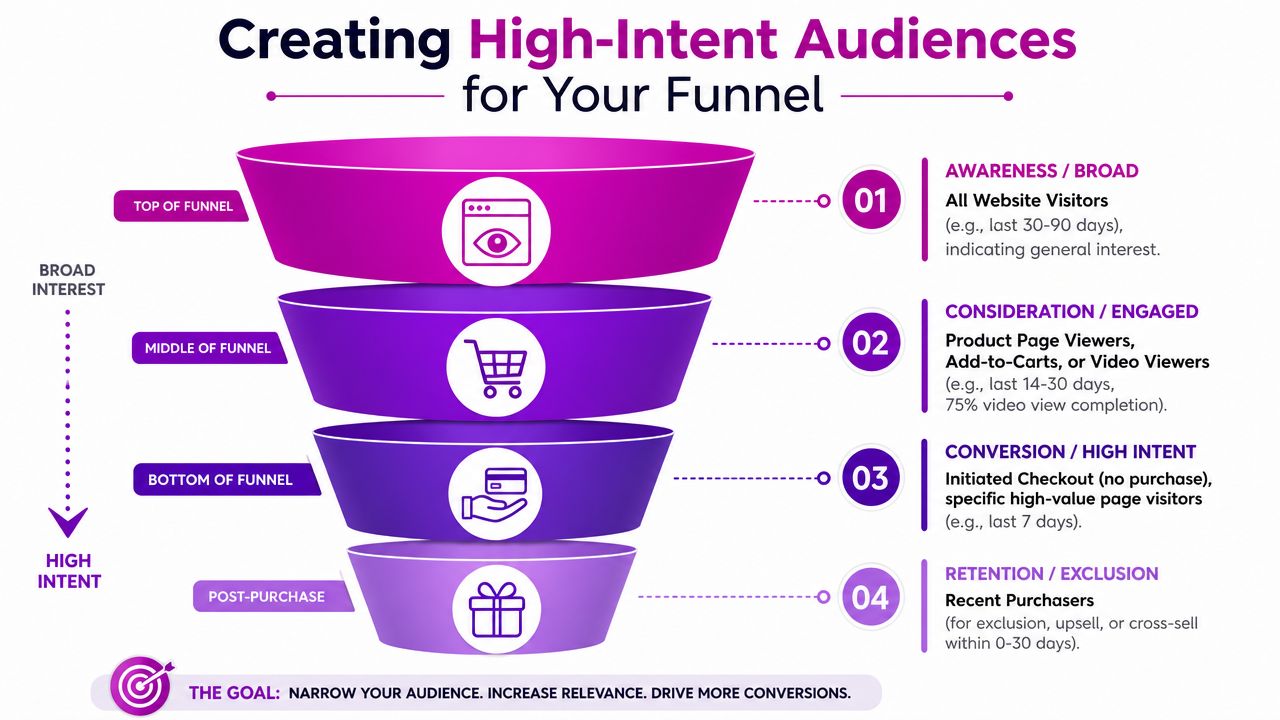
Once tracking is working, the next job is segmentation. At this stage, many Shopify stores leave money on the table. They create one audience called “all website visitors” and show the same ad to everyone. That approach ignores intent, recency, and buying stage.
Shopify's guidance gives a strong starting point. In Shopify's Facebook retargeting guide, they recommend Website Custom Audience windows of 30 days for general website visitors, 14 days for viewed content, and 7 days for add-to-cart and initiate-checkout users. That structure is practical because it follows the usual decay of buying intent. The stronger the signal, the tighter the window should be.
The audience tiers I'd build first
For a first serious Shopify setup, I'd start with a lean structure that mirrors the funnel instead of overcomplicating it.
| Funnel Stage | Audience Definition | Recency Window | Strategic Goal |
|---|---|---|---|
| Top of funnel | All website visitors, excluding purchasers and deeper funnel users | 30 days | Re-engage broad interest without paying for fresh acquisition again |
| Mid funnel | Viewed content, excluding add-to-cart, checkout, and purchase | 14 days | Move product browsers back to product pages |
| Bottom funnel | Added to cart, excluding purchase | 7 days | Recover abandoned shopping intent |
| Bottom funnel | Initiated checkout, excluding purchase | 7 days | Close the highest-intent non-buyers |
| Post-purchase | Recent purchasers | Store-specific | Exclude from general remarketing or use for upsell and cross-sell |
How to build them correctly
The logic matters as much as the audience itself. Each lower-funnel audience should exclude people who already completed the next step.
For example:
That stops overlap and keeps your message aligned with actual user behavior.
Here's a useful visual summary before you build inside Ads Manager:
Shopify-specific audience examples
A few practical examples for common store types:
Broad audiences tell you who visited. Narrow audiences tell you who's close to buying.
One smart addition for cart recovery
If cart abandonment is a key issue, it's worth pairing Meta audiences with retention thinking beyond paid ads. This breakdown of app store research's recovery insights is useful because it helps frame cart recovery as a system, not just a retargeting ad set.
The important point is this: your audiences should reflect buyer intent, not just available events. If you segment well, your creative can become specific. That's when remarketing with Facebook Ads starts behaving like a profit engine instead of a reminder banner.
Crafting Ad Creatives That Re-engage and Convert
Audience quality gets people into the right ad set. Creative closes the gap between interest and action.
This is why so many remarketing campaigns underperform. The targeting is fine, but the ad is lazy. Brands show the same static image to product viewers, cart abandoners, and checkout abandoners and then wonder why results flatten. Warm audiences need sharper messaging, not recycled prospecting assets.
According to Taboola's Facebook retargeting guide, high-performing remarketing depends on matching creative to audience intent, and the standard eCommerce setup for cart abandonment is Dynamic Product Ads using a connected product catalog and the Catalog Sales objective. The same guidance also recommends testing multiple ads for warm audiences so you can find the message that converts best.
What to show each audience
Product viewers
These users showed interest but not enough to start checkout. They often need confidence, not pressure.
Use creative that answers hesitation:
For Shopify brands, this is often where product-page objections belong inside the ad. If people keep viewing but not adding to cart, the ad should handle the objection your PDP didn't fully resolve.
Add-to-cart audiences
These people already chose the product. Don't interrupt that intent with generic branding.
Use:
In most accounts, this audience responds best when the ad feels like a continuation of the shopping session.
Initiated checkout users
This is your hottest non-buyer segment. At this stage, the creative should focus on friction removal.
That usually means emphasizing:
Build a creative matrix, not one ad
The stores that scale remarketing well don't run one ad per audience. They build a small bench of options.
A simple structure looks like this:
This matters for two reasons. First, Meta needs options to learn what message fits each sub-group inside your audience. Second, warm audiences fatigue fast when they keep seeing the same asset.
Creative rule: Don't just repeat the product. Repeat the purchase argument in different forms.
What usually doesn't work
Three patterns show up again and again:
If you want remarketing with Facebook Ads to stay profitable, creative has to do more than remind. It has to resolve uncertainty. That's why stores with average targeting but strong message-market fit often outperform stores with complex setup and weak ads.
Structuring Campaigns for Budget and Bidding Success
A lot of Shopify brands assume remarketing deserves a large slice of spend because it usually looks efficient. That's the trap.
Remarketing often reports strong numbers because it targets warm users. But warm audiences are finite. Once you overfund them, performance can stall, frequency rises, and you end up paying more to chase the same people. A strategic guide from Matthew J. Holmes on whether you should run retargeting Facebook Ads argues that remarketing should typically be about 10% of total Facebook ad budget. That's a useful corrective for brands tempted to let remarketing absorb too much spend.

The structure I'd start with
For most growing Shopify stores, I prefer a consolidated campaign instead of a pile of tiny campaigns.
Use one campaign built around the purchase goal, then separate ad sets by intent tier:
This structure keeps reporting easier to read and makes budget decisions less chaotic. Inside each ad set, run multiple creatives rather than splitting into too many campaign layers.
Why overspending breaks remarketing
Retargeting doesn't scale the same way prospecting does. You can't force more volume out of a small audience just by raising budget. If your initiated-checkout pool is limited, Meta will serve impressions more often to the same people.
That's when brands start blaming creative, landing pages, or attribution settings for a problem that's really just audience saturation.
A better way to think about budget is this:
If you need a broader view of paid social structure for Shopify, this guide to Facebook ad ecommerce strategy is a useful companion because it places remarketing inside the wider acquisition system.
A practical budget framework
Keep remarketing constrained
If your store is early in paid social, don't let remarketing dominate just because the reported return looks cleaner. It often gets too much credit for conversions that were already likely to happen.
Match spend to audience depth
Checkout abandoners can justify stronger pressure than broad visitors because their intent is higher. Website visitors need lighter budget because the audience is broader and less qualified.
Give smaller pools more time
The same strategic source above also recommends a longer evaluation window for lower-spend remarketing. That's important. Tiny retargeting pools produce noisy daily results. Judging too quickly usually leads to unnecessary edits.
Budget discipline matters more than clever ad hacks when your audience size is limited.
Campaign checklist for launch
If your remarketing with Facebook Ads feels expensive, the answer usually isn't more spend. It's tighter segmentation, stricter exclusions, and a budget level that matches audience size.
Measuring Performance and Optimizing for ROAS
Once the campaigns are live, the job changes from setup to control. Most Shopify teams make this harder than it needs to be by staring at too many columns in Ads Manager.
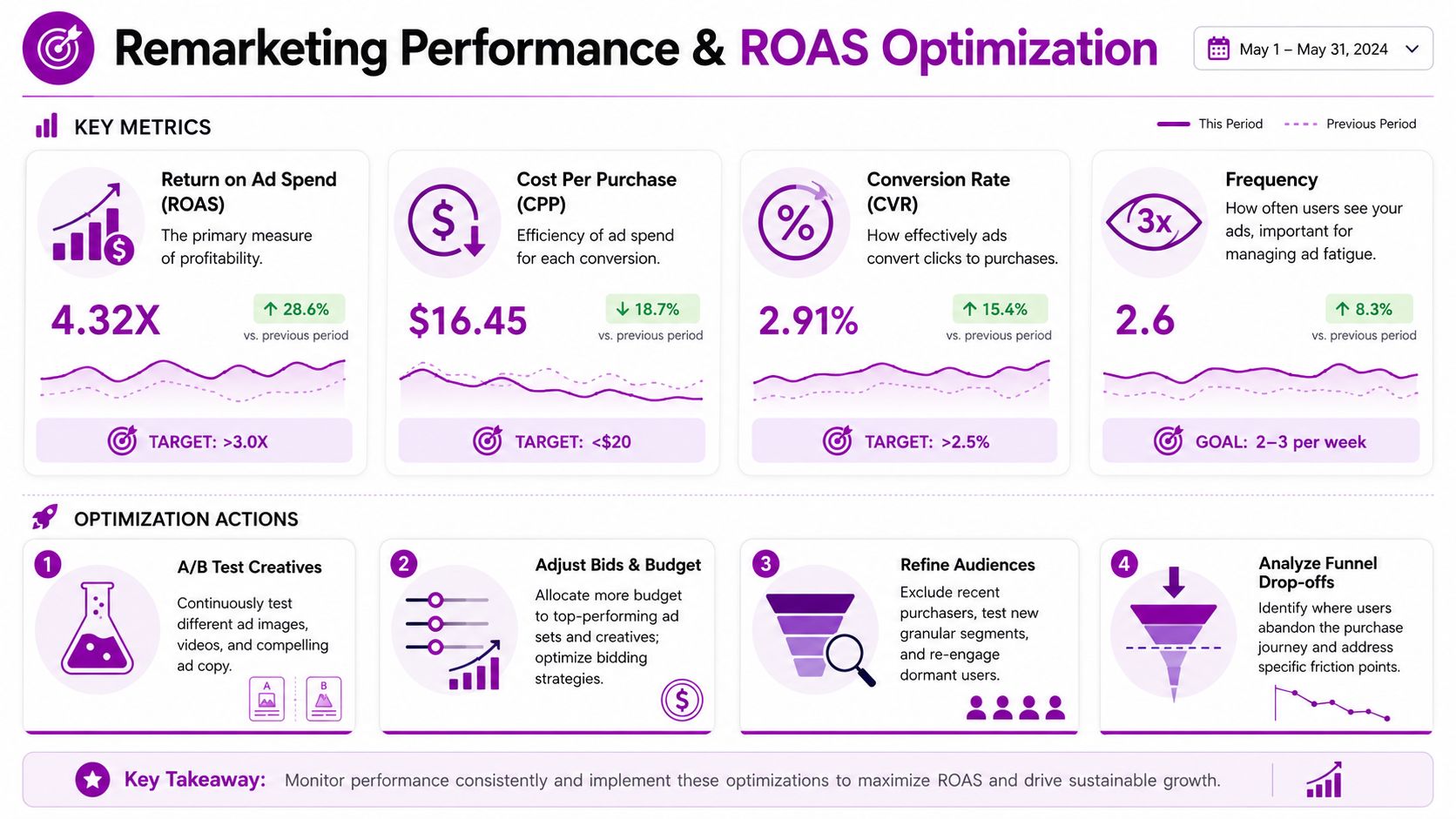
For remarketing, I care most about a small group of indicators: return, efficiency, and saturation. You don't need a huge dashboard to make smart decisions. You need a routine.
The metrics that actually matter
ROAS
Return on ad spend tells you whether the campaign is contributing profitably to the business. If you need a clearer framework for interpreting it, this breakdown of how to calculate return on ad spend is useful.
For remarketing, ROAS usually looks stronger than prospecting. That's normal. The point isn't to compare the two as if they do the same job. The point is to see whether your remarketing return stays healthy as frequency rises and as audience windows shift.
Cost per purchase
This metric helps you compare one audience tier against another. If checkout abandoners are efficient and product viewers are drifting, that often tells you where to rework creative or trim spend.
Frequency
Frequency is where hidden problems show up. If people keep seeing the same ad and purchases don't keep pace, you're not reinforcing intent anymore. You're just repeating yourself.
Watch frequency like a pressure gauge. It often tells you budget is too high before CPA makes it obvious.
A weekly optimization routine
I like a simple review process for Shopify brands.
What to do when performance slips
Use a direct response playbook.
Attribution and decision-making
Post-privacy changes, remarketing can look less neat inside platform reporting than many operators want. That doesn't mean the campaign is broken. It means you should judge it alongside Shopify sales patterns, blended account behavior, and on-site movement through the funnel.
The strongest operators don't optimize remarketing in isolation. They read it in context. If checkout recoveries improve, returning visitor purchase behavior improves, and your warm traffic converts cleanly, the system is doing its job even if one dashboard view looks imperfect on a given day.
Common Pitfalls and Your Advanced Optimization Checklist
The expensive mistakes in remarketing with Facebook Ads are rarely technical. They're strategic.
Most of them come from treating remarketing as a universal fix instead of one channel inside a broader retention system. Meta is strong for recovering warm intent, but it isn't always the right tool for every customer state.
The mistakes that waste the most money
No purchaser exclusions
This is the classic one. A customer buys, then keeps seeing the same conversion ad. That wastes spend and creates a sloppy brand experience.
Fix it by maintaining current purchase exclusions and, where relevant, moving buyers into separate upsell or cross-sell logic.
One generic ad for every audience
If a homepage visitor and a checkout abandoner see the same ad, your message is too blunt. Different behavior needs different persuasion.
Fix it by mapping each audience to a specific objection or next step.
Long windows for weak intent
Broad, stale audiences often look appealing because they're bigger. Bigger doesn't mean better. If someone visited a while ago and showed only light engagement, Meta may not be the best recovery channel.
A more strategic angle comes from Common Thread Collective's Facebook ads retargeting guidance, which notes that lapsed visitors or existing customers may be better re-acquired through email or SMS in some cases, and recommends a 1-day click window for product-detail-page viewers and abandoned checkout audiences in tighter, high-intent setups. That's a useful reminder that recency and channel choice matter as much as ad creative.
When Facebook remarketing is the wrong channel
A lot of advanced operators outperform in this area.
If someone abandoned checkout recently, Meta is often a strong fit. If someone bought before and is now a lapsed customer, owned channels may be smarter. Email and SMS usually give you more control when the relationship already exists, especially for replenishment, repeat purchase timing, and customer-specific offers.
Use Meta when you need reach and behavioral follow-up. Use owned channels when you already have direct permission and stronger customer context.
The mature strategy isn't “retarget everyone everywhere.” It's “use the cheapest, clearest channel for the specific recovery job.”
Your advanced optimization checklist
Use this as a working list for the next account review:
The brands that win with remarketing don't just “set up retargeting.” They build a disciplined system around tracking, segmentation, budget control, creative testing, and channel choice. That's what makes remarketing with Facebook Ads profitable instead of merely active.
If your Shopify team needs help turning this into a working system, ECORN supports brands with Shopify development, CRO, and eCommerce consulting that can improve the on-site experience remarketing depends on. For stores that already have traffic and demand, tightening the connection between ads, product pages, and checkout usually matters more than adding more campaign complexity.



Shopify Design Agency: How to Pick the Right Partner

Mastering Multi Store Management on Shopify

Scale Shopify Store

10 Shopify App Ideas Worth Building in 2026

Conversion Rate Optimization for Landing Pages: The Playbook

Shopify Plus Automation: A Guide for 2026

10 Social Selling Platforms for Shopify Merchants

Shopify Website Design Examples: 7 Stores Worth Studying

7 Ecommerce Newsletter Examples for Shopify Brands

One Product Shopify Store: Build and Scale

Mobile Pop Up Strategy for Shopify Stores That Converts

Sitemap for Shopify: How to Find, Optimize, and Submit It

7 Single Product Websites Worth Emulating

Product Variants Shopify: The Complete 2026 Guide

Ecommerce Analytics Consulting for Growth

What Is AI Integration for eCommerce

How to Choose the Right eCommerce Website Development Firm

E Business Strategy Implementation

Conversion Tracking Setup for Shopify Stores

BigCommerce vs Shopify Plus Which Enterprise Wins in 2026

Shopify Theme Kit: Setup, Commands, and Migration Guide

Shopify Extension Development: A Practical 2026 Guide

Shopify Speed Score Explained and How to Improve It

Shopify Mobile Optimization: The 2026 Playbook

How to Add Subcategory in Shopify for Better UX

How to Implement Structured Data for Ecommerce in 2026

SEO App Mobile: Shopify Store Optimization Guide

Shopify Plus Support: What It Includes and How to Choose

Google Ads for Shopify: The Complete 2026 Playbook

Shopify New York: How to Find and Hire the Right Agency

Google Search Console for Shopify: The Complete Setup

First Party Data Collection for eCommerce Growth

FAQ Online Store Guide: Build and Measure It Right

Do FB Ads Work for eCommerce in 2026?

One Page Checkout for Shopify: Design and Implementation

Shopify GraphQL vs REST: The 2026 Developer Decision

Shopify Ecommerce Consulting: Strategy, Pricing &

Are Reddit Ads Worth It for eCommerce Brands

Shopify Title and Meta Description: A Practical 2026 Guide

Product Video Best Practices for Shopify Brands

Real-Time Inventory Management: A 2026 Guide

AI Chatbot Integration for Shopify Stores

Affiliate Program Management: A Shopify Guide

10 Best Performance Monitoring Tools for Shopify in 2026

Digital Asset Management for eCommerce Brands in 2026

Every Type of Facebook Ads Explained for eCommerce Growth

Product Information Management Explained for Shopify Brands

Support Ticket System: A Guide for Shopify Stores

10 Best Customer Service Tools for Shopify in 2026

Can I Start a Business with No Money? a 2026 Blueprint

What Sells Good on Etsy: Best Niches for 2026

Shopify Add to Cart Button: A Practical 2026 Guide

Customer Feedback Automation: A Practical eCommerce Guide

Critical Rendering Path: A Guide for Shopify Stores

How to Promote on TikTok for eCommerce in 2026

B2B eCommerce Consulting That Drives Real Revenue

10 Best Practices for Site Navigation in 2026

Return vs Refund for Shopify Stores: A Practical Guide

What Is Customer Lifetime Value and Why It Matters

What Is Voice of Customer Research for eCommerce

SMS Marketing for Ecommerce That Actually Converts

Master How to Improve Email Deliverability in 2026

Top 7 eCommerce Partners NYC for Shopify Brands in 2026

Machine Learning for Ecommerce: Boost Your Shopify Store

Beauty Market Research: Your 2026 Growth Guide

Shopify International Expansion: A 2026 Roadmap

What Does CRO Stand for in Business: Understanding CRO

Shopify Visual Merchandising: A Playbook for Higher Sales

Shopify Landing Page Design: Master Conversion in 2026

10 Best AI SEO Optimization Tools for Shopify in 2026

Agentic AI for Ecommerce: Boost Your Sales in 2026
Mastering Email Marketing Data for eCommerce Growth

Conversion Rate Optimisation Australia: Boost Your Sales

Conversion Rate Optimization AI: Your Shopify Store Guide

10 Product Bundling Strategies for Shopify in 2026

How to Increase Customer Lifetime Value: A Shopify Playbook

AI Customer Service Automation: Shopify Guide 2026

Clean Website Design: A Shopify Conversion Playbook

Omnichannel Retail Strategy: A Shopify Playbook

Product Data Enrichment: A Guide for Shopify Brands

Instagram Shopping Features a Guide for Shopify Stores

What Is Revenue Optimization: A Holistic RevOps Guide

Benefits of Conversion Rate Optimization: Boost Your

WordPress to Shopify Migration: Your 2026 Seamless Switch

Boost Sales: Ecommerce Payment Processing Guide 2026

Unified Commerce Platform: Benefits, KPIs & Shopify Guide

How to Reduce Bounce Rate eCommerce: Your 2026 Guide

Shopify API Integration: A Practical End-to-End Guide

How to Implement Data Governance: A 2026 Guide

Shopify Store Development Cost: A 2026 Breakdown

What Is Server Side Tracking: The Shopify Guide 2026

Marketing Automation Workflows: A Shopify Guide for 2026

Shopify: How to Reduce Technical Debt

Shopify UX Design Change: A Playbook for Growth

User Generated Content Strategy: Shopify Playbook

Shopify Pause and Build Plan Cost: A Complete 2026 Guide

Compare at Price on Shopify: A Complete Guide for 2026

Where Can I Sell My Prints? 10 Best Platforms for 2026
Shopify Order Management System: The Ultimate Guide 2026
What Is Marketing Attribution? an eCommerce Guide for 2026


newsletter in your inbox