


You're usually searching for Shopify Plus contact at one of two moments. Either you're evaluating Plus and need to talk to the sales side, or your store is live and something operational is broken right now.
Those are not the same path. That's where most guides get sloppy.
If you use the public Shopify Plus form for an active store issue, you'll waste time. If you jump into support expecting a pricing or migration conversation, you'll hit the wrong team. For Plus merchants, speed comes from choosing the right front door first, then giving the right context to the person on the other end.
Why Finding the Right Shopify Plus Contact Matters
At Plus level, “contact Shopify” sounds simple but usually isn't. A brand can lose hours just because the request started in the wrong queue.
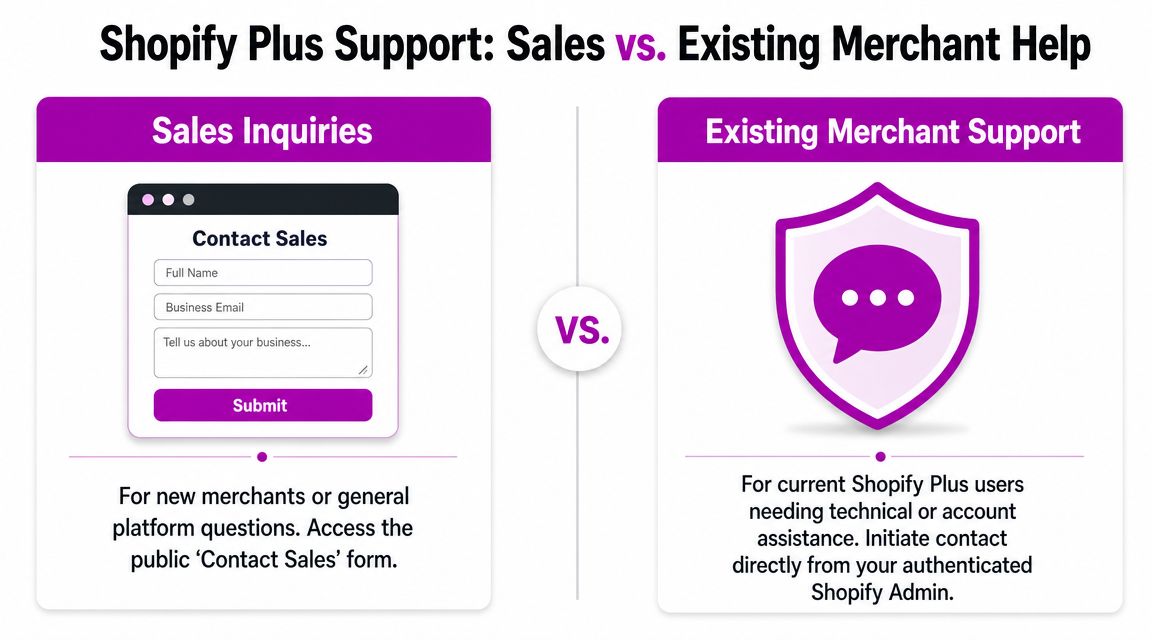
The first distinction is the one most merchants miss. Shopify Plus sales contact is for commercial conversations like pricing, migration, platform fit, and enterprise planning. Shopify Plus support contact is for authenticated merchants who need help with account, store, or technical issues inside the platform.
That split matters more now because Shopify Plus is no niche product. One 2026 industry summary reported more than 60,268 websites using Shopify Plus, including 46,084 live websites, and said the United States accounted for 25,413 of them, which shows how large the installed base has become in enterprise ecommerce across major markets (Shopify Plus market summary).
The two contact paths most teams confuse
Here's the practical version:
| Intent | Correct path | Wrong move |
|---|---|---|
| Evaluating Shopify Plus | Public sales contact page | Opening a support case for pricing or migration questions |
| Existing merchant with store issue | Authenticated Help Center and admin-led support flow | Submitting the sales form and waiting for routing |
When teams blur those paths, they usually describe the problem poorly too. They say “we need Shopify Plus contact” when what they really mean is one of these:
- Pre-sales guidance about migration, platform fit, and commercial terms
- Operational support for checkout issues, account access, or platform behavior
- Strategic implementation help that support won't own, such as redesigns, custom functionality, or CRO work
Why this matters in practice
A Plus store has more moving parts than a basic Shopify setup. More teams, more apps, more workflows, more risk if checkout or integrations misbehave. If you're still deciding whether Plus fits your business, it helps to understand the benefits of Shopify Plus before you contact anyone, because your questions get sharper fast when you know which platform capabilities matter to your operation.
Practical rule: If the conversation starts with revenue goals, migration planning, or enterprise requirements, talk to sales. If it starts with “our store is down,” “checkout is failing,” or “we can't access the account,” go through authenticated support.
That single distinction saves more time than most escalation tricks.
Reaching the Shopify Plus Sales Team
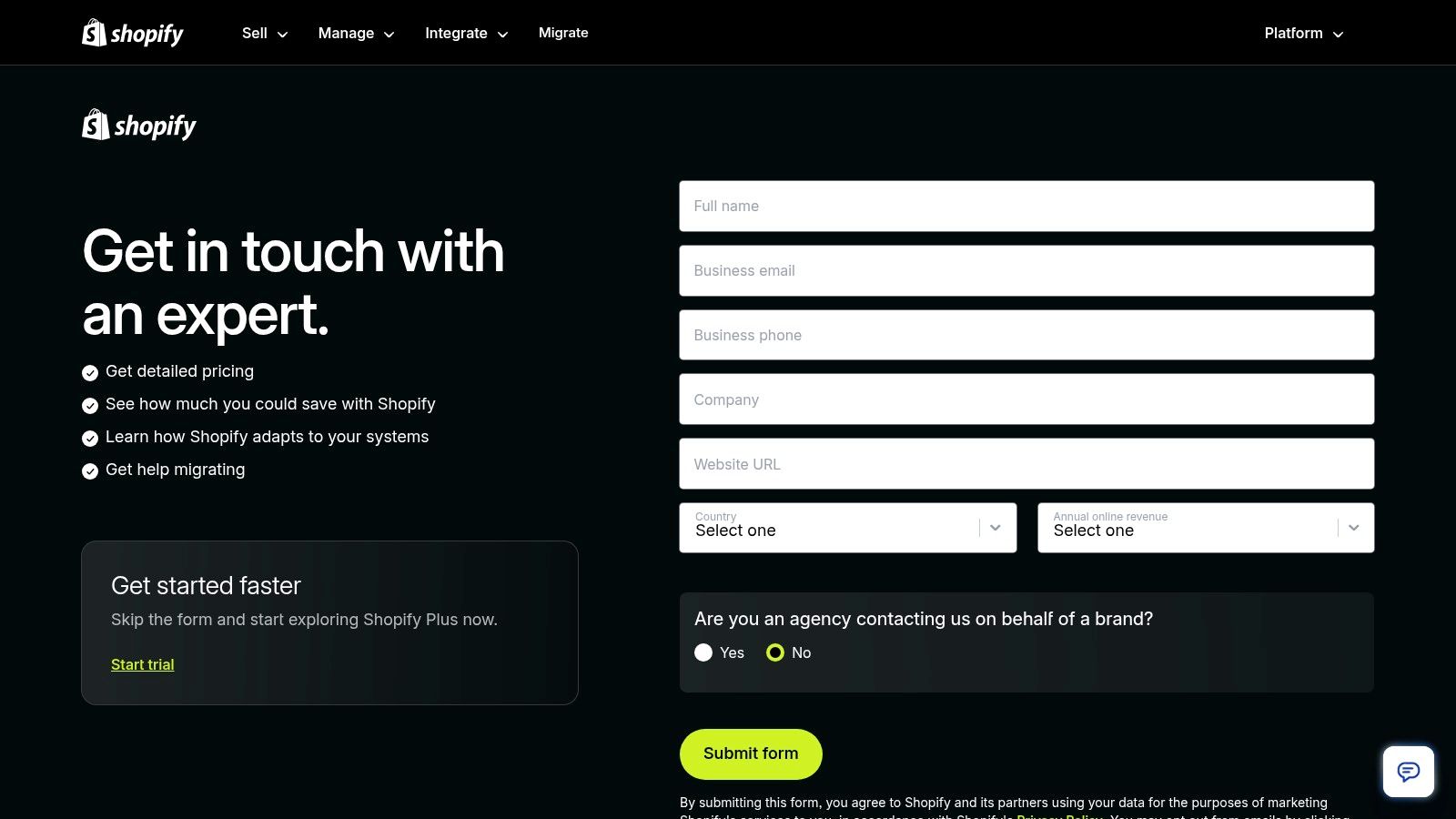
If you're not yet on Plus, the public Shopify Plus contact route is the sales path. It's designed to qualify whether your business is a fit and route you into a commercial conversation.
That page is not where existing merchants should go for urgent technical support. Shopify's public Plus contact page is mainly a sales and consultation entry point, while merchant support is handled through the authenticated Help Center (Shopify Plus contact page).
What the sales team is actually there to discuss
The best sales conversations aren't generic demos. They're qualification calls. Shopify wants to understand your business model, your current platform, and where Plus would remove friction.
Come prepared with clear answers on:
- Current platform setup. Are you migrating from another platform, moving up from standard Shopify, or rebuilding an existing Plus store?
- Business complexity. Separate B2B and DTC needs, international storefronts, multiple teams, or custom workflows all change the conversation.
- Commercial priorities. Pricing matters, but so do launch timing, internal resources, and whether you need implementation support.
- Known blockers. Checkout limitations, integration pain, performance issues, and governance problems are more useful than broad complaints.
What works on the first call
Sales calls go faster when the merchant brings specifics instead of aspirations. “We need a better ecommerce platform” is weak. “We need cleaner operations across multiple teams, stronger control over checkout-related workflows, and a migration path that won't disrupt trading” is useful.
I'd also separate your questions into three buckets before the call:
Commercial
Contract structure, onboarding expectations, and how Shopify frames Plus for your type of business.Operational
Internal workflows, permissions, support expectations, and how your team would run the store day to day.Technical
Integrations, data migration, app dependencies, and any custom functionality that may need outside implementation.
Treat the sales conversation like discovery, not rescue. If you show up with a support problem disguised as a buying question, you'll get delayed or redirected.
What not to expect from sales
The sales team won't act like your implementation partner. They can frame the platform and the commercial fit, but they won't replace a technical audit, migration plan, or custom scoping process.
That's where merchants often misread the process. They assume “contact Shopify Plus” means one unified team that handles evaluation, setup, troubleshooting, and build work. It doesn't. Sales can open the right conversation. They won't run your execution.
Getting Help from Shopify Plus Support
If you're already a Plus merchant, support starts inside the authenticated Shopify environment. That's the operational route.
Shopify's support model for Plus is different from standard plans. Plus includes priority phone, email, and chat support, while all plans have 24/7 chat access, and Shopify's recommended workflow is to start with AI Search before escalating to a human advisor (Shopify support workflow for merchants).
Which support channel to use
Not every issue belongs in the same queue.
| Situation | Best channel | Why |
|---|---|---|
| Checkout problem or revenue-impacting incident | Phone | Fastest for urgent triage |
| Time-sensitive issue that needs back-and-forth | Chat | Good for active troubleshooting |
| Non-urgent issue needing documentation | Better paper trail and structured detail |
Plus merchants should be selective. Phone is for pressure situations. Chat is strong when a support advisor needs to ask follow-up questions quickly. Email is useful when the problem includes screenshots, steps to reproduce, and a timeline.
How to get through triage faster
AI-led triage can be useful for simple issues. It's slower when the problem is account-specific or technically layered. The merchants who get routed faster tend to provide a clean problem statement immediately.
Use this structure:
- What broke. Name the function, not your frustration.
- When it started. Include the rough timing.
- Who is affected. Customers, internal staff, specific markets, or only one environment.
- What changed. Theme deploy, app update, admin change, or nothing obvious.
- What you've already tested. This prevents repetitive first-line scripts.
A weak support opener looks like this: “Checkout isn't working, please help.”
A strong opener looks like this: “Customers are reaching checkout but payment completion is failing on the live store. The issue began after a theme publish. It affects active traffic, and we've reproduced it across devices.”
The support mistake that costs time
The biggest mistake is opening with too much story and not enough diagnosis. Support agents need a routeable issue. They don't need your full internal postmortem in the first message.
If the problem risks lost orders, say that immediately and choose the urgent channel. If it's annoying but contained, document it properly and use a lower-friction channel.
Another mistake is asking support to own tasks that are outside support scope. Platform support can investigate bugs, access, and native behavior. They won't become your implementation team for redesigns, app strategy, or custom build work.
Navigating Escalations and Service Level Agreements
Frontline support handles a lot, but not everything. Some issues need deeper technical review, account-level visibility, or commercial context around business impact.
That's where escalation discipline matters. The merchants who get traction don't just repeat “this is urgent.” They build a clean case.
What good escalation looks like
Escalation works when the support team can prove scope, impact, and reproducibility.
Bring evidence such as:
- Timeline of the issue. When it started, whether it is continuous or intermittent, and any key changes around that time.
- Screen recordings. Short recordings beat long written descriptions for broken admin flows and checkout problems.
- Reproduction steps. Exact clicks, customer path, or environment details.
- Business impact summary. Keep it factual and brief.
- Internal owner. One person should coordinate updates so the ticket doesn't become noisy.
A messy escalation usually has three different team members replying with partial context. That slows everything down.
Why channel mix affects escalation pressure
At Plus scale, support operations are rarely single-channel. Industry analysis notes that the right stack is often made up of multiple tools, and that phone contact alone can account for 10-30% of total volume for Plus merchants, which is why teams should benchmark channel mix before changing staffing or escalation flows (Plus support channel mix analysis).
That matters because the loudest channel is not always the most efficient one. Some brands push everything into phone queues and then wonder why serious incidents get buried with routine questions.
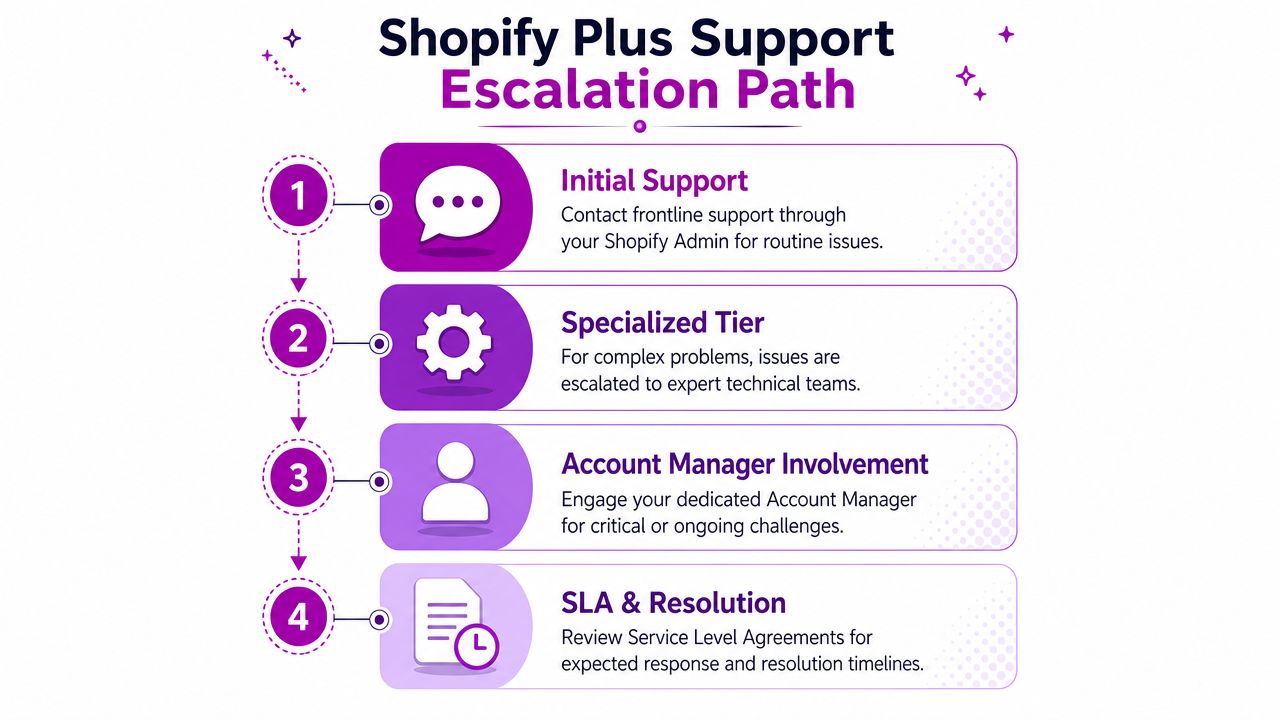
A practical escalation ladder
Use a simple progression:
Frontline support for first triage
Start with the official route and document the case cleanly.Specialized review for persistent or complex issues
Ask for escalation when the issue is reproducible, business-critical, or clearly beyond routine troubleshooting.Account-level involvement when the issue affects operations broadly
Bring in your internal commercial or ecommerce lead so the business impact is clearly represented.
Escalations move faster when the merchant can separate platform behavior from custom code, app conflicts, and process errors. If you can't isolate that internally, the ticket becomes harder to prioritize.
Service levels matter, but merchants often treat them like a guarantee of immediate resolution. They aren't. Think of them as operational guardrails. You still need the right evidence, channel choice, and internal coordination to make those timelines work in your favor.
The Agency Alternative for Faster Solutions and Growth
A common Shopify Plus mistake looks like this: the ecommerce lead opens a support ticket for a checkout customization, the developer waits on an answer support will never give, and the launch slips by a week.
The problem is not response time. It is contact mismatch.
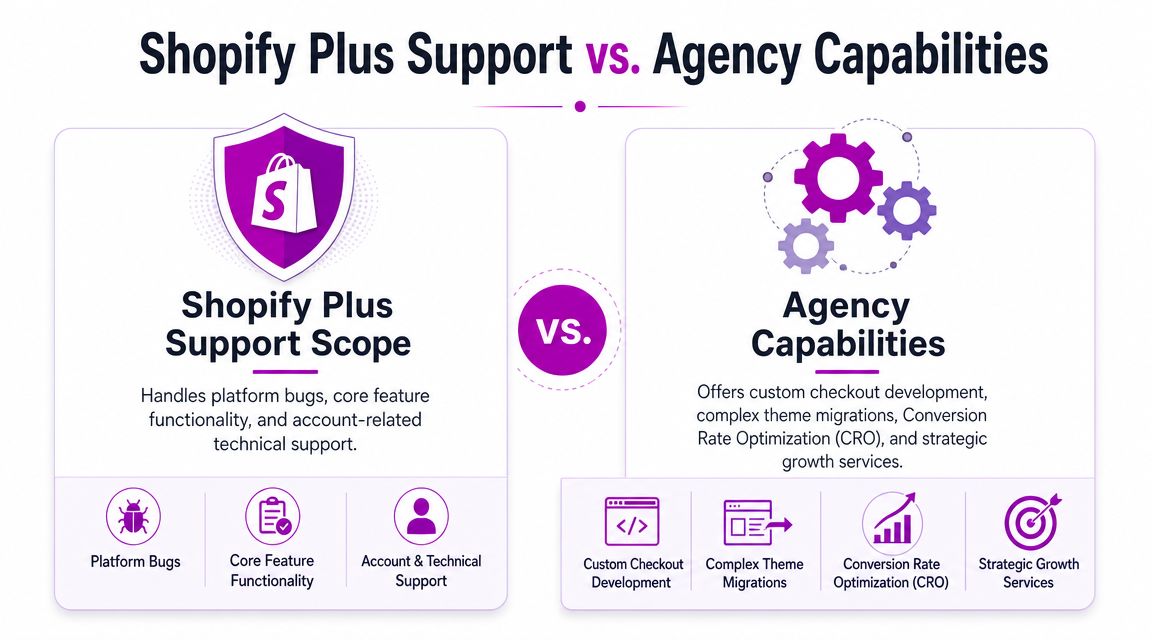
Shopify Plus support handles the platform. It can confirm native behavior, investigate account-specific issues, and help with authenticated problems inside your store. It does not own delivery work. If the core ask is build this, redesign this, speed this up, clean up our app stack, or fix the architecture behind recurring issues, an agency or specialist team is usually the right contact from the start.
A study of 44,369 stores found that Shopify Plus merchants have 2.4x more apps and are typically doing $1M+ per year in sales, which points to a more complex operating environment and a stronger need for specialized services beyond standard support (Shopify Plus merchant complexity study).
Work that usually needs an agency, not support
The dividing line is simple. If someone needs to scope, build, test, coordinate, and own the outcome, that sits outside normal support.
That often includes:
- Checkout and storefront customization that goes beyond explaining native limits
- Replatforming and migration delivery, including data mapping, QA, redirects, and launch sequencing
- Conversion rate optimization programs, where someone needs to run tests, redesign templates, and measure lift
- Integration and app cleanup, especially when too many tools are creating overlap, performance issues, or brittle workflows
- Technical planning, where the team needs a recommendation, not just a platform answer
Merchants often send execution questions into support queues and get frustrated by replies that, while usually correct, belong to a different category of problem.
When the agency route is faster
Agency support is faster when the issue touches revenue, roadmap, or implementation detail.
For example, if your team is deciding whether a checkout request is blocked by Shopify, caused by app code, or better solved with a different UX pattern, a good agency can usually sort that in one working session. Official support may still be part of the process, but it should be used to confirm platform behavior, not to run the project.
The same applies to growth work. Shopify is not going to build your testing roadmap, restructure your collection pages, or reduce theme debt after three years of rushed app installs. An operator who works in Plus stores every week will usually identify the constraint faster because they have seen the same pattern before.
If you are comparing partners, this overview of Shopify agency options is a useful starting point. If your stack also includes custom services or Ruby-based systems around Shopify, it can also help to hire ruby developers for the engineering layer outside the storefront.
Shopify Plus support is the right contact for platform issues inside an authenticated merchant account. An agency is the right contact when the business needs someone to execute.
A practical filter
Use a simple rule:
| Need | Better contact |
|---|---|
| Store problem inside the platform, account issue, native feature behavior | Shopify Plus support |
| Platform evaluation, migration fit, commercial questions before signing | Shopify Plus sales |
| Redesign, custom development, CRO, systems work, implementation ownership | Agency or specialist team |
Teams save time when they separate those paths early. Pre-sales goes to Shopify Plus sales. Authenticated operational support goes to Shopify Plus support. Delivery and growth work goes to the people who will build it.
Shopify Plus Contact FAQ
Can any team member contact Shopify Plus support
That depends on your internal permissions and account setup. In practice, support moves faster when your team limits contact to a small group of operators who understand the store, can reproduce issues, and can answer follow-up questions without internal back-and-forth.
If too many people contact support separately, context gets fragmented. One owner for each issue is usually the cleanest setup.
What if I'm locked out and can't reach authenticated support
Start with account recovery through Shopify's normal access path. If the issue is access-related, be precise about whether it affects the account owner, staff users, or a single login method. The more specific you are, the easier it is for support to route the problem correctly once identity checks begin.
Don't submit a sales inquiry for an access problem. That just adds delay.
Should I use chat, phone, or email first
Use the channel that matches the risk.
Phone is best when trading is disrupted. Chat is strong for active troubleshooting. Email works when the issue is non-urgent and needs a written trail with attachments, examples, and internal documentation.
What's the difference between pre-sales and support contact
Pre-sales is for merchants evaluating Shopify Plus, planning a migration, or discussing commercial fit. Support is for existing merchants working inside an authenticated account and dealing with operational issues.
That distinction is the whole game. If you remember one thing from this guide, remember that.
When should I stop waiting on support and bring in an agency
Bring in an agency when the issue isn't really a support issue. That usually means custom feature work, growth experimentation, redesigns, integration cleanup, or technical debt that keeps creating new support tickets.
Support is there to help you operate the platform. It isn't there to run your ecommerce roadmap.
If your team is stuck between platform support and the work Shopify won't own, ECORN can help with the practical middle ground: Shopify development, design, and CRO work for brands that need implementation, not just answers.


Luxury Skincare Branding Playbook That Converters

10 Best Podcast Ecommerce Shows for Store Growth in 2026

Shopify Developer Hourly Rate: What to Pay in 2026

Critical Shopify Setup Errors That Are Secretly Sabotaging Your Store

Ecommerce Conversion Tracking: The Complete How-To Guide

Shopify Design Agency: How to Pick the Right Partner

Mastering Multi Store Management on Shopify

Scale Shopify Store

10 Shopify App Ideas Worth Building in 2026

Conversion Rate Optimization for Landing Pages: The Playbook

Shopify Plus Automation: A Guide for 2026

10 Social Selling Platforms for Shopify Merchants

Shopify Website Design Examples: 7 Stores Worth Studying

7 Ecommerce Newsletter Examples for Shopify Brands

One Product Shopify Store: Build and Scale

Mobile Pop Up Strategy for Shopify Stores That Converts

Sitemap for Shopify: How to Find, Optimize, and Submit It

7 Single Product Websites Worth Emulating

Product Variants Shopify: The Complete 2026 Guide

Ecommerce Analytics Consulting for Growth

What Is AI Integration for eCommerce

How to Choose the Right eCommerce Website Development Firm

E Business Strategy Implementation

Conversion Tracking Setup for Shopify Stores

BigCommerce vs Shopify Plus Which Enterprise Wins in 2026

Shopify Theme Kit: Setup, Commands, and Migration Guide

Shopify Extension Development: A Practical 2026 Guide

Shopify Speed Score Explained and How to Improve It

Shopify Mobile Optimization: The 2026 Playbook

How to Add Subcategory in Shopify for Better UX

How to Implement Structured Data for Ecommerce in 2026

SEO App Mobile: Shopify Store Optimization Guide

Shopify Plus Support: What It Includes and How to Choose

Google Ads for Shopify: The Complete 2026 Playbook

Shopify New York: How to Find and Hire the Right Agency

Google Search Console for Shopify: The Complete Setup

First Party Data Collection for eCommerce Growth

FAQ Online Store Guide: Build and Measure It Right

Do FB Ads Work for eCommerce in 2026?

One Page Checkout for Shopify: Design and Implementation

Shopify GraphQL vs REST: The 2026 Developer Decision

Shopify Ecommerce Consulting: Strategy, Pricing &

Are Reddit Ads Worth It for eCommerce Brands

Shopify Title and Meta Description: A Practical 2026 Guide

Product Video Best Practices for Shopify Brands

Real-Time Inventory Management: A 2026 Guide

AI Chatbot Integration for Shopify Stores

Affiliate Program Management: A Shopify Guide

10 Best Performance Monitoring Tools for Shopify in 2026

Digital Asset Management for eCommerce Brands in 2026

Every Type of Facebook Ads Explained for eCommerce Growth

Product Information Management Explained for Shopify Brands

Support Ticket System: A Guide for Shopify Stores

10 Best Customer Service Tools for Shopify in 2026

Can I Start a Business with No Money? a 2026 Blueprint

What Sells Good on Etsy: Best Niches for 2026

Shopify Add to Cart Button: A Practical 2026 Guide

Customer Feedback Automation: A Practical eCommerce Guide

Critical Rendering Path: A Guide for Shopify Stores

How to Promote on TikTok for eCommerce in 2026

B2B eCommerce Consulting That Drives Real Revenue

10 Best Practices for Site Navigation in 2026

Return vs Refund for Shopify Stores: A Practical Guide

What Is Customer Lifetime Value and Why It Matters

What Is Voice of Customer Research for eCommerce

SMS Marketing for Ecommerce That Actually Converts

Master How to Improve Email Deliverability in 2026

Top 8 eCommerce Partners NYC for Shopify Brands in 2026

Machine Learning for Ecommerce: Boost Your Shopify Store

Beauty Market Research: Your 2026 Growth Guide

Shopify International Expansion: A 2026 Roadmap

What Does CRO Stand for in Business: Understanding CRO

Shopify Visual Merchandising: A Playbook for Higher Sales

Shopify Landing Page Design: Master Conversion in 2026

10 Best AI SEO Optimization Tools for Shopify in 2026

Agentic AI for Ecommerce: Boost Your Sales in 2026
Mastering Email Marketing Data for eCommerce Growth

Conversion Rate Optimisation Australia: Boost Your Sales

Conversion Rate Optimization AI: Your Shopify Store Guide

10 Product Bundling Strategies for Shopify in 2026

How to Increase Customer Lifetime Value: A Shopify Playbook

AI Customer Service Automation: Shopify Guide 2026

Clean Website Design: A Shopify Conversion Playbook

Omnichannel Retail Strategy: A Shopify Playbook

Product Data Enrichment: A Guide for Shopify Brands

Instagram Shopping Features a Guide for Shopify Stores

What Is Revenue Optimization: A Holistic RevOps Guide

Benefits of Conversion Rate Optimization: Boost Your

WordPress to Shopify Migration: Your 2026 Seamless Switch

Boost Sales: Ecommerce Payment Processing Guide 2026

Unified Commerce Platform: Benefits, KPIs & Shopify Guide

How to Reduce Bounce Rate eCommerce: Your 2026 Guide

Shopify API Integration: A Practical End-to-End Guide

How to Implement Data Governance: A 2026 Guide

Shopify Store Development Cost: A 2026 Breakdown

What Is Server Side Tracking: The Shopify Guide 2026

Marketing Automation Workflows: A Shopify Guide for 2026

Shopify: How to Reduce Technical Debt

Shopify UX Design Change: A Playbook for Growth

User Generated Content Strategy: Shopify Playbook


newsletter in your inbox