


If your Shopify inbox feels like a triage room already, it usually means the store has outgrown the tools you started with. Orders, returns, shipping complaints, and “where is my package” messages land in Gmail, get copied into Slack, and vanish into spreadsheets that nobody trusts by Friday.
A support ticket system gives that chaos a structure you can run the business from. It turns every request into a trackable case, keeps ownership attached to the issue, and makes it possible to see what keeps breaking before customers churn or agents burn out.
Why Growing Shopify Brands Outgrow Shared Inboxes
The failure mode is usually subtle at first. One agent answers from Gmail, another jumps in from Slack, and a third updates a spreadsheet that no one opens during a rush. The customer sees a fragmented thread, the team sees missing context, and the founder sees more messages but no real visibility.
That's when a shared inbox stops being “scrappy” and starts becoming expensive. Once response times slip, customers repeat themselves, and the same product complaint keeps resurfacing without being tagged, you're paying for the same work more than once. A dedicated system creates ownership, status, and a backlog that can be managed instead of guessed at, which is the practical difference between reactive support and operational control.
The signs are operational, not philosophical
When I've rolled this out across Shopify brands, the trigger usually isn't ambition, it's friction. The team can no longer answer three questions quickly, who owns this issue, what's waiting, and what keeps coming back. If those answers require checking three tools, the support process is already leaking time.
There's a useful checklist for evaluating software before the switch, and what to look for in ticket software is a good place to sanity-check feature claims against actual workflow needs. For teams comparing support tooling more broadly, this overview of customer service tools helps frame where ticketing fits in the stack.
Practical rule: if your team can't tell whether the backlog is shrinking or just moving between channels, the inbox has become a liability.
The historical reason this matters is simple. Ticketing systems were introduced in the 1980s to help IT teams handle larger volumes of support requests more structurally, often through telephone or on-site support workflows (Topdesk history of IT help desks). That same logic applies to Shopify support today, even if the channels have changed. The request still needs a home, an owner, and a way to measure whether the team is keeping up.
How a Support Ticket System Actually Works
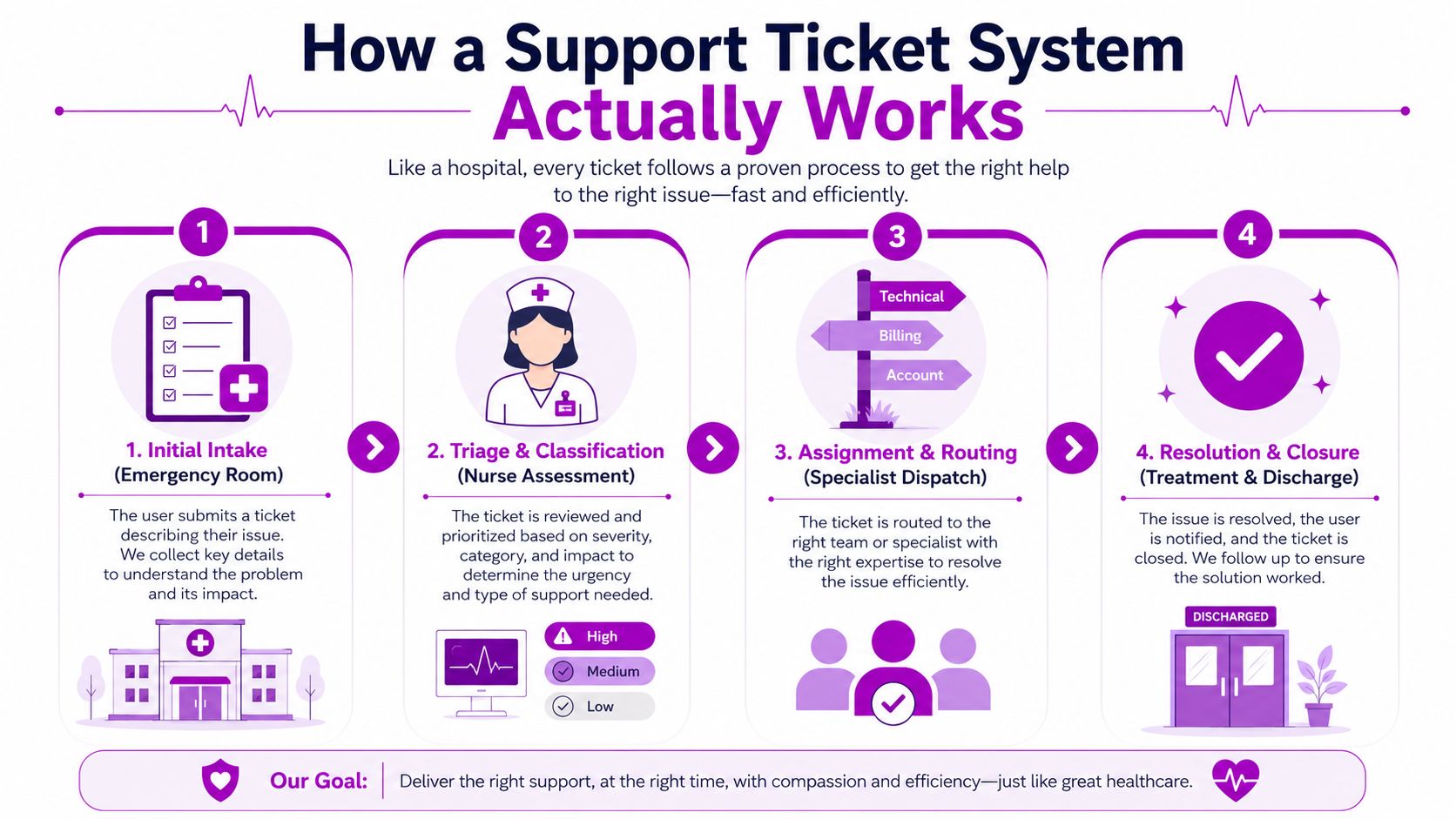
Think of the system like a hospital triage desk. The front desk doesn't solve everything, it identifies the issue, sends it to the right specialist, and keeps the record intact until the patient is discharged. A good support ticket system does the same thing for customer requests, only the “patient” is an order issue, a return, a product question, or a shipping problem.
Intake creates one record, not another inbox thread
A customer writes in about a damaged hoodie or asks where their order is. The system turns that message into a ticket with the key details attached, so the team isn't reassembling the story from screenshots and forwarded emails. That's the first place a Shopify brand saves time, because the issue becomes searchable and ownable from the moment it arrives.
Triage keeps the queue from turning into guesswork
Once the ticket exists, it gets categorized and prioritized. A shipping delay, a size exchange, and a refund request do not deserve the same path, even if they all came in through the same channel. Intelligent routing matters here because the wrong assignment creates delays that look like “support slowness” when the problem is poor intake design.
A cleaner operational model uses a single canonical ticket service for all writes, a relational database like PostgreSQL or MySQL for transactional consistency, and an async message queue for work that shouldn't block the customer-facing request, such as notifications, SLA timers, retries, and integrations (production-grade ticket system design). That separation is why some systems stay responsive under load while others feel sluggish the moment the queue gets busy.
Resolution closes the loop, but it also preserves context
The point isn't just to answer the customer. It's to keep the conversation tied to the ticket until the issue is resolved, then retain enough history to explain what happened if the same customer comes back next week. For Slack-heavy teams, essential ticketing features for Slack is a useful reference because it shows how collaboration should work without turning every support issue into a public thread.
A ticket should move work forward without making the customer repeat the story three times.
Core Features That Drive eCommerce Support Performance
Most feature lists read like a brochure. That's the wrong lens for a Shopify team. The key question is whether a capability reduces handoffs, preserves context, and stops repetitive questions from clogging the queue.
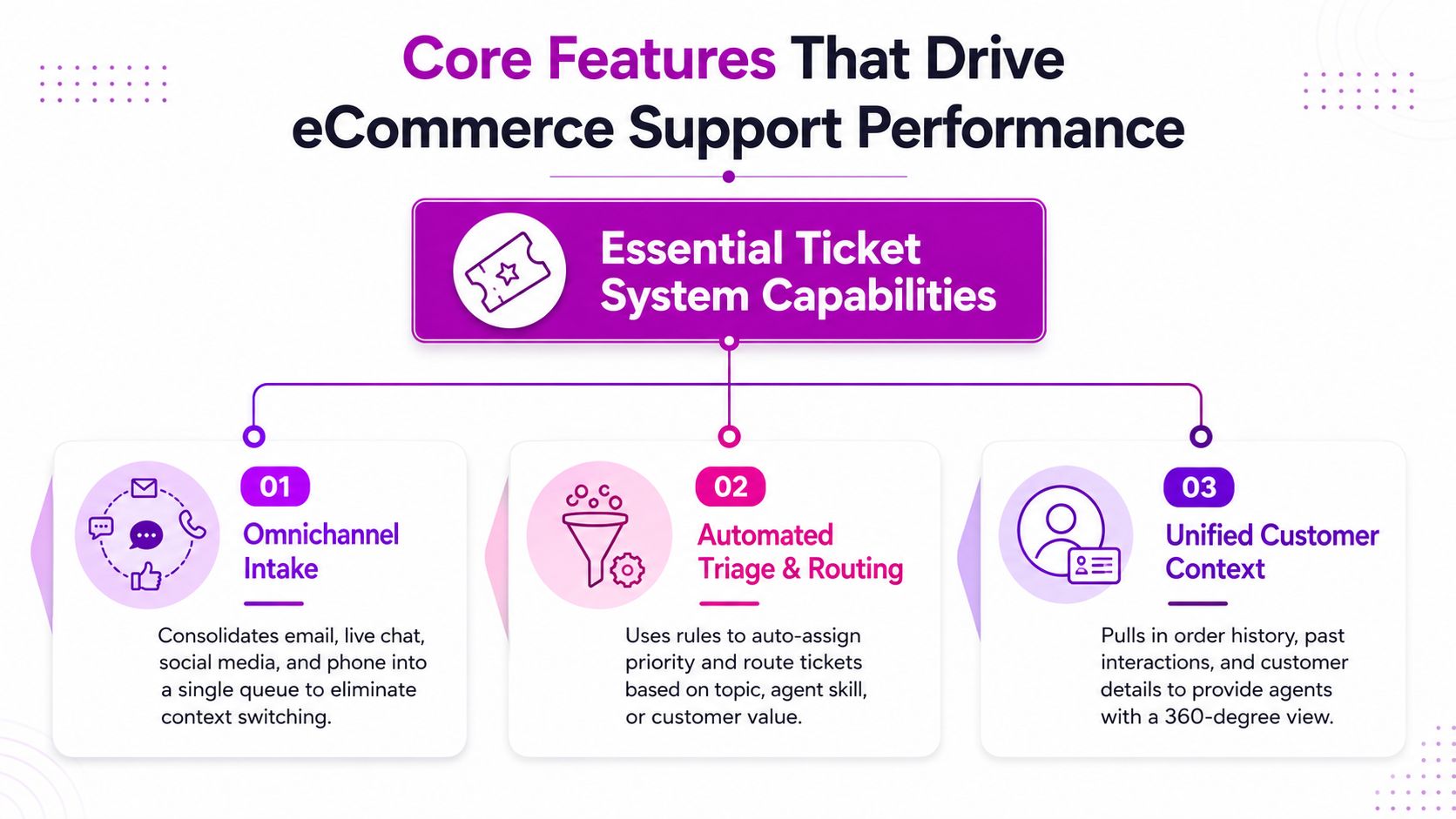
Omnichannel intake matters because customers don't care about your internal channel map
Email, chat, social DMs, SMS, and contact forms all create work. If those paths stay separate, your agents spend too much time switching tabs and too little time solving the actual issue. A unified queue keeps one view of the customer instead of making the team rebuild it every time the channel changes.
Automation is only useful when the rule is obvious
Automation works well for common requests, like order status, shipping updates, or standard return flows. It fails when brands try to automate around unclear policies or messy intake fields, because the system starts routing bad data faster rather than fixing the process. The best automation rules do less, not more, and they're built on patterns the team can explain in plain language.
Unified context turns a ticket into a working record
A useful system pulls in order history, past contacts, and customer details so the agent can answer without hunting through Shopify tabs. That matters for exchanges, damaged goods, and repeat buyers with unresolved issues. The more context the system shows at the moment of reply, the less likely the agent is to send a generic response that creates another round of back-and-forth.
The best teams also lean on macros, SLA policies, and knowledge bases for repeatable work, but only when those tools are tied to the actual support volume. A macro that sounds robotic is worse than a thoughtful human reply. A knowledge base that's never updated just deflects customers into the same question again through a different path.
Turning Ticket Data Into Product and CRO Insights
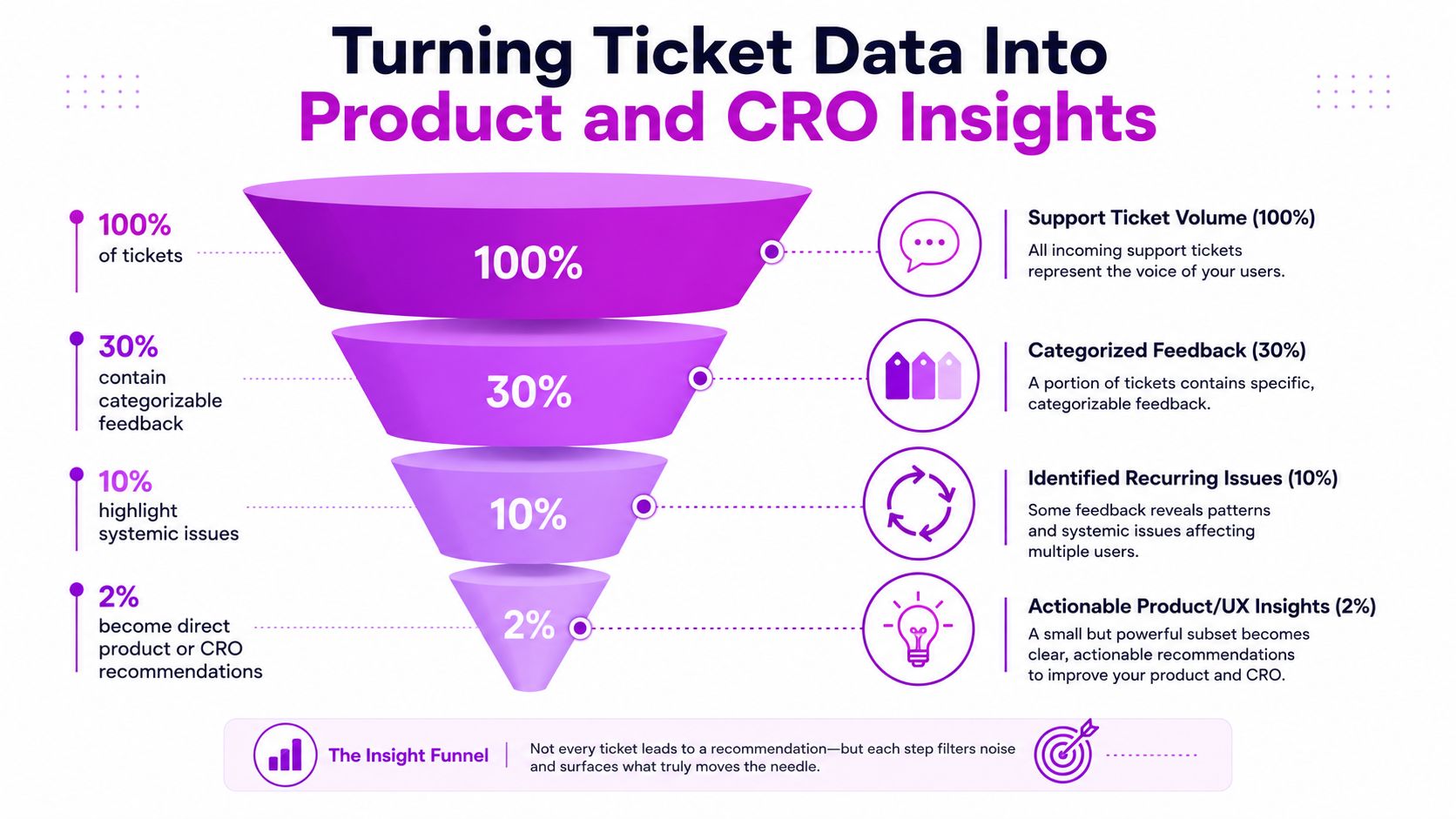
Support data becomes valuable when it stops living only inside the queue. A government digital-service workflow, documented in guidance on support lifecycle improvement, pushes teams to define objectives, build a taxonomy, tag tickets, and turn the output into recurring reports and action items (SparrowDesk guidance). That same structure works well for Shopify brands because it turns recurring friction into product and conversion insights instead of letting it sit as isolated complaints.
Tagging creates the bridge between operations and product
If you don't tag tickets consistently, you don't have insight, you have anecdotes. A good taxonomy can separate checkout confusion from sizing confusion, shipping frustration from product quality, and policy confusion from technical bugs. Once that's in place, recurring themes stop being vague “customer complaints” and start becoming evidence.
The practical payoff is that support no longer ends at resolution. A pattern in tickets might point to a confusing PDP, a broken mobile cart step, or a return policy that needs clearer copy. Those are CRO problems as much as they are service problems.
Recurring issues deserve a reporting rhythm
One-off noise doesn't help product teams. Recurring patterns do, especially when they show up in weekly or monthly reports and get turned into action items for merchandising, UX, or development. That workflow is strongest when support, CRO, and product all agree on the taxonomy before the tickets pile up.
You can also tighten the loop by connecting support to customer-feedback workflows. This internal reference on customer feedback automation is useful if the goal is to move from manual review to a repeatable process that doesn't create extra analyst work.
Best practice: treat ticket tags like research labels, not housekeeping. If the taxonomy doesn't change decisions, it's too shallow.
What this looks like in a Shopify brand
A flood of questions about sizing might mean the size chart is unclear. Repeated shipping complaints might point to a delivery promise that marketing is overselling. Returns that mention “different than expected” can expose a product page gap that photos or copy should have solved before purchase. Support catches the friction first, CRO fixes it upstream.
Choosing the Right System for Your Brand Stage
A Shopify brand that still lives in one shared inbox can survive for a while, then the cracks show up fast. Replies slow down, ownership gets fuzzy, and the team spends more time sorting tickets than solving them. The right system depends on the stage of the business, because each stage needs a different balance of control, automation, reporting, and team coordination.
| Criteria | Emerging Brand | Growing Brand | Shopify Plus |
|---|---|---|---|
| Pricing model | Low-friction entry, simple seat pricing | Predictable cost that scales with headcount | Flexible commercial terms that support larger teams |
| Shopify integration depth | Basic order lookup and customer context | Tighter app and workflow connections | Deep integration across storefronts and internal systems |
| Automation | Simple rules and saved replies | Routing, tagging, and SLA logic | Advanced workflows with layered exceptions |
| AI features | Nice to have, not mandatory | Useful for triage and reply assist | Worth evaluating for volume, multilingual work, and consistency |
| Multi-language support | Only if customer base needs it | Important for international growth | Usually essential, especially across markets |
| Reporting depth | Basic volume and response visibility | Trend views, backlog, and category reporting | Long-horizon reporting, team comparisons, and forecasting |
| Internal collaboration | Simple handoff notes | Shared context across support and ops | Cross-team workflows with accountability |
Emerging brands need speed and clarity
At the earliest stage, the goal is to get out of the inbox mess without creating a second system that nobody wants to use. Clean ownership, simple automation, and a fast view of what needs attention matter more than feature depth. If the platform feels like a project management suite, it is usually too much for a small support team that needs to move quickly.
For newer Shopify brands, the best tool is the one agents open on every shift. It should make order lookup easy, keep customer context in front of the agent, and reduce the number of manual decisions required to answer common questions. That leaves more time for the work that needs judgment, like handling exceptions, spotting product complaints, and feeding back patterns the merch or CRO team should see.
Growing brands need repeatability
Once ticket volume becomes steady, inconsistency starts costing real time. Routing rules, SLA logic, and cleaner reporting reduce the amount of manual triage, and they make staffing decisions less reactive. AI can help with first-pass sorting and reply drafting, but only after the underlying workflow is organized enough to trust.
This stage is where support data starts doing double duty. A ticket system is no longer only a place to close cases, it also becomes a source of product, content, and conversion insight. If the same question keeps showing up, the issue is usually not the question itself, it is the storefront, the PDP, the shipping promise, or the post-purchase flow creating friction.
Shopify Plus merchants need control and consistency
At larger scale, coordination becomes the main problem. Multiple storefronts, multiple teams, and more complicated policies create a lot of room for drift, especially if each team develops its own habits. The right system keeps rules consistent while still letting agents handle exceptions without losing the thread of the case.
Reporting matters more here because leadership needs to see patterns across teams and channels, not just ticket counts in a queue. Zendesk's analytics, as documented in Zendesk reporting guidance, includes views for total tickets, open tickets, closed tickets, and deleted tickets, with time windows that cover 7 days, 30 days, 90 days, 180 days, 1 year, and all time, plus month and year comparisons across the last five years. That kind of view helps support move from reactive handling to operational planning, and it gives ecommerce teams the evidence they need when they are deciding whether the problem is service, merchandising, or conversion.
Implementing Your Ticket System Without Disrupting Operations
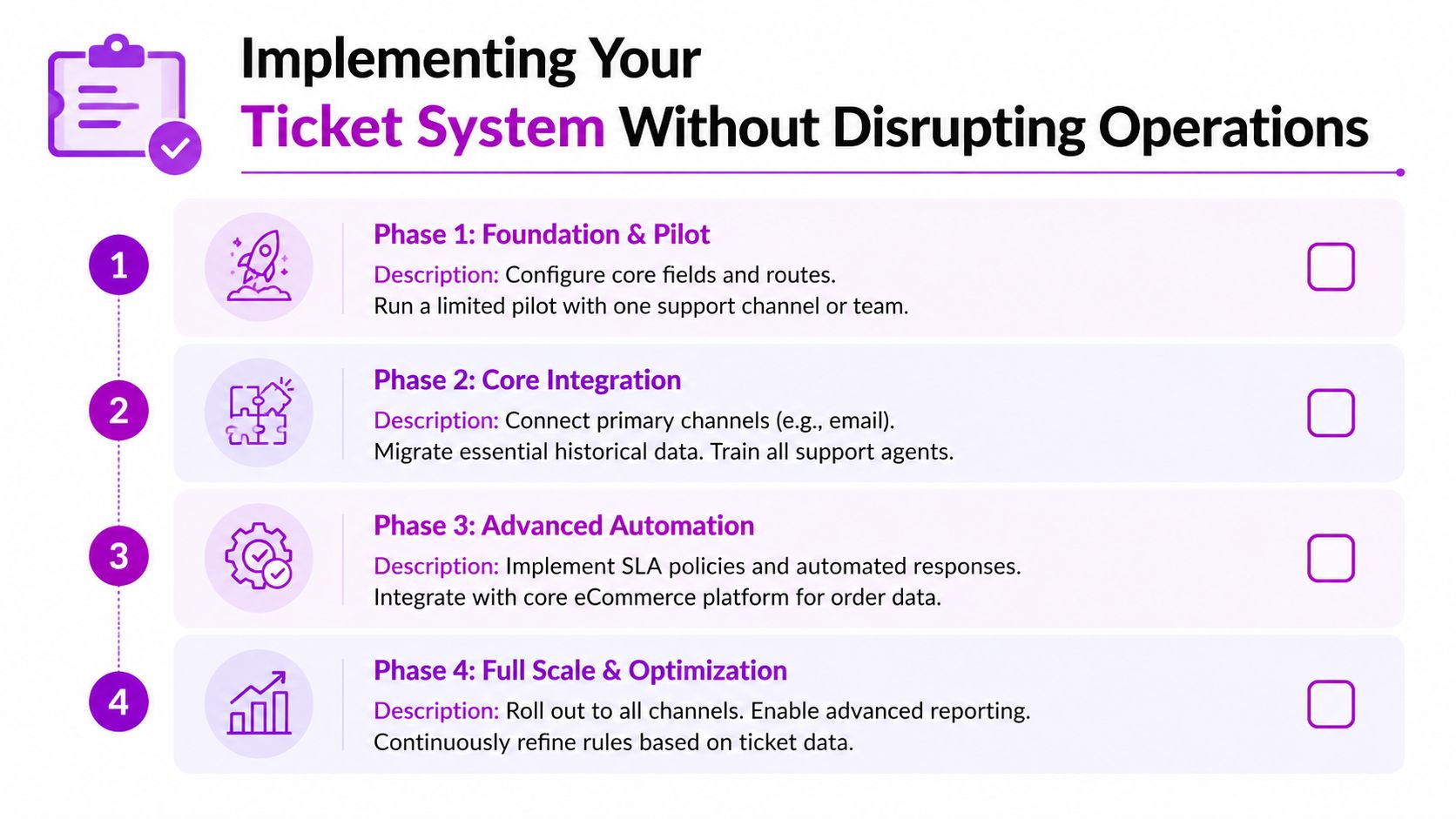
A support ticket system migration goes wrong when a Shopify team tries to flip the switch in one shot. The safer move is a phased rollout, because support cannot afford a day where nobody knows where tickets landed or how cases should be handled. Continuity comes first, then process improvements.
Start with a pilot and get the field map right
Before any migration work starts, define the core fields, categories, and ticket routes. Put one channel or one team into the new setup first, then watch where the process breaks under live volume. If agents start inventing workarounds during the pilot, the form design or routing rules are too complicated and need to be simplified before a wider rollout.
That pilot is also where the system starts paying off as a research tool. If the same issue keeps showing up in a cleanly tagged queue, it points to friction in the storefront, a confusing PDP, a shipping promise that is doing too much work, or a post-purchase flow that leaves customers guessing. Those patterns are useful far beyond case handling, because they tell the team what to fix in product copy, merchandising, and conversion flow.
Migrate only what the team will actually use
Do not drag every old email thread into the new platform. Historical context that helps agents resolve current cases, active customer records, and unresolved issues deserve priority because they change day-to-day work. The rest is clutter that slows the cutover and makes the new system harder to trust in the first week.
Train for behavior, not just clicks
Agents need more than a platform walkthrough. They need to know when to use macros, when to escalate, how to tag tickets consistently, and what strong notes look like for the next person who opens the case. If the team cannot explain why the fields exist, they will stop using them once the queue gets busy.
Training should also show how support work feeds the broader Shopify operation. A note about a sizing complaint, a repeated shipping question, or a product defect is not just a service record. It is input for merchandising decisions, content fixes, and CRO work that can reduce future ticket volume.
Design intake to reduce back-and-forth
Forms should collect only what the next step needs. That matters even more now, because cleaner inputs improve routing, prioritization, and the accuracy of downstream automation. Ask for the order number, issue type, and the minimum context needed to solve the problem, then let the workflow gather more only if it is required.
Keep the intake tight. Every extra field adds a little more abandonment risk and a bigger support burden later.
Measuring Support Performance With the Right KPIs
A support dashboard is only useful if it shows whether the queue is under control or just busy. In practice, the numbers that matter most are total tickets, open tickets, closed tickets, and deleted tickets, along with trends over windows like 7 days, 30 days, 90 days, 180 days, 1 year, or all time. A one-day snapshot can look harmless while a backlog has already been building for weeks.
Backlog is the number that keeps you honest
Zendesk describes backlog as the count of unsolved tickets at the end of a given date, and its backlog history reporting shows weekly movement over the last 12 weeks. That view makes the question obvious, whether the team is clearing work faster than new demand is arriving.
Backlog is also the KPI that exposes sloppy handoffs. If open volume stays flat while unresolved cases keep aging, the team is not keeping up, even if the inbox looks active. For Shopify brands, that usually means customers are waiting longer for shipping answers, refund updates, or product fixes that should have been handled earlier in the workflow.
Compare time periods, not just totals
Month and year comparisons matter because support volume shifts with launches, seasonality, and promotional spikes. Looking only at open tickets hides the direction of travel. Comparing the right periods helps you decide whether staffing, routing, or policy changes are needed before customers feel the pressure.
This is also where ticket data starts to feed product and CRO work. A repeat spike in size questions, a pattern of delivery complaints, or confusion around a promotion is not just a support issue. It points to a page that needs clearer copy, a product that needs better expectations, or a checkout flow that is creating avoidable friction.
Practical rule: measure what supports action. If a KPI does not tell you whether to hire, re-route, deflect, or change policy, it is just decoration.
Best Practices and Migration Tips for Long-Term Success
The systems that age well are the ones built around discipline, not just features. Keep your taxonomy tight, review it quarterly, and delete tags that nobody uses. If a rule only works for one product line or one season, isolate it before it spreads into a brittle mess.
Don't over-automate the front end. Use self-service to deflect obvious questions, but keep the tone human and the escalation path obvious when the issue is nuanced. Agents should sound like they know the brand, not like they're reading from a script.
The strongest teams also treat ticket data as a living input to product and CRO decisions, not a monthly cleanup task. That means support leaders, merchandisers, and marketers need a recurring habit of looking at themes together, then deciding what changes on the site, in the product, or in the policy. AI will make that loop faster, but it won't replace the need for clean inputs and clear ownership.
If you want a Shopify support setup that does more than manage messages, ECORN helps brands connect service, conversion, and operations into one practical workflow. Visit ECORN to talk through support system design, Shopify optimization, and the kind of implementation that holds up when volume climbs.



How Does Shopify Work for Sellers? a Practical Guide

Shopify Theme ZIP: How to Upload and Install It
Shopify Plus Organization Admin: Roles and Access Guide

How to Build a Drop Down Menu in Shopify: Steps and Fixes
Shopify Plus Integration Services Guide

Shopify Customer Experience: A 2026 Guide

Shopify Plus Expansion Stores: Limits and Setup
Shopify Theme Update: Safe Steps, Backups and Rollback

Shopify Website Design Packages: What You Actually Get

How to Choose a Shopify Plus Web Design Agency in 2026

Shopify Plus Ecommerce Agency: How to Pick the Right One

Shopify Themes Retina: How to Serve 2x Images

How to Cross Sell on Shopify Without Friction

Best Shopify Theme for Custom Products Compared
Multi Store Inventory Management: A Practical Guide

SEO Consulting for Ecommerce: A Practical Guide

Shopify Theme Updater App: A Safe Update Playbook
Shopify Git Integration: A Developer's Guide to 2026
Headless Ecommerce Development Services Explained

How to Build a Shopify Clothing Website That Converts

How to Launch a Box Subscription Business in 2026

Luxury Skincare Branding Playbook That Converters

10 Best Podcast Ecommerce Shows for Store Growth in 2026

Shopify Developer Hourly Rate: What to Pay in 2026
Critical Shopify Setup Errors That Are Secretly Sabotaging Your Store

Ecommerce Conversion Tracking: The Complete How-To Guide

Shopify Design Agency: How to Pick the Right Partner

Mastering Multi Store Management on Shopify

Scale Shopify Store

10 Shopify App Ideas Worth Building in 2026

Conversion Rate Optimization for Landing Pages: The Playbook

Shopify Plus Automation: A Guide for 2026

10 Social Selling Platforms for Shopify Merchants

Shopify Website Design Examples: 7 Stores Worth Studying

7 Ecommerce Newsletter Examples for Shopify Brands

One Product Shopify Store: Build and Scale

Mobile Pop Up Strategy for Shopify Stores That Converts

Sitemap for Shopify: How to Find, Optimize, and Submit It

7 Single Product Websites Worth Emulating

Product Variants Shopify: The Complete 2026 Guide

Ecommerce Analytics Consulting for Growth

What Is AI Integration for eCommerce

How to Choose the Right eCommerce Website Development Firm

E Business Strategy Implementation

Conversion Tracking Setup for Shopify Stores

BigCommerce vs Shopify Plus Which Enterprise Wins in 2026

Shopify Theme Kit: Setup, Commands, and Migration Guide

Shopify Extension Development: A Practical 2026 Guide

Shopify Speed Score Explained and How to Improve It

Shopify Mobile Optimization: The 2026 Playbook

How to Add Subcategory in Shopify for Better UX

How to Implement Structured Data for Ecommerce in 2026

SEO App Mobile: Shopify Store Optimization Guide

Shopify Plus Support: What It Includes and How to Choose

Google Ads for Shopify: The Complete 2026 Playbook

Shopify New York: How to Find and Hire the Right Agency

Google Search Console for Shopify: The Complete Setup

First Party Data Collection for eCommerce Growth

FAQ Online Store Guide: Build and Measure It Right

Do FB Ads Work for eCommerce in 2026?

One Page Checkout for Shopify: Design and Implementation

Shopify GraphQL vs REST: The 2026 Developer Decision

Shopify Ecommerce Consulting: Strategy, Pricing &

Are Reddit Ads Worth It for eCommerce Brands

Shopify Title and Meta Description: A Practical 2026 Guide

Product Video Best Practices for Shopify Brands

Real-Time Inventory Management: A 2026 Guide

AI Chatbot Integration for Shopify Stores

Affiliate Program Management: A Shopify Guide

10 Best Performance Monitoring Tools for Shopify in 2026

Digital Asset Management for eCommerce Brands in 2026

Every Type of Facebook Ads Explained for eCommerce Growth

Product Information Management Explained for Shopify Brands

10 Best Customer Service Tools for Shopify in 2026

Can I Start a Business with No Money? a 2026 Blueprint

What Sells Good on Etsy: Best Niches for 2026

Shopify Add to Cart Button: A Practical 2026 Guide

Customer Feedback Automation: A Practical eCommerce Guide

Critical Rendering Path: A Guide for Shopify Stores

How to Promote on TikTok for eCommerce in 2026

B2B eCommerce Consulting That Drives Real Revenue

10 Best Practices for Site Navigation in 2026

Return vs Refund for Shopify Stores: A Practical Guide

What Is Customer Lifetime Value and Why It Matters

What Is Voice of Customer Research for eCommerce

SMS Marketing for Ecommerce That Actually Converts

Master How to Improve Email Deliverability in 2026

Top 8 eCommerce Partners NYC for Shopify Brands in 2026

Machine Learning for Ecommerce: Boost Your Shopify Store

Beauty Market Research: Your 2026 Growth Guide

Shopify International Expansion: A 2026 Roadmap

What Does CRO Stand for in Business: Understanding CRO

Shopify Visual Merchandising: A Playbook for Higher Sales

Shopify Landing Page Design: Master Conversion in 2026

10 Best AI SEO Optimization Tools for Shopify in 2026

Agentic AI for Ecommerce: Boost Your Sales in 2026
Mastering Email Marketing Data for eCommerce Growth

Conversion Rate Optimisation Australia: Boost Your Sales

Conversion Rate Optimization AI: Your Shopify Store Guide

10 Product Bundling Strategies for Shopify in 2026


newsletter in your inbox