


Your Shopify store is growing, which usually means your support stack is breaking in quieter ways before it breaks loudly. First, the inbox gets heavier. Then live chat starts bleeding into evenings. Then your team spends most of the day answering the same questions about shipping, returns, discount codes, subscription changes, and product fit.
That's the moment when AI customer service automation becomes useful. Not as a trend. Not as a shiny chatbot in the corner. As an operating system for handling routine support without forcing your team to live inside Gorgias, Zendesk, or Shopify Inbox all day.
The shift in customer behavior is already here. By 2025, 95% of customer interactions are predicted to be handled by AI, and 69% of consumers already prefer AI-powered self-service tools for quick issue resolution, according to YourGPT's AI customer service statistics roundup. For a Shopify merchant, that doesn't mean removing humans. It means customers increasingly expect immediate answers for simple issues, while your team steps in when the issue needs judgment, empathy, or commercial nuance.
A good automation setup should do three things at once. It should resolve repetitive questions fast, route edge cases correctly, and protect trust while doing it. That last part gets missed a lot.
Moving Beyond the Inbox Tsunami
A familiar pattern shows up once a Shopify brand starts scaling. Paid traffic rises, order volume follows, and support demand grows faster than the team expected. The ticket queue fills up with “Where is my order?”, “How do I exchange this?”, “Can I change my address?”, “Why didn't my discount work?”, and “Which size should I buy?”
None of those questions are unusual. The problem is volume.
A support lead might have strong macros, a decent help center, and a few saved views in the helpdesk. Even then, the team stays reactive. They spend their best hours doing repetitive triage instead of solving the issues that protect retention, save at-risk orders, or convert hesitant shoppers.
AI customer service automation changes that operating model. In practice, it means using AI to answer common questions, classify intent, pull relevant store data, draft replies, and push only the right conversations to a human. On Shopify, that often looks like a bot checking order status, surfacing return steps, answering shipping policy questions, or guiding a shopper toward the right product page.
Support doesn't become strategic when you hire more agents. It becomes strategic when your team stops spending most of its time on low-judgment work.
The strongest setups don't try to automate every interaction. They automate the repeatable parts of support so people can handle exceptions well. That distinction matters for growing brands because most support pain isn't caused by a lack of effort. It's caused by a mismatch between customer expectations and team capacity.
If your team is still handling basic order and policy questions manually, you're paying human wages for work that software can now do instantly and around the clock.
The Core Capabilities of AI Automation
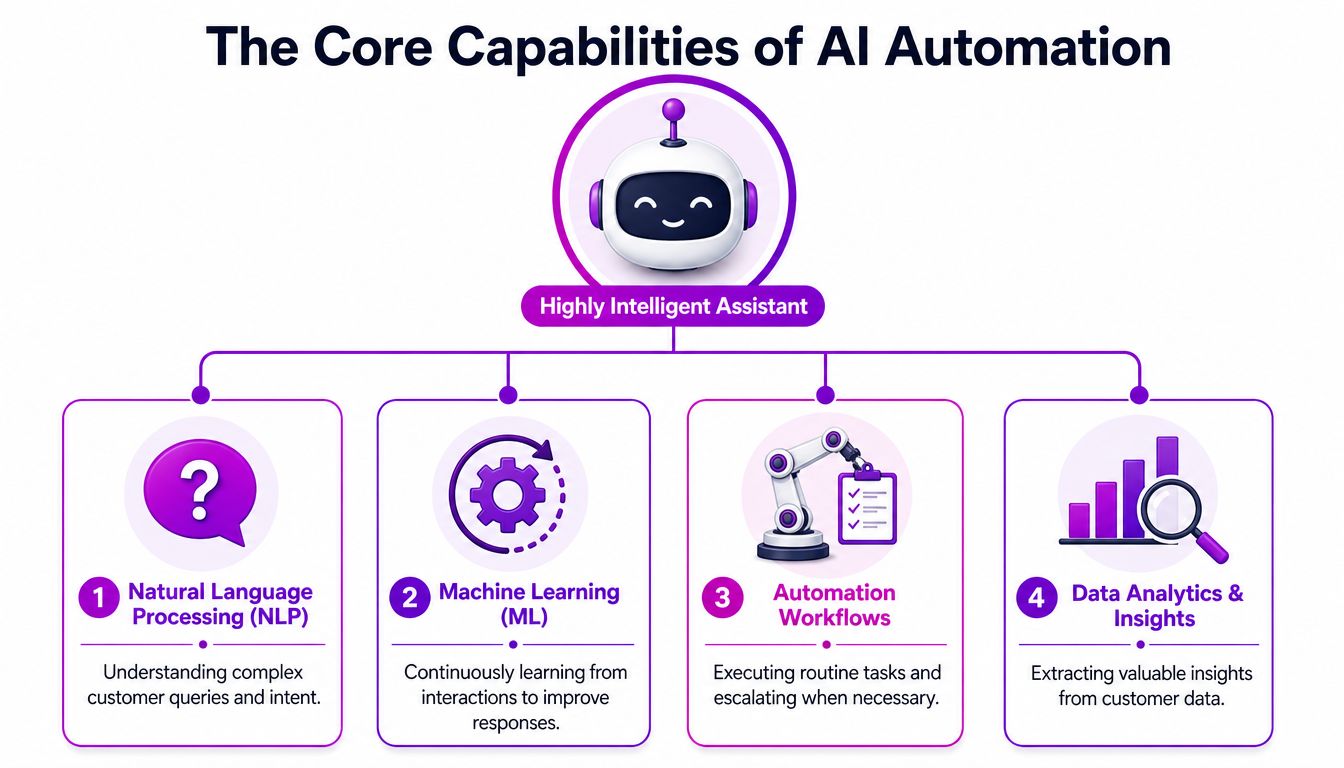
AI customer service automation works better when you stop thinking about it as “a chatbot” and start treating it like a digital support team with different roles. On Shopify, each role connects to a practical job inside the customer journey.
The front desk
The first layer is the conversational interface customers see. This is the bot on chat, email intake, or messaging. Its job isn't to sound clever. Its job is to understand the request and move it toward resolution.
If a customer asks where an order is, the AI should identify intent, request the right identifier if needed, and return the relevant shipping status. If someone asks whether a product is final sale, it should pull the policy answer cleanly. Natural Language Processing and Machine Learning are essential for these operations. IBM notes that AI customer service automation uses these capabilities to reduce response times by up to 85%, and that generative AI can increase CSAT by 40% by proactively predicting and solving issues before they escalate, as explained in IBM's overview of AI in customer service.
The dispatcher
A lot of merchants fail here. They install a bot that can answer simple questions, but when the issue gets messy, the handoff falls apart.
The dispatcher layer decides who should get the conversation next. A damaged order goes to post-purchase support. A subscription billing issue goes to the retention team. A wholesale inquiry goes somewhere else entirely. This routing logic is where automation starts saving serious time, because it removes manual sorting and reduces internal forwarding.
If you want a clean primer on the workflow side of this, LicenseTrim's automation guide is a useful read because it frames automation as orchestration, not just response generation.
The expert communicator
Generative AI is the writing layer. It drafts replies, summarizes the issue, and gives your agent a usable first version instead of a blank box. For Shopify brands, this matters most in edge cases like delayed shipments, return exceptions, or product complaints where tone matters.
The draft still needs guardrails. It should pull from your brand voice, refund policy, shipping rules, and escalation rules. If it can't do that, it produces polished nonsense.
The internal library
The last layer is your knowledge system. This includes your FAQ content, shipping policies, returns policy, product information, and internal support SOPs. The AI needs structured material to answer correctly.
That's why merchants often get better results after cleaning up policy pages, macro libraries, and product detail content. If the store's own information is messy, the AI just scales the mess. For a wider view of how brands are applying this across the storefront and operations stack, this piece on AI applications in eCommerce is a practical companion.
Tangible Benefits and ROI for Shopify Merchants
A Shopify support stack starts paying for itself when it changes unit economics, not when it adds another dashboard.
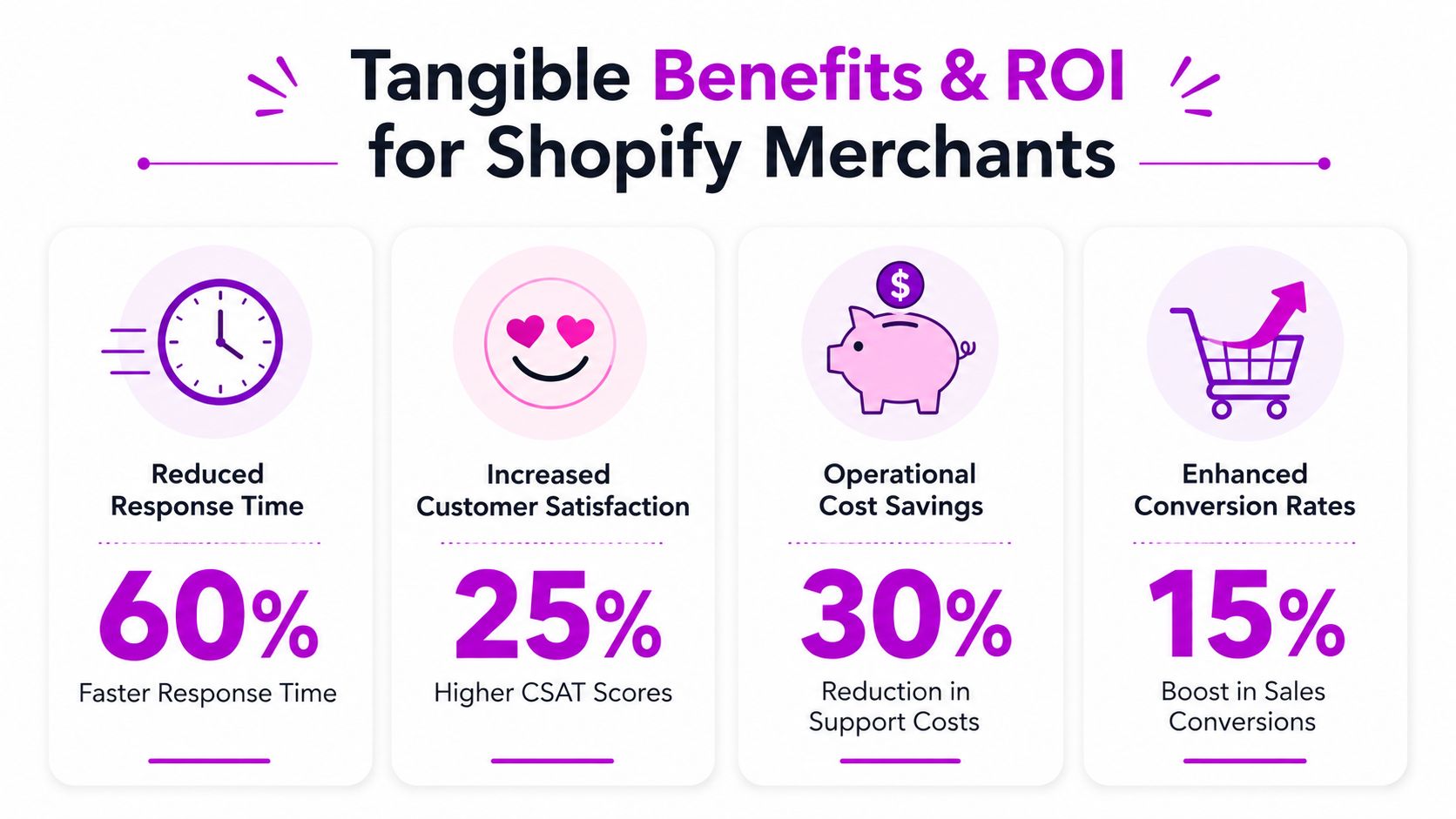
For most growing brands, the ROI shows up in three places. Ticket handling cost drops. Response speed improves on high-volume contacts. Support stops being a pure cost center and starts protecting conversion, repeat purchase rate, and retention.
Financial return
The financial case is strongest when brands measure AI against avoided labor, faster resolution, and fewer lost sales from slow replies. IBM reports that companies using AI-infused workflows are seeing an average of 3.5x ROI, according to its Global AI Adoption Index 2023.
On Shopify, that matters most during volume spikes. BFCM, holiday gifting, influencer drops, and restocks can double or triple support load in a few days. If AI handles order-status questions, policy clarifications, and basic return eligibility checks, the team can avoid emergency hiring or overtime that disappears once the spike is over.
The more useful framing is margin protection. If a support lead can hold service levels with six agents instead of eight during peak periods, that is a real operating gain.
Operational efficiency
Efficiency gains come from role design, not just speed.
A strong CX rep should spend time on subscription saves, damaged shipment recovery, fraud-sensitive orders, and pre-purchase questions tied to checkout intent. They should not spend half a shift pasting tracking links or re-explaining the same exchange policy. AI works well when it removes that repetitive load and sends the hard cases to people with full context.
That only works if the workflow is set correctly:
- Good automation resolves repetitive contacts inside clear policy boundaries.
- Weak automation answers vaguely, then creates more follow-up work for the team.
- High-performing automation changes staffing plans, QA review, and escalation rules.
I usually tell merchants to watch one metric before anything else: cost per resolved ticket. If automation rate goes up but repeat contacts also rise, the savings are fake. The queue looks smaller, but the customer is doing extra work.
Customer experience impact
The customer side is where many brands under-measure the payoff. Fast answers matter, but trust matters just as much.
If a shopper asks whether a final-sale item can be exchanged, an AI assistant should say it is automated, cite the store policy clearly, and hand off when the case falls outside the rule set. That kind of transparency does two jobs at once. It reduces support load, and it increases confidence that the answer is consistent with what will happen after purchase.
PwC found that 82% of U.S. consumers want more human interaction as technology improves. For Shopify merchants, the takeaway is simple. AI should be visible, bounded, and easy to escalate. Hidden automation can hurt trust. Clear automation often improves it.
Customers usually notice the gains in practical ways:
- Immediate order and return updates instead of waiting for business hours
- Consistent answers across chat, email, and help center flows
- Faster handoff to a human with the order context already attached
- Better pre-purchase support on sizing, bundle contents, compatibility, or shipping timing
This is also where conversion enters the picture. A transparent AI assistant that answers product and policy questions accurately can keep a shopper on the product page long enough to buy. A vague or overconfident bot does the opposite.
This video gives a useful view of how these systems are being applied in practice:
If you're comparing approaches, this roundup of strategies for AI customer service is worth reviewing because it focuses on deployment choices rather than hype.
Real World Use Cases and Success Metrics
Most Shopify stores shouldn't start with ambitious AI projects. They should start where volume is high, answers are predictable, and failure risk is low. Three use cases usually rise to the top.
WISMO and order status
“Where is my order?” is still the easiest place to begin. The customer enters an order number or email, the AI checks fulfillment and tracking data, and it returns a plain-language update. If there's a carrier delay or split shipment, the system can explain that too, assuming the underlying order and shipment data are connected properly.
This type of flow works because it sits close to structured data. The AI doesn't need to invent anything. It needs to retrieve, translate, and present.
The metrics to track here are straightforward:
- Automation rate for order-status conversations
- First response time for post-purchase inquiries
- Escalation reasons when the bot can't resolve the issue
- Repeat contact rate for the same order
If the bot resolves the request but customers still come back confused, your messaging is the problem, not the automation layer.
Returns and exchanges
Returns are a better use case than many merchants expect, especially when the flow follows your actual policy. Instead of forcing a shopper to read policy pages, the AI can ask the right questions in sequence. Was the item worn? Is it final sale? Is the return window still open? Do they want exchange, store credit, or refund?
That reduces back-and-forth and removes inconsistency between agents.
Practical rule: Automate policy-based decisions first. Leave exception handling with people until you've seen enough edge cases to build safe rules.
For returns, focus on these success metrics:
| Metric | Why it matters |
|---|---|
| Self-service completion | Shows whether customers can finish the flow without agent intervention |
| Exception rate | Highlights where your policy or logic needs human review |
| Time to resolution | Reveals whether the automation is actually shortening the process |
| Agent touches per return | Shows how much manual work remains |
Product recommendation and pre-purchase support
At this juncture, support and conversion start to overlap. A shopper asks whether two products differ in fit, whether a supplement pairs with another SKU, or whether a bundle includes the refill. If your AI has access to clean product data, policy content, and prior customer context, it can answer quickly and direct the shopper toward the most relevant product page.
This use case needs tighter supervision because bad answers can create refunds, complaints, and lost trust. Keep the scope narrow at first. Train it on specific collections, common comparison questions, and high-intent traffic moments.
The metrics here are less about ticket reduction and more about commercial quality:
- Chat-to-purchase quality
- Human handoff rate on pre-purchase questions
- Common unanswered product questions
- Support-driven merchandising insights
If the same product question keeps showing up in chat, the PDP is incomplete.
Your Four Phase Implementation Roadmap
Brands get stuck when they treat AI customer service automation like a plugin install. It's closer to an ops project. The software matters, but the workflow design matters more.
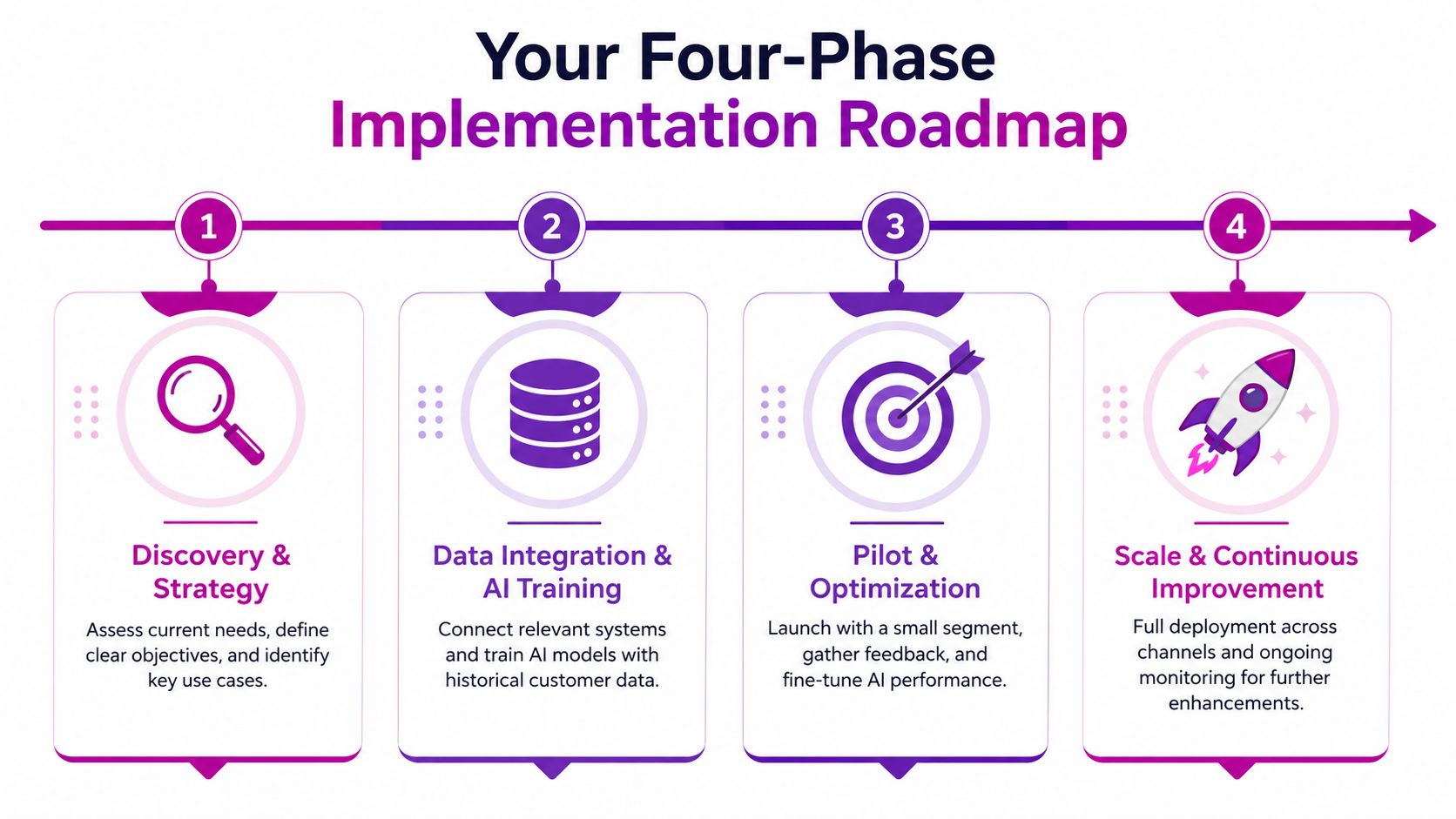
Phase one, audit the real support load
Start with your helpdesk, not your wish list. Pull recent tickets and sort them by intent. You're looking for repeated categories, unclear policies, broken internal processes, and high-friction points that create avoidable contact.
For a Shopify merchant, the first pass usually surfaces some version of this:
- Order tracking questions that should be self-serve
- Return confusion caused by unclear policy communication
- Discount and checkout issues tied to promotions
- Product questions caused by weak product pages
- Subscription and address-change requests that need system access
Set a few KPIs before selecting a vendor. Good ones include automation rate, first response time, handoff quality, resolution quality, and customer satisfaction by intent category. Don't make “highest automation percentage” the main goal. That creates perverse incentives fast.
Phase two, choose software that fits your stack
Vendor selection should be boring and rigorous. The right system has to work with Shopify data, your helpdesk, your return platform, and your team's operating habits.
Use this checklist when comparing tools:
| Criteria | Why It Matters | What to Look For |
|---|---|---|
| Shopify integration | The AI needs access to orders, fulfillment status, customer records, and product data | Native Shopify connection and reliable access to real-time store data |
| Helpdesk compatibility | Agents need handoff continuity inside the tools they already use | Integration with platforms like Gorgias, Zendesk, or Shopify Inbox |
| Knowledge controls | Answers are only as good as the source material behind them | Ability to prioritize approved FAQs, policies, and internal docs |
| Escalation logic | Poor handoff ruins customer trust | Clear routing rules, transcripts, summaries, and ownership assignment |
| Brand voice controls | Generic tone weakens customer experience | Editable response guidance and approval settings |
| Reporting | You need to know what's working and what's failing | Intent-level reporting, resolution tracking, and conversation review tools |
| Ease of maintenance | If updates are painful, the system goes stale fast | Simple workflow editing and non-technical content updates |
Phase three, build workflows before chasing sophistication
Start with narrow, high-confidence workflows. WISMO. Returns. Shipping policy. Basic order edits. Store credit questions. Keep each flow tied to a known policy or system action.
Then train the AI on your real materials:
- Policy pages
- FAQ content
- Shipping and return rules
- Product education
- Saved replies and macros that already perform well
If the AI can't cite a trustworthy internal answer, it shouldn't answer the customer.
That one rule prevents a lot of bad automation.
Phase four, roll out in layers
Don't launch every workflow at once. Release to a limited channel, customer segment, or support category first. Review transcripts aggressively. Look for failure patterns, confused customers, bad tone, and unnecessary handoffs.
After that, expand gradually. Add more intents. Tighten routing. Improve the help center. Train agents on how to work with summaries, draft replies, and escalation signals. The human team still owns the customer relationship. The AI just changes how much of the routine workload reaches them.
Common Pitfalls and The Trust Imperative
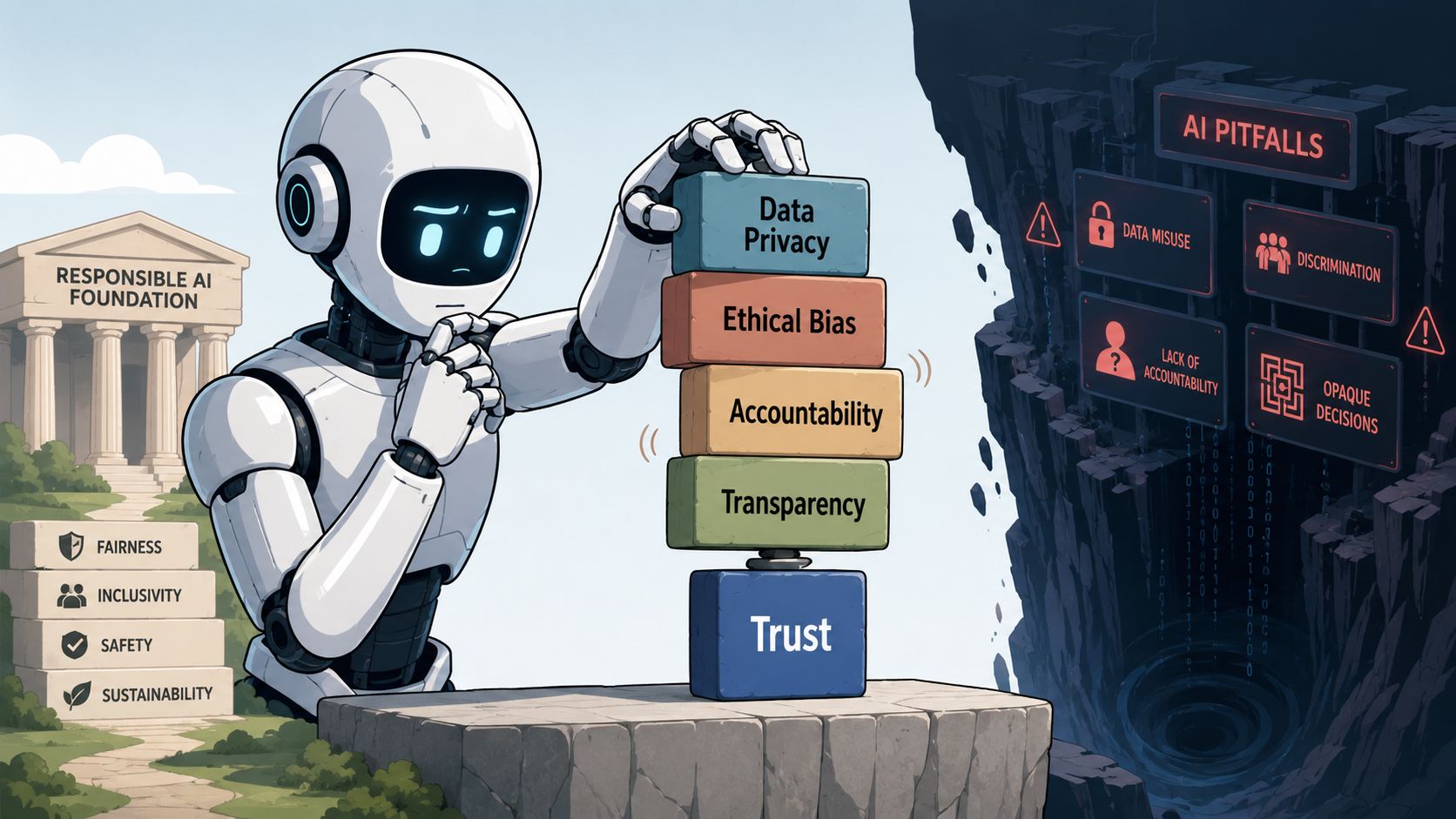
The most expensive AI customer service automation mistakes usually aren't technical. They're relational. A merchant gets excited about automation rate, installs a bot, hides the fact that it's AI, makes human escalation hard, and ends up creating a support experience that feels evasive.
That's where trust calibration matters. Customers don't need a machine to pretend it's a person. They need a fast, useful system that's honest about what it is and clear about when a human will step in.
Hidden AI hurts more than most brands expect
This is one of the clearest findings merchants should pay attention to. 68% of consumers feel uneasy when AI interactions are not explicitly labeled, yet only 22% of SMBs practice transparent disclosure. Brands that label AI interactions see 15% higher conversion rates, according to Genesys on cultivating trust with AI in customer service automation.
That should change how Shopify brands think about disclosure. Labeling the assistant isn't just an ethics move. It can help conversion because it reduces uncertainty. Customers know what kind of help they're getting, and they know what to do if the issue needs a person.
What breaks trust fastest
A few patterns show up again and again:
- The bot blocks access to humans when the customer clearly needs an exception
- The AI answers outside policy because the knowledge base is outdated
- The tone sounds polished but unhelpful because the model is drafting around missing facts
- The merchant automates sensitive moments like complaints or damaged orders too early
Those failures don't just create bad tickets. They shape how customers talk about the brand.
Label the AI clearly, give customers a visible path to a person, and keep a tight leash on anything involving refunds, exceptions, or emotional friction.
Trust should be measured, not assumed
Teams typically track deflection and response time. They should also review trust indicators. Look at failed conversations, repeat contacts after AI interactions, handoff satisfaction, and complaint themes. Read the transcripts where customers get annoyed. That's usually where the design flaws are hiding.
A bot that resolves more tickets but leaves customers feeling trapped is not an efficiency win. It's deferred churn.
Building Your Intelligent Support Engine
The practical value of AI customer service automation on Shopify isn't that it gives you a more modern support widget. It gives your business a way to scale service without letting support complexity eat the margin.
The pattern is simple. Automate routine work. Route exceptions intelligently. Keep humans focused on judgment-heavy conversations. Measure the output in operational terms and customer terms, not just vanity automation percentages.
The brands that get the best results usually treat support as part of the buying experience, not as a back-office function. That's why AI in service often connects naturally to broader commerce use cases like guided selling, recommendation flows, and assisted shopping. If you're thinking beyond support alone, Zinc's perspective on building an AI shopping agent is useful because it shows where service and conversion start to overlap.
For Shopify merchants specifically, this also pairs well with stronger human channels. AI should absorb routine demand so live chat can do what it does best: rescue sales, answer nuanced questions, and de-risk purchase decisions. That's the same reason this guide on Shopify live chat as a support and sales machine is worth reading alongside your automation plan.
The end state isn't “less human support.” It's a support engine that knows when to be automated, when to be assisted, and when to be personal.
If you're planning AI customer service automation on Shopify and want help turning it into a real operating system, not just another app install, ECORN can help with the strategy, Shopify implementation, CRO alignment, and support workflow design needed to make it perform.



Conversion Rate Optimization for Landing Pages: The Playbook

Shopify Plus Automation: A Guide for 2026

10 Social Selling Platforms for Shopify Merchants

Shopify Website Design Examples: 7 Stores Worth Studying

7 Ecommerce Newsletter Examples for Shopify Brands

One Product Shopify Store: Build and Scale

Mobile Pop Up Strategy for Shopify Stores That Converts

Sitemap for Shopify: How to Find, Optimize, and Submit It

7 Single Product Websites Worth Emulating

Product Variants Shopify: The Complete 2026 Guide

Ecommerce Analytics Consulting for Growth

What Is AI Integration for eCommerce

How to Choose the Right eCommerce Website Development Firm

E Business Strategy Implementation

Conversion Tracking Setup for Shopify Stores

BigCommerce vs Shopify Plus Which Enterprise Wins in 2026

Shopify Theme Kit: Setup, Commands, and Migration Guide

Shopify Extension Development: A Practical 2026 Guide

Shopify Speed Score Explained and How to Improve It

Shopify Mobile Optimization: The 2026 Playbook

How to Add Subcategory in Shopify for Better UX

How to Implement Structured Data for Ecommerce in 2026

SEO App Mobile: Shopify Store Optimization Guide

Shopify Plus Support: What It Includes and How to Choose

Google Ads for Shopify: The Complete 2026 Playbook

Shopify New York: How to Find and Hire the Right Agency

Google Search Console for Shopify: The Complete Setup

First Party Data Collection for eCommerce Growth

FAQ Online Store Guide: Build and Measure It Right

Do FB Ads Work for eCommerce in 2026?

One Page Checkout for Shopify: Design and Implementation

Shopify GraphQL vs REST: The 2026 Developer Decision

Shopify Ecommerce Consulting: Strategy, Pricing &

Are Reddit Ads Worth It for eCommerce Brands

Shopify Title and Meta Description: A Practical 2026 Guide

Product Video Best Practices for Shopify Brands

Real-Time Inventory Management: A 2026 Guide

AI Chatbot Integration for Shopify Stores

Affiliate Program Management: A Shopify Guide

10 Best Performance Monitoring Tools for Shopify in 2026

Digital Asset Management for eCommerce Brands in 2026

Every Type of Facebook Ads Explained for eCommerce Growth

Product Information Management Explained for Shopify Brands

Support Ticket System: A Guide for Shopify Stores

10 Best Customer Service Tools for Shopify in 2026

Can I Start a Business with No Money? a 2026 Blueprint

What Sells Good on Etsy: Best Niches for 2026

Shopify Add to Cart Button: A Practical 2026 Guide

Customer Feedback Automation: A Practical eCommerce Guide

Critical Rendering Path: A Guide for Shopify Stores

How to Promote on TikTok for eCommerce in 2026

B2B eCommerce Consulting That Drives Real Revenue

10 Best Practices for Site Navigation in 2026

Return vs Refund for Shopify Stores: A Practical Guide

What Is Customer Lifetime Value and Why It Matters

What Is Voice of Customer Research for eCommerce

SMS Marketing for Ecommerce That Actually Converts

Master How to Improve Email Deliverability in 2026

Top 7 eCommerce Partners NYC for Shopify Brands in 2026

Machine Learning for Ecommerce: Boost Your Shopify Store

Beauty Market Research: Your 2026 Growth Guide

Shopify International Expansion: A 2026 Roadmap

What Does CRO Stand for in Business: Understanding CRO

Shopify Visual Merchandising: A Playbook for Higher Sales

Shopify Landing Page Design: Master Conversion in 2026

10 Best AI SEO Optimization Tools for Shopify in 2026

Agentic AI for Ecommerce: Boost Your Sales in 2026
Mastering Email Marketing Data for eCommerce Growth

Conversion Rate Optimisation Australia: Boost Your Sales

Conversion Rate Optimization AI: Your Shopify Store Guide

10 Product Bundling Strategies for Shopify in 2026

How to Increase Customer Lifetime Value: A Shopify Playbook

Clean Website Design: A Shopify Conversion Playbook

Omnichannel Retail Strategy: A Shopify Playbook

Product Data Enrichment: A Guide for Shopify Brands

Instagram Shopping Features a Guide for Shopify Stores

What Is Revenue Optimization: A Holistic RevOps Guide

Benefits of Conversion Rate Optimization: Boost Your

WordPress to Shopify Migration: Your 2026 Seamless Switch

Boost Sales: Ecommerce Payment Processing Guide 2026

Unified Commerce Platform: Benefits, KPIs & Shopify Guide

How to Reduce Bounce Rate eCommerce: Your 2026 Guide

Shopify API Integration: A Practical End-to-End Guide

How to Implement Data Governance: A 2026 Guide

Shopify Store Development Cost: A 2026 Breakdown

What Is Server Side Tracking: The Shopify Guide 2026

Marketing Automation Workflows: A Shopify Guide for 2026

Shopify: How to Reduce Technical Debt

Shopify UX Design Change: A Playbook for Growth

User Generated Content Strategy: Shopify Playbook

Shopify Pause and Build Plan Cost: A Complete 2026 Guide

Compare at Price on Shopify: A Complete Guide for 2026

Where Can I Sell My Prints? 10 Best Platforms for 2026
Shopify Order Management System: The Ultimate Guide 2026
What Is Marketing Attribution? an eCommerce Guide for 2026

10 Best Black Friday Sales Sheets for 2026

Discover the Top Social Media Marketing Agencies For
Consumer Confidence Definition for eCommerce in 2026
What Is Social Commerce? Your 2026 Guide to Boosting Sales

A Social Ad Campaign Playbook for eCommerce Growth


newsletter in your inbox