


You're usually not looking at Shopify migration services because everything is fine.
You're looking because the current store has become harder to run than it should be. Simple merchandising requests turn into developer tickets. Routine updates feel risky. Marketing wants landing pages faster, operations wants cleaner order workflows, and leadership wants a platform that supports growth without dragging the team into constant maintenance.
That's where a migration goes wrong in a lot of conversations. People frame it as a platform feature comparison. In practice, it's a business continuity project. The hard part isn't only moving products and pages. It's protecting revenue, customer trust, reporting, search visibility, and the day-to-day workflows your team depends on.
A well-run Shopify migration doesn't just rebuild the storefront on a new platform. It reduces operational friction while preserving the things your business has already earned.
Is Your Current Platform Holding You Back
A common scenario looks like this. A brand outgrows the store it launched with. The catalog gets larger, promotions get more frequent, and the app stack becomes more important. Then every change starts taking too long.
The team feels it first in small ways. Merchants wait on basic content edits. Marketers hesitate to launch campaigns because tracking isn't fully trusted. Developers spend time maintaining old logic instead of building revenue-driving improvements. Customers don't see that internal strain directly, but they feel it through slower pages, inconsistent navigation, and checkout friction.
That's when Shopify migration services start making sense. Not because Shopify is a magic fix, but because a managed migration can reset the operating model around a platform built for modern commerce teams.
For growing brands, the core value is often less about features on a comparison sheet and more about control. You want merchandising to move faster. You want marketing, retention, and paid traffic to connect cleanly to the storefront. You want the store team focused on growth work, not platform triage. If conversion performance is part of that review, this guide to ecommerce conversion optimization is a useful companion because it shows where platform decisions and on-site buying experience overlap.
A migration should solve operational bottlenecks, not recreate them on a prettier storefront.
The brands that get the most from Shopify aren't treating migration as an isolated technical event. They're using it to clean up years of workarounds, retire fragile dependencies, and create a more stable base for the next stage of growth.
What Shopify Migration Services Actually Include
A professional migration is closer to moving a business into a new building than moving a few files from one system to another. You're not only transporting furniture. You're reconnecting utilities, forwarding mail, checking the floor plan, and making sure customers can still find the front door.
Data transfer is only one layer
It's common to start with data, and that's reasonable. Products, customers, orders, content, and media usually need to move. Depending on the source platform, that can also include categories, collections, reviews, blog content, and custom fields.
But the main work is in how that data is interpreted inside Shopify. Product structures may need to be rethought. Variant logic may need cleanup. Legacy category systems often need to become Shopify collections. Historical data may be useful for service and reporting, but not every field belongs in the new storefront exactly as it existed before.
A migration team should define what moves, what gets transformed, what gets archived, and what shouldn't come over at all.
Theme, integrations, and store operations matter just as much
The next layer is the storefront itself. Some brands want a close recreation of the existing design. Others use the migration to redesign templates, improve mobile UX, and simplify navigation. Both approaches can work. What doesn't work is assuming the old theme logic can be copied blindly onto a new platform.
Then come the operational systems. That includes payments, shipping rules, tax setup, analytics, email flows, customer support tools, review platforms, subscriptions, ERPs, CRMs, and marketplace connectors. If your business sells across channels, teams often review middleware or platform-specific connectors at this stage. For example, a technical overview of the Zinc platform for Walmart integration can help operators think through how external commerce systems fit into the broader migration architecture.
Here's a practical way to think about scope:
| Migration area | What it usually covers | Why it matters |
|---|---|---|
| Data | Products, customers, orders, content, media, collections | Keeps the store usable on day one |
| Storefront | Theme setup, templates, navigation, UX decisions | Preserves brand trust and buying flow |
| Integrations | Apps, ERP, CRM, email, reviews, analytics, support tools | Prevents operational breakage after launch |
| SEO | Redirects, metadata, internal links, crawl consistency | Protects discoverability and existing search value |
Practical rule: If a proposal only talks about importing products and customers, it's not a full migration plan.
Strong Shopify migration services are designed to reduce the business risks around the switch. Data is one pillar. It isn't the whole structure.
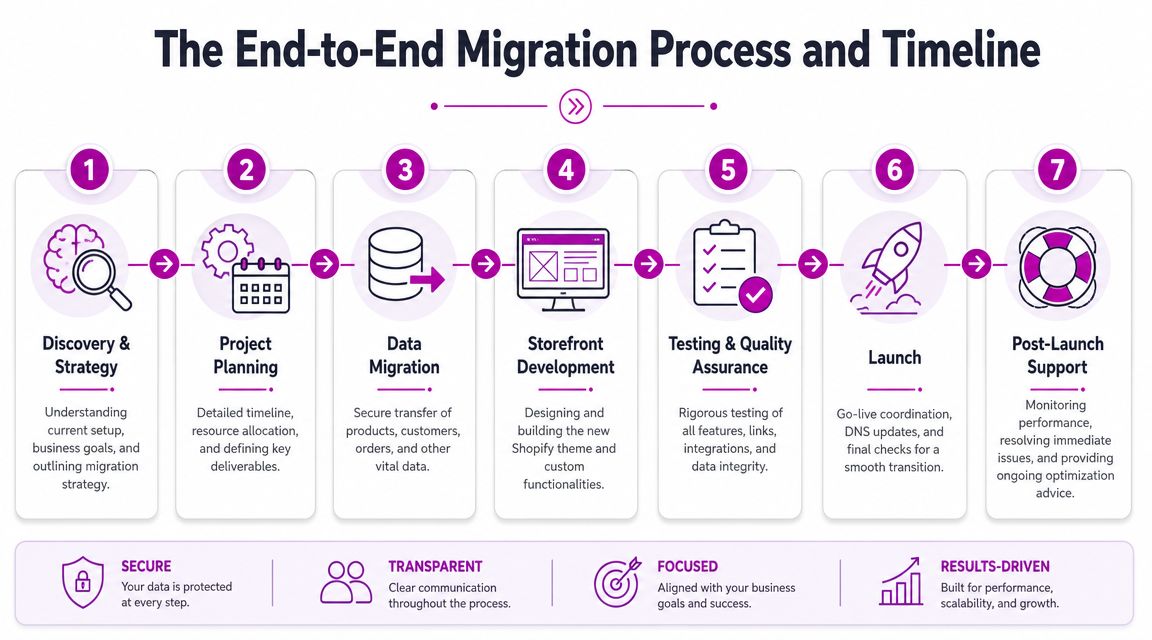
The End to End Migration Process and Timeline
The safest migrations follow a staged process. That's not bureaucracy. It's how you avoid finding major issues when the new store is already live.
A useful visual summary sits below.
Discovery and planning
The project starts with an audit. Teams review the current platform, catalog structure, customer data, order history, app dependencies, content inventory, analytics setup, and SEO footprint. This process ensures the migration strategy gets grounded in reality.
A lot of migration problems start here because stakeholders assume they already know what the store contains. They usually know the main systems. They often don't know the edge cases. Custom product attributes, old redirects, duplicate content, historical workflows, and hidden app dependencies can all surface during discovery.
The planning output should be concrete:
- Scope definition: What moves, what gets rebuilt, and what gets retired
- Responsibility mapping: Who owns content, integrations, QA, approvals, and launch
- Risk register: Which areas could affect revenue, search, or support operations
- Cutover approach: How final sync and launch will be coordinated
If you want a practical framework for those moving parts, this Shopify migration checklist is a useful reference.
Build, staging, and validation
Once the plan is approved, the team sets up the Shopify environment and begins staged migration work. Data is imported into a non-public environment. The theme is configured. Apps and integrations are connected. Tracking is implemented. Key workflows are tested.
This stage is where disciplined teams separate “imported” from “validated.” A product record appearing in Shopify doesn't mean it's ready. Merchants still need to confirm variant behavior, pricing logic, collection assignment, media quality, merchandising rules, and customer-facing content.
A lot of businesses underestimate how much of a migration is really structured QA.
Launch prep and timeline expectations
The implementation window depends heavily on the method. According to Naturaily's Shopify migration overview, DIY migrations usually take 2–4 weeks, automated services can finish in 3–7 days, and professional migrations often take 6–12 weeks including design and optimization work. That difference matters because faster paths often reduce planning, validation, or launch control.
That doesn't mean every store needs a long enterprise-style project. It means the timeline should match the risk profile of the business. If the store has meaningful organic traffic, complex operations, or a large catalog, speed alone is a poor success metric.
Below is a useful walkthrough of the sequence in video form.
Go live and early support
The launch itself should feel uneventful to customers. That's the goal. Internally, the team is checking storefront behavior, checkout flow, order capture, analytics, redirects, and app functionality in a tightly managed sequence.
The first days after launch matter as much as the build. Support teams need to know what changed. Merchants need a process for triaging defects. Developers need a short list of post-launch checks instead of reacting to issues randomly.
A migration is complete when the new store is stable in production, not when the import script finishes.
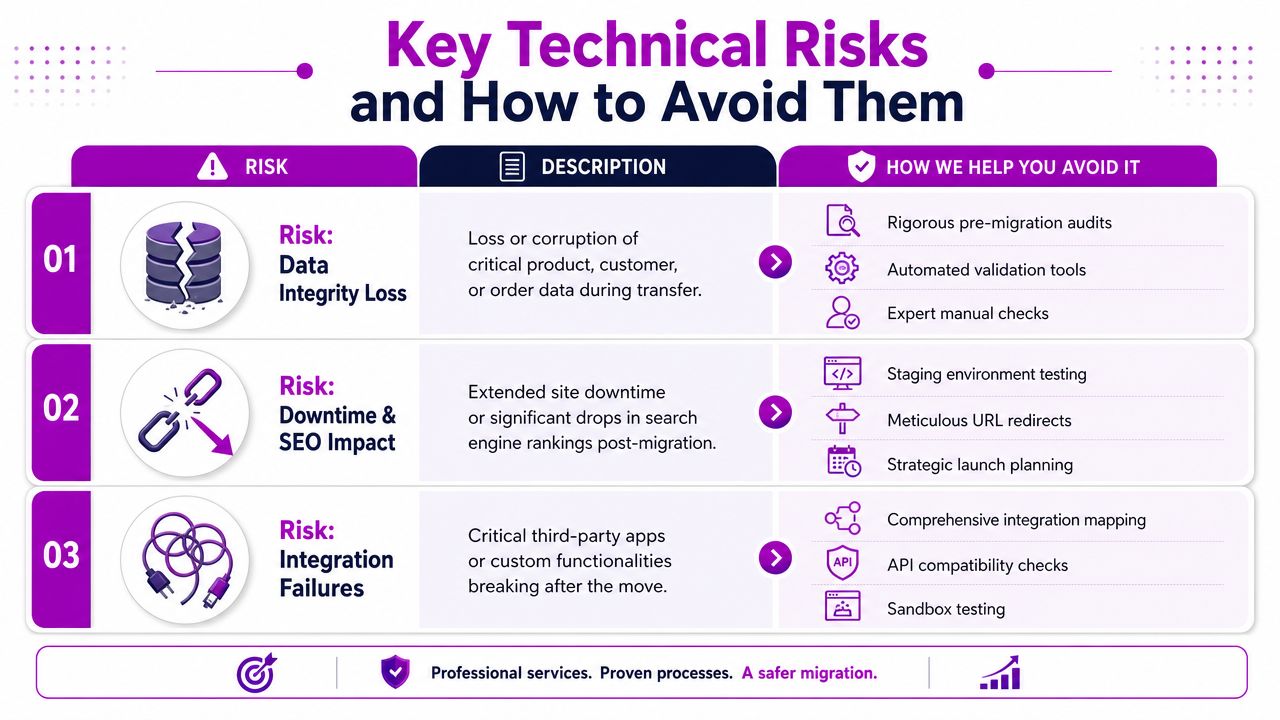
Key Technical Risks and How to Avoid Them
Most migration failures fall into three buckets. Data integrity, SEO continuity, and customer experience. The reason businesses hire specialists isn't because the mechanics are mysterious. It's because each of these areas has edge cases that can damage operations fast if they're handled casually.
Data integrity risk
Bad data doesn't always fail loudly. Sometimes it arrives in Shopify and looks fine until the team starts using it. Variants don't match the right products. Collection logic behaves strangely. Historical orders are incomplete. Customer records appear present but lack the fields support needs.
That's why a sound process starts before import. As explained in Blackbelt Commerce's migration guide, a technically solid Shopify migration should begin with data analysis, data cleansing, and schema mapping. The same guidance also notes that a delta migration is required to sync late-arriving orders, inventory, and customer updates before cutover, and that customer passwords cannot be migrated, which means teams need account-activation and password-reset flows built into launch planning.
The practical implications are straightforward:
- Audit first: Review source data quality before anyone imports it
- Map deliberately: Decide how legacy entities translate into Shopify objects
- Validate in staging: Check metafields, customer records, and order history before launch
- Run delta sync: Capture business activity that occurs between initial import and cutover
Without that discipline, a business can go live with two versions of the truth. One in legacy systems, one in Shopify.
SEO continuity risk
Brands often underestimate how fragile search visibility can be during a replatform. Years of accumulated authority are tied to URLs, internal links, metadata, and crawl paths. If those change carelessly, search engines have to rediscover what used to be stable.
This is especially important on Shopify because URL structure is more opinionated than many legacy platforms. If a category path, product path, or content URL changes, the redirect strategy has to be exact.
A practical SEO migration plan should include:
- Benchmarking before the move so the team knows what needs protection
- A 1:1 redirect map for every legacy URL that matters
- Internal link review so the new site doesn't point users and crawlers into redirect chains
- Post-launch monitoring for 404s, crawl issues, and traffic changes
If redirects are treated as a cleanup task for after launch, the migration is already off track.
Customer experience risk
Customers don't care that a migration is technically difficult. They care whether the site works. If they can't log in, can't find products, or hit confusion in checkout, trust drops immediately.
Account access is the most common surprise. Because passwords can't be migrated, the customer communication plan needs to be ready before launch. That includes account activation, reset messaging, support scripts, and clear on-site prompts.
The same standard applies to the rest of the buying journey. Navigation should feel intuitive. Search should return the right products. Emails and order confirmations should fire correctly. Shipping and tax logic should behave as expected. A professional migration treats these as launch blockers, not polishing tasks.
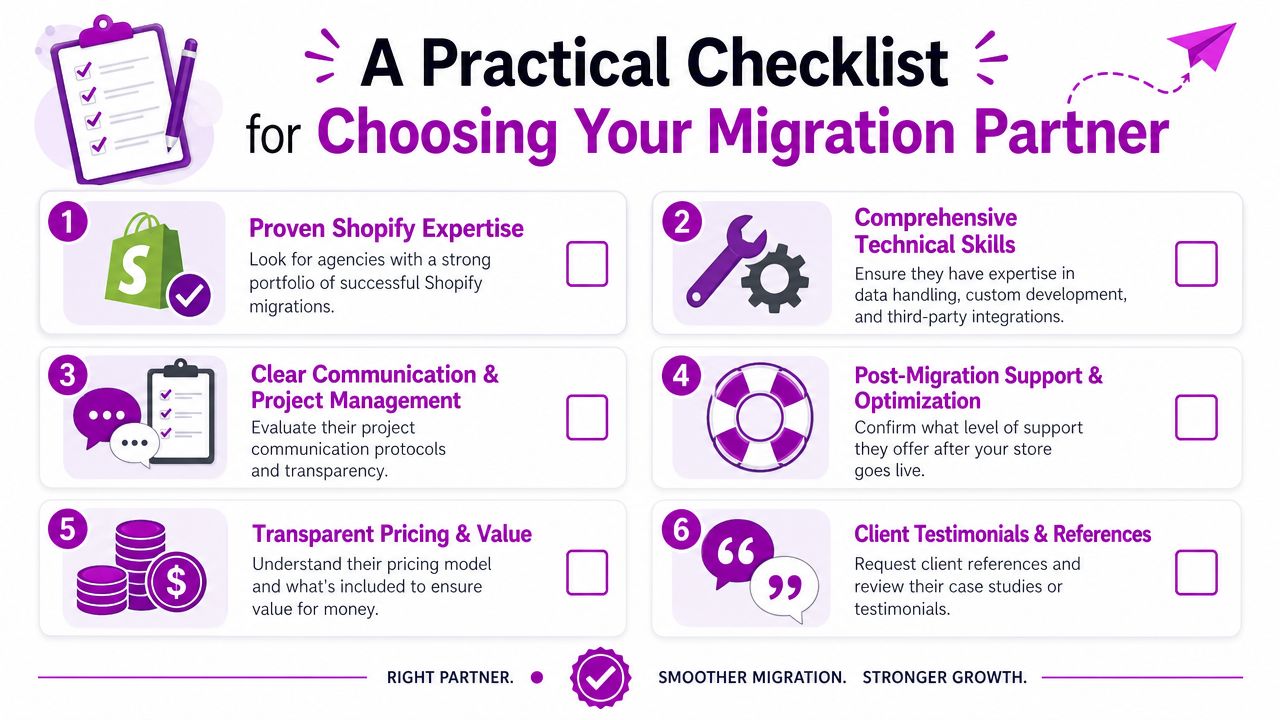
A Practical Checklist for Choosing Your Migration Partner
Most agencies can say they handle Shopify migrations. The useful question is whether they can protect the business while doing it.
Questions worth asking in the first call
Don't start with “How fast can you move us?” Start with questions that reveal process quality.
- What source platforms have you migrated from before? A team that has handled Magento, WooCommerce, BigCommerce, or custom stacks will usually speak clearly about structural differences, not just design outcomes.
- How do you handle data mapping and validation? You want to hear about audits, staged imports, sample checks, and reconciliation. You don't want a vague promise that “everything transfers.”
- What's your approach to complex integrations? Ask how they document dependencies across ERP, CRM, subscriptions, reviews, analytics, and support tools.
- Who owns launch coordination? Someone should clearly manage approvals, cutover timing, issue triage, and post-launch checks.
One useful evaluation aid is to compare an agency's communication style with its methodology. If the process sounds improvised during sales, it usually stays improvised in delivery. For brands evaluating broader Shopify expertise and partner fit, this guide to Shopify agency partners and success stories gives helpful context.
SEO and launch control should be non-negotiable
A migration partner doesn't need to promise perfect outcomes. They do need a serious plan for search preservation and launch governance.
According to Arslan Emre's guidance on vetting Shopify Plus migration experts, enterprise-grade migration services reduce risk by benchmarking pre-migration metrics, implementing a 1:1 redirect map, and monitoring for 404s and traffic fluctuations after launch to preserve ranking equity. That's the type of answer you want to hear from a partner. Specific, preventative, and operational.
Use this short checklist during evaluation:
| Question | What a strong answer sounds like |
|---|---|
| How do you protect SEO? | They mention benchmarking, redirect mapping, internal link review, and post-launch monitoring |
| How do you verify data? | They describe audit, mapping, staged validation, and final sync controls |
| How do you handle launch? | They outline ownership, checklists, timing, and support coverage |
| What happens after go-live? | They have a defined stabilization period and issue-response process |
The right partner makes the migration feel controlled before the project starts.
Watch for warning signs
A few red flags usually predict trouble:
- Platform-only selling: They talk about Shopify features but not your operational dependencies
- No validation language: They mention imports, not reconciliation
- Thin SEO answers: They say “we'll add redirects” without discussing mapping logic
- No post-launch plan: They treat launch day as the finish line
That combination usually leads to reactive migration work. Reactive work is where continuity risk shows up.
Why Growing Brands Partner with ECORN for Migration
The clearest reason brands bring in a structured migration partner is simple. They need someone to manage the switch as an operating change, not just a development project.
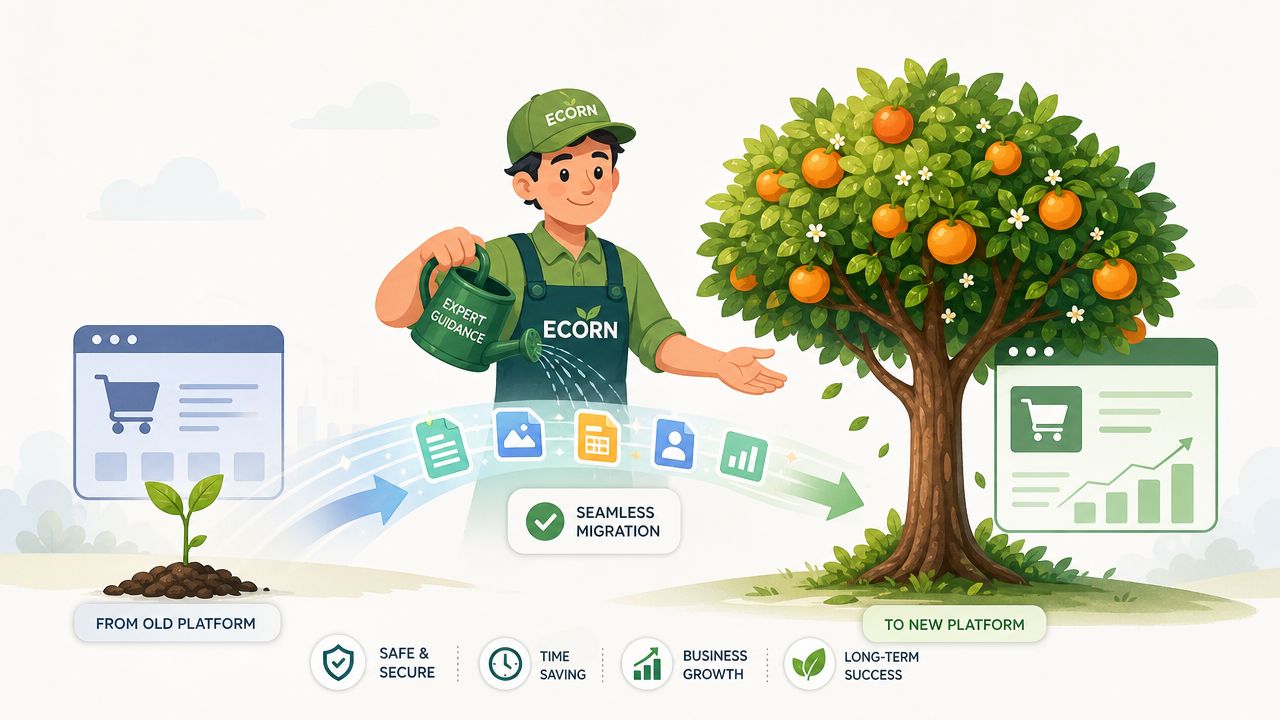
A growing brand typically arrives with a familiar mix of pressure points. The old platform is harder to maintain than it used to be. Marketing wants faster execution. Operations wants cleaner workflows. Leadership wants the move to happen without damaging search visibility, customer experience, or reporting confidence.
That's where a methodical partner earns its keep. The work usually starts with a source-data audit, then staged imports, validation checkpoints, storefront build decisions, integration setup, and launch sequencing. The value isn't in any one step by itself. It's in having the entire chain connected so problems are caught before customers see them.
ECORN is one option in that category. The agency works across Shopify design, development, and CRO, which matters because migration projects rarely stay inside one discipline. A team may start with data movement and quickly run into UX, merchandising, tracking, or app-logic questions that need coordinated decisions rather than handoffs between separate vendors.
What tends to matter most to growing brands is the operating model after launch. Can the internal team manage the storefront more easily? Can marketers launch faster? Are key workflows clearer than they were before? A successful migration should answer yes to those questions.
The strongest migration projects don't feel dramatic once they're live. Customers can shop. Staff can work. The business keeps moving. That's the point.
Frequently Asked Questions About Shopify Migration
How much do Shopify migration services cost
Pricing depends on scope, not just platform-to-platform transfer. The biggest factors are catalog complexity, theme work, custom functionality, app and integration requirements, content migration, and the amount of SEO preservation needed. A simple store with limited customization is very different from a multi-system business with historical data, custom fields, and operational dependencies.
Will my existing store go down during the migration
Usually, the safer approach is to build and test the new Shopify store in staging while the current store keeps operating. The risky moment is cutover, which needs coordination so orders, customer updates, and inventory changes are handled cleanly. Downtime risk is less about Shopify itself and more about how well launch is managed.
Can reviews, subscriptions, and other complex data be migrated
Sometimes yes, but it depends on the source system and the destination setup in Shopify. Reviews, subscriptions, loyalty data, and B2B logic often need platform-specific handling rather than a simple export-import step. This is why integration mapping should happen early instead of being left until the end.
What should I do right after launch
Watch the basics first. Orders, checkout, analytics, redirects, email flows, customer account access, and support tickets. Then move into optimization. If paid acquisition is part of your growth plan after the move, Come Together Media's optimization tips are a useful follow-on resource for tightening campaign performance once the store is stable.
Is a faster migration always better
Not usually. Fast can be fine for a low-complexity store. It can also hide skipped validation, weak redirect planning, or fragile app setup. The better question is whether the migration method matches the business risk.
If you're planning a move to Shopify and want a team that treats migration as a business continuity project, not just a data transfer, ECORN is a practical place to start.


SEO Consulting for Ecommerce: A Practical Guide
Shopify Theme Updater App: A Safe Update Playbook
Shopify Git Integration: A Developer's Guide to 2026
Headless Ecommerce Development Services Explained

How to Build a Shopify Clothing Website That Converts

How to Launch a Box Subscription Business in 2026

Luxury Skincare Branding Playbook That Converters

10 Best Podcast Ecommerce Shows for Store Growth in 2026

Shopify Developer Hourly Rate: What to Pay in 2026

Critical Shopify Setup Errors That Are Secretly Sabotaging Your Store

Ecommerce Conversion Tracking: The Complete How-To Guide

Shopify Design Agency: How to Pick the Right Partner

Mastering Multi Store Management on Shopify

Scale Shopify Store

10 Shopify App Ideas Worth Building in 2026

Conversion Rate Optimization for Landing Pages: The Playbook

Shopify Plus Automation: A Guide for 2026

10 Social Selling Platforms for Shopify Merchants

Shopify Website Design Examples: 7 Stores Worth Studying

7 Ecommerce Newsletter Examples for Shopify Brands

One Product Shopify Store: Build and Scale

Mobile Pop Up Strategy for Shopify Stores That Converts

Sitemap for Shopify: How to Find, Optimize, and Submit It

7 Single Product Websites Worth Emulating

Product Variants Shopify: The Complete 2026 Guide

Ecommerce Analytics Consulting for Growth

What Is AI Integration for eCommerce

How to Choose the Right eCommerce Website Development Firm

E Business Strategy Implementation

Conversion Tracking Setup for Shopify Stores

BigCommerce vs Shopify Plus Which Enterprise Wins in 2026

Shopify Theme Kit: Setup, Commands, and Migration Guide

Shopify Extension Development: A Practical 2026 Guide

Shopify Speed Score Explained and How to Improve It

Shopify Mobile Optimization: The 2026 Playbook

How to Add Subcategory in Shopify for Better UX

How to Implement Structured Data for Ecommerce in 2026

SEO App Mobile: Shopify Store Optimization Guide

Shopify Plus Support: What It Includes and How to Choose

Google Ads for Shopify: The Complete 2026 Playbook

Shopify New York: How to Find and Hire the Right Agency

Google Search Console for Shopify: The Complete Setup

First Party Data Collection for eCommerce Growth

FAQ Online Store Guide: Build and Measure It Right

Do FB Ads Work for eCommerce in 2026?

One Page Checkout for Shopify: Design and Implementation

Shopify GraphQL vs REST: The 2026 Developer Decision

Shopify Ecommerce Consulting: Strategy, Pricing &

Are Reddit Ads Worth It for eCommerce Brands

Shopify Title and Meta Description: A Practical 2026 Guide

Product Video Best Practices for Shopify Brands

Real-Time Inventory Management: A 2026 Guide

AI Chatbot Integration for Shopify Stores

Affiliate Program Management: A Shopify Guide

10 Best Performance Monitoring Tools for Shopify in 2026

Digital Asset Management for eCommerce Brands in 2026

Every Type of Facebook Ads Explained for eCommerce Growth

Product Information Management Explained for Shopify Brands

Support Ticket System: A Guide for Shopify Stores

10 Best Customer Service Tools for Shopify in 2026

Can I Start a Business with No Money? a 2026 Blueprint

What Sells Good on Etsy: Best Niches for 2026

Shopify Add to Cart Button: A Practical 2026 Guide

Customer Feedback Automation: A Practical eCommerce Guide

Critical Rendering Path: A Guide for Shopify Stores

How to Promote on TikTok for eCommerce in 2026

B2B eCommerce Consulting That Drives Real Revenue

10 Best Practices for Site Navigation in 2026

Return vs Refund for Shopify Stores: A Practical Guide

What Is Customer Lifetime Value and Why It Matters

What Is Voice of Customer Research for eCommerce

SMS Marketing for Ecommerce That Actually Converts

Master How to Improve Email Deliverability in 2026

Top 8 eCommerce Partners NYC for Shopify Brands in 2026

Machine Learning for Ecommerce: Boost Your Shopify Store

Beauty Market Research: Your 2026 Growth Guide

Shopify International Expansion: A 2026 Roadmap

What Does CRO Stand for in Business: Understanding CRO

Shopify Visual Merchandising: A Playbook for Higher Sales

Shopify Landing Page Design: Master Conversion in 2026

10 Best AI SEO Optimization Tools for Shopify in 2026

Agentic AI for Ecommerce: Boost Your Sales in 2026
Mastering Email Marketing Data for eCommerce Growth

Conversion Rate Optimisation Australia: Boost Your Sales

Conversion Rate Optimization AI: Your Shopify Store Guide

10 Product Bundling Strategies for Shopify in 2026

How to Increase Customer Lifetime Value: A Shopify Playbook

AI Customer Service Automation: Shopify Guide 2026

Clean Website Design: A Shopify Conversion Playbook

Omnichannel Retail Strategy: A Shopify Playbook

Product Data Enrichment: A Guide for Shopify Brands

Instagram Shopping Features a Guide for Shopify Stores

What Is Revenue Optimization: A Holistic RevOps Guide

Benefits of Conversion Rate Optimization: Boost Your

WordPress to Shopify Migration: Your 2026 Seamless Switch

Boost Sales: Ecommerce Payment Processing Guide 2026

Unified Commerce Platform: Benefits, KPIs & Shopify Guide

How to Reduce Bounce Rate eCommerce: Your 2026 Guide

Shopify API Integration: A Practical End-to-End Guide

How to Implement Data Governance: A 2026 Guide


newsletter in your inbox