


You're probably dealing with this right now.
A product manager wants one clean product page for a bestselling shirt. Marketing wants each color to feel discoverable. Operations wants inventory tracked accurately by size and color. SEO wants the right price and availability to show up in Google. And your theme or app stack starts behaving strangely the moment the catalog gets more complex.
That tension is what Shopify product variation really is. It's not just a setup task in the admin. It's a structural decision that affects merchandising, search visibility, stock accuracy, reporting, and how easily customers can buy.
A simple catalog hides the problem. A larger one exposes it fast. The good news is that most variant headaches come from using the wrong model for the job, not from Shopify being impossible to work with.
The Shopify Product Variation Puzzle
Take a common example. You sell a t-shirt in ten colors and five sizes. A busy merchant looks at that and asks a deceptively simple question. Is this one product, or is it many?
On paper, it feels like one product. To your customer, it may also feel like one product. They want one page, clear swatches, a size picker, and confidence that the black medium they selected is the one that goes into the cart.
But your business sees something else. Each combination has its own stock level. Some colors may have different imagery. Some sizes may go out of stock earlier. One material version may cost more. Once ads, feeds, and analytics enter the picture, the “one product” idea gets complicated.
Why this gets messy fast
The moment you choose how to structure that shirt, you're making trade-offs:
- Merchandising trade-off. One page can simplify browsing, but too many choices can overload buyers.
- Inventory trade-off. A single grouped product can keep the catalog tidy, but each purchasable combination still needs operational discipline.
- Marketing trade-off. One URL concentrates attention, while separate products can target more specific search intent.
- Theme trade-off. Your storefront has to present variant options clearly, or customers will click one thing and add another.
Practical rule: If customers think they're choosing among versions of the same item, variants may fit. If they think they're comparing distinct products, separate listings often work better.
Many teams get stuck because they treat variants as a cosmetic feature. They're not. They're a catalog model.
A good variant setup reduces friction. A bad one creates hidden costs across your store. That's why the right question isn't “How do I add variants?” It's “What should count as a variant in the first place?”
The Shopify Variant Model Explained
Shopify organizes sellable items in a simple hierarchy: product, options, and variants.
The easiest way to understand it is to think like a coffee shop. The product is “Latte.” The options are things like size, milk type, and flavor. The variant is one exact combination, such as large, oat milk, vanilla. That final combination is what a customer buys.
In Shopify, the same logic applies to apparel, furniture, supplements, or beauty products. “T-Shirt” is the product. “Color” and “Size” are options. “Black, Medium” is the variant.
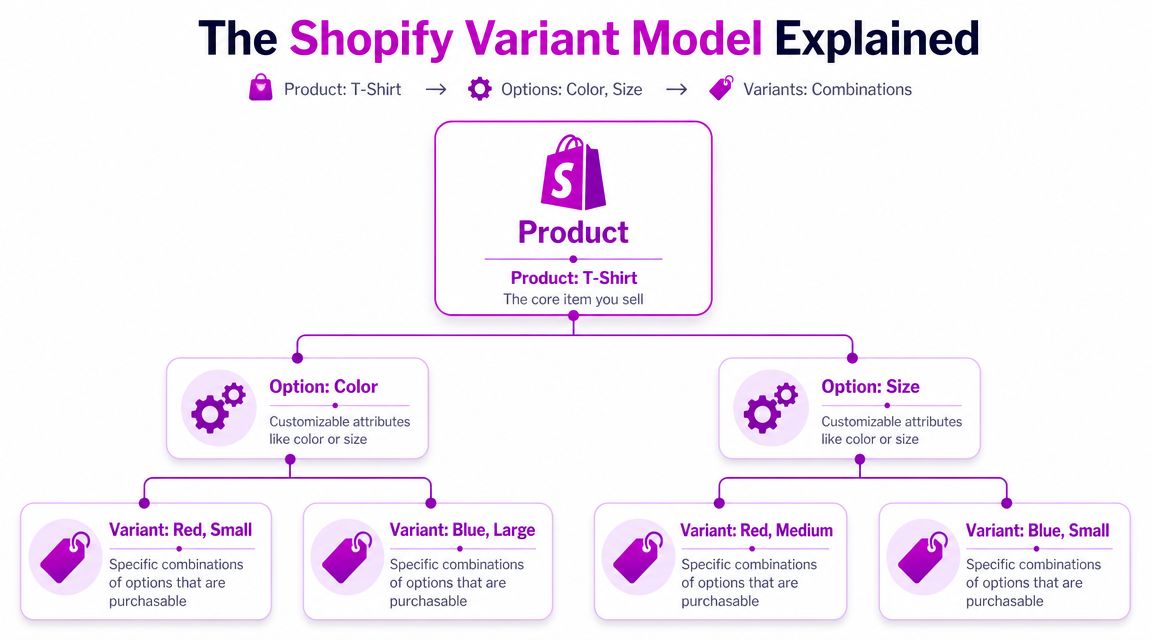
Product versus option versus variant
Here's the clean mental model:
- Product is the parent container customers land on.
- Options are the dimensions a customer chooses from, such as size, color, or material.
- Variant is the exact purchasable combination that carries operational meaning.
That last part matters most. A variant isn't just a display choice. It's the inventory-bearing unit. It's the thing that ties to stock, pricing, and fulfillment logic.
The constraint most merchants miss
Shopify's native model supports up to three option dimensions per product, and each unique combination becomes a variant, as described in Shopify's variant documentation. Shopify also recommends presenting each option separately in the interface rather than cramming everything into one selector, because that makes selection clearer for shoppers.
That sounds straightforward until real catalogs show up.
A fashion brand may want size, color, fit, length, fabric, and regional labeling. A furniture brand may want finish, width, hardware, leg style, and cushion fill. Shopify forces you to decide which of those belong inside the core variant structure and which should live elsewhere.
Treat the variant as the thing your warehouse and order system must get right. Treat everything else as supporting information unless it truly changes what gets picked, packed, and fulfilled.
Why clear option design matters
Many storefront problems start with sloppy option design, not with Shopify itself.
If you collapse options into vague labels like “Option 1” or mix multiple concepts into one dropdown, buyers get confused. Themes and apps also struggle when the option logic is inconsistent. That's why a good setup uses human language such as “Color,” “Size,” and “Material,” shown as separate selectors with clear visual feedback.
Once you see the model this way, variant strategy becomes less mysterious. You're not organizing pages. You're organizing sellable combinations.
Weighing Your Options Variants vs Separate Products
The biggest strategic decision isn't whether Shopify supports variants. It does. The key decision is whether a group of choices should live on one product page or be split into separate products.
That choice affects far more than merchandising. It changes how people find products, how your team manages stock, how themes behave, and how easy it is to analyze performance.
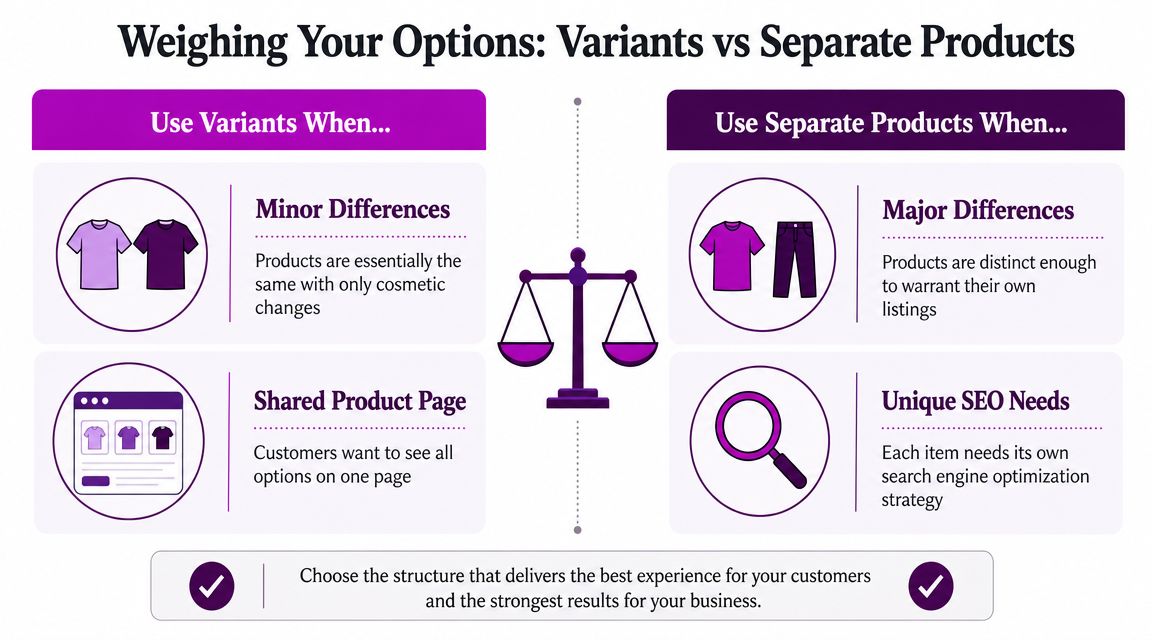
When variants usually make sense
Variants work best when the differences are close enough that customers still perceive one core item.
A shirt that changes by size and color usually belongs on one page. A candle that comes in multiple scents might also fit, if the page still feels coherent and the buying process stays simple. The benefit is obvious. Customers compare options without jumping between product pages.
Variants also help when your team wants one central page for reviews, media, and merchandising context.
When separate products are usually better
Separate products make more sense when each version has its own story, positioning, or search intent.
If one “variant” has a different use case, different hero imagery, different customer objections, or its own ad strategy, that's often a separate product in disguise. The same is true when one product family needs very different descriptions, benefit blocks, or merchandising logic across markets.
Community threads also show a practical risk here. Complex variant setups can create storefront issues such as invisible swatches, failed selections, or cart problems when theme code and variant logic don't line up, as seen in this Shopify Community discussion about variant selection and cart behavior.
A side by side view
| Criteria | Using Variants | Using Separate Products |
|---|---|---|
| SEO focus | One main URL for the group | Multiple URLs for distinct intent |
| Customer journey | Easier comparison on one page | Easier discovery of distinct items |
| Inventory view | Centralized under one parent product | Split across multiple product records |
| Theme complexity | More variant logic on one page | Simpler product logic per page |
| Analytics | Consolidated product-level view | More granular product-level comparison |
| Merchandising | Strong when differences are minor | Strong when differences are meaningful |
The real trade-off isn't only SEO
Merchants often frame this as an SEO question. That's too narrow.
This is really a control question. Do you want one product page to do all the work, or do you want more isolated pages with more isolated merchandising logic? One page can be elegant. It can also become brittle if every system depends on variant state being passed correctly.
Consider these decision cues:
- Use variants when the shopper's mental model is “I'm buying the same item in a different version.”
- Split products when the shopper's mental model is “I'm comparing different products that happen to be related.”
- Be cautious with variants when imagery, copy, pricing logic, and merchandising differ enough that one page starts feeling overloaded.
- Be cautious with separate products when you're duplicating operational effort just to force cosmetic differences into separate URLs.
If your merchandising team keeps asking for special handling for one “variant,” that's often a sign it wants to be a product.
The cleanest catalogs aren't the ones with the fewest product pages. They're the ones where your structure matches buyer intent and operational reality.
How to Set Up Product Variations in Shopify
Once you've decided that variants are the right model, setup should stay disciplined. Shopify makes it easy to add options, but easy setup can still create long-term mess if naming, ordering, and pricing logic are inconsistent.
Start at the product level in the Shopify admin, then add options that reflect how customers naturally choose the item.
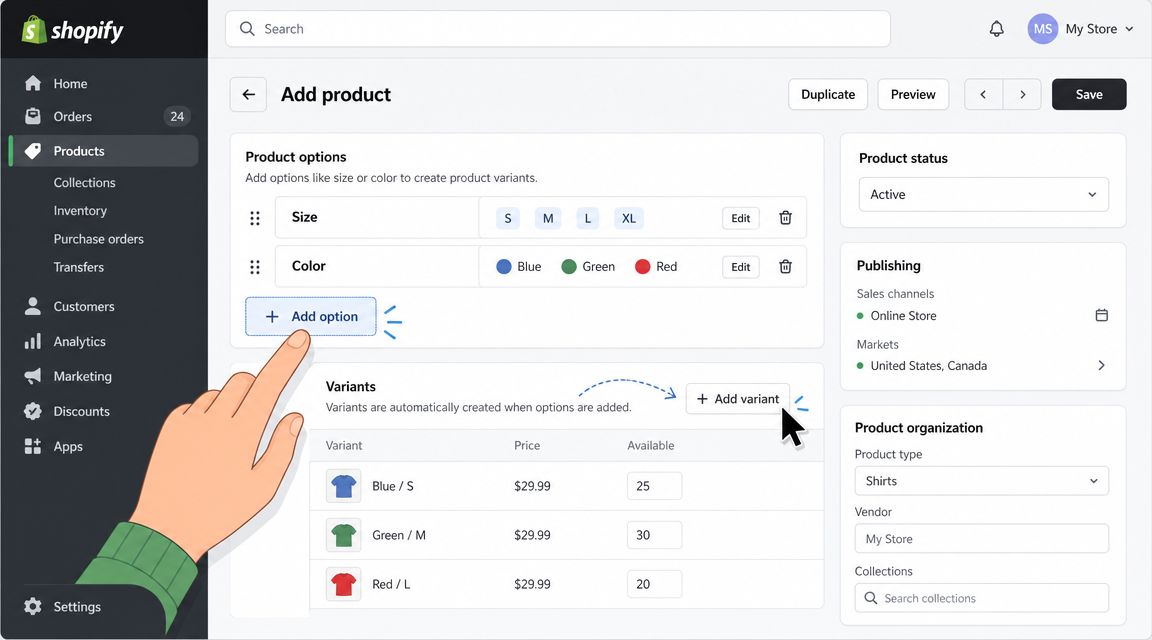
Set up options in customer language
Name options clearly. Use “Size,” “Color,” and “Material.” Don't leave generic labels in place.
Order also matters. Put the most intuitive decision first. For apparel, shoppers often expect color before size, or size before color, depending on the category and your audience. What matters is consistency across the catalog.
A clean setup usually follows this pattern:
- Create the parent product with a title, description, and media that fit the whole group.
- Add option names that describe real customer choices.
- Enter option values carefully so naming stays standardized across products.
- Review the generated variants before publishing anything live.
Treat each variant like a real sellable item
Each variant should be checked as if it were its own SKU in your business, because operationally that's what it becomes.
That means reviewing:
- SKU assignment so inventory and reporting stay accurate
- Price differences if one version costs more than another
- Availability settings to avoid selling combinations you can't fulfill
- Variant images where visual differences matter
One of the most useful habits is to test the storefront immediately after setup. Don't stop at seeing the options in admin. Click each variant on the product page and verify that the image, price, and selected option state all change the way a customer expects.
For a walkthrough of the admin flow, this video is a useful visual reference:
A small setup choice that prevents future pain
Render each option separately in the storefront. Don't hide multiple decision layers inside one awkward selector. That follows Shopify's documented recommendation in the earlier reference and makes it easier for themes, apps, and buyers to keep selection state straight.
The setup itself isn't hard. The discipline is the hard part.
Navigating Shopify's Variant Limits and Pitfalls
Every product model has a ceiling. Shopify's is generous in some ways and firm in others.
The most important structural limit is that the option model still centers on a maximum of three option dimensions per product. At the same time, Shopify expanded the product variant limit from a long-standing 100 to 2,048, according to the official Shopify changelog announcement. That's a meaningful platform shift for merchants with larger catalogs.
What the higher variant limit changes
For years, many merchants had to work around the older cap by splitting products unnaturally, relying on apps, or pushing logic outside Shopify's native structure. The move to 2,048 variants gives brands much more room for products with many size, color, or material combinations.
That doesn't mean every product should now become a giant matrix of choices.
A higher ceiling solves one type of constraint. It doesn't remove the operational and merchandising consequences of complexity. If a product page has too many combinations, buyers still have to understand them. Your team still has to manage them. Your theme still has to render them cleanly.
The difference between capacity and usability
A catalog can be technically valid and still be commercially clumsy.
Here are the pitfalls merchants hit most often:
- Variant explosion. Too many combinations create admin overhead and make stock planning harder.
- Image management friction. As variation expands, keeping the right media tied to the right choices becomes harder to maintain.
- Theme conflicts. Swatches, pickers, and add-to-cart behavior can break when theme code, apps, and variant state get out of sync.
- Decision overload. Buyers may hesitate when one page asks them to process too many dependent choices.
More variants don't automatically create a better buying experience. They just give you a bigger box to organize responsibly.
Why the three-option structure still matters
The three-option design forces prioritization. That can be frustrating, but it's also useful. It pushes merchants to separate inventory-critical decisions from descriptive or supporting attributes.
For example, “Size,” “Color,” and “Material” may deserve native option status. Something like care instructions, fit notes, finish details, or sourcing information often doesn't need to create a new sellable unit. If you put every attribute into the variant model, your catalog gets heavy fast.
Troubleshooting mindset
When a variant setup starts breaking, merchants often blame Shopify first. In practice, the root issue is usually one of three things:
- the product model is too complex for the current theme,
- an app is interfering with variant selection,
- too much presentation logic has been attached to the variant layer.
The fix isn't always more code. Sometimes it's a cleaner product structure.
Advanced Solutions Beyond Standard Variants
When native variants stop fitting the business, the answer isn't always to keep forcing more combinations into the product editor. Smarter stores separate what must be operational from what only needs to be informative or interactive.
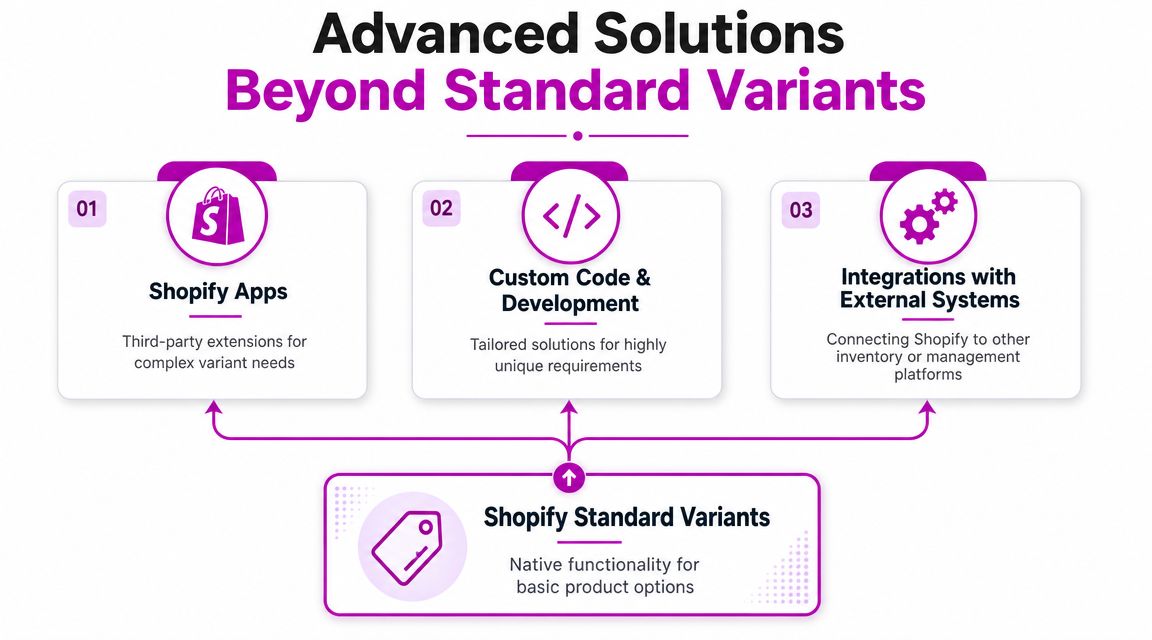
Use metafields when the issue is data, not inventory
A common advanced workaround has been to use variant metafields for variant-specific content such as unique descriptions or extra specifications, as discussed in this Shopify Community thread on variant-specific descriptions. This helps separate presentation data from inventory data, which reduces SKU explosion and keeps the admin more manageable.
That distinction is powerful.
If a difference doesn't need its own stock record, price record, or fulfillment behavior, it may belong in metafields rather than in the core variant matrix. Teams often use this approach for extra specs, compatibility notes, care details, or richer merchandising content. If you want a practical primer, ECORN has a useful article on Shopify metafields.
Use apps when the issue is interface complexity
Some merchants need more than Shopify's default selector pattern. They may want bundle builders, customizers, or guided option flows.
That's where apps can help, especially when the main problem is front-end experience rather than core catalog design. An app can support conditional logic, custom fields, or presentation layers that native variants don't handle elegantly.
The caution is straightforward. Every app that touches product pages becomes part of your storefront behavior. If the app controls how options display or update, it can also become a point of failure.
Use custom development when the logic is unique
There are cases where neither native variants nor apps are clean enough. A made-to-order product builder, a configurator with interdependent components, or a specialized B2B quoting flow may need custom theme work or deeper integration with external systems.
That route makes sense when the business model is unique and the product page is central to revenue. It also gives your team tighter control over how product state, cart behavior, and supporting content work together.
The best advanced solution is usually the one that removes complexity from the variant layer, not the one that keeps stuffing more into it.
Best Practices for Variants SEO CRO and Inventory
A strong variant strategy shows up in three places at once. Search engines understand the page correctly. Shoppers can choose quickly. Your operations team trusts the data.
If one of those breaks, the variant model starts leaking value.
SEO needs variant accuracy, not just variant existence
A common blind spot is structured data. Google expects product structured data to match the visible price and availability of the specific variant, not just the parent product. When those values drift, merchants can run into Merchant Center mismatches and weaker Shopping visibility, as described in this Shopify Community discussion on variant price mismatch errors.
That has a practical implication. SEO for variant-heavy stores isn't only about collection pages and meta titles. It's also about making sure the selected variant state is reflected correctly in theme output, feeds, and schema.
If your team needs outside perspective on that broader search layer, this guide to Shopify SEO agencies is a useful overview of what specialized support typically focuses on.
CRO depends on reducing selection friction
A product page can have every variant set up correctly in admin and still convert poorly if buyers can't understand their choices.
Keep the interface obvious:
- Show options separately so customers don't decode nested logic.
- Make unavailable combinations clear instead of letting shoppers discover stock issues late.
- Update media and price promptly when a different variant is selected.
- Use concise labels that reflect how real shoppers talk about the product.
For teams refining the full buying experience, this resource on Shopify product page optimization is relevant because variant UX usually sits inside the broader product page conversion system.
A variant picker should answer questions, not create them.
Inventory discipline starts before forecasting
Inventory issues often get blamed on demand volatility. In variant-heavy catalogs, many problems start earlier with structure.
A few habits help:
- Keep naming consistent across option values so reporting stays usable.
- Avoid creating variants for descriptive differences that don't affect fulfillment.
- Review slow-moving combinations and ask whether they should remain variants at all.
- Audit your storefront behavior regularly so selected variants, cart contents, and available stock stay aligned.
The highest-performing setup is rarely the most complex one. It's the one where merchandising, search, and operations all agree on what a variant is.
If your store has outgrown basic variant setups, ECORN can help with Shopify development, CRO, and catalog structure decisions that affect product pages, theme behavior, and scalable merchandising.



Conversion Rate Optimization for Landing Pages: The Playbook

Shopify Plus Automation: A Guide for 2026

10 Social Selling Platforms for Shopify Merchants

Shopify Website Design Examples: 7 Stores Worth Studying

7 Ecommerce Newsletter Examples for Shopify Brands

One Product Shopify Store: Build and Scale

Mobile Pop Up Strategy for Shopify Stores That Converts

Sitemap for Shopify: How to Find, Optimize, and Submit It

7 Single Product Websites Worth Emulating

Product Variants Shopify: The Complete 2026 Guide

Ecommerce Analytics Consulting for Growth

What Is AI Integration for eCommerce

How to Choose the Right eCommerce Website Development Firm

E Business Strategy Implementation

Conversion Tracking Setup for Shopify Stores

BigCommerce vs Shopify Plus Which Enterprise Wins in 2026

Shopify Theme Kit: Setup, Commands, and Migration Guide

Shopify Extension Development: A Practical 2026 Guide

Shopify Speed Score Explained and How to Improve It

Shopify Mobile Optimization: The 2026 Playbook

How to Add Subcategory in Shopify for Better UX

How to Implement Structured Data for Ecommerce in 2026

SEO App Mobile: Shopify Store Optimization Guide

Shopify Plus Support: What It Includes and How to Choose

Google Ads for Shopify: The Complete 2026 Playbook

Shopify New York: How to Find and Hire the Right Agency

Google Search Console for Shopify: The Complete Setup

First Party Data Collection for eCommerce Growth

FAQ Online Store Guide: Build and Measure It Right

Do FB Ads Work for eCommerce in 2026?

One Page Checkout for Shopify: Design and Implementation

Shopify GraphQL vs REST: The 2026 Developer Decision

Shopify Ecommerce Consulting: Strategy, Pricing &

Are Reddit Ads Worth It for eCommerce Brands

Shopify Title and Meta Description: A Practical 2026 Guide

Product Video Best Practices for Shopify Brands

Real-Time Inventory Management: A 2026 Guide

AI Chatbot Integration for Shopify Stores

Affiliate Program Management: A Shopify Guide

10 Best Performance Monitoring Tools for Shopify in 2026

Digital Asset Management for eCommerce Brands in 2026

Every Type of Facebook Ads Explained for eCommerce Growth

Product Information Management Explained for Shopify Brands

Support Ticket System: A Guide for Shopify Stores

10 Best Customer Service Tools for Shopify in 2026

Can I Start a Business with No Money? a 2026 Blueprint

What Sells Good on Etsy: Best Niches for 2026

Shopify Add to Cart Button: A Practical 2026 Guide

Customer Feedback Automation: A Practical eCommerce Guide

Critical Rendering Path: A Guide for Shopify Stores

How to Promote on TikTok for eCommerce in 2026

B2B eCommerce Consulting That Drives Real Revenue

10 Best Practices for Site Navigation in 2026

Return vs Refund for Shopify Stores: A Practical Guide

What Is Customer Lifetime Value and Why It Matters

What Is Voice of Customer Research for eCommerce

SMS Marketing for Ecommerce That Actually Converts

Master How to Improve Email Deliverability in 2026

Top 7 eCommerce Partners NYC for Shopify Brands in 2026

Machine Learning for Ecommerce: Boost Your Shopify Store

Beauty Market Research: Your 2026 Growth Guide

Shopify International Expansion: A 2026 Roadmap

What Does CRO Stand for in Business: Understanding CRO

Shopify Visual Merchandising: A Playbook for Higher Sales

Shopify Landing Page Design: Master Conversion in 2026

10 Best AI SEO Optimization Tools for Shopify in 2026

Agentic AI for Ecommerce: Boost Your Sales in 2026
Mastering Email Marketing Data for eCommerce Growth

Conversion Rate Optimisation Australia: Boost Your Sales

Conversion Rate Optimization AI: Your Shopify Store Guide

10 Product Bundling Strategies for Shopify in 2026

How to Increase Customer Lifetime Value: A Shopify Playbook

AI Customer Service Automation: Shopify Guide 2026

Clean Website Design: A Shopify Conversion Playbook

Omnichannel Retail Strategy: A Shopify Playbook

Product Data Enrichment: A Guide for Shopify Brands

Instagram Shopping Features a Guide for Shopify Stores

What Is Revenue Optimization: A Holistic RevOps Guide

Benefits of Conversion Rate Optimization: Boost Your

WordPress to Shopify Migration: Your 2026 Seamless Switch

Boost Sales: Ecommerce Payment Processing Guide 2026

Unified Commerce Platform: Benefits, KPIs & Shopify Guide

How to Reduce Bounce Rate eCommerce: Your 2026 Guide

Shopify API Integration: A Practical End-to-End Guide

How to Implement Data Governance: A 2026 Guide

Shopify Store Development Cost: A 2026 Breakdown

What Is Server Side Tracking: The Shopify Guide 2026

Marketing Automation Workflows: A Shopify Guide for 2026

Shopify: How to Reduce Technical Debt

Shopify UX Design Change: A Playbook for Growth

User Generated Content Strategy: Shopify Playbook

Shopify Pause and Build Plan Cost: A Complete 2026 Guide

Compare at Price on Shopify: A Complete Guide for 2026

Where Can I Sell My Prints? 10 Best Platforms for 2026

Shopify Order Management System: The Ultimate Guide 2026

What Is Marketing Attribution? an eCommerce Guide for 2026

10 Best Black Friday Sales Sheets for 2026

Discover the Top Social Media Marketing Agencies For

Consumer Confidence Definition for eCommerce in 2026

What Is Social Commerce? Your 2026 Guide to Boosting Sales


newsletter in your inbox