


Your welcome email goes out. The subject line looks solid. The product photos are clean. Then the dashboard fills with bounces, complaints, and almost no real engagement. If that sounds familiar, the problem usually isn't the offer. It's that your sending setup, list quality, and reputation signals are telling mailbox providers to distrust you.
That's the core of how to improve email deliverability in 2026. You don't “hack” inbox placement with clever copy alone. You earn it with authentication, steady sending behavior, clean lists, and content that gets real clicks and replies, not just opens. For Shopify brands, this matters even more because promotional volume grows fast, and reputation damage travels faster than recovery.
The brands that win in the inbox are the ones that act like disciplined operators. They warm up new infrastructure gradually, they suppress low-quality contacts, and they pay attention to what mailbox providers reward. If you've been sending to a tired list and hoping the next campaign will fix itself, stop. Start with the basics and execute them hard.
Introduction to Email Deliverability Challenges
A new Shopify store often launches with the same pattern. The founder installs an email app, imports a customer list, sends a welcome discount, and expects a quick spike in revenue. Instead, the first batch lands in spam, the bounce rate jumps, and the “sent” number in the platform dashboard doesn't reflect inbox reality.
For businesses managing multiple brands, a multi-brand email signature platform can keep customer-facing emails consistent with accurate branding, contact details, and professional messaging.
That gap is why deliverability gets misunderstood. Delivery just means the message reached a mail server. Deliverability means it reached the inbox where people might see it. Mailbox providers now lean heavily on reputation-based filtering, so your domain history, complaint signals, and sending consistency matter more than your optimism.
Why Shopify brands get burned early
New and replatformed stores tend to make the same mistakes. They blast to the entire list on day one, skip authentication, and treat every subscriber as equally valuable. That's a fast way to train Gmail, Microsoft, and Yahoo to watch your traffic more aggressively.
Practical rule: Send like you're building trust, not pushing a launch campaign. The inbox rewards predictable behavior.
A better approach starts with your most engaged subscribers and expands only after the signals stay stable. That's especially important if you've changed platforms, migrated domains, or started using a new sending domain for the first time. Treat the first month as reputation-building work, not as a scaling phase.
The upside is that deliverability is fixable. You don't need a miracle. You need a process that proves you're a legitimate sender, sends to people who want your messages, and reacts quickly when metrics begin to slip.
Setup Email Authentication with SPF DKIM DMARC and BIMI
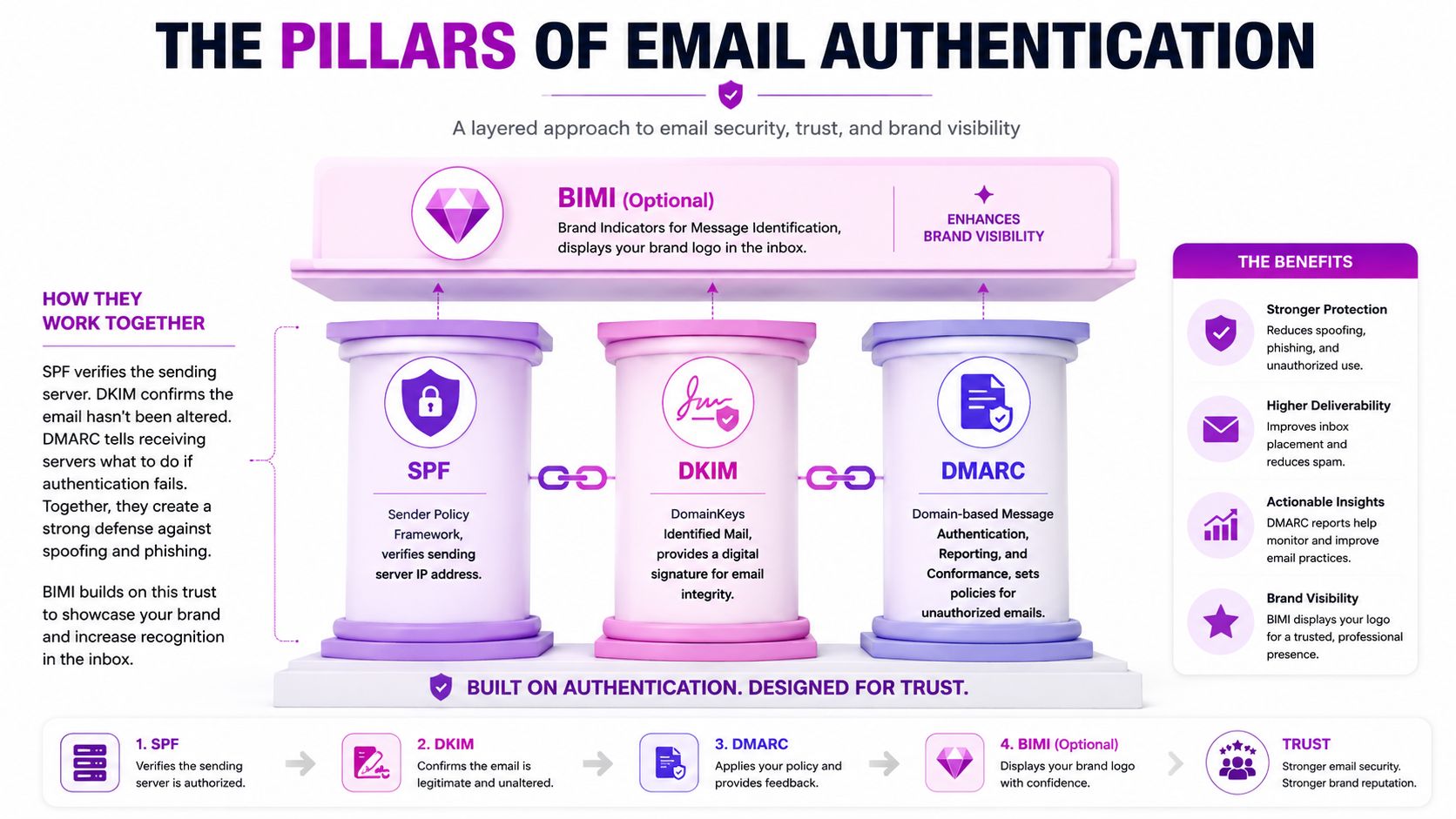
Authentication is mandatory. If you want mailbox providers to trust your domain, you need SPF, DKIM, and DMARC in place, then you need to verify them with tools like MXToolbox or Mail-tester. That stack is a prerequisite for inbox trust, not an advanced optimization layer. A technical review of Shopify email hosting and professional communication setup can help you avoid the common traps, and ECORN's guide on professional Shopify email hosting is a useful reference point if your brand is still sorting out the basics.
What each record actually does
SPF tells mailbox providers which servers are allowed to send on your behalf. DKIM adds a digital signature so the email can be checked for integrity. DMARC ties the two together and tells receivers what to do when something fails authentication.
BIMI sits on top as a brand visibility layer. It doesn't replace the core records, and you shouldn't treat it like a fix for poor sending behavior. Use it only after your authentication stack is solid and your reputation signals are healthy.
The biggest mistake I see is teams adding one record and assuming they're done. They're not. SPF alone won't save a weak domain. DKIM alone won't rescue a bad list. DMARC without alignment won't help much either. The point is to make every layer reinforce the same identity.
What to check before you scale sends
Use the same discipline every time a new domain, subdomain, or ESP is involved.
- Confirm sender identity: Make sure the domain used in your marketing emails matches the records you've set up.
- Verify all three layers: Check SPF, DKIM, and DMARC with validation tools before serious volume goes out.
- Watch for broken TXT entries: A typo, extra space, or duplicate record can unexpectedly break authentication.
- Keep the setup stable: Don't keep changing your sending identity once you've started building reputation.
The point isn't technical perfection for its own sake. It's reducing ambiguity. Mailbox providers are less suspicious when your emails consistently pass the same checks. Once that's in place, your messages stop looking like guesswork and start looking like legitimate communication.
Choose Sending Infrastructure and Warm Up Properly
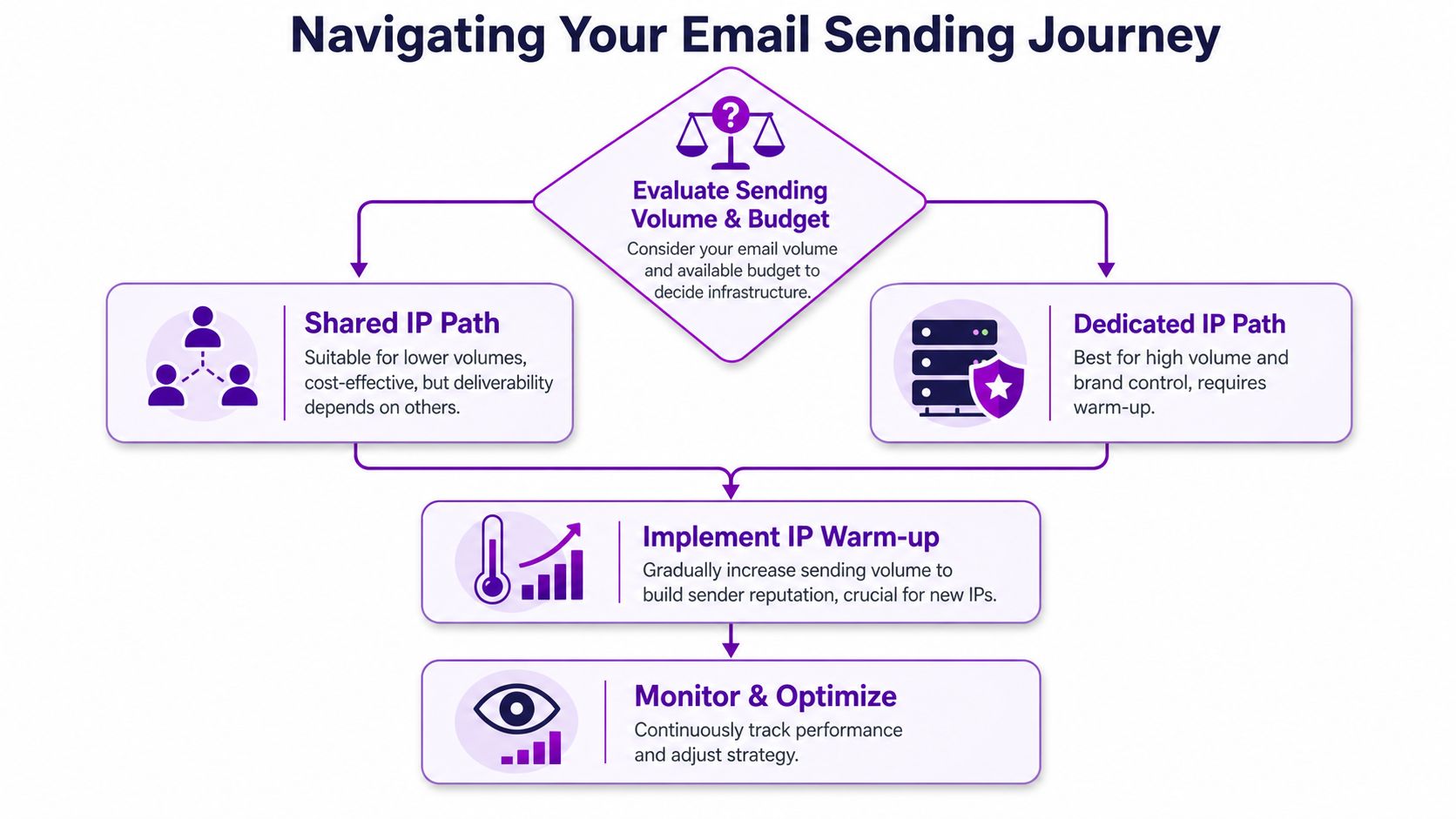
Infrastructure choices shape reputation before a subscriber opens anything. Early-stage Shopify brands with modest volume usually do better on a shared IP because the provider handles most of the infrastructure burden. Brands that are scaling harder and want tighter control can move to a dedicated IP, but that choice also adds more responsibility.
A dedicated IP is not a shortcut. It is a reputation asset you have to earn and protect.
Shared IP or dedicated IP
A shared IP is easier to start with because you are not carrying the full burden of reputation alone. The trade-off is clear. You also share the neighborhood, so another sender's bad behavior can spill over and affect your placement.
A dedicated IP makes sense once you have enough volume and sending discipline to support it. The downside is just as clear. If your send volume is erratic or your list quality is weak, your own problems show up faster. For a Shopify brand, infrastructure choice should follow operational maturity, not ego. If you are still getting the basics right, keep the setup simple and stable. If your team is already running eCommerce email marketing automation, a dedicated path can make sense because your cadence and segmentation are more controlled.
Warm up with discipline
New sending infrastructure should be warmed up gradually, not blasted into production. The deliverability guidance in the brief recommends increasing volume by 15–20% per week, with a full ramp from a cold IP to normal sending volume typically taking 4–8 weeks (Sender). That pacing matters because sudden spikes can trigger mailbox-provider suspicion and get your messages filtered before you have built trust.
Start with your most engaged subscribers. Recent buyers, active clickers, and people who regularly interact with your brand are the right first audience. Do not begin with old leads or broad promo lists. Those contacts are the fastest way to signal weak relevance.
A simple warm-up mindset
- Begin small: Send to your strongest segment first.
- Hold the cadence steady: Avoid sudden bursts or erratic send days.
- Expand only when signals stay clean: If complaints or bounces creep up, pause expansion.
- Treat cadence as a brand asset: Predictability helps you look legitimate to Gmail, Microsoft, and Yahoo.
Modern inbox providers reward consistency, not volume for its own sake. That matters even more now, because interactive content, dynamic modules, and aggressive campaign changes can make a sender look unpredictable if the infrastructure is not already stable. Build the sending history first, then add creative complexity. For Shopify brands, that means using a controlled ramp, keeping source identity stable, and recovering reputation with measured sends instead of trying to force your way back into the inbox.
Maintain List Hygiene and Segment Audiences
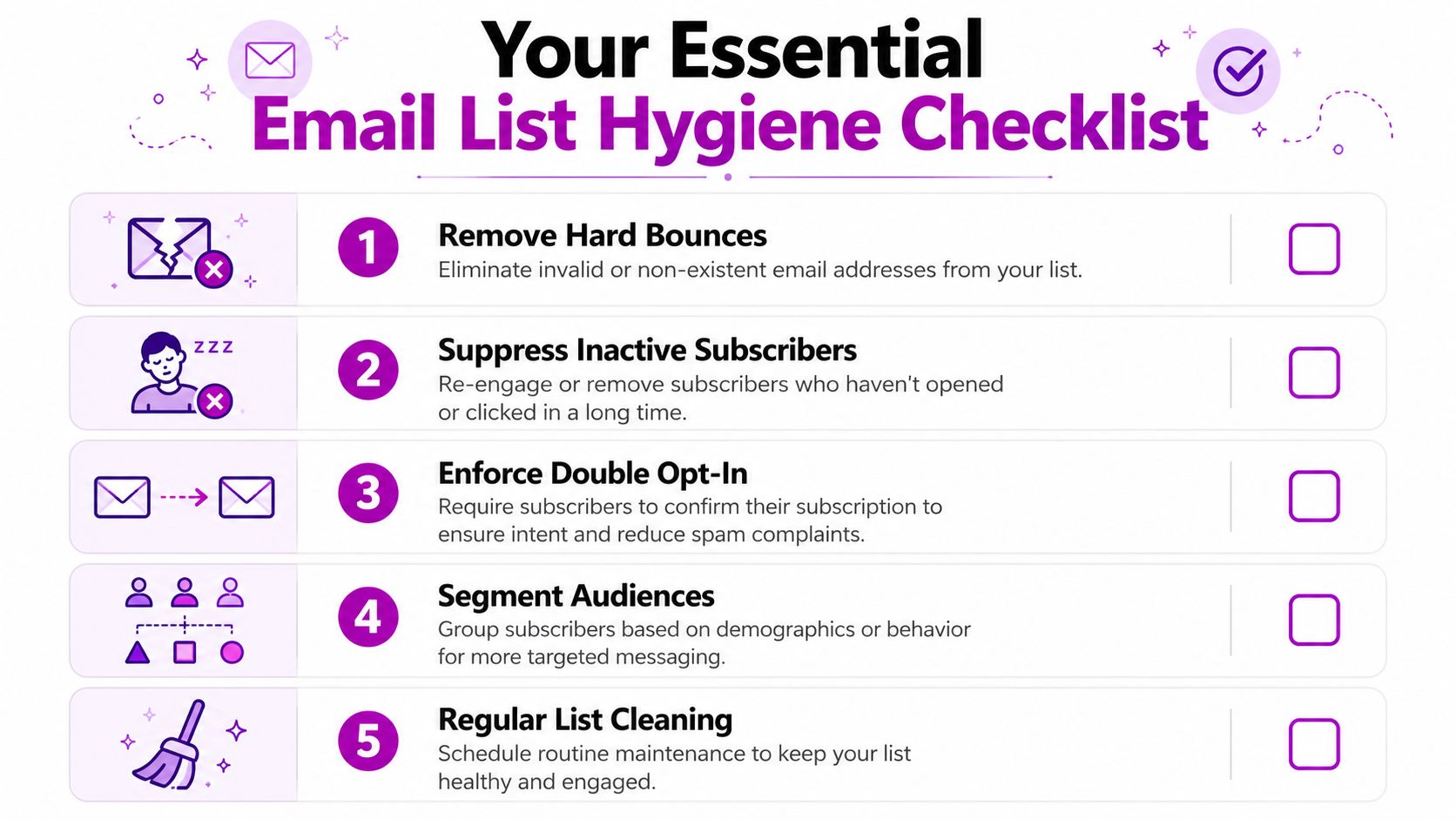
Bad list hygiene will sink campaigns that otherwise look strong. It increases bounces, drives complaints, and makes every future send harder to place in the inbox. Keep bounce rates below 2% and spam complaint rates below 0.1%. Once those numbers climb, mailbox providers start filtering more aggressively (Messageflow). If your bounce rate is the problem, the fix usually starts with the list itself. Scalelist's guide to email deliverability best practices covers verifying addresses before they enter a sequence, keeping catch-all emails separate, and the Gmail, Yahoo and Microsoft sender rules.
Clean the list before you “optimize” it
Remove hard bounces right away. Suppress inactive subscribers or move them into a separate re-engagement path. Double opt-in is worth the extra friction because it filters out typos, bots, and low-intent signups before they ever reach your main list.
A smaller list of real buyers beats a bloated list full of dead addresses. If your signup flow or platform keeps feeding junk into the database, no subject line test will rescue performance.
Segment by behavior, not just by labels
Shopify brands should segment by intent. Recent buyers, recent clickers, and recent engagers deserve more frequent sends than dormant contacts. That is not just a conversion play, it protects reputation because mailbox providers keep seeing positive signals from people who interact.
Use ecommerce email marketing automation to set suppression rules that match real behavior, then keep the logic strict. If someone has not engaged, stop sending them the same pressure campaign you use for active buyers. If your copy starts sounding machine-made, transform robotic emails into human-like before it lands in a inbox that already distrusts generic blasts.
Build a repeatable hygiene rhythm
- Remove hard bounces fast: Invalid addresses do not become valuable later.
- Suppress long-term inactive contacts: Stop carrying dead weight just to inflate list size.
- Use permission-based sign-up methods: Double opt-in improves intent from the start.
- Separate active buyers from cold leads: Different behavior deserves different frequency.
- Re-engage or retire the quiet segment: Do not keep sending to people who never interact.
A healthy list is cleaner and more honest. It tells mailbox providers that your audience wants your mail, which is the strongest signal you can send without buying your way into trouble.
Optimize Email Content and Boost Engagement
Inbox providers keep rewarding emails people interact with. If your content feels generic, polished design will not save it. Subject lines, preheaders, mobile layout, and offer framing all need to push the same outcome, real clicks and replies.
Privacy changes have made opens less useful, so click and reply behavior should drive your creative decisions. That is the signal that matters now. A campaign that gets attention but no action is still weak.
Write for action, not decoration
Your subject line has to match the body. If the promise is fuzzy, subscribers ignore it. If the promise is clear and the email delivers on it quickly, engagement rises.
Use plain, specific language. “New arrivals your customers are buying” beats clever filler. So does “Your order update and product picks” when the goal is to keep the message relevant and easy to scan on mobile.
Make the design easier to click
Mobile-first layout is required. Keep the structure simple, put the CTA where it is easy to spot, and shorten the path to the product. A cluttered template can hurt engagement even when the offer is strong.
If you use AI-assisted copy, make it sound human, not machine-written. A tool like transform robotic emails into human-like helps when drafts read stiff, but it should support clarity, not replace judgment.
Use dynamic content carefully
Dynamic product blocks and lightweight interactive elements can lift clicks when they stay relevant. Do not overload the email with visual tricks. If the message loads slowly, feels crowded, or buries the main CTA, you have traded engagement for novelty.
Rule of thumb: Every element should earn its place by making the next click easier.
Interactive features help when they sharpen relevance, especially in merchandising or post-purchase flows. Skip them when they distract from the purchase path or create rendering problems across inboxes. In a Shopify store, the cleanest path usually wins over the flashiest layout. That matters even more now, because inbox providers and subscribers both punish emails that feel automated and shallow. Use Litmus to keep your focus on the behaviors that matter, then tighten the copy until it sounds like a real brand talking to a real customer.
Monitor Key Metrics and Troubleshoot Deliverability
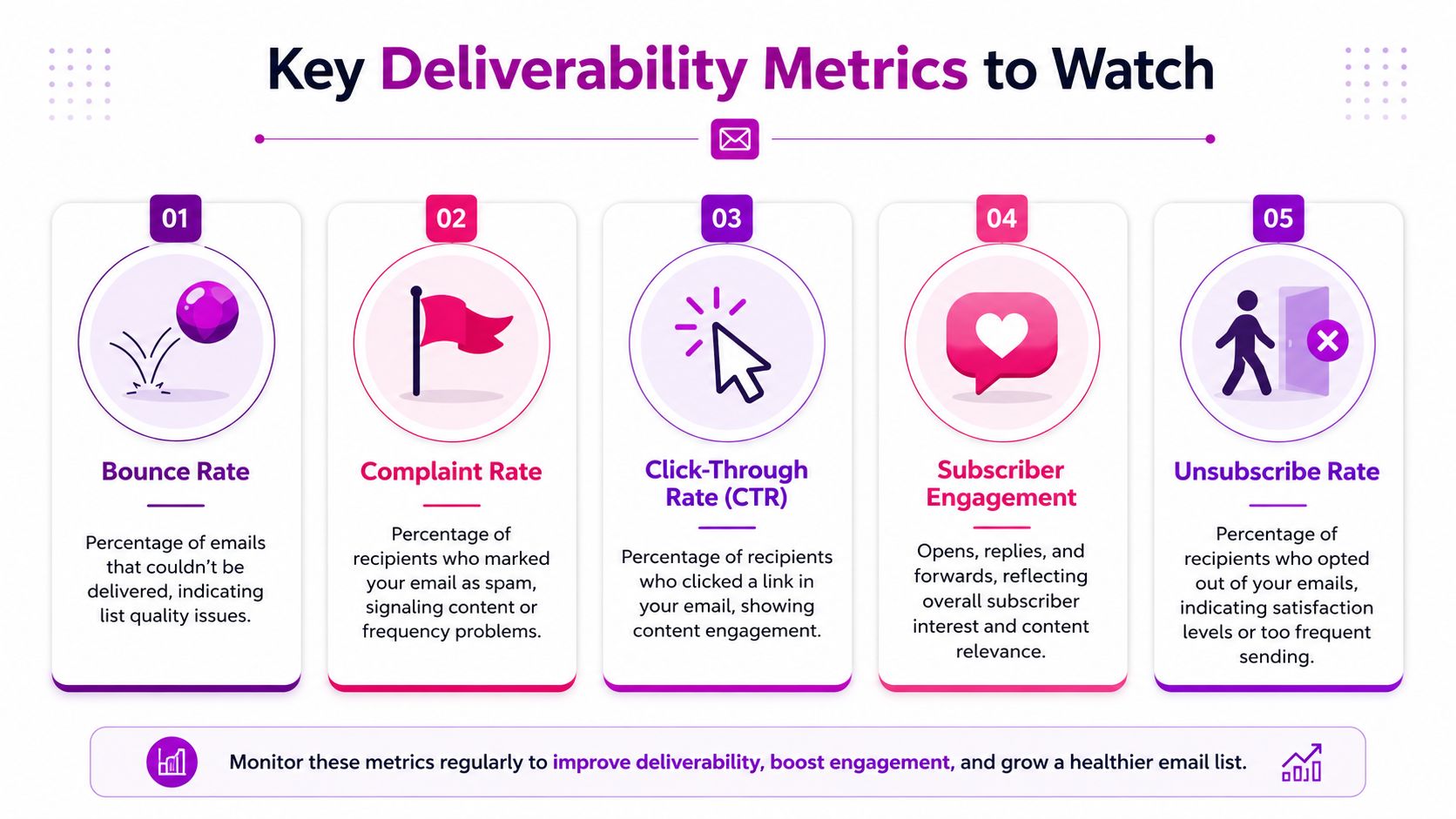
Deliverability is a monitoring problem as much as a setup problem. If you are not watching the right metrics, you keep sending into a reputation issue until revenue feels it. Focus on bounce rate, complaint rate, click behavior, and whether subscribers keep engaging over time.
Read the metric correctly
Bounce rate shows whether your list is still clean enough to send. Complaint rate shows whether the content, cadence, or targeting is pushing too hard. Clicks and replies show whether people still find the message worth their attention. Unsubscribes are not automatically bad, but a rising unsubscribe rate means the audience is telling you the frequency or relevance is off.
Open rates are less reliable now, so clicks and replies deserve more weight in your dashboard. That means you should stop treating open spikes as proof of success when the downstream behavior stays weak. A campaign that gets opens but no clicks is not a real deliverability win.
Know when to pause
If bounce rates start climbing, stop broad sends and inspect the source. If complaints rise, tighten segmentation and reduce pressure. If clicks fall across multiple sends, the problem may be content relevance, list fatigue, or a reputation issue that needs more than a creative refresh.
Pause before you keep pushing volume into a failing reputation. Recovering a sender profile is slower and more expensive than holding back for a few sends and fixing the root cause.
Troubleshoot in the right order
- Check authentication first: If SPF, DKIM, or DMARC failed, fix that before anything else.
- Inspect list quality: Remove bad addresses and suppress inactive contacts.
- Review engagement by segment: Recent buyers and active clickers should perform better than cold contacts.
- Look for content friction: Overly promotional or unclear emails often draw complaints.
- Watch inbox placement, not just sent status: A delivered email that lands in spam still underperforms.
No single metric tells the full story. Look for patterns across sends, not one-off spikes.
Mailbox providers now weigh engagement and interaction signals more aggressively, especially as interactive content becomes more common and easier to ignore when it feels forced. Use that shift to your advantage. Watch the metrics that reflect real reader behavior, then tighten your segmentation, content, and sending cadence until the pattern improves.
Implement Shopify Email Tips and Actionable Checklist
For Shopify brands, deliverability work lives inside the tools you already use every day. Your email app, theme, signup source, and automation logic all shape how mailbox providers judge your sending behavior. If your store is already dealing with reputation damage, the recovery path has to be tighter than a normal growth plan.
Shopify checklist to execute now
- Audit your signup sources: Know exactly where every subscriber came from.
- Review suppression logic: Make sure inactive and risky contacts are excluded from regular campaigns.
- Separate flows by intent: Welcome, browse, post-purchase, and promotional sends should not all behave the same way.
- Keep authentication stable: Don't keep changing domains or sender identities once you've started warming up.
- Monitor complaint-heavy campaigns: If one promotion draws trouble, tighten targeting immediately.
If you're repairing a damaged reputation, start with a narrow audience. After deliverability issues, email only those who engaged in the last 3 months for 2–4 weeks, then widen the segment gradually every 2–3 campaigns Mailchimp. That operational discipline is what many guides skip, and it is usually where recovery succeeds or fails.
Recent engagers are your safest proof of trust. Cold contacts are a liability until your reputation settles. Don't be sentimental about old list segments. If they are not helping your inbox placement, they are hurting it.
Interactive content can raise clicks, but only if it matches buyer intent and does not create extra friction. Mailbox providers are paying more attention to engagement and interaction signals, so Shopify brands need to keep content useful, lightweight, and easy to act on. Quizzes, product pickers, and other interactive elements should support the purchase path, not distract from it.
If you need outside help, choose support that looks at the full chain, not just the template. ECORN can review your Shopify setup, email flows, and suppression logic as part of broader eCommerce consulting, which is more useful than a cosmetic email refresh when deliverability is the primary problem.
If you want a sharper, Shopify-specific deliverability plan, contact ECORN and get your authentication, list hygiene, and recovery workflow reviewed before your next campaign goes out.


Multi Store Inventory Management: A Practical Guide

SEO Consulting for Ecommerce: A Practical Guide
Shopify Theme Updater App: A Safe Update Playbook
Shopify Git Integration: A Developer's Guide to 2026
Headless Ecommerce Development Services Explained

How to Build a Shopify Clothing Website That Converts
How to Launch a Box Subscription Business in 2026

Luxury Skincare Branding Playbook That Converters
10 Best Podcast Ecommerce Shows for Store Growth in 2026
Shopify Developer Hourly Rate: What to Pay in 2026
Critical Shopify Setup Errors That Are Secretly Sabotaging Your Store

Ecommerce Conversion Tracking: The Complete How-To Guide

Shopify Design Agency: How to Pick the Right Partner

Mastering Multi Store Management on Shopify

Scale Shopify Store

10 Shopify App Ideas Worth Building in 2026

Conversion Rate Optimization for Landing Pages: The Playbook

Shopify Plus Automation: A Guide for 2026

10 Social Selling Platforms for Shopify Merchants

Shopify Website Design Examples: 7 Stores Worth Studying

7 Ecommerce Newsletter Examples for Shopify Brands

One Product Shopify Store: Build and Scale

Mobile Pop Up Strategy for Shopify Stores That Converts

Sitemap for Shopify: How to Find, Optimize, and Submit It

7 Single Product Websites Worth Emulating

Product Variants Shopify: The Complete 2026 Guide

Ecommerce Analytics Consulting for Growth

What Is AI Integration for eCommerce

How to Choose the Right eCommerce Website Development Firm

E Business Strategy Implementation

Conversion Tracking Setup for Shopify Stores

BigCommerce vs Shopify Plus Which Enterprise Wins in 2026

Shopify Theme Kit: Setup, Commands, and Migration Guide

Shopify Extension Development: A Practical 2026 Guide

Shopify Speed Score Explained and How to Improve It

Shopify Mobile Optimization: The 2026 Playbook

How to Add Subcategory in Shopify for Better UX

How to Implement Structured Data for Ecommerce in 2026

SEO App Mobile: Shopify Store Optimization Guide

Shopify Plus Support: What It Includes and How to Choose

Google Ads for Shopify: The Complete 2026 Playbook

Shopify New York: How to Find and Hire the Right Agency

Google Search Console for Shopify: The Complete Setup

First Party Data Collection for eCommerce Growth

FAQ Online Store Guide: Build and Measure It Right

Do FB Ads Work for eCommerce in 2026?

One Page Checkout for Shopify: Design and Implementation

Shopify GraphQL vs REST: The 2026 Developer Decision

Shopify Ecommerce Consulting: Strategy, Pricing &

Are Reddit Ads Worth It for eCommerce Brands

Shopify Title and Meta Description: A Practical 2026 Guide

Product Video Best Practices for Shopify Brands

Real-Time Inventory Management: A 2026 Guide

AI Chatbot Integration for Shopify Stores

Affiliate Program Management: A Shopify Guide

10 Best Performance Monitoring Tools for Shopify in 2026

Digital Asset Management for eCommerce Brands in 2026

Every Type of Facebook Ads Explained for eCommerce Growth

Product Information Management Explained for Shopify Brands

Support Ticket System: A Guide for Shopify Stores

10 Best Customer Service Tools for Shopify in 2026

Can I Start a Business with No Money? a 2026 Blueprint

What Sells Good on Etsy: Best Niches for 2026

Shopify Add to Cart Button: A Practical 2026 Guide

Customer Feedback Automation: A Practical eCommerce Guide

Critical Rendering Path: A Guide for Shopify Stores

How to Promote on TikTok for eCommerce in 2026

B2B eCommerce Consulting That Drives Real Revenue

10 Best Practices for Site Navigation in 2026

Return vs Refund for Shopify Stores: A Practical Guide

What Is Customer Lifetime Value and Why It Matters

What Is Voice of Customer Research for eCommerce

SMS Marketing for Ecommerce That Actually Converts

Top 8 eCommerce Partners NYC for Shopify Brands in 2026

Machine Learning for Ecommerce: Boost Your Shopify Store

Beauty Market Research: Your 2026 Growth Guide

Shopify International Expansion: A 2026 Roadmap

What Does CRO Stand for in Business: Understanding CRO

Shopify Visual Merchandising: A Playbook for Higher Sales

Shopify Landing Page Design: Master Conversion in 2026

10 Best AI SEO Optimization Tools for Shopify in 2026

Agentic AI for Ecommerce: Boost Your Sales in 2026
Mastering Email Marketing Data for eCommerce Growth

Conversion Rate Optimisation Australia: Boost Your Sales

Conversion Rate Optimization AI: Your Shopify Store Guide

10 Product Bundling Strategies for Shopify in 2026

How to Increase Customer Lifetime Value: A Shopify Playbook

AI Customer Service Automation: Shopify Guide 2026

Clean Website Design: A Shopify Conversion Playbook

Omnichannel Retail Strategy: A Shopify Playbook

Product Data Enrichment: A Guide for Shopify Brands

Instagram Shopping Features a Guide for Shopify Stores

What Is Revenue Optimization: A Holistic RevOps Guide

Benefits of Conversion Rate Optimization: Boost Your

WordPress to Shopify Migration: Your 2026 Seamless Switch

Boost Sales: Ecommerce Payment Processing Guide 2026

Unified Commerce Platform: Benefits, KPIs & Shopify Guide

How to Reduce Bounce Rate eCommerce: Your 2026 Guide

Shopify API Integration: A Practical End-to-End Guide

How to Implement Data Governance: A 2026 Guide


newsletter in your inbox