


You can have strong product pages, sharp creative, and plenty of traffic, then still watch buyers drift away before the page finishes drawing. On Shopify, that gap often isn't a merchandising problem. It's a critical rendering path problem, where HTML, CSS, and JavaScript delay the first visible pixels long enough for impatience to win.
That delay is especially painful in commerce because the page is rarely “just a page.” It carries review widgets, personalization, tag managers, app scripts, font files, and framework logic that all compete to render the first screen. Google's web.dev framework breaks the critical rendering path into critical resources, critical path length, and critical bytes, which is a useful way to see why the first visible paint gets delayed when too many blockers pile up (web.dev's CRP analysis guide).
For store owners, the frustrating part is that the site can look fine in a design review and still feel slow to shoppers. The browser still has to finish DOM, CSSOM, render tree, layout, and paint steps before anything appears, and any render-blocking asset in that chain pushes the first render later (web.dev's critical path overview). If you want a plain-English explanation of why that hurts real users, page speed problems explained is a helpful companion read.
Why Your Shopify Store Speed Is Killing Conversions
A store owner sees the traffic dashboard trending the right way, but the checkout numbers don't follow. The product pages feel polished, the merchandising is strong, and the ads are doing their job. Yet shoppers still bounce early, and the page never seems to get a fair shot.
That's the pattern I see most often on Shopify. The page doesn't fail loudly. It stalls while the browser waits on render-blocking assets, and the buyer experiences that as hesitation, not as a technical issue.
The delay happens before your content feels real
The critical rendering path is the browser sequence that turns HTML, CSS, and JavaScript into pixels on screen, and the browser engine treats it like a dependency graph, not a loose list of tasks. DOM construction, CSSOM construction, render tree creation, layout, paint setup, painting, and compositing all have to line up before first visible pixels appear (web.dev's critical path lesson). That means a slow stylesheet, a synchronous script, or a long request chain can delay first render even when the rest of the page is already “loaded enough” from a marketer's perspective.
Shopify makes this easier to trigger because modern storefronts rarely ship with only theme code. Merchants stack personalization tools, reviews, heatmaps, subscriptions, popups, and analytics tags into the same surface area. Each one can become part of the blocking path if it lands too early.
Practical rule: if the first screen waits on code that doesn't help a shopper decide, that code is probably in the wrong place.
What it looks like in practice
The symptoms are usually familiar. The header snaps in first, the hero appears later, product media shuffles into place, then the page finally settles. On paper, the asset list can look reasonable. In reality, the browser spent too long negotiating dependencies before it could paint a stable first view.
The business cost is that the page feels uncertain. Buyers don't describe it as a DOM problem or a CSSOM problem. They just feel friction, and friction is enough to interrupt the path to add-to-cart.
A useful way to think about this is simple. The more you ask the browser to resolve before first paint, the more likely you are to turn a fast store into a hesitant one. That's why CRP work often gives better ROI than another round of creative tweaks, because it removes delay from the exact moment the buyer is deciding whether to stay.
Understanding the Critical Rendering Path Stages
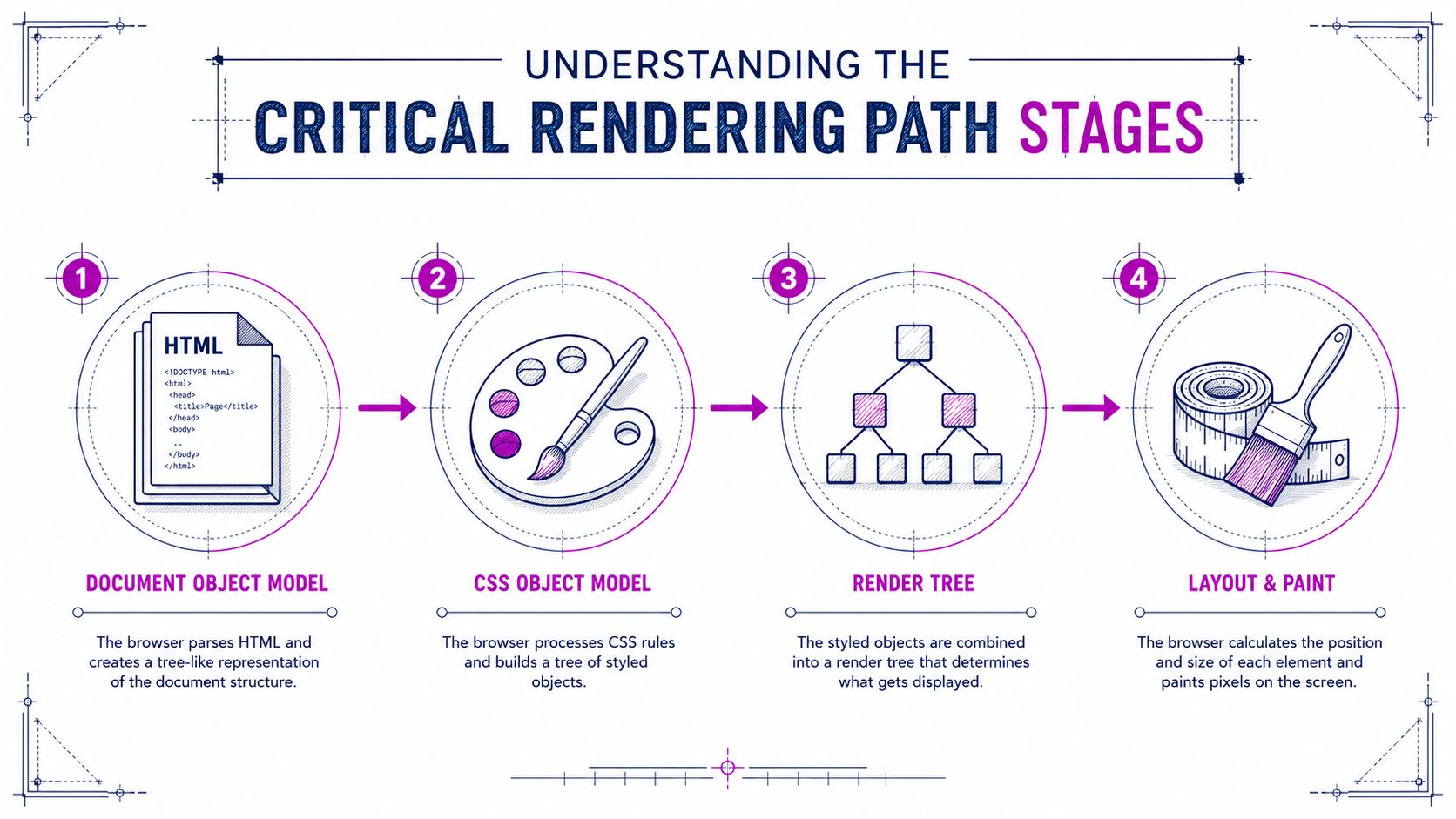
The browser works like a build crew under pressure. HTML gives it the structure. CSS defines the finish work and layout rules. JavaScript can pause the job if it needs to run before the page can keep moving. The critical rendering path is the sequence that decides how quickly the first useful screen reaches a shopper.
The browser has to build the structure before it can paint it
The browser starts by parsing HTML into the DOM, which is the document structure. It then parses CSS into the CSSOM, which is the style structure. Those two are combined into a render tree, and only then can layout calculate sizes and positions before paint fills in the pixels (web.dev's critical path lesson).
That order matters because each stage depends on the one before it. If CSS is still loading, the browser cannot decide with confidence how a button should look or where a product title should sit. If JavaScript blocks parsing, the browser cannot finish building the structure it needs to style.
A house analogy that helps
HTML works like the blueprint, the DOM is the framed house. CSS is the finish schedule, and the CSSOM is the instruction set that says what gets painted, what gets hidden, and how much space each room gets. The render tree is the version the crew works from after hidden or irrelevant pieces are removed.
Layout is the measuring tape. Paint is the final coat. Compositing is the cleanup crew combining layers into the image the shopper sees.
The browser does not care that the design looks simple in Figma. It cares about what it must wait for before it can show the first useful pixels.
Why render-blocking resources matter most
The issue is not that a page uses HTML, CSS, and JavaScript. Every modern store does. The problem starts when those assets arrive in the wrong order or force the browser to stop and wait. Google's CRP guidance frames this through critical resources, critical path length, and critical bytes, because every extra blocker adds more round trips before the first visible paint (web.dev CRP analysis).
For Shopify teams, the practical rule is straightforward. If a resource does not help the first screen render, it should not be allowed to delay the first screen. That applies when reviewing apps, custom scripts, and theme changes, especially on storefronts that rely on personalization tools, reviews, heatmaps, subscriptions, popups, and analytics tags.
Measuring Critical Rendering Path Performance
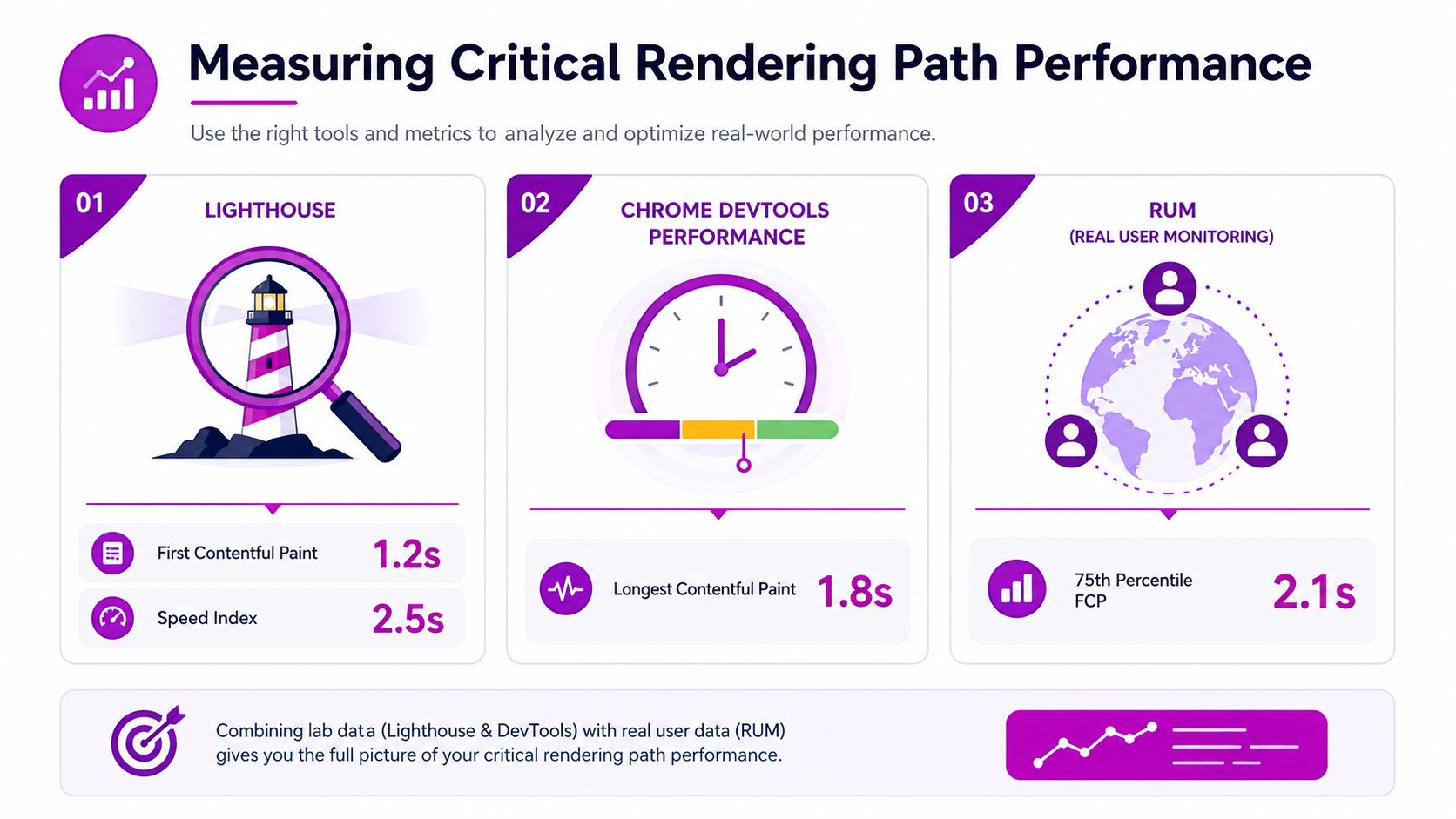
Bad performance hides in plain sight unless you look at the browser with the right tools. Lighthouse gives you a lab view, Chrome DevTools shows the execution trace, and RUM tells you what actual shoppers felt. The useful part is not the score itself, but the shape of the delay.
Start with the metric that matches the symptom
The critical rendering path connects directly to First Contentful Paint (FCP), because FCP marks the moment the browser first shows something useful on screen (web.dev CRP analysis). If the page feels slow to open, FCP is usually the first place to look. If the largest visible element comes in late, then the issue has moved deeper into the path and into the loading strategy for the hero content.
Chrome DevTools is better when you need to see the order of events. The Performance tab shows long tasks, render blocking, and whether layout or script execution is chewing up the main thread. Lighthouse is useful for repeatable audits, especially when you want a before-and-after comparison on the same template. For a practical walk-through of measurement workflows, this guide from ECORN's team on how to measure website performance is a solid reference.
Use field data to avoid chasing false wins
Lab tests are clean. Real shoppers are not. A store can look decent in Lighthouse and still feel slow in the field because apps, geographies, devices, and cache state all change the outcome. That's why RUM matters.
RUM helps you see whether an optimization improved the experience for actual visitors instead of a controlled test. If only the desktop lab score improved, but mobile shoppers still wait, the work wasn't really done.
Read the trace like a merchant, not a developer
You don't need to memorize every browser event. You do need to know what to ask for.
- Look for blocked rendering: If CSS or synchronous scripts delay the first paint, the browser trace will show a gap before visible content appears.
- Check the first meaningful output: If the header appears but the hero and product content lag, the issue is usually a sequencing problem.
- Compare template types: Home pages, product pages, and collection pages often behave differently, so don't assume one fix covers the whole store.
A good Shopify performance review doesn't stop at the score. It ties browser behavior back to the exact template and script that caused the delay.
High-Impact Critical Rendering Path Optimizations

The fastest wins usually come from reducing what the browser has to wait for, not from trying to make everything “faster” at once. On Shopify, that means tightening CSS delivery, deferring scripts that don't help the first screen, and making sure the browser discovers the right assets early.
Critical CSS earns its place first
Critical CSS extraction and inlining is usually the highest-value move because it lets the browser paint above-the-fold content without waiting for the full stylesheet. That doesn't mean inline every style in the theme. It means identifying the rules needed for the first visible area, then serving the rest later.
Many stores overcorrect. They inline too much CSS, bloat the document head, and create a maintenance headache. Keep the inlined set small, stable, and tied to the templates that need it.
Script order matters more than script count
JavaScript is the other major blocker. Classic scripts stop parsing by default, while async and defer change that behavior in different ways (browser rendering guide). Use defer for scripts that need the DOM but not the first paint. Use async only when execution order doesn't matter and the script can run independently.
Fonts deserve the same discipline. If a custom font is part of the brand, load it in a way that avoids blocking the first render or causing layout shift later. The point is not to remove branding. It's to stop typography from becoming a launch bottleneck.
Prioritize by architectural fit, not by checklist purity
Some optimizations fit every store. Others only help when the page architecture matches the tactic. Strategic use of preload can help late-discovered critical assets, but excessive preloading can compete with more important requests and reduce effectiveness, which is exactly the kind of trade-off teams miss when they copy a generic checklist (MDN's CRP guidance).
A useful order of operations looks like this:
- Inline only the critical CSS.
- Move non-essential JavaScript to defer or async.
- Preload only assets that block the first useful render.
- Clean up font delivery and reserve layout space.
That sequence usually gives better results than chasing every possible micro-optimization at once.
Keep the first screen lean
The first screen doesn't need every app, badge, popup, or recommendation engine firing immediately. It needs enough code to show the offer, establish trust, and let the buyer move forward. Everything else can wait until the page has painted and stabilized.
When Critical Rendering Path Optimizations Backfire
Not every optimization helps just because it sounds technical. On an eCommerce site, the fastest path to a clean audit can still create a worse buying experience if it breaks app timing, delays personalization, or bloats the head with too many preload hints.
Too many priorities can create a new bottleneck
The browser only has so much attention to give at the start of a page load. If you preload too many assets, you're telling it that everything is urgent, which weakens the value of the hint. That matters on Shopify because merchants often add fonts, hero media, and app assets all at once, then expect the browser to sort it out.
Request chains are another common trap. A script loads another script, which loads a stylesheet, which loads a third-party widget. Even if each individual file looks small, the chain stretches the critical path and pushes first render later. MDN's CRP guidance specifically calls out that too many preloads can reduce effectiveness and that request chains plus blocking scripts can outweigh the benefit of standard tactics (MDN's CRP guide).
Personalization and framework rendering change the math
Modern storefronts often rely on personalization engines, A/B testing, reviews, and framework-driven rendering. Those features can be useful, but they also change what “critical” means. A client-rendered section that feels elegant in development can inflate the path in production if the browser has to download too much JavaScript before it can show anything useful.
That's why the question isn't “Should we use CRP optimizations?” The question is whether a specific optimization improves the actual shopping session. If a delayed script stops the page from painting early but also delays a revenue-driving widget, the trade-off needs to be measured, not guessed.
If the optimization only looks good in a waterfall, it's probably not finished.
Decide with the business outcome in mind
The best filter is simple. Ask whether the change improves the experience of a real product page, not just the technical shape of the load. If an app affects trust, pricing, or checkout readiness, it may deserve more priority. If it only adds visual polish after the shopper already understands the offer, it can probably wait.
On Shopify, teams often get stuck. They optimize the head, but the architecture underneath still forces the browser to resolve too much before the page feels alive. Fixing that means accepting trade-offs, not blindly following a template checklist.
Shopify-Specific Implementation Strategies
Shopify gives you real control over the storefront, but not all of it sits in the same layer. Some wins live in Liquid and theme structure. Others sit in app governance. A few require a developer who understands how your theme, CDN, and scripts interact.
Clean up the theme first
Start in the theme files. Keep critical markup high in the document, keep CSS organized so above-the-fold rules are easy to isolate, and avoid dumping everything into one massive asset bundle. Shopify's own page-speed guidance covers the broader theme optimization mindset in Shopify page speed optimization, and that's where theme structure usually becomes visible.
A simple pattern helps:
<link rel="preconnect" href="https://fonts.gstatic.com" crossorigin><link rel="preload" href="{{ 'critical.css' | asset_url }}" as="style"><script src="{{ 'theme.js' | asset_url }}" defer></script>That isn't a magic recipe. It's a reminder that the browser should discover important resources early and wait on non-essential execution later.
Audit apps like they're production code
Every app script deserves a reason to exist on the first screen. Review widgets, chat tools, and upsell apps often don't need to initialize before the shopper can see the product. Load them after the page is visible, or only on templates where they are used.
A practical audit usually finds one of three things:
- The app is necessary, but too early. Move it later.
- The app duplicates native Shopify capability. Replace it.
- The app is harmless alone, but costly in combination. Remove the overlap.
That last case is common. One script rarely sinks the page. Six medium scripts do.
Use Shopify-native choices where possible
Shopify's own stack can reduce the need for extra third-party work. Native features often cut down on the number of external requests, which keeps the critical path narrower. The point is not ideological purity. It's reducing the surface area the browser has to process before the first render.
If you're on Shopify Plus, this becomes more important because enterprise stores tend to accumulate more scripts, more customization, and more approval layers. That's where a specialist team can separate the scripts that matter from the scripts that just look important.
Your Critical Rendering Path Optimization Checklist
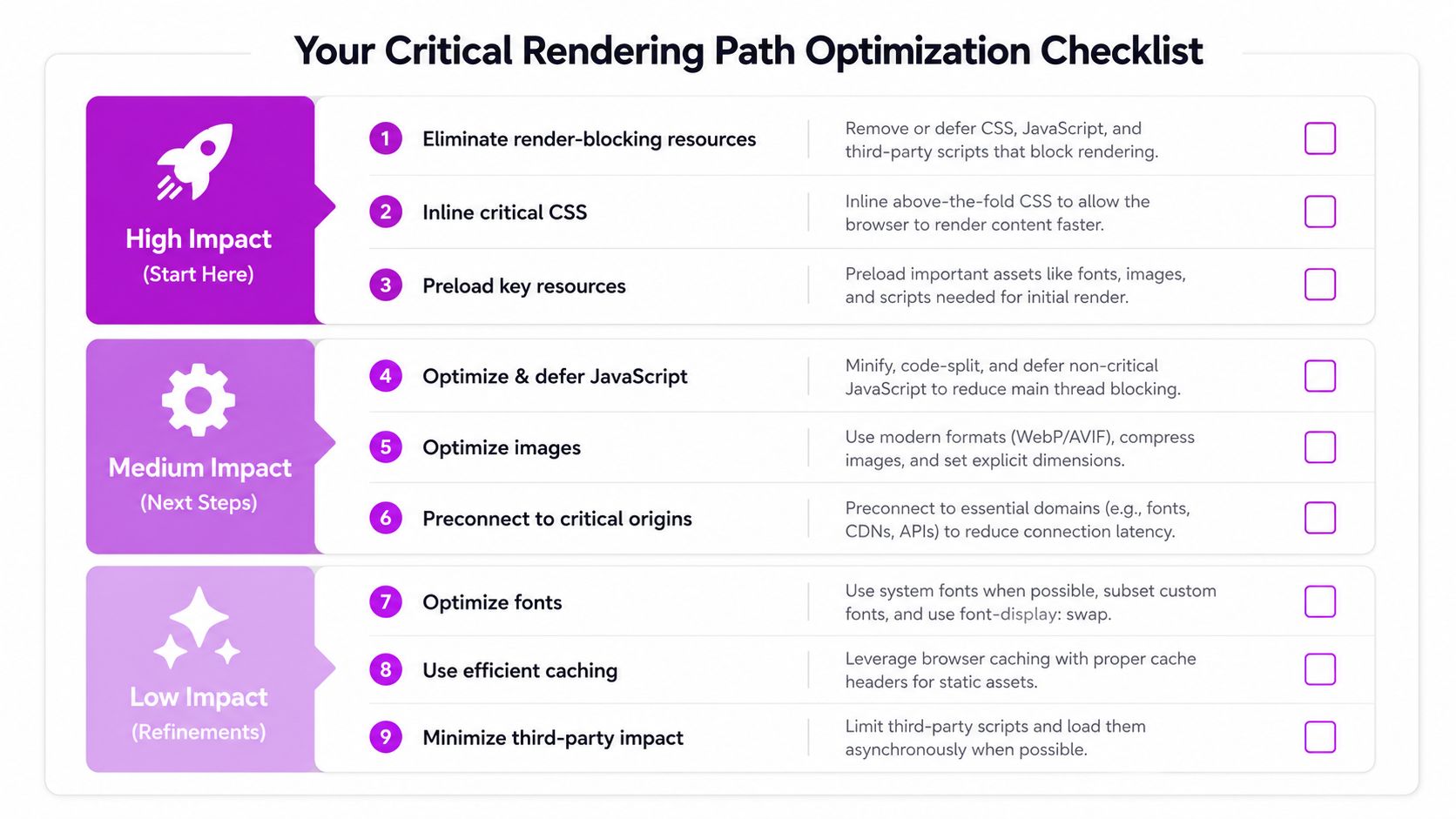
Start with the parts of the page that delay the first visible render, not the parts that make the dashboard look busy. If you need a clean order of attack, use this:
- High Impact, Start Here: inline only the critical CSS, defer non-essential JavaScript, and remove app scripts that don't help the first screen.
- Medium Impact, Next Steps: tighten preload usage, reserve space for media and fonts, and reduce request chains in the head.
- Low Impact, Refinements: polish font loading, trim template-specific code, and review edge-case widgets that only affect a small part of the funnel.
A Shopify store that treats speed like a revenue lever usually sees the biggest wins from fewer blockers, better ordering, and less script clutter. In practice, the cleanest improvements come when the team measures before and after with the same template and checks whether the page feels faster to a real shopper, not just to Lighthouse.
If the critical path still looks crowded after those changes, the site probably needs a deeper architectural review. That's the point where a seasoned Shopify developer can separate theme issues, app overhead, and rendering strategy without guessing.
If you want a Shopify build that treats the critical rendering path as a revenue problem, not just a technical one, ECORN can help audit the store, trim the blocking work, and prioritize the fixes that improve how product pages feel. Their Shopify team works across design, development, and CRO, so the cleanup doesn't stop at a prettier waterfall. It turns into a faster storefront your shoppers can feel the moment they land.



Shopify Plus Expansion Stores: Limits and Setup
Shopify Theme Update: Safe Steps, Backups and Rollback

Shopify Website Design Packages: What You Actually Get

How to Choose a Shopify Plus Web Design Agency in 2026
Shopify Plus Ecommerce Agency: How to Pick the Right One

Shopify Themes Retina: How to Serve 2x Images

How to Cross Sell on Shopify Without Friction

Best Shopify Theme for Custom Products Compared
Multi Store Inventory Management: A Practical Guide

SEO Consulting for Ecommerce: A Practical Guide

Shopify Theme Updater App: A Safe Update Playbook

Shopify Git Integration: A Developer's Guide to 2026
Headless Ecommerce Development Services Explained

How to Build a Shopify Clothing Website That Converts

How to Launch a Box Subscription Business in 2026

Luxury Skincare Branding Playbook That Converters
10 Best Podcast Ecommerce Shows for Store Growth in 2026
Shopify Developer Hourly Rate: What to Pay in 2026

Critical Shopify Setup Errors That Are Secretly Sabotaging Your Store

Ecommerce Conversion Tracking: The Complete How-To Guide

Shopify Design Agency: How to Pick the Right Partner

Mastering Multi Store Management on Shopify

Scale Shopify Store

10 Shopify App Ideas Worth Building in 2026

Conversion Rate Optimization for Landing Pages: The Playbook

Shopify Plus Automation: A Guide for 2026

10 Social Selling Platforms for Shopify Merchants

Shopify Website Design Examples: 7 Stores Worth Studying

7 Ecommerce Newsletter Examples for Shopify Brands

One Product Shopify Store: Build and Scale

Mobile Pop Up Strategy for Shopify Stores That Converts

Sitemap for Shopify: How to Find, Optimize, and Submit It

7 Single Product Websites Worth Emulating

Product Variants Shopify: The Complete 2026 Guide

Ecommerce Analytics Consulting for Growth

What Is AI Integration for eCommerce

How to Choose the Right eCommerce Website Development Firm

E Business Strategy Implementation

Conversion Tracking Setup for Shopify Stores

BigCommerce vs Shopify Plus Which Enterprise Wins in 2026

Shopify Theme Kit: Setup, Commands, and Migration Guide

Shopify Extension Development: A Practical 2026 Guide

Shopify Speed Score Explained and How to Improve It

Shopify Mobile Optimization: The 2026 Playbook

How to Add Subcategory in Shopify for Better UX

How to Implement Structured Data for Ecommerce in 2026

SEO App Mobile: Shopify Store Optimization Guide

Shopify Plus Support: What It Includes and How to Choose

Google Ads for Shopify: The Complete 2026 Playbook

Shopify New York: How to Find and Hire the Right Agency

Google Search Console for Shopify: The Complete Setup

First Party Data Collection for eCommerce Growth

FAQ Online Store Guide: Build and Measure It Right

Do FB Ads Work for eCommerce in 2026?

One Page Checkout for Shopify: Design and Implementation

Shopify GraphQL vs REST: The 2026 Developer Decision

Shopify Ecommerce Consulting: Strategy, Pricing &

Are Reddit Ads Worth It for eCommerce Brands

Shopify Title and Meta Description: A Practical 2026 Guide

Product Video Best Practices for Shopify Brands

Real-Time Inventory Management: A 2026 Guide

AI Chatbot Integration for Shopify Stores

Affiliate Program Management: A Shopify Guide

10 Best Performance Monitoring Tools for Shopify in 2026

Digital Asset Management for eCommerce Brands in 2026

Every Type of Facebook Ads Explained for eCommerce Growth

Product Information Management Explained for Shopify Brands

Support Ticket System: A Guide for Shopify Stores

10 Best Customer Service Tools for Shopify in 2026

Can I Start a Business with No Money? a 2026 Blueprint

What Sells Good on Etsy: Best Niches for 2026

Shopify Add to Cart Button: A Practical 2026 Guide

Customer Feedback Automation: A Practical eCommerce Guide

How to Promote on TikTok for eCommerce in 2026

B2B eCommerce Consulting That Drives Real Revenue

10 Best Practices for Site Navigation in 2026

Return vs Refund for Shopify Stores: A Practical Guide

What Is Customer Lifetime Value and Why It Matters

What Is Voice of Customer Research for eCommerce

SMS Marketing for Ecommerce That Actually Converts

Master How to Improve Email Deliverability in 2026

Top 8 eCommerce Partners NYC for Shopify Brands in 2026

Machine Learning for Ecommerce: Boost Your Shopify Store

Beauty Market Research: Your 2026 Growth Guide

Shopify International Expansion: A 2026 Roadmap

What Does CRO Stand for in Business: Understanding CRO

Shopify Visual Merchandising: A Playbook for Higher Sales

Shopify Landing Page Design: Master Conversion in 2026

10 Best AI SEO Optimization Tools for Shopify in 2026

Agentic AI for Ecommerce: Boost Your Sales in 2026
Mastering Email Marketing Data for eCommerce Growth

Conversion Rate Optimisation Australia: Boost Your Sales

Conversion Rate Optimization AI: Your Shopify Store Guide

10 Product Bundling Strategies for Shopify in 2026

How to Increase Customer Lifetime Value: A Shopify Playbook

AI Customer Service Automation: Shopify Guide 2026

Clean Website Design: A Shopify Conversion Playbook

Omnichannel Retail Strategy: A Shopify Playbook

Product Data Enrichment: A Guide for Shopify Brands

Instagram Shopping Features a Guide for Shopify Stores


newsletter in your inbox