


Your Shopify store probably didn't become messy overnight. It happened in layers. First came a few apps that solved real problems fast. Then a spreadsheet to reconcile inventory. Then a workaround for order edits. Then someone on the team started checking three systems every morning just to answer a simple question like, “Can we ship this today?”
That's the point where most merchants stop needing more apps and start needing a system.
Shopify is flexible enough to support both stages. Early on, ad hoc tools are often fine. But as order volume, channels, and teams expand, disconnected software stops being a growth enabler and starts acting like a tax on operations. Good Shopify integration services don't just connect tools. They turn scattered workflows into a reliable operating model that can scale without adding chaos every quarter.
When Manual Workflows Start Breaking Your Growth
A familiar pattern shows up in growing stores. Sales are healthy. Marketing is working. New channels are opening up. But operations are held together by people copying data from one screen to another.
Orders flow into Shopify, but the ERP doesn't have the latest line-item detail. Inventory is “close enough” in one system and wrong in another. Customer support can see the order, but not the fulfillment exception behind it. Finance gets the right answer eventually, after someone exports CSVs and cleans them by hand.

The scaling wall doesn't look technical at first
Most merchants don't say, “We need an integration architecture.” They say things like:
- Inventory keeps drifting: A product shows available in Shopify even though the warehouse system says otherwise.
- Orders need manual rescue: Staff have to fix tax, shipping, bundle, or status issues one by one.
- Reporting takes too long: Teams spend more time assembling numbers than acting on them.
- Apps overlap: Two different tools try to own the same data and create conflicting updates.
These are integration problems disguised as operations problems.
Shopify's footprint explains why this pressure shows up so often. In 2025, Shopify generated $378 billion in gross merchandise volume, merchants produced $14.6 billion in sales during the 2025 Black Friday-Cyber Monday weekend, that weekend result was a 27% year-over-year increase, and more than 81 million consumers shopped with Shopify merchants worldwide. Shopify also reported $11.6 billion in revenue in 2025, roughly 30% growth, according to this roundup of Shopify statistics. At that scale, integration services stop being a nice-to-have and become part of normal commerce operations.
Ad hoc fixes stop working
A quick app install can solve one local issue. It rarely solves the broader flow of data across commerce, fulfillment, finance, and customer service. That's why merchants doing meaningful volume often move from reactive tool selection to deliberate workflow design.
Practical rule: If your team is acting as middleware between Shopify and other platforms, your current setup has already outgrown itself.
If you're sorting through that transition, it helps to study examples of workflow design built for heavier order flow. SelfServe's guide for high-volume Shopify automation is useful because it frames automation around operational load, not just app features.
This shift is mental. You're no longer buying isolated software fixes. You're deciding how orders, inventory, customer records, returns, and attribution should move through the business without constant human repair.
What Are Shopify Integration Services Exactly
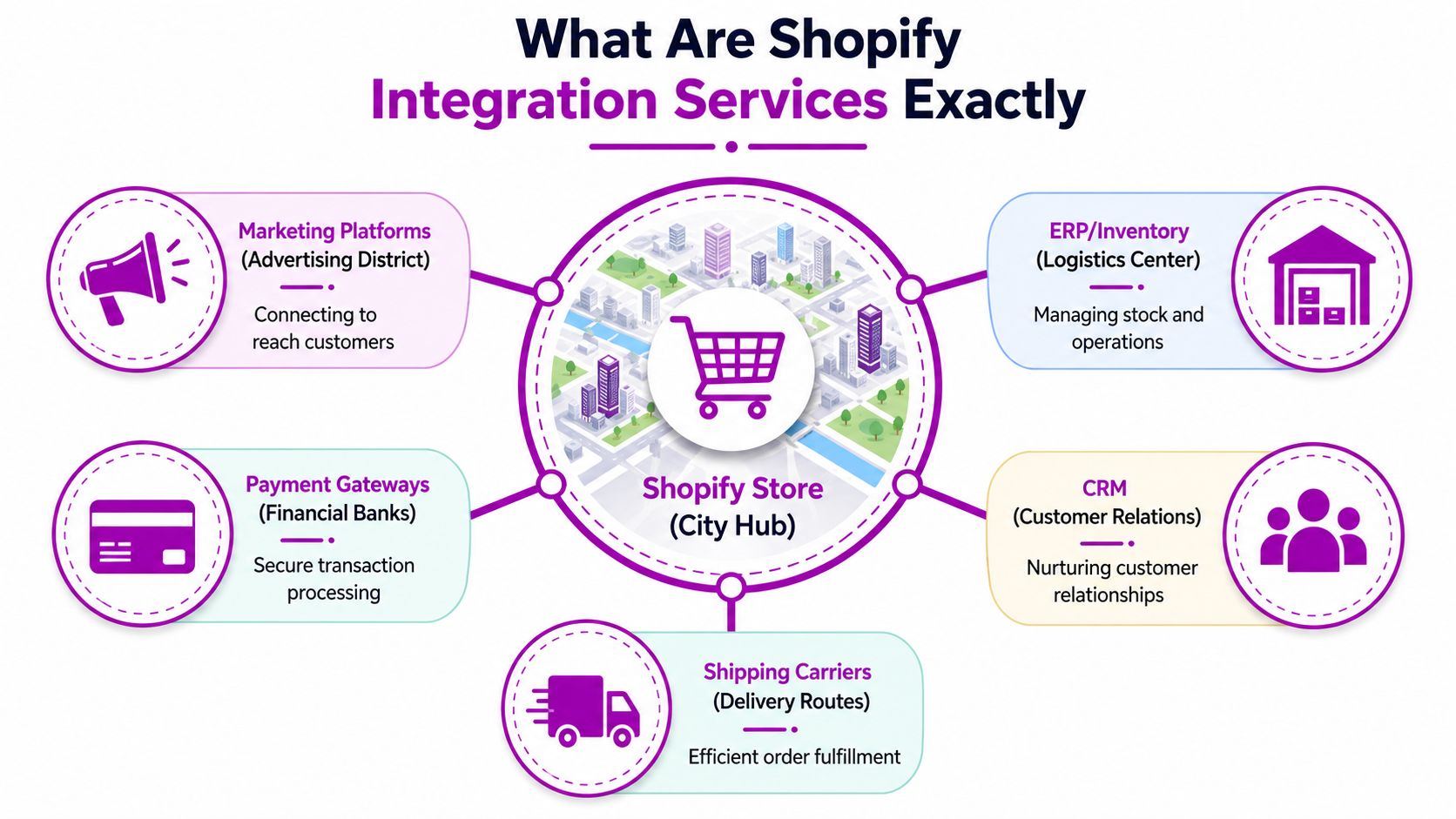
Shopify integration services are the planning, implementation, testing, and maintenance work that connects Shopify to the rest of your business systems. That can include your ERP, CRM, 3PL, payment tools, analytics stack, marketplaces, subscription platform, returns software, or attribution tools.
Think of Shopify as the city center. It's where customers arrive, browse, and buy. But the city can't function if the roads out of downtown are poorly built. Inventory needs a clean route to the warehouse. Customer data needs a route to CRM. Financial records need a route to accounting or ERP. Marketing events need a route to reporting tools that can effectively use them.
An app install is not the same as an integration strategy
This distinction matters. Installing an app from the Shopify App Store is often just the starting point. A real integration service asks harder questions:
- What system owns inventory truth
- Which statuses should sync and when
- What happens when data is missing or invalid
- How should returns, edits, cancellations, and partial fulfillments behave
- Who receives alerts when something fails
Without those decisions, you don't have an effective integration. You have a connection with untested assumptions.
Three common ways to connect Shopify
Most projects fall into one of these models.
Pre-built connectors
These are packaged integrations between Shopify and another platform. They're often the fastest route when your process is close to standard.
They work well when:
- Your workflows are straightforward: Basic order sync, product sync, or shipment updates.
- Your team needs speed: You want to reduce manual work quickly.
- The target systems are widely supported: Common ERP, CRM, and shipping platforms often have established connectors.
They struggle when your business rules are unusual. Bundles, custom fulfillment logic, multi-entity finance structures, or complex B2B requirements often push packaged connectors beyond their comfort zone.
A quick explainer is helpful before choosing a model:
Middleware
Middleware sits between Shopify and other systems, acting like a traffic controller. It can transform data, route events, manage retries, and apply business rules before anything reaches the destination system.
This is often the practical middle ground. You get more flexibility than a simple app connector without hard-wiring every point-to-point connection yourself.
Middleware becomes useful when the question changes from “Can these systems connect?” to “How should this business process behave when reality gets messy?”
Direct API-to-API integrations
This is the most customized approach. Developers connect Shopify directly to another platform's API and build around your exact process requirements.
It gives you control. It also gives you responsibility. Every rule, edge case, monitoring path, and maintenance burden sits with the implementation team. For mature merchants with unusual workflows, that can be worth it. For merchants still changing core processes every quarter, it can be more rigidity than they need.
What good integration services actually include
A solid engagement usually covers more than code.
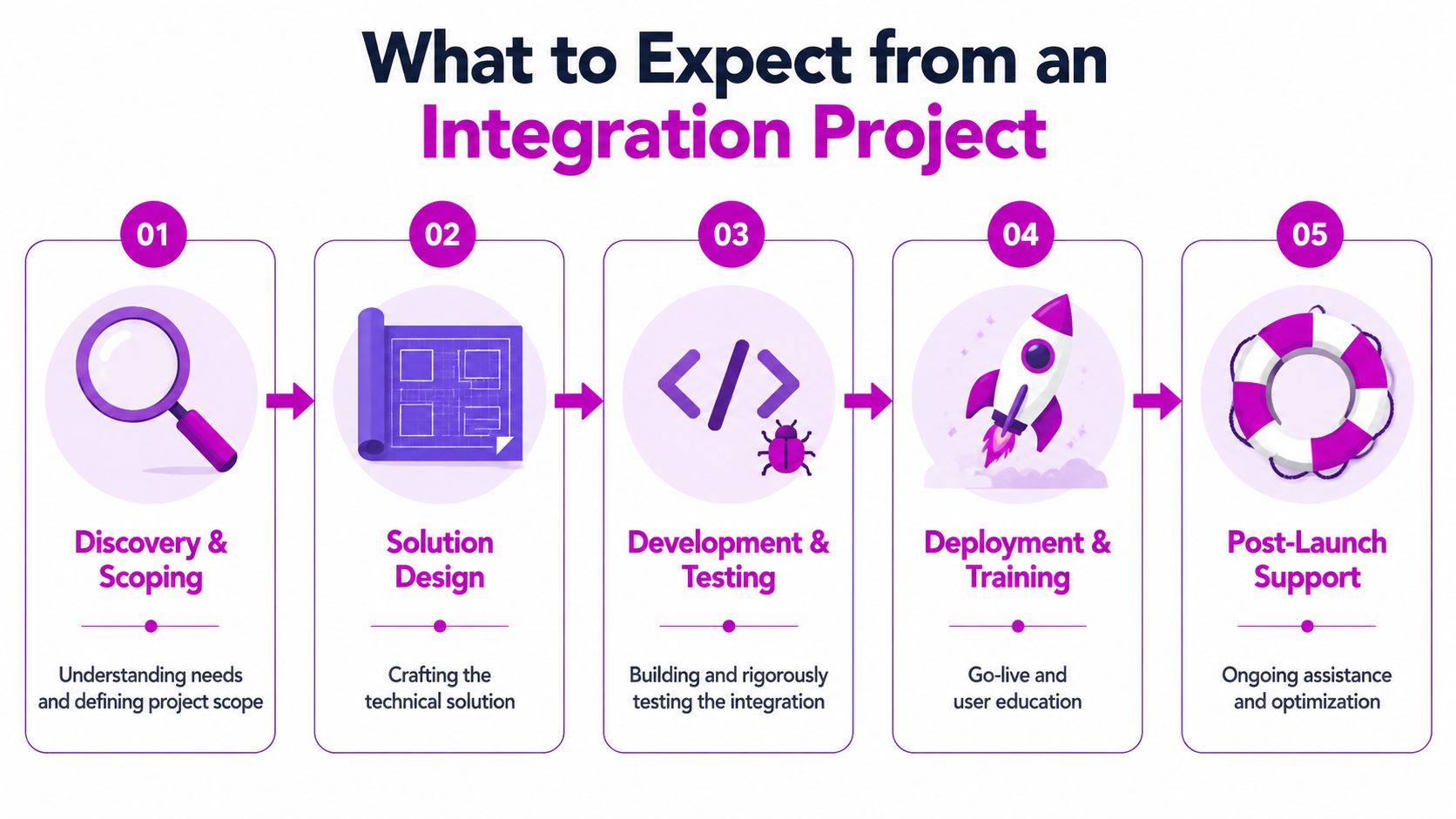
- Discovery: mapping systems, fields, dependencies, and failure points
- Solution design: deciding source-of-truth rules and sync behavior
- Implementation: configuring connectors, middleware, or APIs
- Testing: validating normal flows and ugly edge cases
- Support: monitoring, exception handling, and ongoing refinement
That's why the shift from ad hoc apps to a strategic stack matters. You're not just adding tools. You're deciding how the business should run when Shopify is one important system among many.
Essential Shopify Integrations Your Business Will Need
The right integration stack depends on what stage your store is in. A merchant doing straightforward direct-to-consumer fulfillment doesn't need the same setup as a brand managing retail, marketplaces, wholesale, subscriptions, and multiple warehouses. Still, a few categories show up again and again because they solve repeat problems in scaling operations.
ERP and inventory synchronization
Many serious integration projects begin when orders and stock levels affect multiple teams. In such scenarios, Shopify can't operate as an isolated storefront.
For ERP-grade Shopify integration services, the key pattern is bi-directional synchronization so inventory, orders, and customer records stay aligned across Shopify and the ERP. Fisher Technology explicitly describes the need to sync data both ways and recommends defining the exact fields and business rules moving in each direction before go-live, because weak inventory data and unclear ownership often cause failures. Their guidance is worth reading in full if ERP is on your roadmap through their article on Shopify and ERP integration planning.
That matters because ERP integrations don't forgive vague thinking. If one system treats available inventory differently from another, the sync will spread bad data faster than a person ever could.
What this integration should settle
- System ownership: Which platform owns stock quantity, pricing logic, customer master data, and order state.
- Exception handling: What happens when a SKU is missing, an address fails validation, or a partial shipment occurs.
- Operational accountability: Which team resolves breaks when the systems disagree.
CRM and marketing automation
A CRM integration gives your team a usable customer record instead of a scattered one. Shopify knows what people bought. Your email and lifecycle tools know what they clicked, what they ignored, and what segment they belong to. Without integration, those views remain incomplete.
The practical value is better orchestration. Support sees context. Retention teams build cleaner audiences. Lifecycle automation can react to real order and customer behavior instead of stale exports.
This is also where merchants learn that “installed” doesn't mean “implemented.” If the wrong events sync, or customer profiles duplicate across systems, campaigns become less trustworthy even though the integration technically exists.
Shipping, 3PL, and fulfillment platforms
This category matters as soon as fulfillment gets more complex than printing labels from a single location. Once you add multiple warehouses, third-party logistics providers, preorder rules, or split shipments, the storefront needs a cleaner relationship with operational systems.
A mature shipping integration usually handles:
- Order release logic: When an order is ready for fulfillment and when it should wait.
- Tracking data return: Shipment status needs to flow back to Shopify and customer comms tools.
- Status clarity: Fulfilled, partially fulfilled, held, canceled, and returned should mean the same thing across the stack.
If those states drift, customer service inherits the mess.
Marketplaces and channel expansion
Selling beyond Shopify creates a new class of integration issue. Catalog data, availability, pricing, fulfillment promises, and order routing all need to stay aligned across channels.
Amazon is a common inflection point because it increases order opportunity while also introducing stricter operational discipline. If that's your next step, this guide on how to connect Shopify to Amazon is a useful reference for thinking through catalog and channel sync requirements before you start plugging tools together.
Analytics, attribution, and decision systems
Analytics integrations aren't glamorous, but they're often where executive trust is won or lost. Leaders need a dependable answer to basic questions. Which products are driving profit. Which channels acquire repeat buyers. Which operational bottlenecks are eroding margin.
The mistake here is treating reporting as an afterthought. A strategic stack sends clean event and order data to the places where people make decisions. If product, finance, paid media, and CX each use a different version of reality, the business will move slower no matter how polished the storefront looks.
The strongest integration stack doesn't try to connect everything at once. It stabilizes the flows that create the most operational friction first, then expands in phases.
What to Expect from an Integration Project
Many merchants approach integration projects with two bad assumptions. First, they think the technical build is the whole project. Second, they assume go-live is the finish line.
In practice, the work is closer to renovating a busy warehouse than installing a new light fixture. You're changing how information moves through a live business while orders continue to come in every day.
Discovery is where strong projects are won
The first phase should focus on process, not code. A competent team will ask how orders move now, where people intervene manually, which fields matter, and what failures the business can tolerate.
That sounds basic, but it's where expensive mistakes are prevented. If nobody identifies the true source of pricing, tax, fulfillment hold logic, or inventory availability early, the technical solution will look polished while breaking the business in subtle ways.
A useful discovery process usually produces:
- System maps: Which platforms exchange data and in what direction.
- Field-level requirements: What needs to sync, what doesn't, and how each value should be interpreted.
- Failure scenarios: Cancellations, edits, duplicates, missing SKUs, fulfillment exceptions, and refund edge cases.
Build and testing are more business-heavy than most teams expect
Development matters, but testing is where reality catches up. Good testing doesn't stop at “order created successfully.” It checks the weird cases that operations teams deal with every week.
That includes edited orders, partial fulfillments, out-of-stock items, delayed shipments, refund flows, customer merges, and promotions that affect downstream systems. User acceptance testing should involve the people who run support, fulfillment, finance, and merchandising, not just technical stakeholders.
A clean demo proves the integration can work. A messy UAT proves it can survive real operations.
Go-live should be controlled, not dramatic
The best launches feel almost boring. Teams know what's changing, what fallback process exists, who watches logs or alerts, and how exceptions are escalated.
Post-launch support matters because no merchant environment stands still. New apps get added. Product structures change. Operations teams revise workflows. Promotions introduce special rules. That's one reason some brands prefer a retained or subscription-style model over a one-and-done project fee.
A fixed-bid project can make sense when scope is tight and the process is stable. A subscription model fits better when integrations need continuous tuning, support, and staged rollout across multiple systems. Agencies such as ECORN structure Shopify work around flexible subscription packages, which can align well for merchants who want ongoing iteration rather than treating integrations as isolated builds.
How to Measure the ROI of Your Integrations
If an integration only gets judged on whether data moved from one system to another, you're measuring the wrong thing. Technical completion is necessary. It's not enough.
The question is whether the integration reduced operational drag, improved decision quality, or protected revenue that was leaking through errors and delays. In a Shopify ecosystem this large, even small workflow improvements can matter. Independent reporting places the Shopify App Store at 11,905 apps as of late 2024, estimates that about 87% of Shopify merchants use apps, puts Shopify at roughly 4.8 million websites worldwide, notes merchants processed an average of 199 million orders per month in 2023, and states Shopify surpassed $1 trillion in cumulative GMV in 2024 while 2024 annual GMV reached $292.3 billion, according to this overview of Shopify ecosystem statistics.
Start with business friction, not platform outputs
A better ROI model tracks what the business was paying before the integration. That usually shows up in labor, error handling, delayed reporting, missed marketing signals, and customer service overhead.
Simple ROI formula
(Value gained - Cost) / Cost
The formula is simple. The discipline is in defining “value gained” accurately.
The most useful KPIs are operational
Look for measures that leaders care about:
- Manual hours removed: Count recurring admin work that disappears or shrinks after launch.
- Error reduction: Track fewer fulfillment mistakes, fewer order reconciliation issues, or fewer inventory disputes.
- Speed improvements: Measure how much faster teams can close books, release orders, or answer support tickets.
- Data trust: Ask whether teams still maintain shadow spreadsheets because they don't trust system outputs.
Some returns are indirect but still real. For example, cleaner customer data improves segmentation, which can make retention campaigns more relevant. Better email operations also depend on the messages being technically deliverable. If your CRM integration is working but inbox placement is weak, this practical guide on how to improve Gmail deliverability is a worthwhile companion resource for lifecycle teams.
Measure before and after, then keep measuring
The common mistake is taking one snapshot after go-live and calling that proof. Integration ROI is stronger when tracked over time because operations stabilize, teams change habits, and later improvements build on the original work.
Use a baseline period before launch. Then compare the same operational measures after the system has settled. Don't just ask whether the integration works. Ask whether the business runs with less friction because of it.
An Evaluation Checklist for Choosing an Integration Partner
A good integration partner doesn't just know Shopify. They know how commerce operations break when systems disagree. That's an important distinction.
You're not hiring someone to connect two APIs in a vacuum. You're hiring them to translate business rules into stable workflows, handle edge cases without drama, and keep teams aligned when the process gets complicated.
Look for depth in process design
Marketing and attribution work shows why partner quality matters. Everflow's Shopify integration guidance shows that reliable attribution often depends on precise event-level tracking, a tracking domain, and either Direct Linking or a transaction-ID parameter appended to the landing page URL so attribution survives through purchase flow. It also recommends verifying test orders in reporting after setup. That's a useful reminder from Everflow's Shopify integration documentation: real implementation quality is about preserving identifiers and validating outcomes, not just turning on a tag.
That same principle carries across ERP, CRM, fulfillment, and analytics integrations. Surface-level setup isn't enough.
Use this checklist in partner conversations
| Evaluation Criteria | Key Questions to Ask | Why It Matters for Success |
|---|---|---|
| Technical fit | How do you decide between apps, middleware, and custom API work? | You want a partner that matches architecture to business needs, not one that forces every problem into their preferred toolset. |
| Shopify operational knowledge | How do you handle order edits, partial fulfillments, returns, bundle logic, and multi-system status conflicts? | Most integration failures happen in edge cases, not in the happy path demo. |
| Source-of-truth thinking | Which system should own inventory, customer data, pricing, and order status in our setup? | If ownership is unclear, sync logic becomes unreliable and teams lose trust quickly. |
| Testing discipline | Who participates in UAT and what scenarios do you test before launch? | Operations, support, fulfillment, and finance often catch issues that developers won't see on their own. |
| Exception handling | What happens when data is missing, delayed, duplicated, or invalid? | Stable integrations assume failure will happen and define how it gets contained. |
| Monitoring and support | How do you surface sync failures and what post-launch support do you provide? | Go-live isn't the end. Merchants need an operating plan for maintenance and change. |
| Communication style | How do you document decisions, dependencies, and unresolved risks? | Clear communication prevents scope confusion and helps internal teams stay aligned. |
| Commercial model | Do you only work on fixed projects, or can you support phased rollout and ongoing optimization? | Growing brands often need evolution, not a single static project. |
Questions that reveal experience fast
In live conversations, a few questions tend to separate experienced teams from presentation-heavy ones.
- Ask for a failure scenario: “Tell me about a sync conflict you had to resolve and how you handled it.”
- Ask how they define completion: If they only talk about deployment, that's a warning sign.
- Ask who owns support after launch: Somebody should be accountable when business rules change or a connected system updates.
- Ask how they document field mappings and rules: If that answer is vague, handoff quality probably will be too.
If you're comparing service options, ECORN's integrations service overview is one example of how an agency frames integration work alongside broader Shopify development support. The important thing isn't the agency name. It's whether the partner can think in systems, not just installs.
Strong partners don't hide complexity. They organize it so your team can operate through it.
Scale Your Store with an Expert Integration Strategy
The move from ad hoc apps to a strategic stack is really a maturity shift. Early-stage stores optimize for speed. Scaling stores need speed plus reliability. That changes how you choose tools, how you scope projects, and how you decide what gets connected first.
Merchants usually get the most traction by taking three practical steps.
Audit where operations still depend on people
List the workflows that require copy-paste work, spreadsheet reconciliation, manual status checks, or daily exception handling. Those aren't just annoyances. They're signs that your systems aren't carrying their share of the work.
Prioritize integrations by business impact
Don't start with the most interesting technical project. Start with the flow that causes the most friction or risk. For one brand, that's inventory accuracy. For another, it's ERP sync. For another, it's customer data flowing cleanly into lifecycle marketing and support tools.
Build a phased roadmap
Trying to modernize everything at once usually creates too much change for one team to absorb. A phased roadmap works better. Stabilize the core operational flows first. Then expand into attribution, analytics, channel sync, and more advanced automation once your foundation is dependable.
The merchants that scale well on Shopify rarely win by having the most apps. They win by making sure their stack behaves like one coordinated system instead of a pile of disconnected tools.
If your store is hitting that point where apps, spreadsheets, and manual checks are starting to limit growth, ECORN can help map the gaps, prioritize the right Shopify integrations, and shape a phased plan that fits how your team operates in practice. Their Shopify-focused model includes project work and flexible subscription support, which is useful when integration needs keep evolving as the business grows.


Shopify Git Integration: A Developer's Guide to 2026
Headless Ecommerce Development Services Explained

How to Build a Shopify Clothing Website That Converts

How to Launch a Box Subscription Business in 2026

Luxury Skincare Branding Playbook That Converters

10 Best Podcast Ecommerce Shows for Store Growth in 2026

Shopify Developer Hourly Rate: What to Pay in 2026

Critical Shopify Setup Errors That Are Secretly Sabotaging Your Store

Ecommerce Conversion Tracking: The Complete How-To Guide

Shopify Design Agency: How to Pick the Right Partner

Mastering Multi Store Management on Shopify

Scale Shopify Store

10 Shopify App Ideas Worth Building in 2026

Conversion Rate Optimization for Landing Pages: The Playbook

Shopify Plus Automation: A Guide for 2026

10 Social Selling Platforms for Shopify Merchants

Shopify Website Design Examples: 7 Stores Worth Studying

7 Ecommerce Newsletter Examples for Shopify Brands

One Product Shopify Store: Build and Scale

Mobile Pop Up Strategy for Shopify Stores That Converts

Sitemap for Shopify: How to Find, Optimize, and Submit It

7 Single Product Websites Worth Emulating

Product Variants Shopify: The Complete 2026 Guide

Ecommerce Analytics Consulting for Growth

What Is AI Integration for eCommerce

How to Choose the Right eCommerce Website Development Firm

E Business Strategy Implementation

Conversion Tracking Setup for Shopify Stores

BigCommerce vs Shopify Plus Which Enterprise Wins in 2026

Shopify Theme Kit: Setup, Commands, and Migration Guide

Shopify Extension Development: A Practical 2026 Guide

Shopify Speed Score Explained and How to Improve It

Shopify Mobile Optimization: The 2026 Playbook

How to Add Subcategory in Shopify for Better UX

How to Implement Structured Data for Ecommerce in 2026

SEO App Mobile: Shopify Store Optimization Guide

Shopify Plus Support: What It Includes and How to Choose

Google Ads for Shopify: The Complete 2026 Playbook

Shopify New York: How to Find and Hire the Right Agency

Google Search Console for Shopify: The Complete Setup

First Party Data Collection for eCommerce Growth

FAQ Online Store Guide: Build and Measure It Right

Do FB Ads Work for eCommerce in 2026?

One Page Checkout for Shopify: Design and Implementation

Shopify GraphQL vs REST: The 2026 Developer Decision

Shopify Ecommerce Consulting: Strategy, Pricing &

Are Reddit Ads Worth It for eCommerce Brands

Shopify Title and Meta Description: A Practical 2026 Guide

Product Video Best Practices for Shopify Brands

Real-Time Inventory Management: A 2026 Guide

AI Chatbot Integration for Shopify Stores

Affiliate Program Management: A Shopify Guide

10 Best Performance Monitoring Tools for Shopify in 2026

Digital Asset Management for eCommerce Brands in 2026

Every Type of Facebook Ads Explained for eCommerce Growth

Product Information Management Explained for Shopify Brands

Support Ticket System: A Guide for Shopify Stores

10 Best Customer Service Tools for Shopify in 2026

Can I Start a Business with No Money? a 2026 Blueprint

What Sells Good on Etsy: Best Niches for 2026

Shopify Add to Cart Button: A Practical 2026 Guide

Customer Feedback Automation: A Practical eCommerce Guide

Critical Rendering Path: A Guide for Shopify Stores

How to Promote on TikTok for eCommerce in 2026

B2B eCommerce Consulting That Drives Real Revenue

10 Best Practices for Site Navigation in 2026

Return vs Refund for Shopify Stores: A Practical Guide

What Is Customer Lifetime Value and Why It Matters

What Is Voice of Customer Research for eCommerce

SMS Marketing for Ecommerce That Actually Converts

Master How to Improve Email Deliverability in 2026

Top 8 eCommerce Partners NYC for Shopify Brands in 2026

Machine Learning for Ecommerce: Boost Your Shopify Store

Beauty Market Research: Your 2026 Growth Guide

Shopify International Expansion: A 2026 Roadmap

What Does CRO Stand for in Business: Understanding CRO

Shopify Visual Merchandising: A Playbook for Higher Sales

Shopify Landing Page Design: Master Conversion in 2026

10 Best AI SEO Optimization Tools for Shopify in 2026

Agentic AI for Ecommerce: Boost Your Sales in 2026
Mastering Email Marketing Data for eCommerce Growth

Conversion Rate Optimisation Australia: Boost Your Sales

Conversion Rate Optimization AI: Your Shopify Store Guide

10 Product Bundling Strategies for Shopify in 2026

How to Increase Customer Lifetime Value: A Shopify Playbook

AI Customer Service Automation: Shopify Guide 2026

Clean Website Design: A Shopify Conversion Playbook

Omnichannel Retail Strategy: A Shopify Playbook

Product Data Enrichment: A Guide for Shopify Brands

Instagram Shopping Features a Guide for Shopify Stores

What Is Revenue Optimization: A Holistic RevOps Guide

Benefits of Conversion Rate Optimization: Boost Your

WordPress to Shopify Migration: Your 2026 Seamless Switch

Boost Sales: Ecommerce Payment Processing Guide 2026

Unified Commerce Platform: Benefits, KPIs & Shopify Guide

How to Reduce Bounce Rate eCommerce: Your 2026 Guide

Shopify API Integration: A Practical End-to-End Guide

How to Implement Data Governance: A 2026 Guide

Shopify Store Development Cost: A 2026 Breakdown

What Is Server Side Tracking: The Shopify Guide 2026


newsletter in your inbox