

You're probably feeling it already. Ad costs are up, conversion rate is stuck, support tickets keep repeating the same complaints, and a few bad reviews seem to undo a month of marketing work. On most Shopify stores, that usually gets framed as a traffic problem, a creative problem, or a support problem.
It's often a customer experience problem.
When operators ask how to improve customer experience, they usually get broad advice about personalization, omnichannel, or delighting the customer. That's not wrong. It's just incomplete. What matters is sequence. You need to know which fixes deserve attention first, which ones can wait, and where automation helps versus where it erodes trust.
After working across dozens of Shopify stores, the pattern is consistent. The highest-ROI CX work usually starts at points of friction that directly interrupt purchase or repeat purchase. Then it expands into support systems, personalization, and longer-term journey design. If you try to improve everything at once, you'll burn time and add tools without changing the customer's experience in a meaningful way.
Why Customer Experience Is Your Biggest Growth Lever
A lot of brands still treat CX like a soft layer on top of the business. Nice to have. Useful for support. Hard to tie to revenue.
That's the wrong frame.
If your store brings in traffic but visitors bounce, if carts get abandoned because checkout feels annoying, or if customers buy once and disappear after a confusing delivery experience, that isn't a marketing failure alone. It's a breakdown in the customer journey. Every one of those moments affects whether people buy, come back, and tell someone else your brand is worth trusting.
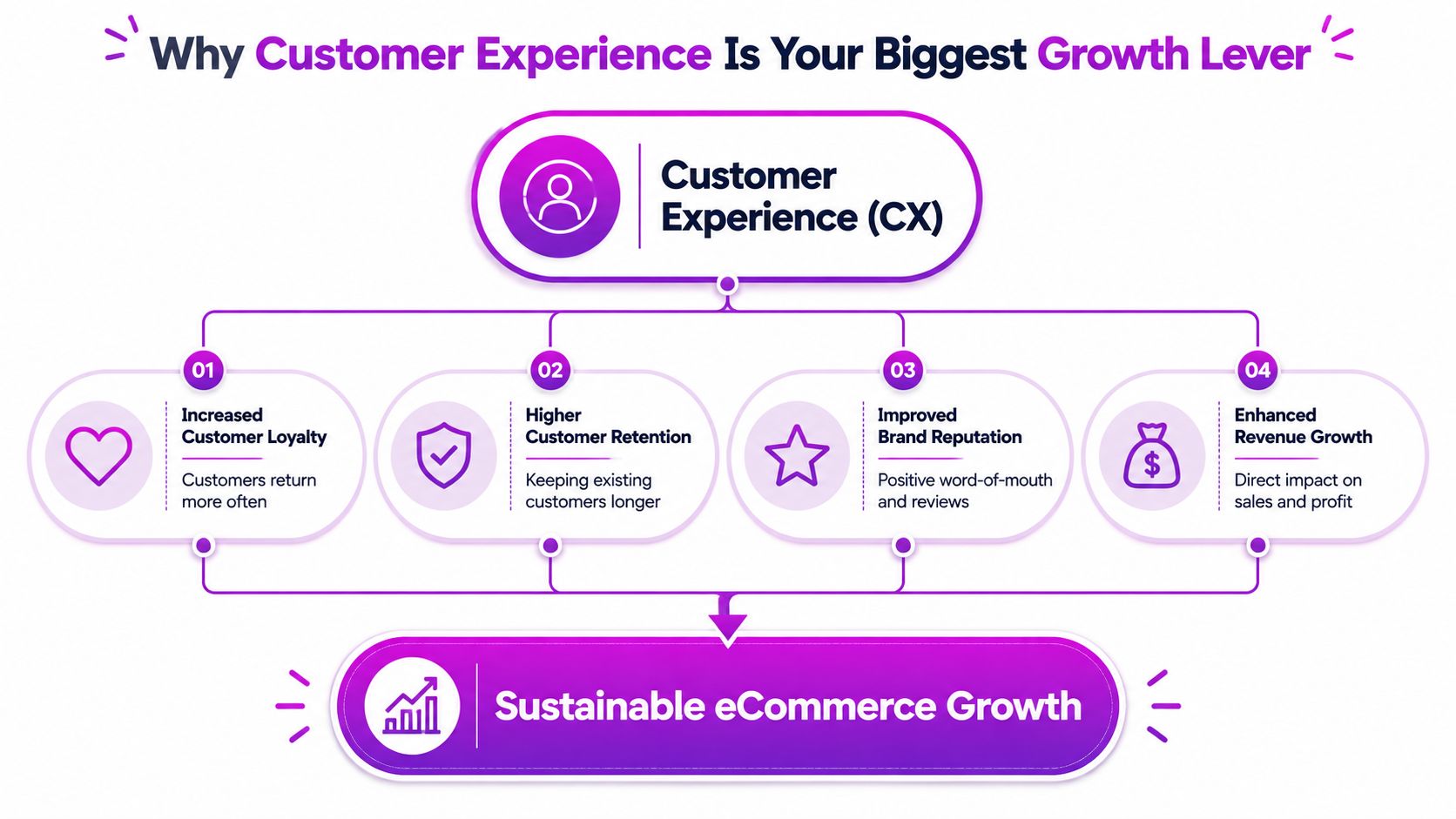
CX affects both conversion and retention
The commercial case is straightforward. In PwC's 2025 Customer Experience Survey, 52% of consumers said they stopped using or buying from a brand because of a bad experience, while customer-centric brands can report 60% higher profits than companies that don't focus on CX.
That's why customer experience shouldn't sit in a silo with support. It belongs in merchandising, operations, lifecycle marketing, and checkout optimization too.
A paid ad can earn the click. A discount can trigger the first order. But if the product page is unclear, shipping expectations are vague, and help is slow when something goes wrong, the customer remembers the friction, not the campaign.
Practical rule: If a customer has to work hard to buy, wait, or get help, your store is taxing demand you already paid for.
What moves the needle first
On Shopify, the biggest early wins usually come from the least glamorous fixes. Cleaner product pages. Better variant clarity. Faster storefronts. Fewer form fields. Clearer shipping messaging. Better order updates. Faster routing for support tickets.
These changes don't feel as exciting as a rebrand or a new AI stack. They usually outperform them.
Here's the order I use when thinking about CX investments for eCommerce teams:
| Priority | Focus area | Why it comes first |
|---|---|---|
| First | Checkout and post-purchase friction | Directly affects completed orders and repeat intent |
| Second | Onsite clarity and navigation | Removes confusion before customers hesitate |
| Third | Support workflow | Protects trust when issues happen |
| Fourth | Personalization and advanced automation | Pays off more after the basics work |
Long-term brand loyalty is built in small operational moments. The customer doesn't separate your ads, site, checkout, emails, and support team into departments. They experience one brand. If those pieces feel disconnected, growth gets expensive fast.
Your CX Roadmap Starts with a Journey Map
Most brands start fixing CX in the wrong place. They rewrite support macros, add a quiz app, launch live chat, or redesign a page section because it “feels off.” Sometimes that helps. Often it just treats a symptom.
McKinsey's guidance is useful here. Many CX programs fail because companies fix individual touchpoints without understanding the full customer journey, and the recommended approach is to map the journey, synthesize research, and pilot solutions with customers before scaling.
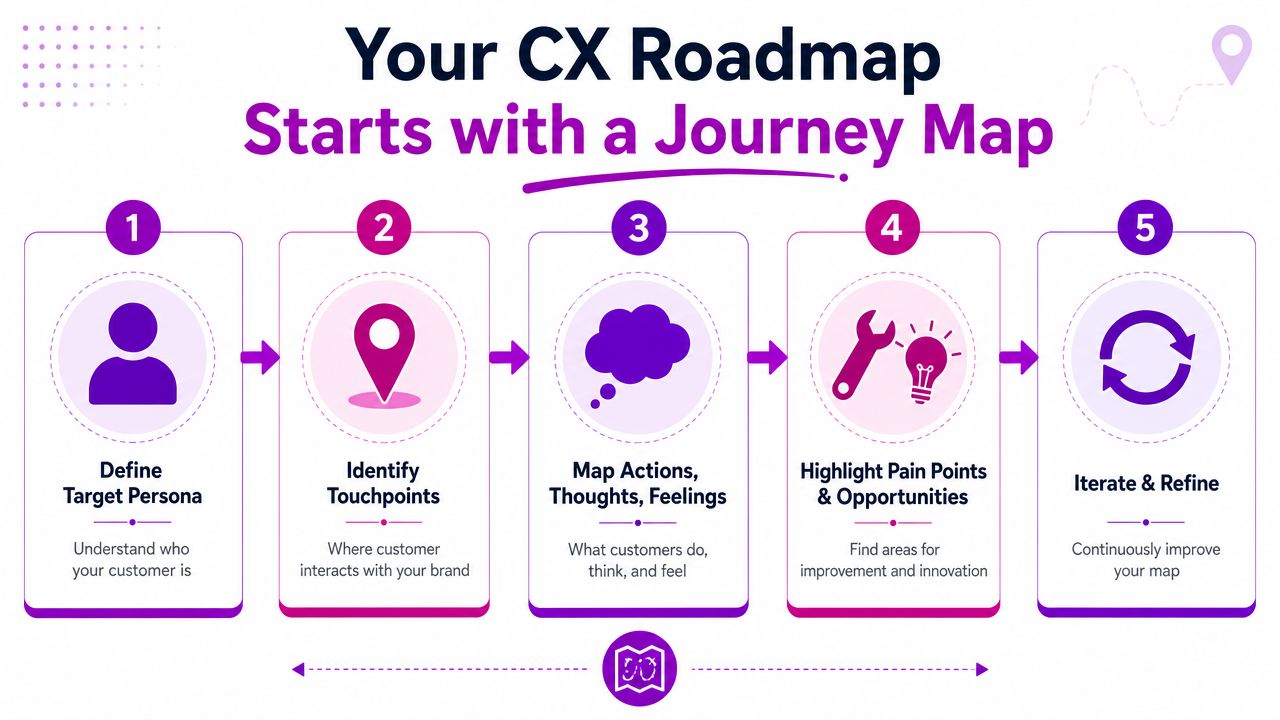
Use a simple five-stage map
You don't need an enterprise workshop deck. For a Shopify brand, a practical journey map can fit on one page. Use these five stages:
Discovery
Where customers first hear about you. Usually Meta ads, Google search, creator content, organic social, email, or word of mouth.Consideration
Where they evaluate. Product pages, collection pages, reviews, FAQs, shipping policy, returns policy, and comparison behavior.Purchase
Cart, checkout, payment methods, promo code handling, trust signals, and mobile completion flow.Post-purchase
Confirmation emails, shipping updates, tracking page, delivery expectations, returns, exchanges, and service interactions.Loyalty
Replenishment, second purchase journeys, subscriptions, loyalty programs, review requests, and win-back flows.
If you want examples of what this can look like in practice, these customer journey mapping examples are a useful reference point for eCommerce teams.
Pull evidence from tools you already have
Most stores already have enough data to build the first version.
- Shopify analytics and GA4 show where people enter, where they exit, and which product or collection pages lose momentum.
- Hotjar or Microsoft Clarity session recordings show rage clicks, dead clicks, repeated scrolling, and hesitation around size selectors, shipping info, or promo fields.
- Helpdesk tags in Gorgias, Zendesk, or Richpanel expose patterns like “where is my order,” “wrong size,” “can't apply discount,” or “return confusion.”
- Post-purchase surveys reveal expectation gaps. Customers often tell you exactly why they hesitated or what made them nervous.
- Review mining from Yotpo, Judge.me, or Loox helps distinguish product complaints from experience complaints.
A useful test is this: for each stage, can your team answer three questions?
| Stage | What customers are trying to do | What gets in their way | What signal proves it |
|---|---|---|---|
| Discovery | Understand relevance fast | Weak landing page match | Bounce patterns, short sessions |
| Consideration | Resolve doubts | Missing info, confusing PDPs | Session recordings, pre-sale tickets |
| Purchase | Complete order easily | Form friction, surprise costs | Cart exits, checkout abandonment |
| Post-purchase | Feel informed and safe | Silence, unclear tracking | WISMO tickets, angry replies |
| Loyalty | Decide to return | No reason or reminder | Low repeat order activity |
Here's a practical asset to review with your team before mapping your own flow:
The best journey maps aren't pretty. They're blunt. They show where customers get confused, where your team causes delay, and where revenue leaks out.
Don't map every edge case
The mistake I see most is overcomplicating the exercise. Start with one primary persona, one top-selling path, and one main country or market. If most of your revenue comes from mobile traffic to hero products, map that journey first.
Then pressure-test your assumptions with actual customers. Ask recent buyers what almost stopped them from ordering. Ask support what questions keep repeating. Ask operations where fulfillment confusion starts. That's how to improve customer experience without drowning in diagrams no one uses.
Win Customers Before the Checkout
A lot of brands focus on checkout because it's measurable. That makes sense, but the customer's confidence is usually formed earlier. If the ad promise doesn't match the landing page, if the collection page feels generic, or if the product page makes shoppers hunt for basics, you've already introduced friction.
That's why pre-purchase CX deserves its own workstream.

Discovery needs relevance, not just reach
Personalization gets overhyped when the basics aren't in place, but it does matter when it's used well. According to Wavetec's CX statistics roundup, companies that grow faster generate 40% more of their revenue from personalization than slower-growing competitors.
On Shopify, that doesn't mean you need a giant personalization engine on day one. It usually starts with tighter message matching:
- Channel-specific landing pages for paid social, search, or creator traffic
- Segment-aware hero messaging based on problem, use case, or product category
- Geography-specific delivery language so shoppers know what to expect
- Returning-visitor merchandising that surfaces recently viewed products or categories
If you sell skincare, don't send acne-focused ad traffic to a generic “Shop All” page. If you sell furniture, don't make first-time visitors dig through shipping terms to understand delivery windows. Better CX starts with helping the right customer orient quickly.
For smaller brands, trust signals also do heavy lifting before checkout. If you want a grounded perspective on credibility cues, this guide for local makers on trust is worth reviewing. The principles apply well to independent Shopify brands too.
Onsite quick wins that usually pay back first
You don't need a full redesign to make the site easier to buy from. Start with the obvious points of hesitation.
- Compress heavy media so pages load faster, especially on mobile collection and product pages.
- Move core buying info higher. Shipping timing, returns, materials, sizing, and compatibility shouldn't be buried in tabs no one opens.
- Tighten variant selection. Ambiguous names create mistakes and support volume.
- Fix internal search if it returns weak or empty results for common product terms.
- Audit mobile sticky elements. Add-to-cart bars, chat widgets, and promo banners often compete for the same small space.
A product page should answer the customer's next question before they ask it. What is it? Who is it for? How does sizing work? When will it arrive? What if it's wrong?
If shoppers keep opening support chat from the product page, that's usually not a support problem. It's a merchandising problem.
Longer-term projects that compound
Once the obvious friction is cleaned up, invest in systems that improve relevance across the site.
A few examples:
- Search and merchandising tools like Searchspring, Algolia, or Shopify's improved native search features can make large catalogs easier to shop.
- Structured product data helps collections filter cleanly and improves consistency across templates.
- Quiz flows can work well for categories with high choice anxiety, but only if they shorten decisions rather than adding another step.
- Personalized lifecycle handoffs between onsite behavior and Klaviyo flows can reinforce what customers viewed without feeling creepy or repetitive.
I'd separate these into quick wins and strategic builds like this:
| Time horizon | Good candidates | Common mistake |
|---|---|---|
| Quick win | Speed cleanup, PDP clarity, search tuning | Installing more widgets |
| Strategic project | Search overhaul, content architecture, segmentation | Starting before data is clean |
One practical note. Don't confuse visual polish with better experience. Some of the weakest-converting stores look premium but hide critical information behind motion, tabs, sliders, and oversized lifestyle imagery. Customers don't reward mystery when they're trying to buy.
The best pre-checkout CX work feels almost invisible. The right traffic lands on the right page, understands the offer fast, and moves forward without needing to decode the store.
Perfect the Purchase and Post-Purchase Moments
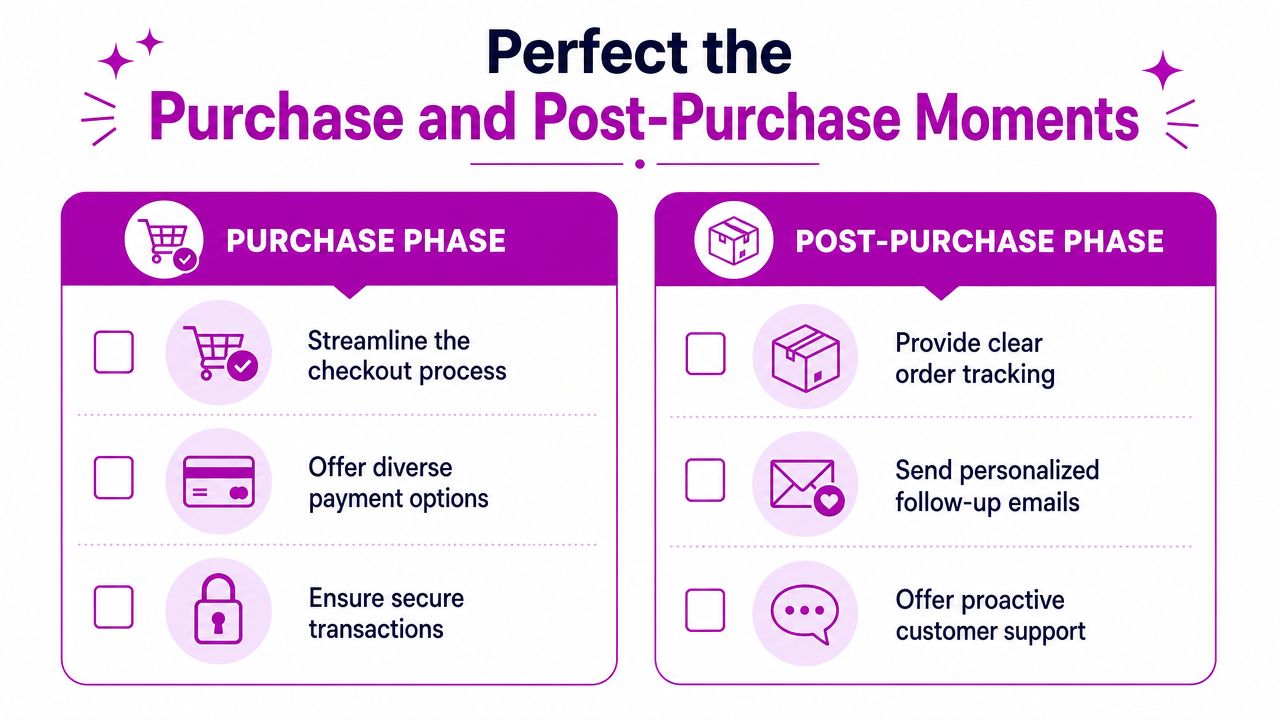
For a store seeking the fastest measurable CX impact, I would first examine this stage. The reason is not that other parts of the journey are unimportant, but because customer anxiety peaks here. The customer is about to hand over money, then wait. If anything feels uncertain, hesitation shows up immediately.
Adobe's broader CX guidance is useful on prioritization here. A major gap in most CX guidance is failing to identify which fixes reduce the most revenue leakage, and prioritizing interventions at high-friction points like checkout and post-purchase communication often produces the fastest measurable business results for eCommerce stores.
What a weak flow feels like
A customer adds an item to cart. Checkout asks for more fields than necessary. Payment options are limited. The shipping timeline is vague. They place the order, get a plain confirmation, then hear nothing useful for days.
From the brand side, this often looks manageable. From the customer side, it feels like risk.
The fix usually isn't dramatic. It's operational clarity.
What a strong flow feels like
The cart is clean. Checkout supports familiar payment options such as Shop Pay and other relevant wallets for the market. Form friction is minimal. Shipping expectations are clear before payment, not after it.
Then the post-purchase sequence starts doing its job:
- Confirmation email reassures the customer that the order is received and accurate.
- Shipping update explains what happens next in plain language.
- Tracking page gives live status without forcing the customer to hunt through carrier pages.
- Delay or issue notice gets sent proactively when needed.
- Return and exchange instructions are easy to find before frustration builds.
This is also where email deliverability matters more than many teams realize. If order and support emails land in spam, your “proactive communication” strategy doesn't exist in practice. A practical resource on that front is this guide on how to stop email from going to spam in Gmail.
Customers rarely complain that you sent too much useful order communication. They complain when they don't know what's happening.
A practical Shopify checklist
For most Shopify brands, the purchase and post-purchase cleanup list looks like this:
- Reduce checkout doubt by removing avoidable distractions, tightening policy visibility, and making total costs easier to understand.
- Support guest behavior because not every buyer wants to create an account before they trust you.
- Use post-purchase tools well. Klaviyo, Wonderment, AfterShip, or a branded tracking page can make delivery communication feel intentional rather than improvised.
- Write for anxious customers. “Your order is confirmed” is good. “We've packed your order and here's what happens next” is better.
- Prepare exception flows for delays, split shipments, and inventory issues. Those moments define trust more than the smooth ones do.
A lot of repeat revenue is won in this quiet window between purchase and delivery. If you answer questions before they become tickets, customers stay calm. If they stay calm, they're far more open to buying again.
Build a Support System That Creates Fans
Support should fix problems, but it should also protect margin, preserve trust, and surface the friction your site and operations create. Too many brands treat support as a cost center and then wonder why the same complaints keep coming back.
The better model is simple. Automate the predictable, humanize the exceptional.
Where automation works well
Automation is useful when the issue is routine, the answer is stable, and the customer mainly wants speed.
Good candidates include:
- Order status questions
- Basic return policy lookup
- Subscription management
- Simple product availability questions
- FAQ routing before an agent takes over
In Shopify environments, that usually means pairing a helpdesk like Gorgias or Zendesk with live chat, a searchable knowledge base, and basic intent detection. If you're evaluating chat specifically, this overview of Shopify live chat and its role in support and sales covers the operational upside well.
Automation also works behind the scenes. Tagging tickets, suggesting macros, summarizing conversations, and routing issues to the right queue can save your team time without putting a bot between the customer and a sensitive problem.
Where a human should take over fast
Some issues are emotionally loaded even if they look operational in your dashboard.
A delayed gift order. A damaged delivery. A missing package. A loyalty dispute. A refund tied to a confusing policy. These aren't just tickets. They're trust tests.
The guidance here should be explicit. A key challenge is balancing automation with human service, because customers want speed for simple issues but still expect easy escalation to humans for complex or emotionally charged problems.
That means your chatbot should never trap the customer. “Talk to a person” has to be visible, immediate, and real.
A bot that saves your team time but makes customers repeat themselves isn't reducing effort. It's moving effort from your team to the buyer.
Measure a few things that matter
Most support teams track too much and learn too little. A tighter scorecard works better. Gainsight's guidance is clear here. To effectively measure CX improvement, it's best to select 3-5 core metrics, starting with CSAT or NPS for a baseline, then adding operational metrics like first-response time and customer effort score as the program matures.
For eCommerce, I'd usually start with:
| Metric | Why it matters | What it tells you |
|---|---|---|
| CSAT | Customer reaction to support interaction | Whether help felt useful |
| First-response time | Speed to reassurance | Whether customers are waiting too long |
| Customer effort score | Ease of getting resolution | Whether your system creates friction |
| Top ticket themes | Root-cause visibility | What the business should fix upstream |
That last one matters most. If support volume is driven by order tracking confusion, don't just hire more agents. Fix post-purchase communication. If presale tickets ask the same sizing question every day, change the product page.
That's how support creates fans. Not by sounding cheerful in macros, but by helping the whole business remove recurring frustration.
Your Quick-Start CX Questions Answered
What's the first CX metric to track if I can only pick one
Start with CSAT. It's the fastest way to get a baseline on whether customers feel helped after an interaction. It's not perfect, but it's practical. Then read the comments, not just the score. The comments tell you whether the issue came from policy, product information, delivery, or agent handling.
I have a limited budget. Where do I invest first
Fix the points closest to revenue leakage. In most Shopify stores, that means checkout friction, product-page clarity, and post-purchase communication before anything more advanced. Don't start with a loyalty program if customers are still confused about shipping. Don't buy more automation if your tracking emails are weak and your return process is hard to understand.
What kind of Shopify app usually gives the best early CX ROI
Usually one of three categories. A helpdesk platform that centralizes tickets and tags themes clearly. A post-purchase tracking and notification tool that reduces anxiety after the sale. Or a session recording and heatmap tool that shows exactly where shoppers hesitate. The right choice depends on where your biggest friction sits today.
The bigger rule is this. Don't automate because you can. Automate when the request is predictable, low-risk, and easy to resolve. Keep a human in the loop when the issue is complex, emotional, or likely to affect trust. That's still the cleanest answer to how to improve customer experience without making it feel mechanical.
If you want help turning this into an execution plan, ECORN works with Shopify brands on the practical side of CX improvement, including CRO, storefront friction reduction, journey analysis, and Shopify development. That's often the fastest way to move from “we know what's wrong” to a prioritized backlog your team can ship.


Shopify Developer Hourly Rate: What to Pay in 2026

Ecommerce Conversion Tracking: The Complete How-To Guide

Shopify Design Agency: How to Pick the Right Partner

Mastering Multi Store Management on Shopify

Scale Shopify Store

10 Shopify App Ideas Worth Building in 2026

Conversion Rate Optimization for Landing Pages: The Playbook

Shopify Plus Automation: A Guide for 2026

10 Social Selling Platforms for Shopify Merchants

Shopify Website Design Examples: 7 Stores Worth Studying

7 Ecommerce Newsletter Examples for Shopify Brands

One Product Shopify Store: Build and Scale

Mobile Pop Up Strategy for Shopify Stores That Converts

Sitemap for Shopify: How to Find, Optimize, and Submit It

7 Single Product Websites Worth Emulating

Product Variants Shopify: The Complete 2026 Guide

Ecommerce Analytics Consulting for Growth

What Is AI Integration for eCommerce

How to Choose the Right eCommerce Website Development Firm

E Business Strategy Implementation

Conversion Tracking Setup for Shopify Stores

BigCommerce vs Shopify Plus Which Enterprise Wins in 2026

Shopify Theme Kit: Setup, Commands, and Migration Guide

Shopify Extension Development: A Practical 2026 Guide

Shopify Speed Score Explained and How to Improve It

Shopify Mobile Optimization: The 2026 Playbook

How to Add Subcategory in Shopify for Better UX

How to Implement Structured Data for Ecommerce in 2026

SEO App Mobile: Shopify Store Optimization Guide

Shopify Plus Support: What It Includes and How to Choose

Google Ads for Shopify: The Complete 2026 Playbook

Shopify New York: How to Find and Hire the Right Agency

Google Search Console for Shopify: The Complete Setup

First Party Data Collection for eCommerce Growth

FAQ Online Store Guide: Build and Measure It Right

Do FB Ads Work for eCommerce in 2026?

One Page Checkout for Shopify: Design and Implementation

Shopify GraphQL vs REST: The 2026 Developer Decision

Shopify Ecommerce Consulting: Strategy, Pricing &

Are Reddit Ads Worth It for eCommerce Brands

Shopify Title and Meta Description: A Practical 2026 Guide

Product Video Best Practices for Shopify Brands

Real-Time Inventory Management: A 2026 Guide

AI Chatbot Integration for Shopify Stores

Affiliate Program Management: A Shopify Guide

10 Best Performance Monitoring Tools for Shopify in 2026

Digital Asset Management for eCommerce Brands in 2026

Every Type of Facebook Ads Explained for eCommerce Growth

Product Information Management Explained for Shopify Brands

Support Ticket System: A Guide for Shopify Stores

10 Best Customer Service Tools for Shopify in 2026

Can I Start a Business with No Money? a 2026 Blueprint

What Sells Good on Etsy: Best Niches for 2026

Shopify Add to Cart Button: A Practical 2026 Guide

Customer Feedback Automation: A Practical eCommerce Guide

Critical Rendering Path: A Guide for Shopify Stores

How to Promote on TikTok for eCommerce in 2026

B2B eCommerce Consulting That Drives Real Revenue

10 Best Practices for Site Navigation in 2026

Return vs Refund for Shopify Stores: A Practical Guide

What Is Customer Lifetime Value and Why It Matters

What Is Voice of Customer Research for eCommerce

SMS Marketing for Ecommerce That Actually Converts

Master How to Improve Email Deliverability in 2026

Top 8 eCommerce Partners NYC for Shopify Brands in 2026

Machine Learning for Ecommerce: Boost Your Shopify Store

Beauty Market Research: Your 2026 Growth Guide

Shopify International Expansion: A 2026 Roadmap

What Does CRO Stand for in Business: Understanding CRO

Shopify Visual Merchandising: A Playbook for Higher Sales

Shopify Landing Page Design: Master Conversion in 2026

10 Best AI SEO Optimization Tools for Shopify in 2026

Agentic AI for Ecommerce: Boost Your Sales in 2026
Mastering Email Marketing Data for eCommerce Growth

Conversion Rate Optimisation Australia: Boost Your Sales

Conversion Rate Optimization AI: Your Shopify Store Guide

10 Product Bundling Strategies for Shopify in 2026

How to Increase Customer Lifetime Value: A Shopify Playbook

AI Customer Service Automation: Shopify Guide 2026

Clean Website Design: A Shopify Conversion Playbook

Omnichannel Retail Strategy: A Shopify Playbook

Product Data Enrichment: A Guide for Shopify Brands

Instagram Shopping Features a Guide for Shopify Stores

What Is Revenue Optimization: A Holistic RevOps Guide

Benefits of Conversion Rate Optimization: Boost Your

WordPress to Shopify Migration: Your 2026 Seamless Switch

Boost Sales: Ecommerce Payment Processing Guide 2026

Unified Commerce Platform: Benefits, KPIs & Shopify Guide

How to Reduce Bounce Rate eCommerce: Your 2026 Guide

Shopify API Integration: A Practical End-to-End Guide

How to Implement Data Governance: A 2026 Guide

Shopify Store Development Cost: A 2026 Breakdown

What Is Server Side Tracking: The Shopify Guide 2026

Marketing Automation Workflows: A Shopify Guide for 2026

Shopify: How to Reduce Technical Debt

Shopify UX Design Change: A Playbook for Growth

User Generated Content Strategy: Shopify Playbook

Shopify Pause and Build Plan Cost: A Complete 2026 Guide

Compare at Price on Shopify: A Complete Guide for 2026

Where Can I Sell My Prints? 10 Best Platforms for 2026


newsletter in your inbox