


You're usually not considering a Shopify Plus migration because everything is calm. You're considering it because the current setup keeps forcing workarounds.
The site may still be selling, but your team is patching around limitations. International requirements are getting messier. Permissions are too loose or too rigid. App logic is piling up. Marketing wants faster launches. Operations wants fewer manual checks. Finance wants a cleaner business case than “we've outgrown it.”
That's the right moment to evaluate Shopify Plus seriously.
A good migration is not a design project with data import attached. It's a business decision first, then an architecture decision, then a launch discipline exercise. The brands that handle it well don't start with theme ideas. They start by asking a harder question: what exactly gets better after the move, and is that improvement worth the cost and complexity?
Is a Shopify Plus Migration Your Next Smart Move
A lot of brands treat Plus like the default next tier. That's a mistake.
The move only makes sense when the platform solves a real operational constraint or generates a measurable commercial gain. Public commentary often skips that part, even though the business case is the part that matters most. One independent analysis puts it plainly: the decision should be tied to needs like cross-border checkout volume, advanced user permissions, or payment-gateway requirements, not just growth for its own sake. The same source notes that migrations are often in the five-figure range and usually take 4 to 12 weeks, which means the ROI question has to be answered before anyone starts rebuilding a storefront (business case for Shopify Plus migration).
The signs that justify the move
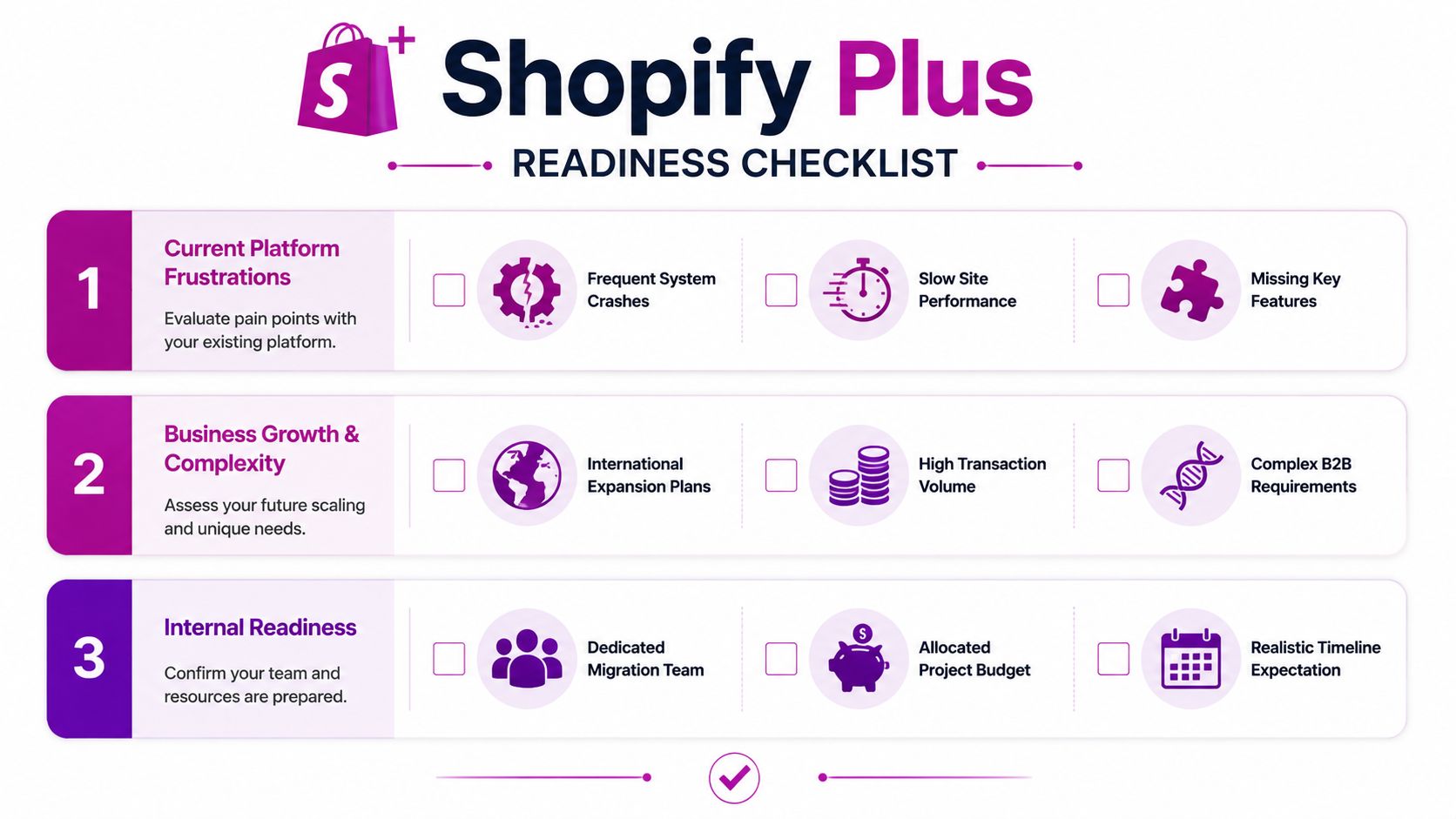
If your team is asking whether Shopify Plus is “worth it,” start with friction, not features.
Ask these questions:
- Cross-border complexity: Are international storefronts, currencies, taxes, and localized checkout rules starting to create operational drag?
- Team control: Do different departments need clearer permissions, approval paths, or safer ways to manage content and promotions?
- Payments and checkout logic: Are your current payment options or checkout requirements limiting how you sell?
- Operational overhead: Is the team spending too much time stitching together apps, manual exports, and exception handling?
- Security and governance: Do you need stronger control over who can access what, and how changes are made?
If the answer is yes to several of those, Plus is no longer a vanity upgrade. It becomes infrastructure.
What doesn't justify a migration
A migration usually goes wrong before the first CSV export. It goes wrong when leadership approves the project for the wrong reason.
Here are weak reasons to migrate:
| Weak reason | Why it fails |
|---|---|
| “We're growing fast” | Growth alone doesn't prove Plus will improve margin or operations |
| “Our competitor is on Plus” | Their model, channels, and complexity may be completely different |
| “We want a redesign anyway” | Redesign and replatforming together can help, but only if the platform shift has its own logic |
| “More features must mean better ROI” | Unused enterprise features are just extra cost |
Practical rule: If you can't name the workflows, markets, or checkout constraints that Plus will improve, you're not ready to migrate.
Teams benefit from stepping back and understanding your Shopify migration process before they lock scope. A proper migration playbook forces decisions around data, redirects, integrations, and launch ownership early, when changing direction is still cheap.
A simple go or no-go framework
Use three filters.
Revenue impact
Will Plus reduce friction in a place that affects conversion, average order value, retention, or expansion into new markets? If not, the commercial case is weak.
Operational impact
Will it remove recurring manual work, simplify governance, or reduce dependency on fragile custom setups? If your current team keeps compensating for the platform, that labor cost is part of the ROI model.
Execution readiness
Do you have budget, internal owners, realistic timing, and tolerance for short-term disruption? If not, even a correct strategic decision can turn into a bad project.
For teams comparing platform capabilities against actual needs, ECORN has a useful breakdown of the benefits of Shopify Plus that's most helpful when read as a qualification tool, not a sales checklist.
Architecting Your Migration Data and Infrastructure
Most migration failures look technical on the surface. In practice, they start with sloppy planning.
Bad product data, unclear field mapping, missing app logic, and unowned redirects will follow you into Shopify Plus. The platform won't clean up years of inconsistency for you. It will expose it faster.
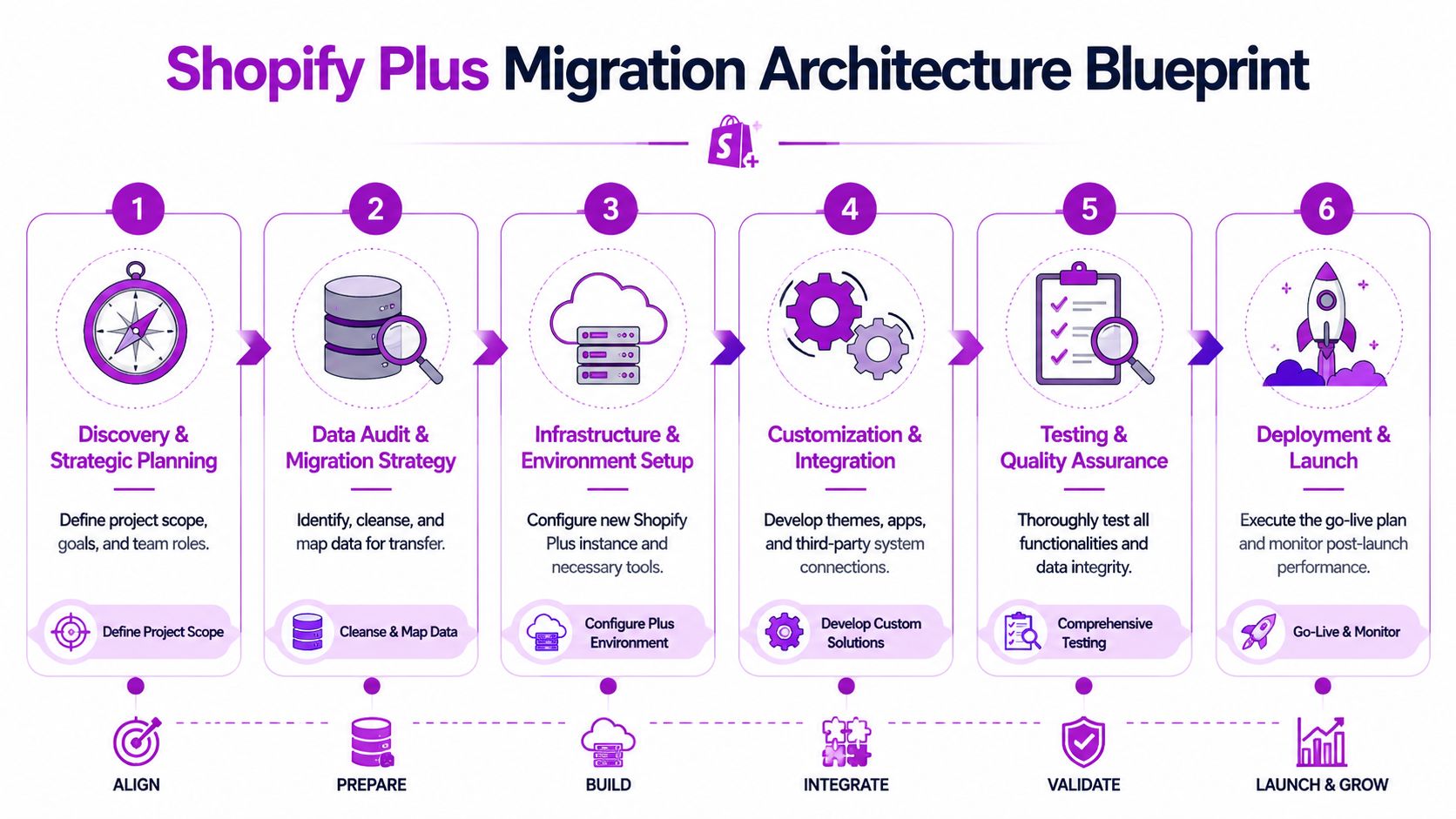
Shopify's own migration guidance supports a controlled approach built around seven phases: inventory and field mapping, data export and cleaning, theme rebuild, app and integration audit, SEO and redirect preservation, QA and UAT, and final cutover with a delta sync to capture data created during the build (Shopify migration guidance).
Start with data inventory, not exports
Before anyone exports products or customers, define what each data type should become inside Shopify.
That means identifying:
- Product structure: variants, collections, tags, metafields, media, bundles, and any custom merchandising logic
- Customer records: account status, segmentation rules, tax handling, B2B distinctions, and marketing consent data
- Order history: how much history needs to move, what reporting depends on it, and what can remain archived externally
- Content assets: blogs, landing pages, FAQ content, navigation, and media libraries
- SEO assets: indexed URLs, metadata, and redirect logic
If you skip this stage, you get “successful” imports that create unusable stores.
The seven phases that keep projects under control
Inventory and field mapping
List every source object and decide its destination. At this stage, custom attributes become native fields, metafields, or retired data.
Data export and cleaning
Exports should be treated as raw material, not launch-ready data. Remove duplicated records, dead values, and naming inconsistencies before import.
Theme rebuild
A Shopify Plus migration is usually the wrong time to drag old front-end decisions into a new stack unchanged. Rebuild intentionally, even when the visual design stays familiar.
App and integration audit
Every integration should answer one of three questions: keep, replace, or retire. If no one can explain why an app exists, it probably shouldn't survive the migration.
SEO and redirect preservation
Redirects should be mapped before launch, not discovered after traffic starts hitting 404s. This work needs ownership, testing, and a master sheet.
QA and UAT
Testing isn't a final checkbox. It's proof that products, promotions, checkout rules, shipping, taxes, and order flows all behave as expected under real scenarios.
Final cutover and delta sync
A final delta sync captures customers and orders created while the new store is being built. For longer projects, this step is one of the biggest protections against silent data loss.
Clean data beats complete data. Moving every historical inconsistency into Shopify gives you a bigger mess on a better platform.
What teams often underestimate
The technical move is only one part of the architecture. The main challenge is dependency mapping.
A migration plan needs to show how these pieces connect:
| Area | What to decide early |
|---|---|
| Storefront | Theme approach, templates, content model, market structure |
| Operations | Fulfillment flow, returns logic, tax setup, shipping methods |
| Systems | ERP, CRM, 3PL, subscriptions, reviews, search, email |
| Analytics | Tracking ownership, event consistency, reporting continuity |
| SEO | Redirect coverage, indexable page strategy, metadata migration |
This is also where outside expert input can save time. Teams that are already planning the build often benefit from broader guidance on optimizing your Shopify store, especially when migration scope overlaps with performance, UX, and maintainability decisions.
Build for launch and for six months after launch
Migration architecture shouldn't only answer “how do we go live?” It should answer “how do we avoid rebuilding this again right after go-live?”
A stronger infrastructure plan usually includes:
- A simplified app stack: fewer overlapping tools, clearer ownership
- Documented integration behavior: what triggers syncs, where failures surface, who responds
- Defined fallback logic: what happens if a feed, app, or middleware process fails
- A launch-safe content model: merchandising teams should be able to operate without developer bottlenecks
- A working cutover checklist: backups, validation steps, sign-off owners, and rollback criteria
If you want one practical artifact to govern all of that, use a migration checklist that covers business, content, technical, and launch dependencies in one place. This Shopify migration checklist is a useful model because it forces teams to think about cutover and verification, not just data transfer.
Crafting the Customer Experience Theme Apps and Integrations
Most brands don't need a prettier version of the store they already have. They need a store that's easier to run, faster to evolve, and less dependent on fragile custom logic.
That changes how you handle theme, apps, and integrations during a Shopify Plus migration.
Rebuild versus lift and shift
The wrong instinct is to preserve everything. Teams often assume the safest move is copying the old experience as closely as possible. In practice, that usually means carrying over design debt, interaction clutter, and platform-specific compromises.
A lift-and-shift approach can make sense when the current UX is strong, the customer journey is proven, and the main problem sits in backend operations. It reduces decision fatigue and can help teams protect continuity during a tight timeline.
A theme rebuild makes more sense when the existing storefront is weighed down by legacy templates, inconsistent merchandising patterns, or performance issues. Rebuilding on a modern Shopify 2.0 structure also gives content and merchandising teams more control after launch.
Here's the practical test:
| Decision path | Best used when |
|---|---|
| Lift and shift | Brand continuity matters more than UX redesign |
| Selective rebuild | Core journeys work, but key templates need modernization |
| Full rebuild | Legacy design, weak maintainability, or major experience gaps are holding growth back |
If your current storefront requires developer help for routine merchandising, don't preserve that problem in the new build.
The app audit most teams rush
App sprawl is one of the most expensive forms of ecommerce debt. A migration gives you a clean moment to challenge every tool.
The growth of Shopify Plus itself shows why this matters. TechnologyChecker reports active Shopify Plus domains grew from just over 3,300 in late 2021 to more than 30,600 by mid-2025, and that migration volume is heavily fueled by brands coming from platforms like Magento and WooCommerce. That shift reflects confidence in Shopify's broader app and partner ecosystem for complex enterprise requirements (Shopify Plus technology adoption trends).
That doesn't mean “install more apps.” It means use the ecosystem more selectively.
A serious audit should separate apps into four groups:
- Keep: tools that clearly support revenue, operations, or compliance
- Replace: apps that duplicate native Shopify capabilities or create unnecessary complexity
- Rebuild: functions that matter but need a cleaner implementation
- Retire: legacy tools no one owns anymore
What good integration strategy looks like
The best migrations reduce moving parts.
That usually means choosing Shopify-native or well-supported solutions where possible, standardizing event flows, and documenting where data originates. If customer tags come from one system, pricing logic from another, and segmentation from a third, your store becomes hard to troubleshoot and even harder to improve.
Focus on these decisions:
Front-end impact
Any app touching page rendering, search, reviews, subscriptions, or personalization should justify its performance cost.
Operational dependency
If fulfillment, tax, inventory, or CRM data depends on middleware or custom connectors, map failure points before launch.
Team ownership
Every integration should have an internal owner. If no one owns it, no one will catch silent failures quickly.
A strong Shopify Plus migration doesn't replicate your old stack. It removes what your old stack taught you to tolerate.
Unlocking True Value with Shopify Plus Exclusives
Many brands migrate to Plus and then use it like a more expensive version of standard Shopify. That's where ROI disappears.
The point of Shopify Plus isn't access for its own sake. It's the ability to solve business problems with better operational logic, cleaner checkout behavior, and more controlled automation.

Use exclusives to remove friction
Start with the use case, not the feature list.
If your promotions team relies on manual setup for tiered offers, shipping exceptions, or customer-specific logic, Shopify Plus gives you more control over how those rules are applied. If operations keeps tagging risky orders or routing exceptions by hand, workflow automation becomes part of margin protection. If merchandising needs coordinated campaign launches, scheduling tools become operational assets.
That's how the platform starts paying for itself.
Three tools that matter when used together
Shopify Flow
Flow is most valuable when it removes repetitive decisions from the ops team. It can support logic around customer tagging, fraud review workflows, order routing, inventory alerts, and internal notifications.
The mistake is automating too much too early. Start with processes your team already follows consistently. If the human rule is unstable, the automation will be unstable too.
Scripts and checkout logic
For brands with complex offers or checkout rules, logic at checkout can become a real differentiator. Promotions, shipping conditions, and customer-specific behavior need to be designed carefully so they support conversion rather than confuse it.
What works is restraint. Keep the rules understandable. Test edge cases. Don't build a promotional maze that finance loves and customers abandon.
Launchpad and campaign operations
Launchpad matters most for brands that run coordinated launches, drops, or planned campaign events. It helps teams schedule operational changes with less last-minute scrambling across merchandising and marketing.
That sounds simple, but it changes how disciplined campaign execution becomes.
What works in practice: treat Plus-exclusive features like process infrastructure. If a feature doesn't remove manual work, reduce checkout friction, or improve launch control, it probably isn't a priority yet.
APIs and extensibility should support a business model
Expanded API access is valuable when you already know what needs to connect. It doesn't create strategy on its own.
Good use cases include cleaner ERP coordination, better customer data movement, and more reliable event handling between systems. Weak use cases usually start with “we want custom” and end with another maintenance burden.
There's also a training issue here. Teams need to know how these tools fit together operationally. This walkthrough is a useful starting point before implementation discussions get too technical:
Where the best ROI usually appears
Not in flashy customization. In consistency.
You usually see value when:
- Promotions run with fewer errors
- Operations handles fewer manual exceptions
- Teams launch campaigns without development bottlenecks
- Checkout behavior aligns more closely with your commercial model
- Systems exchange cleaner data with less intervention
That is the primary benefit. A Shopify Plus migration becomes profitable when the exclusive features support repeatable execution across marketing, operations, and growth.
Finalizing the Launch Plan QA Checklists and Contingencies
Launch week is where disciplined teams look calm and unprepared teams look unlucky.
They're usually not unlucky. They just skipped hard testing, compressed decisions, or assumed the build team would catch everything. Shopify's enterprise guidance says a typical Shopify Plus migration takes about three to four months, while complexity can stretch projects much further. Shopify highlights one case where Anker moved 16 sites in three months and another where Staples completed an enterprise replatform in under 12 months, which tells you the same thing every experienced operator already knows: complexity determines timeline, and testing determines whether the timeline was realistic (Shopify enterprise migration guidance).
QA has to mirror real buying conditions
A proper QA cycle isn't just “check the site on mobile” and “place a test order.”
You need scenario-based testing across the full commerce flow:
- Product discovery: search, filters, collection sorting, variant switching, image behavior
- Cart behavior: bundles, discounts, threshold logic, gift logic, and shipping messages
- Checkout: payment methods, address validation, edge-case shipping combinations, tax outcomes
- Accounts: login, reset flows, account creation, B2B access if applicable
- Post-purchase: confirmation emails, order visibility, fulfillment handoff, returns triggers
The easiest way to miss defects is to test by feature instead of by customer journey.
UAT should be owned by business teams too
Developers can verify implementation. They can't fully validate business logic on their own.
User Acceptance Testing should involve the people who run the store:
| Team | What they should verify |
|---|---|
| Marketing | Landing pages, merchandising blocks, promotions, tracking |
| Operations | Order flow, fulfillment behavior, notifications, exceptions |
| Finance | Taxes, payment handling, reporting outputs |
| Customer support | Account flows, order lookup, communication triggers |
| Regional teams | Market-specific content, shipping rules, localized details |
Launch readiness is not a feeling. It's documented evidence that the critical flows work under expected conditions.
The pre-flight checklist that matters
A concise launch checklist should answer five questions.
Is the data correct
Spot-check products, customer records, collections, and recent orders. Don't rely only on import completion messages.
Do the commercial rules work
Verify discounts, shipping thresholds, tax logic, and payment methods against expected business rules.
Are integrations behaving end to end
Place orders and confirm they move through the systems that matter. ERP, CRM, 3PL, subscriptions, and email flows all need proof, not assumptions.
Are SEO protections in place
Redirects, metadata, canonicals, and indexation controls should already be reviewed before launch day.
Is ownership clear
Every launch task needs an owner, a backup, and a decision-maker.
Your rollback plan is part of the launch plan
Teams often write launch checklists and forget rollback criteria. That's risky.
A practical contingency plan should define:
- What gets backed up: exports, content, redirect maps, theme versions, configuration snapshots
- What triggers rollback: payment failure, order routing failure, severe checkout defect, critical content issue
- Who can call it: one named decision-maker, not a committee
- How communication works: internal escalation, support coverage, customer-facing response if needed
Rollback isn't a sign of poor planning. It's evidence of mature planning.
The first hour after go-live
The first hour should be tightly controlled. No one should be debating priorities live.
Watch these areas first:
- Checkout completion
- Order creation
- Payment acceptance
- Shipping and tax output
- Core analytics signals
- Support inbox volume
If those are healthy, the rest of launch-day triage becomes manageable. If they're not, everyone needs to stop chasing cosmetic bugs and focus on revenue-critical paths first.
Beyond the Launch Budgeting and Long-Term Growth
A Shopify Plus migration is easiest to justify on paper right before launch. Its true impact is seen later.
If the new store stabilizes but the team never improves checkout, merchandising, automation, or customer journeys, the project becomes an expensive relocation. The long-term return comes from what you do after the move.
Set timeline expectations by source platform
The source platform changes the scope more than generally anticipated. One migration guide projects that moving from Shopify to Plus can take 24 to 48 hours, while WooCommerce, Magento, and BigCommerce migrations usually take 4 to 8 weeks, and custom platforms often take 8 to 12 or more weeks. The same guide recommends reserving a 10 to 15 percent contingency budget for unforeseen issues (Shopify Plus migration timing and contingency planning).
That contingency matters because migration overruns rarely come from one dramatic failure. They come from accumulated friction:
- undocumented integrations
- unsupported custom features
- bad product data
- delayed business decisions
- app replacements that looked simple in discovery
Budget for the hidden work, not just the build
The visible budget usually covers design, development, and migration mechanics. The hidden budget is where teams get surprised.
A more realistic planning model includes:
Remediation work
Some issues only surface during QA. You need room to fix them without derailing launch quality.
Integration adjustment
Third-party systems often need configuration changes after initial connection. That's normal.
Post-launch support
The first few weeks after launch generate fixes, refinements, and business-rule corrections. Budget for that support instead of pretending the launch ends the project.
CRO and experimentation
If you want ROI, reserve budget for optimization after stabilization. Otherwise the new platform just inherits the old conversion problems.
Your first 90 days should have a growth agenda
Teams often spend the first month reacting. Better teams stabilize fast, then start improving deliberately.
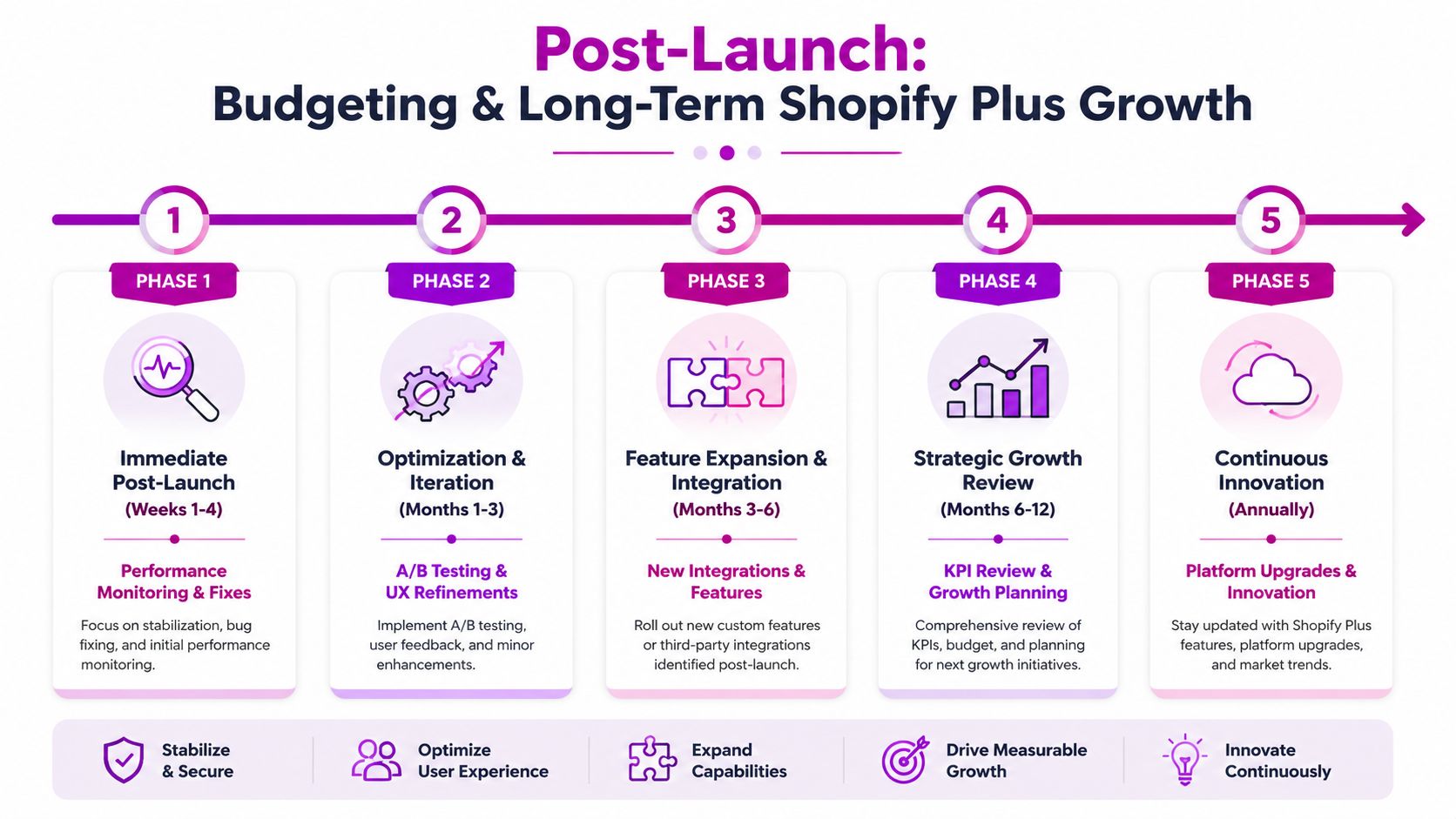
A practical post-launch rhythm looks like this:
Weeks one to four
Focus on stability. Review support tickets, checkout friction, search behavior, broken merchandising paths, and integration reliability.
Month one to three
Start structured optimization. Prioritize the highest-friction points in navigation, product detail pages, cart, and checkout. New platform flexibility then begins to matter commercially.
After stabilization
Revisit deferred opportunities from the migration. That might include more advanced automations, revised merchandising logic, B2B workflows, or market-specific improvements.
The migration creates the opportunity. CRO is what turns that opportunity into payback.
What good post-launch teams actually measure
Not vanity metrics. Operational and commercial signals tied to the business case that justified the migration.
Track things like:
| Area | Useful post-launch focus |
|---|---|
| Customer journey | Checkout drop-off points, search usage, navigation friction |
| Store operations | Manual exceptions, support themes, order processing issues |
| Merchandising | Collection performance, promo execution quality, on-site discovery |
| International growth | Market-specific friction, local payment adoption, content gaps |
| Platform use | Whether teams are actually using the new capabilities they paid for |
The important part is consistency. If you said Plus would improve international selling, governance, automation, or checkout flexibility, review those exact areas after launch.
The strongest ROI usually comes from what you stop doing
That includes manual workarounds, brittle integrations, overgrown app stacks, and developer dependency for basic commercial tasks.
A successful Shopify Plus migration should leave your team with more control, fewer operational bottlenecks, and a clearer optimization roadmap. If that isn't happening, the issue usually isn't Shopify Plus. It's that the business stopped at migration and never moved into iteration.
If you're evaluating a Shopify Plus migration and need a practical view on scope, architecture, launch planning, or post-launch CRO, ECORN can support the work as a Shopify-focused partner for migration, design, development, and optimization.


Headless Ecommerce Development Services Explained

How to Build a Shopify Clothing Website That Converts

How to Launch a Box Subscription Business in 2026

Luxury Skincare Branding Playbook That Converters

10 Best Podcast Ecommerce Shows for Store Growth in 2026

Shopify Developer Hourly Rate: What to Pay in 2026

Critical Shopify Setup Errors That Are Secretly Sabotaging Your Store

Ecommerce Conversion Tracking: The Complete How-To Guide

Shopify Design Agency: How to Pick the Right Partner

Mastering Multi Store Management on Shopify

Scale Shopify Store

10 Shopify App Ideas Worth Building in 2026

Conversion Rate Optimization for Landing Pages: The Playbook

Shopify Plus Automation: A Guide for 2026

10 Social Selling Platforms for Shopify Merchants

Shopify Website Design Examples: 7 Stores Worth Studying

7 Ecommerce Newsletter Examples for Shopify Brands

One Product Shopify Store: Build and Scale

Mobile Pop Up Strategy for Shopify Stores That Converts

Sitemap for Shopify: How to Find, Optimize, and Submit It

7 Single Product Websites Worth Emulating

Product Variants Shopify: The Complete 2026 Guide

Ecommerce Analytics Consulting for Growth

What Is AI Integration for eCommerce

How to Choose the Right eCommerce Website Development Firm

E Business Strategy Implementation

Conversion Tracking Setup for Shopify Stores

BigCommerce vs Shopify Plus Which Enterprise Wins in 2026

Shopify Theme Kit: Setup, Commands, and Migration Guide

Shopify Extension Development: A Practical 2026 Guide

Shopify Speed Score Explained and How to Improve It

Shopify Mobile Optimization: The 2026 Playbook

How to Add Subcategory in Shopify for Better UX

How to Implement Structured Data for Ecommerce in 2026

SEO App Mobile: Shopify Store Optimization Guide

Shopify Plus Support: What It Includes and How to Choose

Google Ads for Shopify: The Complete 2026 Playbook

Shopify New York: How to Find and Hire the Right Agency

Google Search Console for Shopify: The Complete Setup

First Party Data Collection for eCommerce Growth

FAQ Online Store Guide: Build and Measure It Right

Do FB Ads Work for eCommerce in 2026?

One Page Checkout for Shopify: Design and Implementation

Shopify GraphQL vs REST: The 2026 Developer Decision

Shopify Ecommerce Consulting: Strategy, Pricing &

Are Reddit Ads Worth It for eCommerce Brands

Shopify Title and Meta Description: A Practical 2026 Guide

Product Video Best Practices for Shopify Brands

Real-Time Inventory Management: A 2026 Guide

AI Chatbot Integration for Shopify Stores

Affiliate Program Management: A Shopify Guide

10 Best Performance Monitoring Tools for Shopify in 2026

Digital Asset Management for eCommerce Brands in 2026

Every Type of Facebook Ads Explained for eCommerce Growth

Product Information Management Explained for Shopify Brands

Support Ticket System: A Guide for Shopify Stores

10 Best Customer Service Tools for Shopify in 2026

Can I Start a Business with No Money? a 2026 Blueprint

What Sells Good on Etsy: Best Niches for 2026

Shopify Add to Cart Button: A Practical 2026 Guide

Customer Feedback Automation: A Practical eCommerce Guide

Critical Rendering Path: A Guide for Shopify Stores

How to Promote on TikTok for eCommerce in 2026

B2B eCommerce Consulting That Drives Real Revenue

10 Best Practices for Site Navigation in 2026

Return vs Refund for Shopify Stores: A Practical Guide

What Is Customer Lifetime Value and Why It Matters

What Is Voice of Customer Research for eCommerce

SMS Marketing for Ecommerce That Actually Converts

Master How to Improve Email Deliverability in 2026

Top 8 eCommerce Partners NYC for Shopify Brands in 2026

Machine Learning for Ecommerce: Boost Your Shopify Store

Beauty Market Research: Your 2026 Growth Guide

Shopify International Expansion: A 2026 Roadmap

What Does CRO Stand for in Business: Understanding CRO

Shopify Visual Merchandising: A Playbook for Higher Sales

Shopify Landing Page Design: Master Conversion in 2026

10 Best AI SEO Optimization Tools for Shopify in 2026

Agentic AI for Ecommerce: Boost Your Sales in 2026
Mastering Email Marketing Data for eCommerce Growth

Conversion Rate Optimisation Australia: Boost Your Sales

Conversion Rate Optimization AI: Your Shopify Store Guide

10 Product Bundling Strategies for Shopify in 2026

How to Increase Customer Lifetime Value: A Shopify Playbook

AI Customer Service Automation: Shopify Guide 2026

Clean Website Design: A Shopify Conversion Playbook

Omnichannel Retail Strategy: A Shopify Playbook

Product Data Enrichment: A Guide for Shopify Brands

Instagram Shopping Features a Guide for Shopify Stores

What Is Revenue Optimization: A Holistic RevOps Guide

Benefits of Conversion Rate Optimization: Boost Your

WordPress to Shopify Migration: Your 2026 Seamless Switch

Boost Sales: Ecommerce Payment Processing Guide 2026

Unified Commerce Platform: Benefits, KPIs & Shopify Guide

How to Reduce Bounce Rate eCommerce: Your 2026 Guide

Shopify API Integration: A Practical End-to-End Guide

How to Implement Data Governance: A 2026 Guide

Shopify Store Development Cost: A 2026 Breakdown

What Is Server Side Tracking: The Shopify Guide 2026

Marketing Automation Workflows: A Shopify Guide for 2026


newsletter in your inbox