


Your Shopify store probably isn't “broken.” Orders still come in. Campaigns still launch. New landing pages still get built. But every month, small problems take longer to fix, theme updates feel risky, and one innocent app install somehow creates three new bugs.
That's what technical debt looks like in eCommerce.
On a Shopify store, it rarely shows up as a dramatic engineering crisis first. It shows up as slower product pages, broken cart drawers after routine changes, duplicated theme code nobody wants to touch, app scripts piled on top of each other, and a dev backlog that keeps growing while delivery gets slower. Founders usually experience it as rising costs and falling agility. Marketers experience it as friction: campaigns delayed, experiments blocked, and customer journeys that don't behave the way they should.
If you're trying to figure out how to reduce technical debt, the goal isn't to make the codebase “pretty.” The goal is to protect conversion, keep operations smooth, and stop your store from getting more expensive to change.
The Hidden Costs Dragging Down Your Shopify Store
Friday afternoon, your team is trying to launch a paid campaign before the weekend. Creative is approved. The offer is live. Then the product page starts loading the wrong variant script on mobile, the cart drawer breaks for bundled items, and a change that should take 20 minutes turns into a long Slack thread with your developer, agency, and app support.
That is the cost of technical debt on a Shopify store. It rarely arrives as one dramatic failure. It shows up as delay, hesitation, and expensive workarounds around code nobody trusts.
For founders and marketing leads, the problem is not messy code in the abstract. The problem is that debt starts taxing revenue. Pages load with more friction. Merchandising changes take longer. A routine app update creates side effects in another part of the theme. Your team starts avoiding tests, launches, and UX improvements because each change feels risky.
What founders usually notice first
The first signals are operational, not technical:
- Launches slow down because small requests now need investigation before anyone can safely change the theme
- Conversion work stalls because product page, cart, or localization changes carry a higher risk of breaking something else
- Development costs rise because your team spends more hours tracing conflicts, patching regressions, and maintaining one-off fixes
- Customer experience gets less consistent because scripts, sections, and app logic compete in ways nobody planned
I see this pattern often on Shopify stores that have grown fast. The business outpaces the architecture. What worked at $1M in annual revenue becomes expensive at $10M because every campaign depends on a storefront that is harder to change.
Technical debt creates a tax on execution. You pay it in slower releases, weaker experiments, and avoidable conversion loss.
It also creates management drag. Leaders spend more time chasing estimates, resolving blockers, and coordinating handoffs between internal teams, freelancers, and agencies. If that sounds familiar, this guide for agency operations leaders is useful for understanding how execution friction turns into management overhead.
What it looks like on Shopify specifically
On Shopify, debt often hides inside decisions that made sense at the time.
A team duplicates a section to ship a seasonal landing page faster. An app gets installed for reviews, then another for upsells, then a third for subscriptions. A previous developer adds custom logic for bundles or international pricing. Six months later, nobody is fully sure which scripts still matter, which snippets are safe to remove, or why a collection page behaves differently from one template to another.
Common examples include:
- Theme bloat from copied templates, unused snippets, and scripts still loading after the feature is gone
- App overlap where multiple tools inject assets into the same pages and slow down rendering or conflict with each other
- Fragile customizations built for a launch window and never cleaned up after the deadline passed
- Unclear ownership so every request starts with discovery work before real work can begin
The expensive part is not cosmetic. It is commercial. If your store is harder to maintain, you release fewer improvements. If releases feel risky, your team tests less. If you test less, conversion gains come slower while operating costs keep rising. That is why reducing technical debt matters to growth teams, not just developers.
How to Audit and Measure Your Store's Technical Debt
A founder usually notices technical debt during a busy trading period, not in a sprint review. The merch team needs a landing page live by Friday. A small change to the product template takes three days, breaks a promo banner, and pulls a developer off revenue work to patch side effects. At that point, the problem is no longer code quality. It is slower execution, higher operating cost, and missed sales.
Audit the customer journey first
Start where revenue is won or lost. Review the homepage, collection pages, product pages, cart, and top campaign landing pages on mobile and desktop. Check what a customer experiences: slow first loads, layout shifts, delayed add-to-cart actions, inconsistent merchandising blocks, and third-party widgets loading in the wrong order.
This is also where technical debt becomes visible to a non-technical team. If a page feels heavy, hard to update, or unpredictable during launches, it deserves scrutiny.
Use a short set of tools your team can act on right away:
- Google Lighthouse to spot front-end performance, accessibility, and page quality issues
- Shopify Theme Inspector to find rendering bottlenecks inside the theme
- Browser developer tools to see which scripts, images, and third-party assets load on key templates
If site speed is a known issue, pair the audit with a focused Shopify page speed optimization review so performance fixes can be tied back to conversion and bounce risk.
Measure debt in terms the business feels
A useful audit tracks two kinds of cost. The first is customer-facing friction. The second is delivery friction inside the team.
For Shopify stores, that usually means looking at questions like these:
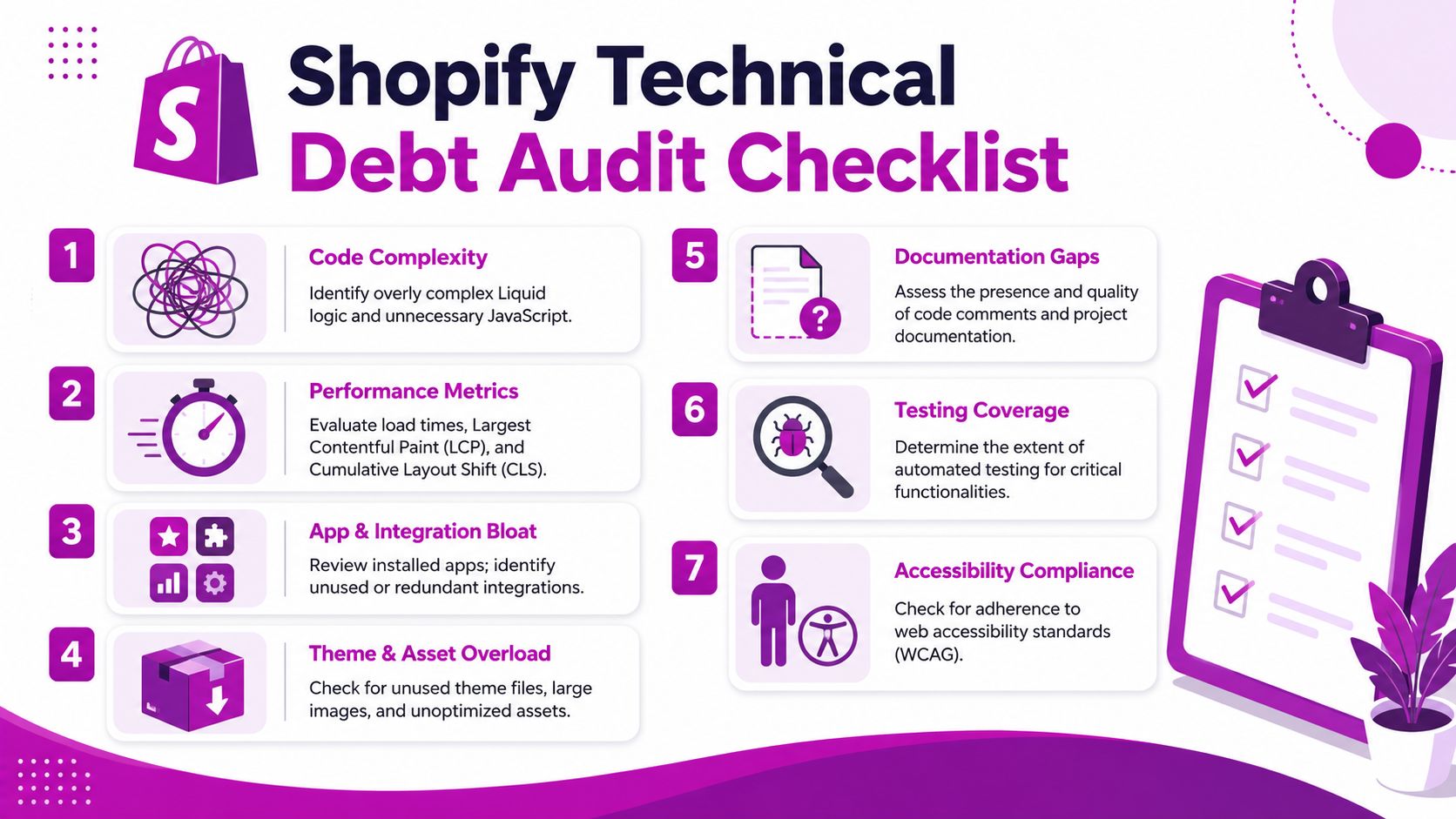
| Audit area | What to look for |
|---|---|
| Theme complexity | Large Liquid files, nested logic, repeated snippets, hardcoded exceptions |
| Performance | Heavy JavaScript, unoptimized images, scripts loading on pages where they aren't needed |
| Delivery friction | Changes that take too long to ship, frequent hotfixes, releases that create new bugs |
| App sprawl | Installed apps no one uses, overlapping features, leftover code after app removal |
| Documentation | Missing notes on custom logic, settings, integrations, or deployment steps |
I also look at release behavior. How long does a routine change take from request to production? Which templates keep causing regressions? Which app or customization makes the team nervous every time there is a campaign launch? Those patterns usually reveal debt faster than a purely technical review.
Practical rule: If your team avoids touching a part of the store because it often causes rework, include it in the audit.
Build a backlog from evidence, not labels
The audit only becomes useful when findings turn into clear work items. Broad labels like "theme cleanup" or "fix technical debt" create vague backlogs that never get funded. Specific issues are easier to estimate, easier to approve, and easier to connect to business outcomes.
Use a checklist like this:
- Identify high-risk templates such as product, collection, cart, search, and campaign landing pages.
- List all apps and injected scripts and record what each one still contributes.
- Flag duplicated logic across sections, snippets, and templates.
- Log recurring bugs that return after releases or seasonal changes.
- Document fragile workflows such as theme deployment, app configuration, and merchandising changes.
- Review test coverage for high-value storefront behavior.
- Capture accessibility issues that create customer friction and increase maintenance work.
A good debt item names the affected template or workflow, the commercial impact, and the likely fix. For example, "unused subscription app scripts still load on non-subscription product pages, adding weight and creating conflicts" is much more actionable than "clean app code."
The goal is not a perfect diagnosis. The goal is a working list of issues the team can rank, cost, and fix with confidence.
The Triage Framework Prioritizing What to Fix First
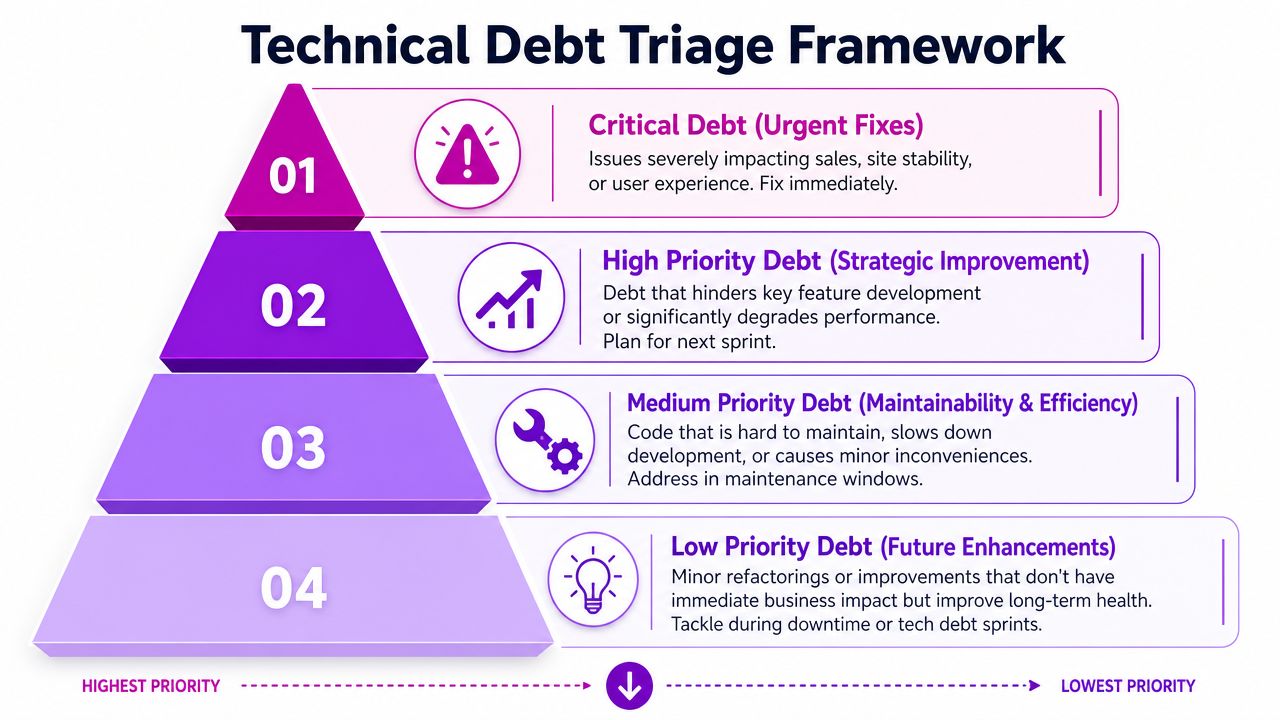
An audit usually produces an uncomfortable result. You don't find one problem. You find twenty. If the team tries to fix all of them at once, delivery stalls and nobody feels progress.
The better approach is triage.
Use business impact and effort
Plot every debt item on a simple matrix with two axes:
- Business impact
- Development effort
That forces a useful conversation. A messy file that nobody touches may irritate developers, but it might not deserve immediate time. A checkout bug, a broken product media component, or a bloated collection page deserves attention because it affects sales and customer confidence.
Zenhub's guidance is especially relevant for commerce teams: eCommerce teams should prioritize debt in checkout, catalog, and high-performance areas, because debt in those zones compounds operational risk and conversion loss much faster than debt in rarely modified areas (Zenhub on reducing technical debt).
The four buckets that make decisions easier
Here's the simple version I use with Shopify teams:
| Category | What belongs here | What to do |
|---|---|---|
| Quick wins | High impact, low effort | Fix immediately |
| Major projects | High impact, high effort | Break into phases and plan |
| Fill-in tasks | Low impact, low effort | Do during natural gaps |
| Backburner | Low impact, high effort | Delay unless context changes |
This framework works because it stops teams from confusing “annoying” with “important.”
What usually lands in each bucket
- Quick wins often include removing unused app code, stopping scripts from loading sitewide, or fixing duplicated logic in a frequently edited section.
- Major projects may include restructuring a bloated product template, replacing an app-heavy cart experience, or cleaning up theme architecture before a redesign.
- Fill-in tasks include naming cleanup, old comments, or low-risk refactors in stable areas.
- Backburner items are the classic trap. They look worthwhile in theory but don't materially change customer experience or team velocity right now.
Don't prioritize debt by how ugly the code looks. Prioritize it by how often it slows revenue work, breaks key journeys, or creates repeated support effort.
A Shopify-specific filter
For eCommerce, ask three questions before approving debt work:
- Does this affect buying journeys? Product discovery, product pages, cart, checkout-adjacent flows.
- Does this slow campaign execution? Seasonal launches, merchandising changes, landing pages, bundles.
- Does this increase operating cost? More QA, more bug-fixing, more agency time, more hesitation around releases.
If the answer is no to all three, it's probably not first in line.
Practical Refactoring Strategies for Shopify Codebases
Once priorities are clear, the next challenge is execution. Many teams overcorrect during this phase. They either avoid refactoring entirely, or they propose a grand cleanup project that freezes feature work.
Both approaches fail.
Improve code during normal delivery
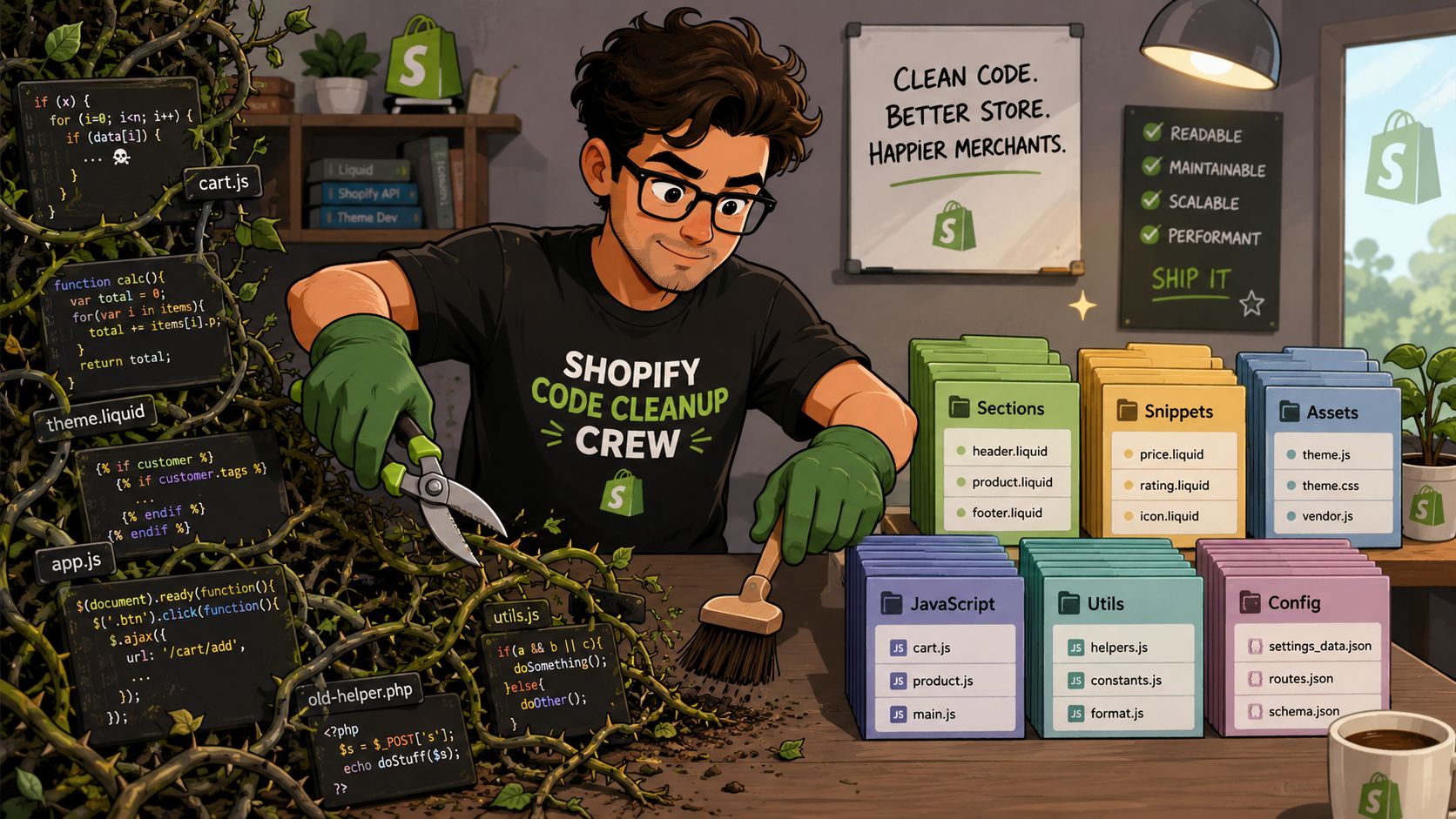
The first strategy is simple: when a developer touches an area, they leave it cleaner than they found it. That might mean extracting repeated Liquid into a snippet, removing dead settings, renaming confusing variables, or reducing JavaScript that no longer serves the feature.
This works well on Shopify because many issues sit close to active business work. If the team is already editing a product section for merchandising, that's the right moment to simplify the related logic.
What doesn't work is “we'll clean it up later.” Later usually means never.
Refactor hotspots, not everything
A proven method is to target code that is both high-complexity and high-churn. Those are the hotspots that create the biggest maintenance cost and the highest ongoing risk (expert talk on hotspot-based refactoring).
On a Shopify store, hotspots often include:
- Product templates that carry years of feature additions
- Cart logic touched by promotions, subscriptions, upsells, and shipping rules
- Collection and filtering code that changes often with merchandising needs
- App integration layers where scripts and custom events collide
If a file is ugly but rarely touched, leave it alone for now. If a file is changed every sprint and every edit feels dangerous, that's where refactoring pays off.
Three practical moves that work well on Shopify
Break large templates into smaller components
A monolithic product-template.liquid or an overloaded section file creates fear. Split repeated responsibilities into focused snippets or sections. Keep media rendering, variant presentation, trust signals, and related products separate where possible.
That gives your team clearer ownership and makes testing easier after each change.
Replace heavy apps when they create more drag than value
Some apps are worth keeping. Others slow the storefront and complicate theme behavior. If an app injects too much front-end code or duplicates logic your team already maintains, replacing it with a lighter custom solution can reduce both performance drag and maintenance pain.
This is often part of broader Shopify page speed optimization work, especially when third-party scripts affect key storefront interactions.
Refactor around recurring business workflows
If every sale event requires custom patching, the underlying issue probably isn't the campaign. It's the way the theme handles merchandising changes. Refactor around actual operating patterns: badges, bundles, promo blocks, landing page modules, regional content, and inventory messaging.
The best refactoring work makes the next release easier. If the cleanup doesn't reduce stress around future changes, it was probably scoped in the wrong place.
A good refactor should help the next sprint, not just satisfy a technical preference.
Building a Debt Prevention Machine with CI CD and Testing
Most Shopify teams don't get into trouble because they never fix debt. They get into trouble because they fix some of it, then keep adding more.
That's why prevention matters more than one-off cleanup.
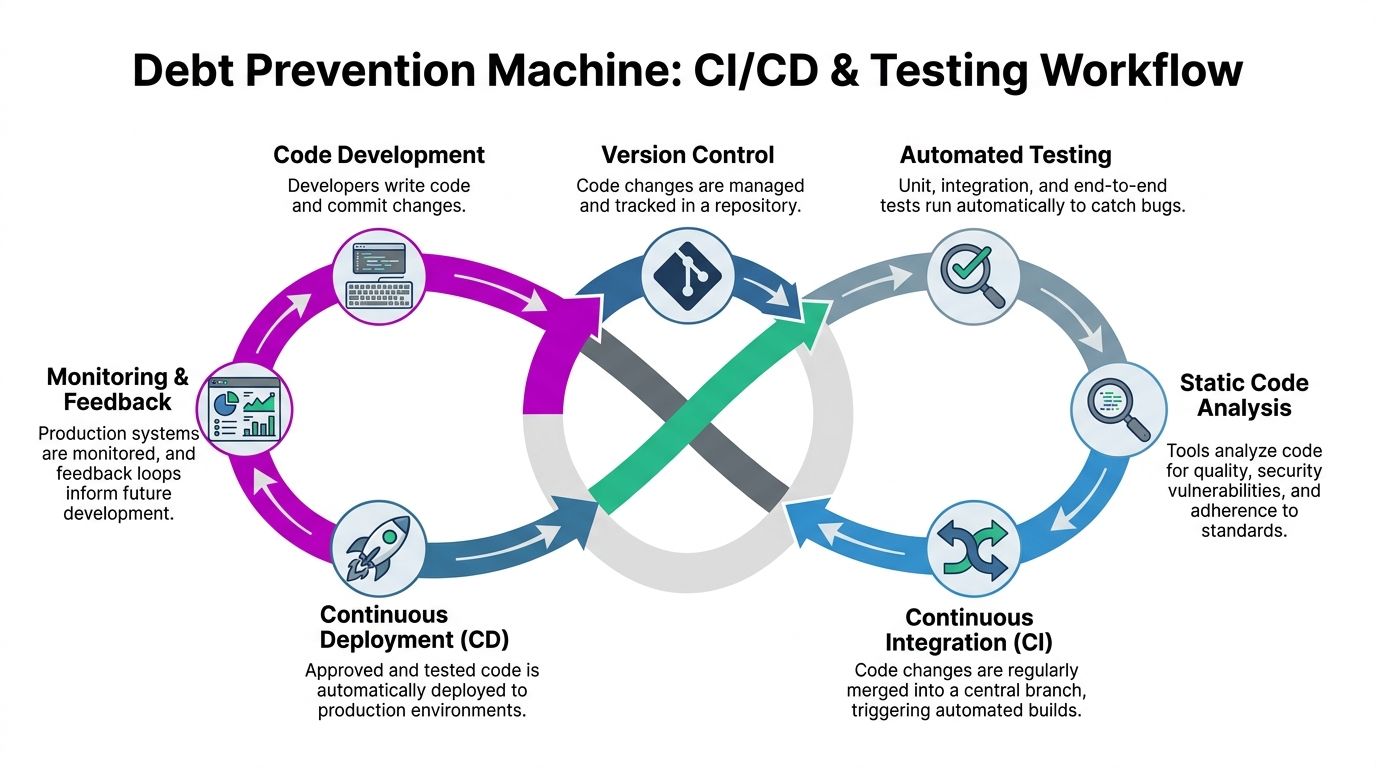
Without a reliable workflow, theme development becomes guesswork. A developer makes changes locally, pushes them manually, someone checks a few pages, and the team hopes nothing important broke. That might work for a tiny store. It doesn't hold up once multiple people, apps, campaigns, and storefront variants are involved.
What a healthier release process looks like
A better setup uses version control, automated checks, and staged deployment. In practice, that often means GitHub, Shopify CLI, and a CI workflow such as GitHub Actions that validates changes before they reach production.
Carnegie Mellon SEI recommends enforcing a CI/CD gate where code must pass quality scans and unit tests before check-in, which is one of the most effective ways to stop new debt from accumulating (SEI guidance on managing technical debt).
That principle matters on Shopify even if your stack isn't complex. The point isn't enterprise ceremony. The point is preventing avoidable regressions.
A before and after comparison
| Without CI/CD discipline | With CI/CD discipline |
|---|---|
| Theme edits go live with limited review | Changes move through a controlled workflow |
| Bugs are found after release | More issues are caught before deployment |
| Knowledge sits with one developer or agency | Process becomes repeatable and visible |
| Testing is inconsistent | Critical checks happen every time |
Here's a useful walkthrough to pair with that model:
What to automate first
You don't need a huge setup to get value. Start with the checks that protect revenue-critical behavior.
- Version control for all theme work so changes are traceable and reversible
- Automated linting or code-quality scans to catch obvious issues early
- Unit or component testing where practical for logic-heavy storefront behavior
- Preview environments so stakeholders can review before release
- Release checklists for cart, product page, navigation, search, and tracking behavior
If your team relies on memory and Slack messages to deploy safely, you don't have a process. You have a risk pattern.
CI/CD and testing won't eliminate every bug. They will reduce preventable ones, make releases calmer, and stop the store from degrading every time someone ships under pressure.
Governance and Team Alignment to Make Debt Reduction a Habit
A common Shopify pattern looks like this. Marketing wants a landing page live by Thursday, a developer warns that the theme is brittle, and the conversation stalls because nobody can tie the cleanup work to revenue, conversion, or launch risk. The debt stays put. The same delays show up again on the next campaign.
Technical debt gets reduced when it has an owner, a budget, and a place in planning. Otherwise it loses every argument against visible growth work.
For Shopify teams, that usually means setting aside a fixed share of development capacity for debt reduction in every cycle. The exact percentage depends on how unstable the store is, but the principle is simple. If debt work only happens after a bad release, it never becomes routine. If it is planned the same way as merchandising updates, CRO tests, and app work, the store gets easier and cheaper to run.
Put debt work in the same queue as revenue work
Debt should sit in the same project system as campaigns, features, and bugs. A separate spreadsheet is where good intentions go to die.
What works in practice:
- Create debt tickets with a business impact statement such as slower campaign launches, higher QA effort, or recurring cart bugs
- Label tickets by store area like PDP, cart, search, collection pages, checkout extensions, or tracking
- Add a cost of delay so stakeholders can see what happens if the fix waits another month
- Review debt during sprint or roadmap planning so trade-offs are explicit instead of buried in Slack threads
Teams that need more structure around planning, ownership, and delivery usually benefit from a stronger operating rhythm. This guide on managing web development projects pairs well with the governance side of debt reduction.
Give founders and marketers language they can act on
Debt work gets approved faster when it is framed in operating terms. “Refactor the theme architecture” is easy to defer. “Cut the time needed to launch a campaign page from three days to one” gets attention. “Clean up app conflicts in cart” is abstract. “Reduce checkout friction and support tickets during promotions” is concrete.
I have seen this change the quality of decisions quickly. Once a founder understands that a fragile codebase slows experiments, delays launches, and increases the odds of conversion-impacting bugs, debt stops sounding like internal developer housekeeping. It becomes margin protection.
The same principle shows up in broader guidance on how teams reduce technical debt. Debt work sticks when it is tied to delivery speed, customer experience, and operating cost, not just code quality.
Set clear ownership
Shared responsibility often means no responsibility. One person should own the debt register, keep priorities current, and push for decisions when trade-offs appear. That owner does not need to fix everything personally. They need to make sure the work is visible, sized, and connected to business outcomes.
A simple governance habit is enough for many stores:
- Track the top 10 debt items
- Review them monthly with both technical and commercial stakeholders
- Retire, re-rank, or schedule items based on current business impact
- Measure whether fixes reduced launch time, bug volume, or maintenance effort
Visible debt. Protected capacity. Shared language. That is what turns cleanup from a one-off project into a repeatable operating habit.
The Compounding Returns of a Healthy Shopify Codebase
A healthy Shopify codebase pays you back in ways that stack over time.
Your team ships with less hesitation. Marketers can request landing pages and merchandising changes without triggering a mini rescue project. Developers spend less time decoding old logic and more time building useful improvements. Storefront issues still happen, but they stop feeling constant.
That's why the best approach to how to reduce technical debt is operational, not cosmetic. Audit the store. Triage by business impact. Refactor the hotspots that hurt delivery and customer experience. Prevent new debt with testing and release controls. Then make debt work part of normal planning.
What the return actually looks like
The gains usually show up as:
- Faster execution because routine changes no longer require deep investigation
- Better customer experience because critical pages are lighter and more stable
- Lower operating friction because teams aren't repeatedly fixing the same problems
- More strategic flexibility because the storefront can adapt without constant fear
A clean codebase isn't the actual prize. A more resilient eCommerce operation is.
If your store has started feeling expensive to change, that's the signal to act. Start with a small audit of your product page, cart, app stack, and deployment workflow. You don't need a full rebuild to make progress. You need visibility, prioritization, and a team willing to fix the right things in the right order.
Frequently Asked Questions About Technical Debt
A founder usually notices technical debt when simple store changes stop being simple. A campaign page takes too long to launch. A promo breaks a product template. The team starts avoiding changes during high-revenue weeks because nobody trusts what might break.
Those are business problems first, technical problems second.
Common questions and direct answers
| Question | Answer |
|---|---|
| We don't have an in-house developer. Can we still tackle this? | Yes. You can still review the theme setup, app stack, recurring bugs, and release workflow. In many Shopify stores, the first warning signs are operational: repeated launch delays, duplicated app functionality, pages that break after small edits, and no clear owner for fixes. |
| Is technical debt only a problem for large Shopify stores? | No. Smaller stores often feel the cost sooner because one broken template, one failed launch, or one slow product page has a bigger effect on revenue and team capacity. |
| Should we refactor or rebuild the theme? | Start with refactoring unless the current theme is so unstable that routine changes create constant risk. In most engagements, targeted cleanup is cheaper, faster, and less risky than a full rebuild. |
| How do we know what to fix first? | Start with debt that affects conversion, merchandising speed, or release confidence. On Shopify, that usually means product pages, cart behavior, collection templates, app conflicts, and any workflow the team touches every week. |
| How do we explain this to marketing or leadership? | Tie the work to missed revenue, slower campaign execution, higher agency or developer costs, and a weaker customer experience. That framing gets better alignment than engineering language alone. |
A few practical callouts
If you want a broader operating view, this guide on how to reduce technical debt is a useful complement to a Shopify-specific plan.
Keep these points in mind:
- Act before peak season exposes the problem. Debt is always more expensive when the store is already under pressure.
- Put debt work into normal planning. If it lives in a side backlog forever, campaign work will keep pushing it out.
- Prioritize by commercial impact. Revenue-critical templates and high-change areas deserve more attention than stable pages nobody touches.
- Treat rewrites carefully. A new theme can still recreate the same mess if the team keeps the same app habits, release shortcuts, and ownership gaps.
The goal is a store your team can change with confidence, without slowing campaigns, hurting conversion, or creating avoidable rework.
If your Shopify store is getting harder to change, ECORN can help assess the codebase, identify the debt that's hurting growth, and turn it into a practical remediation plan tied to speed, stability, and conversion.



Shopify Theme Kit: Setup, Commands, and Migration Guide

Shopify Extension Development: A Practical 2026 Guide

Shopify Speed Score Explained and How to Improve It

Shopify Mobile Optimization: The 2026 Playbook

How to Add Subcategory in Shopify for Better UX

How to Implement Structured Data for Ecommerce in 2026

SEO App Mobile: Shopify Store Optimization Guide

Shopify Plus Support: What It Includes and How to Choose

Google Ads for Shopify: The Complete 2026 Playbook

Shopify New York: How to Find and Hire the Right Agency

Google Search Console for Shopify: The Complete Setup

First Party Data Collection for eCommerce Growth

FAQ Online Store Guide: Build and Measure It Right

Do FB Ads Work for eCommerce in 2026?

One Page Checkout for Shopify: Design and Implementation

Shopify GraphQL vs REST: The 2026 Developer Decision

Shopify Ecommerce Consulting: Strategy, Pricing &

Are Reddit Ads Worth It for eCommerce Brands

Shopify Title and Meta Description: A Practical 2026 Guide

Product Video Best Practices for Shopify Brands

Real-Time Inventory Management: A 2026 Guide

AI Chatbot Integration for Shopify Stores

Affiliate Program Management: A Shopify Guide

10 Best Performance Monitoring Tools for Shopify in 2026

Digital Asset Management for eCommerce Brands in 2026

Every Type of Facebook Ads Explained for eCommerce Growth

Product Information Management Explained for Shopify Brands

Support Ticket System: A Guide for Shopify Stores

10 Best Customer Service Tools for Shopify in 2026

Can I Start a Business with No Money? a 2026 Blueprint

What Sells Good on Etsy: Best Niches for 2026

Shopify Add to Cart Button: A Practical 2026 Guide

Customer Feedback Automation: A Practical eCommerce Guide

Critical Rendering Path: A Guide for Shopify Stores

How to Promote on TikTok for eCommerce in 2026

B2B eCommerce Consulting That Drives Real Revenue

10 Best Practices for Site Navigation in 2026

Return vs Refund for Shopify Stores: A Practical Guide

What Is Customer Lifetime Value and Why It Matters

What Is Voice of Customer Research for eCommerce

SMS Marketing for Ecommerce That Actually Converts

Master How to Improve Email Deliverability in 2026

Top 7 eCommerce Partners NYC for Shopify Brands in 2026

Machine Learning for Ecommerce: Boost Your Shopify Store

Beauty Market Research: Your 2026 Growth Guide

Shopify International Expansion: A 2026 Roadmap

What Does CRO Stand for in Business: Understanding CRO

Shopify Visual Merchandising: A Playbook for Higher Sales

Shopify Landing Page Design: Master Conversion in 2026

10 Best AI SEO Optimization Tools for Shopify in 2026

Agentic AI for Ecommerce: Boost Your Sales in 2026
Mastering Email Marketing Data for eCommerce Growth

Conversion Rate Optimisation Australia: Boost Your Sales

Conversion Rate Optimization AI: Your Shopify Store Guide

10 Product Bundling Strategies for Shopify in 2026

How to Increase Customer Lifetime Value: A Shopify Playbook

AI Customer Service Automation: Shopify Guide 2026

Clean Website Design: A Shopify Conversion Playbook

Omnichannel Retail Strategy: A Shopify Playbook

Product Data Enrichment: A Guide for Shopify Brands

Instagram Shopping Features a Guide for Shopify Stores

What Is Revenue Optimization: A Holistic RevOps Guide

Benefits of Conversion Rate Optimization: Boost Your

WordPress to Shopify Migration: Your 2026 Seamless Switch

Boost Sales: Ecommerce Payment Processing Guide 2026

Unified Commerce Platform: Benefits, KPIs & Shopify Guide

How to Reduce Bounce Rate eCommerce: Your 2026 Guide

Shopify API Integration: A Practical End-to-End Guide

How to Implement Data Governance: A 2026 Guide

Shopify Store Development Cost: A 2026 Breakdown

What Is Server Side Tracking: The Shopify Guide 2026

Marketing Automation Workflows: A Shopify Guide for 2026

Shopify UX Design Change: A Playbook for Growth

User Generated Content Strategy: Shopify Playbook

Shopify Pause and Build Plan Cost: A Complete 2026 Guide

Compare at Price on Shopify: A Complete Guide for 2026

Where Can I Sell My Prints? 10 Best Platforms for 2026

Shopify Order Management System: The Ultimate Guide 2026

What Is Marketing Attribution? an eCommerce Guide for 2026

10 Best Black Friday Sales Sheets for 2026

Discover the Top Social Media Marketing Agencies For

Consumer Confidence Definition for eCommerce in 2026

What Is Social Commerce? Your 2026 Guide to Boosting Sales

A Social Ad Campaign Playbook for eCommerce Growth

7 Best FAQ Page Examples for SaaS & eCommerce

Market Research in Fashion Industry: A Guide for Shopify

Shopify Migration Services: Expert Guide for 2026

Mastering FB Retargeting Ads for Shopify in 2026

What Is Omnichannel Ecommerce

Master Your Shopify Plus Migration: The 2026 Guide

Shopify Integration Services: A Merchant's 2026 Guide

Shopify Collection Description: A Guide to SEO & Sales

Shopify Plus Contact: Reach Sales & Support Effectively

Top Luxury Shopify Stores: Design & UX Strategies

How to Improve Customer Experience: A Shopify Roadmap

Creative Facebook Ads: 10 Examples for Shopify Brands

Remarketing with Facebook Ads: A Shopify Guide for 2026

SEO Linking Strategies for Shopify Stores

Top 7 Statistics YouTube Channels for eCommerce in 2026

Hiring Shopify Plus Designers: A Founder's Guide


newsletter in your inbox