


Most advice on AI chatbot integration starts in the wrong place. Store owners get pushed straight into platform demos, widget embeds, and prompt tuning, while the harder question gets skipped entirely, whether a chatbot should exist on the store in the first place. For a Shopify team, that decision matters more than the tool choice, because a fast bot that answers the wrong questions just adds friction at checkout.
The broader market makes the temptation obvious. One industry estimate places the global chatbot market at USD 9,560.7 million in 2025, with a projection of USD 41,244.2 million by 2033 and a 19.6% CAGR from 2026 to 2033; another widely cited 2025 forecast averages major analyst estimates at $9.08 billion for 2025 and $18.27 billion by 2028, which shows how quickly the category is being monetized. That scale doesn't mean every store needs one. It means the stores that add chatbots without a real use case are competing inside a crowded, expensive software category rather than solving a customer problem.
Deciding If Your Store Actually Needs a Chatbot
A chatbot is not the default answer for support. On Shopify, I've seen stores get more value from cleaner FAQ pages, better predictive search, or a faster handoff to a human agent than they would've gotten from a bot that tries to answer everything. Nielsen Norman Group's position is blunt, the team should first verify that the chatbot solves a real, widespread user need, that AI is the best solution versus simpler alternatives, and that the integration has measurable ROI and fits product strategy, which is a useful correction to the usual “just launch one” advice (NNGroup on when a chatbot is not the answer).
Start with demand, not with tooling
If customers keep asking the same pre-purchase questions, a bot may earn its keep. That's especially true when those questions are tied to variant selection, shipping expectations, or order visibility, because those are repeated interactions that don't need full human judgment every time. But if the issue is poor site navigation or weak product copy, a chatbot can hide the underlying problem instead of fixing it.
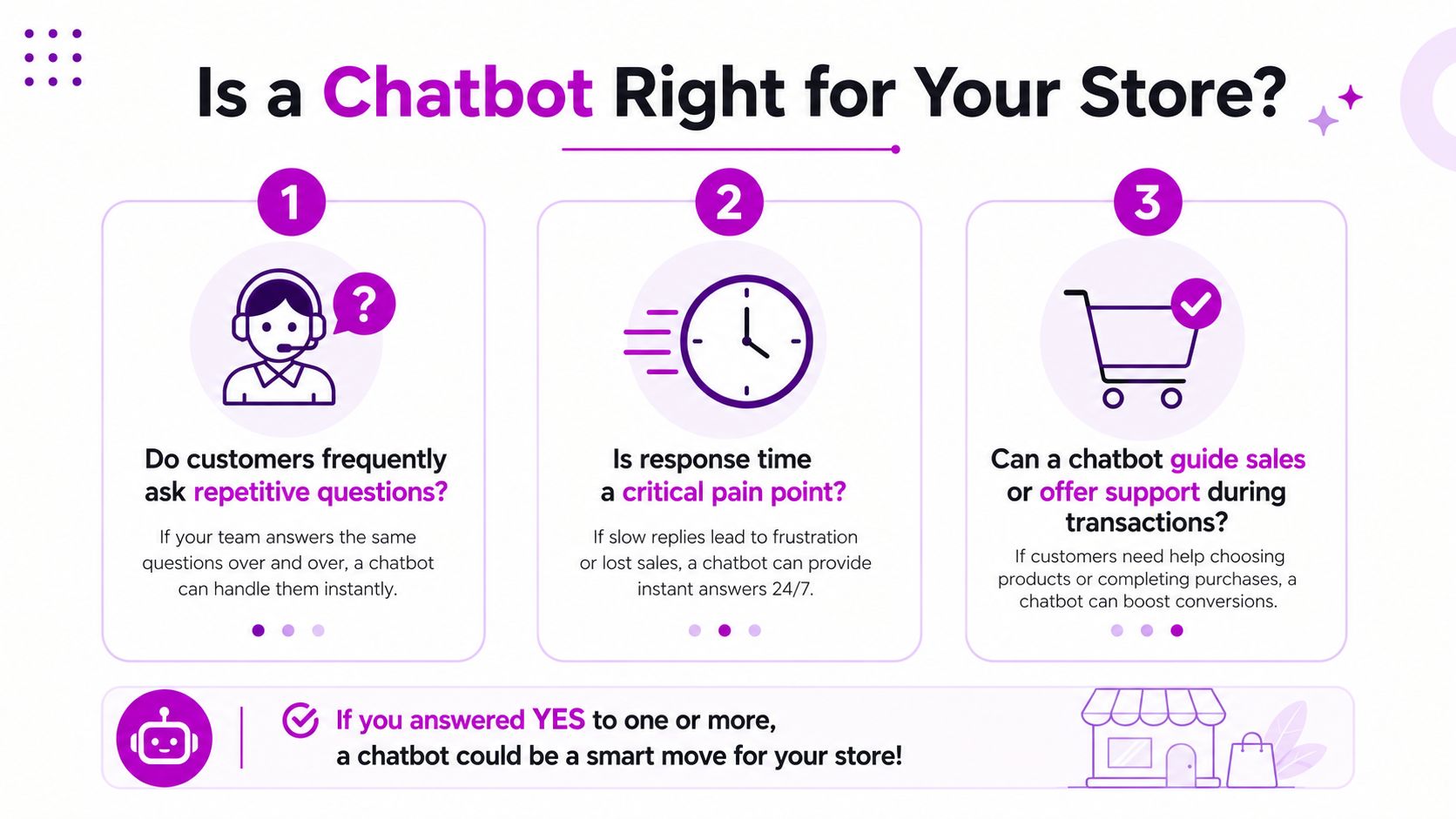
Practical rule: add a chatbot only when the same question appears often enough that scripted help, search, or live chat can't keep up.
Use a readiness check before you build
A simple readiness check saves a lot of rework. Start with 3–5 high-volume, low-complexity use cases, then monitor containment, resolution, CSAT, deflection, and fallback quality during the first 90 days of optimization. One implementation guide also recommends budgeting 20–30% of total implementation cost for first-year maintenance and continuous improvement, because early gains usually stay limited to the intents you explicitly train and connect to backend systems (AI chatbot implementation guide).
A good Shopify team asks four questions before writing any conversation flow:
- Is the need repetitive? If agents answer the same thing over and over, automation has a clean target.
- Can the bot resolve it safely? If the answer depends on policy exceptions or subjective judgment, handoff matters more than automation.
- Is the data ready? If product, order, and policy data live in disconnected systems, the bot will stall.
- Will a simpler fix work first? FAQ cleanup, search tuning, or better macros can beat a chatbot on both cost and complexity.
For store owners who are still deciding, this ecommerce chatbot overview is a useful way to sanity-check the use case before committing to the build.
Choosing the Right Chatbot Platform for Shopify
Platform choice gets messy because “integrates with Shopify” can mean very different things. Some tools only embed a widget and surface canned responses. Others can listen to Shopify events, pull order or catalog data, and hand off to support tools. If you're on Shopify Plus with more than one storefront, a key question is not whether the app works in the App Store, it's whether it can respect your routing, customer service, and merchandising rules without turning into a maintenance burden.
Compare platform behavior, not just feature lists
Tidio is usually attractive when a store wants quick deployment and a lightweight support layer. Gorgias makes more sense when your service team already lives in ticketing workflows and needs customer context close to support operations. Zendesk is stronger when you want the chatbot to sit inside a broader support stack with routing, escalation, and agent tooling. Custom builds using OpenAI or Dialogflow fit teams that need tighter control over prompts, data sources, or edge-case behavior, but they also create ongoing upkeep because you own more of the integration surface.
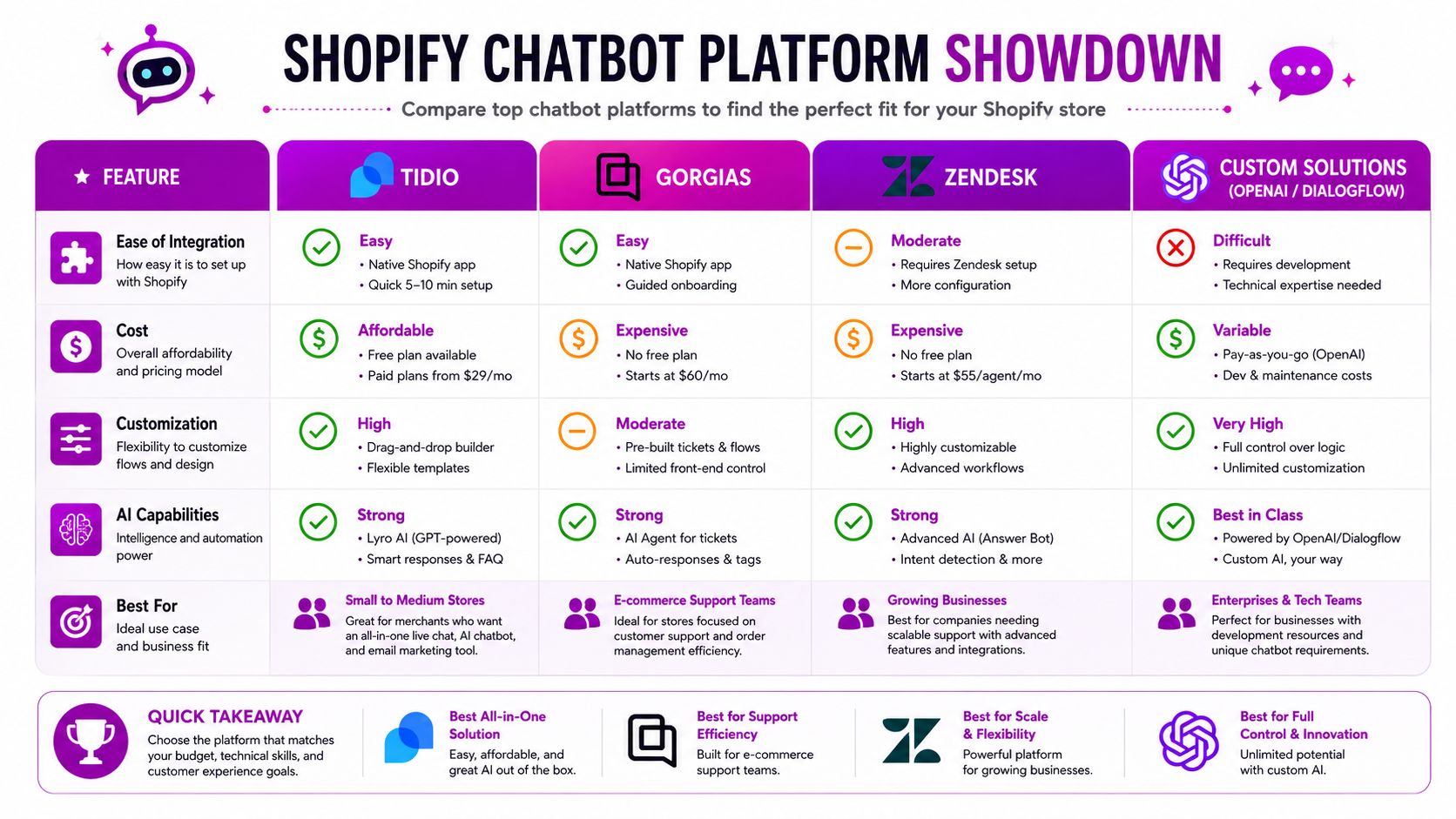
A practical way to compare them is by the work you'll inherit:
| Platform type | Where it fits | What usually breaks first |
|---|---|---|
| Tidio | Fast support rollout | Deeper Shopify logic and custom routing |
| Gorgias | Support-first teams | Overly generic bot behavior if data is thin |
| Zendesk | Larger service ops | Setup complexity across channels |
| Custom solution | Exact workflow control | Maintenance, prompt drift, and integration upkeep |
If you need a Shopify-specific example of a control point outside the chatbot itself, Ship Restrict's page on automated order prevention on Shopify is a good reminder that some problems are better solved with rule enforcement before the customer ever reaches support.
A chatbot platform should fit the store's operating model, not force the team to rebuild support around the app.
Pick custom only when the trade-off is worth it
Custom builds make sense when the bot must do something a packaged app can't, such as relying on private product logic, restricted collections, or exact routing rules tied to customer tags. They also make sense when Shopify Plus merchants need multi-store behavior that a single-purpose app can't model cleanly. The trade-off is obvious, though. Once you own the prompts, middleware, and sync logic, you also own the debugging, versioning, and maintenance.
For teams that want a managed Shopify consulting path alongside development, ECORN is one option among several because it combines Shopify work with AI integrations and broader ecommerce implementation. That's useful when you need the bot to sit inside merchandising and CRO decisions, not just customer service.
Setting Up API Connections and Webhooks
Most chatbot projects fail at the seam between the conversation layer and Shopify. The front end looks fine, then the bot can't confirm an order, can't check inventory, or keeps returning stale product data. The fix is to treat Shopify as the source of truth and wire the bot to specific endpoints and webhook events instead of scraping assumptions from the storefront.
Connect only the data the bot actually needs
For common ecommerce queries, the usual Shopify surfaces are straightforward. Product lookups come from the Admin API or Storefront API depending on whether the bot needs public catalog data or authenticated merchant context. Order status checks usually require authenticated access to order data, while inventory and customer profile use cases depend on whether the bot is reading live operational data or just referencing display-friendly catalog content. If you want the implementation pattern laid out in a Shopify-specific way, this Shopify API integration guide is worth keeping open while you map the fields.
Authentication should be the first thing you lock down. Don't let the chatbot service talk to Shopify with broad access if the use case only needs read access to product or order metadata. Keep the bot's token scope narrow, and separate public product questions from private account questions so you don't end up exposing the wrong data in a fallback response.
Use webhooks for the data that changes fast
A bot that answers from cached state gets embarrassing very quickly. Orders get placed, inventory moves, and customer profiles change, so the bot needs event-driven updates where freshness matters. Webhooks are the cleanest way to keep the bot synchronized with events like order creation, inventory changes, and profile updates, then push those changes into your middleware or knowledge layer before the customer asks.
Don't make the chatbot poll Shopify for everything. Pull on demand for lookup flows, then use webhooks to keep the underlying data current.
The other issue is failure handling. Shopify API calls can fail temporarily, and your bot should degrade gracefully instead of guessing. If order lookup times out, answer with a safe fallback, log the error, and route the customer to support with context rather than inventing an answer.
Keep the integration narrow and observable
In practice, the safest pattern is a thin middleware layer between the chatbot and Shopify. That layer can validate the user intent, fetch the right data, normalize the response, and record failures before the bot surfaces anything to the customer. It also makes it easier to swap platforms later, which matters more than many expect once the first release proves useful.
A brittle integration usually has one of three symptoms, the bot knows too much, it trusts stale data, or it retries hard enough to create duplicate support noise. A disciplined API and webhook setup avoids all three.
Designing Conversations That Drive Conversions
A technically correct bot can still be bad for revenue if the conversation feels robotic or generic. The best Shopify chatbot flows are short, specific, and tied to moments where customers already have intent. That means designing for product discovery, purchase confidence, and post-purchase certainty rather than trying to entertain people with open-ended AI chatter.
Lead with useful narrowing, not broad small talk
For abandoned cart recovery, the first response should reduce uncertainty, not sound clever. If a customer hesitates, the bot should help with shipping windows, return policy, or product fit, because those are the kinds of objections that stop checkout. For product recommendations, browsing history can help, but only if the bot uses it to narrow the decision tree instead of dumping a long list of options.
One flow I've seen work well in apparel is simple. The bot opens with a size or fit question, then asks one follow-up about style preference, then links to a small set of products that match both. That's better than asking a vague “How can I help?” because the customer already knows the topic, they just need a decision fast.
Write fallback paths before you write the hero flow
A fallback message should never pretend to understand more than it does. If the bot can't resolve a question, it should admit the gap, offer a narrower prompt, and hand off to a human when the issue is complex, emotional, or account-specific. That's especially important for returns, damaged shipments, or anything involving policy exceptions, where a bad answer does more damage than a slow answer.
Useful handoff rule: if the bot needs more than one clarification and still can't identify the intent, hand the conversation to a person with the transcript attached.
The strongest post-purchase flows are even simpler. Order status, address correction, and product care questions work when the bot asks for one thing at a time and responds with a clear next step. If the bot has to guess, it should stop guessing.
Keep conversion logic honest
A chatbot should support the buying decision, not pressure it. On Shopify, the best flows help customers compare options, understand fit, and confirm they're buying the right thing. When the bot starts pushing too hard, customers feel manipulated and drop the interaction.
That's why conversational design and merchandising need to stay aligned. If product detail pages are thin, the bot will inherit that weakness. If policies are confusing, the bot will expose it fast.
Testing and Measuring Chatbot Performance
Launching without a measurement plan is how teams end up defending a weak bot for months. A good test cycle checks whether the chatbot answers correctly, responds quickly enough, and hands off cleanly when it cannot solve the issue. The point is not to produce a flashy demo. The point is to prove the bot improves support or sales behavior in production.
Measure the metrics that reflect service quality
Implementation guides point to a useful benchmark: mature deployments often reach 55–65% resolution for customer-service inquiries after iterative optimization, while first-release systems often sit around 40–55% before the knowledge base expands (enterprise AI chatbot deployment guide). That context helps, but the important work is measuring your own bot against your own use cases, not against a generic vendor claim.
The metrics that matter most are the ones tied to customer outcomes. Resolution rate tells you whether the bot solved the issue without escalation. Containment rate shows how often the bot kept the conversation in flow. Fallback frequency exposes weak intents or bad routing. CSAT captures whether people felt helped, not just whether the bot answered. Response latency matters when the bot sits inside a shopping journey and delays feel like friction.
Test before broad rollout
A staged rollout catches failure patterns early. One guide recommends launching with the top 5–10 intents, creating roughly 200 training examples per intent, and deploying to 10% of traffic for 2 weeks to measure resolution rate and CSAT before broad rollout (enterprise AI chatbot deployment guide). That approach is boring, and boring is good here.
Pre-launch testing should include messy edge cases, not just happy paths. Try misspellings, incomplete order numbers, ambiguous product names, and policy questions that sit near the boundary of what the bot can safely answer. If it fails cleanly in testing, you can fix it before customers hit the same edge. On Shopify, I also test the actual webhook path, especially order lookup, fulfillment status, and customer tag updates, because a bot can sound right and still break when the API response is missing a field or the admin app scope is too narrow.
Watch the first 90 days closely
The first 90 days are where bot behavior reveals itself. Watch which intents keep failing, which answers trigger handoff, and which product or policy changes created new gaps. If a conversation keeps missing because the bot lacks context, retrain it or narrow the intent. If the issue is unclear policy, fix the policy content first. If handoff volume spikes after a catalog change, check whether the bot is still reading stale product data or an outdated metafield source.
Maintaining and Optimizing After Launch
A chatbot's real maintenance work starts after launch, because product lines, shipping rules, promotions, and support policies never stay still. Stores that treat the bot like a static app end up with stale answers, broken handoffs, and a support team that stops trusting it. Stores that keep tuning it turn the bot into a reliable operating layer.
Review logs like a merchandising team reviews sales data
Conversation logs show where the bot loses confidence. Look for repeated clarification loops, unanswered product questions, and places where the bot offers a generic fallback too early. Those are the signals that the intent library is too thin or the backend connection isn't giving the bot enough context.
When a product or policy changes, update the source content first, then retrain the related intents. If the bot is answering from an old shipping policy or a retired product page, no amount of prompt tuning will fix the mismatch. Support and the bot need to tell the same story, or customers will notice the gap fast.
Budget for upkeep, not just launch
Maintenance is part of the build, not an extra. The earlier implementation guide's recommendation to reserve 20–30% of total implementation cost for first-year maintenance is realistic because the first release only covers the narrow intents you planned for. That spend usually goes into retraining, new intent coverage, and tightening handoffs rather than into flashy features. If a team has no budget for that work, the bot usually decays.
A practical optimization loop looks like this:
- Check the top failed intents weekly. Fix the ones that affect order or product confidence first.
- Review handoff transcripts. If agents keep answering the same thing, that's a new bot candidate.
- Retire unused flows. Extra paths create confusion when they no longer match store behavior.
- Re-test after launches and policy changes. Promotions and product swaps often create the biggest accuracy regressions.
Keep the bot small enough that your team can explain every active intent without reading a spec document.
Expand only after the core flows are stable
The temptation is to keep adding more skills. Resist that until the current flows are stable. New intents should come from repeated customer demand, not from the desire to make the bot look impressive. In ecommerce, boring reliability beats broad capability every time.
Privacy Compliance and Accessibility Standards
Trust is part of chatbot performance, not a separate legal checkbox. Recent health and policy research shows chatbot adoption can be limited by mistrust in communities affected by historic inequities, and it recommends equitable infrastructure, transparency, community involvement, and education as prerequisites for acceptance (CHCF on underserved communities). For Shopify stores, privacy and accessibility choices affect conversion, support load, and brand credibility at the same time.
Make data handling visible and minimal
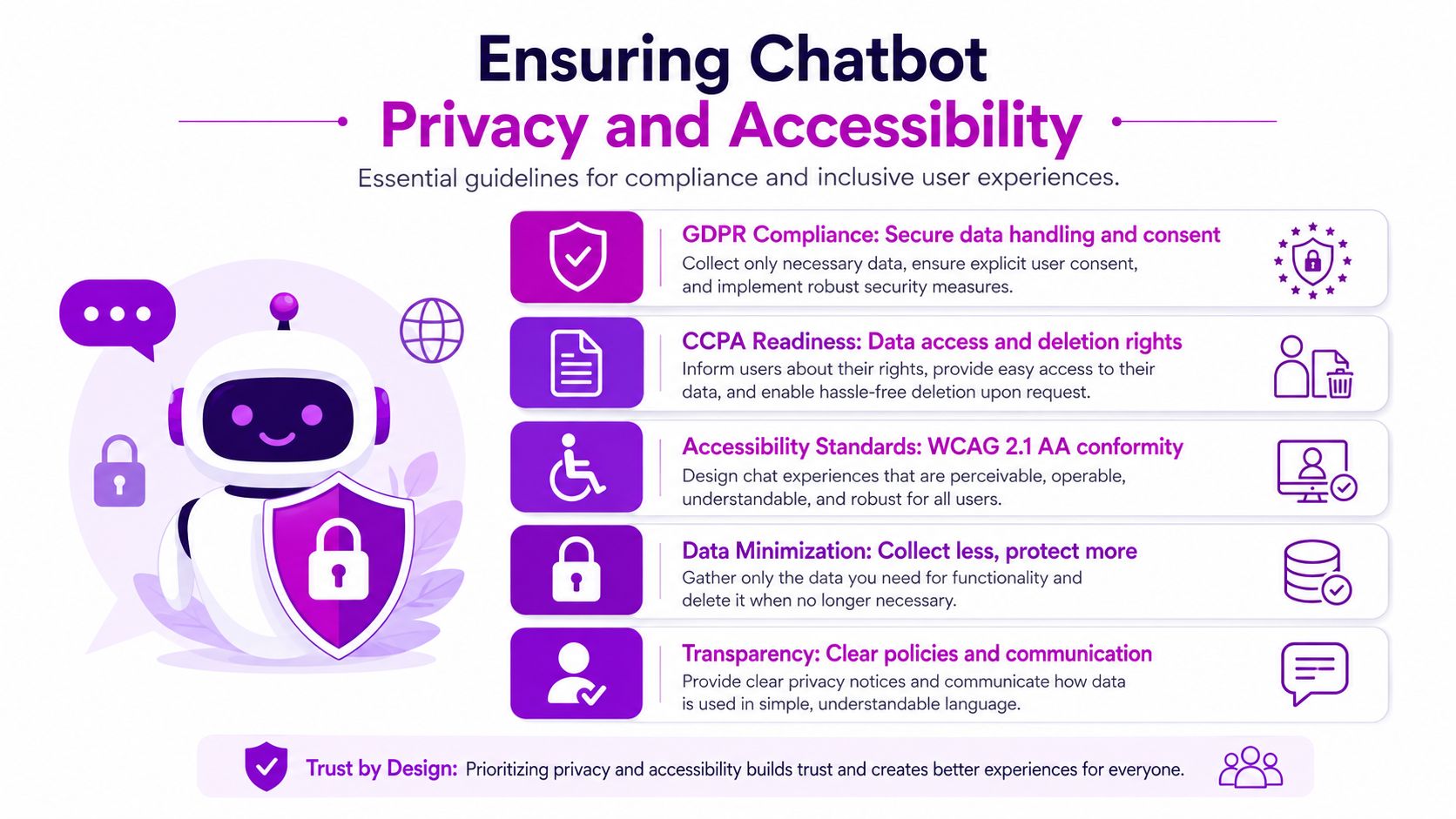
If the bot collects personal data, customer-facing consent needs to be explicit and understandable. Retention should be limited to what the bot needs for support, and users should be able to request access or deletion through a documented process. The implementation details vary by market, but the operating principle stays the same, collect less, store less, explain more.
Accessibility belongs in the same conversation because customers do not all interact in the same way. Screen readers, keyboard users, and shoppers with low literacy or cognitive fatigue need a bot that presents one clear action at a time, uses plain language, and does not bury critical paths behind tiny controls. That lines up with the same equitable design guidance highlighted in the CHCF material, which emphasizes diversity in design teams, user testing for comprehension and bias, multilingual support, and disability-friendly interaction design across planning, testing, integration, auditing, and maintenance phases.
Build for the widest usable experience
Screen reader support, keyboard navigation, and clear focus states are not optional extras. Neither is plain language. A chatbot that hides key actions in tiny buttons or overloaded prompts excludes customers who would otherwise buy or get support without friction.
The same applies to content coverage. Recent review work in health chatbots still shows concentration around adolescents, women, mental health, and sexual and reproductive health, which suggests that evidence and design attention remain uneven across populations. On ecommerce sites, the lesson is the same. Test for different user groups, not just the most convenient ones.
Treat compliance as part of the deployment checklist
A solid Shopify chatbot deployment should include consent flows, retention rules, escalation paths for sensitive issues, and accessibility checks before launch. It should also be reviewed whenever the bot starts collecting new categories of information. That is the point where a helpful support feature becomes a system that needs governance.
If you are building this for a live Shopify brand, ECORN can help with the Shopify side of the implementation, including AI integrations, development, and conversion work that keeps the bot tied to store operations instead of sitting off to the side.



Ecommerce Analytics Consulting for Growth

What Is AI Integration for eCommerce

How to Choose the Right eCommerce Website Development Firm

E Business Strategy Implementation

Conversion Tracking Setup for Shopify Stores

BigCommerce vs Shopify Plus Which Enterprise Wins in 2026

Shopify Theme Kit: Setup, Commands, and Migration Guide

Shopify Extension Development: A Practical 2026 Guide

Shopify Speed Score Explained and How to Improve It

Shopify Mobile Optimization: The 2026 Playbook

How to Add Subcategory in Shopify for Better UX

How to Implement Structured Data for Ecommerce in 2026

SEO App Mobile: Shopify Store Optimization Guide

Shopify Plus Support: What It Includes and How to Choose

Google Ads for Shopify: The Complete 2026 Playbook

Shopify New York: How to Find and Hire the Right Agency

Google Search Console for Shopify: The Complete Setup

First Party Data Collection for eCommerce Growth

FAQ Online Store Guide: Build and Measure It Right

Do FB Ads Work for eCommerce in 2026?

One Page Checkout for Shopify: Design and Implementation

Shopify GraphQL vs REST: The 2026 Developer Decision

Shopify Ecommerce Consulting: Strategy, Pricing &

Are Reddit Ads Worth It for eCommerce Brands

Shopify Title and Meta Description: A Practical 2026 Guide

Product Video Best Practices for Shopify Brands

Real-Time Inventory Management: A 2026 Guide

Affiliate Program Management: A Shopify Guide

10 Best Performance Monitoring Tools for Shopify in 2026

Digital Asset Management for eCommerce Brands in 2026

Every Type of Facebook Ads Explained for eCommerce Growth

Product Information Management Explained for Shopify Brands

Support Ticket System: A Guide for Shopify Stores

10 Best Customer Service Tools for Shopify in 2026

Can I Start a Business with No Money? a 2026 Blueprint

What Sells Good on Etsy: Best Niches for 2026

Shopify Add to Cart Button: A Practical 2026 Guide

Customer Feedback Automation: A Practical eCommerce Guide

Critical Rendering Path: A Guide for Shopify Stores

How to Promote on TikTok for eCommerce in 2026

B2B eCommerce Consulting That Drives Real Revenue

10 Best Practices for Site Navigation in 2026

Return vs Refund for Shopify Stores: A Practical Guide

What Is Customer Lifetime Value and Why It Matters

What Is Voice of Customer Research for eCommerce

SMS Marketing for Ecommerce That Actually Converts

Master How to Improve Email Deliverability in 2026

Top 7 eCommerce Partners NYC for Shopify Brands in 2026

Machine Learning for Ecommerce: Boost Your Shopify Store

Beauty Market Research: Your 2026 Growth Guide

Shopify International Expansion: A 2026 Roadmap

What Does CRO Stand for in Business: Understanding CRO

Shopify Visual Merchandising: A Playbook for Higher Sales

Shopify Landing Page Design: Master Conversion in 2026

10 Best AI SEO Optimization Tools for Shopify in 2026

Agentic AI for Ecommerce: Boost Your Sales in 2026
Mastering Email Marketing Data for eCommerce Growth

Conversion Rate Optimisation Australia: Boost Your Sales

Conversion Rate Optimization AI: Your Shopify Store Guide

10 Product Bundling Strategies for Shopify in 2026

How to Increase Customer Lifetime Value: A Shopify Playbook

AI Customer Service Automation: Shopify Guide 2026

Clean Website Design: A Shopify Conversion Playbook

Omnichannel Retail Strategy: A Shopify Playbook

Product Data Enrichment: A Guide for Shopify Brands

Instagram Shopping Features a Guide for Shopify Stores

What Is Revenue Optimization: A Holistic RevOps Guide

Benefits of Conversion Rate Optimization: Boost Your

WordPress to Shopify Migration: Your 2026 Seamless Switch

Boost Sales: Ecommerce Payment Processing Guide 2026

Unified Commerce Platform: Benefits, KPIs & Shopify Guide

How to Reduce Bounce Rate eCommerce: Your 2026 Guide

Shopify API Integration: A Practical End-to-End Guide

How to Implement Data Governance: A 2026 Guide

Shopify Store Development Cost: A 2026 Breakdown

What Is Server Side Tracking: The Shopify Guide 2026

Marketing Automation Workflows: A Shopify Guide for 2026

Shopify: How to Reduce Technical Debt

Shopify UX Design Change: A Playbook for Growth

User Generated Content Strategy: Shopify Playbook

Shopify Pause and Build Plan Cost: A Complete 2026 Guide

Compare at Price on Shopify: A Complete Guide for 2026

Where Can I Sell My Prints? 10 Best Platforms for 2026
Shopify Order Management System: The Ultimate Guide 2026
What Is Marketing Attribution? an eCommerce Guide for 2026

10 Best Black Friday Sales Sheets for 2026

Discover the Top Social Media Marketing Agencies For
Consumer Confidence Definition for eCommerce in 2026
What Is Social Commerce? Your 2026 Guide to Boosting Sales

A Social Ad Campaign Playbook for eCommerce Growth

7 Best FAQ Page Examples for SaaS & eCommerce

Market Research in Fashion Industry: A Guide for Shopify
Shopify Migration Services: Expert Guide for 2026

Mastering FB Retargeting Ads for Shopify in 2026
What Is Omnichannel Ecommerce

Master Your Shopify Plus Migration: The 2026 Guide
Shopify Integration Services: A Merchant's 2026 Guide
Shopify Collection Description: A Guide to SEO & Sales

Shopify Plus Contact: Reach Sales & Support Effectively

Top Luxury Shopify Stores: Design & UX Strategies


newsletter in your inbox