


Every growing brand hits the same ugly moment. Someone on the team needs the latest hero image for a Shopify collection, a marketplace listing is due this afternoon, the social team wants a resized version for paid ads, and nobody can tell which file is final because the “final_final_v7” folder lives in three different places.
That's usually when the hidden cost shows up. Designers keep re-exporting assets, marketers pull old logos from stale slides, and operations teams spend half a day hunting for a file that should've taken thirty seconds to find. For a Shopify brand trying to move fast across storefronts, marketplaces, and social, digital asset management stops being a nice-to-have and starts looking like the operating layer that keeps content from turning into chaos.
The Asset Chaos Every Growing Brand Knows Too Well
A holiday launch is sitting on someone's calendar, and the workday is already leaking away. Product photos are in Dropbox, brand videos are in a shared drive, the agency uploaded a new lifestyle set into a Slack thread, and the social manager is still pulling logos from a brand PDF that was emailed years ago. No one is doing anything wrong, but the system is broken.
That kind of sprawl creates predictable failures. A marketplace listing goes live with the wrong crop. A regional team uses an outdated packshot. An approved image gets resized three times by three people because nobody can see the downstream channel needs in one place. The result isn't just inconvenience, it's a slow drag on launch speed, consistency, and trust.
Practical rule: if your team asks, “Where's the latest version?” more than once a week, you've already outgrown folder-based asset management.
The simplest way to think about digital asset management is this, it's not a prettier folder system. It's the operating layer that turns scattered creative into a single, searchable, trustworthy source of truth. That matters most for eCommerce because the same asset rarely lives in one channel anymore, it has to work in the PDP, the ad account, the email builder, the marketplace, and the social scheduler.
The better question isn't whether you have assets. It's whether your assets are governed, reusable, and ready for every channel that can generate revenue. That's where the rest of this guide goes, from plain-English definition to Shopify workflows, rollout decisions, governance, ROI, and the AI readiness most brands skip until it's messy.
What Digital Asset Management Actually Means
Think of a DAM like a very disciplined public library. A librarian knows where every book lives, who can check it out, which edition is current, and whether a copy is for public reading or staff only. Your product images, videos, logos, and campaign files need the same kind of system, except the “books” have to move across Shopify, marketplaces, social, and partner portals.
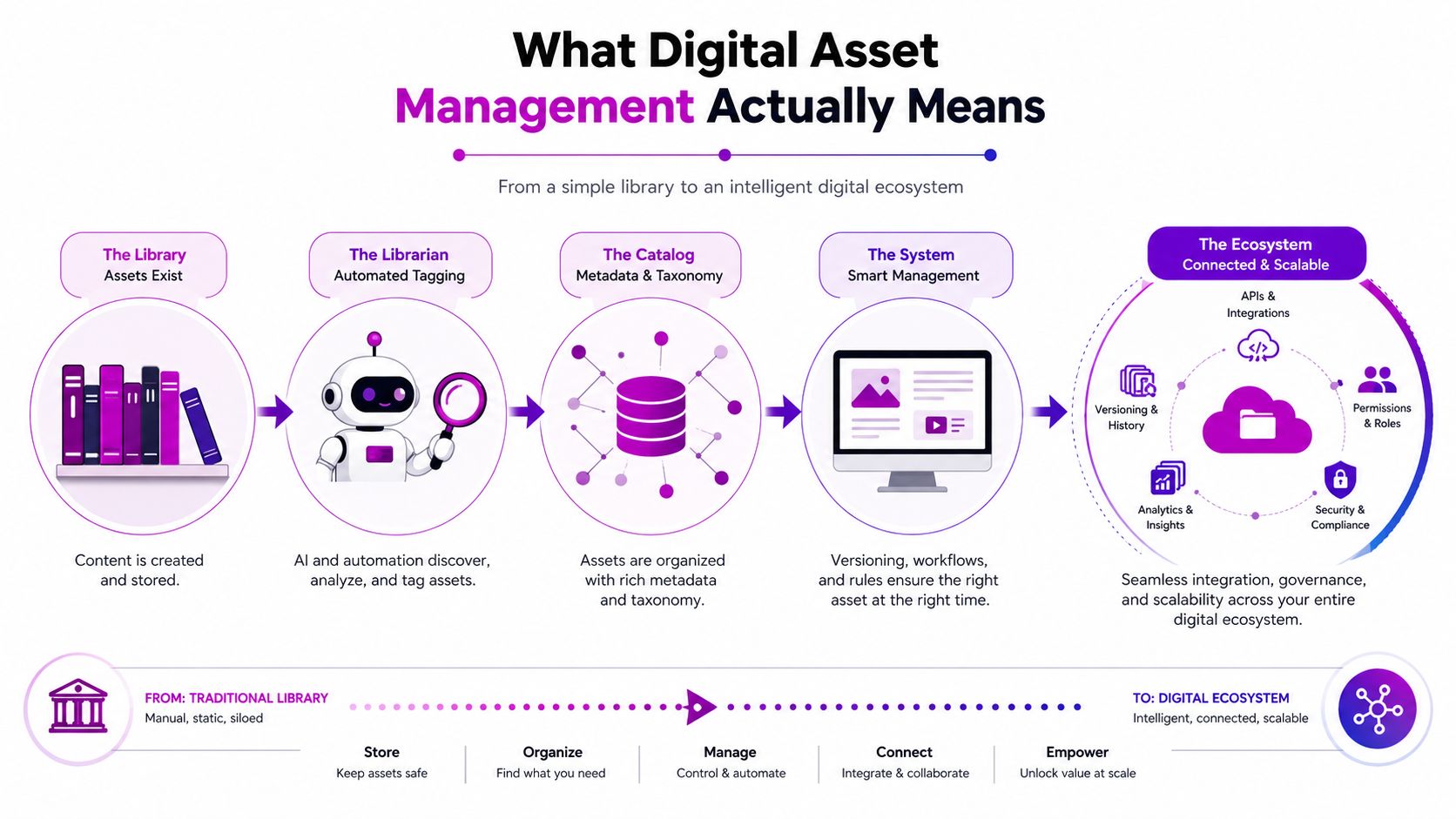
At a practical level, digital asset management is the combination of people, process, and technology that organizes, stores, retrieves, distributes, and governs digital files across a business. In eCommerce, that usually means the marketing team, creative team, merchandising team, and ops team all work from the same governed library instead of improvising from inboxes and shared drives.
The five building blocks that matter
A useful DAM setup usually has five parts. Centralized storage keeps approved files in one place. Structured metadata makes those files searchable, so a product image can be tagged by SKU, color, model, campaign, or usage rights. Search and retrieval let the right person find the right version fast.
The other two pieces are where DAM becomes operational instead of decorative. Access control and permissions decide who can view, edit, approve, or download sensitive files. Distribution and publishing workflows push approved assets into the systems where they're used, including your storefront, partner portal, or social stack.
For example, product images can be tagged with model, SKU, and color so a merchandiser can pull the right visual without asking creative to dig through a folder. A retailer-facing pricing sheet can sit behind restricted access. An asset can download in the right dimensions for Instagram, PDP, or Amazon without someone manually re-exporting every version.
DAM, cloud drive, CMS, and PIM are not the same thing
A cloud drive like Google Drive or Dropbox stores files, but it doesn't give you a real content operating model. A CMS media library helps you publish website content, but it usually isn't designed to govern enterprise-wide asset workflows. A PIM manages product data, while a DAM manages the visuals and media that sit around that product data.
Short version: PIM tells the channel what the product is. DAM gives the channel the images, videos, and creative files that show it.
If you want a clean mental model, use this one. The PIM manages structured product information. The DAM manages governed media. The CMS publishes the experience. When those three are aligned, eCommerce teams move faster with fewer version mistakes and a lot less duplicate work.
How DAM Connects With Shopify and Omnichannel Workflows
The value shows up when DAM stops sitting off to the side and becomes the upstream engine for the whole commerce stack. A single approved hero image can flow into a Shopify PDP, an Amazon listing, a Pinterest pin, a TikTok Shop creative, and a retail partner portal without anyone downloading, renaming, and re-uploading it five times. That's the difference between storage and content operations.
For Shopify brands, the integration pattern is usually straightforward in concept, even if the setup takes care. Some teams use native Shopify apps, some connect through APIs, and some run headless storefronts that pull media from a DAM while a PIM handles product attributes. In every version, the goal is the same, one governed asset library feeding multiple channels with minimal manual handling.
The technical metadata from earlier matters here more than people expect. If the asset's aspect ratio, color profile, or file format is wrong, the channel can distort it, compress it badly, or render it inconsistently. That's why DAM is as much about downstream reliability as it is about storage.
| Channel | Asset Need | DAM Capability | Operational Benefit |
|---|---|---|---|
| Shopify PDP | Product hero images, alternate angles, lifestyle shots | Channel presets, version control, metadata tags | Faster product page updates |
| Amazon | Compliant listing images and clean file formatting | Automated transformation and rights tracking | Fewer listing errors |
| Meta ads | Platform-specific crop sizes and rapid variants | Auto-crop and format conversion | Less manual rework |
| TikTok Shop | Short-form product visuals and quick creative refreshes | Searchable approved asset library | Faster campaign swaps |
| Lightweight, web-ready visuals | Web optimization and curated downloads | Better load times and fewer broken visuals | |
| Retail partner portals | Approved, restricted brand packs | Permissioned sharing and watermarking | Controlled external distribution |
If you're working with more complex media, especially 3D or technical product content, the conversion stage gets even more important. A useful reference is top 3D model converters for 2026, because teams often underestimate how many asset formats sit between creative production and channel-ready delivery.
What changes at scale is simple. DAM becomes the layer that enforces consistency while still letting each channel get the version it needs. That's why the best implementations feel less like a file cabinet and more like a routing system.
Benefits and ROI of DAM for eCommerce Brands
A growing brand usually feels the value of DAM before it can name the category. A campaign team gets product files from one governed place instead of chasing them across Slack threads and old drives. A regional marketer can adapt creative without waiting for a designer to resend the correct version. A merchandising lead can reuse approved content instead of commissioning new photography every time a product or promo changes.
The market data matches that operating reality. Analysts at Mordor Intelligence say sales and marketing enablement held 33.43% share in 2025, and product and eCommerce management is projected to grow at a 14.89% CAGR through 2031 in its market view of DAM, which points to DAM being used as commercial infrastructure, not just an archive. The broader market is also expanding, with Fortune Business Insights estimating USD 5.36 billion in 2025 growing to USD 19.36 billion by 2034 at 15.10% CAGR (Fortune Business Insights, Mordor Intelligence).
Where the ROI usually comes from
The first return is time-to-market. Approved assets are already in one place, so campaign builds move faster and teams spend less time hunting for files. The second return is brand control, because versioned and permissioned assets reduce the odds of an outdated image or spec sheet going live. The third return is reuse, which cuts duplicate creative work and lowers the need for fresh shoots or repeated edits.
There is also a practical legal benefit. Licensed imagery, UGC, and regional partner assets are easier to manage when rights, expiration dates, and usage terms live with the file. That reduces the chance of a rights mistake surfacing after content is already public.
A DAM pays for itself when creative shifts from being recreated to being reused.
What leadership cares about
Founders and operators do not need a lecture on asset governance. They need to know whether the team can launch faster, waste less, and avoid preventable mistakes. DAM helps on all three, especially when marketing, merchandising, legal, and external partners all touch the same content pool.
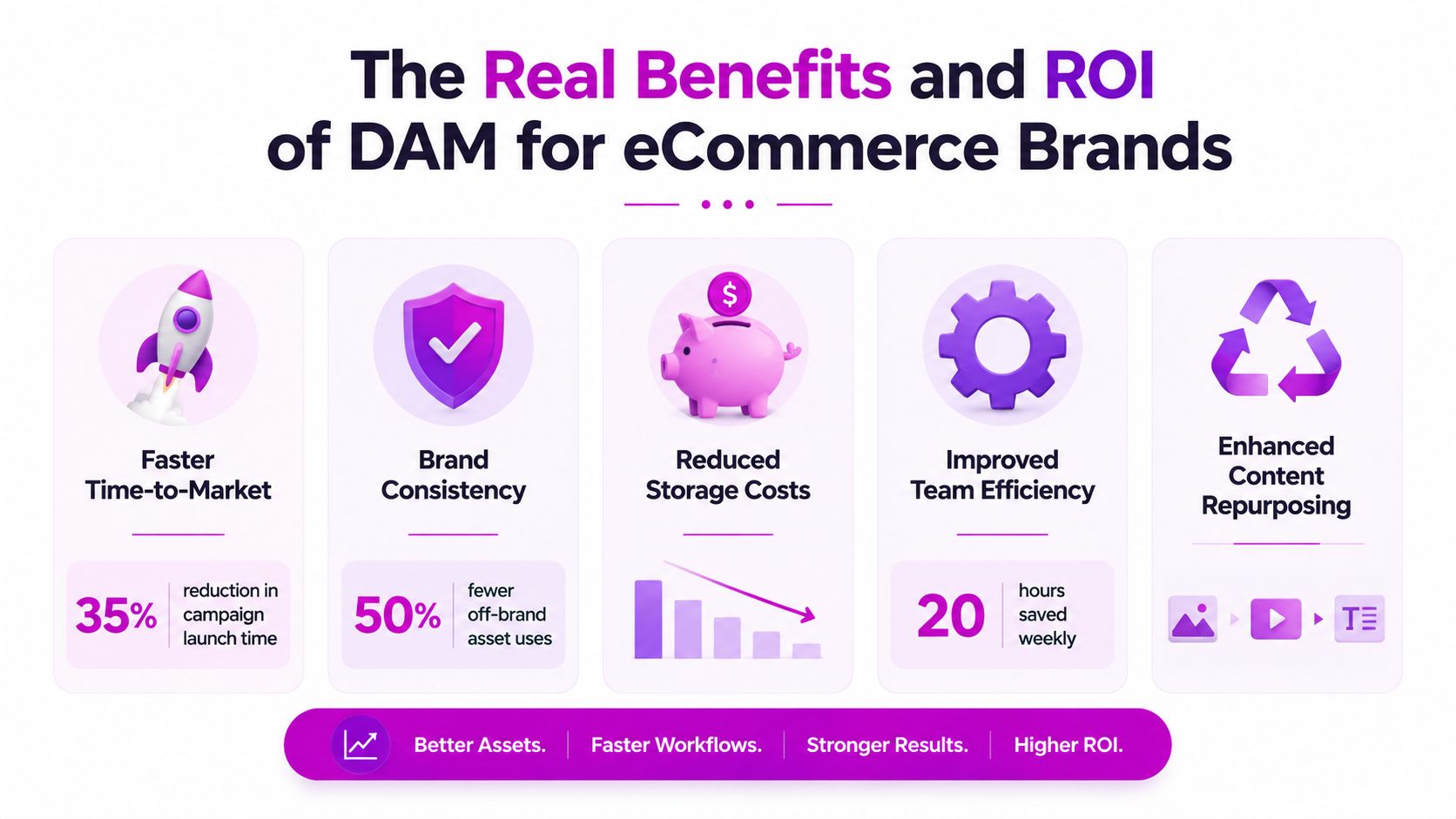
A simple ROI frame for an eCommerce brand starts with three questions. How many campaign assets get reused instead of recreated. How many approval loops disappear because everyone works from one source of truth. How often compliance issues drop once rights and version control are enforced. Those are the numbers that matter inside the business, even when the budget line just says “software.”
For teams that also manage structured product data, product information management often sits next to DAM as part of the same content operating model. DAM handles the files, and the surrounding system keeps those files aligned with the product details that drive each channel.
Choosing the Right DAM Platform for Your Shopify Brand
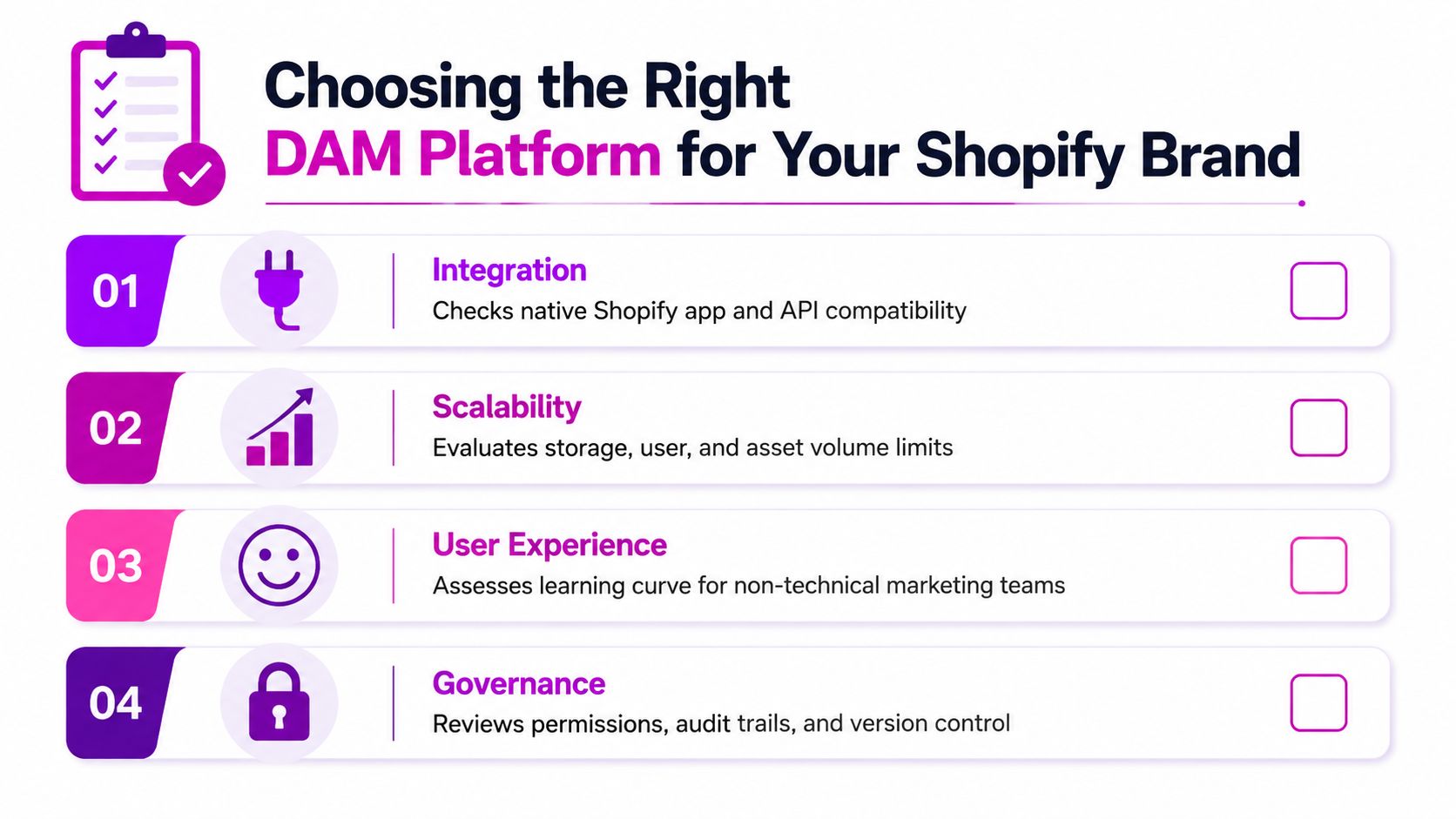
The wrong way to buy a DAM is to compare feature lists like you're shopping for headphones. The right way is to judge functional fit, because a Shopify brand with three stores and a small creative team has different needs from a Shopify Plus brand running multiple regions, marketplaces, and a headless front end. The platform should fit your operating model, not force a new one.
A useful evaluation rubric usually starts with seven areas. Shopify and Shopify Plus integration depth matters first, because if the platform can't connect cleanly, the rest of the promise is theoretical. PIM and headless compatibility matters if your product data and content stack are already split. Metadata and taxonomy flexibility matters because your file structure should reflect how your team works, not how the vendor thinks you should work.
AI features deserve a real look too. Auto-tagging, visual search, facial recognition, and smart crop can save a lot of manual work, but only if the metadata model is disciplined. Governance and rights management are essential for brands that use influencer content or licensed imagery. Security, permissions, and total cost of ownership matter just as much, because migration and ongoing services can easily reshape the actual budget.
How to weight the criteria by stage
Emerging brands usually care most about speed, simplicity, and a Shopify-native setup that doesn't need a full-time administrator. Mid-market teams tend to care more about governance, workflow, and rights control, because more people are touching the same asset library. Shopify Plus brands usually need API-first architecture, multi-store support, and tighter integration with headless or composable systems.
The open DAM specification that groups requirements into roughly 20 functional areas is a useful reminder that this category has real depth behind the buzzwords (Digital Asset Management News). That's why vendor demos should go beyond search bars and upload buttons.
If your stack already includes structured product data management, this internal guide on Product Information Management is worth keeping open beside your DAM shortlist, because the two systems solve different problems and need to work together.
Vendor question set: Can it support Shopify and Shopify Plus cleanly? Can it handle your metadata model? Can non-technical users adopt it without heavy training? Can it govern rights, versions, and approvals without workarounds?
SaaS or self-hosted
Cloud-native SaaS usually makes the most sense when the team wants speed, updates, and lower operational burden. Self-hosted or hybrid options can make sense when data residency, custom control, or internal IT standards are unusually strict. Either way, the evaluation should start with workflows, not architecture pride.
Implementation and Governance Playbook for DAM
Most DAM failures don't come from the software itself. They come from weak tagging, version control gaps, poor workflow integration, and unclear decision rights. That's why rollout planning has to include governance from day one, not after the system is already full of messy content.
Expect the operating model to take time. One consulting source says mature governance can take 6–12 months and phased migration can take 18–24 months, which is a useful reality check for teams hoping to “just move the files over” in a quarter (RevueSuite). The timeline gets longer when legacy media needs digitization or remediation before ingest.
Four phases that actually work
Start with a discover and audit phase. Inventory what you have, where it lives, who uses it, and which assets are still worth saving. Teams usually discover duplicate folders, orphaned rights-restricted files, and naming conventions nobody can interpret at this stage.
Then move into foundation and taxonomy. Decide who owns metadata, what your controlled vocabulary looks like, and how asset types map to products, campaigns, or channels. If taxonomy is vague, AI tagging will only make the mess more efficient.
Next comes integration and rollout. Connect the DAM to Shopify, PIM, creative tools, and any partner portals that need approved content. Train the people who touch assets every day, not just the admins.
Finally, enter optimize and govern. Review usage, fix broken taxonomy patterns, archive expired assets, and keep the brand council active. A monthly council keeps marketing, creative, legal, and IT aligned on permissions, naming, rights, and workflow changes.
Governance details that usually get skipped
The most important decisions are often boring. Who can approve a new asset type. What happens when a license expires. Which team can override metadata. How is a regional adaptation marked so it doesn't replace the master file.
AI should sit inside those rules, not outside them. Auto-tagging, smart crop, and content generation work best when the company has already defined what “approved” means. Legacy content can also slow the project if older files need digitization before upload, so budget time for remediation instead of assuming every file will import cleanly.
Governance check: if no one can answer who owns taxonomy, versioning, and rights expiration, the rollout isn't ready.
Use Cases and Metrics That Prove DAM Is Working
A Shopify Plus apparel brand launching seasonal collections has one obvious pressure point, product pages. When a DAM stores approved imagery with preset crops and channel-ready variants, the team doesn't need to manually prep every PDP asset from scratch. For this kind of brand, the most useful metrics are asset reuse rate, time-to-market for new campaigns, and creative production hours saved.
A beauty brand running localized campaigns across many markets faces a different risk, rights leakage. Influencer imagery can expire, regional approvals can differ, and a file that's fine in one market might not be valid in another. In that case, the dashboard should focus on compliance incidents per quarter, expired asset usage, and the speed at which the team can retire or replace a restricted file.
A home goods brand moving from DTC Shopify into Amazon, TikTok Shop, and retail partner portals needs a single media source feeding several destinations. DAM becomes the source of approved images, videos, and support files, while PIM and APIs help distribute them cleanly. For that model, the best metrics are time-to-market, reuse across channels, and the reduction in manual export work.
If you want to see how image handling fits into a broader commerce workflow, this guide to image optimization for Shopify is a useful companion because channel readiness depends on more than just having the right file in the right folder.
Metrics that tell the truth
Track what your team feels. If launch prep gets shorter, if fewer stale assets appear in market, and if creative hours stop disappearing into duplicate work, DAM is doing real operational work. If adoption is low and people keep bypassing the system, the problem is usually governance or usability, not the asset library itself.
Use the same KPI set for a quarter or two before changing it. That gives you a clear before-and-after view and stops the conversation from turning into vibes-based reporting.
Your DAM Checklist and What Comes Next in 2026
The decision usually comes down to three things. Do you need DAM now, or can you still survive on shared drives for a bit longer. Which criteria matter most at your stage. And who internally owns the program, because software without ownership turns into another unused platform.
Screenshot-friendly checklist
- Audit your current library, including duplicated files, stale versions, and rights-restricted assets.
- Define taxonomy ownership, so one team controls naming, tagging, and metadata rules.
- Map your channels, including Shopify, marketplaces, paid social, email, and partner portals.
- Confirm integration needs, especially PIM, headless storefronts, and creative tools.
- Set permission levels, so external partners only see what they're supposed to see.
- Build a rights workflow, with expiration handling and archive rules.
- Decide how AI will be used, especially auto-tagging, search, and smart crop.
- Plan migration in phases, not as one giant content dump.
- Choose metrics up front, including reuse, launch speed, and compliance incidents.
- Assign a brand council, with monthly review ownership across marketing, legal, IT, and merchandising.
Two 2026 issues deserve a place in the plan. First, DAM has to align with an organization-wide AI strategy, or teams will start using shadow tools outside governance. Second, legacy media risk is real, including archival content on old storage that may need remediation before ingest, especially when hard drives from the 1990s are failing at rates exceeding 20% (CMSWire).
If your brand is moving toward Shopify Plus complexity, or if product content has become a cross-functional operating problem, the next move is to treat DAM and PIM as part of the same commerce stack, not separate software purchases.
If you want help turning scattered creative into a governed Shopify content system, ECORN can help you map the stack, tighten workflows, and plan the rollout without the usual rework. Visit ECORN to talk through your current setup and see what a cleaner DAM-led operating model could look like for your brand.



Shopify Development Company in USA Hiring Guide
Shopify Inventory Tracking App: How to Set It Up Right
Shopify Volume Pricing: How to Set Up Tiered Discounts
How Does Shopify Work for Sellers? a Practical Guide

Shopify Theme ZIP: How to Upload and Install It
Shopify Plus Organization Admin: Roles and Access Guide
How to Build a Drop Down Menu in Shopify: Steps and Fixes
Shopify Plus Integration Services Guide
Shopify Customer Experience: A 2026 Guide

Shopify Plus Expansion Stores: Limits and Setup
Shopify Theme Update: Safe Steps, Backups and Rollback

Shopify Website Design Packages: What You Actually Get

How to Choose a Shopify Plus Web Design Agency in 2026
Shopify Plus Ecommerce Agency: How to Pick the Right One
Shopify Themes Retina: How to Serve 2x Images

How to Cross Sell on Shopify Without Friction

Best Shopify Theme for Custom Products Compared
Multi Store Inventory Management: A Practical Guide

SEO Consulting for Ecommerce: A Practical Guide

Shopify Theme Updater App: A Safe Update Playbook

Shopify Git Integration: A Developer's Guide to 2026
Headless Ecommerce Development Services Explained

How to Build a Shopify Clothing Website That Converts

How to Launch a Box Subscription Business in 2026

Luxury Skincare Branding Playbook That Converters

10 Best Podcast Ecommerce Shows for Store Growth in 2026

Shopify Developer Hourly Rate: What to Pay in 2026
Critical Shopify Setup Errors That Are Secretly Sabotaging Your Store

Ecommerce Conversion Tracking: The Complete How-To Guide

Shopify Design Agency: How to Pick the Right Partner

Mastering Multi Store Management on Shopify

Scale Shopify Store

10 Shopify App Ideas Worth Building in 2026

Conversion Rate Optimization for Landing Pages: The Playbook

Shopify Plus Automation: A Guide for 2026

10 Social Selling Platforms for Shopify Merchants

Shopify Website Design Examples: 7 Stores Worth Studying

7 Ecommerce Newsletter Examples for Shopify Brands

One Product Shopify Store: Build and Scale

Mobile Pop Up Strategy for Shopify Stores That Converts

Sitemap for Shopify: How to Find, Optimize, and Submit It

7 Single Product Websites Worth Emulating

Product Variants Shopify: The Complete 2026 Guide

Ecommerce Analytics Consulting for Growth

What Is AI Integration for eCommerce

How to Choose the Right eCommerce Website Development Firm

E Business Strategy Implementation

Conversion Tracking Setup for Shopify Stores

BigCommerce vs Shopify Plus Which Enterprise Wins in 2026

Shopify Theme Kit: Setup, Commands, and Migration Guide

Shopify Extension Development: A Practical 2026 Guide

Shopify Speed Score Explained and How to Improve It

Shopify Mobile Optimization: The 2026 Playbook

How to Add Subcategory in Shopify for Better UX

How to Implement Structured Data for Ecommerce in 2026

SEO App Mobile: Shopify Store Optimization Guide

Shopify Plus Support: What It Includes and How to Choose

Google Ads for Shopify: The Complete 2026 Playbook

Shopify New York: How to Find and Hire the Right Agency

Google Search Console for Shopify: The Complete Setup

First Party Data Collection for eCommerce Growth

FAQ Online Store Guide: Build and Measure It Right

Do FB Ads Work for eCommerce in 2026?

One Page Checkout for Shopify: Design and Implementation

Shopify GraphQL vs REST: The 2026 Developer Decision

Shopify Ecommerce Consulting: Strategy, Pricing &

Are Reddit Ads Worth It for eCommerce Brands

Shopify Title and Meta Description: A Practical 2026 Guide

Product Video Best Practices for Shopify Brands

Real-Time Inventory Management: A 2026 Guide

AI Chatbot Integration for Shopify Stores

Affiliate Program Management: A Shopify Guide

10 Best Performance Monitoring Tools for Shopify in 2026

Every Type of Facebook Ads Explained for eCommerce Growth

Product Information Management Explained for Shopify Brands

Support Ticket System: A Guide for Shopify Stores

10 Best Customer Service Tools for Shopify in 2026

Can I Start a Business with No Money? a 2026 Blueprint

What Sells Good on Etsy: Best Niches for 2026

Shopify Add to Cart Button: A Practical 2026 Guide

Customer Feedback Automation: A Practical eCommerce Guide

Critical Rendering Path: A Guide for Shopify Stores

How to Promote on TikTok for eCommerce in 2026

B2B eCommerce Consulting That Drives Real Revenue

10 Best Practices for Site Navigation in 2026

Return vs Refund for Shopify Stores: A Practical Guide

What Is Customer Lifetime Value and Why It Matters

What Is Voice of Customer Research for eCommerce

SMS Marketing for Ecommerce That Actually Converts

Master How to Improve Email Deliverability in 2026

Top 8 eCommerce Partners NYC for Shopify Brands in 2026

Machine Learning for Ecommerce: Boost Your Shopify Store

Beauty Market Research: Your 2026 Growth Guide

Shopify International Expansion: A 2026 Roadmap

What Does CRO Stand for in Business: Understanding CRO

Shopify Visual Merchandising: A Playbook for Higher Sales

Shopify Landing Page Design: Master Conversion in 2026

10 Best AI SEO Optimization Tools for Shopify in 2026

Agentic AI for Ecommerce: Boost Your Sales in 2026
Mastering Email Marketing Data for eCommerce Growth


newsletter in your inbox