

The most popular advice about Shopify Plus integrations is also the least useful: install the right app, connect your accounts, and move on. That approach works only while your commerce operation is simple. Once Shopify Plus sits beside an ERP, CRM, OMS, WMS, PIM, loyalty platform, payment service, analytics layer, and multiple selling channels, the connector is rarely the difficult part.
The difficult part is deciding which system owns each piece of data, where business logic belongs, how failures are recovered, and how changes are monitored. Shopify describes Plus as an enterprise commerce platform built around integrations, with APIs, SDKs, automated workflows, and Shopify Plus Partners connecting existing tools such as ERP and CRM systems (Shopify's integration guidance). That flexibility is valuable, but flexibility without governance creates a distributed system nobody can safely change.
Why Shopify Plus Integrations Are an Architecture Problem
A Shopify Plus integration isn't a checkbox in an implementation plan. It's a live dependency between systems, teams, vendors, and operational decisions.
Every connection introduces questions that an app listing won't answer. Which platform is the source of truth for inventory? Should customer updates flow immediately or in batches? What happens when a webhook arrives twice? Who owns the mapping when an ERP field changes? Which team receives the alert when a fulfillment sync fails overnight?
Shopify Plus has a broad integration footprint. BuiltWith tracks 140,445 websites as Shopify Plus customers, including sites using Shopify Pay, Klaviyo, Facebook Pixel, Klarna, Gorgias, Amazon Payments, Yotpo, MailChimp for Shopify, NetSuite, and ManyChat (BuiltWith's Shopify Plus technology profile). The precise mix varies by brand, but the architectural lesson is consistent: Plus stores commonly sit inside a network of specialized systems, not a single clean application stack.
The connector is the easy part
Installing a connector proves that two systems can exchange data. It doesn't prove that the exchange is correct, observable, recoverable, or affordable to operate.
A useful architecture review should map:
- Data ownership: Identify the authoritative system for products, prices, customers, inventory, orders, tax, and fulfillment status.
- Integration topology: Document whether systems connect directly, through middleware, or through an event gateway.
- Business logic: Keep pricing, allocation, discount, and routing rules in the system best equipped to own them.
- Failure handling: Define retries, dead-letter queues, reconciliation jobs, and manual recovery procedures.
- Change control: Version schemas, test releases, and assign an owner to every integration contract.
Practical rule: If nobody can explain what happens after a failed order sync, the integration isn't finished.
The risk increases as systems accumulate dependencies. A marketing platform may rely on customer data from the CRM, while loyalty depends on the same identity model and fulfillment depends on inventory from the ERP. A change that looks local can affect several downstream workflows.
The 2026 integration challenge is therefore architectural. The stack must tolerate API changes, rate limits, latency, duplicated events, vendor outages, and shifting Shopify primitives. Shopify Plus gives you more room to build, but it doesn't remove distributed-system risk.
What Shopify Plus Integrations Are
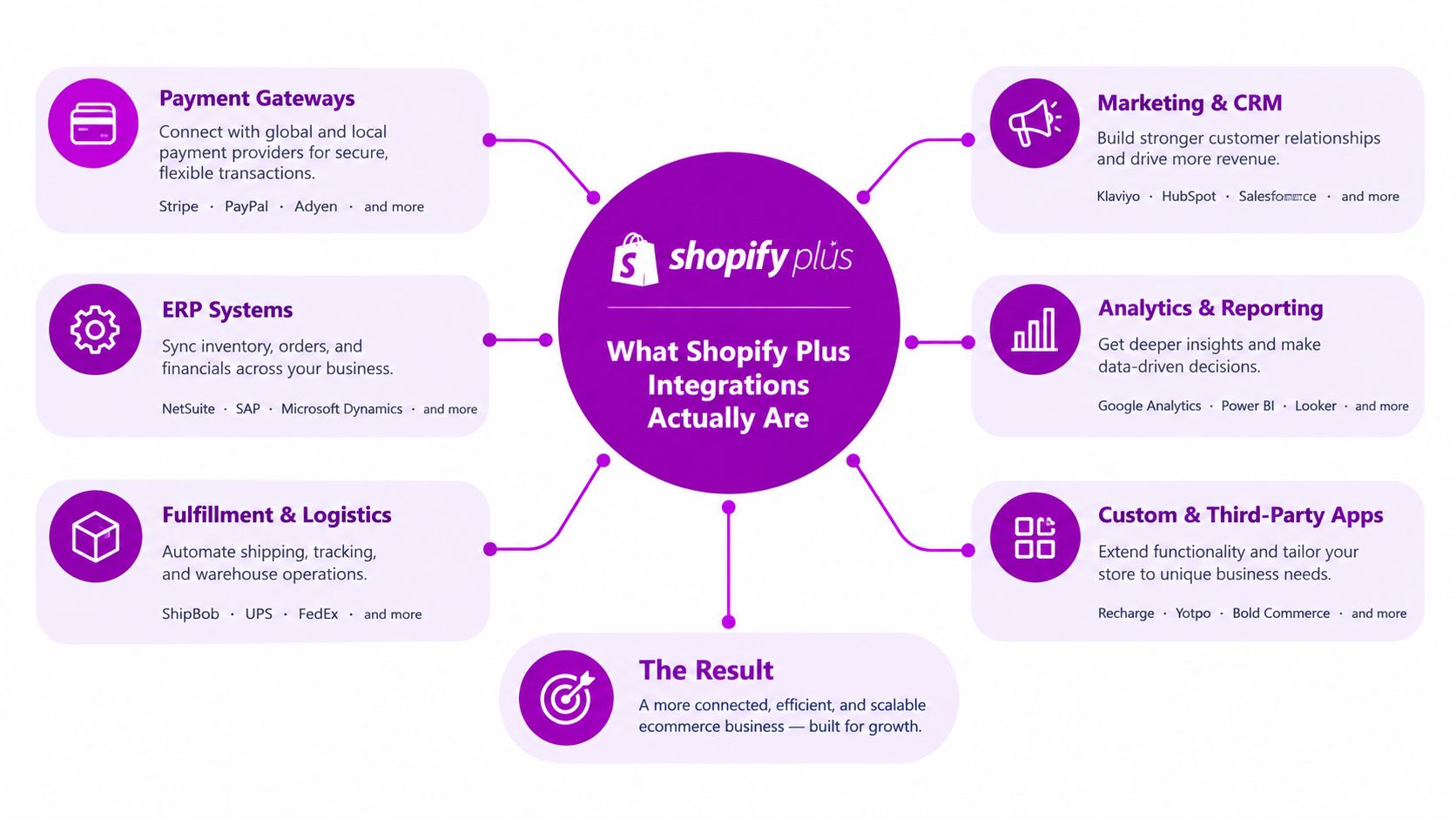
A Shopify Plus integration is a governed exchange of data, events, or actions between Shopify and another system. An ERP can send inventory to Shopify, an OMS can route orders, a CRM can receive customer changes, a warehouse can return fulfillment events, and an internal service can apply business rules through Shopify's APIs.
The app is only one component. The integration also includes data ownership, authentication, field mapping, event timing, error handling, and operational monitoring. Treating it as an architecture decision prevents a connector from becoming the owner of pricing, inventory, or customer identity without the controls to support that role.
For non-technical teams, the plumbing analogy remains useful. Shopify is the building where commerce happens. APIs are the pipes that let systems request or update information. Webhooks are sensors announcing events, such as an order being created. Middleware is the control room that translates messages, applies routing rules, queues work, and records outcomes.
Shopify describes Plus integrations as connections built with APIs, SDKs, and Shopify Plus Partners (Shopify's explanation of Plus integrations). The implication is practical: an integration is not limited to an App Store installation. It may be a public app, a custom app for one merchant, an integration service, or an internal application.
Three types of implementation
A public app serves multiple merchants and addresses a repeatable problem, such as reviews, subscriptions, search, or email marketing. Choose it when the workflow is standardized and the vendor maintains the Shopify compatibility layer.
A custom app is built for one merchant or organization. It suits proprietary workflows, unusual data models, and internal tools that should not be packaged as a generic marketplace product.
A private app is older terminology found in legacy discussions. New architecture decisions should follow Shopify's current app and API model instead of treating a private app as the default technical choice.
Plus capabilities also affect integration boundaries. Shopify says checkout UI extensions for the information, shipping, and payment steps are available only to Shopify Plus stores, allowing custom app or function logic in checkout areas restricted on lower-tier plans (Shopify Community discussion on checkout API validation). This can support external validation, conditional checkout experiences, and operational rules, while making checkout a boundary that needs stricter testing and ownership.
The install takes minutes. The contract lasts for years. Define its fields, event behavior, authentication, ownership, retry rules, release procedures, and response when either system changes.
Headless, Middleware, and Direct API Architectures Compared
The three common Shopify Plus patterns solve different problems. Choosing one because it sounds modern is a mistake. Choose based on system count, engineering capacity, storefront requirements, and the cost of failure.
Direct API connections work well for a small stack. Shopify talks directly to an ERP, or a fulfillment service receives order data without an intermediary. This approach has fewer moving parts and can reduce initial setup effort. It becomes difficult when each new system needs its own authentication, mapping, retry logic, monitoring, and deployment process.
Middleware introduces an integration layer such as Celigo, Alloy, Workato, Boomi, Make, or a custom iPaaS service. Middleware translates schemas, orchestrates workflows, queues events, and gives operations teams a central place to inspect failures. For brands with several operational systems and limited engineering capacity, this is usually the most sensible default.
Headless commerce separates the storefront from Shopify's native presentation layer, often using the Storefront API or Hydrogen. It suits brands that need a custom customer experience, performance control, or a frontend shared across channels. Headless doesn't replace middleware. In a serious operation, it often increases the need for a properly governed integration layer.
Architecture comparison
| Architecture | Setup Cost | Maintenance Burden | Best For |
|---|---|---|---|
| Direct API | Lower for a narrow use case | Low at first, then rises with every additional dependency | Small stacks and isolated high-volume flows |
| Middleware | Moderate, with platform and implementation work | Centralized but ongoing | Brands coordinating several ERP, CRM, fulfillment, and marketing systems |
| Headless | Highest because the frontend becomes an owned system | High, covering frontend infrastructure and integrations | Custom storefronts, advanced UX, and omnichannel experiences |
My recommendation is straightforward. With fewer than three meaningful integrations, direct APIs can be appropriate. From three to ten, use middleware to centralize translation, queuing, logging, and ownership. Above ten, or whenever you operate a custom storefront, invest in headless only if the customer experience requires it, and pair it with middleware rather than treating headless as an integration strategy.
A well-designed direct connection can outperform a badly configured iPaaS. The issue isn't whether middleware is fashionable. It's whether the number of dependencies justifies a control plane.
For implementation patterns and tooling selection, Shopify API integration guidance can help teams evaluate how direct API work fits into a broader architecture. Use that assessment before choosing a connector, not after the stack has already become difficult to unwind.
Core Building Blocks of a Shopify Plus Integration Stack
A Shopify Plus stack succeeds through clear ownership, not through a long app list. Each primitive should have one defined role, a known failure response, and an owner responsible for its data and limits.
The integration primitives
The Admin API manages operational resources such as products, orders, customers, inventory, and settings. GraphQL suits read-heavy catalog synchronization because clients can request only the fields required. REST remains practical when a legacy ERP connector or vendor integration already depends on it. Set scopes narrowly and design around rate limits before implementation.
The Storefront API supports custom shopping experiences, including headless storefronts and custom buying journeys. It should not replace an ERP or OMS. Keep ownership explicit for inventory, payment state, fulfillment, and other transactional data.
Webhooks notify downstream systems when Shopify data changes, reducing constant polling. They do not guarantee exactly-once processing. The receiving service needs idempotency, durable event storage, retries, monitoring, and reconciliation so a delayed or duplicated event does not corrupt downstream records.
Shopify Functions run selected commerce logic close to Shopify's execution layer. They fit discount, delivery, payment, and validation rules where an external middleware call would add latency or create another failure point. Confirm runtime and input constraints before moving logic out of middleware.
Checkout extensibility supplies supported extension points for checkout experiences and logic. Treat legacy checkout customization as migration debt, not permanent infrastructure. Define which validation, custom fields, and conditional experiences belong in extensions, then confirm that the required checkout surface supports them.
Metafields and metaobjects provide structured storage for custom information attached to Shopify resources. They work well when PIM attributes or merchandising content must travel with a product. Assign ownership, naming rules, data types, and lifecycle controls, or the model will become a collection of inconsistent fields.
For teams comparing orchestration products, best API integration tools 2026 provides a market overview. Use comparisons to shortlist tools, then test each option against data ownership, queueing, observability, access control, and recovery requirements.
| Building Block | What It Provides | Typical Use Case | Key Limit to Plan Around |
|---|---|---|---|
| Admin API | Operational data management | Product, order, customer, and inventory synchronization | Rate limits, schema changes, and access scope |
| Storefront API | Custom commerce presentation | Headless storefronts and custom buying journeys | More frontend infrastructure to operate |
| Webhooks | Event-driven processing | Order, product, inventory, and fulfillment notifications | Duplicate events, retries, and delivery backlogs |
| Shopify Functions | Native commerce logic | Discount, delivery, payment, and validation rules | Runtime and input constraints |
| Checkout extensibility | Supported checkout customization | Custom fields, validation, and conditional experiences | Extension availability depends on the checkout surface |
| Metaobjects and metafields | Custom data modeling | PIM attributes, merchandising content, and structured references | Governance is required to prevent inconsistent schemas |
A working stack uses only the primitives that match the required latency, data volume, failure tolerance, and ownership model. If a workflow has no clear owner or recovery path, adding another connector will increase operational risk rather than solve the architecture.
High-Value Integration Use Cases for Growing Brands
The valuable integration is the one that changes a decision. Moving an order from Shopify to another database is necessary, but it creates little business value by itself. The value appears when accurate data lets a team change inventory allocation, customer treatment, merchandising, fulfillment, or financial control.
Operations and inventory
An ERP such as NetSuite, SAP S/4HANA, or Microsoft Dynamics 365 can own purchasing, financial records, and operational inventory. Shopify then receives sellable availability while orders and customer details move into the back office.
The important design question is not “Can the ERP connect?” It's “Which inventory state should Shopify display?” Available stock, reserved stock, damaged stock, inbound stock, and safety stock may need different treatment. A brand selling through DTC, wholesale, and physical retail should document those rules before building the sync.
An OMS such as Fluent Commerce or Loop becomes valuable when the order needs orchestration rather than simple fulfillment. Split shipments, pre-orders, returns, and location-based allocation should live in the system designed to coordinate them, not in a chain of fragile app automations.
Customer and merchandising decisions
Salesforce or HubSpot can provide customer and account context, while Klaviyo can act on behavioral and transactional events. The integration earns its keep when returning customers are recognized consistently, wholesale pricing tiers reach the correct account, or lifecycle campaigns reflect actual fulfillment and return status.
Search and merchandising systems such as Algolia, Bloomreach, or Constructor should receive clean product data and availability signals. A backorder event can then inform merchandising decisions, such as suppressing a product from a campaign or changing how it appears in search.
Warehouse and logistics tools, including ShipHero or 3PL Central, need reliable order, address, inventory, and fulfillment exchanges. Don't send every available field just because a connector supports it. Send the fields that drive a decision and define what happens when one is missing.
Finance and risk controls
Celigo, Workato, or Make can automate finance and operations workflows, but automation should remain observable. A flow that creates an invoice, tags an order, or routes an exception needs logs, ownership, and a manual recovery path.
Payment and fraud workflows deserve the same architectural treatment. Brands reviewing operational controls can use guidance on how to prevent Shopify chargebacks, but prevention also depends on clean order data, fulfillment evidence, customer identity, and consistent status updates across systems.
The following video provides a visual overview of Shopify integration concepts:
The best use cases connect data to an accountable action. If a sync only copies records and nobody uses the result to make a better decision, question whether the integration belongs in the roadmap.
Failure Modes, Security, and Compliance You Should Plan For
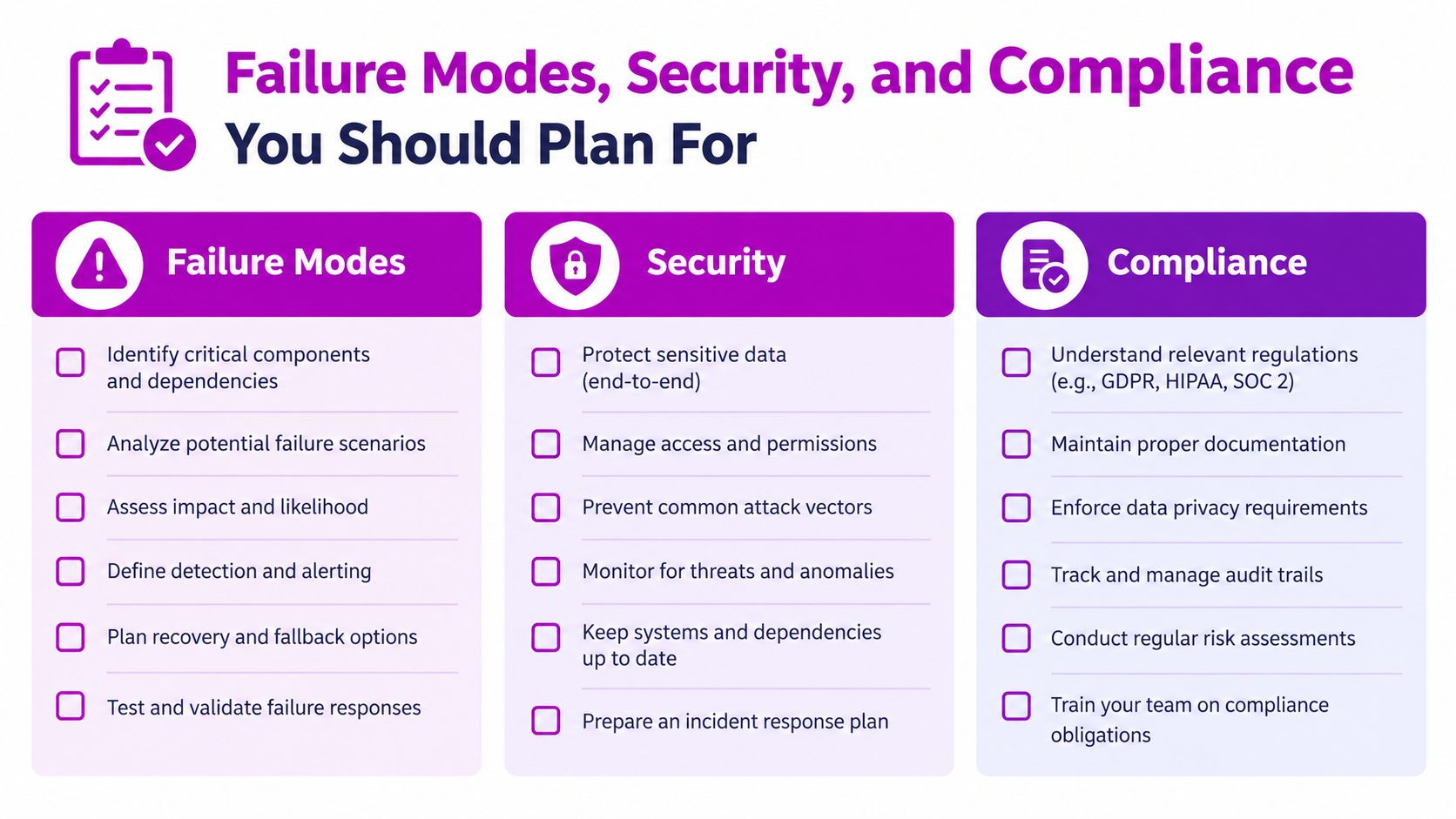
Integration failures rarely announce themselves in a convenient dashboard. A webhook can queue without notice, a token can expire between scheduled jobs, and a third-party schema can change without your team noticing until a customer sees the consequence.
Flash-sale traffic can create webhook backlogs. Token rotation can break an overnight sync. An app update can alter a field or event payload. Middleware jobs can collide with Shopify API limits, causing retries that increase the load instead of resolving it.
Operational tests that matter
Test the unhappy paths before production:
- Duplicate events: Send the same order or fulfillment event more than once and confirm that the receiving system remains idempotent.
- Delayed processing: Pause a consumer and verify that queued events recover without changing order state incorrectly.
- Partial failure: Make one downstream system unavailable while allowing the rest of the workflow to continue safely.
- Credential rotation: Rotate tokens in a controlled environment and confirm that monitoring detects an invalid credential.
- Schema change: Remove or alter a mapped field and verify that the integration fails visibly rather than writing corrupted data.
- Rate-limit pressure: Simulate concurrent jobs and confirm that backoff, queueing, and reconciliation work as designed.
The iAmTechie analysis of Shopify Plus ERP integration highlights the gap between the promise of quick integration and the operational issues created by siloed systems, ERP complexity, synchronization gaps, data inconsistency, rate limits, and API changes. That gap is why brands need observability and governance, not only a connector.
Security and compliance boundaries
Use scoped Admin API access tokens. Give each integration only the permissions it needs, separate credentials by environment and service, and record when access changes. Custom apps can be appropriate for merchant-specific workflows, but the decision should account for ownership, deployment, secret management, and vendor access.
Shopify secures the platform, but your team remains responsible for data leaving Shopify. Review middleware vendors for security controls, audit evidence, retention policies, subprocessors, and incident procedures. GDPR considerations become important when EU customer data enters a US-based SaaS platform, and CCPA obligations can affect customer information associated with California orders.
Shopify Checkout can reduce the payment-card environment your team must operate, but checkout extensions and downstream services can still introduce data and compliance responsibilities. Loyalty systems deserve particular scrutiny because they often combine identity, purchase history, preferences, and behavioral data. The OpenLoyalty discussion of Shopify Plus loyalty and omnichannel architecture is a useful reminder that customer identity becomes harder to govern as stores, POS, wholesale, and DTC channels converge.
How to Choose Between Apps, Partners, and Custom Builds
Stop choosing integrations from vendor demos alone. Ask three questions: How unique is the workflow? How much data moves through it? What happens if it fails?
Native apps make sense for commoditized needs such as reviews, basic tax, subscriptions, or standard marketing automation. A partner-built solution is more appropriate when the integration touches proprietary data shapes, a custom OMS, or a warehouse process that needs Shopify API fluency. Custom builds belong in revenue-critical or compliance-sensitive paths where your team needs source-code ownership, version control, and direct responsibility for recovery.
| Criteria | Native App | Partner Build | Custom Build |
|---|---|---|---|
| Workflow uniqueness | Low | Medium to high | High |
| Data and dependency complexity | Standardized | Specialized | Strategic or deeply coupled |
| Ownership | Vendor-led | Shared with implementation partner | Internal or contracted engineering team |
| Failure impact | Usually contained | Requires a defined support model | Must include monitoring and recovery ownership |
| Best decision | Buy the commodity | Buy expertise for differentiation | Build control into a critical path |
Use Shopify integration services as a reference point when scoping planning, implementation, testing, and maintenance responsibilities. ECORN is one option for brands that need Shopify and Shopify Plus integration work across storefronts, APIs, and operational systems.
The decision rule is simple. If the workflow is commoditized, choose an app. If it's differentiated but not strategic, choose a partner. If an outage or downgrade would directly threaten revenue or compliance, build it with control and ownership in mind.
Designing an Integration Roadmap That Stays Simple at Scale
Most integration debt starts as roadmap debt. Teams approve isolated requests without defining an integration taxonomy, naming a system owner, or recording why a connection exists.
Create an architecture decision record for every meaningful integration. Assign ownership for data, code, credentials, monitoring, vendor communication, and recovery. Sequence high-blast-radius systems, including orders, inventory, payments, and fulfillment, before lower-risk additions such as reviews or surveys.
A practical rolling roadmap has three buckets:
- Stabilize: Remove duplicate flows, add monitoring, fix reconciliation, and document ownership.
- Extend: Add channels, markets, B2B workflows, or decision-support data without bypassing governance.
- Replace: Retire brittle apps, rewrite legacy logic into supported Shopify primitives, or move direct connections into middleware.
Establish a webhook gateway or middleware layer before a major launch forces you to bolt queueing onto checkout operations. Keep AI search, agentic checkout, loyalty, and omnichannel work behind the same API contracts and data ownership rules as traditional commerce flows. New capabilities don't justify bypassing architecture.
The right question isn't which integration you can launch fastest. It's how much custom integration the business can operate safely without turning Shopify Plus into another legacy platform.
ECORN helps brands plan, build, test, and maintain Shopify Plus integrations across storefronts, APIs, and operational systems, with Shopify development and CRO support available through flexible project or subscription engagements. Visit ECORN to discuss your current stack, identify fragile dependencies, and define an integration roadmap your team can operate confidently.



Why Is Conversion Rate Optimization Important
Ecommerce Loyalty Program Software How to Choose and Launch
Shopify Plans Comparison for Every Business Stage
How to Improve User Experience for eCommerce Growth

Shopify Checkout Optimization That Converts More
Shopify Inventory Sync: A Practical Setup Guide
Shopify App Integration Playbook That Scales
Shopify CMS Integration: Your 2026 Guide to Options

Shopify Store Audit: Find Hidden Conversion Leaks

Shopify Plus Experts: How to Hire the Right Team
Chargeback Protection Shopify: A Practical 2026 Guide

8 Examples of Conversion Rate Optimization
How to Conversion Rate Optimization for Shopify Stores

Shopify Design Essentials Every Store Owner Needs
Ecommerce Terms of Service: How to Draft and Implement

How to Implement Structured Data for Ecommerce in 2026

SEO App Mobile: Shopify Store Optimization Guide

Shopify Plus Support: What It Includes and How to Choose

Google Ads for Shopify: The Complete 2026 Playbook

Shopify New York: How to Find and Hire the Right Agency

Google Search Console for Shopify: The Complete Setup

First Party Data Collection for eCommerce Growth

FAQ Online Store Guide: Build and Measure It Right

Do FB Ads Work for eCommerce in 2026?

One Page Checkout for Shopify: Design and Implementation

Shopify GraphQL vs REST: The 2026 Developer Decision

Shopify Ecommerce Consulting: Strategy, Pricing &

Are Reddit Ads Worth It for eCommerce Brands

Shopify Title and Meta Description: A Practical 2026 Guide

Product Video Best Practices for Shopify Brands

Real-Time Inventory Management: A 2026 Guide

AI Chatbot Integration for Shopify Stores

Affiliate Program Management: A Shopify Guide

10 Best Performance Monitoring Tools for Shopify in 2026

Digital Asset Management for eCommerce Brands in 2026

Every Type of Facebook Ads Explained for eCommerce Growth

Product Information Management Explained for Shopify Brands

Support Ticket System: A Guide for Shopify Stores

10 Best Customer Service Tools for Shopify in 2026

Can I Start a Business with No Money? a 2026 Blueprint

What Sells Good on Etsy: Best Niches for 2026

Shopify Add to Cart Button: A Practical 2026 Guide

Customer Feedback Automation: A Practical eCommerce Guide

Critical Rendering Path: A Guide for Shopify Stores

How to Promote on TikTok for eCommerce in 2026

B2B eCommerce Consulting That Drives Real Revenue

10 Best Practices for Site Navigation in 2026

Return vs Refund for Shopify Stores: A Practical Guide

What Is Customer Lifetime Value and Why It Matters

What Is Voice of Customer Research for eCommerce

SMS Marketing for Ecommerce That Actually Converts

Master How to Improve Email Deliverability in 2026

Top 7 eCommerce Partners NYC for Shopify Brands in 2026

Machine Learning for Ecommerce: Boost Your Shopify Store

Beauty Market Research: Your 2026 Growth Guide

Shopify International Expansion: A 2026 Roadmap

What Does CRO Stand for in Business: Understanding CRO

Shopify Visual Merchandising: A Playbook for Higher Sales

Shopify Landing Page Design: Master Conversion in 2026

10 Best AI SEO Optimization Tools for Shopify in 2026

Agentic AI for Ecommerce: Boost Your Sales in 2026
Mastering Email Marketing Data for eCommerce Growth

Conversion Rate Optimisation Australia: Boost Your Sales

Conversion Rate Optimization AI: Your Shopify Store Guide

10 Product Bundling Strategies for Shopify in 2026

How to Increase Customer Lifetime Value: A Shopify Playbook

AI Customer Service Automation: Shopify Guide 2026

Clean Website Design: A Shopify Conversion Playbook

Omnichannel Retail Strategy: A Shopify Playbook

Product Data Enrichment: A Guide for Shopify Brands

Instagram Shopping Features a Guide for Shopify Stores

What Is Revenue Optimization: A Holistic RevOps Guide

Benefits of Conversion Rate Optimization: Boost Your

WordPress to Shopify Migration: Your 2026 Seamless Switch

Boost Sales: Ecommerce Payment Processing Guide 2026

Unified Commerce Platform: Benefits, KPIs & Shopify Guide

How to Reduce Bounce Rate eCommerce: Your 2026 Guide

Shopify API Integration: A Practical End-to-End Guide

How to Implement Data Governance: A 2026 Guide

Shopify Store Development Cost: A 2026 Breakdown

What Is Server Side Tracking: The Shopify Guide 2026

Marketing Automation Workflows: A Shopify Guide for 2026

Shopify: How to Reduce Technical Debt

Shopify UX Design Change: A Playbook for Growth

User Generated Content Strategy: Shopify Playbook

Shopify Pause and Build Plan Cost: A Complete 2026 Guide

Compare at Price on Shopify: A Complete Guide for 2026

Where Can I Sell My Prints? 10 Best Platforms for 2026
Shopify Order Management System: The Ultimate Guide 2026
What Is Marketing Attribution? an eCommerce Guide for 2026

10 Best Black Friday Sales Sheets for 2026

Discover the Top Social Media Marketing Agencies For
Consumer Confidence Definition for eCommerce in 2026

What Is Social Commerce? Your 2026 Guide to Boosting Sales

A Social Ad Campaign Playbook for eCommerce Growth

7 Best FAQ Page Examples for SaaS & eCommerce

Market Research in Fashion Industry: A Guide for Shopify
Shopify Migration Services: Expert Guide for 2026

Mastering FB Retargeting Ads for Shopify in 2026
What Is Omnichannel Ecommerce


newsletter in your inbox