


You notice it in the weekly numbers before you can explain it. Paid sessions are still arriving, the campaign dashboard looks healthy, and the product catalogue hasn't changed. Yet add-to-carts stay flat, purchases feel unpredictable, and every proposed fix seems to involve another theme adjustment, app, or copy rewrite.
That's usually the moment to run a Shopify store audit. Not a redesign, and not a collection of subjective opinions about whether the homepage “feels premium.” A proper audit is a controlled diagnosis of where measurement, traffic quality, storefront performance, persuasion, or search visibility breaks down.
The order matters. Start with measurement integrity, then read the funnel, test speed and technical health, inspect product and checkout friction, evaluate SEO and AI-shopper readiness, and turn the findings into a recurring operating routine. This sequence prevents a common and expensive mistake: optimizing a page against data that never recorded the customer journey correctly.
When a Shopify Store Quietly Stops Growing
A founder often sees the problem first as a marketing problem. The ad spend rises, sessions look acceptable, and the team debates new audiences. But if visits remain steady while sales flatten, the store itself deserves investigation before another campaign launches.
The audit should pressure-test six failure zones:
- Measurement: Are Shopify orders, GA4 purchases, advertising conversions, and app events recording the same customer activity?
- Funnel: Where does the largest drop occur, from session through purchase?
- Performance: Does mobile speed prevent shoppers from seeing or using the page?
- Conversion experience: Do product pages, carts, and checkout answer objections without adding friction?
- Search visibility: Can search engines discover, understand, and connect the store's important pages?
- Operating cadence: Does anyone revisit the system after a theme update, launch, or traffic-source change?
Treating the audit as a redesign mandate creates the wrong incentives. Teams start polishing navigation, changing button colours, or installing a popup before they know whether the purchase event fires. Those changes may be reasonable later, but they're weak first moves when the underlying evidence is incomplete.
Practical rule: Don't approve a CRO recommendation until you can explain which verified funnel signal supports it.
A structured audit also creates a useful baseline for comparison. Shopify audit guidance increasingly recommends a full review each quarter, monthly quick checks for speed, links, and checkout, and analysis of at least 30 to 90 days of Shopify Analytics data to reduce short-term distortion. The Shopify CRO audit guidance also frames the funnel through sessions, add-to-cart rate, checkout-start rate, and purchase rate.
Flat sales with steady traffic rarely need a cosmetic answer. More often, the store has an instrumentation failure or an experience problem hiding behind apparently normal acquisition numbers.
Measurement Integrity Before Anything Else
The first audit task happens before opening the theme editor. Place a test order, inspect the event stream, and reconcile the revenue recorded in Shopify with the revenue reported in GA4 and each advertising platform.
Check these layers in order:
- Shopify Analytics baseline: Confirm the correct store, date range, currency, filters, and reporting view.
- GA4 ecommerce: Verify
view_item,add_to_cart,begin_checkout, andpurchaseevents with the expected value, currency, transaction ID, and item data. - Advertising conversions: Test Google Ads, Meta, and other active channels for duplicate or missing purchase events.
- Checkout and post-purchase apps: Check whether upsells or thank-you-page tools create a second purchase event.
- Consent behaviour: Test both accepted and declined consent paths, because a banner can suppress events without showing an obvious storefront error.
The reconciliation itself needs an explanation, not just a pass or fail. Refunds, tax, shipping, currency handling, duplicate events, and payment-gateway redirects can all create differences. A payment redirect may prevent the thank-you page from loading, while a theme change can remove a checkout or analytics integration that previously worked.
| Source | What Causes the Gap | Typical Direction |
|---|---|---|
| Shopify Orders | Authoritative order records, refunds, taxes, shipping, and payment status | Usually the control total |
| GA4 ecommerce | Missing purchase event, duplicate transaction ID, consent suppression, or currency mismatch | Can undercount or overcount |
| Meta and Google Ads | Attribution windows, browser restrictions, consent, duplicate tags, or server-side differences | Often differs by campaign and user path |
| Upsell and post-purchase apps | Additional event listeners or repeated transaction signals | Can inflate purchase counts |
A more resilient setup may combine browser and server-side signals. The server-side tracking overview is useful when checking whether browser-only collection leaves gaps across consented or restricted environments.
Don't treat a small discrepancy as proof that everything works. Document the expected gap, identify its cause, and confirm that transaction IDs remain unique. A tracking stack that produces attractive dashboards but cannot explain its relationship to Shopify orders isn't ready for CRO decisions.
Reading the Funnel Against the Real Benchmark
A store-wide conversion rate gives you orientation, not a diagnosis. Widely cited Shopify and CRO audit guidance places the average Shopify store at about 1.4%, while top-performing stores reach roughly 3.2% or higher, as described in this Shopify audit benchmark reference. That gap is large enough to signal a structural issue, not merely a button-level opportunity.
Read the journey in stages:
- Session to product view: Did the landing experience move the visitor toward a relevant product?
- Product view to add-to-cart: Did the product page make the offer clear and credible?
- Add-to-cart to checkout: Did the cart preserve intent or introduce uncertainty?
- Checkout to purchase: Did payment, delivery, account, and form requirements block completion?
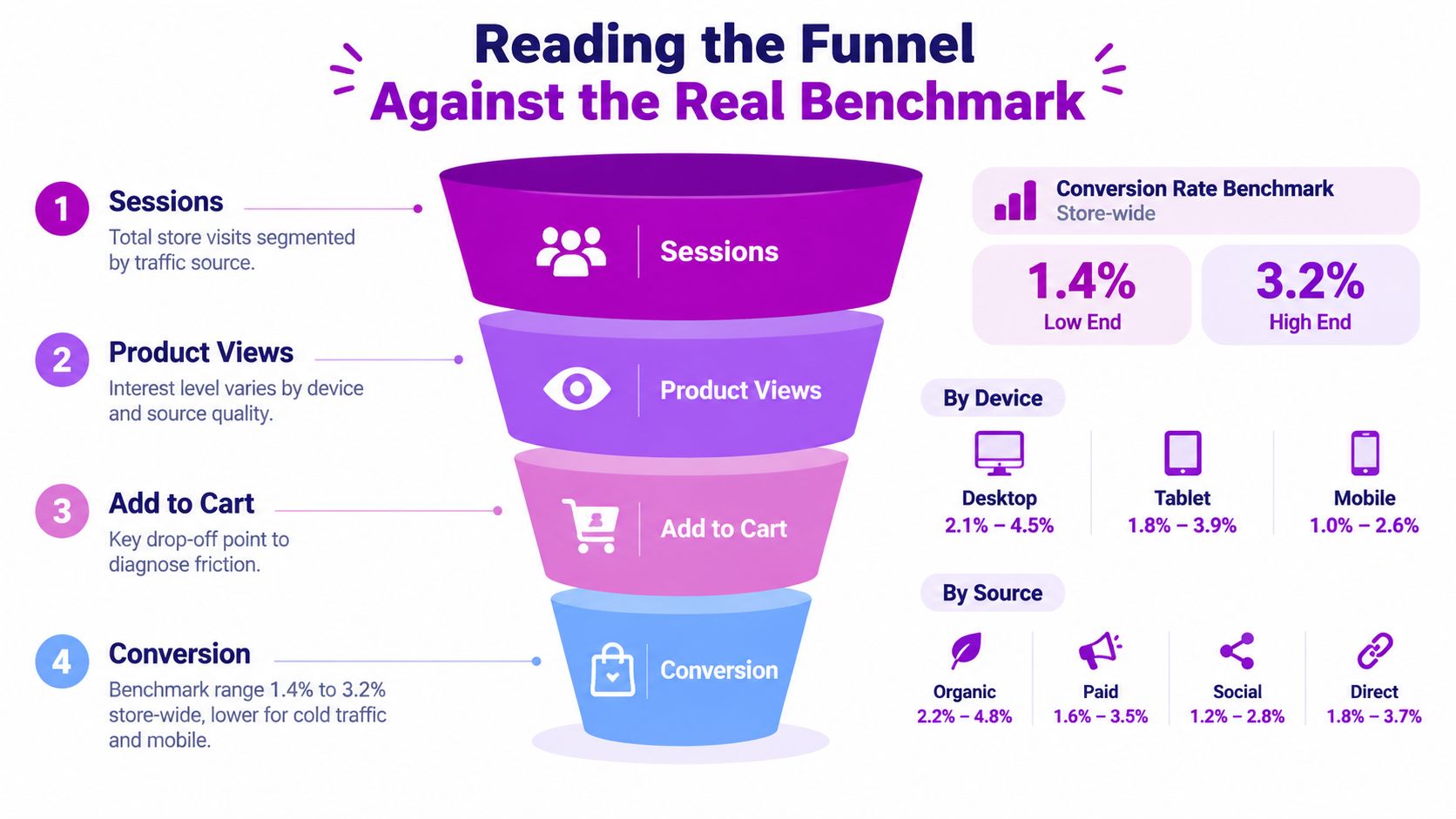
Suppose a store converts at 1.1%, receives strong traffic, and records a product-view-to-cart rate of 4%. If the internal comparison rate is 8% to 12%, the product page deserves attention before checkout. The raw checkout-abandonment count may look alarming, but that's a downstream symptom. Too few qualified visitors are making it into the later stages.
The comparison must be fair. Segment the funnel by:
- Device: Mobile visitors often encounter different navigation, image, and form problems than desktop shoppers.
- Traffic source: Branded search, returning customers, paid social, and cold prospecting carry different intent.
- Country and market: Currency, delivery expectations, tax display, and payment preferences can change behaviour.
- Landing page type: A collection page, product page, campaign landing page, and homepage shouldn't share one blended diagnosis.
Use the largest meaningful drop as the starting point, then inspect the reason behind it. A high-level store conversion rate tells you that performance is weak or strong relative to a benchmark. The stage-by-stage view tells you what to fix.
The last visible abandonment isn't always the first real leak. Trace intent from the top of the funnel before rewriting checkout.
Speed and Technical Health Checks
A slow or unstable store makes every later recommendation harder to trust. Start with mobile performance and use LCP under 4 seconds as the practical mobile target specified in this Shopify store audit framework.
Run PageSpeed Insights and Lighthouse against the highest-traffic page types, not only the homepage. Include product pages, collections, campaign landing pages, and any template that receives meaningful organic or paid traffic.
The order of the technical pass
First, identify the LCP element. A large hero image, an app-injected banner, a render-blocking script, or a heavy theme section can hold back the main content. Compressing every image without knowing which element controls LCP wastes time.
Next, inspect layout stability. Late-loading review widgets, announcement bars, cookie banners, and resized images can shift the page while shoppers try to read or tap. That creates a usability problem even when the final page looks polished.
Then, audit JavaScript and fonts. Unused app scripts, duplicated font files, and features left active after an app is removed are common Shopify liabilities. A theme can appear lean in the editor while still loading third-party code across every template.
Finally, review technical discoverability. Check canonical tags, robots directives, collection indexation, and the 301 map after collection or product URL changes. Broken internal links deserve priority because they waste crawl paths and interrupt customer journeys.
| Check | Target | What It Catches in Shopify |
|---|---|---|
| Mobile LCP | Under 4 seconds | Heavy hero media, app scripts, and theme rendering delays |
| Layout stability | Stable visual layout | Late banners, review widgets, and image dimensions |
| App and theme payload | Remove unnecessary code | Unused embeds, redundant scripts, and font loading |
| Crawl signals | Consistent directives | Broken canonicals, blocked collections, and redirect gaps |
Use the Shopify page speed optimization guide when you need a remediation path rather than another score report. The goal isn't a perfect laboratory score. It's a fast, stable shopping path on the templates that matter commercially.
Audit the app list with the same discipline. For each app, identify the customer or operational problem it solves, the templates it touches, and whether the business still needs it. Consolidation often beats adding another performance tool on top of an already crowded stack.
Conversion Friction in Product Page Cart and Checkout
Once measurement and technical health are credible, inspect the buying path in sequence. Start with the product page, move to the cart, then complete checkout on a real mobile device. Desktop screenshots hide too many practical failures.
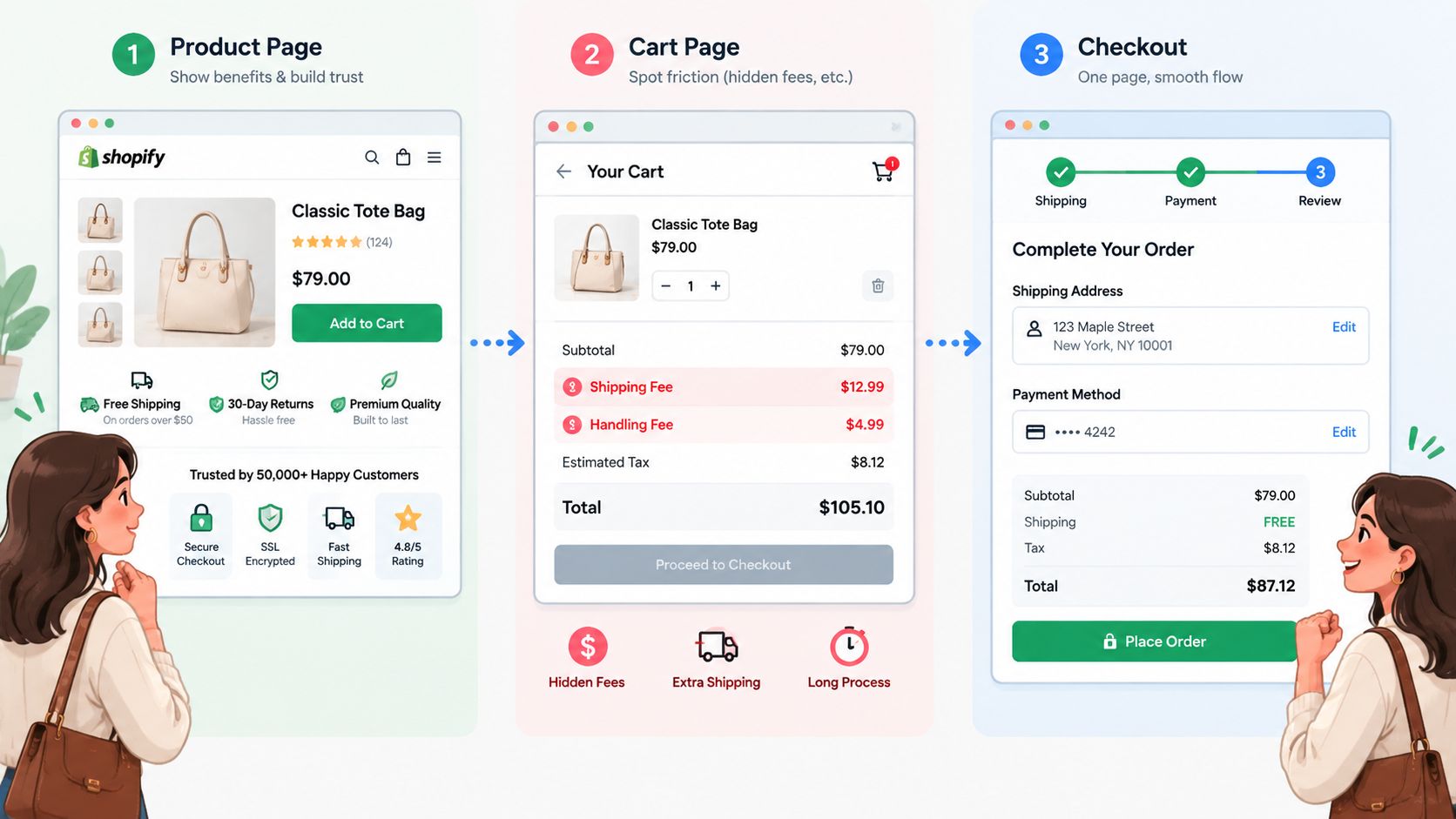
Product page
The first screen should answer three questions quickly: what is the product, why does it matter, and what should the shopper do next? Check whether the headline leads with a benefit, whether the first image shows the product in a useful context, and whether the buy box makes variants understandable.
An auditor should also look for:
- Trust near the decision point: Reviews, guarantees, delivery information, and returns shouldn't be buried below unrelated content.
- Useful image sequencing: Lifestyle imagery can establish use before close-up specifications explain detail.
- Variant clarity: Size, colour, fit, compatibility, and availability need visible states and helpful error messages.
- Shipping and returns: Surface the information before the customer commits, especially for unfamiliar products.
- Mobile interaction: Confirm that the add-to-cart control, image gallery, and variant selectors behave cleanly with one hand.
For products where fit or sizing creates hesitation, a resource on sizing automation for retailers can help frame the problem as decision support rather than another decorative feature. The right solution depends on category, catalogue complexity, and the evidence behind the hesitation.
Cart and checkout
The cart should preserve momentum. Shoppers need to see the product, quantity, subtotal, delivery implications, and available payment choices without hunting through the interface. Edit-in-place quantities are more useful than forcing a return to the product page, while a shipping progress indicator can clarify the consequence of adding another item when the threshold is real and easy to understand.
Look for surprise fees that appear only at checkout, discount fields that encourage coupon searching, and totals that change without explanation. In Shop Pay and accelerated flows, test guest checkout availability, address autocomplete, field count, and payment-method coverage. A checkout that works in a controlled desktop session may still fail when a mobile shopper uses a different address, wallet, or consent state.
The video below is useful as a visual prompt for mapping friction across the path.
Don't install a new checkout app because abandonment is visible. First determine whether the problem is missing information, an account requirement, payment limitations, a delivery surprise, or an event-tracking error. Each diagnosis leads to a different fix.
SEO and AI-Shopper Visibility
A technical SEO crawl should connect search visibility with shopping comprehension. Run Screaming Frog or Sitebulb against the live store and inspect the pages that carry product and category intent, not just the pages with the most links.
Look for orphaned collection pages, duplicate H1s, missing canonicals, thin descriptions, template-generated metadata, and broken links from editorial content into collections. Independent audit data reports that broken internal links affect 36.1% of sites, with a median of 14 dead links per site, while performance issues affect 71.2% of sites. The SEO audit statistical breakdown provides the source for those findings. The practical implication is straightforward: internal link integrity and mobile performance deserve attention before an elaborate content expansion.
Validate what search engines can interpret
Product, review, breadcrumb, and FAQ schema should validate in Google's Rich Results testing environment. Schema won't compensate for unclear page content, but invalid markup can prevent eligible information from being understood consistently.
Collection pages need individual titles and descriptions that reflect the category, buyer intent, and differentiating attributes. Product copy should answer practical questions instead of repeating supplier language. Avoid forcing a word-count target onto every catalogue item. The useful standard is sufficient, specific information for both the shopper and the retrieval system.
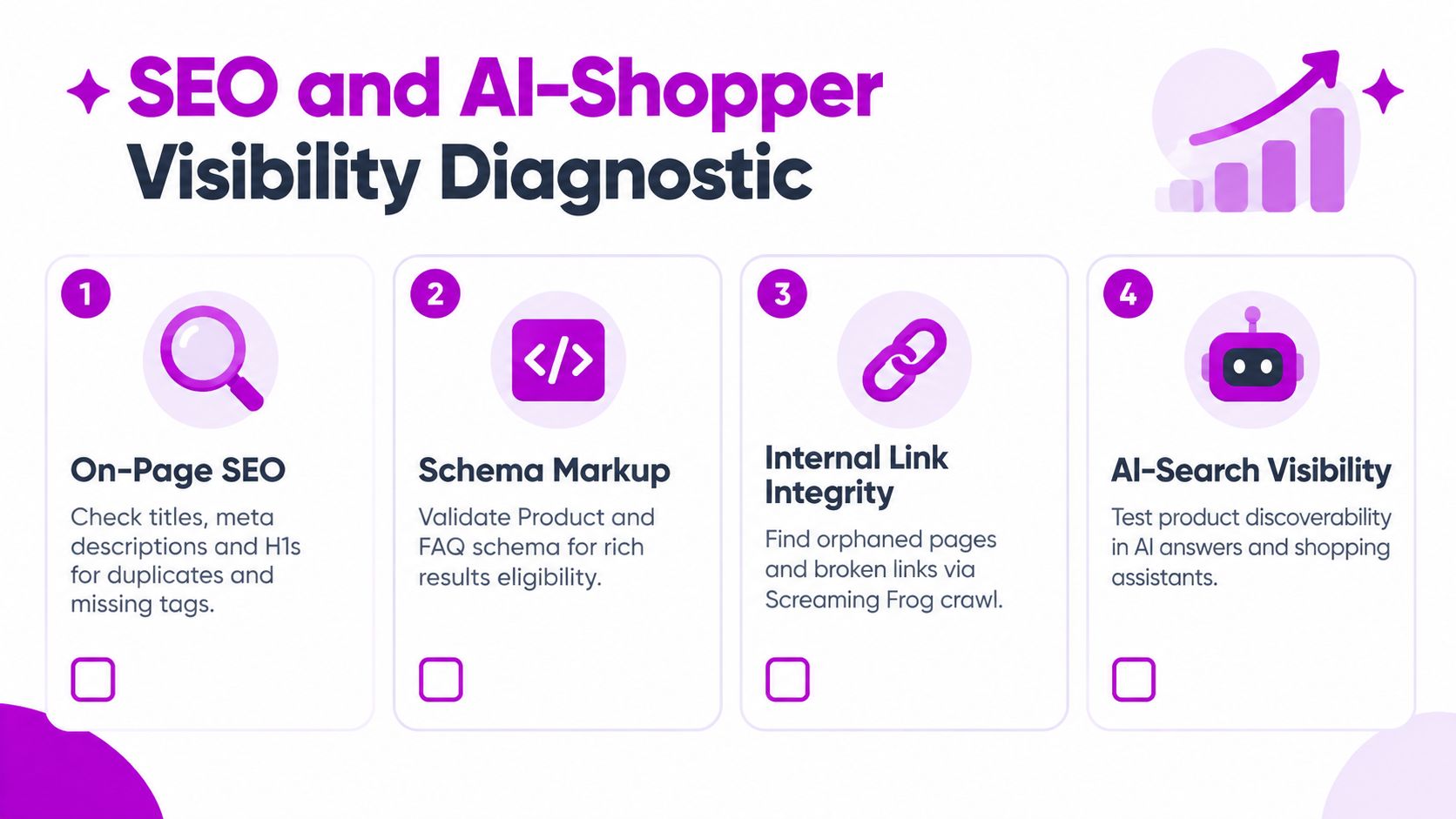
AI-shopper readiness is the newer layer many audit checklists still omit. Recent Shopify ecommerce SEO guidance treats site architecture and sitemap structure as part of the audit conversation, while newer frameworks add AI-shopper visibility as a distinct concern.
Write product pages so an AI system can extract the answer without guessing:
- Product identity: State the product type, brand, material, use case, and relevant category plainly.
- Decision facts: Present size, compatibility, care, delivery, returns, and price context in structured sections.
- Comparison support: Use concise comparison tables and FAQs where shoppers commonly weigh alternatives.
- Entity consistency: Keep brand, founder, category, and expertise signals aligned across the homepage, About page, product pages, and author bios.
- Retrieval paths: Connect guides and blog posts to relevant products and collections with descriptive internal links.
Test representative products in ChatGPT, Perplexity, and Google's AI search experiences. Record whether the product is discoverable, accurately described, and linked to the correct page. Treat inclusion as a diagnostic signal, not a promise of placement.
Scoring Prioritizing and Building the Audit Cadence
An audit becomes useful when the team can decide what to do Monday morning. Put every finding into a backlog with evidence, affected template, owner, dependency, and expected customer impact. Avoid ranking issues by how visually obvious they look.
A simple scoring model is enough:
Priority score = impact × confidence ÷ effort
Rate each dimension from 1 to 5. Impact represents the likely commercial or customer consequence, confidence reflects the strength of the evidence, and effort captures implementation complexity. The formula doesn't create scientific certainty. It forces the team to separate a proven purchase-event failure from a speculative homepage preference.
| Finding | Impact (1-5) | Effort (1-5) | Confidence (1-5) | Priority Score | Bucket |
|---|---|---|---|---|---|
| Duplicate purchase event | 5 | 2 | 5 | 12.5 | Quick win |
| Missing shipping information near buy box | 4 | 2 | 4 | 8 | Quick win |
| Heavy review script on product template | 4 | 3 | 4 | 5.3 | Sprint work |
| Collection architecture and redirect rebuild | 5 | 5 | 3 | 3 | Structural rebuild |
The buckets keep scope honest:
- Quick wins: Changes that can be implemented in under 2 hours, such as correcting an event parameter, restoring an app embed, or fixing a broken internal link.
- Sprint work: Changes that fit a 1 to 2 week delivery cycle, such as restructuring a product template or removing redundant scripts.
- Structural rebuilds: Changes planned across a quarter, such as a theme architecture change, catalogue restructuring, or a complex measurement migration.
Use external checklists as inputs, not substitutes for store evidence. A regional resource such as this checklist for Texas businesses can help broaden an audit inventory, while the Shopify-specific score should still come from the store's own data and customer paths.
The cadence should match the rate of change:
- Weekly: Reconcile Shopify revenue with analytics and check purchase-event health.
- Monthly: Review Lighthouse results, important product pages, internal links, and the checkout flow.
- Quarterly: Repeat the deep audit across tracking, speed, technical SEO, the full funnel, and AI-shopper visibility.
The audit loses value when it sits in a presentation. Assign owners, record before-and-after evidence, and rerun the relevant test after every theme, app, consent, checkout, or catalogue change. ECORN offers Shopify design, development, CRO, and audit work as project or subscription support, including diagnostic reviews of performance, SEO health, and user experience.
If your Shopify store has steady traffic but disappointing add-to-carts or purchases, ECORN can audit the measurement layer, funnel, technical experience, and conversion path in the order that prevents wasted work. Visit ECORN to discuss a focused Shopify audit and turn the findings into an owned, recurring optimization plan.



Shopify Plus Experts: How to Hire the Right Team
Chargeback Protection Shopify: A Practical 2026 Guide
8 Examples of Conversion Rate Optimization
How to Conversion Rate Optimization for Shopify Stores

Shopify Design Essentials Every Store Owner Needs
Ecommerce Terms of Service: How to Draft and Implement

How to Implement Structured Data for Ecommerce in 2026

SEO App Mobile: Shopify Store Optimization Guide

Shopify Plus Support: What It Includes and How to Choose

Google Ads for Shopify: The Complete 2026 Playbook

Shopify New York: How to Find and Hire the Right Agency

Google Search Console for Shopify: The Complete Setup

First Party Data Collection for eCommerce Growth

FAQ Online Store Guide: Build and Measure It Right

Do FB Ads Work for eCommerce in 2026?

One Page Checkout for Shopify: Design and Implementation

Shopify GraphQL vs REST: The 2026 Developer Decision

Shopify Ecommerce Consulting: Strategy, Pricing &

Are Reddit Ads Worth It for eCommerce Brands

Shopify Title and Meta Description: A Practical 2026 Guide

Product Video Best Practices for Shopify Brands

Real-Time Inventory Management: A 2026 Guide

AI Chatbot Integration for Shopify Stores

Affiliate Program Management: A Shopify Guide

10 Best Performance Monitoring Tools for Shopify in 2026

Digital Asset Management for eCommerce Brands in 2026

Every Type of Facebook Ads Explained for eCommerce Growth

Product Information Management Explained for Shopify Brands

Support Ticket System: A Guide for Shopify Stores

10 Best Customer Service Tools for Shopify in 2026

Can I Start a Business with No Money? a 2026 Blueprint

What Sells Good on Etsy: Best Niches for 2026

Shopify Add to Cart Button: A Practical 2026 Guide

Customer Feedback Automation: A Practical eCommerce Guide

Critical Rendering Path: A Guide for Shopify Stores

How to Promote on TikTok for eCommerce in 2026

B2B eCommerce Consulting That Drives Real Revenue

10 Best Practices for Site Navigation in 2026

Return vs Refund for Shopify Stores: A Practical Guide

What Is Customer Lifetime Value and Why It Matters

What Is Voice of Customer Research for eCommerce

SMS Marketing for Ecommerce That Actually Converts

Master How to Improve Email Deliverability in 2026

Top 7 eCommerce Partners NYC for Shopify Brands in 2026

Machine Learning for Ecommerce: Boost Your Shopify Store

Beauty Market Research: Your 2026 Growth Guide

Shopify International Expansion: A 2026 Roadmap

What Does CRO Stand for in Business: Understanding CRO

Shopify Visual Merchandising: A Playbook for Higher Sales

Shopify Landing Page Design: Master Conversion in 2026

10 Best AI SEO Optimization Tools for Shopify in 2026

Agentic AI for Ecommerce: Boost Your Sales in 2026
Mastering Email Marketing Data for eCommerce Growth

Conversion Rate Optimisation Australia: Boost Your Sales

Conversion Rate Optimization AI: Your Shopify Store Guide

10 Product Bundling Strategies for Shopify in 2026

How to Increase Customer Lifetime Value: A Shopify Playbook

AI Customer Service Automation: Shopify Guide 2026

Clean Website Design: A Shopify Conversion Playbook

Omnichannel Retail Strategy: A Shopify Playbook

Product Data Enrichment: A Guide for Shopify Brands

Instagram Shopping Features a Guide for Shopify Stores

What Is Revenue Optimization: A Holistic RevOps Guide

Benefits of Conversion Rate Optimization: Boost Your

WordPress to Shopify Migration: Your 2026 Seamless Switch

Boost Sales: Ecommerce Payment Processing Guide 2026

Unified Commerce Platform: Benefits, KPIs & Shopify Guide

How to Reduce Bounce Rate eCommerce: Your 2026 Guide

Shopify API Integration: A Practical End-to-End Guide

How to Implement Data Governance: A 2026 Guide

Shopify Store Development Cost: A 2026 Breakdown

What Is Server Side Tracking: The Shopify Guide 2026

Marketing Automation Workflows: A Shopify Guide for 2026

Shopify: How to Reduce Technical Debt

Shopify UX Design Change: A Playbook for Growth

User Generated Content Strategy: Shopify Playbook

Shopify Pause and Build Plan Cost: A Complete 2026 Guide

Compare at Price on Shopify: A Complete Guide for 2026

Where Can I Sell My Prints? 10 Best Platforms for 2026
Shopify Order Management System: The Ultimate Guide 2026
What Is Marketing Attribution? an eCommerce Guide for 2026

10 Best Black Friday Sales Sheets for 2026

Discover the Top Social Media Marketing Agencies For

Consumer Confidence Definition for eCommerce in 2026
What Is Social Commerce? Your 2026 Guide to Boosting Sales

A Social Ad Campaign Playbook for eCommerce Growth

7 Best FAQ Page Examples for SaaS & eCommerce

Market Research in Fashion Industry: A Guide for Shopify

Shopify Migration Services: Expert Guide for 2026

Mastering FB Retargeting Ads for Shopify in 2026
What Is Omnichannel Ecommerce

Master Your Shopify Plus Migration: The 2026 Guide
Shopify Integration Services: A Merchant's 2026 Guide

Shopify Collection Description: A Guide to SEO & Sales

Shopify Plus Contact: Reach Sales & Support Effectively

Top Luxury Shopify Stores: Design & UX Strategies
How to Improve Customer Experience: A Shopify Roadmap

Creative Facebook Ads: 10 Examples for Shopify Brands

Remarketing with Facebook Ads: A Shopify Guide for 2026

SEO Linking Strategies for Shopify Stores


newsletter in your inbox