


A complete Product, Offer, and Review setup in JSON-LD is the highest-ROI structured data foundation for ecommerce in 2026, especially after Google retired FAQ rich results. Google recommends JSON-LD as the preferred implementation method, and the strongest opportunity is to make product price, availability, ratings, and fulfilment details machine-readable.
The counterintuitive part is that adding more schema isn't automatically better. A carefully maintained product graph can improve how a store earns clicks, while a large collection of outdated FAQ markup can consume development time without producing a visible search feature. Structured data works when it accurately describes what shoppers can see and buy on the page.
Why Structured Data for Ecommerce Matters Right Now
Ecommerce stores without accurate schema markup can lose organic clicks to competitors whose listings communicate price, availability, and trust signals more clearly. Structured data doesn't replace rankings, product quality, or conversion work. It gives Google a standardized, machine-readable explanation of a page, which can help an eligible product result display information that a plain blue link can't.
Schema.org became a formalized shared vocabulary in 2011, launched by Google, Microsoft, Yahoo, and Yandex to help search engines interpret page content consistently. Google describes structured data as a standardized format and recommends JSON-LD as the preferred implementation approach in its structured data policies. For a product detail page, that format can describe the product identity, offer, price, stock state, ratings, shipping details, and return policy.
The 2026 shift is just as important as the implementation method. Google removed FAQ rich results from standard search on May 7, 2026, then retired the related FAQ search appearance report, Rich Results Test support, and API support during 2026, as recorded in Google's Search updates documentation. Older ecommerce advice that treats FAQPage markup as a reliable way to win extra SERP space is no longer a sound investment for most merchants.
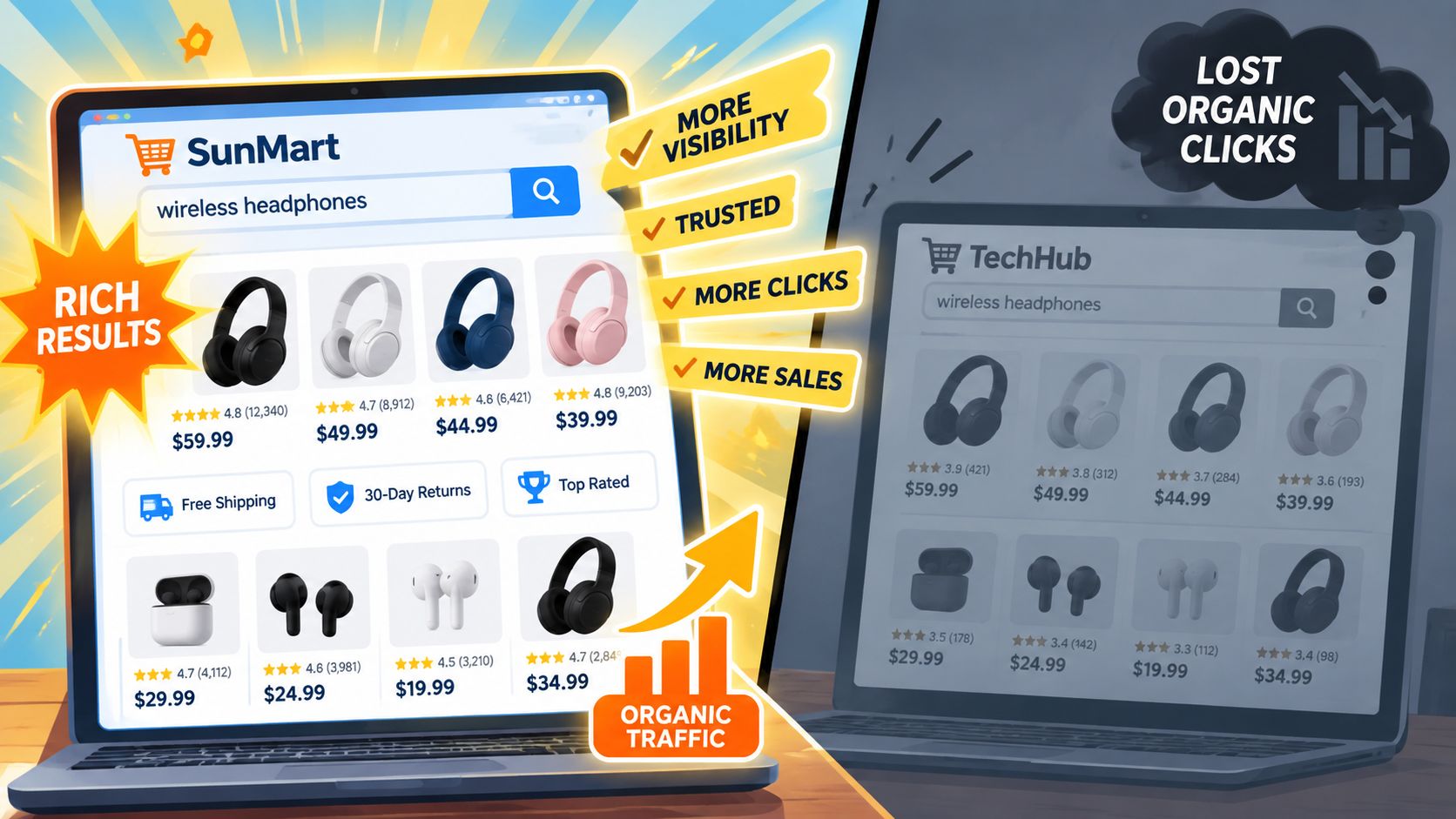
The practical priority in 2026
Product markup deserves attention before decorative schema types. A useful order is:
- Product first: Describe the item buyers are searching for.
- Offer next: Keep price, currency, availability, and variant data synchronized.
- Review enrichment after that: Expose ratings only when they are genuine and visible to shoppers.
- Breadcrumb and organization context: Clarify hierarchy and brand identity.
- FAQ reassessment: Keep visible FAQs for customers, but don't assume FAQPage creates search real estate.
Google supports product data through on-page Product structured data, Merchant Center feeds, or both. That makes schema part of a broader ecommerce discovery system rather than a standalone SEO trick. The rest of this guide focuses on selecting the right types, writing JSON-LD, implementing it on Shopify, testing it, and measuring page-level outcomes.
Schema Types That Drive Real Ecommerce Results
The most useful schema isn't the schema with the longest property list. It's the markup that accurately supports a search feature connected to a commercial decision.
Start with the product entity
Google's Product structured data documentation says an eligible product page must include name and at least one of review, aggregateRating, or offers. In practice, a product page should identify the product clearly, connect it to an offer, and include review data only when the page visibly supports that data.
Offer handles commercial facts such as price, currency, and availability. Google also supports additional merchant details including shippingDetails and hasMerchantReturnPolicy. These properties can give shoppers more useful context before they click, but they must reflect the store's actual policies and current offer.
Review and AggregateRating can support rating displays when the review information is authentic, relevant, and visible on the page. They aren't a licence to inject a rating copied from another location or generated from incomplete product feedback.
| Schema Type | SERP Feature | Required Fields | Priority |
|---|---|---|---|
| Product | Product rich result with commercial details | name plus review, aggregateRating, or offers | Immediate |
| Offer | Price, currency, and availability details | Offer properties supported by the page | Immediate |
| Review or AggregateRating | Rating information where eligible | Accurate review or aggregate rating data | High |
| BreadcrumbList | Breadcrumb path in search presentation | Ordered breadcrumb items | High |
| Organization | Brand and organization context | Organization identity details | Supporting |
| WebSite | Site-level machine-readable context | Site identity and relevant properties | Supporting |
Separate visible features from context
BreadcrumbList can clarify where a product sits within a collection hierarchy. Organization and WebSite markup can help describe the business and site, but they aren't substitutes for complete Product and Offer data. Their value is primarily contextual, while product markup is tied directly to the commercial listing.
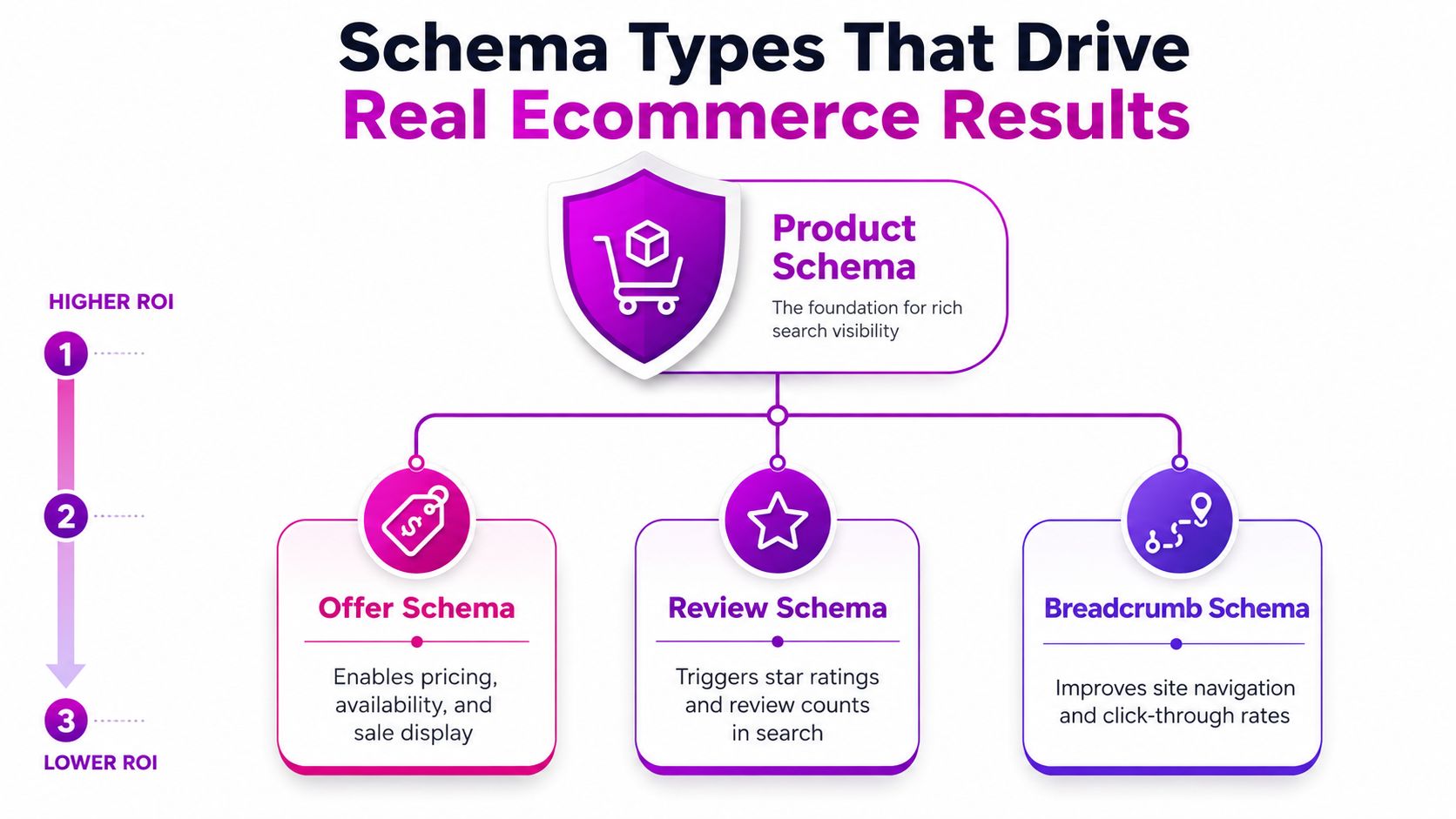
A common implementation failure is treating every property as equally valuable. A store with accurate product names, offers, availability, and ratings is in a stronger position than a store with elaborate Organization markup but incomplete product data. Prioritize the schema that describes the page's primary purpose.
Practical rule: If a property isn't visible, accurate, and maintained from the same source as the product page, don't add it just to make the JSON-LD look complete.
Writing JSON-LD Markup for Products, Offers, and Reviews
A product graph should mirror the information a shopper can verify on the page. For illustration, consider noise-canceling headphones priced at $89, with a 4.6-star average from 312 reviews. Those figures are examples for showing field relationships, not performance claims or a recommendation to publish data that doesn't exist on your store.

{"@context": "https://schema.org","@type": "Product","name": "Noise-Canceling Headphones","image": ["https://example.com/images/headphones.jpg"],"description": "Wireless noise-canceling headphones with over-ear cushions.","sku": "NC-HEAD-001","brand": {"@type": "Brand","name": "Example Audio"},"offers": {"@type": "Offer","url": "https://example.com/products/noise-canceling-headphones","price": "89.00","priceCurrency": "USD","availability": "https://schema.org/InStock"},"aggregateRating": {"@type": "AggregateRating","ratingValue": "4.6","reviewCount": "312"}}Map each field to a real page element
name should match the visible product title. The image should identify the same product, and the description shouldn't promise features absent from the page. sku helps distinguish products internally, while brand identifies the maker when that information is available.
The offers object belongs under the Product entity. Keep price in a machine-readable numeric format, use the correct ISO currency code, and use a supported availability value. If a product has multiple purchasable variants, generate offer data that corresponds to the variant experience rather than exposing one price for every option.
The rating object belongs to the product's real review data. Don't publish ratingValue or reviewCount unless shoppers can find the supporting review information on the page. For implementation guidance on collecting and displaying Shopify reviews, see this Shopify review implementation guide.
For a simpler product, remove the rating object and retain a valid offer, provided the page meets Google's eligibility requirements. A small, correct object is preferable to a broad object containing stale or unsupported claims.
The code shown above is illustrative JSON-LD. In production, Shopify Liquid should populate the values dynamically from product, variant, inventory, and review data. Never hard-code a price that changes in the admin.
Implementing Structured Data on Shopify
Modern Shopify themes often output baseline Product structured data, but the presence of a theme-generated block doesn't guarantee that every product, variant, review, or policy field is correct. Start by viewing the rendered product page, opening browser developer tools, and searching the source for application/ld+json, Product, or offers.
Choose the implementation path
If the native theme output contains accurate Product and Offer information, keep it and avoid adding a second competing Product object. Duplicate markup can create conflicting prices, URLs, or availability states.
For a coded solution, edit the relevant product template or section Liquid file and generate JSON-LD from Shopify's product and selected-variant objects. Use escaped output, canonical product URLs, current inventory states, and the same currency shown at checkout. Variant logic matters because each purchasable variant may have a different price, stock state, SKU, or image.
An app can be appropriate when a team needs deployment speed or doesn't maintain Liquid code. Tools such as JSON-LD for SEO and Schema Pro can reduce manual work, but they still require configuration and testing. An app doesn't automatically resolve conflicts created by the theme, review provider, or another SEO application.
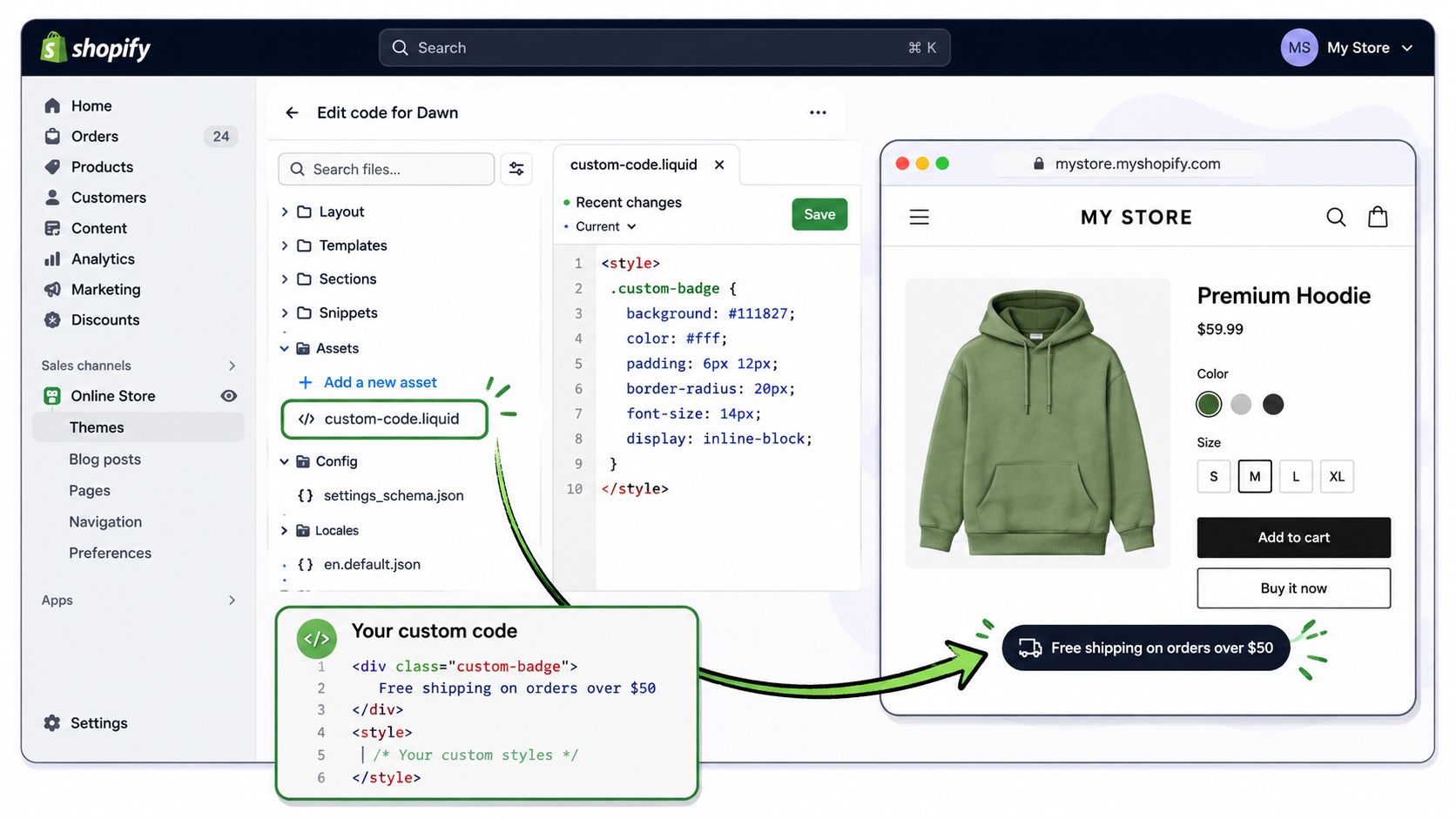
Shopify merchants using metafields for technical specifications, materials, ingredients, or product attributes should establish a clean source of truth before generating markup. This Shopify metafields guide is useful when deciding which product data should feed both visible content and structured data.
Handle Shopify-specific edge cases
- Variant pricing: Generate the offer for the selected or default purchasable variant, and make sure the visible page state agrees with the markup.
- Canonical URLs: Use the canonical product URL rather than a filtered, tracked, or alternate path.
- Collection pages: Add breadcrumb context and avoid presenting a collection as if it were one individual product.
- Review apps: Check whether the app outputs its own rating markup before adding another review object.
- Theme changes: Re-test after theme upgrades, because template changes can alter both visible content and JSON-LD.
For a broader example of how structured markup can be adapted to a different business model, Silva Marketing's guide on schema markup for contractors provides useful context on local business entities and implementation decisions. The underlying lesson is the same: markup must describe the page that users see.
Testing and Validating Your Structured Data
Validation should happen before deployment and after Google has crawled the live page. A JSON object can be syntactically valid while still missing the fields needed for a product rich result, so one test isn't enough.
Use the tools in sequence
Start with Google's Rich Results Test. Paste a public product URL or raw JSON-LD and check which rich result types the tool detects. A valid result means the markup is understood for testing purposes. Warnings usually indicate missing recommended information, while errors can prevent eligibility for the relevant feature.
Then use Search Console's URL Inspection tool on the live canonical URL. This confirms whether Google can access the page and lets you request a fresh crawl after a meaningful change. The live page, not a theme editor preview, is the version that matters.
Run a quick browser check during development:
- Inspect the source: Find every
application/ld+jsonblock. - Count product entities: Look for duplicate Product objects from themes and apps.
- Compare visible values: Match title, price, currency, stock state, and rating details.
- Test variants: Change the selected variant and confirm the rendered offer responds correctly.
- Check the canonical: Make sure the markup URL points to the canonical product page.
Diagnose the failure rather than the symptom
Missing price, priceCurrency, or availability usually means the Offer object is incomplete or is reading from the wrong Shopify object. A type error often comes from sending a number, string, array, or URL in a format the property doesn't accept. A canonical mismatch can occur when markup uses a collection path while the page declares the product URL as canonical.
Browser extensions and Schema.org validators can help catch malformed JSON during development, but Google's own tools should guide decisions about Google rich result eligibility. Fix hard errors first. Handle warnings according to whether the missing property adds useful, accurate information to the page.
A green syntax check isn't proof of a useful implementation. The decisive test is whether the markup matches the live product experience.
Common Structured Data Mistakes and How to Fix Them
Deployment is only the beginning. Ecommerce catalogs change through price updates, stock changes, new review imports, discontinued products, and theme releases. Structured data needs the same maintenance discipline as the product page itself.
The recurring failure patterns
Incorrect nesting often appears when a review object is placed in an unrelated location or when an Offer is detached from its Product. The test may detect the entities but fail to associate them correctly. Fix the graph so offers and aggregateRating describe the relevant Product, then validate the rendered result.
Missing required offer data is another common blocker. If priceCurrency is absent, malformed, or inconsistent with the visible price, Google may ignore the Offer block. Add the correct currency code from the store's actual market configuration, render it dynamically, and test both the default product state and its variants.
Non-canonical URLs create competing product identities. A tracked URL, collection URL, or parameterized variant URL can cause the markup to describe a different address from the one Google treats as canonical. Use the canonical product URL consistently in the page, JSON-LD, internal links, and feed data.
Stale availability damages trust even when the syntax is perfect. If a product is sold out but the markup still says InStock, connect availability to the same inventory logic that controls the purchase interface. The same principle applies to expired discounts and old prices.
Don't repeat the old FAQ playbook
FAQPage markup is the most obvious investment to reassess in 2026. Google removed FAQ rich results from standard search on May 7, 2026, and later retired supporting FAQ reporting and testing features, so maintaining FAQPage solely for an expanded SERP treatment no longer makes sense for most ecommerce sites. Keep useful questions and answers visible for shoppers, but direct engineering effort toward Product, Offer, Review, BreadcrumbList, and Organization markup that supports current page understanding.
Measure the effect of a correction in Search Console at the product-template level. A sitewide average can hide the difference between a high-intent product page that gained a richer listing and an informational page that never had product eligibility.
Measuring the SEO and Conversion Impact of Structured Data
Structured data earns continued investment only when the team connects implementation to observable outcomes. The cleanest measurement starts with pages that already attract relevant organic impressions, because richer search presentation can only influence a result that Google shows to a searcher.
An independent ecommerce rollout across 8,400 pages produced 41% more organic clicks, while the same source claimed a 52% overall CTR improvement after schema deployment in its schema markup case study. Those figures are useful directional evidence, not a promise for every store. The source also makes clear that results depend on ranking position and the snippet earned by each page.
Other industry summaries commonly place product-rich-result CTR gains in the 20% to 30% range, but those figures are position- and snippet-dependent rather than guaranteed. A product page ranking on the first page with visible price, availability, and ratings has a different opportunity from a poorly ranked page whose markup never earns a rich presentation.
Build a page-level baseline
Before changing markup, export Search Console data for a defined group of product pages. Record impressions, clicks, CTR, average position, query patterns, and the page template used. Don't blend product pages with collection pages, editorial content, and the homepage, because each page type has a different search purpose.
After deployment, compare:
- High-intent product pages: Look for CTR changes where the product already receives meaningful impressions.
- Complete versus incomplete templates: Separate pages with valid Product, Offer, and Review data from pages still awaiting enrichment.
- Search appearance data: Monitor available Rich Results reporting and inspect representative URLs after Google recrawls them.
- Organic conversion behaviour: Compare product-page sessions, add-to-cart activity, and purchase rate in the analytics platform, while controlling for changes in price, stock, promotions, and landing-page experience.
A controlled comparison is more informative than a sitewide before-and-after chart. Keep a comparable group of product pages unchanged where practical, or roll the implementation out by template and compare the groups over the same period. The goal isn't to claim that schema caused every movement. The goal is to identify whether richer listings produce more qualified visits and whether those visits behave differently.
Treat structured data as a maintained product system
Operating principle: Structured data isn't a set-it-and-forget-it task. Every catalog, pricing, inventory, review, and theme change can alter the facts Google reads.
Use the following priority list:
- Implement complete Product markup on priority product detail pages.
- Connect Offer data to current variant price, currency, availability, canonical URL, shipping, and return information where supported.
- Add Review or AggregateRating data only when the evidence is genuine and visible.
- Audit FAQPage markup and move effort away from the retired FAQ rich-result playbook.
- Validate with Rich Results Test and URL Inspection before and after release.
- Measure CTR and conversion behaviour by page template, not through diluted sitewide averages.
Shopify merchants with coding confidence can maintain a Liquid-based implementation from the store's product data. Merchants with complex review, variant, or international storefront setups may prefer a reputable structured-data app, provided they audit its output and eliminate duplicate markup. Teams that need broader Shopify development, SEO, and conversion support can also evaluate ECORN's implementation and optimization services as part of a larger ecommerce project.
The practical next step is small and measurable. Select a group of high-intent product pages, document the current Search Console baseline, implement Product with accurate Offer and Review data, test every variant path, and review the results at the template level after Google processes the changes.
If your Shopify store needs a structured-data audit, theme implementation, or conversion-focused ecommerce development, ECORN can help connect Product, Offer, and Review markup with the underlying catalog and storefront experience. Visit ECORN to discuss a focused schema project or a broader Shopify SEO and CRO engagement.



10 Best Podcast Ecommerce Shows for Store Growth in 2026
Shopify Developer Hourly Rate: What to Pay in 2026

Ecommerce Conversion Tracking: The Complete How-To Guide

Shopify Design Agency: How to Pick the Right Partner

Mastering Multi Store Management on Shopify

Scale Shopify Store

10 Shopify App Ideas Worth Building in 2026

Conversion Rate Optimization for Landing Pages: The Playbook

Shopify Plus Automation: A Guide for 2026

10 Social Selling Platforms for Shopify Merchants

Shopify Website Design Examples: 7 Stores Worth Studying

7 Ecommerce Newsletter Examples for Shopify Brands

One Product Shopify Store: Build and Scale

Mobile Pop Up Strategy for Shopify Stores That Converts

Sitemap for Shopify: How to Find, Optimize, and Submit It

7 Single Product Websites Worth Emulating

Product Variants Shopify: The Complete 2026 Guide

Ecommerce Analytics Consulting for Growth

What Is AI Integration for eCommerce

How to Choose the Right eCommerce Website Development Firm

E Business Strategy Implementation

Conversion Tracking Setup for Shopify Stores

BigCommerce vs Shopify Plus Which Enterprise Wins in 2026

Shopify Theme Kit: Setup, Commands, and Migration Guide

Shopify Extension Development: A Practical 2026 Guide

Shopify Speed Score Explained and How to Improve It

Shopify Mobile Optimization: The 2026 Playbook

How to Add Subcategory in Shopify for Better UX

SEO App Mobile: Shopify Store Optimization Guide

Shopify Plus Support: What It Includes and How to Choose

Google Ads for Shopify: The Complete 2026 Playbook

Shopify New York: How to Find and Hire the Right Agency

Google Search Console for Shopify: The Complete Setup

First Party Data Collection for eCommerce Growth

FAQ Online Store Guide: Build and Measure It Right

Do FB Ads Work for eCommerce in 2026?

One Page Checkout for Shopify: Design and Implementation

Shopify GraphQL vs REST: The 2026 Developer Decision

Shopify Ecommerce Consulting: Strategy, Pricing &

Are Reddit Ads Worth It for eCommerce Brands

Shopify Title and Meta Description: A Practical 2026 Guide

Product Video Best Practices for Shopify Brands

Real-Time Inventory Management: A 2026 Guide

AI Chatbot Integration for Shopify Stores

Affiliate Program Management: A Shopify Guide

10 Best Performance Monitoring Tools for Shopify in 2026

Digital Asset Management for eCommerce Brands in 2026

Every Type of Facebook Ads Explained for eCommerce Growth

Product Information Management Explained for Shopify Brands

Support Ticket System: A Guide for Shopify Stores

10 Best Customer Service Tools for Shopify in 2026

Can I Start a Business with No Money? a 2026 Blueprint

What Sells Good on Etsy: Best Niches for 2026

Shopify Add to Cart Button: A Practical 2026 Guide

Customer Feedback Automation: A Practical eCommerce Guide

Critical Rendering Path: A Guide for Shopify Stores

How to Promote on TikTok for eCommerce in 2026

B2B eCommerce Consulting That Drives Real Revenue

10 Best Practices for Site Navigation in 2026

Return vs Refund for Shopify Stores: A Practical Guide

What Is Customer Lifetime Value and Why It Matters

What Is Voice of Customer Research for eCommerce

SMS Marketing for Ecommerce That Actually Converts

Master How to Improve Email Deliverability in 2026

Top 8 eCommerce Partners NYC for Shopify Brands in 2026

Machine Learning for Ecommerce: Boost Your Shopify Store

Beauty Market Research: Your 2026 Growth Guide

Shopify International Expansion: A 2026 Roadmap

What Does CRO Stand for in Business: Understanding CRO

Shopify Visual Merchandising: A Playbook for Higher Sales

Shopify Landing Page Design: Master Conversion in 2026

10 Best AI SEO Optimization Tools for Shopify in 2026

Agentic AI for Ecommerce: Boost Your Sales in 2026
Mastering Email Marketing Data for eCommerce Growth

Conversion Rate Optimisation Australia: Boost Your Sales

Conversion Rate Optimization AI: Your Shopify Store Guide

10 Product Bundling Strategies for Shopify in 2026

How to Increase Customer Lifetime Value: A Shopify Playbook

AI Customer Service Automation: Shopify Guide 2026

Clean Website Design: A Shopify Conversion Playbook

Omnichannel Retail Strategy: A Shopify Playbook

Product Data Enrichment: A Guide for Shopify Brands

Instagram Shopping Features a Guide for Shopify Stores

What Is Revenue Optimization: A Holistic RevOps Guide

Benefits of Conversion Rate Optimization: Boost Your

WordPress to Shopify Migration: Your 2026 Seamless Switch

Boost Sales: Ecommerce Payment Processing Guide 2026

Unified Commerce Platform: Benefits, KPIs & Shopify Guide

How to Reduce Bounce Rate eCommerce: Your 2026 Guide

Shopify API Integration: A Practical End-to-End Guide

How to Implement Data Governance: A 2026 Guide

Shopify Store Development Cost: A 2026 Breakdown

What Is Server Side Tracking: The Shopify Guide 2026

Marketing Automation Workflows: A Shopify Guide for 2026

Shopify: How to Reduce Technical Debt

Shopify UX Design Change: A Playbook for Growth

User Generated Content Strategy: Shopify Playbook

Shopify Pause and Build Plan Cost: A Complete 2026 Guide

Compare at Price on Shopify: A Complete Guide for 2026

Where Can I Sell My Prints? 10 Best Platforms for 2026


newsletter in your inbox