


Your marketing team has a campaign ready, but the storefront can't quite support the experience they've designed. They want editorial landing pages, localized storytelling, product education, personalized merchandising, and faster publishing. Instead, every change becomes a compromise between Shopify's native content tools, developer availability, and the risk of creating disconnected product information.
A Shopify CMS integration can solve that tension without replacing Shopify's commerce engine. The right architecture gives Shopify responsibility for products, pricing, inventory, checkout, and orders, while a native or external CMS manages richer editorial experiences. The challenge isn't choosing the most technically advanced option. It's choosing the level of complexity your operating model can support.
Why Your Content Is Outgrowing Native Shopify Tools
Native Shopify tools are often the right starting point. Themes, products, checkout, apps, and content stay close together, so a small marketing team can update collection copy, adjust page sections, and launch campaigns without maintaining a separate frontend application.
The operating model changes as content demands grow. Marketing teams may need reusable campaign modules, product-led guides, region-specific landing pages, editorial collections, and content distributed across websites, apps, email, and other touchpoints. Native templates support substantial customization, but repeated workarounds can make each new content type slower to publish and more dependent on developers.
The business issue is usually speed and control. Waiting for engineering capacity to publish a seasonal story or restructure a landing page reduces the time available for testing. Solving every request with custom template logic creates dependencies that are harder and more expensive to maintain.
A useful rule is simple:
Practical rule: Choose architecture based on the publishing problems your team faces repeatedly, not on the novelty of a technology stack.
Three viable paths cover most Shopify content strategies:
- Native Shopify: Keep content and commerce within Shopify's storefront tools. This has the simplest operating model and suits brands with conventional page requirements.
- Headless Shopify: Keep Shopify as the commerce backend, then use an external CMS and custom frontend to deliver content. This offers greater presentation control, but requires engineering ownership, synchronization work, and ongoing maintenance.
- Hybrid Shopify: Use Shopify's native storefront for core commerce, then add an external CMS or custom experience where a specific need justifies it, such as editorial content or complex landing pages.
Headless is becoming a practical business decision rather than a purely technical preference. Shopify's enterprise analysis reported that headless adoption among the top 1,000 U.S. retailers increased from 31% in 2024 to 47%, while average payback remained 18 months. Those figures do not make headless the default. They show why the business case must include implementation cost, team capability, content synchronization, and the operational return expected from greater publishing flexibility.
The right architecture also needs a clear content model. Define which system owns each field, how updates reach every channel, and who maintains the integration before adding another platform. That discipline matters more than choosing the most fashionable stack, especially as brands prepare content for AI-driven discovery and reuse.
The Three Paths of Shopify Content Architecture
Think of these architectures as three ways to build a house. Native Shopify is a turnkey home, headless is a custom build, and hybrid is a renovation that changes only the rooms that need more control.
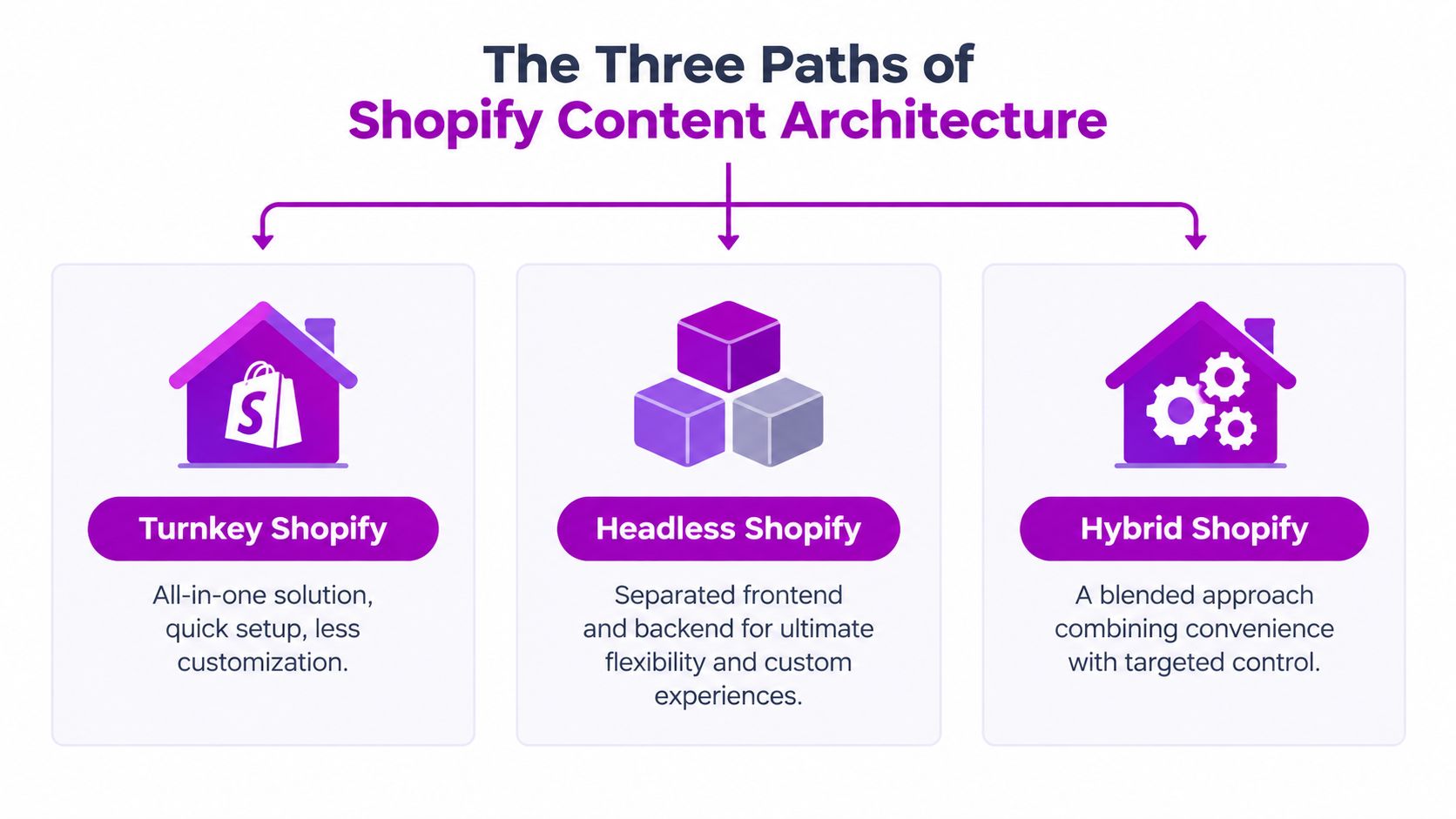
Native Shopify as the turnkey option
The native approach uses Shopify's Online Store tools, theme architecture, metafields, metaobjects, sections, templates, and apps. Shopify owns both the commerce layer and the primary presentation layer.
This model fits a brand with a manageable content system, one main storefront experience, and a team that values operational simplicity. It's also a strong choice when the main differentiator is product, brand, or merchandising rather than an unusually complex digital experience.
The advantage is tight integration. Product data, collection pages, checkout, analytics integrations, theme editing, and commerce operations live within a connected platform. Developers have fewer systems to coordinate, and marketers don't need to understand API relationships to publish routine changes.
The limitation is structural flexibility. A theme can be extended, but it still follows Shopify's storefront model. If the team needs a content object to behave differently across many channels, or wants a fully bespoke frontend interaction model, native tools may force content into presentation-specific structures.
Headless Shopify as the custom build
A headless architecture separates the frontend from Shopify's backend. Shopify provides products, variants, pricing, inventory, carts, checkout, customer accounts, orders, and fulfillment. An external CMS manages editorial content, while a custom application renders the customer-facing experience.
This is suitable for brands with strong frontend requirements, multiple digital experiences, complex editorial operations, or the engineering resources to maintain a custom storefront. The team can choose its framework, content delivery patterns, interaction design, and integrations instead of working within a theme-led presentation layer.
The benefit is composability. A headless CMS can model guides, recipes, buying advice, campaign stories, authors, regions, and related products as structured content. The frontend can reuse those objects across web, mobile, or other channels.
The cost is ownership. The brand now maintains a custom frontend, deployment process, API integrations, preview workflows, caching rules, monitoring, and fallback behavior. Headless isn't a free customization layer. It's a different operating model.
Hybrid Shopify as the renovated home
Hybrid architecture keeps the parts of Shopify that work well and introduces external systems only where they solve a defined constraint. A brand might keep product, collection, cart, and checkout experiences native while connecting WordPress, Sanity, or another CMS for a content-heavy blog and selected campaign pages.
This approach fits teams that need richer content but aren't ready to operate a fully custom storefront. It can also support phased modernization. A brand can validate a new editorial workflow or frontend pattern before committing to a broader rebuild.
The advantage is controlled change. The business gets targeted flexibility without immediately moving every storefront function into a custom application.
The disadvantage is boundary management. Editors and developers must understand which system owns each page, how navigation works across experiences, how tracking remains consistent, and where preview and publishing responsibilities sit. Hybrid reduces migration risk, but it doesn't remove architecture decisions.
A useful comparison looks like this:
| Architecture | Best fit | Main strength | Main trade-off |
|---|---|---|---|
| Native Shopify | Conventional storefront and lean teams | Simple publishing and close commerce integration | Less freedom for complex content experiences |
| Headless Shopify | Content-rich, multi-channel, or highly customized brands | Maximum frontend and content flexibility | Higher development and maintenance responsibility |
| Hybrid Shopify | Brands with one or two clear content constraints | Targeted flexibility with a gradual path | More complicated ownership and governance |
Here's a practical overview of how Shopify headless implementations are commonly structured:
When to Choose an External CMS Integration
Choose an external CMS when a recurring business constraint justifies the added operational load. “Headless” is an implementation choice, not the reason to make one.
International growth can expose that constraint quickly. Shopify supports merchants in more than 175 countries, and independent reporting estimates the merchant base reached roughly 5.5 million by 2026, according to Shopify ecosystem data from Datarefs. A brand operating across markets may need translated editorial content, regional campaign rules, local navigation, market-specific merchandising stories, and approval workflows that are difficult to maintain cleanly within one theme structure.
Look for repeated publishing friction
Review the team's weekly work rather than a technical demonstration. The strongest case for integration appears when the same bottleneck keeps delaying launches or creating duplicated effort.
- Campaign complexity: Marketing may need long-form launches, comparison pages, buying guides, video modules, and product recommendations without rebuilding templates. Structured CMS content can reduce developer dependency.
- Localization pressure: Different markets may require distinct stories, navigation, assets, and promotional context. An external CMS can provide clearer content relationships and governance.
- Editorial commerce: Tutorials, recipes, size guidance, education, or community content may need dynamic links to products and collections. A dedicated content model is more durable than page-specific fields.
- Frontend differentiation: Custom interactions, unusual navigation, or channel-specific interfaces can justify headless investment when the storefront experience directly supports the brand's commercial strategy.
- Multi-channel reuse: Approved content may need to serve a website, application, retail display, or campaign system. API-delivered structured content travels more easily than presentation-bound copy.
The business case should connect the integration to workflow outcomes. Can marketers publish without waiting for a release? Can regional teams reuse approved components? Can product information remain authoritative while campaign content changes independently? Can a new channel launch without duplicating every content record?
A WordPress setup may suit a brand that primarily needs editorial publishing rather than a fully custom storefront. The Shopify and WordPress integration guide outlines ways to connect WordPress content with Shopify products, collections, and Buy Button elements.
Decision test: If the external CMS would replace only a few simple page fields, keep Shopify native. If it changes how the organization creates, approves, localizes, and distributes content, integration deserves serious consideration.
Account for synchronization before approving the project. Shopify's enterprise guidance points to siloed systems, ERP complexity, real-time synchronization gaps, and inconsistent data quality as common integration risks in broader commerce environments, as outlined in its enterprise data integration guidance. An external CMS can improve editorial agility, but it also adds a system that needs ownership, permissions, monitoring, and explicit data rules. Those controls become even more important when structured content will later support automation or AI-assisted discovery.
Choosing the Right Headless CMS for Your Brand
Once headless is justified, platform selection should follow the content model and operating model. Starting with brand familiarity or developer preference alone often produces a system that technically works but frustrates editors.
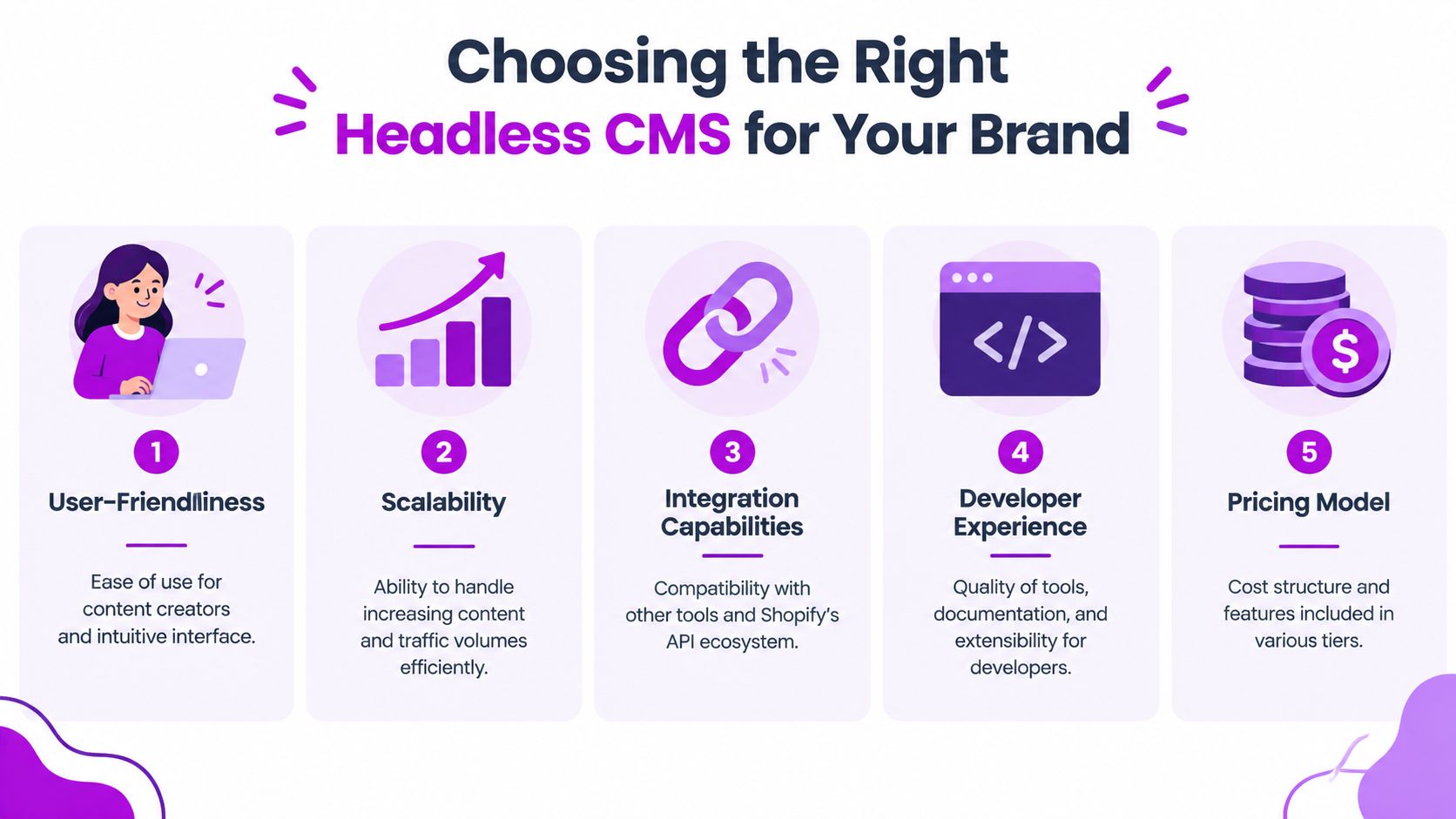
Start with content modeling
Write down the content types before comparing vendors. A typical commerce brand may need landing pages, campaign modules, buying guides, authors, ingredients, product references, markets, reusable banners, media assets, and SEO fields.
Then define relationships. A guide might reference several products. A campaign might target a market and a collection. A recipe might require a product, an image, nutritional content, and related recipes. The CMS should represent those relationships directly rather than forcing editors to paste URLs and duplicate copy.
Sanity is often considered when teams want a flexible, developer-oriented content model and an editing environment precisely configured to their needs. Its approach can work well for brands where the content studio itself needs to be designed around the organization's workflow.
Contentful is a common enterprise option for teams that value structured content, established governance, and a broad integration ecosystem. It can suit organizations with multiple teams and channels, provided the content model stays understandable to editors.
Strapi appeals to teams that want more control over deployment and customization. That control can be valuable for organizations with internal engineering capabilities, but the team must take greater responsibility for infrastructure, upgrades, security, and operational support.
These aren't universal rankings. The right choice depends on how much control the business wants to own.
Evaluate the editor experience in real tasks
Give each shortlisted CMS a practical publishing exercise. Ask a marketer to create a landing page, reference a product, add an image, request approval, preview the result, and update one component. Watch where they hesitate.
Check whether the platform supports:
- Clear roles and approvals: Editors should know who can draft, review, publish, and revert content.
- Preview that resembles production: Preview should show content alongside real storefront data, not just an isolated CMS record.
- Reusable modules: Teams should be able to build consistent experiences without copying large blocks of content.
- Localization controls: Regional variations should be visible and governed rather than hidden in naming conventions.
- Asset governance: Images, video, usage rights, alt text, and focal points need a reliable home.
A beautiful API won't compensate for a confusing editorial interface. Conversely, a friendly interface won't save a platform that makes developers build workarounds for every important content relationship.
Price the full operating model
Licensing is only one line in the budget. Include implementation, frontend development, integration maintenance, content migration, monitoring, preview infrastructure, release management, and editor training.
Ask how the CMS charges for seats, API usage, environments, assets, locales, or traffic. Avoid building a content architecture that depends on expensive requests for every page view if the content could be cached safely.
For the Shopify layer, evaluate how the CMS connects to products and collections, how it handles references when catalog data changes, and how the team responds when an API is unavailable. A good integration fails gracefully. It doesn't show stale pricing as if it were current.
Teams comparing architecture options can also use this guide to Shopify headless commerce to frame frontend, API, and operational questions before selecting a CMS.
Score the stack, not just the CMS
Use a weighted evaluation that reflects business priorities:
| Criterion | Questions to ask |
|---|---|
| Content modeling | Can the CMS represent relationships without duplicated fields? |
| Developer experience | Are APIs, SDKs, webhooks, and documentation clear enough for maintainers? |
| Editor usability | Can marketers publish common experiences without technical help? |
| Scalability and delivery | Can content be cached, previewed, invalidated, and delivered reliably? |
| Total ownership | Who maintains integrations, infrastructure, migrations, and upgrades? |
Run the evaluation with both an editor and a developer. If one group loves the platform and the other needs constant exceptions, the organization hasn't found an operational fit.
Key Implementation and Architecture Decisions
The most important implementation decision is ownership. Shopify should remain the system of record for commerce data, including products, variants, inventory, pricing, customer accounts, orders, checkout, payment, and fulfillment. The CMS should own editorial content, page composition, navigation, campaign modules, banners, and richer copy.
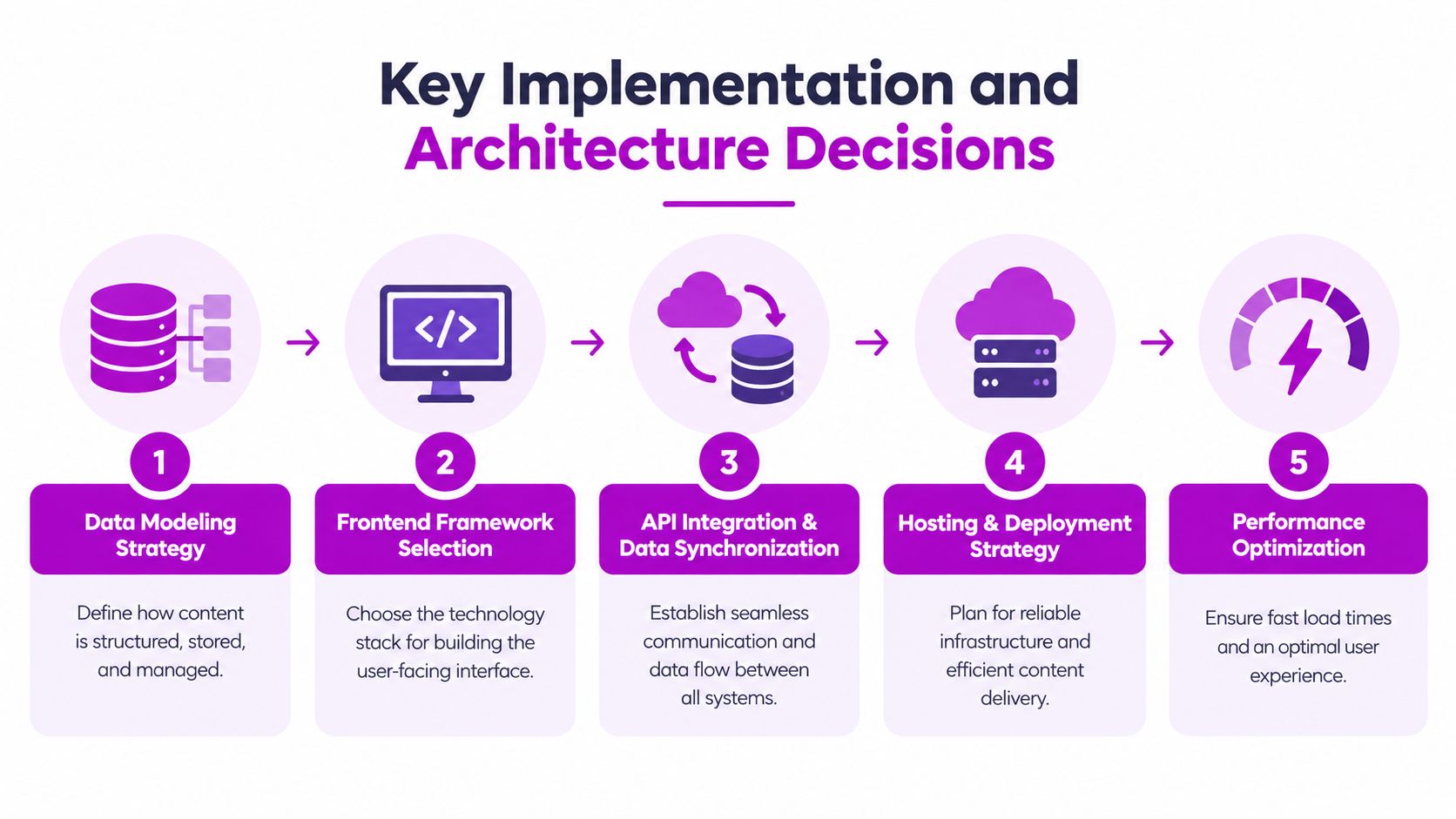
Define the boundary before writing code
Create a field ownership map. For each object, record the authoritative system, the identifier used to connect records, the update method, the cache policy, and the fallback behavior.
For example, the CMS can store a product story, editorial title, related guide, and campaign placement. Shopify should supply the current product title where commerce accuracy matters, along with price, availability, variant information, and purchasing actions. The frontend can combine those responses without copying live commercial values into editorial records.
This prevents a common failure mode, where an editor updates a product price in the CMS because the page displays it there. That duplicates operational data and creates a risk that customers see a value that no longer matches checkout.
Fetch dynamic data and cache editorial content differently
In a sound implementation, the storefront fetches products, pricing, and inventory in real time from Shopify's Storefront API, while CMS content is cached more aggressively, as described in this Shopify and Sanity integration architecture guide.
A headless storefront can request CMS content and Shopify commerce data in parallel, then join the results in the server-side loader. That pattern reduces unnecessary waiting while preserving the accuracy of information that can change during the customer session.
Caching still needs rules. Decide which content can be cached for longer, what event invalidates it, how webhooks trigger purges, and what the storefront should render if the CMS is temporarily unavailable. A campaign banner can fall back to a previous approved version. Checkout and inventory shouldn't depend on a stale editorial cache.
Use Shopify's headless stack deliberately
Shopify's Headless channel centralizes Storefront API access tokens and permissions. Hydrogen provides a React-based framework for custom storefronts, while Oxygen supports hosting, server-side rendering, caching, and edge deployment as part of Shopify's headless toolset, according to Shopify's bring-your-own-stack documentation.
That stack can reduce setup work, but it doesn't eliminate engineering responsibility. The team still needs to define routes, content queries, error states, SEO metadata, analytics, preview behavior, deployment controls, and access boundaries.
A practical implementation sequence is:
- Model content: Define reusable editorial objects and relationships.
- Map ownership: Keep commerce fields in Shopify and editorial fields in the CMS.
- Design delivery: Decide which requests are real-time, cached, pre-rendered, or rendered at request time.
- Build preview and publishing: Connect CMS previews to storefront routes and use webhooks for cache invalidation.
- Test failure states: Simulate missing products, unavailable inventory, stale content, API errors, and incomplete translations.
Implementation warning: A fast frontend with unclear ownership is still an unreliable commerce system.
Building a Future-Proof Composable and AI-Ready Store
A modern Shopify CMS integration is valuable because it gives content a durable structure. Instead of storing a finished page as one large block, the brand models the parts that may need to travel, change, or connect: product references, benefits, ingredients, audience, market, campaign, media, and calls to action.
That structure supports more than a polished website. It can feed mobile experiences, retail screens, search interfaces, customer education, and future shopping assistants without requiring the team to rewrite every page for each channel. Shopify continues to handle the transaction, while the content system provides organized context around the product.
Structure content for machines and people
AI-driven storefronts need more than attractive copy. They need clear relationships and dependable data. A system should distinguish a product claim from a product specification, a temporary promotion from a permanent benefit, and a market-specific statement from global brand guidance.
That means content models should include explicit fields, controlled references, approval status, market context, and publication rules. It also means the integration should expose meaningful structured content through APIs rather than presenting every important detail as unstructured text inside a visual page builder.
Shopify's 2026 decoupled-CMS guidance connects headless content management and structured data with future commerce experiences. At the same time, a 2026 scan found 64.6% of Shopify stores were missing email and SMS systems, according to Shopify's decoupled CMS guidance. That figure points to a broader readiness issue. Many brands need to improve data foundations and content governance before advanced personalization can work reliably.

Keep composability practical
Composable architecture doesn't mean adding a separate vendor for every capability. Each additional system creates integration work, data contracts, permissions, monitoring, and failure modes. Add a service when it solves a real constraint, then document who owns it and how the rest of the stack behaves when it fails.
A future-ready store should therefore have:
- Structured content: Reusable models rather than page-specific copy.
- Clear commerce authority: Shopify owns transactional data and purchasing logic.
- Channel-aware delivery: Content can reach approved destinations without duplication.
- Observable integrations: Teams can identify failed webhooks, stale caches, and broken references.
- A staged roadmap: Native and hybrid patterns remain valid while the business proves demand for deeper decoupling.
The strongest architecture is the one your team can operate consistently. Headless may offer the broadest canvas, but a well-governed native or hybrid system can be more future-proof than a custom build nobody has time to maintain.
ECORN helps growing Shopify brands plan and implement CMS integrations, custom storefronts, Shopify Plus solutions, CRO, and connected backend workflows. Visit ECORN to discuss a practical architecture that fits your content operations, commerce goals, and AI-readiness roadmap.



Shopify Store Audit: Find Hidden Conversion Leaks

Shopify Plus Experts: How to Hire the Right Team

Chargeback Protection Shopify: A Practical 2026 Guide

8 Examples of Conversion Rate Optimization
How to Conversion Rate Optimization for Shopify Stores

Shopify Design Essentials Every Store Owner Needs
Ecommerce Terms of Service: How to Draft and Implement

How to Implement Structured Data for Ecommerce in 2026

SEO App Mobile: Shopify Store Optimization Guide

Shopify Plus Support: What It Includes and How to Choose

Google Ads for Shopify: The Complete 2026 Playbook

Shopify New York: How to Find and Hire the Right Agency

Google Search Console for Shopify: The Complete Setup

First Party Data Collection for eCommerce Growth

FAQ Online Store Guide: Build and Measure It Right

Do FB Ads Work for eCommerce in 2026?

One Page Checkout for Shopify: Design and Implementation

Shopify GraphQL vs REST: The 2026 Developer Decision

Shopify Ecommerce Consulting: Strategy, Pricing &

Are Reddit Ads Worth It for eCommerce Brands

Shopify Title and Meta Description: A Practical 2026 Guide

Product Video Best Practices for Shopify Brands

Real-Time Inventory Management: A 2026 Guide

AI Chatbot Integration for Shopify Stores

Affiliate Program Management: A Shopify Guide

10 Best Performance Monitoring Tools for Shopify in 2026

Digital Asset Management for eCommerce Brands in 2026

Every Type of Facebook Ads Explained for eCommerce Growth

Product Information Management Explained for Shopify Brands

Support Ticket System: A Guide for Shopify Stores

10 Best Customer Service Tools for Shopify in 2026

Can I Start a Business with No Money? a 2026 Blueprint

What Sells Good on Etsy: Best Niches for 2026

Shopify Add to Cart Button: A Practical 2026 Guide

Customer Feedback Automation: A Practical eCommerce Guide

Critical Rendering Path: A Guide for Shopify Stores

How to Promote on TikTok for eCommerce in 2026

B2B eCommerce Consulting That Drives Real Revenue

10 Best Practices for Site Navigation in 2026

Return vs Refund for Shopify Stores: A Practical Guide

What Is Customer Lifetime Value and Why It Matters

What Is Voice of Customer Research for eCommerce

SMS Marketing for Ecommerce That Actually Converts

Master How to Improve Email Deliverability in 2026

Top 7 eCommerce Partners NYC for Shopify Brands in 2026

Machine Learning for Ecommerce: Boost Your Shopify Store

Beauty Market Research: Your 2026 Growth Guide

Shopify International Expansion: A 2026 Roadmap

What Does CRO Stand for in Business: Understanding CRO

Shopify Visual Merchandising: A Playbook for Higher Sales

Shopify Landing Page Design: Master Conversion in 2026

10 Best AI SEO Optimization Tools for Shopify in 2026

Agentic AI for Ecommerce: Boost Your Sales in 2026
Mastering Email Marketing Data for eCommerce Growth

Conversion Rate Optimisation Australia: Boost Your Sales

Conversion Rate Optimization AI: Your Shopify Store Guide

10 Product Bundling Strategies for Shopify in 2026

How to Increase Customer Lifetime Value: A Shopify Playbook

AI Customer Service Automation: Shopify Guide 2026

Clean Website Design: A Shopify Conversion Playbook

Omnichannel Retail Strategy: A Shopify Playbook

Product Data Enrichment: A Guide for Shopify Brands

Instagram Shopping Features a Guide for Shopify Stores

What Is Revenue Optimization: A Holistic RevOps Guide

Benefits of Conversion Rate Optimization: Boost Your

WordPress to Shopify Migration: Your 2026 Seamless Switch

Boost Sales: Ecommerce Payment Processing Guide 2026

Unified Commerce Platform: Benefits, KPIs & Shopify Guide

How to Reduce Bounce Rate eCommerce: Your 2026 Guide

Shopify API Integration: A Practical End-to-End Guide

How to Implement Data Governance: A 2026 Guide

Shopify Store Development Cost: A 2026 Breakdown

What Is Server Side Tracking: The Shopify Guide 2026

Marketing Automation Workflows: A Shopify Guide for 2026

Shopify: How to Reduce Technical Debt

Shopify UX Design Change: A Playbook for Growth

User Generated Content Strategy: Shopify Playbook

Shopify Pause and Build Plan Cost: A Complete 2026 Guide

Compare at Price on Shopify: A Complete Guide for 2026

Where Can I Sell My Prints? 10 Best Platforms for 2026
Shopify Order Management System: The Ultimate Guide 2026
What Is Marketing Attribution? an eCommerce Guide for 2026

10 Best Black Friday Sales Sheets for 2026

Discover the Top Social Media Marketing Agencies For

Consumer Confidence Definition for eCommerce in 2026

What Is Social Commerce? Your 2026 Guide to Boosting Sales

A Social Ad Campaign Playbook for eCommerce Growth

7 Best FAQ Page Examples for SaaS & eCommerce

Market Research in Fashion Industry: A Guide for Shopify

Shopify Migration Services: Expert Guide for 2026

Mastering FB Retargeting Ads for Shopify in 2026
What Is Omnichannel Ecommerce

Master Your Shopify Plus Migration: The 2026 Guide
Shopify Integration Services: A Merchant's 2026 Guide

Shopify Collection Description: A Guide to SEO & Sales

Shopify Plus Contact: Reach Sales & Support Effectively

Top Luxury Shopify Stores: Design & UX Strategies

How to Improve Customer Experience: A Shopify Roadmap

Creative Facebook Ads: 10 Examples for Shopify Brands

Remarketing with Facebook Ads: A Shopify Guide for 2026


newsletter in your inbox