


A Shopify founder installs the official Google & YouTube channel, connects a Merchant Center account, launches Performance Max, and watches spend begin to move. The first report looks encouraging until the founder compares Google Ads purchases with Shopify orders and finds two different answers. Some orders appear in Shopify but not Google Ads, while other conversions may have been recorded by more than one tracking source.
That situation is common because Google Ads for Shopify isn't mainly a campaign-launch problem. The account can underperform before the first ad impression if the feed is incomplete, conversion events fire at the wrong point in checkout, or automation receives unreliable data. The practical job is to connect the systems, prove that the numbers reflect completed orders, and only then give Google's bidding systems more control.
Why Most Shopify Google Ads Accounts Underperform Before They Even Launch
A Shopify store can have eligible products, an active budget, and a connected Google account, yet still start with unreliable inputs. Merchant Center may contain incomplete product details, a purchase event may fire when checkout begins rather than when payment is confirmed, or multiple tracking sources may record the same order.
Google Ads remains a foundational acquisition channel for ecommerce. A 2026 benchmark reports that it receives 40–45% of total ecommerce paid media budgets and produces a median 4.2× ROAS across Search, Shopping, and Performance Max, according to CorePPC's ecommerce benchmark report. That benchmark describes broad market performance, not a forecast for any Shopify store. It does show why measurement and feed quality deserve attention before budget increases or automated bidding.
Operator's rule: Treat campaign launch as the beginning of the audit, not the end of setup.
The structural problems behind weak accounts
Account reviews repeatedly uncover four issues:
- Feed governance: Product titles, images, availability, pricing, shipping, and policy fields must agree across Shopify and Merchant Center.
- Conversion integrity: Google Ads needs a completed purchase signal that can be reconciled with Shopify orders.
- Automation timing: Performance Max and automated bidding can act on incorrect inputs as efficiently as accurate ones.
- Account structure: Search, Standard Shopping, and Performance Max need distinct roles based on the catalog, margins, and available data.
Google Ads workflows now provide Shopify merchants with a direct connection path through Tools, Data Manager, + Connect Product. That integration reduces setup work, but it does not verify whether the resulting catalog or conversion data is correct. A fast connection can still produce a fast launch with faulty reporting.
The practical deliverables are clear: data plumbing that keeps Shopify, Google Ads, and Merchant Center aligned; purchase measurement that matches completed Shopify orders; and campaign roles suited to the store's maturity. Creative affects performance, but a stronger headline cannot correct a duplicated purchase event, missing revenue value, or a product feed that fails eligibility checks.
A short visual walkthrough can help teams orient themselves to the relationship between the platforms:
Connecting Shopify, Google Ads, and Merchant Center the Right Way
Set up the three systems as one workflow. Google Ads controls campaigns and bidding, Merchant Center governs product eligibility and retail data, and Shopify supplies the catalog and order environment. Connecting them separately creates gaps that are difficult to diagnose later.
Prepare ownership and access first
Use a Google Ads account with verified billing and business ownership. Create or confirm a Merchant Center account under the same business ownership, install Shopify's official Google & YouTube channel, and publish clear shipping, returns, and contact information on the storefront.
Avoid using a personal Gmail address as the long-term owner of Merchant Center. Give the store team appropriate access, document who owns billing and product data, and make sure the domain belongs to the same business identity used across the accounts.
Connect the accounts in sequence
- Start in Merchant Center. Claim and verify the Shopify domain, then check that the business details match the storefront.
- Link Merchant Center to Google Ads. Use the linked accounts area in Merchant Center or Google Ads and approve the connection from the correct owner account.
- Connect Shopify's Google & YouTube channel. Complete the channel's account connection and API permissions so Shopify can sync catalog data.
- Review shipping and tax settings. Confirm that the information sent to Merchant Center matches how the store fulfills orders, especially when multiple warehouses or shipping regions are involved.
- Pause duplicate sources. If another app or feed provider is sending the same products, disable the redundant source before it creates conflicting attributes.
The current Shopify setup guidance separates Google Ads conversion measurement from connecting Merchant Center for Shopping and Performance Max. That branching is important. A store can measure paid conversions without immediately advertising its entire catalog, but retail campaigns require a functioning product data connection. Review Shopify's Google and YouTube setup instructions before choosing the path.
Prove the connection before spending
Open Merchant Center diagnostics and confirm that a real product is eligible. Check the Shopify channel for feed errors, warnings, and rejected products. Then place a controlled test order and confirm that the purchase event reaches Google Ads after payment confirmation.
Don't treat a green connection status as proof that the whole system works. A green integration can still send a missing currency, an incorrect value, or an event that fires twice. The first test should cover the entire path, from product feed to ad account conversion to Shopify order record.
Picking the Right Conversion Tracking for Your Store
A Shopify store can show healthy traffic while Google Ads optimizes toward duplicate purchases, missing values, or orders that never came from an ad. Tracking is therefore an engineering choice with commercial consequences. Native Shopify tracking is quick to deploy, GA4 adds behavioral and cross-channel context, and server-side collection can preserve more signal when browser-based tracking loses information. Each option involves a different balance of speed, control, and technical work.
Shopify merchants commonly choose among three setups:
| Setup | Signal quality | Best for |
|---|---|---|
| Native Google & YouTube channel conversion tracking | Fast, practical signal with limited implementation complexity | Smaller stores beginning with Google Ads |
| GA4 with the Google tag through Shopify customer events or a tag manager | Broader event and analytics context, with more configuration risk | Stores needing behavioral analysis and multiple reporting views |
| Server-side collection using Shopify web pixels with GA4 Measurement Protocol or a server container | Greater control over event handling and matching, with higher technical overhead | Scaling stores with complex catalogs or stricter attribution requirements |
A smaller store with fewer than 50 orders per week can usually begin with the native pixel and GA4, provided events are tested and deduplicated. That threshold is a starting point, not a rule. Stores with complicated checkout paths, multiple markets, or heavy dependence on modeled and matched signals may need server-side architecture sooner.
Review ECORN's guide to server-side tracking when comparing implementation effort with control over event handling and matching.
Choose one primary purchase source
The most damaging setup sends the native Google channel purchase event and a separate GA4-imported purchase event to Google Ads as primary conversions. Both may represent the same order, causing bidding to count revenue twice. Enhanced Conversions for Web can provide hashed customer information for matching, but it does not replace one clearly defined purchase event.
Assign each signal a specific role:
- Primary Google Ads purchase: One event used for bidding and optimization.
- Secondary analytics purchase: A diagnostic or reporting event that does not steer automated bidding.
- Enhanced Conversions: An additional matching signal, configured once and tested for deduplication.
- Order ID: The reconciliation key for comparing ad conversions with Shopify orders.
Validate the event against real orders
Compare Google Ads conversions with Shopify orders across the same date range. The audit target is a difference of about 5% or less, based on CorePPC's Shopify Google Ads audit guidance. The cited review also found that 42% of more than 200 Shopify accounts had at least one tracking misconfiguration.
Use a rolling 14-day validation window for operational checks. Match records by order ID, not session totals. Investigate duplicate events, checkout-versus-purchase timing, currency mismatches, missing Enhanced Conversions, and orders containing a Google referrer without a paid ad click.
Shopify may attribute an order with a Google referrer to Google, while Google Ads counts only a purchase connected to an ad click. Shopify's Google Ads conversion tracking guidance explains this distinction. The reconciliation should therefore compare order records, conversion definitions, and click eligibility before budget or bidding changes are made.
Choosing Search, Shopping, and Performance Max for a Shopify Catalog
Campaign type should match the store's demand, margins, feed quality, and reporting maturity. Search offers the clearest control over queries and ad copy. Standard Shopping gives more direct product-level analysis. Performance Max can expand reach across Google inventory, but automation reduces visibility into where spend goes and which signals drive delivery.
| Campaign Type | Best For | Reporting Depth | Automation Level |
|---|---|---|---|
| Search | Branded, high-intent, and specific long-tail demand | Strong query and keyword visibility | Lower |
| Standard Shopping | Catalogs with clean feeds and a need for product-level control | Strong product and query reporting | Moderate |
| Performance Max | Governed catalogs seeking broader Google network reach | Broader, less granular placement insight | High |
Give each campaign a defined job
Search fits precise searches that map clearly to products or categories. Separate branded and non-brand campaigns so existing demand does not get confused with prospecting. Add negative keywords to exclude irrelevant intent, then review search terms often enough to catch new waste.
Standard Shopping works well when the feed is stable and the team needs granular product and query reporting. The 2026 benchmark cited earlier reports average ROAS of 5.1× for Shopping, 3.4× for Search, and a median 4.2× across Search, Shopping, and Performance Max. Treat these figures as context, not targets. Evaluate performance against contribution margin, fulfillment costs, returns, and customer value.
Performance Max earns a test when purchase tracking, feed rules, creative assets, and audience signals have been checked against real business data. It can reach customers across Search, Shopping, YouTube, Discover, Gmail, and Display. The trade-off is less channel-level visibility, so measurement integrity and feed governance must be in place before increasing automation.
Prevent internal competition
Keep brand exclusions and negative keyword rules consistent across campaigns. Resellers should assess brand exclusions when manufacturer-brand bidding produces costly demand that adds few incremental orders. Search should own deliberate brand terms, while non-brand activity should not absorb them.
A practical structure gives Search the highest-intent queries, Standard Shopping the products that require close control, and Performance Max approved catalog segments where broader discovery is acceptable. Product selection should reflect economics and tracking quality, not campaign symmetry. Exclude low-margin or poorly tracked items from automation until their data and profitability are reliable.
For broader campaign planning, review ECORN's Google Ads for ecommerce resource alongside your account's own order-level evidence. The right campaign mix is the one your Shopify data can support, not the one with the most automation.
Optimizing Your Product Feed for Shopping and Performance Max
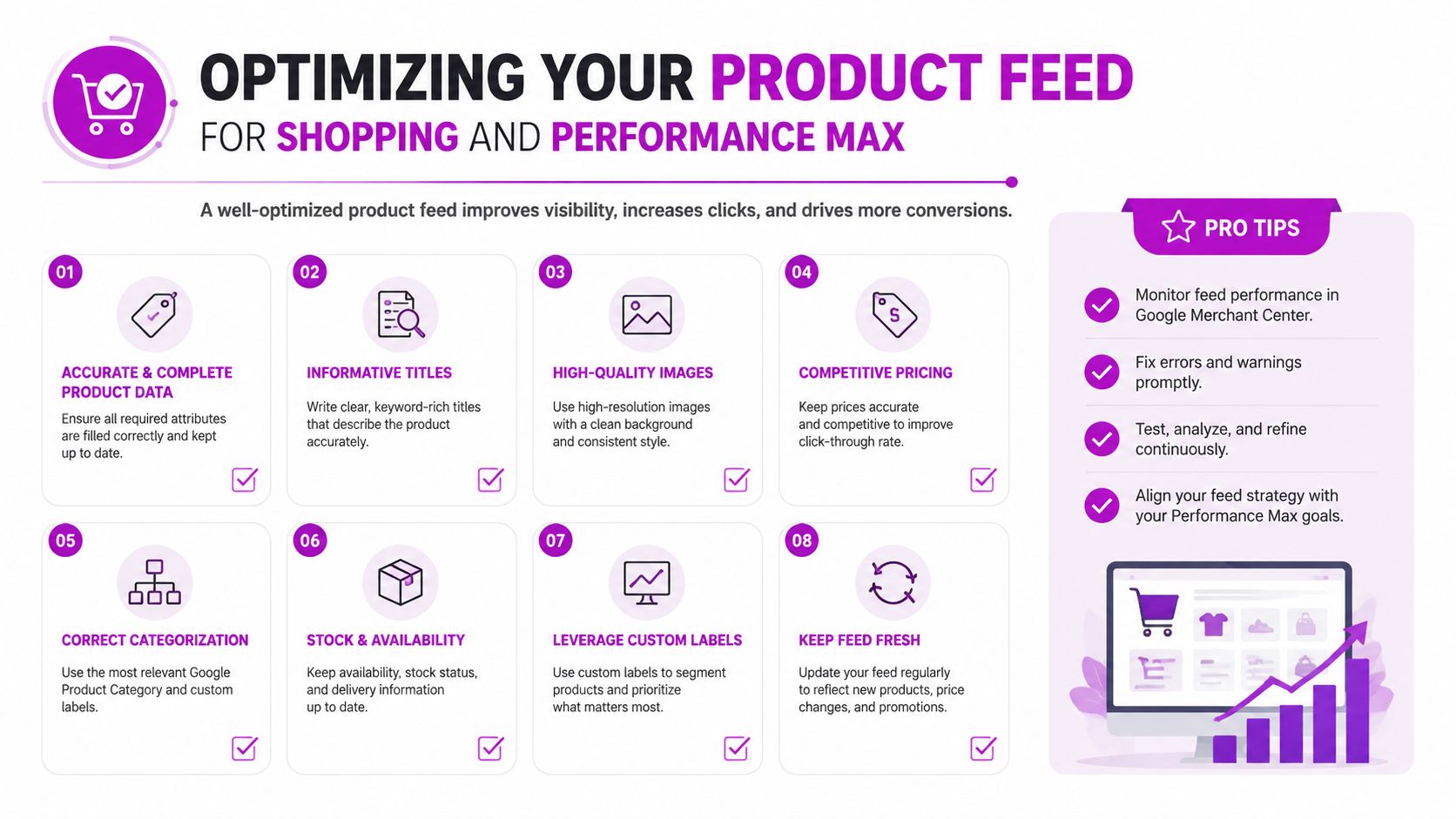
A product feed isn't a technical formality. It is the retail creative that tells Google what a product is, who might want it, and which searches deserve an impression. Weak titles and incomplete attributes restrict discovery before an ad can compete.
Write titles for shoppers
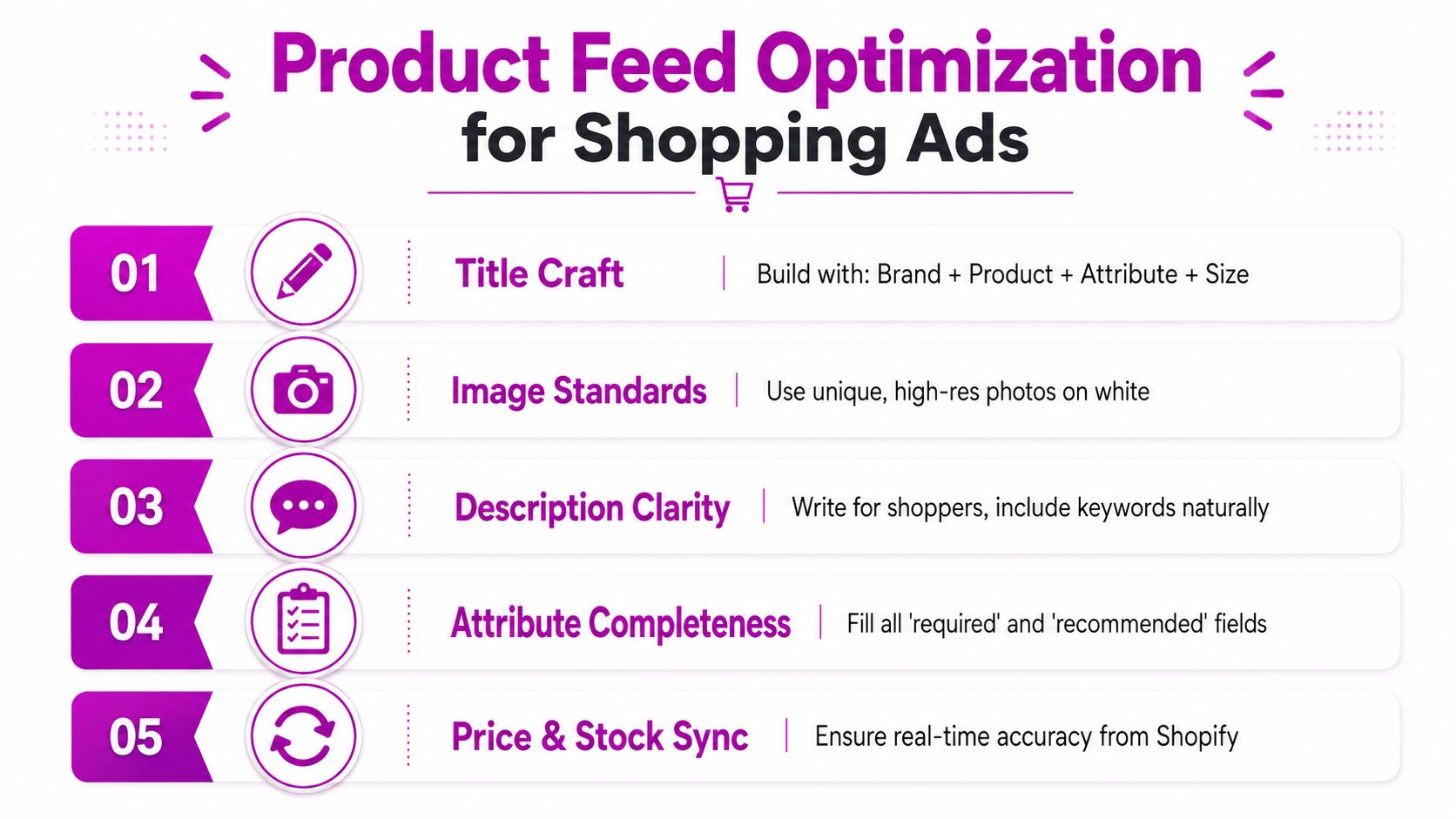
Build titles around the product information a buyer uses. A practical pattern is brand, product type, key attribute, size or variant. Put the important differentiator early, avoid repetitive keyword stuffing, and keep variant information aligned with the landing page.
Map each product to the most relevant Google product category. Shopify's vendor and product type fields can help populate Merchant Center attributes, but the mapping still needs human review. Use item group IDs to keep color, size, and other variants connected instead of presenting each variation as an unrelated product.
Images deserve the same attention as titles. Use clear, high-resolution product photography with a clean primary image, avoid promotional overlays, and reserve lifestyle imagery for supporting assets where appropriate. A feed can be technically approved and still lose clicks because the product presentation looks generic or unclear.
Align commercial data
Price and availability must match the Shopify storefront. Shipping settings in Shopify can conflict with Merchant Center expectations when delivery regions, warehouse rules, or thresholds differ. Check the final customer-facing price, stock state, and shipping promise rather than assuming the integration has translated every rule correctly.
Merchant Center diagnostics should be part of the pre-launch checklist:
- Disapprovals: Open the affected product, identify the policy or attribute issue, and fix the source field in Shopify where possible.
- Warnings: Prioritize warnings that affect eligibility, relevance, or customer trust.
- Supplemental data: Use supplemental feeds for custom labels, promotional information, or segmentation fields that Shopify doesn't provide cleanly.
- Audit timing: Review diagnostics before launching and again after material catalog changes.
Performance Max makes this discipline more important because automation can distribute a flawed product across several surfaces. Feed quality is not only about passing policy review. It also determines how accurately Google matches products to intent and how confidently bidding systems value the resulting traffic.
Bidding Strategy, Budgets, and On-Site Conversion Rate Optimization
Choose bidding based on verified conversion volume, not the number of conversions you hope to receive. A campaign with unstable purchase tracking shouldn't receive a target ROAS instruction and a large budget at the same time.
Start with a controlled approach. Manual CPC or Maximize Clicks with a cap can be safer while the account gathers clean data. Once the purchase event is stable, Maximize Conversions can take over. Target CPA or target ROAS belongs later, when the campaign has enough reliable conversion history for the target to describe reality rather than restrict delivery.
Allocate budget by business priority
Set budgets around margin, inventory, and intent:
- High-intent Search: Protect branded and product-specific demand, but monitor whether the campaign is merely collecting customers who would have purchased anyway.
- Controlled Shopping: Fund products with stable availability, clear margins, and useful query data.
- Performance Max: Give automation enough room to learn, but don't let it consume the account budget before the feed and conversion source are validated.
Shared budgets can help smooth delivery, but they can also move spend away from a strategically important campaign. Check where the budget goes each week. Audience layers can support the structure, with Customer Match for existing customer strategies and observation audiences for analysis where the campaign type permits it. Uploading an audience doesn't make an unprofitable offer profitable.
Fix the Shopify page before changing the bid
A product page needs a clear hierarchy. Put the product image, title, price, variant selector, availability, and primary purchase action where a shopper can find them without hunting. Explain shipping, returns, delivery expectations, and product benefits close to the decision point.
Reviews, strong product photography, useful comparison content, and collection-page filters reduce uncertainty. Urgency elements should reflect a real constraint, not a manufactured countdown. A higher bid can't compensate for a page that loads slowly, hides delivery information, or sends a searcher to a generic collection instead of the promised product.
The relationship is direct: better pages improve conversion rate, better feeds improve relevance, and stable conversion signals make automated bidding less erratic. Work on those inputs before treating bid strategy as the main lever.
Validating Numbers and Scaling Without Breaking Reporting
A Shopify store can show healthy revenue while Google Ads reports too many purchases, too much value, or sales that should not receive paid attribution. Scaling under those conditions turns a measurement error into a budget problem. Validate the numbers first, then decide whether more spend is justified.
Reconcile orders by ID
Export Shopify orders and Google Ads conversions for the same period. Match records by order ID wherever the event payload supports it. Do not compare Shopify sessions with Google Ads clicks and treat the gap as proof that tracking is broken. The platforms use different attribution rules, lookback windows, and definitions.
Shopify may associate an order with a Google referrer, including traffic from organic search or free product listings. Google Ads counts purchases connected to paid ad clicks. Shopify's documentation explains the reporting available by campaign, ad group, and keyword, while the merchant-side distinction explains why the same order can appear differently in each system.
Write down every material difference. Label the likely cause, such as a duplicate native and GA4 purchase event, an order outside the paid click path, delayed reporting, missing consented signals, a currency mismatch, or an order that never reached Google Ads. Without that record, the team may keep changing bids to correct a tracking issue.
Run a weekly control routine
A useful weekly review compares:
- Google Ads conversions with Shopify completed orders.
- Reported conversion value with Shopify revenue under the selected attribution rule.
- Click-to-conversion rate with the store's actual conversion behavior.
- CPA and ROAS with contribution margin, refunds, shipping costs, and discounts.
- Product status in Merchant Center with the products receiving spend.
Use the same date range and timezone in every system. Freeze major tracking changes during a performance comparison where possible. Changing the conversion source, attribution setting, feed rules, and budget at the same time removes the ability to identify which change affected the result.
Measurement standard: The platform report supports the decision. Shopify order data is the reconciliation point.
Start the audit before increasing spend. Common failure modes include broken tracking, duplicate GA4 and Google Ads events, currency mismatches, and missing Enhanced Conversions. The audit methodology outlined above provides a practical checklist for inspecting those issues without treating platform ROAS as final commercial truth.
Scale in stages
| Daily Spend | Primary Check | Scaling Action |
|---|---|---|
| Under $50 per day | Feed eligibility, search terms, exclusions, and order matching | Fix data and relevance issues before adding budget |
| $50 to $500 per day | Conversion stability, product economics, and asset coverage | Test automated bidding and new Performance Max assets carefully |
| Above $500 per day | Margin segmentation, brand separation, and reporting governance | Split budgets by economics and raise spend in controlled increments |
These are operating bands, not universal rules. At lower spend, feed corrections and search-term review often produce more useful learning than a complex campaign rebuild. In the middle band, a stable conversion source can support tROAS testing and additional Performance Max asset variations. At higher spend, separate brand from non-brand traffic, isolate products by margin or inventory logic, and change budgets deliberately.
A 20% budget lift every 72 hours is one controlled scaling approach described in the operating plan for this playbook. If CPA rises by more than 25% week over week, stop the expansion and inspect the funnel before adding spend. Review conversion duplication, order matching, feed eligibility, margin, and landing-page behavior. Those figures are decision rules, not guarantees of performance.
Answer the recurring account questions
Why don't Google Ads conversions match Shopify orders? Start with order IDs, then inspect Google Ads under Goals, Conversions, Summary. Check whether the native Google channel and an imported GA4 purchase are both marked primary, whether Enhanced Conversions is duplicated, and whether the order came from a paid click or another Google source.
Why is Performance Max spending on Display and Discover instead of Shopping? Open the campaign's product and asset group views. Check Merchant Center diagnostics, confirm product eligibility, review the asset group's retail inputs, and see whether an aggressive tROAS target is limiting Shopping delivery. Performance Max distributes delivery across Google surfaces, so Display and Discover activity alone does not prove failure. It does require a joint review of feed eligibility, asset quality, and placement reporting.
Why are products disapproved in Merchant Center? Open Merchant Center, Products, Needs attention, then inspect the individual policy or attribute message. Common causes include missing GTINs, prohibited claims such as “cure” or “guaranteed,” and prices that differ between the feed and the Shopify storefront. Correct the source data, request a review when appropriate, and do not resubmit the same product without addressing the cause.
Why is brand Search taking credit from organic traffic? Review the Search campaign's search terms and keyword details. Tighten match intent, add brand negatives to non-brand campaigns where appropriate, and separate branded reporting from prospecting. A brand campaign can protect visibility, but its ROAS does not represent incremental acquisition by itself.
Automation performs well only when the operator governs its inputs. Keep the feed accurate, define one primary purchase source, reconcile conversions against Shopify orders, and scale only when the account can explain where revenue came from. That discipline gives Performance Max room to find demand while keeping commercial judgment with the operator.
ECORN helps Shopify brands audit Google Ads accounts, improve conversion tracking, govern product feeds, and build profit-focused campaign strategies alongside Shopify CRO and development work. Visit ECORN to discuss an account audit or a focused optimization project before increasing your ad budget.



Ecommerce Conversion Tracking: The Complete How-To Guide

Shopify Design Agency: How to Pick the Right Partner

Mastering Multi Store Management on Shopify

Scale Shopify Store

10 Shopify App Ideas Worth Building in 2026

Conversion Rate Optimization for Landing Pages: The Playbook

Shopify Plus Automation: A Guide for 2026

10 Social Selling Platforms for Shopify Merchants

Shopify Website Design Examples: 7 Stores Worth Studying

7 Ecommerce Newsletter Examples for Shopify Brands

One Product Shopify Store: Build and Scale

Mobile Pop Up Strategy for Shopify Stores That Converts

Sitemap for Shopify: How to Find, Optimize, and Submit It

7 Single Product Websites Worth Emulating

Product Variants Shopify: The Complete 2026 Guide

Ecommerce Analytics Consulting for Growth

What Is AI Integration for eCommerce

How to Choose the Right eCommerce Website Development Firm

E Business Strategy Implementation

Conversion Tracking Setup for Shopify Stores

BigCommerce vs Shopify Plus Which Enterprise Wins in 2026

Shopify Theme Kit: Setup, Commands, and Migration Guide

Shopify Extension Development: A Practical 2026 Guide

Shopify Speed Score Explained and How to Improve It

Shopify Mobile Optimization: The 2026 Playbook

How to Add Subcategory in Shopify for Better UX

How to Implement Structured Data for Ecommerce in 2026

SEO App Mobile: Shopify Store Optimization Guide

Shopify Plus Support: What It Includes and How to Choose

Shopify New York: How to Find and Hire the Right Agency

Google Search Console for Shopify: The Complete Setup

First Party Data Collection for eCommerce Growth

FAQ Online Store Guide: Build and Measure It Right

Do FB Ads Work for eCommerce in 2026?

One Page Checkout for Shopify: Design and Implementation

Shopify GraphQL vs REST: The 2026 Developer Decision

Shopify Ecommerce Consulting: Strategy, Pricing &

Are Reddit Ads Worth It for eCommerce Brands

Shopify Title and Meta Description: A Practical 2026 Guide

Product Video Best Practices for Shopify Brands

Real-Time Inventory Management: A 2026 Guide

AI Chatbot Integration for Shopify Stores

Affiliate Program Management: A Shopify Guide

10 Best Performance Monitoring Tools for Shopify in 2026

Digital Asset Management for eCommerce Brands in 2026

Every Type of Facebook Ads Explained for eCommerce Growth

Product Information Management Explained for Shopify Brands

Support Ticket System: A Guide for Shopify Stores

10 Best Customer Service Tools for Shopify in 2026

Can I Start a Business with No Money? a 2026 Blueprint

What Sells Good on Etsy: Best Niches for 2026

Shopify Add to Cart Button: A Practical 2026 Guide

Customer Feedback Automation: A Practical eCommerce Guide

Critical Rendering Path: A Guide for Shopify Stores

How to Promote on TikTok for eCommerce in 2026

B2B eCommerce Consulting That Drives Real Revenue

10 Best Practices for Site Navigation in 2026

Return vs Refund for Shopify Stores: A Practical Guide

What Is Customer Lifetime Value and Why It Matters

What Is Voice of Customer Research for eCommerce

SMS Marketing for Ecommerce That Actually Converts

Master How to Improve Email Deliverability in 2026

Top 7 eCommerce Partners NYC for Shopify Brands in 2026

Machine Learning for Ecommerce: Boost Your Shopify Store

Beauty Market Research: Your 2026 Growth Guide

Shopify International Expansion: A 2026 Roadmap

What Does CRO Stand for in Business: Understanding CRO

Shopify Visual Merchandising: A Playbook for Higher Sales

Shopify Landing Page Design: Master Conversion in 2026

10 Best AI SEO Optimization Tools for Shopify in 2026

Agentic AI for Ecommerce: Boost Your Sales in 2026
Mastering Email Marketing Data for eCommerce Growth

Conversion Rate Optimisation Australia: Boost Your Sales

Conversion Rate Optimization AI: Your Shopify Store Guide

10 Product Bundling Strategies for Shopify in 2026

How to Increase Customer Lifetime Value: A Shopify Playbook

AI Customer Service Automation: Shopify Guide 2026

Clean Website Design: A Shopify Conversion Playbook

Omnichannel Retail Strategy: A Shopify Playbook

Product Data Enrichment: A Guide for Shopify Brands

Instagram Shopping Features a Guide for Shopify Stores

What Is Revenue Optimization: A Holistic RevOps Guide

Benefits of Conversion Rate Optimization: Boost Your

WordPress to Shopify Migration: Your 2026 Seamless Switch

Boost Sales: Ecommerce Payment Processing Guide 2026

Unified Commerce Platform: Benefits, KPIs & Shopify Guide

How to Reduce Bounce Rate eCommerce: Your 2026 Guide

Shopify API Integration: A Practical End-to-End Guide

How to Implement Data Governance: A 2026 Guide

Shopify Store Development Cost: A 2026 Breakdown

What Is Server Side Tracking: The Shopify Guide 2026

Marketing Automation Workflows: A Shopify Guide for 2026

Shopify: How to Reduce Technical Debt

Shopify UX Design Change: A Playbook for Growth

User Generated Content Strategy: Shopify Playbook

Shopify Pause and Build Plan Cost: A Complete 2026 Guide

Compare at Price on Shopify: A Complete Guide for 2026

Where Can I Sell My Prints? 10 Best Platforms for 2026
Shopify Order Management System: The Ultimate Guide 2026
What Is Marketing Attribution? an eCommerce Guide for 2026


newsletter in your inbox