

A customer places an order while your warehouse team is receiving stock, and three systems record three different realities. Shopify shows the product as available, the 3PL has already allocated the units, and a marketplace still offers them for sale. By the time someone notices, the customer has paid for inventory nobody can fulfill.
That's the operational problem behind Shopify inventory sync. It isn't just about moving quantities between apps. It's about deciding which system owns the count, which systems are allowed to change it, and how every other channel learns about that change. Shopify describes inventory as the quantity available for sale and provides inventory history, adjustments, and reports in the admin, while its broader inventory model supports synchronization across channels such as TikTok, YouTube, Facebook, Instagram, Amazon, Target, Walmart, and eBay (Shopify's inventory documentation).
The practical rule is simple: one system should be authoritative, and every other system should mirror it. The right setup depends on where stock physically sits, how many locations and channels you operate, and whether your team can maintain an app integration or custom API reliably.
When Inventory Sync Goes Wrong
A DTC brand sells through Shopify and uses a 3PL for fulfillment. Shopify shows four units of a popular variant. One customer places an order, committing two units, while the fulfillment request travels to the warehouse. Almost simultaneously, the 3PL reduces its available count and sends an update to Shopify. The events arrive in a different order.
For a short period, Shopify still shows four units. A second customer buys the remaining two. The 3PL now has an order it cannot fulfill, while Shopify has accepted orders against stock already allocated in the warehouse.
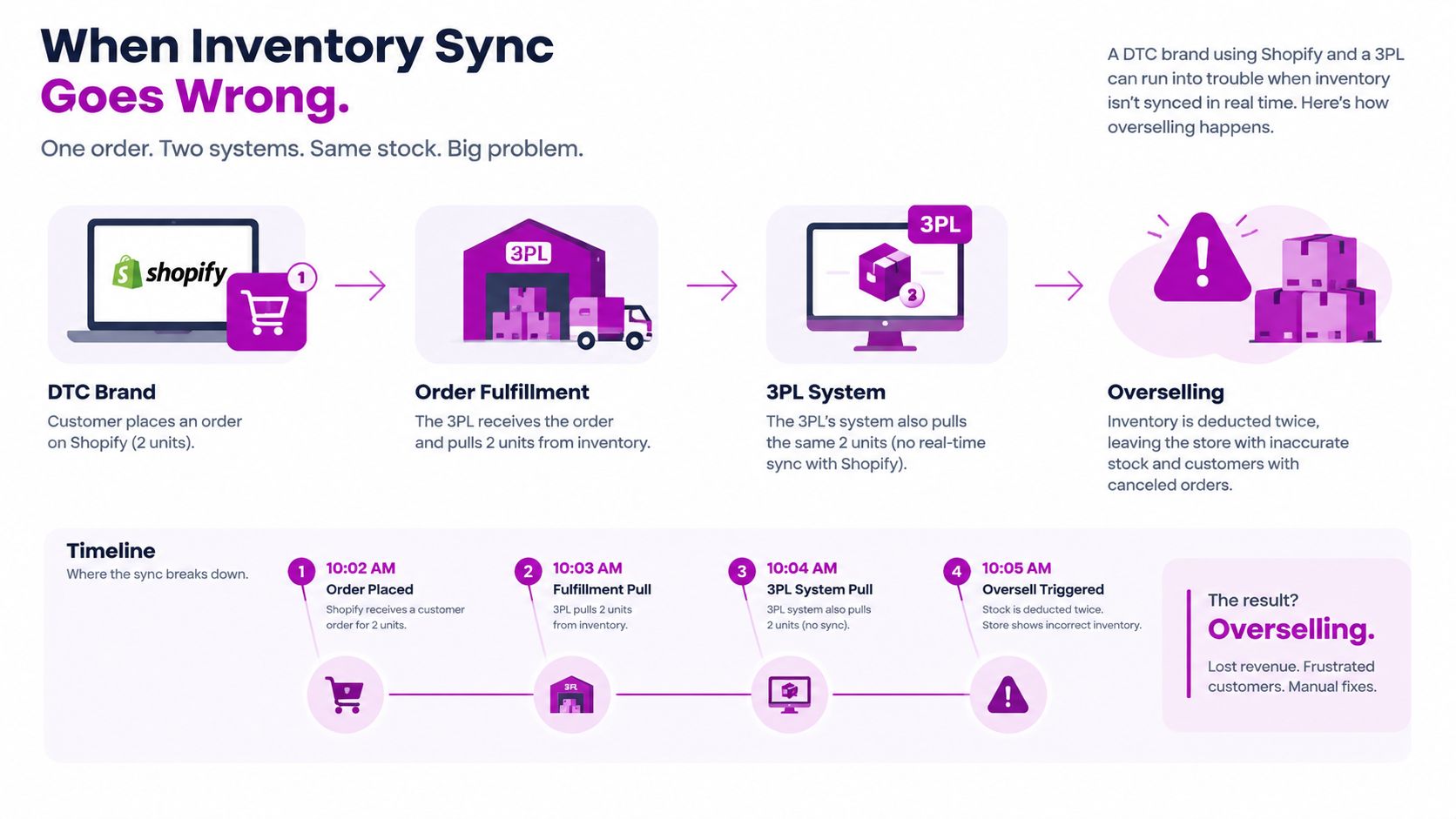
The underlying failure is usually a conflict between latency and ownership, rather than one incorrect quantity field. Events can be accurate individually and still produce the wrong sellable count when two systems are permitted to write changes.
The recurring symptoms
- Oversells: Two channels sell the same units before a decrement reaches every system. Delayed events and separate channel counts create the gap.
- Phantom stock: Shopify displays units the warehouse has allocated, lost, damaged, or transferred. The storefront remains open because the fulfillment update never arrived.
- Duplicate decrements: Shopify reduces stock for an order, then the 3PL or ERP processes that same event as another adjustment and reduces it again.
- Location drift: The total in the admin appears correct, but the quantity assigned to the fulfillment location is wrong. Reviewing only the overall total hides the problem.
- Checkout failures: A customer reaches checkout while another system reserves the final units. The order may time out or fail without revealing which system held the conflicting count.
- SKU mismatches: The warehouse uses one identifier while Shopify maps the variant to another. The physical unit exists, but the connected channel treats it as unavailable.
Shopify tracks stock movements, orders, transfers, and physical adjustments across locations and channels (Shopify's inventory management guidance). That makes it useful for operational visibility, but visibility does not resolve a double-write design.
Operational rule: If Shopify and the 3PL can both decrement the same sellable quantity, the integration has no clear owner.
Define the owner for each event before changing tools. If the 3PL holds and allocates physical stock, it may own the count, with Shopify receiving updates. If Shopify controls allocation across locations and channels, the 3PL should report receipts, fulfillment, and exceptions rather than independently rewriting sellable inventory. Every other connected system should receive the result, not compete to create it.
How Shopify Inventory Actually Works
Shopify doesn't store inventory as one universal number attached directly to a product. A product variant connects to an inventory item, and that inventory item can have inventory levels at one or more Shopify locations. The available quantity is calculated in relation to those location-level records and inventory states.
That distinction matters because “on hand” and “available” aren't interchangeable. A warehouse may physically hold units that are already committed to orders, while incoming units may be recorded but not yet sellable. A manual adjustment in the Shopify admin writes a change at a location. A sale creates a separate commitment against available stock.
The stock states operators need to separate
| State | What It Counts | When It Changes |
|---|---|---|
| On hand | Units physically recorded at a location | Receiving, adjustment, damage, transfer, or fulfillment activity |
| Committed | Units assigned to orders but not yet fulfilled | Order creation, cancellation, or fulfillment |
| Incoming | Units expected at a location but not yet available | Purchase order receipt or transfer workflow |
| Available | Units Shopify can offer for sale after commitments and rules | Sales, cancellations, adjustments, and location changes |
A typical sale starts when Shopify creates an order and commits inventory. The fulfillment process then moves the order through warehouse handling, while the committed quantity remains unavailable for another customer. A cancellation can release that commitment, whereas a completed fulfillment changes the location's stock position.
This is why a simple “push the latest quantity” integration can produce bad results. If an external system overwrites a number without understanding whether it represents on-hand, committed, or available stock, it can release inventory that belongs to an existing order or remove units that should remain sellable.
For a deeper operational view of these distinctions, review real-time inventory management. The useful mental model is a graph of variants, inventory items, locations, orders, and fulfillment events, not a spreadsheet with one quantity column.
With multiple locations, one variant can have separate stock positions across warehouses, retail sites, and 3PL nodes. Channel routing then determines which locations can fulfill an order and how Shopify calculates availability. Syncing becomes a distributed-systems problem involving delayed messages, retries, duplicate events, and conflict resolution.
Setting Up Multi-Location and Channel Sync
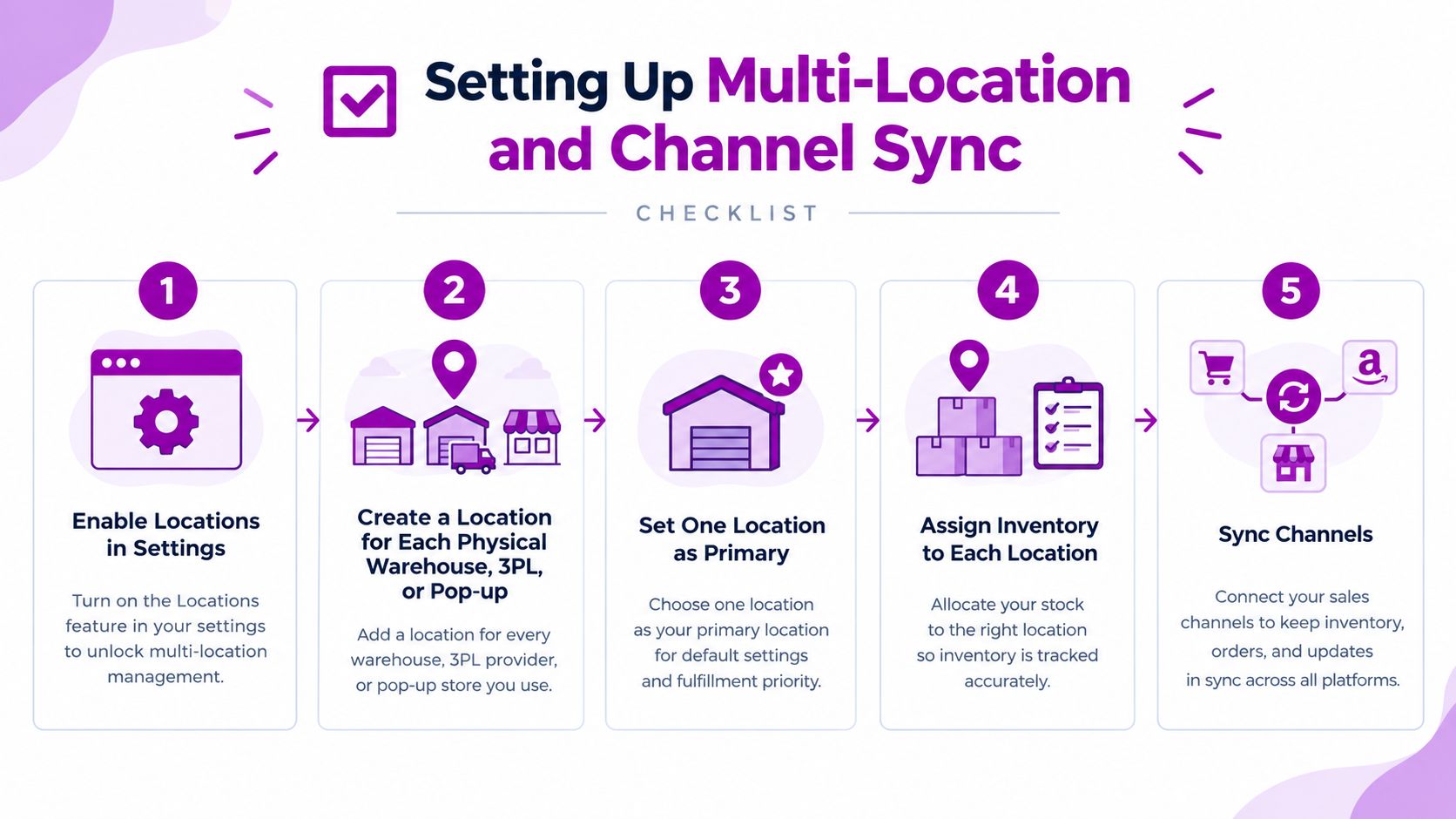
Start with the physical network, not the app marketplace. In Shopify, open the location settings and create a location for every warehouse, 3PL, retail site, or temporary pop-up that holds stock. Choose a primary location for operational clarity, but don't treat that setting as permission to ignore the others.
Configure the inventory graph in order
- Create every fulfillment location. Use names your operations team recognizes. A 3PL location should not share a generic label with a Shopify warehouse.
- Assign inventory to each location. For a small catalog, manual assignment can work. For a larger catalog, use a CSV import or integration, and remember that Shopify imports can overwrite values rather than adjust them.
- Set channel availability deliberately. Decide whether the Online Store can draw from one location, a priority sequence, or multiple locations with fallback behavior.
- Connect additional channels. Review POS, Shop, Markets, and marketplace connections separately. Each channel needs a clear rule for when stock is committed, such as order creation or payment.
- Run a controlled test. Pick a known SKU, create an order, route fulfillment from a non-default location, and verify the available quantity across the storefront and connected channels.
The most common configuration mistake is leaving inventory assigned only to Shopify's default location while the actual fulfillment happens somewhere else. The store may look correct during a basic test, then fail when an order is routed to the warehouse that has the physical units.
Keep the product-location mapping documented. Teams handling several storefronts should also review guidance on how to simplify stock across sales channels, especially when the same catalog feeds different customer journeys. For location design principles, see multi-location inventory management.
Don't test only a successful order. Test a cancellation, a partial fulfillment, a transfer, and a manual admin adjustment. Those events reveal whether the integration understands Shopify's inventory states or copies the last quantity it received.
Apps, APIs, and Webhooks Compared
A Shopify inventory sync fails when the chosen tool cannot answer one operational question: which system owns the sellable count? Tool selection should follow that decision. Consider who controls identifiers, locations, event order, retries, and exceptions before choosing an app or build.
| Path | Best For | Trade-offs |
|---|---|---|
| Native Shopify channels | Merchants selling through Shopify-supported channels with straightforward rules | Fast to activate, but limited when external warehouses, inbound stock, or complex ownership rules must be coordinated |
| Third-party apps | Teams needing prebuilt connectors, monitoring, and standard mapping | Faster than custom development, but adds subscription cost, another service layer, and possible limits on conflict handling |
| Direct API and webhooks | Brands with engineering capacity and complex fulfillment logic | Offers control over fields, deltas, retries, and routing, but requires ongoing maintenance and an accountable technical owner |
Native channels reduce implementation work when Shopify controls the relevant inventory. They become a poor fit when a 3PL or ERP records the physical count and Shopify must receive authoritative updates from outside the platform. In that setup, a channel can distribute Shopify's number, but it cannot resolve competing adjustments.
Third-party apps suit teams that need standard connectors, mapping, and monitoring without owning a full integration. Their trade-offs are operational rather than just financial: subscription fees, another service layer, and limited control over conflict handling or unusual inventory states. Review how the app handles failed writes, duplicate events, bundle quantities, and location-specific stock before trusting it with live orders.
When custom integration earns its keep
A direct build earns its place when the rules extend beyond SKU and quantity. Lot or expiry data, bundle components, reserved stock, location-level availability, and marketplace buffers may require logic that a packaged app does not expose. The business also needs someone responsible for upgrades, alerting, replaying failed events, and reconciling counts.
Use Shopify's internal variant ID as the primary foreign key. Update quantities through the Inventory Level API rather than the Variant API, and write only inventory deltas to the correct location endpoint. For catalogs above 5,000 variants, bulk operations are recommended, and Shopify's GraphQL Admin API processes those jobs asynchronously. Webgility's Shopify inventory sync guidance also cites rate limits of 80 REST requests per second for Shopify Plus or 2,000 GraphQL cost points per second, so queued processing is safer than sending one request per item.
A webhook can trigger the workflow, but it should not become the source of truth by itself. Treat it as an event signal, then fetch or calculate the authoritative quantity, apply idempotency, and record the result. That design handles retries and out-of-order events more safely than copying every incoming value.
Before budgeting a build, review retailer ERP integration costs to understand the wider implementation scope. ECORN can support Shopify integrations and custom development, but the integration owner still needs to be named inside the business.
Choosing Your Source of Truth
The source of truth is not the system with the nicest dashboard. It's the system closest to the physical stock movement.
If Shopify is the warehouse, Shopify should own the sellable count. Sales channels and apps subscribe to Shopify's updates, and external systems should not independently decrement the same inventory. This works for a merchant whose team receives, stores, picks, and adjusts stock inside Shopify.
If a 3PL, WMS, or ERP physically receives and ships the products, that system usually has the stronger claim. It knows about receipts, pick errors, damages, transfers, and warehouse adjustments before Shopify does. In that model, the external system should push authoritative deltas into Shopify, while Shopify sends order information downstream without also acting as a competing decrement authority.
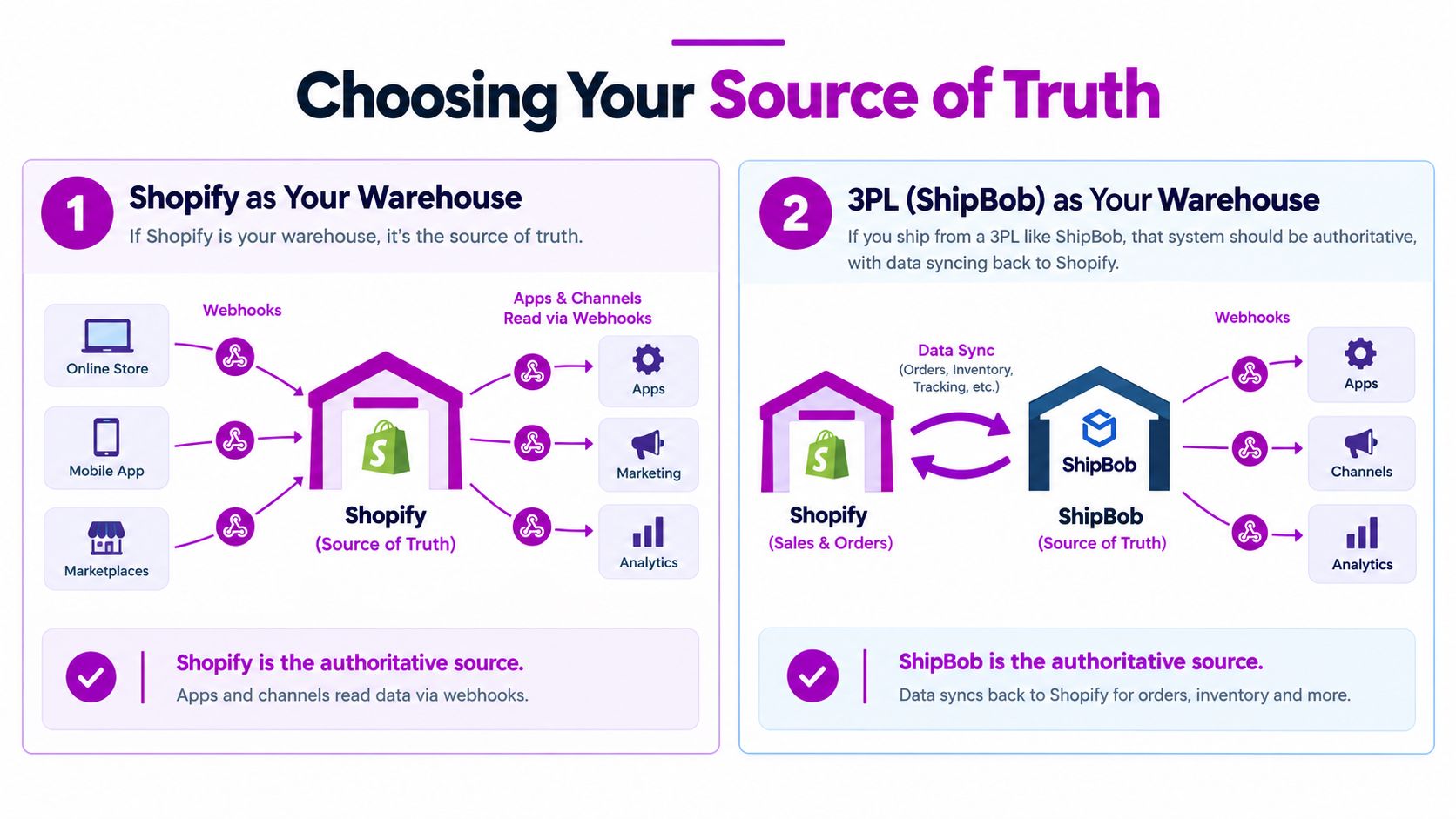
Decision rule: The system where a human physically receives, counts, picks, or adjusts the product should normally own the operational quantity.
That rule doesn't solve every case. Some brands split ownership by location, with Shopify controlling retail stock and an ERP controlling warehouse stock. Others reserve a marketplace allocation or safety buffer outside the shared pool. Those exceptions can work, but the boundary must be explicit at the SKU and location level.
Document four decisions before connecting anything:
- Which system owns on-hand stock?
- Which system commits stock when an order is created?
- Which system releases stock after cancellation?
- Which system can make a manual correction?
The classic double-write bug appears when those answers are missing. Shopify commits an order, the 3PL processes the same order, and both systems believe they're entitled to reduce the quantity. A reliable sync is not two systems agreeing after every event. It's one system making the decision and the other applying the result.
Troubleshooting Sync Failures
Start with the symptom visible to the customer or operator. The goal is to trace that symptom to the system that owns the quantity, the product mapping, or the event path. Reinstalling an app or replaying every event can hide the original cause and create new adjustments.
Use the failure pattern to narrow the search
Stock is higher than the warehouse count. Check for duplicated receiving or purchase-order events. If Shopify and the 3PL both recorded the same inbound receipt, the integration may have added the units twice. Find the original payload, reverse the duplicate adjustment, and assign receiving to one system.
Stock is lower than expected or stopped changing. Inspect webhook delivery, endpoint responses, and the app's connection status. A failed event can leave Shopify showing an old quantity. A paused subscription can produce the same symptom as ordinary sales activity. Replay the original payload only after confirming the handler is idempotent and will not apply it twice.
A live SKU oversells. Treat the incident as an ownership conflict first. Confirm whether Shopify and the external warehouse both decrement stock. Disable the second writer, then reconcile the affected location against the system that should own its count.
A location is missing from a product. Review the product's location settings and confirm that the variant is enabled for sale there. Compare the SKU and barcode with the warehouse record. A mapping mismatch can leave physical stock invisible to Shopify.
A channel shows out of stock while Shopify has units. Check whether the product is published and available in the relevant Markets configuration. Re-publish it only after confirming that the location can serve that channel.
Admin counts look correct but checkout behaves differently. Check open orders, draft orders, discounts, and other checkout conditions that may reserve or restrict inventory. The admin display is evidence, not proof that the storefront can sell every displayed unit.
Common sync risks include SKU mismatches, incorrect location mapping, per-item API overload, and missing inventory webhooks, as noted in the earlier implementation guidance. Fix the root cause before replaying events. Then test the complete path: sale, fulfillment, cancellation, and manual adjustment. Close the incident only after those actions produce the expected quantity in the owning system and its destinations. A dashboard that eventually looks correct does not prove that the event path is reliable.
Best Practices for Scaling Inventory Sync
Scaling inventory sync starts with ownership. Write down which system owns the available count for every SKU and location, then make each connected system follow that decision. A short operating document should cover two areas: the conditions that must stay true each day and the events that require a design review.
The steady-state checklist
- Single ownership: One system owns the count for each SKU and location. Other systems publish or consume changes, but they do not independently decrement the same stock.
- Idempotent handlers: Repeated webhook deliveries create one effective change, not multiple decrements.
- Mutation logs: Record the source event, location, quantity delta, and processing result for every adjustment.
- Controlled buffers: Use a deliberate safety reserve for high-velocity products when event timing or warehouse accuracy creates exposure.
- Scheduled reconciliation: Compare the owning system with each destination on a schedule. Review fast-moving SKUs more often.
- Post-event audits: Check the logs after promotions, catalog changes, warehouse transfers, and major sales events.
Operational guidance from Nventory recommends one source of truth, regular change indexing, and audits after promotions or catalog changes (Nventory's inventory sync best practices). Reconciliation catches silent drift, but it cannot replace live events or correct unclear ownership.
Triggers that justify a redesign
- Catalog growth: Moving beyond 5,000 variants calls for a review of bulk operations, queue capacity, and processing order, as outlined in Webgility's Shopify guidance.
- Channel expansion: Adding a marketplace requires a review of allocation rules, commitment timing, and failure alerts.
- A new 3PL: Confirm ownership before the first inbound shipment. The warehouse should not become an accidental second writer.
- ERP or WMS adoption: Define which system can create, change, and cancel inventory updates before enabling bidirectional flows.
- Sync latency above five minutes: Repeated delay is an operational risk because downstream channels may sell against an old count.
The Shopify app market shows that inventory synchronization remains an ongoing infrastructure need across store types and geographies. Choose the simplest architecture that preserves one owner, clear quantity deltas, observable failures, and reliable reconciliation.
ECORN helps Shopify teams design and maintain integrations across storefronts, marketplaces, 3PLs, and custom operational systems, with Shopify development, consulting, and CRO support available through flexible engagement models. If duplicate writers, unclear location ownership, or recurring reconciliation work persist, visit ECORN to discuss a practical path forward.


Shopify App Integration Playbook That Scales

Shopify CMS Integration: Your 2026 Guide to Options

Shopify Store Audit: Find Hidden Conversion Leaks

Shopify Plus Experts: How to Hire the Right Team

Chargeback Protection Shopify: A Practical 2026 Guide

8 Examples of Conversion Rate Optimization
How to Conversion Rate Optimization for Shopify Stores

Shopify Design Essentials Every Store Owner Needs
Ecommerce Terms of Service: How to Draft and Implement

How to Implement Structured Data for Ecommerce in 2026

SEO App Mobile: Shopify Store Optimization Guide

Shopify Plus Support: What It Includes and How to Choose

Google Ads for Shopify: The Complete 2026 Playbook

Shopify New York: How to Find and Hire the Right Agency

Google Search Console for Shopify: The Complete Setup

First Party Data Collection for eCommerce Growth

FAQ Online Store Guide: Build and Measure It Right

Do FB Ads Work for eCommerce in 2026?

One Page Checkout for Shopify: Design and Implementation

Shopify GraphQL vs REST: The 2026 Developer Decision

Shopify Ecommerce Consulting: Strategy, Pricing &

Are Reddit Ads Worth It for eCommerce Brands

Shopify Title and Meta Description: A Practical 2026 Guide

Product Video Best Practices for Shopify Brands

Real-Time Inventory Management: A 2026 Guide

AI Chatbot Integration for Shopify Stores

Affiliate Program Management: A Shopify Guide

10 Best Performance Monitoring Tools for Shopify in 2026

Digital Asset Management for eCommerce Brands in 2026

Every Type of Facebook Ads Explained for eCommerce Growth

Product Information Management Explained for Shopify Brands

Support Ticket System: A Guide for Shopify Stores

10 Best Customer Service Tools for Shopify in 2026

Can I Start a Business with No Money? a 2026 Blueprint

What Sells Good on Etsy: Best Niches for 2026

Shopify Add to Cart Button: A Practical 2026 Guide

Customer Feedback Automation: A Practical eCommerce Guide

Critical Rendering Path: A Guide for Shopify Stores

How to Promote on TikTok for eCommerce in 2026

B2B eCommerce Consulting That Drives Real Revenue

10 Best Practices for Site Navigation in 2026

Return vs Refund for Shopify Stores: A Practical Guide

What Is Customer Lifetime Value and Why It Matters

What Is Voice of Customer Research for eCommerce

SMS Marketing for Ecommerce That Actually Converts

Master How to Improve Email Deliverability in 2026

Top 7 eCommerce Partners NYC for Shopify Brands in 2026

Machine Learning for Ecommerce: Boost Your Shopify Store

Beauty Market Research: Your 2026 Growth Guide

Shopify International Expansion: A 2026 Roadmap

What Does CRO Stand for in Business: Understanding CRO

Shopify Visual Merchandising: A Playbook for Higher Sales

Shopify Landing Page Design: Master Conversion in 2026

10 Best AI SEO Optimization Tools for Shopify in 2026

Agentic AI for Ecommerce: Boost Your Sales in 2026
Mastering Email Marketing Data for eCommerce Growth

Conversion Rate Optimisation Australia: Boost Your Sales

Conversion Rate Optimization AI: Your Shopify Store Guide

10 Product Bundling Strategies for Shopify in 2026

How to Increase Customer Lifetime Value: A Shopify Playbook

AI Customer Service Automation: Shopify Guide 2026

Clean Website Design: A Shopify Conversion Playbook

Omnichannel Retail Strategy: A Shopify Playbook

Product Data Enrichment: A Guide for Shopify Brands

Instagram Shopping Features a Guide for Shopify Stores

What Is Revenue Optimization: A Holistic RevOps Guide

Benefits of Conversion Rate Optimization: Boost Your

WordPress to Shopify Migration: Your 2026 Seamless Switch

Boost Sales: Ecommerce Payment Processing Guide 2026

Unified Commerce Platform: Benefits, KPIs & Shopify Guide

How to Reduce Bounce Rate eCommerce: Your 2026 Guide

Shopify API Integration: A Practical End-to-End Guide

How to Implement Data Governance: A 2026 Guide

Shopify Store Development Cost: A 2026 Breakdown

What Is Server Side Tracking: The Shopify Guide 2026

Marketing Automation Workflows: A Shopify Guide for 2026

Shopify: How to Reduce Technical Debt

Shopify UX Design Change: A Playbook for Growth

User Generated Content Strategy: Shopify Playbook

Shopify Pause and Build Plan Cost: A Complete 2026 Guide

Compare at Price on Shopify: A Complete Guide for 2026

Where Can I Sell My Prints? 10 Best Platforms for 2026
Shopify Order Management System: The Ultimate Guide 2026

What Is Marketing Attribution? an eCommerce Guide for 2026

10 Best Black Friday Sales Sheets for 2026

Discover the Top Social Media Marketing Agencies For

Consumer Confidence Definition for eCommerce in 2026

What Is Social Commerce? Your 2026 Guide to Boosting Sales

A Social Ad Campaign Playbook for eCommerce Growth

7 Best FAQ Page Examples for SaaS & eCommerce

Market Research in Fashion Industry: A Guide for Shopify
Shopify Migration Services: Expert Guide for 2026

Mastering FB Retargeting Ads for Shopify in 2026
What Is Omnichannel Ecommerce

Master Your Shopify Plus Migration: The 2026 Guide
Shopify Integration Services: A Merchant's 2026 Guide

Shopify Collection Description: A Guide to SEO & Sales

Shopify Plus Contact: Reach Sales & Support Effectively

Top Luxury Shopify Stores: Design & UX Strategies
How to Improve Customer Experience: A Shopify Roadmap


newsletter in your inbox