


You've got two quotes open, both labelled a design package, and one costs eight times the other. Neither agency is necessarily wrong. They're selling different work under the same name, and the label tells you almost nothing until you read the deliverables and the tests that prove the work is done.
Think of Shopify website design packages as a bundle, not a look. A useful package names what will be designed, configured, built, tested and handed over, and what won't. Once you compare quotes line by line on those terms, the price gap usually explains itself.
What a Shopify Website Design Package Includes
Say a 40-product apparel store gets two quotes. One is $1,500 for a design package. The other is $12,000, also called a design package. A first-time buyer often assumes the second agency has better taste or higher margins.
Look closer and the gap is scope. The cheaper quote installs a premium theme, applies your logo, fonts and colours, sets up navigation and uploads products. The larger quote adds custom product and collection templates, app setup, mobile checkout checks, speed work, analytics and launch testing across devices.
That's the trim level analogy. A package is like a car's trim level, not its paint colour. Two cars can share a model name while one has a different engine, brakes and safety kit. Paint is visible. The trim decides how it drives.
Why design means more than visuals
A Shopify storefront has to handle mobile layouts, product discovery, filtering, cart and checkout journeys, and, for some brands, currencies and languages. Each job can become a deliverable or stay outside the quote.
Buyer's rule: Two packages are only comparable when they list the same deliverables, in the same detail, with the same exclusions.
You'll meet three broad families, fixed projects, subscriptions and larger Plus builds. Don't start by picking a name. Start by asking what work your store needs done, then see which family sells that work in the right shape.
Three Package Types and Who Each Suits
Use the table as a first filter. Term length, open or closed scope, and whether you run multiple markets or wholesale will rule out at least one family quickly.
| Package type | How it is sold | Typical term | Best fit | Main trade-off |
|---|---|---|---|---|
| Fixed-scope project | Agreed deliverables, one price, milestone payments | 4 to 12 weeks | New launch or redesign with a clear brief | Scope changes after sign-off cost extra |
| Subscription or retainer | Monthly fee for a block of hours or sprints | Rolling, usually 3+ months | Ongoing CRO, testing and seasonal pages | Unused hours and blurred priorities |
| Enterprise or Shopify Plus build | Scoped project plus dedicated team and monthly support | 3 to 9 months, then retainer | Multi-market, B2B or multi-store brands | Highest cost and slower approvals |
Fixed-scope project
This is commissioning a house from agreed blueprints. You sign off deliverables, price and milestones before building starts, so budget control is strong. It's right for a launch or redesign where you can describe the templates, pages and integrations in advance.
The trade-off is change. A new bundle page, loyalty flow or market added mid-build isn't a small tweak. It's a scope change, priced and scheduled separately, and late changes usually cost more than work planned at the start.
Subscription or retainer
This works like a gym membership for your storefront. A monthly fee buys a set block of hours or sprints for design updates, conversion tests, landing pages and fixes. You don't re-quote every task, and the team learns your store over time.
Flexibility is also the risk. Without a ranked backlog, requests drift toward whoever shouts loudest, hours get spent on low-value polish, and unused time may expire. Ask how priorities are set each month and what happens to unused hours.
Enterprise or Shopify Plus build
This is closer to opening a flagship with its own operations team. Scope can cover multi-market storefronts, custom apps, B2B catalogues, approval rules for who can publish sections, and a dedicated project team. Brands buy control and governance, not just pages.
You'll pay for that control in money and time. More stakeholders, legal checks and integration owners slow approvals. If you sell in one market with standard checkout needs, that overhead rarely earns its keep.
Deliverables to Expect and How to Verify Them
Read this table as contract line items. A deliverable name alone doesn't protect you. The acceptance check in the third column is what lets you say the work is finished, or that it isn't yet.
| Deliverable | What it includes | Acceptance check | Usually in |
|---|---|---|---|
| Theme setup and configuration | Theme install, settings, brand fonts, colours and navigation | Brand checklist signed off on desktop and mobile | Fixed-scope, retainer |
| Custom templates and sections | Product, collection and landing templates built from reusable sections | Sections reused across at least two page types | Fixed-scope, Plus |
| Core Web Vitals baseline and launch report | Lab and real-user metrics for home, collection and product templates | LCP, INP and CLS measured before and after on the same devices | All types |
| Liquid and image performance review | Image sizing, eager LCP image and Liquid loop review | Tested on a catalogue near real size, not a 10-product demo | Retainer, Plus |
| App stack audit | Apps reviewed, removed or replaced, and script load checked | Third-party scripts listed with their load cost | Fixed-scope, retainer |
| AI-commerce readiness | Structured product data, FAQ content and AI referral tracking | Marked included, optional or excluded in writing | Retainer, Plus; optional elsewhere |
| Analytics and handover | Event tracking, conversion dashboard, documentation and training | Named dashboard and recorded walkthrough delivered | All types |
The visible work
Theme setup and custom templates are what most buyers picture. Check them with your eyes and a checklist. Open every template on a phone, test navigation with real product names, and confirm a section built for a landing page can be reused on a collection page without a developer editing code each time.
If you want to understand where template work stops and bespoke building starts, read a custom Shopify development guide for ecommerce experiences before you sign. That boundary is where many budget surprises live.
The less visible work that decides speed
An app stack audit lists every app, what it costs, and what scripts it injects. The agency should remove, replace or defer anything your store doesn't need on first load. Ask for the list in writing, not a verbal promise that the store feels faster.
Liquid and image review matters as your catalogue grows. A theme that loads fine with 10 demo products can slow down at 100 because templates loop through variants and metafields repeatedly. Insist on testing with a catalogue close to your real size, with responsive image sizes and the main hero or product image loaded early rather than hidden behind animation.
Performance targets as acceptance criteria
Treat speed as a pass or fail test, not a report. Google's Core Web Vitals guidance identifies good targets of LCP within 2.5 seconds, INP below 200 milliseconds, and CLS below 0.1, covering loading, interaction responsiveness and visual stability.
Measure mobile home, collection and product templates before and after launch on the same devices, networks and URLs. Run Lighthouse at least three times and judge by the median result, then check Shopify's real-user reporting by page type and device. One fast desktop test in the agency office proves very little.
Say a sprint removes a chat widget that loads on every page and reserves fixed dimensions for product images. Tie that work to numbers: INP should improve because the browser has less script to run on tap, and CLS should fall because images no longer push text down as they load. If neither moves, the sprint didn't deliver.
For handover, confirm events fire correctly in your dashboard. If you're also moving domains or platforms, it's worth planning to verify analytics after a site move so launch week data doesn't go missing.
A deliverable without a measurement is a promise, not a deliverable.
AI Shopping Readiness in the Package
Shoppers now arrive from AI answers, not only from Google listings and ads. Recent figures in Shopify's enterprise ecommerce trends report show traffic from AI search tools to Shopify stores increased more than eightfold year over year by Q1 2026, AI-referred sessions converted nearly 50% better than organic-search sessions and produced 14% higher average order values.
Those visitors often arrive with a specific question already answered. Your product pages need to confirm the answer quickly, in text a machine can read and a person can scan. A polished theme alone doesn't do that.
Ask whether the package includes these five checks:
- Structured product data: Variants, prices, availability and materials marked up for every product.
- Machine-readable policies: Shipping, returns and sizing stated in plain text on crawlable pages.
- Comparison-friendly copy: Dimensions, capacity, ingredients and compatibility in text, not only inside lifestyle images.
- Clear variant information: Which size or colour is in stock, at what price, with no guessing.
- Referral tracking: Sessions from ChatGPT, Gemini, Copilot and other AI tools segmented in your analytics dashboard.
Much of this cost sits in copy and product data work, not theme code, which is why agencies often sell it as an optional extra. That's fine, as long as it's marked included, optional or excluded in writing. A generic promise of SEO-friendly design doesn't cover it.
If you want to go further, look at how to improve brand visibility in AI answers and ask your agency which of the five checks it will deliver. Close with one reporting question: how will AI referral figures be shown to you after launch, and how often?
What Packages Cost and How They Are Priced
Start with how the price is built, not the headline number. The same store can be quoted four ways, and each structure hides different costs outside the fee.
| Pricing model | How the price is set | Hidden costs to check |
|---|---|---|
| Fixed project fee | One quote from a written scope | Copywriting, photography, app subscriptions |
| Monthly retainer | Flat fee for a block of hours or sprints | Unused hours, minimum term, overage rate |
| Hourly rate for fixes | Rate per hour for defined tasks | Open-ended hours without a cap |
| Enterprise or Plus build | Discovery phase and project fee, then support retainer | Integrations, data migration, internal team time |
A fixed project fee gives you one number tied to a written scope, usually paid in milestones. It's the easiest model to approve internally. It's also the easiest to under-scope, because copy, photography and app fees often sit outside it.
A monthly retainer buys capacity, a block of hours or sprints each month. An hourly rate suits small, defined fixes, such as repairing a broken filter, but it needs a cap or estimate so a half-day job can't slowly become two weeks. A Plus build normally combines a paid discovery phase, a project fee, then a support retainer.
Treat any price ranges you see in proposals as indicative only. Region, scope and agency seniority move them a lot, so use ranges to sense-check a quote, not to set your budget. A detailed breakdown of Shopify store development cost can help you map which parts of a quote are build, content or ongoing fees.
Separate the platform cost from the agency cost
Your Shopify plan is paid to Shopify, not to the agency, and it's the base line under every package. In 2026, Shopify's pricing page lists monthly subscription prices of $39 for Basic, $105 for Grow, and $399 for Advanced, with Shopify Plus starting at $2,300 per month.
Now do the annual arithmetic that catches buyers out. A $1,500 monthly retainer is $18,000 a year before apps, copywriting, photography or paid tools. If you add chat, reviews, subscriptions or an AI support tool, check that tool's own billing, just as you'd review AI customer engagement pricing before adding it to the stack, because those subscriptions continue after the design work ends.
Hidden costs to put on one page
- App subscriptions: Monthly fees for reviews, subscriptions, search, loyalty and translation apps.
- Content production: Product copy, photography, video and translation, often excluded from design fees.
- Third-party fees: Premium themes, fonts, integration connectors and developer charges for external systems.
- Unused retainer time: Hours that expire at month end, plus overage rates when you exceed your block.
Ask every agency for four separate lines: build price, retainer price, app costs and content costs. If a quote rolls them into one number, you can't compare it with the next quote, and you won't know what stops when the project ends.
Matching the Package to Your Growth Stage
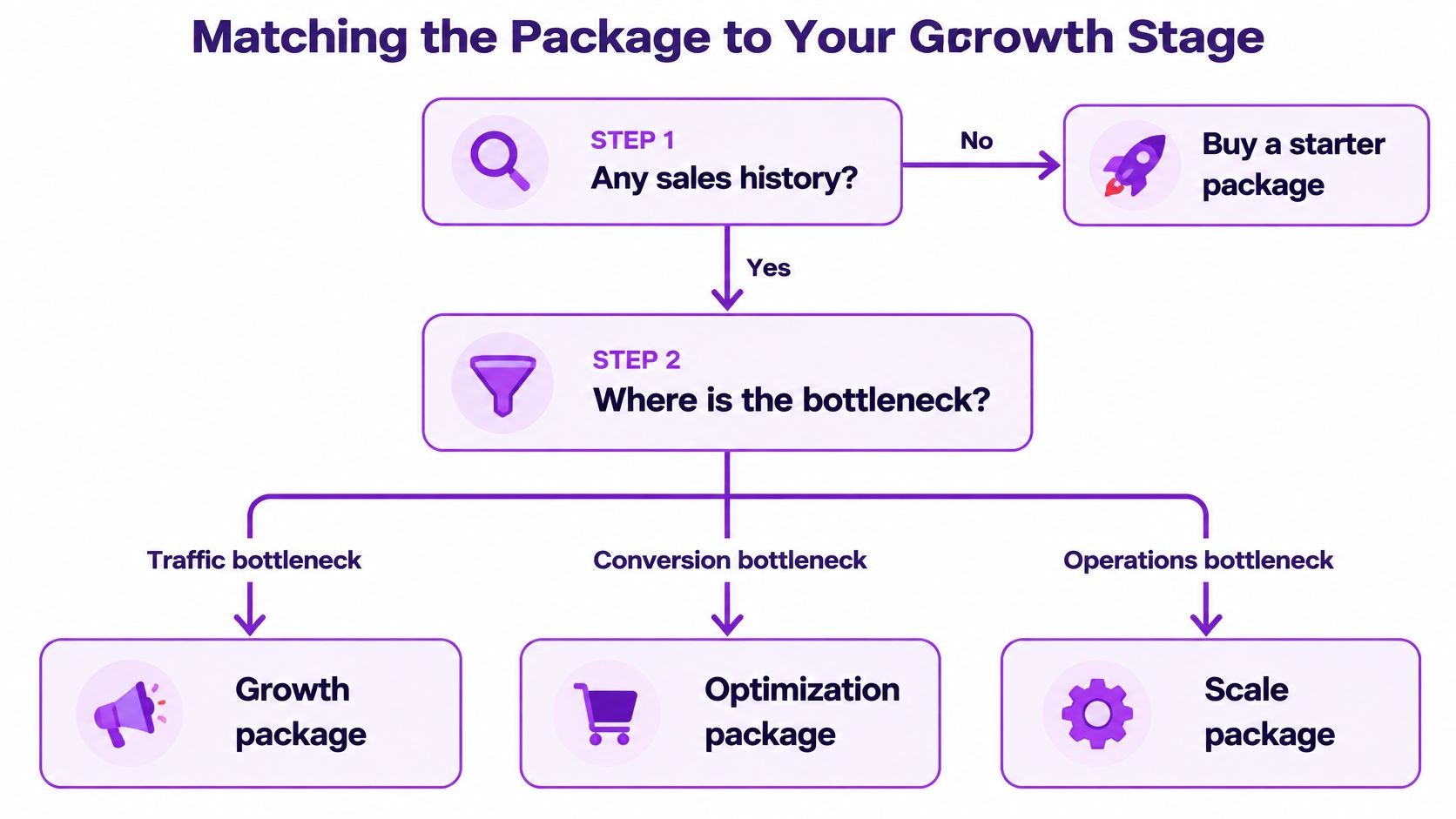
Start from your bottleneck, not your revenue. A store with traffic but weak product pages needs different work from a store with loyal buyers and messy international pricing.
The flowchart below follows the decision in order, from sales history to the type of bottleneck you're trying to fix.
| Growth stage | Typical signal | Package to start with | Package to avoid |
|---|---|---|---|
| Launch | No sales history; testing product-market fit | Fixed-scope theme build with analytics set up | Enterprise build or long retainer |
| Early traction | Steady orders and first repeat customers; clear top products | Fixed-scope redesign of key templates plus short CRO retainer | Custom app development before data exists |
| Growing brand | Consistent monthly revenue, paid traffic and visible conversion gaps | Monthly retainer for testing, templates and performance | Rebuilding the whole theme from scratch |
| Scaling or multi-market | Several storefronts, currencies or B2B wholesale flows | Shopify Plus build with governance and retainer | Single-template packages with no governance |
Work through four questions
1. Do you have any sales history? If not, buy a fixed-scope theme build with analytics installed from day one. You have no conversion data yet, so a retainer would have nothing solid to optimise.
2. Are orders steady, with first repeat customers? Fund a fixed redesign of your top templates, usually product and collection pages, then a short CRO retainer to test what changed. Avoid custom app development at this point. You don't yet know which problem deserves bespoke software.
3. Is revenue consistent, with visible conversion gaps? Move to a monthly retainer. Testing, seasonal pages and performance upkeep become recurring work, and buying them one project at a time slows you down.
4. Do you run several storefronts, currencies or wholesale flows? Only then does a Plus build earn serious consideration. Plenty of brands with paid traffic and steady orders still don't need Plus.
Keep the platform maths in view. In 2026, Shopify's Plus plan help page lists Shopify Plus pricing at $2,500 per month for a one-year USD term or $2,300 per month for a three-year USD term. That commitment should rest on multi-market or wholesale needs you can name, not on prestige or a future you hope arrives soon.
Three Package Scopes Worked Through
These are composite examples, not named clients. Each one shows scope, exclusions and price logic, because the inclusions list explains a package better than its title does.
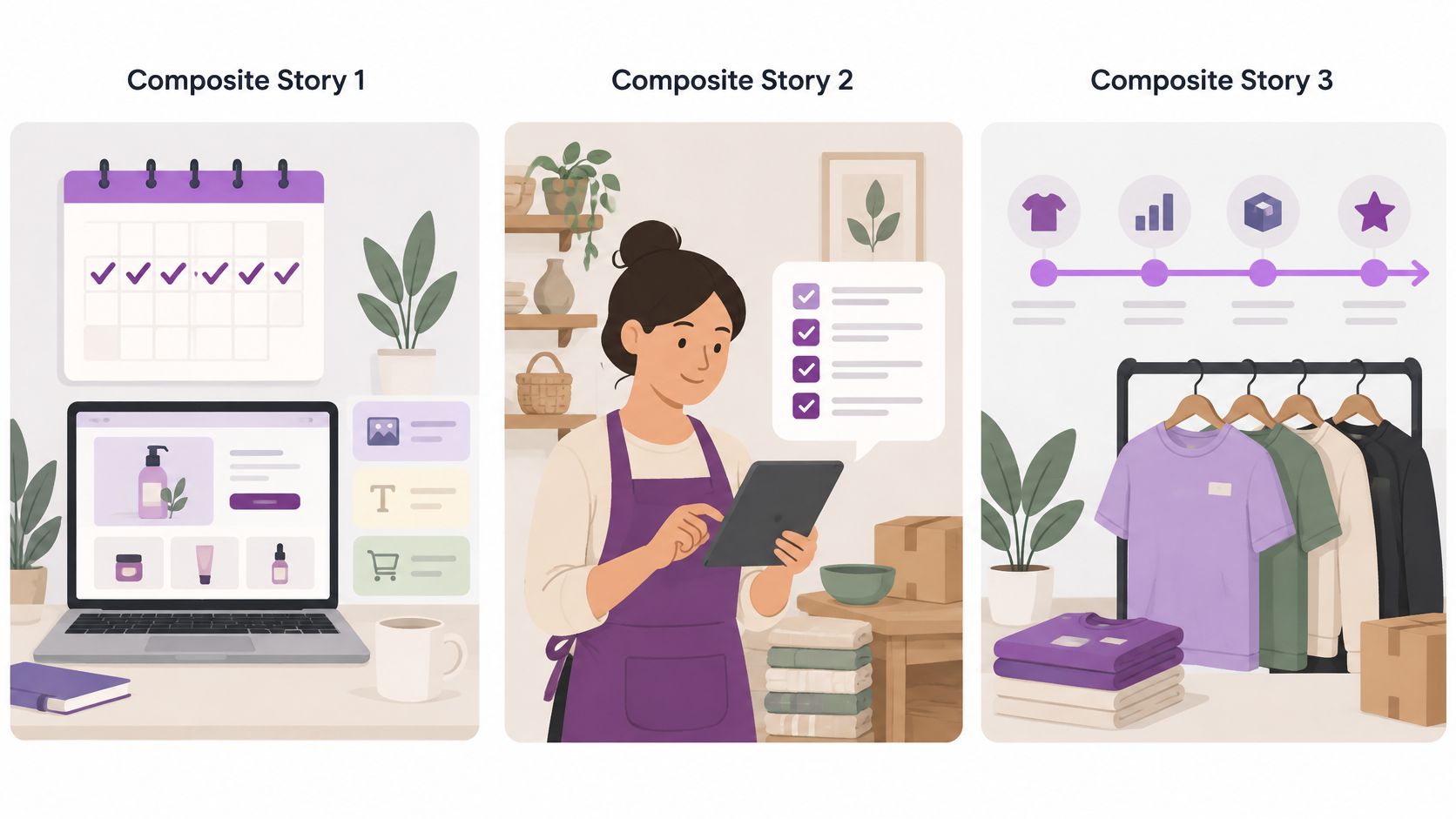
The workflow below reflects the same progression, from planning a launch, to managing a growing catalogue, to fulfilling orders across markets.
A skincare brand launching
A new skincare label buys a six-week fixed-scope package. It covers theme setup, three custom templates for product, bundle and journal pages, setup for 40 product pages, analytics events and a Core Web Vitals baseline with a launch report.
Photography and copywriting are excluded, and the brand supplies both to an agreed deadline. The price logic is simple: one fee for a closed list, milestone payments at design sign-off and launch. Anything new, such as a subscription quiz, gets quoted separately rather than squeezed in.
The risk to manage is content delay. If product copy arrives late, templates get tested with placeholder text and layout problems surface after launch. The scope therefore names a content freeze date.
A homeware brand with steady sales
A homeware store with repeat buyers moves to a monthly retainer of two sprints. Each quarter includes one seasonal landing page. Between campaigns, the team runs product page tests and a Liquid and image review as the catalogue grows from 40 to 900 SKUs.
That catalogue growth is the technical heart of the retainer. Collection templates that once looped through a handful of variants now handle hundreds, so the agency profiles slow templates and fixes image sizes before speed becomes a customer complaint.
AI product-data work is a priced option, not buried in the monthly fee. The brand can approve it as a separate sprint once it sees AI referrals in its dashboard. Price logic here is capacity: a flat monthly fee, a ranked backlog, and an overage rate if a sale period needs extra work.
A B2B supplier in three currencies
A supplier selling to retail customers and wholesale accounts in three currencies commissions a Plus build of roughly six months. Scope covers market-specific pricing, wholesale account flows, a shared section library and a governance rule stating who can create or change reusable sections in each market.
After launch, a retainer covers two markets first, with the third added once internal staff are trained. Integrations with the supplier's existing systems and data migration are scoped as their own lines, because they depend on vendors outside the design team.
Read the exclusions first. They tell you what the headline price does not buy.
Across all three examples, the package name stays vague while the scope list stays useful. That's your test for any real quote.
Confirm the Scope Checklist Before You Sign
Use this list on the actual quote document, not on the agency's sales page. Tick each item only if you can point to the line that states it.
The graphic below highlights three of the checks buyers most often skip: counts, acceptance metrics and dates.
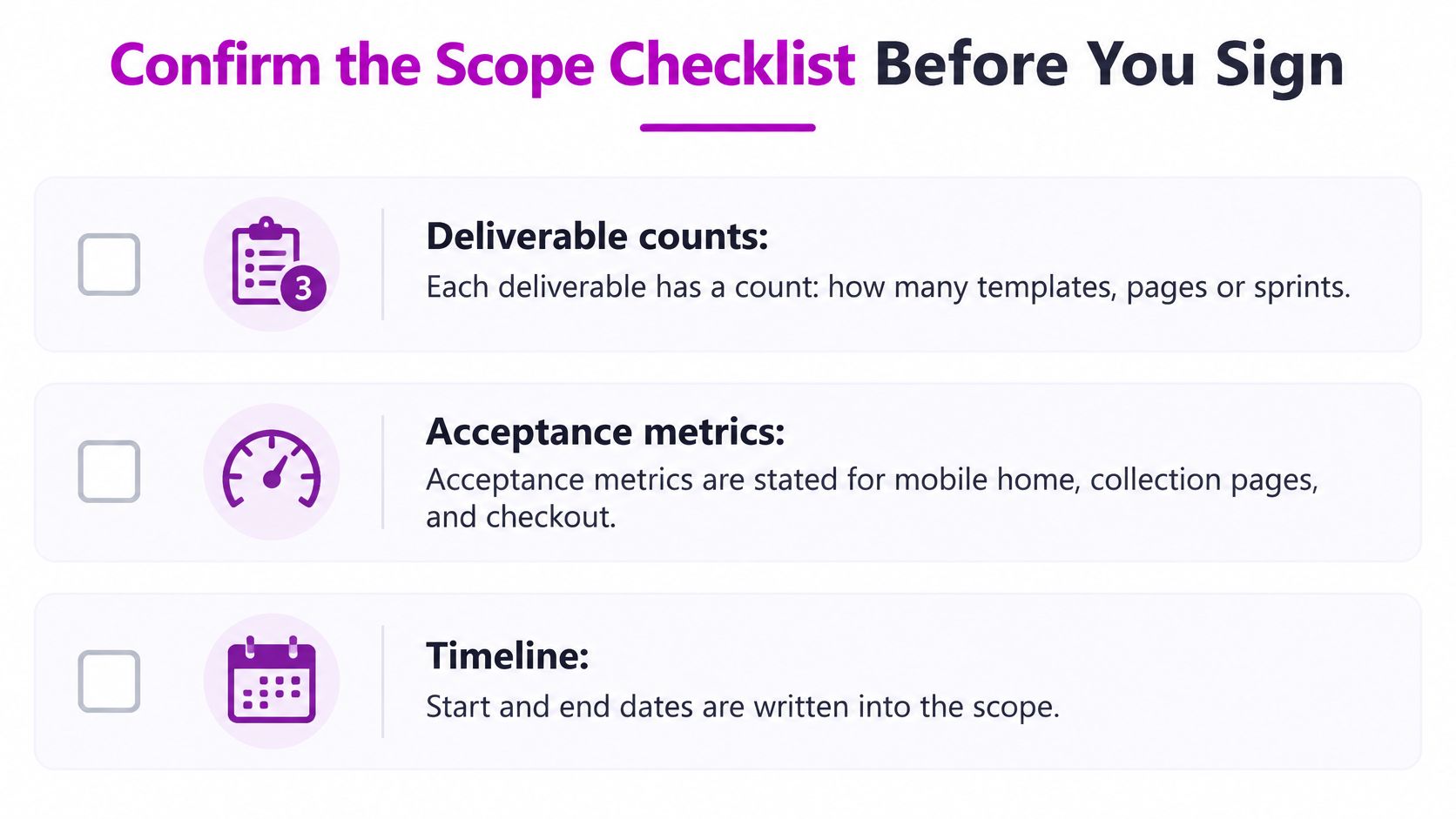
- Deliverable counts: Each deliverable has a number, how many templates, pages or sprints, so finished has a clear meaning.
- Acceptance metrics: Mobile home, collection and product templates carry stated targets for loading, responsiveness and layout stability.
- Real-size testing: Performance is tested on a catalogue close to your real size, not a small demo store.
- AI readiness status: Structured data, policy content and AI referral tracking are marked included, optional or excluded.
- App ownership: Every app is listed with its monthly cost and a named owner on your side or the agency's.
- Revision rules: Revision rounds, feedback format and sign-off steps are written down before design starts.
- Support window: The post-launch support period and response time for bugs are stated in days and hours.
- Code and access: Code ownership, theme repository access and documentation are confirmed, so you aren't locked to one supplier.
- Retainer exit terms: Notice period, minimum term and treatment of unused hours are in the contract.
- Outside costs: Copy, photography, apps and your Shopify plan are listed separately from the agency fee.
Apply a simple decision rule. Shortlist a quote that passes at least eight items and ask for a revised scope covering the rest. If an agency won't put counts, metrics or exit terms in writing, that tells you how disputes will go later.
You don't need to commit to a long arrangement to test fit. Start with a single project or a monthly package trial, such as the monthly packages or single-project option offered by ECORN, and judge the team on one delivered scope. A team that documents a small job well will usually document a large one well too.
If you're comparing Shopify website design packages and want the deliverables, acceptance criteria and exclusions written down before work starts, talk to ECORN about a single project or a monthly design and development package matched to your growth stage. Bring your current quotes, your catalogue size and your main bottleneck, and you'll leave with a scoped plan you can compare line by line.



How to Choose a Shopify Plus Web Design Agency in 2026
Shopify Plus Ecommerce Agency: How to Pick the Right One
Shopify Themes Retina: How to Serve 2x Images

How to Cross Sell on Shopify Without Friction

Best Shopify Theme for Custom Products Compared
Multi Store Inventory Management: A Practical Guide

SEO Consulting for Ecommerce: A Practical Guide
Shopify Theme Updater App: A Safe Update Playbook
Shopify Git Integration: A Developer's Guide to 2026
Headless Ecommerce Development Services Explained

How to Build a Shopify Clothing Website That Converts
How to Launch a Box Subscription Business in 2026

Luxury Skincare Branding Playbook That Converters
10 Best Podcast Ecommerce Shows for Store Growth in 2026
Shopify Developer Hourly Rate: What to Pay in 2026
Critical Shopify Setup Errors That Are Secretly Sabotaging Your Store

Ecommerce Conversion Tracking: The Complete How-To Guide

Shopify Design Agency: How to Pick the Right Partner

Mastering Multi Store Management on Shopify

Scale Shopify Store

10 Shopify App Ideas Worth Building in 2026

Conversion Rate Optimization for Landing Pages: The Playbook

Shopify Plus Automation: A Guide for 2026

10 Social Selling Platforms for Shopify Merchants

Shopify Website Design Examples: 7 Stores Worth Studying

7 Ecommerce Newsletter Examples for Shopify Brands

One Product Shopify Store: Build and Scale

Mobile Pop Up Strategy for Shopify Stores That Converts

Sitemap for Shopify: How to Find, Optimize, and Submit It

7 Single Product Websites Worth Emulating

Product Variants Shopify: The Complete 2026 Guide

Ecommerce Analytics Consulting for Growth

What Is AI Integration for eCommerce

How to Choose the Right eCommerce Website Development Firm

E Business Strategy Implementation

Conversion Tracking Setup for Shopify Stores

BigCommerce vs Shopify Plus Which Enterprise Wins in 2026

Shopify Theme Kit: Setup, Commands, and Migration Guide

Shopify Extension Development: A Practical 2026 Guide

Shopify Speed Score Explained and How to Improve It

Shopify Mobile Optimization: The 2026 Playbook

How to Add Subcategory in Shopify for Better UX

How to Implement Structured Data for Ecommerce in 2026

SEO App Mobile: Shopify Store Optimization Guide

Shopify Plus Support: What It Includes and How to Choose

Google Ads for Shopify: The Complete 2026 Playbook

Shopify New York: How to Find and Hire the Right Agency

Google Search Console for Shopify: The Complete Setup

First Party Data Collection for eCommerce Growth

FAQ Online Store Guide: Build and Measure It Right

Do FB Ads Work for eCommerce in 2026?

One Page Checkout for Shopify: Design and Implementation

Shopify GraphQL vs REST: The 2026 Developer Decision

Shopify Ecommerce Consulting: Strategy, Pricing &

Are Reddit Ads Worth It for eCommerce Brands

Shopify Title and Meta Description: A Practical 2026 Guide

Product Video Best Practices for Shopify Brands

Real-Time Inventory Management: A 2026 Guide

AI Chatbot Integration for Shopify Stores

Affiliate Program Management: A Shopify Guide

10 Best Performance Monitoring Tools for Shopify in 2026

Digital Asset Management for eCommerce Brands in 2026

Every Type of Facebook Ads Explained for eCommerce Growth

Product Information Management Explained for Shopify Brands

Support Ticket System: A Guide for Shopify Stores

10 Best Customer Service Tools for Shopify in 2026

Can I Start a Business with No Money? a 2026 Blueprint

What Sells Good on Etsy: Best Niches for 2026

Shopify Add to Cart Button: A Practical 2026 Guide

Customer Feedback Automation: A Practical eCommerce Guide

Critical Rendering Path: A Guide for Shopify Stores

How to Promote on TikTok for eCommerce in 2026

B2B eCommerce Consulting That Drives Real Revenue

10 Best Practices for Site Navigation in 2026

Return vs Refund for Shopify Stores: A Practical Guide

What Is Customer Lifetime Value and Why It Matters

What Is Voice of Customer Research for eCommerce

SMS Marketing for Ecommerce That Actually Converts

Master How to Improve Email Deliverability in 2026

Top 8 eCommerce Partners NYC for Shopify Brands in 2026

Machine Learning for Ecommerce: Boost Your Shopify Store

Beauty Market Research: Your 2026 Growth Guide

Shopify International Expansion: A 2026 Roadmap

What Does CRO Stand for in Business: Understanding CRO

Shopify Visual Merchandising: A Playbook for Higher Sales

Shopify Landing Page Design: Master Conversion in 2026

10 Best AI SEO Optimization Tools for Shopify in 2026

Agentic AI for Ecommerce: Boost Your Sales in 2026
Mastering Email Marketing Data for eCommerce Growth

Conversion Rate Optimisation Australia: Boost Your Sales

Conversion Rate Optimization AI: Your Shopify Store Guide

10 Product Bundling Strategies for Shopify in 2026

How to Increase Customer Lifetime Value: A Shopify Playbook

AI Customer Service Automation: Shopify Guide 2026

Clean Website Design: A Shopify Conversion Playbook

Omnichannel Retail Strategy: A Shopify Playbook

Product Data Enrichment: A Guide for Shopify Brands

Instagram Shopping Features a Guide for Shopify Stores

What Is Revenue Optimization: A Holistic RevOps Guide

Benefits of Conversion Rate Optimization: Boost Your


newsletter in your inbox