

If Shopify manages your storefront, checkout, and order records, what remains for you to handle, and where does the money from a sale go before it reaches your bank?
That's the question most first-time sellers get wrong. They look at the monthly plan price and assume that's the cost, then discover card processing, extra fees for outside gateways, currency conversion and duty charges layered on top. Understanding how does Shopify work for sellers in practical terms means tracing two things at once, who handles each job and what each sale really costs after every charge is taken.
Who Runs What When You Sell on Shopify
Shopify is a hosted commerce system that holds your storefront, catalog, checkout and order records in one admin, while you supply the products, brand decisions and operations behind each order. You don't host the software or maintain servers. You do decide what to sell, how to price it and how to get it to the customer.
The Shopify help guide on online sales channels describes the model plainly, a merchant creates a storefront, adds products and inventory, configures checkout and payment providers, and manages products, orders and related operations from the Shopify admin. From that one catalog you can also connect Facebook, Instagram and TikTok and control product availability, pricing and currency by channel. Payments aren't processed solely by Shopify itself, because supported methods rely on providers including Shopify Payments, PayPal, Amazon Pay, Apple Pay and Google Pay.
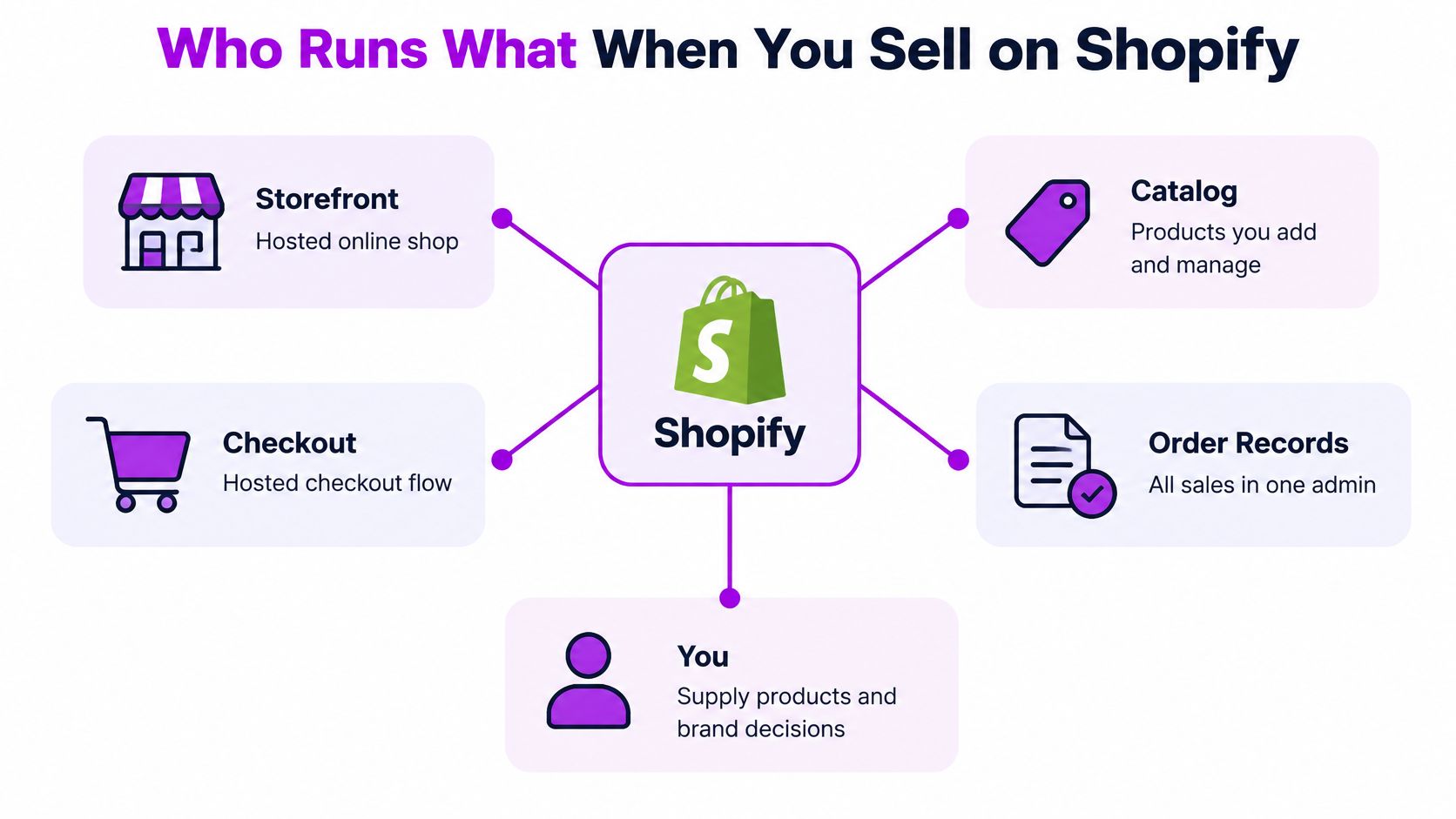
The split of responsibilities
| Area | Shopify handles | Seller controls |
|---|---|---|
| Storefront and hosting | Hosts and runs the online store | Theme choice, design, pages and content |
| Product catalog and inventory | Central admin for products, variants and stock | Descriptions, pricing, variants and stock counts |
| Checkout | Hosted checkout and payment routing | Payment methods offered and shipping rules |
| Payments | Shopify Payments or third-party gateways | Gateway choice and payout setup |
| Sales channels | Connects Facebook, Instagram and TikTok to one catalog | Availability and pricing by channel |
| Orders and fulfillment | Order records and shipping tools | Packing, dispatch, returns and customer service |
Funds follow the provider you choose. Money may be paid through Shopify Payments or directly by a service such as PayPal or Amazon Pay, so one order list can produce payouts from more than one place. Orders through Shopify Payments don't incur Shopify's separate third-party transaction fee, although card processing fees still apply, while an external provider can add that extra fee.
If you're mapping the seller column against your own time and skills, store owner guidance from Chicago Brandstarters is a useful companion for the responsibilities that sit outside the software itself. Run a simple check before launch, any task in the seller column needs an owner, a routine and time in your week.
Setup From Signup to First Sale
Setup is a sequence, not a design exercise. Work through it in order and each step makes the next one testable.
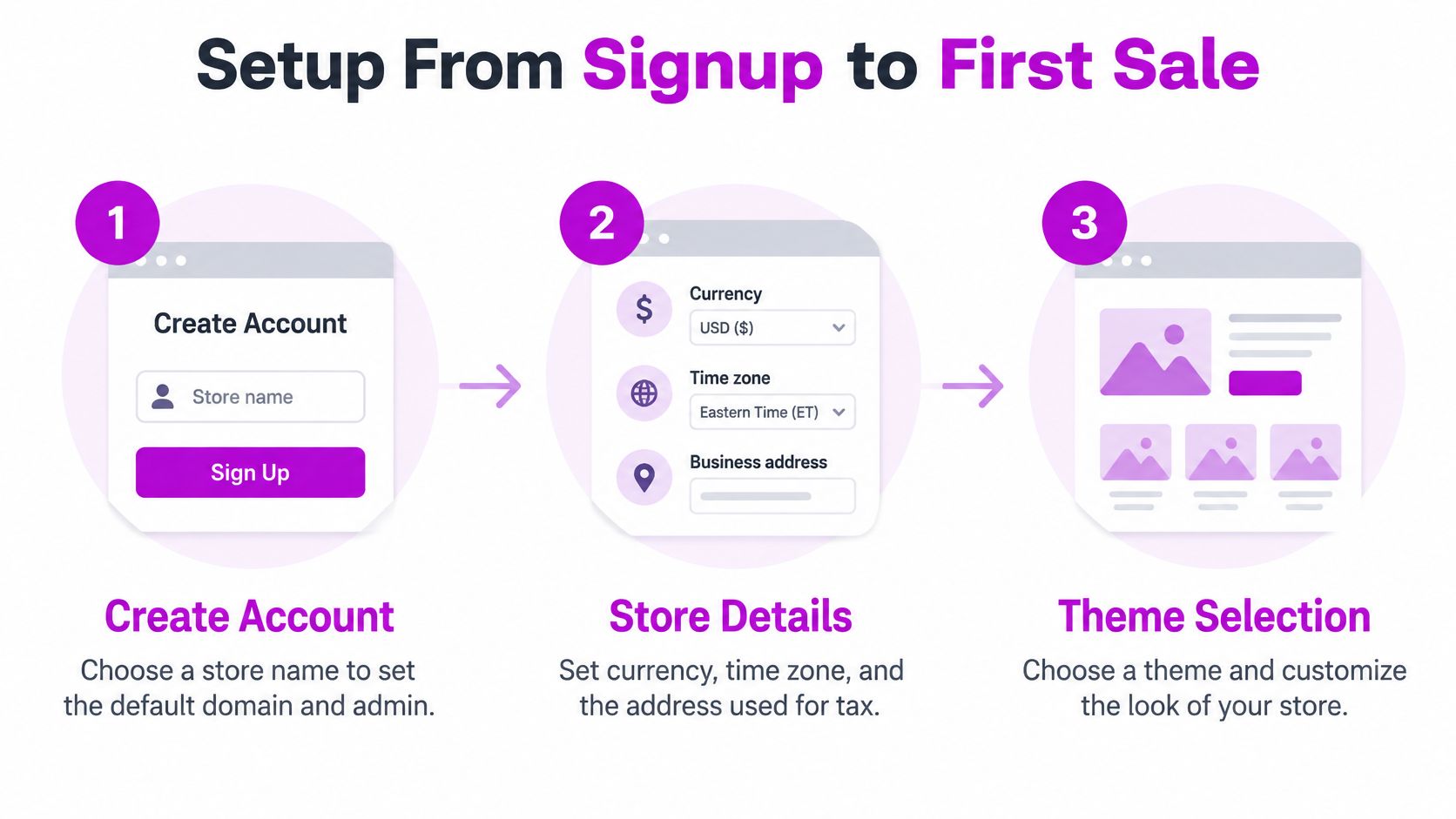
- Create the account and choose a store name. The name sets your default domain and admin address, so pick something close to your brand even if you'll connect a custom domain later. A rushed name creates confusing internal links and customer emails.
- Set store details, currency, time zone and business address. These settings drive tax calculations, report dates and payout currency. Changing your main currency after real sales start is painful, so decide it now.
- Choose a theme and build core pages. Build home, collection, product, about, contact and policy pages before you polish anything. Missing shipping, returns and privacy policies are the pages customers check when they don't yet trust you.
- Add products completely. Add titles, images, variants, weight and an inventory location for every item. A product with no stocked location can sell and then become unfulfillable, which is the most common early setup error.
- Set shipping zones and rates. Define where you'll ship, then add flat rates or connect a carrier for live rates. If a zone has no rate, customers in that place cannot check out.
- Activate payments. Start with Shopify Payments or your chosen third-party gateway, then add wallets your buyers expect. Don't activate a gateway you haven't finished verifying, or payouts can stall after your first real order.
- Set tax settings by market. Confirm whether your displayed prices include or exclude tax in each market. Getting this backwards doesn't break checkout, it changes what the buyer pays and what you remit.
- Place a test order and remove the password lock. Run a full order in test mode, check that it appears in the admin and that the confirmation email arrives. Sellers regularly launch ads while the store password is still on, so make removing it your final deliberate step.
The walkthrough below shows the admin flow behind these steps, which helps if you want to see where each setting lives before you start.
Practical rule: A store is ready when a test order proves four things together, the product displays correctly, payment completes, the order record appears in the admin and the confirmation email is sent.
Don't judge readiness by how the homepage looks. Judge it by that end-to-end test, because it's the only proof that catalog, checkout, payments and notifications are connected. Fix anything the test exposes while the password is still on and no real customer can be affected.
Plans, Fees and What Each Sale Really Costs
The monthly plan is the visible cost, and it's the wrong number to judge by. A lower subscription can be outweighed by payment fees once volume grows, especially if your average order value is low or you depend on external gateways. That's how the cheapest-looking plan stops being cheapest at scale.
As Shopify's pricing page sets out, third-party providers can trigger an additional transaction fee based on the plan, while Shopify Payments separately charges payment-processing fees, and international sales can also add currency-conversion charges. Shopify Payments, Shop Pay, Shop Pay Installments and manual methods avoid the third-party transaction fee. An external provider can leave you paying its own processing charge plus Shopify's fee on the same order.
Every charge that can sit on one sale
| Fee | What it covers | Rate or trigger |
|---|---|---|
| Monthly plan subscription | Platform access, storefront and admin | Charged every month on the chosen plan |
| Payment processing fee | Card processing through Shopify Payments | Applies to card orders processed through Shopify Payments |
| Third-party transaction fee | Extra charge on orders paid through an external provider | Applies to external gateway orders, depending on plan; not charged on Shopify Payments, Shop Pay, Shop Pay Installments or manual methods |
| Currency conversion fee | Converting local-currency sales to the payout currency | 1.5% for US stores, 2% for France and other Shopify Payments regions |
| Duties and import tax calculation | Collecting duties and import taxes at checkout | 0.85% transaction fee when Shopify Payments is the primary gateway |
A simple break-even method
Take your expected monthly orders and multiply by your average order value. Split that revenue by your expected payment mix, for example cards through Shopify Payments versus an external gateway, then subtract the processing fee and any third-party fee for each share. Subtract conversion costs on foreign-currency orders and an allowance for refunds, then add the subscription and compare the total across plans.
That comparison is a matching exercise as much as a pricing one, because your order record, payout report and accounting entry have to agree. If you want the accounting logic behind that discipline, how three way matching works explains why documents should confirm each other before money is treated as settled. For a fuller breakdown of setup and running costs beyond fees, see this guide to the total cost of running a Shopify store.
Rates change by market, card type, currency and plan, so rebuild the model with your own figures rather than trusting a generic monthly price. Run it at your current volume and at double that volume. If the ranking of plans flips between the two, you've found the point where upgrading pays for itself.
Products, Apps and Fulfillment Day to Day
Say a customer buys a jacket after seeing it on Instagram. The order lands in your admin with its sales channel shown on the record, whether it came from your online store, Facebook, Instagram or TikTok. From there, the daily loop is yours to run.
First, check stock at the location that'll ship the item, not just the total across locations. If counts have changed, update quantities in your product and inventory settings before you promise dispatch. Then fulfill the order, print the shipping label, mark it fulfilled and send tracking, so the customer and the admin show the same status.
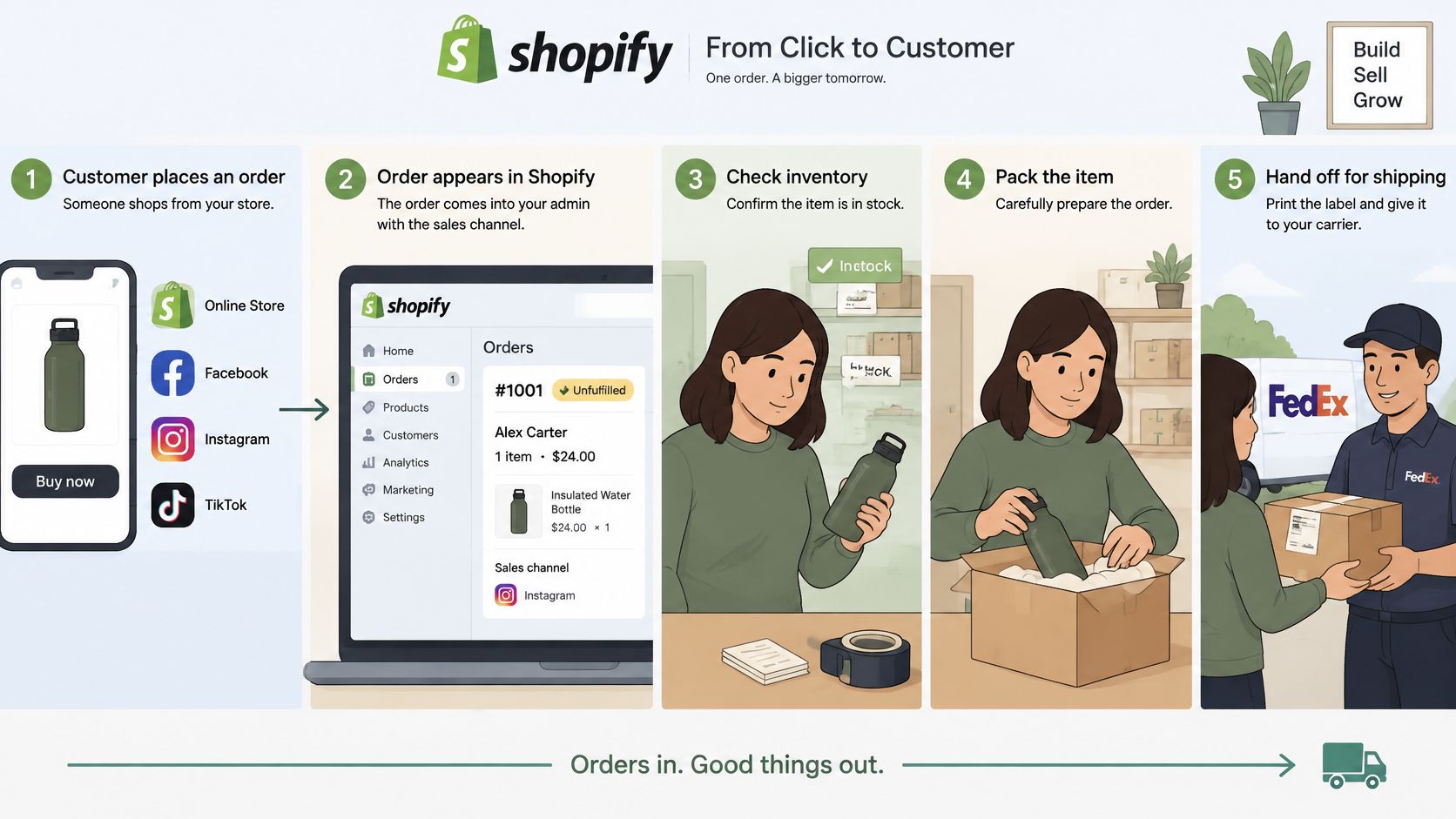
If the jacket comes back, process the return and refund from the original order. That keeps payment, inventory and the customer record matched, instead of creating a loose refund your bookkeeper has to hunt down later.
Where apps fit into that loop
An app is a third-party tool from the Shopify App Store that adds a feature such as email marketing, reviews, accounting or warehouse sync. According to Shopify's API documentation, the GraphQL Admin API is the primary interface for apps that read and write store data, using merchant-authorized access scopes and backend access tokens. Apps can also react through webhooks, where Shopify posts a change to the app so inventory sync, CRM updates and fulfillment triggers happen immediately instead of on a polling schedule.
Say a stock sync app lowers inventory the moment your warehouse ships. Your admin then shows accurate counts across every channel, and you don't oversell the last jacket on TikTok an hour later. That's the practical payoff of event-driven tools.
Before installing any app, check five things.
- Data access: Which products, orders or customer data can it read or change?
- Checkout impact: Does it touch checkout, and what exactly does it alter there?
- Monthly cost: What will it charge at your expected order volume, not today's?
- Support contact: Can you reach a person when an order sync fails?
- Clean uninstall: Can you remove it without leaving broken code or data behind?
One limit protects you here. Checkout extensions can read payment information but can't add, remove or modify payment methods, so your payment choices stay in your own settings no matter which apps you install.
Checkout, Payments and Taxes in Practice
Two different inputs decide what a buyer pays, and confusing them causes most checkout surprises. The market you configure sets the domain, language, currency and pricing. The buyer's shipping address then determines the taxes and duties that apply.
As Shopify's checkout extension documentation explains, changing the destination can change the tax rate even when the selected market stays the same, and a 0.85% transaction fee applies to orders where duties and import taxes are calculated at checkout when Shopify Payments is used as the primary gateway. Shopify can calculate and collect those duties and taxes at checkout and show them upfront, so customers are less likely to face an unexpected bill on delivery.
What makes that calculation reliable
The calculation is only as good as your product data. Each product needs a Harmonized System code and country-of-origin information, and if you buy shipping labels in Shopify you need carriers that support Delivered Duty Paid labels. Leave HS codes blank or ship with a carrier that doesn't support DDP, and reliable landed-cost collection breaks down, which means delays, refused parcels or a customer paying charges you implied were covered.
Complete classification data produces the opposite result. The buyer sees a predictable delivered price, customs handling gets smoother and your support inbox stays quieter. None of that comes from a setting you switch on once, it comes from finished product records.
Before you open a new country, audit the customs fields on every product you'd sell there. Missing data found after launch becomes a customer problem, not an admin task.
A short validation routine
Confirm tax-inclusive or tax-exclusive pricing for each market, since the same sticker price means different things in different places. Run test checkouts using real addresses in each target country and check the final total line by line. Choose payment methods per market too, because a gateway your home buyers trust may not be one buyers elsewhere use, and that affects conversion before price does.
Finally, trace the money. The buyer pays through the chosen gateway and funds settle to the payout method configured for that gateway, whether that's Shopify Payments, PayPal or Amazon Pay. Refunds reverse along the same route, so reconcile each payout against the orders and refunds that produced it using the actual fee rates, not estimates. When a payout looks short, the explanation is almost always sitting in that order-level detail.
Selling Across Borders Without Losing Margin
Adding currencies and languages looks like a storefront feature. In practice it's a margin decision, because localization can improve conversion while reducing what you keep from each order.
Shopify's help documentation on international pricing fees confirms that local-currency sales still incur ordinary payment-processing fees plus currency-conversion fees, listed at 1.5% for US stores and 2% for France and other Shopify Payments regions. That percentage comes off after the customer has happily paid in their own currency, which is why sellers miss it.
One order worked through
Take an order of 100 in a local currency. Subtract your card-processing charge for that order, subtract the conversion fee for your store's region, subtract the duties calculation fee if you're collecting duties at checkout, and subtract the refund cost you expect across orders like it. Now run the same 100 order as a home-currency sale with no conversion. The gap between the two results isn't one big charge, it's several small percentages arriving together.
That gap decides whether the market is worth serving at your current prices. If it wipes out your contribution margin, your options are raising local prices, absorbing less through promotions or not localizing that market yet. For a broader view of the operational side, this overview of selling across borders in e-commerce covers the surrounding decisions.
The chain behind selling globally
- Local payment acceptance: Can buyers pay the way they normally do in that market?
- Exchange-rate exposure: What rate converts the sale, and who carries movement before payout?
- Duties and tax handling: Are charges collected at checkout or left to delivery?
- Settlement timing: When does converted money reach your account?
Connect each market to its payout currency, pricing treatment, refunds, chargebacks and accounting reconciliation so your ledger matches what customers were charged. Judge expansion by margin after conversion costs, not revenue. That discipline matters most for growing brands and Shopify Plus operators running several storefronts, where a small percentage repeated across markets becomes a material sum.
Deciding Whether Shopify Fits Your Stage
Match your situation to the setup below before you argue about plans. The right answer changes with catalog size, markets and how much custom logic your operations need.
| Growth stage | Typical setup | Shopify fit |
|---|---|---|
| Starting out | One brand, a small catalog, one payment method | Strong fit, fast launch and low setup overhead |
| Growing brand | Larger catalog, paid ads, several markets | Strong fit, channels, apps and multi-currency support |
| Scaling on Shopify Plus or multiple storefronts | Several storefronts and complex integrations | Confirm app coverage, developer support and Plus requirements first |
| Heavy ERP or custom backend | Custom logic and deep system links | Check app and API coverage against your requirements before committing |
Three checks before you commit
- Model the total cost of a sale at your expected monthly volume using every fee component, not just the subscription.
- Confirm the payment route for your top markets, since local acceptance and gateway choice change both cost and conversion.
- List your required integrations, such as inventory sync, accounting, shipping labels and CRM, and check each against available apps.
A starting brand with one product line usually needs only the first check done well. A growing brand in several markets should finish all three before adding paid channels, and if one of those markets involves setting up a local entity, renn's guide to launching in Spain shows the kind of country-level groundwork that sits alongside store setup. Larger operators should test app coverage and developer support first.
We're an official Shopify Partner Agency, and our Shopify Expertise packages start from 35 hours per month with no commitment, which suits a structured review before you commit. Run the model with your own order value, payment mix and refund rate first. If two plans come out close, get that fee model and setup checked before you build on it.
If your break-even model shows two plans landing close together, or your payment routes and integrations need untangling before launch, we can review your fee model, store setup and app choices and build the parts you'd rather not learn by trial and error. Visit ECORN to talk through your store, your markets and the numbers behind your next stage of growth.



Shopify Theme ZIP: How to Upload and Install It
Shopify Plus Organization Admin: Roles and Access Guide
How to Build a Drop Down Menu in Shopify: Steps and Fixes
Shopify Plus Integration Services Guide

Shopify Customer Experience: A 2026 Guide

Shopify Plus Expansion Stores: Limits and Setup
Shopify Theme Update: Safe Steps, Backups and Rollback

Shopify Website Design Packages: What You Actually Get

How to Choose a Shopify Plus Web Design Agency in 2026
Shopify Plus Ecommerce Agency: How to Pick the Right One

Shopify Themes Retina: How to Serve 2x Images

How to Cross Sell on Shopify Without Friction

Best Shopify Theme for Custom Products Compared
Multi Store Inventory Management: A Practical Guide

SEO Consulting for Ecommerce: A Practical Guide

Shopify Theme Updater App: A Safe Update Playbook

Shopify Git Integration: A Developer's Guide to 2026
Headless Ecommerce Development Services Explained

How to Build a Shopify Clothing Website That Converts

How to Launch a Box Subscription Business in 2026

Luxury Skincare Branding Playbook That Converters
10 Best Podcast Ecommerce Shows for Store Growth in 2026
Shopify Developer Hourly Rate: What to Pay in 2026
Critical Shopify Setup Errors That Are Secretly Sabotaging Your Store
Ecommerce Conversion Tracking: The Complete How-To Guide

Shopify Design Agency: How to Pick the Right Partner
Mastering Multi Store Management on Shopify
Scale Shopify Store

10 Shopify App Ideas Worth Building in 2026
Conversion Rate Optimization for Landing Pages: The Playbook
Shopify Plus Automation: A Guide for 2026
10 Social Selling Platforms for Shopify Merchants

Shopify Website Design Examples: 7 Stores Worth Studying
7 Ecommerce Newsletter Examples for Shopify Brands
One Product Shopify Store: Build and Scale

Mobile Pop Up Strategy for Shopify Stores That Converts
Sitemap for Shopify: How to Find, Optimize, and Submit It

7 Single Product Websites Worth Emulating
Product Variants Shopify: The Complete 2026 Guide
Ecommerce Analytics Consulting for Growth
What Is AI Integration for eCommerce
How to Choose the Right eCommerce Website Development Firm

E Business Strategy Implementation
Conversion Tracking Setup for Shopify Stores
BigCommerce vs Shopify Plus Which Enterprise Wins in 2026
Shopify Theme Kit: Setup, Commands, and Migration Guide

Shopify Extension Development: A Practical 2026 Guide

Shopify Speed Score Explained and How to Improve It
Shopify Mobile Optimization: The 2026 Playbook
How to Add Subcategory in Shopify for Better UX
How to Implement Structured Data for Ecommerce in 2026

SEO App Mobile: Shopify Store Optimization Guide

Shopify Plus Support: What It Includes and How to Choose

Google Ads for Shopify: The Complete 2026 Playbook

Shopify New York: How to Find and Hire the Right Agency
Google Search Console for Shopify: The Complete Setup
First Party Data Collection for eCommerce Growth
FAQ Online Store Guide: Build and Measure It Right
Do FB Ads Work for eCommerce in 2026?

One Page Checkout for Shopify: Design and Implementation
Shopify GraphQL vs REST: The 2026 Developer Decision
Shopify Ecommerce Consulting: Strategy, Pricing &

Are Reddit Ads Worth It for eCommerce Brands

Shopify Title and Meta Description: A Practical 2026 Guide

Product Video Best Practices for Shopify Brands
Real-Time Inventory Management: A 2026 Guide

AI Chatbot Integration for Shopify Stores

Affiliate Program Management: A Shopify Guide
10 Best Performance Monitoring Tools for Shopify in 2026
Digital Asset Management for eCommerce Brands in 2026
Every Type of Facebook Ads Explained for eCommerce Growth
Product Information Management Explained for Shopify Brands
Support Ticket System: A Guide for Shopify Stores

10 Best Customer Service Tools for Shopify in 2026

Can I Start a Business with No Money? a 2026 Blueprint

What Sells Good on Etsy: Best Niches for 2026

Shopify Add to Cart Button: A Practical 2026 Guide

Customer Feedback Automation: A Practical eCommerce Guide
Critical Rendering Path: A Guide for Shopify Stores

How to Promote on TikTok for eCommerce in 2026

B2B eCommerce Consulting That Drives Real Revenue

10 Best Practices for Site Navigation in 2026
Return vs Refund for Shopify Stores: A Practical Guide

What Is Customer Lifetime Value and Why It Matters
What Is Voice of Customer Research for eCommerce

SMS Marketing for Ecommerce That Actually Converts

Master How to Improve Email Deliverability in 2026

Top 8 eCommerce Partners NYC for Shopify Brands in 2026

Machine Learning for Ecommerce: Boost Your Shopify Store

Beauty Market Research: Your 2026 Growth Guide

Shopify International Expansion: A 2026 Roadmap

What Does CRO Stand for in Business: Understanding CRO

Shopify Visual Merchandising: A Playbook for Higher Sales

Shopify Landing Page Design: Master Conversion in 2026

10 Best AI SEO Optimization Tools for Shopify in 2026

Agentic AI for Ecommerce: Boost Your Sales in 2026
Mastering Email Marketing Data for eCommerce Growth

Conversion Rate Optimisation Australia: Boost Your Sales
Conversion Rate Optimization AI: Your Shopify Store Guide

10 Product Bundling Strategies for Shopify in 2026


newsletter in your inbox