

The theme update looks routine: a newer release is available, the files appear to merge cleanly, and the storefront loads in preview. Then a customer selects a product variant and the wrong item lands in the cart, or an app-powered section disappears from a product page. The code change passed. The business-critical journey didn't.
A Shopify theme updater app should be treated as a risk-control tool, not a shortcut for copying files. A safe update isn't finished when the merge succeeds. It's finished when the changed storefront has passed the checks that matter to customers and the team can restore the previous version if it hasn't.
Why a Theme Update Is Riskier Than It Looks
A clean diff can hide a broken storefront. Product swatches may stop responding, a cart may add the wrong variant, or a tracking pixel may no longer fire. These failures can be difficult to spot in an admin preview, especially if nobody tests the specific customer journey that triggers them.
The risk comes from the parts that have accumulated around the theme. JSON templates and section settings sit alongside app embeds, custom Liquid, scripts, translations, and merchant edits. Replacing an upstream file can remove a setting or reference without producing an obvious error. The page may still render, while a feature the store relies on has vanished.
A successful merge isn't a successful release
Shopify's guidance on theme updates and customizations makes an important distinction: automated updates are available when theme files remain in their original state, apart from certain settings and template files. Customized stores may not qualify for that safer automated path, and manual updates can invalidate settings or require configuration changes.
That's why “the files merged” isn't an adequate release test. A merge tells you how code changes were reconciled. It doesn't prove that an app block still appears, a discount combination works, or a customer can complete the intended flow.
Practical rule: Treat every theme update as a change to a working storefront, not as a routine refresh of static files.
For merchants, the cost of missing a regression isn't limited to developer time. A problem found through customer complaints or sales analysis has already reached the live experience. The safer approach is to assume that a successful merge can still produce a failed storefront, then use staging tests and rollback criteria to decide whether the update is fit to publish.
A good updater therefore needs more than file-transfer capability. It should preserve the original theme, make conflicts visible, allow a meaningful preview, and help the team verify business-critical behavior before production changes.
How Shopify Themes Are Actually Built and Versioned
Before an updater touches files, it needs to identify what kind of theme it's working with and what “newer” means. Architecture version and theme version number answer different questions: architecture describes the theme's file structure, while the version number compares a particular theme with the latest release of that same theme in the Theme Store. Shopify explains this distinction in its theme version documentation.
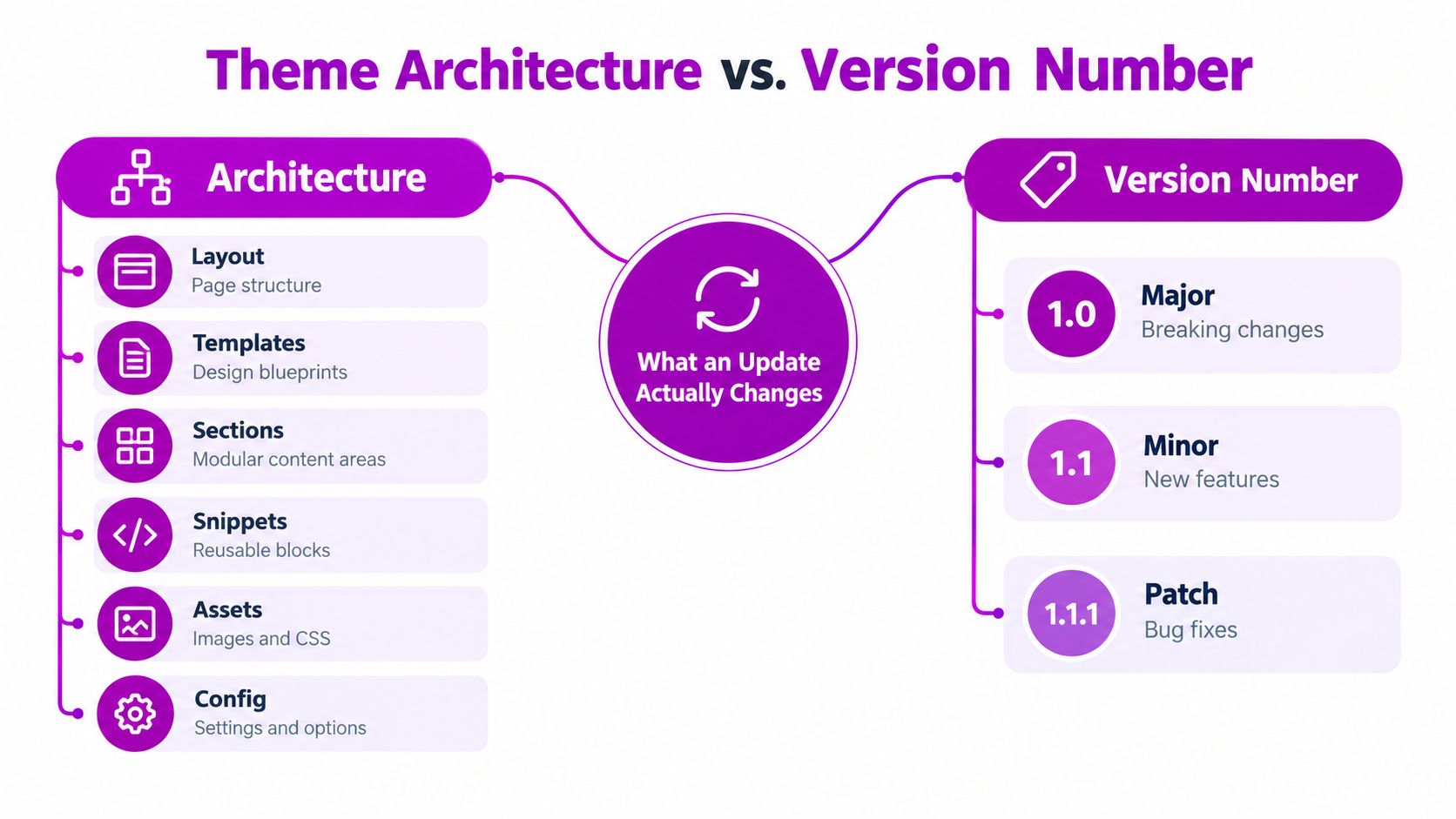
Architecture tells you what can collide
Shopify announced Online Store 2.0 on June 29, 2021. Its Online Store 2.0 announcement describes JSON templates that define page structure and store section settings, giving merchants more flexibility to add or edit sections. That shift matters to an updater because theme behavior can depend on both code and configuration.
A theme's standard structure includes several kinds of files, and each can carry customizations:
- Layout files set the overall page shell and may contain scripts or integrations.
- Templates and JSON configuration define page composition and section settings.
- Sections and snippets hold reusable content and theme logic.
- Assets include styles, scripts, and images.
- Locale files store translated text.
A naive updater may overwrite changes in any of these areas. It should compare the merchant's current files with both the prior theme release and the incoming release, rather than assume every local difference is safe to discard.
Version numbers aren't architecture labels
Shopify distinguishes older vintage themes from Online Store 2.0 themes. Its documentation says vintage themes are no longer available in the Theme Store, and free vintage themes receive no updates beyond security fixes. Knowing the version number alone won't tell you whether an update can be applied safely; the updater must also account for architecture and migration status.
Shopify's development themes provide a way to preview and test changes using a hidden, temporary copy before publication. Theme Check, the linter Shopify added alongside its Online Store 2.0 tooling, scans Liquid and JSON for issues such as syntax errors, missing templates, and performance concerns. Neither tool replaces storefront testing, but both belong in a controlled update workflow.
File Replacement Versus Version Controlled Sync
A file-replacement updater and a version-controlled workflow solve different problems. The first aims to move an upstream release into the store with minimal setup. The second makes changes reviewable, tracks edits over time, and gives the team a clearer path to resolve conflicts before publication.
Shopify's GitHub integration for theme development provides a useful model for this distinction. When a connected branch changes, the Shopify theme updates; edits made in the Shopify admin can also be committed back to the repository. If the theme falls out of sync, the integration supports resetting it to its last commit.
| Dimension | File Replacement Updater | Git-Based Sync |
|---|---|---|
| Best fit | A lightly customized store with simple update needs | A customized theme or a team managing multiple storefronts |
| Risk profile | Can overwrite local changes if it replaces files wholesale | Makes conflicts reviewable, but still requires deliberate merge decisions |
| Audit trail | May provide limited detail about what changed | Records changes in version control and supports pull-request review |
| Rollback options | Depends on whether the app preserves a prior copy | Can reset the Shopify theme to a recorded commit |
Choose based on customization, not convenience
File replacement can suit a store whose theme files remain close to the original and whose team is prepared to check the result carefully. It becomes risky when custom code, settings, app integrations, or translations are mixed into the files being replaced. The tool may complete its task while removing the very changes that make the storefront work.
Git-based sync takes more coordination. Someone needs to review changes, resolve conflicts, and approve deployment. That effort is useful when developers and merchants need to see what changed and why, or when several storefronts must be maintained consistently.
A faster update process isn't better if it makes conflicts invisible.
For a small, lightly customized store, a simpler updater may be adequate if it preserves a duplicate and supports a real preview. For a heavily customized store, the reviewability and rollback options of version control are more valuable than one-click convenience. The choice should follow the store's change history, not the updater's marketing language.
The Gated Deployment Sequence That Prevents Rollbacks
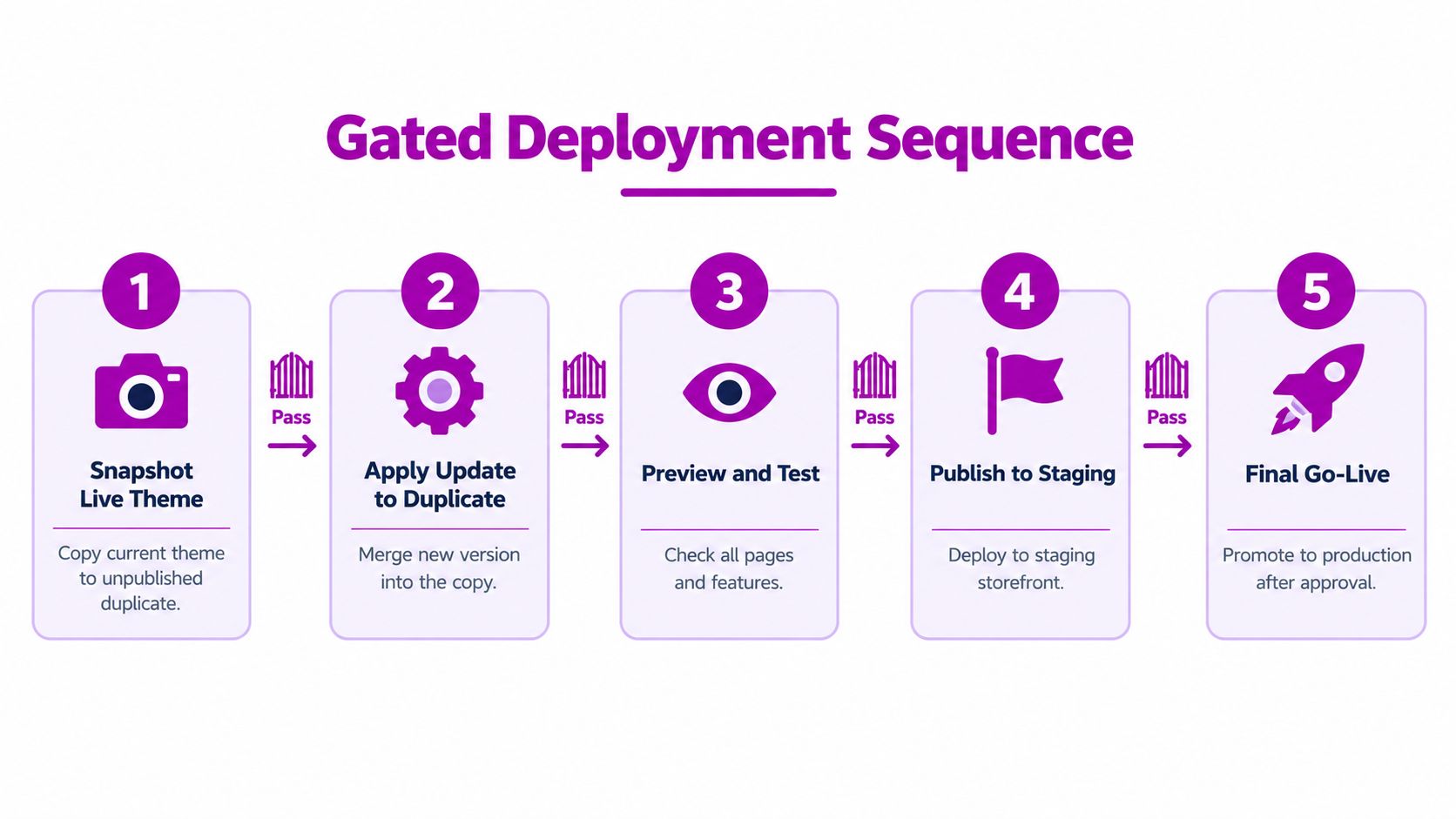
A reliable update moves through gates. Each gate answers a specific question: can the team restore the current version, are local changes understood, does the code validate, and do the customer journeys still work?
Start with a recoverable copy
First, snapshot the live theme and duplicate it as an unpublished theme. Keep the original untouched while the update is prepared. A team that can't quickly identify and restore the prior version shouldn't publish the new one.
Next, compare current files with the previous and incoming releases. Classify each file as unchanged, merchant-modified, upstream-modified, or conflicting. Unchanged files can usually follow the upstream release. Merchant-only changes need protection. Upstream changes should be reviewed for relevance, and conflicts need an explicit decision rather than an automatic overwrite.
Merge, validate, and test actual journeys
A three-way merge compares the old upstream version, the merchant's current version, and the incoming release. That gives the team context a two-way comparison lacks: it can distinguish a merchant's local edit from a change that arrived upstream. Apply the accepted changes to the duplicate, using version control where possible, and require review for unresolved conflicts.
Run Theme Check and Liquid validation before preview. These checks can catch syntax problems and other code-quality issues, but they can't confirm that every interactive storefront feature behaves correctly.
The release gate is the customer journey, not the green checkmark.
Preview representative product, collection, cart, search, account, and checkout-adjacent flows. Include responsive layouts, localized content, multiple currencies or markets, discount combinations, app-powered blocks, and accelerated checkout buttons where the store uses them. For stores with more complex development needs, a Shopify development store workflow can help teams review changes away from the published storefront.
Only publish after the responsible reviewers approve the tested result. Choose a monitored release window, then record the source and target versions, files changed, merge decisions, validation results, and deployment timestamp. That record helps the team explain what shipped and make a controlled rollback if the storefront behaves differently in production.
A Real Update Across Three Customized Storefronts
A shared theme release doesn't mean a shared update decision. Consider an agency preparing the same upstream release for three clients: one runs a vintage theme with hand-edited Liquid, another uses Online Store 2.0 with extensive section settings, and a Shopify Plus storefront relies heavily on app blocks.

One release, different conflict maps
The team duplicates each live theme separately. For the vintage storefront, it flags hand-edited Liquid and checks whether the theme's maintenance status supports the intended update path. That store may need more manual review because its architecture and local code don't match the newer theme's assumptions.
On the Online Store 2.0 storefront, the main review centers on templates and section settings. The developer checks whether the incoming release changes the structure expected by customized JSON templates, while the designer confirms that the merchant's page arrangements still make sense in preview.
The Shopify Plus store presents a different question: do app blocks still appear in the intended sections, and do their controls behave as expected? The team checks app embeds and theme settings as well as code, because a page can look structurally correct while an integration is missing or misplaced.
Route decisions to the right owner
The developer resolves code conflicts and documents changes. The designer checks layout and responsive behavior. The merchant confirms business requirements, such as which promotions, product options, or market-specific content must remain intact.
That division prevents a common mistake: asking a developer to infer whether a visual or commercial change is acceptable. Each storefront gets its own review record, even when the incoming release is shared. If one store fails a required test, the team holds that deployment without blocking the others.
A single updater workflow can coordinate the work, but it shouldn't force identical treatment across different themes. Classification, approvals, and test coverage need to reflect what each storefront contains. After release, the audit trail lets the team trace a problem to a specific decision rather than guess which change caused it.
What Should Not Live in the Theme Anymore
The easiest theme changes to maintain are often the ones that don't need to be merged into theme code. Shopify's theme app extension migration guidance recommends extensions as a way to avoid direct theme-code edits, support versioning, reduce breaking-change risk, and remove an app's storefront additions cleanly when it's uninstalled.
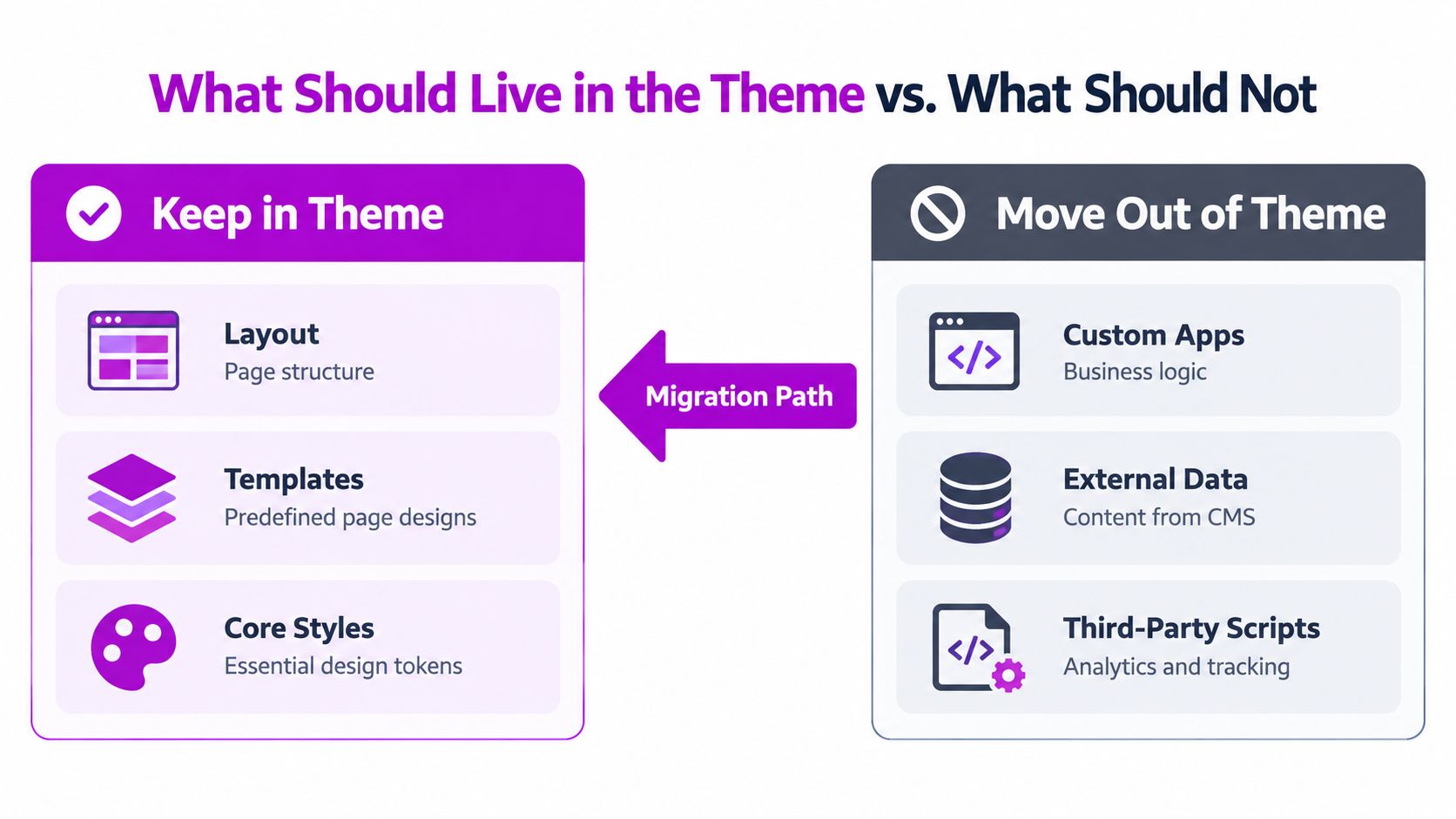
Put each responsibility in the right place
Use this simple migration matrix when auditing a store:
| Storefront responsibility | Prefer |
|---|---|
| Page structure and essential presentation | Theme layout, templates, and core styles |
| Configurable app content within a compatible section | Theme app blocks |
| App functionality that applies more broadly | App embeds |
| Data management and automation | External systems or the app's own services |
App blocks depend on Online Store 2.0 compatibility, while app embeds support broader compatibility across vintage and Online Store 2.0 themes. Shopify's App Store requirements also say apps that modify merchant themes must use theme app extensions rather than direct code changes.
Theme code still has a clear job: it controls the storefront's presentation and the logic that belongs there. But analytics scripts, app features, and external data don't automatically belong in Liquid just because that was the easiest way to add them. Audit those dependencies before the next update, then move what can be modularized out of the theme.
Rollback Criteria and Post-Release Monitoring
A release plan needs a clear point at which the team stops troubleshooting live and restores the previous theme. Decide that threshold before publication, while the current version is still available and the owners are reachable.
Run smoke tests that match the store
At minimum, verify product variants, cart behavior, discount combinations, app-powered blocks, accelerated checkout buttons, and pixel firing where those features are used. Include representative markets and localized content. A test should check behavior, not just appearance: select the variant, add it, and confirm the cart reflects the intended choice.
Set rollback criteria around observable failures. Revert if a critical purchase journey breaks, a required app integration disappears, or the team can't establish that a material production issue is unrelated to the release. Don't patch uncertain changes directly into the live theme while customers are using it. Restore first, then diagnose in the duplicate.
Assign ownership before launch. The agency or developer handles theme integrity and technical checks; the merchant confirms business rules and approves the customer-facing experience. Agree on who can call a rollback, so the response doesn't stall while stakeholders debate responsibility.
Monitor, record, and improve the next release
Keep the release under active review for a 24–48-hour monitoring window. Compare storefront behavior with the agreed baseline, inspect JavaScript errors, confirm that tracking continues to work, and review conversion or revenue-per-session changes over a fixed comparison period. These are merchant-specific operational checks, not a universal benchmark.
Track the signals that show whether the workflow is improving:
- Staging pass rate: How often an update passes without manual code intervention.
- Conflict rate by file type: Where customizations repeatedly complicate merges.
- Rollback rate: How often a published update needs to be reversed.
- JavaScript errors: Whether the release introduced new storefront failures.
- Commercial movement: Whether conversion or revenue per session changes against the agreed comparison period.
Use the findings to adjust test coverage, file ownership, and the next update plan. The best updater isn't the one that automates the most changes. It's the one that stops when the business impact is uncertain and makes recovery straightforward.
If your Shopify theme updates are putting custom code, app behavior, or sales-critical journeys at risk, ECORN can help assess the storefront, plan a controlled update, and strengthen the development and CRO process around it. Talk with ECORN about the theme and integrations you need to preserve, then choose a focused project or ongoing support that fits your team.


Shopify Git Integration: A Developer's Guide to 2026
Headless Ecommerce Development Services Explained

How to Build a Shopify Clothing Website That Converts

How to Launch a Box Subscription Business in 2026

Luxury Skincare Branding Playbook That Converters

10 Best Podcast Ecommerce Shows for Store Growth in 2026
Shopify Developer Hourly Rate: What to Pay in 2026
Critical Shopify Setup Errors That Are Secretly Sabotaging Your Store

Ecommerce Conversion Tracking: The Complete How-To Guide

Shopify Design Agency: How to Pick the Right Partner

Mastering Multi Store Management on Shopify

Scale Shopify Store

10 Shopify App Ideas Worth Building in 2026

Conversion Rate Optimization for Landing Pages: The Playbook

Shopify Plus Automation: A Guide for 2026

10 Social Selling Platforms for Shopify Merchants

Shopify Website Design Examples: 7 Stores Worth Studying

7 Ecommerce Newsletter Examples for Shopify Brands

One Product Shopify Store: Build and Scale

Mobile Pop Up Strategy for Shopify Stores That Converts

Sitemap for Shopify: How to Find, Optimize, and Submit It

7 Single Product Websites Worth Emulating

Product Variants Shopify: The Complete 2026 Guide

Ecommerce Analytics Consulting for Growth

What Is AI Integration for eCommerce

How to Choose the Right eCommerce Website Development Firm

E Business Strategy Implementation

Conversion Tracking Setup for Shopify Stores

BigCommerce vs Shopify Plus Which Enterprise Wins in 2026

Shopify Theme Kit: Setup, Commands, and Migration Guide

Shopify Extension Development: A Practical 2026 Guide

Shopify Speed Score Explained and How to Improve It

Shopify Mobile Optimization: The 2026 Playbook

How to Add Subcategory in Shopify for Better UX

How to Implement Structured Data for Ecommerce in 2026

SEO App Mobile: Shopify Store Optimization Guide

Shopify Plus Support: What It Includes and How to Choose

Google Ads for Shopify: The Complete 2026 Playbook

Shopify New York: How to Find and Hire the Right Agency

Google Search Console for Shopify: The Complete Setup

First Party Data Collection for eCommerce Growth

FAQ Online Store Guide: Build and Measure It Right

Do FB Ads Work for eCommerce in 2026?

One Page Checkout for Shopify: Design and Implementation

Shopify GraphQL vs REST: The 2026 Developer Decision

Shopify Ecommerce Consulting: Strategy, Pricing &

Are Reddit Ads Worth It for eCommerce Brands

Shopify Title and Meta Description: A Practical 2026 Guide

Product Video Best Practices for Shopify Brands

Real-Time Inventory Management: A 2026 Guide

AI Chatbot Integration for Shopify Stores

Affiliate Program Management: A Shopify Guide

10 Best Performance Monitoring Tools for Shopify in 2026

Digital Asset Management for eCommerce Brands in 2026

Every Type of Facebook Ads Explained for eCommerce Growth

Product Information Management Explained for Shopify Brands

Support Ticket System: A Guide for Shopify Stores

10 Best Customer Service Tools for Shopify in 2026

Can I Start a Business with No Money? a 2026 Blueprint

What Sells Good on Etsy: Best Niches for 2026

Shopify Add to Cart Button: A Practical 2026 Guide

Customer Feedback Automation: A Practical eCommerce Guide

Critical Rendering Path: A Guide for Shopify Stores

How to Promote on TikTok for eCommerce in 2026

B2B eCommerce Consulting That Drives Real Revenue

10 Best Practices for Site Navigation in 2026

Return vs Refund for Shopify Stores: A Practical Guide

What Is Customer Lifetime Value and Why It Matters

What Is Voice of Customer Research for eCommerce

SMS Marketing for Ecommerce That Actually Converts

Master How to Improve Email Deliverability in 2026

Top 8 eCommerce Partners NYC for Shopify Brands in 2026

Machine Learning for Ecommerce: Boost Your Shopify Store

Beauty Market Research: Your 2026 Growth Guide

Shopify International Expansion: A 2026 Roadmap

What Does CRO Stand for in Business: Understanding CRO

Shopify Visual Merchandising: A Playbook for Higher Sales

Shopify Landing Page Design: Master Conversion in 2026

10 Best AI SEO Optimization Tools for Shopify in 2026

Agentic AI for Ecommerce: Boost Your Sales in 2026
Mastering Email Marketing Data for eCommerce Growth

Conversion Rate Optimisation Australia: Boost Your Sales

Conversion Rate Optimization AI: Your Shopify Store Guide

10 Product Bundling Strategies for Shopify in 2026

How to Increase Customer Lifetime Value: A Shopify Playbook

AI Customer Service Automation: Shopify Guide 2026

Clean Website Design: A Shopify Conversion Playbook

Omnichannel Retail Strategy: A Shopify Playbook

Product Data Enrichment: A Guide for Shopify Brands

Instagram Shopping Features a Guide for Shopify Stores

What Is Revenue Optimization: A Holistic RevOps Guide

Benefits of Conversion Rate Optimization: Boost Your

WordPress to Shopify Migration: Your 2026 Seamless Switch

Boost Sales: Ecommerce Payment Processing Guide 2026

Unified Commerce Platform: Benefits, KPIs & Shopify Guide

How to Reduce Bounce Rate eCommerce: Your 2026 Guide

Shopify API Integration: A Practical End-to-End Guide

How to Implement Data Governance: A 2026 Guide

Shopify Store Development Cost: A 2026 Breakdown

What Is Server Side Tracking: The Shopify Guide 2026


newsletter in your inbox