

A regional manager needs access to a new market store before launch. Someone suggests granting full access, someone else says the agency created the store, and nobody can confidently name who controls the users, ownership, or billing approval.
That's where Shopify Plus organization admin becomes a governance problem rather than a navigation question. The job isn't just getting people into the admin. It's giving them enough authority to work without letting a routine market request become permission to change the entire portfolio.
Who Holds Organization Admin and What It Can Change
Organization administrator is a high-trust role, not a convenient label for a senior employee. Shopify's organization settings documentation says it grants permissions for almost all organization and store resources, including user management, can be assigned by the organization owner or another organization administrator, and cannot change the organization owner.
That last boundary matters. The person responsible for daily administration doesn't necessarily control the organization's ultimate ownership. Record those responsibilities separately, especially when a founder delegates commerce operations to an internal lead.
Organization and Store Roles by Scope and Authority
| Role | Scope | User management | Store access |
|---|---|---|---|
| Organization owner | Whole organization | Controls organization administration and assigns top roles | Organization-wide authority; verify direct access after store creation |
| Organization administrator | Organization and almost all store resources | Manages users and roles, cannot change the organization owner | Not automatically every store |
| Store user administrator | Assigned stores only | Assigns or removes existing roles only | Only assigned stores |
| Stores permission holder | Organization store management | No user-management authority from this permission alone | Store management and creation; operational access requires appropriate store assignments |
| Store owner | One store | Ownership authority for that store, not organization-wide user administration | Full authority for the store they created |
The narrower user-administration role is useful when regional teams need staffing autonomy without control over the role system. Shopify's managed-role definitions distinguish Store user administrator from Organization administrator: the former cannot create or edit roles, delete organization users, assign organization roles, manage groups, or suspend users.
Say a country manager needs to assign an approved customer-service role to a new colleague. Store user administration may fit that task. Promoting the manager to Organization administrator to solve it would grant authority unrelated to the request.
Test Authority Separately From Entry
Organization authority and direct store access aren't interchangeable. An administrator may have portfolio-level responsibilities yet still need a store assignment before opening a particular storefront.
Don't troubleshoot that situation by repeatedly adding broader roles. Confirm the intended store, the user's assignments, and whether they've selected the store from the Organization page.
Practical rule: An access problem isn't evidence that someone needs a more powerful role.
Before approving another request, produce a named list showing:
- User changes: Who can assign existing roles, and who can create or edit them?
- Store creation: Who can provision storefronts and authorize associated commercial changes?
- Store entry: Who has opened each assigned store successfully?
If those answers exist only in someone's memory, your access model isn't ready for another market.
Why Shopify Plus Splits Organization and Store Access
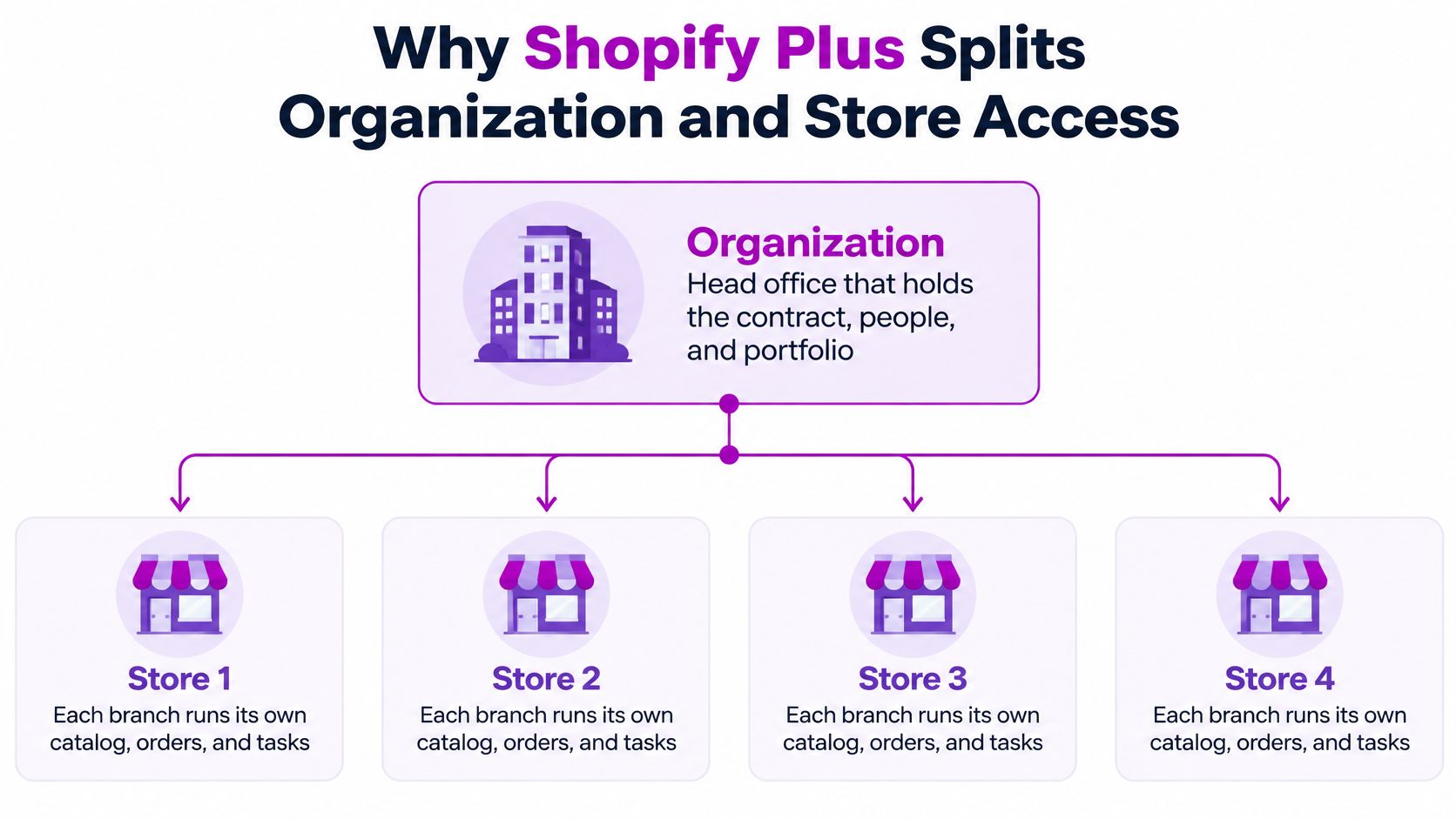
Think of the organization as head office, holding the contract, people, and portfolio. Each store is a branch running its catalog, orders, themes, and local tasks. Central control doesn't require every employee to work in every branch.
According to Shopify's organization and store-creation guide, Plus merchants belong to an organization by default and use expansion stores for multi-store management; ordinary store grouping requires at least two stores controlled by the owners doing the grouping. The organization layer supports centralized billing under a shared contract, organization roles, store-copy features, and analytics across stores.
The hierarchy makes the boundary easier to understand.
Responsibilities by Layer
| Responsibility | Organization layer | Store layer |
|---|---|---|
| Billing | Shared contract for the portfolio | Additional store plan fees require authorized approval through the Stores permission |
| Users and roles | Organization administrator manages across the organization | Store user administrator manages assigned stores only |
| Store creation | Organization owner, administrator, or Stores permission holder | Creator becomes store owner by default |
| Catalog, orders and themes | Not the operational editing layer | Managed per store |
| Analytics | Analytics across multiple stores | Store-level data for each storefront |
This split supports a useful operating compromise. Central teams can establish governance while market teams retain responsibility for local execution. A country merchandiser doesn't need contract authority to maintain a localized assortment, and a finance lead doesn't need theme-editing access to oversee billing.
Choose the Layer Before the Person
Adding a storefront affects more than account navigation. Someone must accept billing responsibility, decide which data should be copied, and define who operates the destination store after provisioning.
Store-copy capability deserves particular care. Treat copied data as a starting point requiring review, not proof that the destination is operationally ready. Assign reviewers for catalog content, local configuration, and the access list before the team starts working.
If your architecture discussion also includes integrations or platform constraints, Wistec on overcoming Shopify limitations provides useful context alongside the permissions exercise. Keep the questions separate: an integration requirement doesn't justify broader human access.
The practical decision sequence is responsibility, layer, role, person. Starting with a person and granting whatever makes their immediate task easiest tends to create exceptions that nobody later removes.
How to Add a Store and Hand Off Ownership
Provisioning isn't finished when the storefront appears in the organization. It's finished when the accountable owner has accepted responsibility and the intended operators can work.
The Stores permission deserves commercial scrutiny. Shopify's organization-permissions guide states that it can manage and create stores and approve additional plan fees; it also explains the creator's default ownership and the potential access gap for other organization leaders.
Use a documented handoff rather than a launch-day message thread.
Provision With an Explicit Handoff
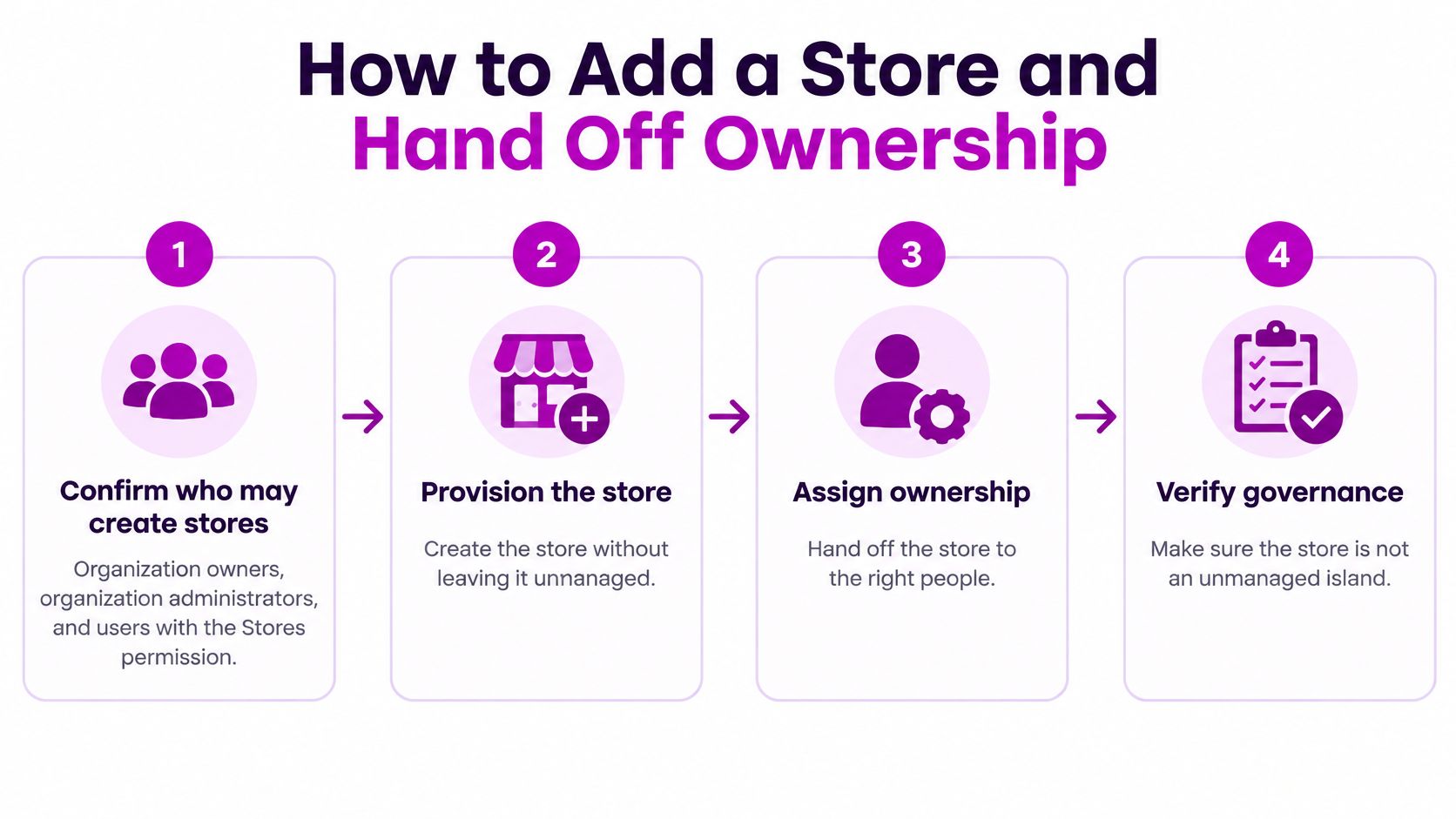
Confirm the provisioning authority. Organization owners, Organization administrators, and users with the Stores permission can create stores. Choose an authorized provisioner rather than temporarily elevating whichever operator happens to be available.
Name the intended owner and market. Record the business purpose, accountable owner, and operating team before creation. Otherwise, the person doing the setup can become the long-term owner by accident.
Approve the commercial change. Have the budget approver sign off on any additional plan fee before the provisioner accepts it. Technical ability to approve a charge isn't the same as internal authority to spend.
Create and select the store. Provision from the Organization page, then select the destination store before administering it. Confirm the store identity before copying data or changing settings so work doesn't land in an existing market.
Complete the ownership handoff. Because the creator becomes owner by default, arrange the appropriate ownership transfer to the accountable person. Record completion, not merely the intention to transfer later.
Verify working access. Check Settings > Users and permissions, or the Users area shown in your admin, and assign the necessary store roles. Ask the intended administrators to open the store themselves rather than relying on an organization-role label.
Update the governance log. Record the storefront, owner, approver, role assignments, and access-test outcome. Keep that record where both operations and the governance team can maintain it.
Make Approval Responsibilities Visible
When finance, commerce operations, and an agency share the process, draw separate lanes for their responsibilities. Sprello's guide to swim lane charts is useful for showing who approves the fee, who provisions, and who accepts ownership without confusing participation with authority.
For the operating model around that handoff, use our guide to managing multiple Shopify stores alongside the access record. Launch planning and permissions planning should use the same store names and accountable people.
A finished setup has a named owner, documented fee approval, and tested primary and backup administrative access. Don't close the provisioning task while any of those remain assumptions.
Designing Least-Privilege Roles for Global Teams
Keep organization administration with a small governance group, then model operational access around job functions. Seniority alone is a poor permission boundary: a country director may need broad commercial responsibility but no ability to redesign access across unrelated brands.
Shopify's user-role documentation separates organization-level users from individual store assignments and supports custom organization roles for Plus organizations. Use that separation to describe the work first, then configure the permissions needed to perform it.
Suggested Minimum Access by Job Function
These are recommended starting policies, not Shopify's preset job titles. Validate the available permissions against the actual tasks your team performs.
| Job function | Organization scope | Store scope | Key restriction |
|---|---|---|---|
| Global eCommerce lead | Organization administrator within the governance group | All portfolio stores, explicitly assigned and tested | Require a change record for routine order or catalog edits to preserve accountability |
| Country manager | None | Assigned market stores only | No store creation or role editing, limiting changes beyond the market |
| Agency partner | None | Named design or development stores | Time-bound access removed at contract end to prevent lingering access |
| Merchandiser | None | Catalog permissions in assigned stores | No billing, user, or role permissions, keeping product work separate from governance |
| Customer-service manager | None | Required order and customer permissions in assigned stores | No theme or billing access, preventing unrelated changes |
| Developer | None | Development stores | No live-store access by default, protecting production operations |
The global lead's change-record requirement is a process control, not a claim that the Organization administrator role technically blocks routine edits. Broad roles still need operational rules and someone responsible for reviewing exceptions.
A country manager who must add staff may also need a narrowly scoped Store user administrator assignment. Treat that as a separate responsibility, with an approved set of existing roles they can assign.
Build and Test the Function Role
- Define the function centrally. Create the custom role around a stable responsibility, such as merchandising or finance, rather than naming it after an employee. Where Shopify separates organization and store role types, use the appropriate type instead of forcing operational work into organization authority.
- Minimize organization permissions. Leave portfolio-wide capabilities out unless the job requires them. Needing access to a store doesn't establish a need to manage the organization.
- Assign markets explicitly. Select the stores required for the function. Don't use every store as a shortcut for an agency handling a localized redesign.
- Test combined access before go-live. Use a test account with the proposed assignments and verify both permitted and prohibited actions. A successful catalog edit proves little if the same account can also change users.
Effective access is the combined result of assigned roles. Review the whole account, not each role in isolation. An apparently narrow merchandising role doesn't cancel broader authority granted through another assignment.
Full access is convenient for the person granting it. The rest of the business carries the risk.
Separate Duties Across the User Lifecycle
Keep store provisioning separate from routine store administration where staffing allows. Likewise, don't bundle finance and development permissions just because the same project involves both teams.
Onboarding should identify the manager approving access, the function role, the assigned stores, and any temporary exception. For agency and temporary accounts, record an expiry date before sending the invitation.
Offboarding needs the reverse check: remove organization membership or relevant assignments, confirm access across the portfolio, and resolve ownership responsibilities before the person leaves. Removing a familiar store assignment isn't sufficient evidence that the account has no other authority.
Review the role matrix quarterly as an internal operating policy, with a named sign-off owner. Focus on exceptions, changed job responsibilities, and role combinations that no longer match the work.
Auditing Migration and Fixing Governance Failures
Suppose a retail manager could maintain staff access before a role migration but can no longer edit roles afterward. The tempting fix is to grant Organization administrator. The better response is to identify which capability changed scope and whether the manager should hold it at all.
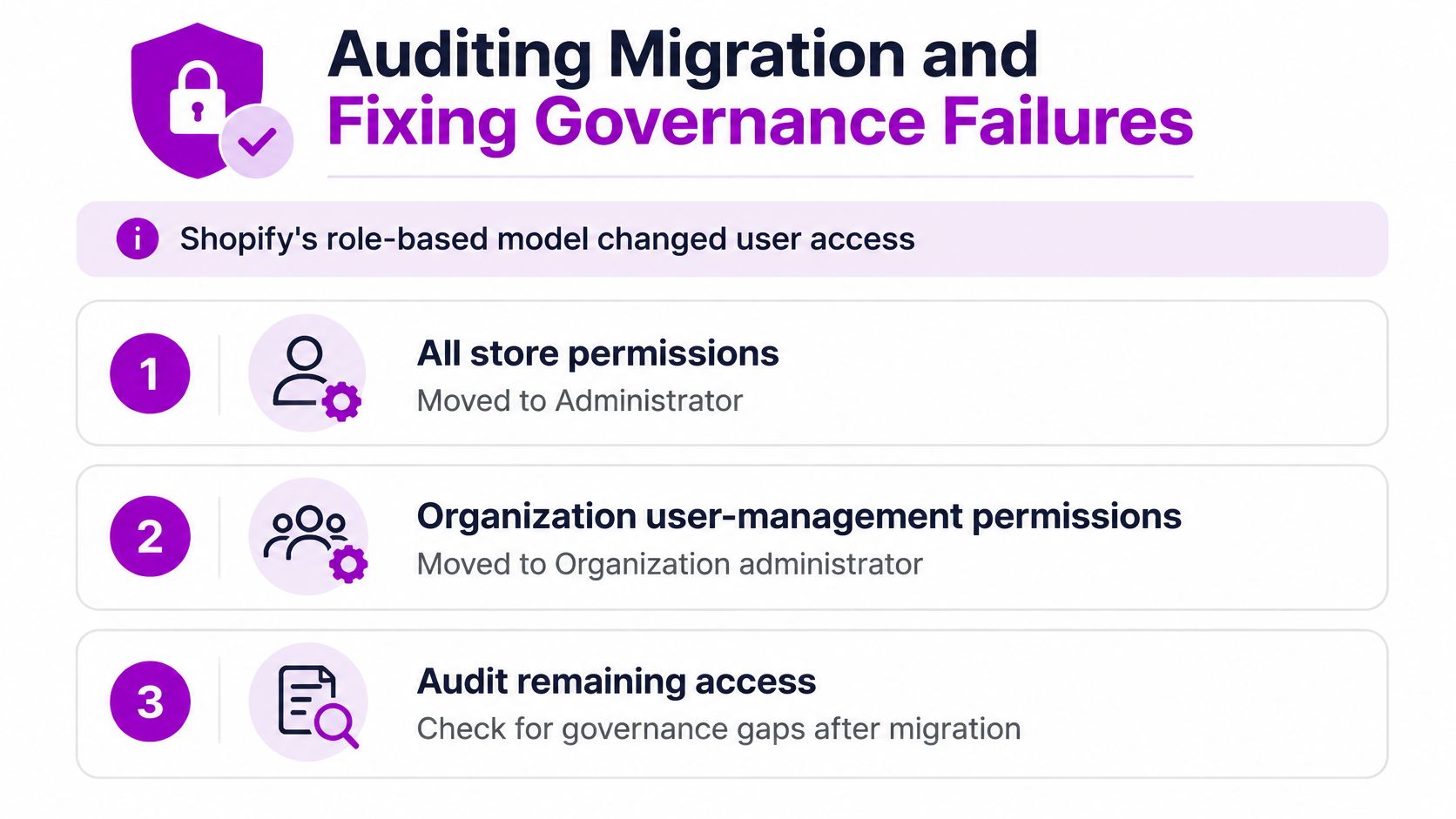
Shopify's role-migration guidance describes moving users with all available store permissions to Administrator and users with organization-level user-management permissions to Organization administrator, while deprecating user-management permissions. Its unified admin and POS user-management changes place staff management in Settings > Users, support POS access across stores through a shared profile, and make role creation and editing an organization-wide capability.
The audit should compare intended responsibilities with effective access, not just confirm that everyone can log in.
Audit the Changed Scope
- Capture the current baseline. Export available user and role records, and supplement them with a store-assignment register where necessary. Preserve enough detail to compare the proposed state with the starting point.
- Identify broadened authority. Flag migrated administrator roles and any account whose permissions extend beyond its manager's intended remit.
- Test by market and channel. Check Shopify admin and POS access separately using a test account. Include actions the account must not perform.
- Review external identities. Match agency and temporary accounts to an active engagement and a named internal sponsor.
- Check retail administration needs. Assign Organization POS Administrator only where its broader responsibilities are justified. Don't use it to restore a familiar button.
- Assign offboarding approval. Document who authorizes removal and who verifies completion across relevant stores and channels.
Centralizing identities can reduce duplication, but it doesn't make every role combination appropriate. A shared user profile still needs distinct decisions about POS operations, commerce administration, and organization governance.
Governance Failures by Symptom, Cause and Fix
| Symptom | Likely cause | Fix |
|---|---|---|
| Nobody can open a new market store | Creator left and no ownership handoff or working access was recorded | Restore access through the authorized ownership process; require an owner and access verification for future creation |
| Retail admin cannot edit roles after migration | Narrow role retained, broader POS responsibility not assigned | Assign Organization POS Administrator only where needed |
| Agency still has organization-wide access | Temporary access never reviewed | Set an end date and remove access at contract close |
| Retail change grants unintended organization access | POS and commerce permissions treated as a shared access layer | Test POS and organization roles separately |
The ownership failure doesn't necessarily mean Shopify has a technically ownerless store. It means the business has lost its accountable owner or usable administrative route, which requires a controlled recovery rather than another invitation.
Connect the access register to your broader data-governance process, including approval records and responsibility for sensitive customer information. Most fixes here need a clear decision and follow-through, not another tool.
Investigate inaccessible stores, unexpected role-editing authority, and inactive accounts that still retain access.
Inactivity alone doesn't prove an account should be deleted. It should trigger an owner check, a business-purpose review, and a documented decision.
Decide Your Organization Admin Structure Before Scaling
Before adding another storefront, agree on who governs the portfolio and who can approve expansion. Make those decisions with the people accountable for commerce, finance, and access administration.
Use a working session to settle the ownership and approval model.
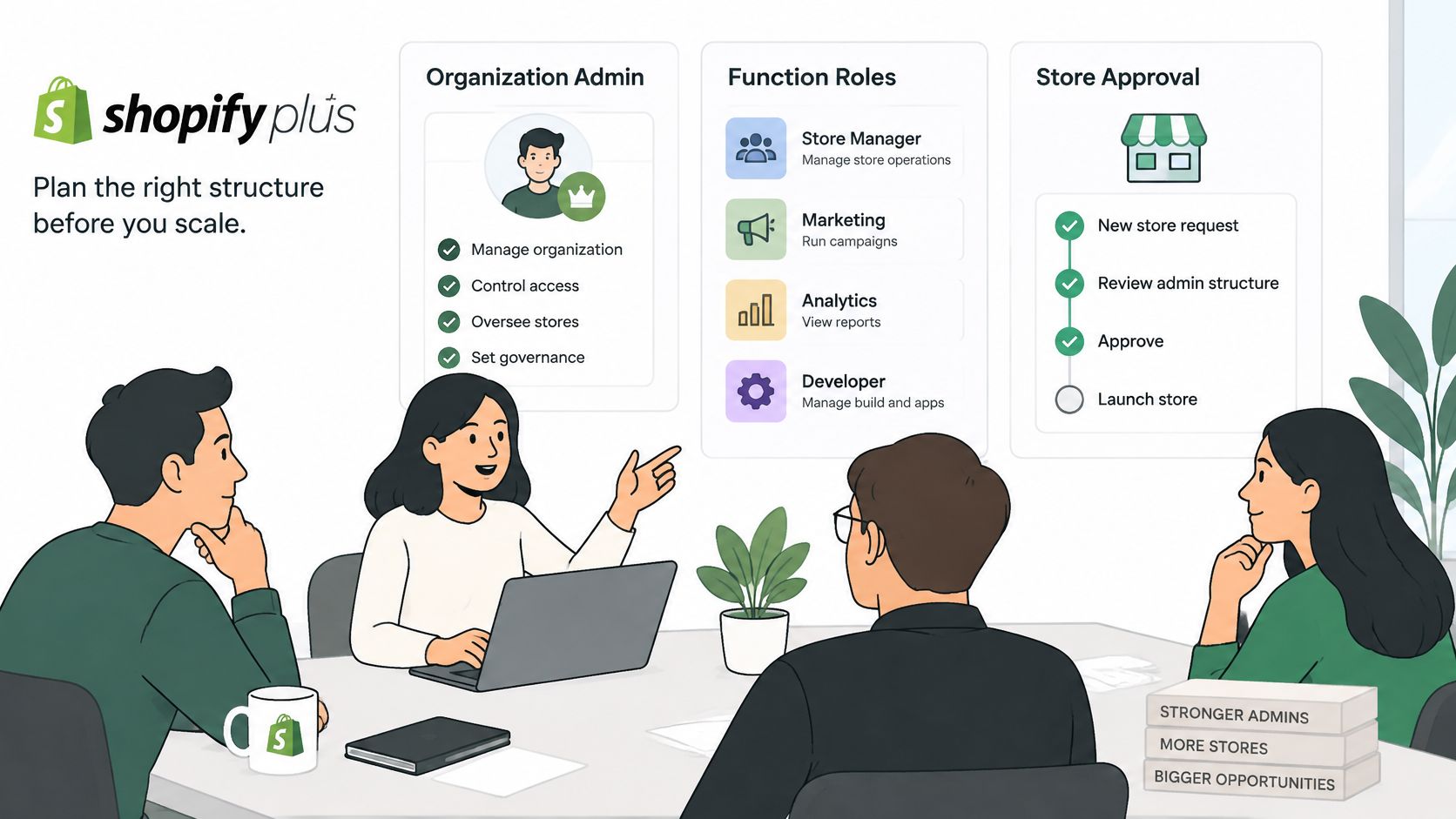
- Name the governance group. Record who holds Organization administrator and why.
- Approve the function roles. Choose the operational roles your team will maintain and identify who authorizes exceptions.
- Set expansion authority. Name the people who approve store creation and any resulting plan fees.
Run the migration audit this week, record an accountable owner for every store, and put the next quarterly review on the calendar. Assign the person who signs it off now, not when the review becomes overdue.
An in-house approach suits teams with the capacity to maintain role matrices and test access. Outside support makes sense when that work competes with launch delivery, but settle who holds the keys before giving any partner access.
Our Shopify pack includes front- and back-end development, design, CRO, and support for multiple stores. For a bounded engagement, single-project Shopify and Shopify Plus work costs $69 per hour, with no minimum or maximum project size.
Use the video as a discussion prompt, not a substitute for checking your organization's actual assignments.
ECORN offers Shopify Plus development and strategic eCommerce consulting for teams operating multiple storefronts. Visit ECORN to discuss your store structure, access responsibilities, and the implementation work needed to support your next market without handing every operator organization-wide control.


How to Build a Drop Down Menu in Shopify: Steps and Fixes
Shopify Plus Integration Services Guide

Shopify Customer Experience: A 2026 Guide

Shopify Plus Expansion Stores: Limits and Setup
Shopify Theme Update: Safe Steps, Backups and Rollback

Shopify Website Design Packages: What You Actually Get

How to Choose a Shopify Plus Web Design Agency in 2026
Shopify Plus Ecommerce Agency: How to Pick the Right One

Shopify Themes Retina: How to Serve 2x Images

How to Cross Sell on Shopify Without Friction

Best Shopify Theme for Custom Products Compared
Multi Store Inventory Management: A Practical Guide

SEO Consulting for Ecommerce: A Practical Guide
Shopify Theme Updater App: A Safe Update Playbook

Shopify Git Integration: A Developer's Guide to 2026
Headless Ecommerce Development Services Explained

How to Build a Shopify Clothing Website That Converts

How to Launch a Box Subscription Business in 2026

Luxury Skincare Branding Playbook That Converters

10 Best Podcast Ecommerce Shows for Store Growth in 2026
Shopify Developer Hourly Rate: What to Pay in 2026
Critical Shopify Setup Errors That Are Secretly Sabotaging Your Store
Ecommerce Conversion Tracking: The Complete How-To Guide

Shopify Design Agency: How to Pick the Right Partner
Mastering Multi Store Management on Shopify

Scale Shopify Store

10 Shopify App Ideas Worth Building in 2026

Conversion Rate Optimization for Landing Pages: The Playbook
Shopify Plus Automation: A Guide for 2026
10 Social Selling Platforms for Shopify Merchants

Shopify Website Design Examples: 7 Stores Worth Studying

7 Ecommerce Newsletter Examples for Shopify Brands

One Product Shopify Store: Build and Scale

Mobile Pop Up Strategy for Shopify Stores That Converts
Sitemap for Shopify: How to Find, Optimize, and Submit It

7 Single Product Websites Worth Emulating

Product Variants Shopify: The Complete 2026 Guide

Ecommerce Analytics Consulting for Growth
What Is AI Integration for eCommerce

How to Choose the Right eCommerce Website Development Firm

E Business Strategy Implementation
Conversion Tracking Setup for Shopify Stores
BigCommerce vs Shopify Plus Which Enterprise Wins in 2026
Shopify Theme Kit: Setup, Commands, and Migration Guide

Shopify Extension Development: A Practical 2026 Guide

Shopify Speed Score Explained and How to Improve It

Shopify Mobile Optimization: The 2026 Playbook

How to Add Subcategory in Shopify for Better UX
How to Implement Structured Data for Ecommerce in 2026

SEO App Mobile: Shopify Store Optimization Guide

Shopify Plus Support: What It Includes and How to Choose

Google Ads for Shopify: The Complete 2026 Playbook

Shopify New York: How to Find and Hire the Right Agency
Google Search Console for Shopify: The Complete Setup
First Party Data Collection for eCommerce Growth
FAQ Online Store Guide: Build and Measure It Right
Do FB Ads Work for eCommerce in 2026?
One Page Checkout for Shopify: Design and Implementation
Shopify GraphQL vs REST: The 2026 Developer Decision
Shopify Ecommerce Consulting: Strategy, Pricing &

Are Reddit Ads Worth It for eCommerce Brands

Shopify Title and Meta Description: A Practical 2026 Guide

Product Video Best Practices for Shopify Brands
Real-Time Inventory Management: A 2026 Guide

AI Chatbot Integration for Shopify Stores
Affiliate Program Management: A Shopify Guide
10 Best Performance Monitoring Tools for Shopify in 2026

Digital Asset Management for eCommerce Brands in 2026

Every Type of Facebook Ads Explained for eCommerce Growth
Product Information Management Explained for Shopify Brands
Support Ticket System: A Guide for Shopify Stores

10 Best Customer Service Tools for Shopify in 2026

Can I Start a Business with No Money? a 2026 Blueprint

What Sells Good on Etsy: Best Niches for 2026

Shopify Add to Cart Button: A Practical 2026 Guide

Customer Feedback Automation: A Practical eCommerce Guide
Critical Rendering Path: A Guide for Shopify Stores

How to Promote on TikTok for eCommerce in 2026

B2B eCommerce Consulting That Drives Real Revenue

10 Best Practices for Site Navigation in 2026
Return vs Refund for Shopify Stores: A Practical Guide

What Is Customer Lifetime Value and Why It Matters

What Is Voice of Customer Research for eCommerce

SMS Marketing for Ecommerce That Actually Converts

Master How to Improve Email Deliverability in 2026

Top 8 eCommerce Partners NYC for Shopify Brands in 2026

Machine Learning for Ecommerce: Boost Your Shopify Store

Beauty Market Research: Your 2026 Growth Guide

Shopify International Expansion: A 2026 Roadmap

What Does CRO Stand for in Business: Understanding CRO

Shopify Visual Merchandising: A Playbook for Higher Sales

Shopify Landing Page Design: Master Conversion in 2026

10 Best AI SEO Optimization Tools for Shopify in 2026

Agentic AI for Ecommerce: Boost Your Sales in 2026
Mastering Email Marketing Data for eCommerce Growth

Conversion Rate Optimisation Australia: Boost Your Sales
Conversion Rate Optimization AI: Your Shopify Store Guide

10 Product Bundling Strategies for Shopify in 2026

How to Increase Customer Lifetime Value: A Shopify Playbook

AI Customer Service Automation: Shopify Guide 2026


newsletter in your inbox