


You open GA4 and see 800 purchases. Shopify says 950 orders. Google Ads claims a different number again, while your payment processor shows the revenue finance recognizes. The team starts debating which dashboard is broken, but the deeper problem is usually that each system measures a different slice of the customer journey.
Ecommerce conversion tracking isn't a pixel installation exercise. It's a measurement system with defined events, consent rules, attribution windows, order identifiers, and ownership rules for conflicting data. Once those rules are explicit, mismatches become explainable operational variances instead of weekly arguments.
Why Your Numbers Do Not Add Up
The first mistake is treating one dashboard as ground truth. GA4 is designed to analyze behavior, sessions, products, and journeys. Shopify is closer to the commerce record. An advertising platform is optimized to evaluate its own media and bidding signals. Those purposes overlap, but they aren't identical.
A purchase can exist in Shopify without appearing in GA4 because the shopper declined analytics consent, an ad blocker prevented the event, checkout moved across domains, or the purchase event failed to fire. Google Ads can claim credit for an order under its own attribution rules even when Shopify doesn't assign that order to Google. A refund can also change the commerce record after the original conversion was reported.
Practical rule: Never ask which platform is “right” until you ask what question each platform is answering.
The integration problem is structural. A 2025 MarTech survey identified data integration as the leading measurement barrier, cited by 65.7% of respondents, while the average martech environment contained roughly 17 to 20 platforms (LayerFive's survey summary). More tools don't automatically create more certainty. If two systems use different event definitions or counting rules, adding another dashboard creates another plausible total.
Start with a hierarchy of truth
Use the payment processor or order ledger to govern completed revenue. Use the commerce platform, such as Shopify, to govern orders, cancellations, refunds, and product-level commerce records. Use consent-aware analytics to understand browsing behavior and funnel progression. Use Google Ads, Meta, and other advertising platforms primarily for campaign optimization and platform-specific credit, not as audited revenue systems.
That hierarchy doesn't make analytics data unimportant. It gives every number a job. Shopify may tell you that an order exists, while GA4 helps explain which product page, session, or checkout stage preceded it. Google Ads may use its reported conversions to optimize bidding, even though finance uses the payment ledger to close the books.
Reconcile before you optimize
Create a daily comparison using stable order IDs. Match Shopify orders to analytics transaction IDs, then compare the surviving records by date, currency, channel, and order status. Investigate missing events, duplicated IDs, timezone differences, consent status, delayed conversions, and refunds instead of averaging the totals.
Also check whether non-human traffic is polluting sessions or triggering events. A practical primer on how bots distort conversion data can help your team separate genuine shopper activity from automated requests and suspicious event patterns.
The objective isn't perfect visibility. Privacy choices and browser limitations make that impossible in many journeys. The objective is operational confidence, supported by documented definitions and a reconciliation process that tells you why systems disagree.
Building a Measurement Plan That Works
A measurement plan earns its keep the first time your store, analytics, and ad platforms disagree on the same day's revenue. I usually see the problem after a merchant has already installed tags, pixels, and app scripts. Orders are coming into Shopify, GA4 shows fewer purchases, Google Ads shows a different total again, and nobody can tell whether the gap comes from consent, implementation, timing, or bad definitions. The fix starts before tag setup. Decide what each system is supposed to count, and what it is not.
Write that down in plain operational terms. Define what counts as a conversion, which events describe the shopper journey, which fields each event must include, and which system owns the final commercial record. Without those definitions, teams end up comparing metrics that sound similar but are built on different rules.
A purchase should be defined as a completed business transaction tied to an order record. Conversion rate is only useful when the numerator and denominator stay consistent across reports. If one team is using orders and another is using sessions filtered by channel, the percentage may look clean while the logic underneath is broken.
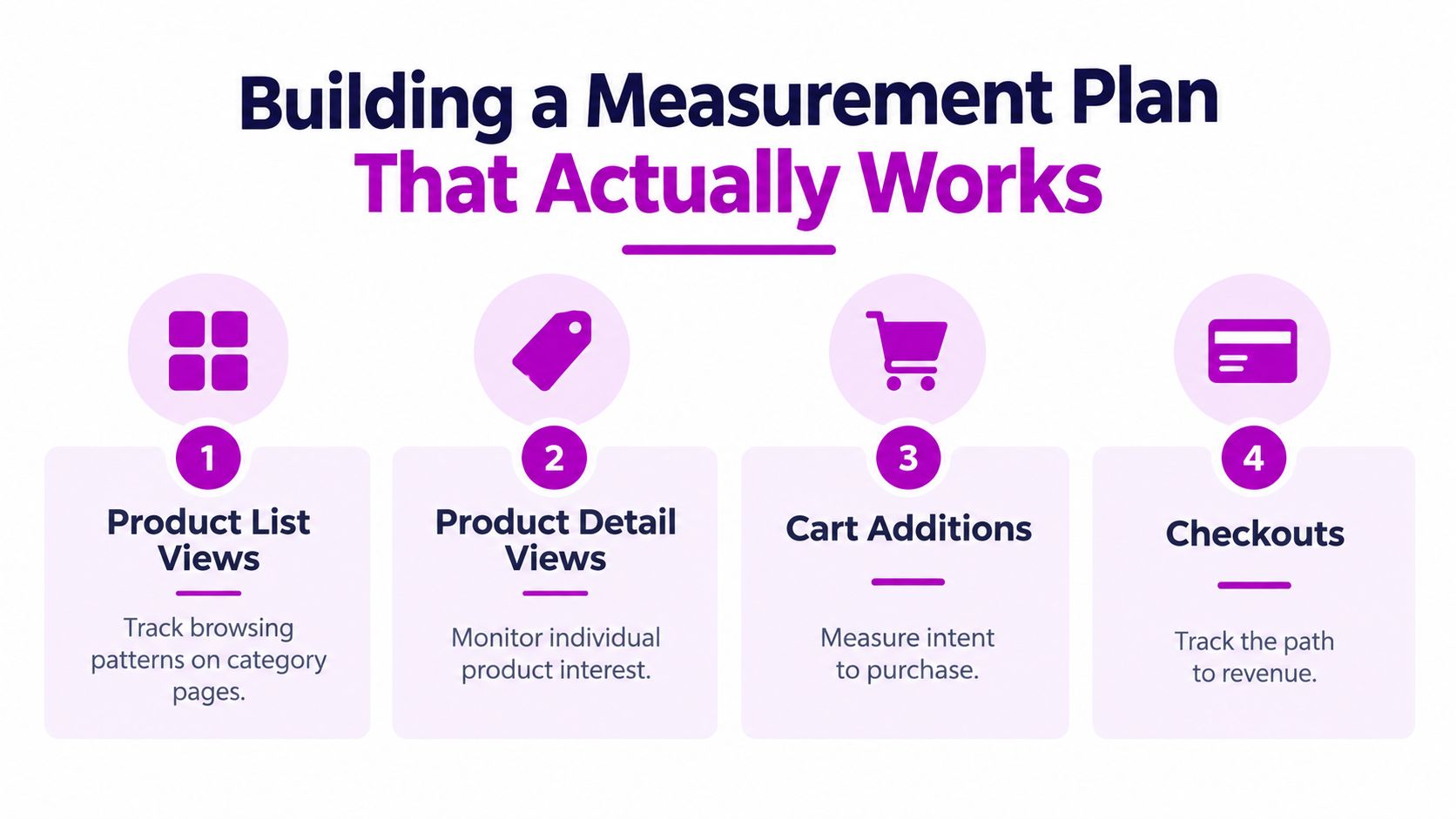
Define the event vocabulary
Use event names that describe shopper behavior in language merchandisers, analysts, and paid media teams all understand.
- Product list views: record when a shopper sees a collection, category, search result, or recommendation grid.
- Product detail views: fire when a product page is viewed, with the relevant product or variant attached.
- Cart additions and removals: capture both actions, including product, quantity, selected variant, and price.
- Checkout initiation: record the start of checkout, not just the loading of a checkout-related page.
- Purchases: send the completed order with a stable transaction ID, value, currency, and full item array.
- Refunds: record returned value against the original transaction so revenue reports can be interpreted correctly.
Those names are not cosmetic. They are the shared vocabulary that lets you compare Shopify, GA4, and ad-platform reporting without guessing what each event really means.
Each ecommerce event also needs the right payload. Where item data applies, include item ID, item name, price, quantity, and applicable category or variant fields. In production, partial payloads are a common failure point. The event appears in reports, so the team assumes tracking works, but product performance, category analysis, and merchandising reports become unreliable because the item data is incomplete.
Treat the purchase event as a financial interface
The purchase event is the handoff between shopper behavior and commercial reporting. Generate the transaction ID from the order system. Do not create it from a page timestamp, browser storage, or a random client-side value. If the ID changes between systems, reconciliation breaks immediately.
Send transaction value and currency with the purchase event. Keep the item array complete and structured consistently with Google's GA4 ecommerce documentation. The point is not to satisfy a spec for its own sake. The point is to make the event usable when finance asks why platform totals do not match.
The data layer should expose order information in a predictable structure. A purchase payload should answer a short set of operational questions:
| Field | Operational question |
|---|---|
| Transaction ID | Which order is this? |
| Value | What amount should the event represent? |
| Currency | Which currency applies to that amount? |
| Items | Which products, variants, prices, and quantities were purchased? |
| Consent status | Was this event eligible for the destination? |
| Order status | Was the order completed, cancelled, or refunded? |
Separate diagnostic events from optimization conversions
Not every tracked event should become a bidding signal. Product views, cart actions, and checkout starts help diagnose where the funnel is leaking. Purchases and refunds support revenue analysis and reconciliation. Ad platforms often need a narrower conversion set than analytics does.
That matters when you set up Google Ads conversions. Send a stable purchase signal with the right value and currency. Do not let the ad platform define what an order is for the rest of the business.
Field ownership should be explicit. Shopify or the order ledger owns order ID and order status. The analytics layer owns event context and session-level behavior. Campaign platforms contribute attribution and optimization signals. That hierarchy closes the reconciliation gap because each number has a job, and no system gets to rewrite the source transaction.
Client-Side Versus Server-Side Tracking Approaches
Client-side tracking runs in the shopper's browser. A Shopify store typically uses a data layer, Google Tag Manager, analytics scripts, pixels, and consent controls to emit events as the shopper moves through the site. This approach is accessible, fast to change, and usually sufficient for a store that needs dependable funnel diagnostics without building a large data pipeline.
The weakness is exposure to the browser. Cookies can be restricted, scripts can be blocked, consent can be denied, and checkout transitions can interrupt the event flow. A purchase visible in the browser's debugging tools can still fail to reach an analytics or advertising destination.
Server-side tracking moves event collection and forwarding into infrastructure controlled by the business or a tracking service. The browser may still provide a consented event or identifier, but the server handles validation, enrichment, deduplication, and delivery to destinations. This can reduce browser-level interference and improve control over the data path, but it doesn't recover information a shopper declined to share.
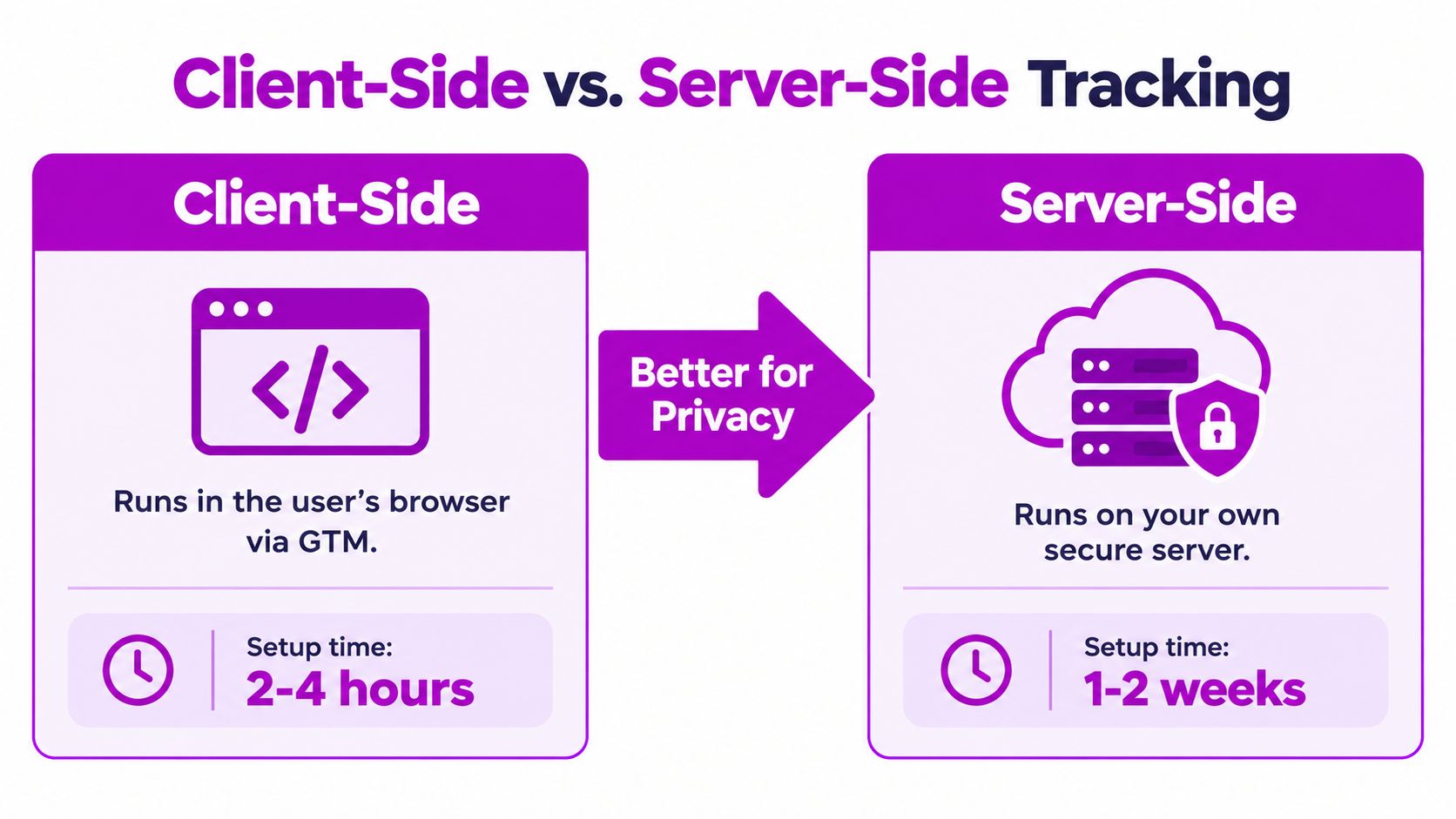
Choose the architecture by business need
| Decision factor | Client-side approach | Server-side approach |
|---|---|---|
| Deployment | Browser tags and platform integrations | Backend or managed server pipeline |
| Change velocity | Quick for standard events | Slower when schemas and endpoints need engineering |
| Browser exposure | Higher | Lower for server-forwarded events |
| Consent responsibility | Still required | Still required |
| Maintenance | Tag and vendor maintenance | Infrastructure, API, schema, and monitoring maintenance |
| Best fit | Emerging stores and straightforward funnels | Growing brands with complex destinations and governance needs |
An industry analysis estimates that cookie-based dashboards may show only 60 to 70% of actual visitors when consent rejection is substantial, while reported ecommerce conversion rates commonly fall in the broad 1 to 3% range (ePages analysis of lost sales and tracking). Treat those figures as an indication of measurement loss, not a benchmark for your store.
Server-side tracking makes sense when browser loss materially affects optimization, when several destinations need the same validated event, or when the business has the technical capacity to maintain the pipeline. It becomes counterproductive when a team buys infrastructure before it has agreed on event definitions and order ownership.
A browser-side setup with clean transaction IDs, consent-aware triggers, and daily reconciliation will outperform an expensive server system with duplicated purchases and unclear currency rules. Server-side collection improves delivery control. It doesn't create truth by itself.
For Shopify teams comparing implementation paths, ECORN's conversion tracking setup guidance is one practical reference alongside native Shopify, GA4, Google Tag Manager, and server-assisted options. The right choice depends on the store's consent requirements, technical resources, channel mix, and tolerance for maintenance.
Understanding Privacy Consent and Data Loss
You open Shopify in the morning and see orders that never showed up in GA4 or an ad platform. That usually points to consent-driven data loss before it points to a checkout problem. Under GDPR and the ePrivacy framework, non-essential cookies generally need user consent, so a shopper can complete a real purchase while parts of their journey remain unobserved in analytics.
That is the first reconciliation gap to accept. The commerce platform can hold a valid order, while GA4 has no matching session, product view, or purchase event. The gap shifts with country, browser, device, traffic source, consent banner design, and the choice the shopper makes at the banner.

Measure what consent permits
Since Google Analytics made revenue reporting mainstream in 2005, the reporting goal has stayed roughly the same. What changed is how much of the journey privacy rules let you observe.
In production, the fix is governance, not wishful thinking. Define whether each event depends on analytics consent, advertising consent, functional storage, or no consent under your legal and technical setup. Store the consent state present at collection time. Then make sure every destination respects that state instead of firing on its own logic.
Teams often compare datasets that were created under different permission rules and then treat the mismatch as a tracking bug. Sometimes it is a bug. Often it is the expected result of lawful collection limits.
First-party data helps, but it does not bypass consent obligations. It gives you a more durable record when customers identify themselves directly and you handle that data lawfully. For teams reviewing that route, first-party data collection guidance is a useful starting point before you align the setup with privacy counsel and your consent-management process.
Stop comparing unlike datasets
Platform numbers diverge for ordinary reasons. An ad platform may include modeled conversions, different identity resolution, or a lookback window that does not match your analytics property. Your order ledger may include orders that were later cancelled or refunded. Logged-in customer records can stitch activity across devices, while anonymous analytics may split the same shopper into multiple users.
Timezone creates another quiet source of disagreement. A purchase placed close to midnight can land on different dates across Shopify, GA4, ad platforms, and finance systems. Refund timing also changes the picture, because marketing reports often keep the original conversion while the order ledger later updates net revenue.
Use a small data dictionary and keep it current:
- Event definition: What action triggers the event?
- Consent status: Which collection and destination rules apply?
- Attribution window: How long can a touchpoint receive credit?
- Counting rule: Are repeats, renewals, or duplicate loads counted?
- Order status: How are cancellations, returns, and refunds handled?
- Reporting timezone and currency: How are dates and amounts normalized?
The practical hierarchy of truth starts here. Consent-aware measurement will never capture every anonymous journey. It can still produce a defensible view of the orders and customer actions you are allowed to measure, as long as the blind spots are explicit and the commerce ledger remains the reference point when reports conflict.
Attribution Methodology and Reconciliation Frameworks
Attribution assigns credit. It doesn't prove that a channel caused the sale. A platform can report more attributed conversions after receiving additional signals, while the underlying number of orders stays unchanged. Treating credited conversions as incremental lift is one of the most expensive interpretation errors in ecommerce reporting.
Fix the methodology before comparing campaigns. Write down the conversion definition, attribution model, lookback window, identity rules, treatment of unknown traffic, and handling of consent-limited sessions. Report raw conversions separately from attributed conversions, so stakeholders can distinguish what happened from how a platform allocated credit.
The IAB and MRC retail media guidance recommends consistent, disclosed attribution windows commonly set at 3, 7, 14, 28, or 30 days, with day-level data and a disclosed maximum window for reconciliation (IAB and MRC retail media measurement guidance). Choose a window that reflects the buying journey, then keep it stable while evaluating performance.
Establish a hierarchy of truth
Use these ownership rules:
- Payment processor or order ledger: Governs completed revenue recognized by the business.
- Commerce platform: Governs orders, cancellations, refunds, products, and customer order status.
- Consent-aware analytics: Governs observed sessions, events, funnel movement, and behavior.
- Advertising platforms: Govern optimization signals and their own attributed credit.
The hierarchy prevents a common category error. Google Ads may be the right source for deciding whether its bidding system received purchase signals. It isn't automatically the right source for total company revenue.
Build a channel-neutral order table
Create one row per order, not one row per touchpoint. Include:
- Order identity: Stable order ID and order timestamp.
- Commercial value: Net or gross value, currency, tax, shipping, refunds, and cancellation status.
- Customer context: New or returning status where the commerce system can define it.
- Session context: Landing-session identifier when available and consented.
- Eligible touchpoints: Channel, campaign, click or impression identifiers, and timestamps.
- Measurement labels: Observed, modeled, or experimentally estimated status.
Deduplicate by order ID before assigning channel credit. Normalize timezones and currencies before aggregation. Decide how to handle delayed conversions, subscription renewals, returns, and cross-device journeys before a report reaches leadership.
A reconciliation report should show the order ledger total first, then the commerce-platform total, analytics purchases, and each advertising platform's attributed conversions. It should also include counts of unmatched orders, duplicate transaction IDs, consent-limited sessions, refunds, and records outside the selected attribution window.
More attribution software can reduce confidence when the underlying event definitions disagree. Clean governance beats another dashboard.
When channel performance drives a major investment decision, use a holdout or geo experiment to estimate causal impact where practical. Use marketing-mix modeling when user-level paths are incomplete and the business needs an aggregate view of channel contribution. Label those results separately from observed event counts. A more recoverable event stream can improve optimization without proving incrementality.
Testing and Validation Procedures
A clean tag fire in preview mode is a weak test. In production, the question is whether one completed order becomes one valid purchase record across Shopify, analytics, and ad platforms, with the same transaction ID, value logic, and consent handling. That is where reconciliation gaps show up.
Test the full order lifecycle in staging first, then repeat the highest-risk checks in production with controlled orders. I would rather delay a release than approve tracking from a single happy-path checkout.
- Duplicate confirmation loads: Reload the confirmation page and confirm the same transaction ID does not create another purchase.
- Declined payments: Verify that a failed payment does not emit a completed purchase event.
- Refunds and cancellations: Confirm the refund references the original transaction and the order status updates correctly.
- Tax and shipping: Check whether event value follows the store's documented gross or net convention.
- Multi-currency orders: Ensure each purchase sends the transaction-level currency and the correct amount.
- Consent-denied sessions: Confirm restricted destinations do not receive events that require consent.
- Cross-domain checkout: Follow the journey from storefront to checkout and back without losing the order or eligible campaign context.
- Item payloads: Inspect item ID, name, price, quantity, category, and variant values on every purchase.
- Internal and test traffic: Exclude staff activity and test orders from production reporting.
Do not approve a release based on realtime tools alone. A purchase can appear in debug views while historical revenue reports, attribution, or downstream ad platform matching still break under normal traffic conditions.
Run a daily variance report
Use a simple hierarchy of truth every day, and keep it consistent:
- Backend orders: Unique completed orders from Shopify or the order ledger.
- Analytics purchases: Events matched by transaction ID.
- Advertising conversions: Platform-reported conversions under the documented attribution rules.
Start with backend orders as the control total, then measure how far each downstream system drifts from that number. Calculate unmatched orders, duplicate events, value variance, refund variance, and delayed records. Set a tolerance that reflects the store's normal consent and attribution conditions, then investigate exceptions instead of smoothing them away in reporting.
Keep a change log for theme releases, checkout edits, consent-manager updates, tag changes, and app installs. When numbers split, the change log usually gets you to the root cause faster than another custom report.
ECORN can help Shopify teams implement ecommerce event tags, standardize GA4, Google Ads, and Meta events, connect consent-aware data flows, and reconcile platform purchase events against Shopify order records. If your dashboards disagree, visit ECORN to discuss a tracking setup built around clear ownership, stable transaction IDs, and ongoing validation.



Shopify Design Agency: How to Pick the Right Partner

Mastering Multi Store Management on Shopify

Scale Shopify Store

10 Shopify App Ideas Worth Building in 2026

Conversion Rate Optimization for Landing Pages: The Playbook

Shopify Plus Automation: A Guide for 2026

10 Social Selling Platforms for Shopify Merchants

Shopify Website Design Examples: 7 Stores Worth Studying

7 Ecommerce Newsletter Examples for Shopify Brands

One Product Shopify Store: Build and Scale

Mobile Pop Up Strategy for Shopify Stores That Converts

Sitemap for Shopify: How to Find, Optimize, and Submit It

7 Single Product Websites Worth Emulating

Product Variants Shopify: The Complete 2026 Guide

Ecommerce Analytics Consulting for Growth

What Is AI Integration for eCommerce

How to Choose the Right eCommerce Website Development Firm

E Business Strategy Implementation

Conversion Tracking Setup for Shopify Stores

BigCommerce vs Shopify Plus Which Enterprise Wins in 2026

Shopify Theme Kit: Setup, Commands, and Migration Guide

Shopify Extension Development: A Practical 2026 Guide

Shopify Speed Score Explained and How to Improve It

Shopify Mobile Optimization: The 2026 Playbook

How to Add Subcategory in Shopify for Better UX

How to Implement Structured Data for Ecommerce in 2026

SEO App Mobile: Shopify Store Optimization Guide

Shopify Plus Support: What It Includes and How to Choose

Google Ads for Shopify: The Complete 2026 Playbook

Shopify New York: How to Find and Hire the Right Agency

Google Search Console for Shopify: The Complete Setup

First Party Data Collection for eCommerce Growth

FAQ Online Store Guide: Build and Measure It Right

Do FB Ads Work for eCommerce in 2026?

One Page Checkout for Shopify: Design and Implementation

Shopify GraphQL vs REST: The 2026 Developer Decision

Shopify Ecommerce Consulting: Strategy, Pricing &

Are Reddit Ads Worth It for eCommerce Brands

Shopify Title and Meta Description: A Practical 2026 Guide

Product Video Best Practices for Shopify Brands

Real-Time Inventory Management: A 2026 Guide

AI Chatbot Integration for Shopify Stores

Affiliate Program Management: A Shopify Guide

10 Best Performance Monitoring Tools for Shopify in 2026

Digital Asset Management for eCommerce Brands in 2026

Every Type of Facebook Ads Explained for eCommerce Growth

Product Information Management Explained for Shopify Brands

Support Ticket System: A Guide for Shopify Stores

10 Best Customer Service Tools for Shopify in 2026

Can I Start a Business with No Money? a 2026 Blueprint

What Sells Good on Etsy: Best Niches for 2026

Shopify Add to Cart Button: A Practical 2026 Guide

Customer Feedback Automation: A Practical eCommerce Guide

Critical Rendering Path: A Guide for Shopify Stores

How to Promote on TikTok for eCommerce in 2026

B2B eCommerce Consulting That Drives Real Revenue

10 Best Practices for Site Navigation in 2026

Return vs Refund for Shopify Stores: A Practical Guide

What Is Customer Lifetime Value and Why It Matters

What Is Voice of Customer Research for eCommerce

SMS Marketing for Ecommerce That Actually Converts

Master How to Improve Email Deliverability in 2026

Top 7 eCommerce Partners NYC for Shopify Brands in 2026

Machine Learning for Ecommerce: Boost Your Shopify Store

Beauty Market Research: Your 2026 Growth Guide

Shopify International Expansion: A 2026 Roadmap

What Does CRO Stand for in Business: Understanding CRO

Shopify Visual Merchandising: A Playbook for Higher Sales

Shopify Landing Page Design: Master Conversion in 2026

10 Best AI SEO Optimization Tools for Shopify in 2026

Agentic AI for Ecommerce: Boost Your Sales in 2026
Mastering Email Marketing Data for eCommerce Growth

Conversion Rate Optimisation Australia: Boost Your Sales

Conversion Rate Optimization AI: Your Shopify Store Guide

10 Product Bundling Strategies for Shopify in 2026

How to Increase Customer Lifetime Value: A Shopify Playbook

AI Customer Service Automation: Shopify Guide 2026

Clean Website Design: A Shopify Conversion Playbook

Omnichannel Retail Strategy: A Shopify Playbook

Product Data Enrichment: A Guide for Shopify Brands

Instagram Shopping Features a Guide for Shopify Stores

What Is Revenue Optimization: A Holistic RevOps Guide

Benefits of Conversion Rate Optimization: Boost Your

WordPress to Shopify Migration: Your 2026 Seamless Switch

Boost Sales: Ecommerce Payment Processing Guide 2026

Unified Commerce Platform: Benefits, KPIs & Shopify Guide

How to Reduce Bounce Rate eCommerce: Your 2026 Guide

Shopify API Integration: A Practical End-to-End Guide

How to Implement Data Governance: A 2026 Guide

Shopify Store Development Cost: A 2026 Breakdown

What Is Server Side Tracking: The Shopify Guide 2026

Marketing Automation Workflows: A Shopify Guide for 2026

Shopify: How to Reduce Technical Debt

Shopify UX Design Change: A Playbook for Growth

User Generated Content Strategy: Shopify Playbook

Shopify Pause and Build Plan Cost: A Complete 2026 Guide

Compare at Price on Shopify: A Complete Guide for 2026

Where Can I Sell My Prints? 10 Best Platforms for 2026

Shopify Order Management System: The Ultimate Guide 2026

What Is Marketing Attribution? an eCommerce Guide for 2026


newsletter in your inbox