

Headless ecommerce is often sold as a speed upgrade. That's the wrong reason to buy it. Separating a storefront from its commerce platform can give a brand more control over its customer experience, but it also creates more systems to build, connect, monitor, and maintain. The decision isn't whether headless is modern. It's whether your business needs the flexibility enough to own the added complexity.
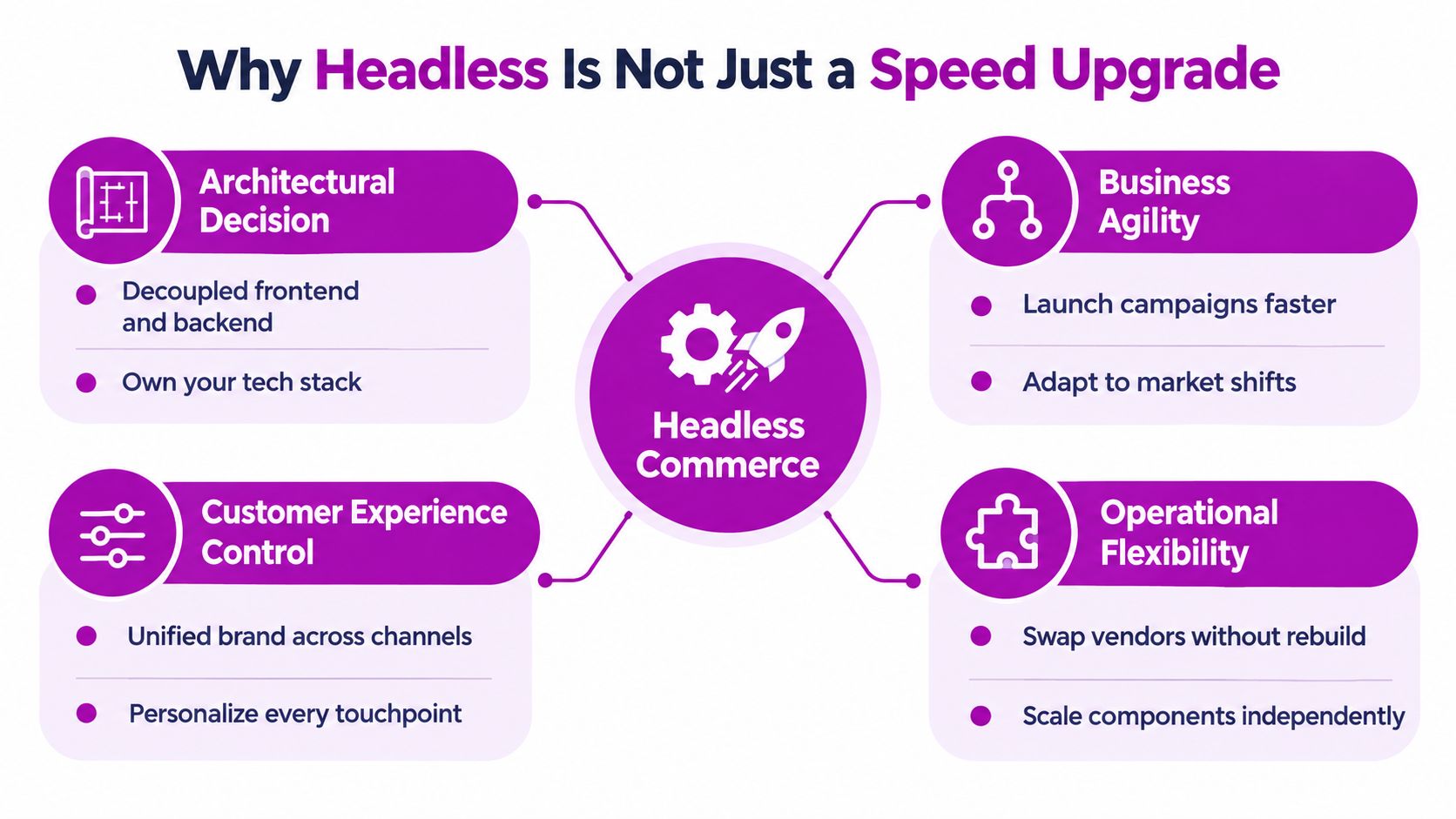
Why Headless Is Not Just a Speed Upgrade
Headless architecture doesn't automatically make a store faster. It gives your team more control over the frontend, including rendering, JavaScript, caching, and asset delivery. That control is valuable only when the team uses it well. A poorly planned headless storefront can be slower and harder to operate than a carefully optimized theme.
The idea grew from a broader move away from tightly integrated ecommerce systems. A major milestone was a 2013 Forrester Research report that criticized ecommerce vendors for falling behind changing user-experience expectations and recommended separating the front end from the back end, as described in the history of headless commerce. The shift became more relevant as retailers served customers through websites, apps, social channels, marketplaces, and in-store interfaces.
In practical terms, headless separates the presentation layer from commerce capabilities such as catalog, pricing, inventory, promotions, payments, and checkout. APIs connect the two. Your team can change a storefront without rebuilding the commerce engine, or use shared services to support different customer-facing experiences.
The promise, and the operating cost
That flexibility comes with a real trade-off. Instead of one managed system, you coordinate a frontend, commerce platform, content tools, APIs, hosting, and integrations. Each piece can evolve independently, which can help teams experiment and serve multiple channels, but it also creates more deployment, testing, security, and support work.
The commercial market reflects growing interest in both platforms and implementation. Mordor Intelligence estimates that the global headless commerce platform market will grow from USD 2.04 billion in 2025 to USD 2.41 billion in 2026, then reach USD 6.17 billion by 2031, a projected 20.69% CAGR from 2026 through 2031 (Mordor Intelligence market analysis). The same analysis forecasts services growing at a 23.84% CAGR through 2031, faster than the overall market. That matters to buyers: implementation, integration, and support aren't side issues. They're part of the architecture decision.
Practical rule: Don't ask how quickly you can go headless. Ask whether your planned storefront changes, channel needs, or integration constraints justify paying for a more complex operating model.
How a Headless Storefront Works
A headless storefront separates the customer-facing experience from the commerce systems that run the store. The storefront is the menu customers see, the commerce platform is the kitchen managing products, prices, inventory, carts, and orders, and the API is the waiter, carrying requests between them.
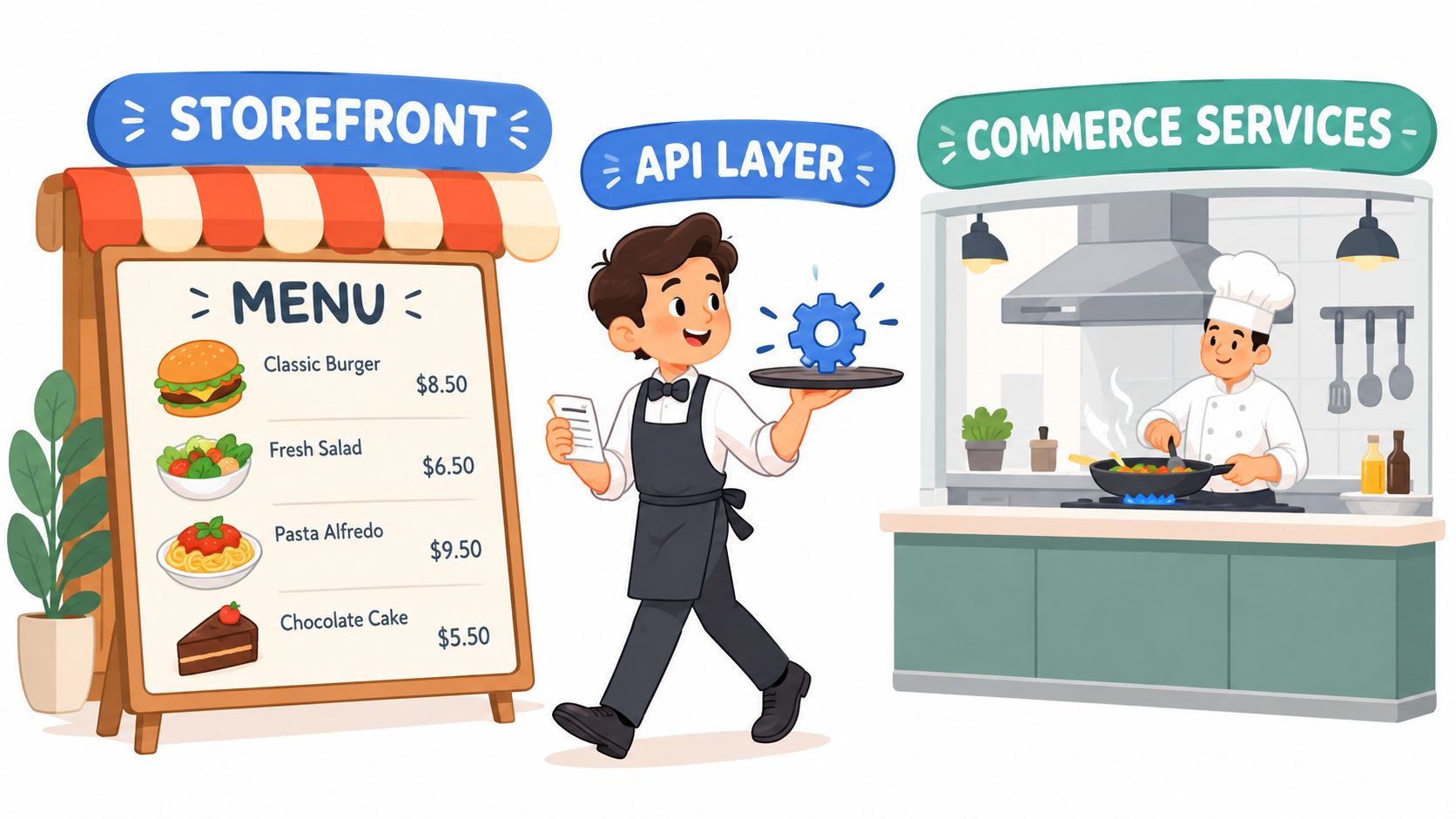
In a traditional setup, one system often renders the storefront and handles commerce. With headless, the frontend can be hosted and deployed separately, using a framework such as Next.js, Nuxt, or Shopify Hydrogen. The commerce platform still manages products, inventory, promotions, carts, and orders.
That separation changes team responsibilities as much as the software architecture. Frontend developers can deploy storefront updates independently, while commerce administrators manage products and pricing in the platform. The teams still need clear rules for data, errors, authentication, and deployments. A product page may render on its own, but accurate prices and stock availability depend on reliable responses from commerce services.
What the API waiter carries
REST and GraphQL are common ways to connect the frontend with backend services. REST typically makes resources available through defined endpoints. GraphQL lets a client request specific fields in a query. Neither makes a storefront faster or simpler by itself. Choose based on the platform, data relationships, team experience, and reliability requirements.
The same product, cart, customer, and order systems can support a web store, mobile app, marketplace, kiosk, or international storefront. HTTP Archive's 2025 ecommerce analysis identifies Largest Contentful Paint (LCP), Interaction to Next Paint (INP), and Cumulative Layout Shift (CLS) as key real-user experience metrics. Track the full shopping journey: a polished product page does little good if a cart update or checkout interaction is slow.
This separation also shapes how software interacts with a storefront. Teams building scraping and automation without a screen work with automated clients that request and process information differently from human shoppers. That makes clear API behavior and dependable responses important beyond the visible storefront.
A concise explainer can give non-technical stakeholders a shared vocabulary before vendor conversations:
Monolithic, Hybrid, and Fully Headless Compared
Growing brands usually have three credible options. A well-built theme can be the right choice when a store needs reliable operations and familiar platform tooling. A hybrid setup can introduce custom experiences where they matter while leaving the hosted commerce platform responsible for core store functions. Full headless makes sense when a brand has a clear need for independent storefronts and the capacity to run them.
| Dimension | Monolithic | Hybrid | Fully Headless |
|---|---|---|---|
| Total cost of ownership | Usually the simplest to manage; costs depend on theme work and platform requirements | Adds custom development and integration costs in selected areas | Requires investment across frontend, APIs, hosting, testing, and ongoing maintenance |
| Time to first launch | Typically the most direct route when the theme fits | Moderate, because custom components and platform features must be coordinated | Usually the most involved, with frontend and integration work before launch |
| Performance ceiling | Can perform well with disciplined theme and asset optimization | Lets teams optimize priority experiences while retaining platform features | Offers more frontend control, but results depend on rendering, caching, and JavaScript discipline |
| Team requirements | Commerce team and theme developers | Theme developers plus frontend and integration support | Ongoing frontend, platform, integration, QA, and operations ownership |
| Flexibility | Best within platform theme capabilities | Selective flexibility | Broadest control across storefronts and frontend behavior |
Choose the architecture that fits the work
A monolithic theme is often the sensible choice when the business has one primary storefront, its theme supports the customer journey, and the team values a simpler operating model. Don't replace a working system just because a custom frontend is fashionable.
Hybrid is a strong middle ground. A brand can keep core platform capabilities while introducing custom landing pages, a custom product configurator, or a distinctive content-led experience. This avoids making every storefront feature part of a custom build.
Fully headless is for brands that can name the constraints they need to solve: multiple storefronts, distinct channel experiences, complex international needs, or a frontend release process that must evolve independently. Before committing, map the components and dependencies in your ecommerce tech stack. If that map reveals that the theme is the actual bottleneck, target that problem first.
The recommendation: use a monolithic theme when simplicity serves the business, hybrid when only some experiences need custom control, and fully headless when the brand can justify both the flexibility and the operating responsibility.
What Headless Ecommerce Development Services Include
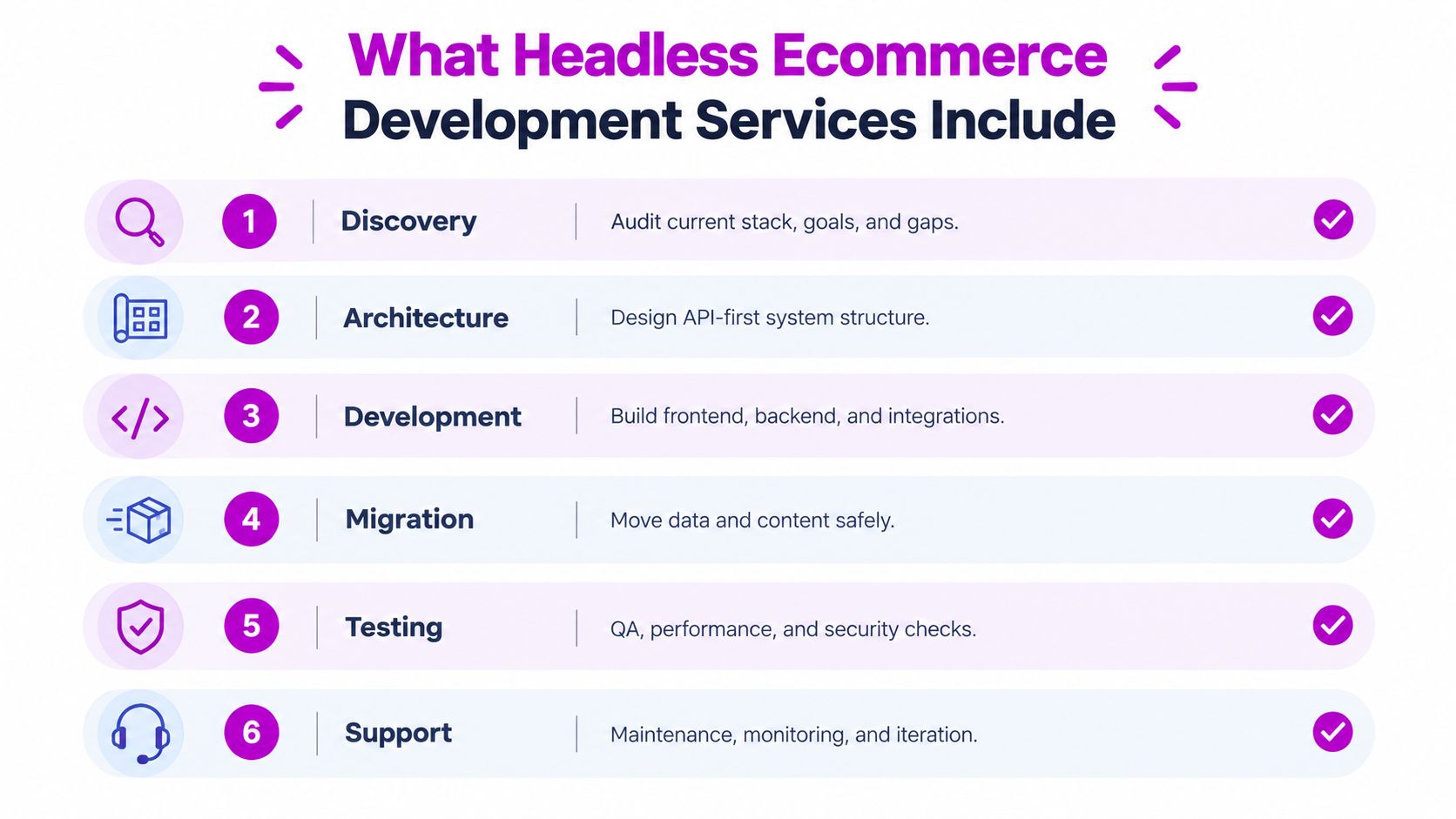
A headless proposal should define how the business will operate after the storefront is decoupled, not just price a new frontend. It needs to account for the connections between content, commerce, search, analytics, checkout, and the systems the team will maintain.
Start with discovery. The agency should review the current platform, customer journeys, integrations, content model, performance constraints, SEO requirements, and migration risks. Then it should explain the proposed system design and why the frontend and CMS suit those requirements. Next.js, Nuxt, and Hydrogen are possible frontend choices; Sanity, Contentful, and Storyblok are CMS options. Choose the stack to fit the work.
Use the proposal as a delivery checklist
The scope should specify API design and integration with the commerce engine, such as Shopify, BigCommerce, or commercetools. It should also document how the storefront will handle catalog and content delivery, customer and cart flows, checkout, promotional rules, and dependencies on external services.
Require measurable performance acceptance criteria, not a general promise that the new stack will be fast. Agree on how the team will test performance in real use and what results must be met before launch. Include the methods that support those results, such as appropriate caching, image handling, and control over third-party scripts. Keep this distinct from the broader architecture decision: acceptance criteria make the vendor accountable for the delivered storefront.
The scope must also cover SEO and analytics foundations, accessibility checks, conversion testing, and migration of content and product data. Marketers need reliable preview environments. Operators need a way to manage search indexes and validate analytics events across the new experience. Product imagery needs an assigned workflow for creation, review, and delivery. Teams can use these product photo workflow tips when refining asset production.
Ask the vendor to separate launch deliverables from ongoing ownership. Name who handles monitoring, maintenance, accessibility reviews, and post-launch optimization, and what each responsibility includes. Without that agreement, the proposal leaves out the work and operating cost required after launch. A storefront can meet its launch criteria and still become difficult to run if nobody owns releases, integrations, and routine fixes. Put those responsibilities in writing before approving the build.
A Headless Readiness Diagnostic for Growing Brands
Headless readiness isn't a revenue threshold. It's a question of whether your business has a meaningful reason to decouple the storefront and the ability to manage what comes with it. Use these five tests to decide whether to proceed, start hybrid, or wait.
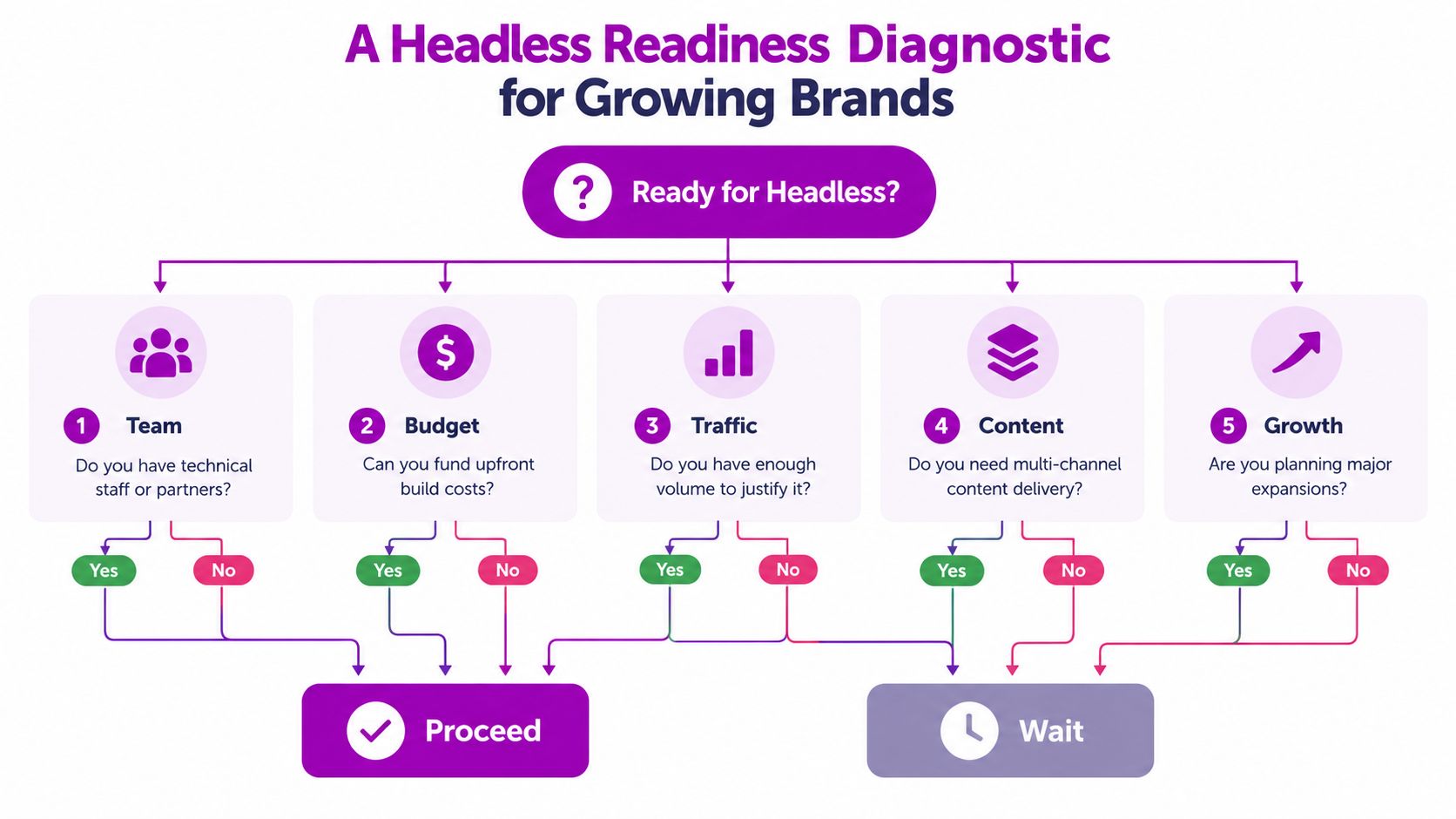
Five questions to take into planning
- Revenue and budget: Go if the expected commercial or operational benefit can justify both the build and recurring engineering. Wait if the budget covers launch but not support. Go hybrid if one custom experience is the primary business need.
- Release frequency: Go if your team needs frequent storefront experimentation and platform constraints slow meaningful changes. Wait if launches are occasional and the theme already supports them. Go hybrid if the team wants to test custom components before expanding.
- Storefront complexity: Go if the business must support distinct international stores, channels, or customer experiences from shared commerce systems. Wait if there's one straightforward storefront and no concrete expansion plan. Go hybrid if only a specific region or channel needs different behavior.
- Technical capability: Go if internal staff or a dependable partner can own frontend releases, APIs, monitoring, and incidents. Wait if there's no named owner for those responsibilities. Go hybrid if you can support a limited custom surface but not a fully distributed storefront.
- Conversion bottleneck: Go only when you can identify a frontend or architecture constraint that the migration will address. Wait if the issue is an untested offer, poor merchandising, or unclear checkout design. Go hybrid if a targeted custom flow lets you test the hypothesis without rebuilding everything.
Don't assume headless will solve performance by itself. One analysis referenced in the 2025 composable-commerce survey%20(1).pdf) found traditional Liquid storefronts passing all three Core Web Vitals more often than several headless frameworks. The conclusion is straightforward: architecture creates options, but implementation discipline and JavaScript budgets determine whether teams use them well.
Planning-doc summary: Proceed when the business case, team ownership, and technical need all support the added operating complexity; otherwise, improve the theme or take a staged hybrid route.
Who Owns the Storefront After Launch
Launch doesn't finish the work. A headless storefront replaces some visible theme maintenance with coordination between frontend releases, APIs, commerce services, vendors, analytics, and data pipelines. Before signing the build contract, name the people responsible for keeping those pieces reliable.
Define ownership before an incident
Start with release ownership. Decide who approves changes to the frontend, CMS, commerce platform, and integrations. Set expectations for preview environments, regression testing, release notes, and rollback procedures. If different vendors own different components, agree how their release schedules interact.
Then define observability. Teams need to monitor the storefront and its APIs together, including error rates, latency, availability, and Core Web Vitals. A fast page can still lead to a failed order if a cart mutation, inventory check, or checkout redirect is delayed or unavailable.
For incident response, assign a first responder and an escalation path for checkout failures. Use timeouts and circuit breakers where appropriate, make cart and order mutations safe to retry, and decide what the storefront should display when an upstream service fails. A fallback for critical customer journeys is part of the operating design, not a post-launch extra.
Protect the customer journey across markets
Assign ownership for analytics and consent governance, especially when multiple storefronts serve different regions. The team must preserve event definitions, respect consent choices, and verify that reporting remains trustworthy after frontend changes. Accessibility and SEO parity also need routine checks across markets, templates, and releases.
Vendor exits deserve a plan too. Document integration contracts, data flows, deployment procedures, and access responsibilities so a brand can change a provider without rebuilding its operating knowledge from scratch.
This work is not theoretical overhead. A Tidal Commerce industry report says 43% of organizations struggle to integrate existing commerce platforms with third-party tools. The same report says 69% of retail leaders reported composable implementation taking more than six months, while 27% reported projects lasting over a year. Treat these as warnings to plan integration and day-two ownership early, not as a prediction for every build.
A support retainer can make sense when the brand needs ongoing monitoring, optimization, and coordination. But a contract should assign responsibility clearly. “Support included” isn't an operating model.
Pricing and Engagement Models That Fit Each Stage
The right engagement model depends on what you're trying to prove or deliver. A pilot, a defined migration, and ongoing storefront optimization are different jobs, so they shouldn't be sold as interchangeable packages.
Match the contract to the stage
A single-project pilot suits a growing brand that wants to test one custom experience, integration, or channel before committing to a broader migration. Keep the scope narrow and define what evidence will determine the next step.
A fixed-scope build fits an established brand with a defined commerce stack, migration plan, and acceptance criteria. It can make sense when discovery has clarified the required integrations, content model, migration tasks, and launch responsibilities. If those details are still unknown, a fixed price can hide assumptions rather than reduce risk.
A monthly retainer or subscription works for a live storefront that needs continuing optimization, support, and iterative expansion. Clarify which work is included, how requests are prioritized, who responds to incidents, and how unused capacity is handled. When comparing vendors, it can help to see how other digital services present AI CRM pricing options, though the right structure for commerce development should reflect its own deliverables and responsibilities.
Don't negotiate only over hours or the initial build fee. Ask for hand-off documentation, agreed performance budgets, a release calendar, and named ownership for maintenance and incidents. For a broader view of the project variables that affect spend, review ecommerce website development cost.
If a vendor can't explain what happens after launch, the proposal is incomplete, whatever the billing model.
Choosing a Vendor Without Getting Burned
Evaluate vendors on delivery details, not framework name-dropping. A polished demo won't tell you who will debug checkout, coordinate CMS changes, or protect SEO during migration.
Use this checklist during proposal review:
- Relevant work: Ask for headless projects on the commerce engine you use. For Shopify Plus, ask how the team has handled Hydrogen or custom storefronts.
- Named specialists: Confirm that frontend and integration engineers will work on the project, not just generalist developers.
- Discovery deliverables: Request the proposed architecture, integration inventory, migration plan, and acceptance criteria before development begins.
- Post-launch ownership: Ask who handles incidents, releases, monitoring, and rollback. Get the answer in writing.
- Comparable references: Speak with brands at a similar stage and ask how the vendor handled problems, hand-offs, and ongoing work.
The best headless ecommerce development services don't sell a technology stack for its own sake. They help build a storefront your internal team can run, improve, and scale with the next phase of growth.
ECORN offers Shopify development, ecommerce consulting, and CRO, including API integrations and headless CMS implementations for Shopify merchants. If you're weighing a full migration against a hybrid approach, visit ECORN to discuss the architecture, delivery scope, and post-launch ownership your brand needs.


How to Build a Shopify Clothing Website That Converts

How to Launch a Box Subscription Business in 2026

Luxury Skincare Branding Playbook That Converters
10 Best Podcast Ecommerce Shows for Store Growth in 2026
Shopify Developer Hourly Rate: What to Pay in 2026
Critical Shopify Setup Errors That Are Secretly Sabotaging Your Store

Ecommerce Conversion Tracking: The Complete How-To Guide

Shopify Design Agency: How to Pick the Right Partner

Mastering Multi Store Management on Shopify

Scale Shopify Store

10 Shopify App Ideas Worth Building in 2026

Conversion Rate Optimization for Landing Pages: The Playbook

Shopify Plus Automation: A Guide for 2026

10 Social Selling Platforms for Shopify Merchants

Shopify Website Design Examples: 7 Stores Worth Studying

7 Ecommerce Newsletter Examples for Shopify Brands

One Product Shopify Store: Build and Scale

Mobile Pop Up Strategy for Shopify Stores That Converts

Sitemap for Shopify: How to Find, Optimize, and Submit It

7 Single Product Websites Worth Emulating

Product Variants Shopify: The Complete 2026 Guide

Ecommerce Analytics Consulting for Growth

What Is AI Integration for eCommerce

How to Choose the Right eCommerce Website Development Firm

E Business Strategy Implementation

Conversion Tracking Setup for Shopify Stores

BigCommerce vs Shopify Plus Which Enterprise Wins in 2026

Shopify Theme Kit: Setup, Commands, and Migration Guide

Shopify Extension Development: A Practical 2026 Guide

Shopify Speed Score Explained and How to Improve It

Shopify Mobile Optimization: The 2026 Playbook

How to Add Subcategory in Shopify for Better UX

How to Implement Structured Data for Ecommerce in 2026

SEO App Mobile: Shopify Store Optimization Guide

Shopify Plus Support: What It Includes and How to Choose

Google Ads for Shopify: The Complete 2026 Playbook

Shopify New York: How to Find and Hire the Right Agency

Google Search Console for Shopify: The Complete Setup

First Party Data Collection for eCommerce Growth

FAQ Online Store Guide: Build and Measure It Right

Do FB Ads Work for eCommerce in 2026?

One Page Checkout for Shopify: Design and Implementation

Shopify GraphQL vs REST: The 2026 Developer Decision

Shopify Ecommerce Consulting: Strategy, Pricing &

Are Reddit Ads Worth It for eCommerce Brands

Shopify Title and Meta Description: A Practical 2026 Guide

Product Video Best Practices for Shopify Brands

Real-Time Inventory Management: A 2026 Guide

AI Chatbot Integration for Shopify Stores

Affiliate Program Management: A Shopify Guide

10 Best Performance Monitoring Tools for Shopify in 2026

Digital Asset Management for eCommerce Brands in 2026

Every Type of Facebook Ads Explained for eCommerce Growth

Product Information Management Explained for Shopify Brands

Support Ticket System: A Guide for Shopify Stores

10 Best Customer Service Tools for Shopify in 2026

Can I Start a Business with No Money? a 2026 Blueprint

What Sells Good on Etsy: Best Niches for 2026

Shopify Add to Cart Button: A Practical 2026 Guide

Customer Feedback Automation: A Practical eCommerce Guide

Critical Rendering Path: A Guide for Shopify Stores

How to Promote on TikTok for eCommerce in 2026

B2B eCommerce Consulting That Drives Real Revenue

10 Best Practices for Site Navigation in 2026

Return vs Refund for Shopify Stores: A Practical Guide

What Is Customer Lifetime Value and Why It Matters

What Is Voice of Customer Research for eCommerce

SMS Marketing for Ecommerce That Actually Converts

Master How to Improve Email Deliverability in 2026

Top 8 eCommerce Partners NYC for Shopify Brands in 2026

Machine Learning for Ecommerce: Boost Your Shopify Store

Beauty Market Research: Your 2026 Growth Guide

Shopify International Expansion: A 2026 Roadmap

What Does CRO Stand for in Business: Understanding CRO

Shopify Visual Merchandising: A Playbook for Higher Sales

Shopify Landing Page Design: Master Conversion in 2026

10 Best AI SEO Optimization Tools for Shopify in 2026

Agentic AI for Ecommerce: Boost Your Sales in 2026
Mastering Email Marketing Data for eCommerce Growth

Conversion Rate Optimisation Australia: Boost Your Sales

Conversion Rate Optimization AI: Your Shopify Store Guide

10 Product Bundling Strategies for Shopify in 2026

How to Increase Customer Lifetime Value: A Shopify Playbook

AI Customer Service Automation: Shopify Guide 2026

Clean Website Design: A Shopify Conversion Playbook

Omnichannel Retail Strategy: A Shopify Playbook

Product Data Enrichment: A Guide for Shopify Brands

Instagram Shopping Features a Guide for Shopify Stores

What Is Revenue Optimization: A Holistic RevOps Guide

Benefits of Conversion Rate Optimization: Boost Your

WordPress to Shopify Migration: Your 2026 Seamless Switch

Boost Sales: Ecommerce Payment Processing Guide 2026

Unified Commerce Platform: Benefits, KPIs & Shopify Guide

How to Reduce Bounce Rate eCommerce: Your 2026 Guide

Shopify API Integration: A Practical End-to-End Guide

How to Implement Data Governance: A 2026 Guide

Shopify Store Development Cost: A 2026 Breakdown

What Is Server Side Tracking: The Shopify Guide 2026

Marketing Automation Workflows: A Shopify Guide for 2026

Shopify: How to Reduce Technical Debt


newsletter in your inbox