

Shopify reported that its platform had processed more than $1.7 trillion in cumulative global commerce by 2025, according to Shopify's enterprise platform announcement. That figure changes how you should think about Shopify Plus integration services. You're not wiring a checkout button to a spreadsheet. You're connecting a storefront that can carry serious order volume to the systems that own stock, prices, invoices, and customer records.
Teams get confused at the same point. They shop for connectors, compare app logos, and ask which tool syncs fastest. The harder questions come later, usually after launch. Which system owns the stock number when two systems disagree? What happens when Shopify sends the same order event twice? Who fixes the price when a request succeeds but writes the wrong market price? Integration is a reliability and data ownership problem first, and a connector problem second.
Why Plus Stores Need Integration Services
Say a fashion brand runs three Plus storefronts, one warehouse in the US, and NetSuite for finance. A customer orders the last jacket in size medium. Shopify takes payment, the warehouse needs the pick, NetSuite needs the invoice, and the other two stores need to stop selling that jacket. If any line in that chain is slow or wrong, staff start copying data by hand.
That's the scale behind the work. Shopify's 2025 annual report states the platform facilitated $378.4 billion in GMV in 2025, up 29% from $292.3 billion in 2024 and $235.9 billion in 2023, and that the majority of Shopify's gross merchandise volume is generated by merchants on Shopify Plus and other enterprise offerings even though most merchants subscribe to Basic and Grow plans. The same report recorded $8.8 billion in merchant-solutions revenue in 2025, compared with $6.5 billion in 2024.
The switchboard behind the shop floor
Think of your theme as the shop floor. Customers browse there, but they don't see the switchboard behind it. Shopify Plus integration services are the lines from that shop floor to the warehouse, finance, catalog, and marketplaces.
The main families are ERP, PIM, OMS or WMS, CRM, marketplaces, payments and tax, and headless or custom front ends. You don't need all of them on day one. You do need to know which line carries which record, because a weak line doesn't announce itself with a clean error. It shows up as operations pain.
- Wrong stock: Shopify sells an item the warehouse already allocated to a marketplace order.
- Double orders: The same order lands twice in the ERP and finance posts it twice.
- Tax mismatches: Shopify charges one rate and the ERP expects another for the same region.
- Split customers: One person exists under two identities, so support and marketing see different histories.
Fulfillment cost is part of the same picture, since a clean handoff to carriers and warehouses affects what you spend per parcel. Teams reviewing that side can also look at practical ways to cut delivery expenses for online stores while they map order flow.
If your staff act as the middleware between Shopify and the warehouse every morning, you don't have an integration. You have a manual workaround with a storefront attached.
The sections that follow give you scopes and weeks by system, a way to choose an architecture, a reliability design that survives missed events, security rules tied to real records, and a brief you can hand to a partner.
Scopes and Timelines by System
Start with the lookup table, then read the rows in order. Timelines assume your product, price, and location mappings are already agreed. If nobody has decided those mappings, add discovery time before anyone writes code.
| Domain | Typical scope | Timeline | Start here when |
|---|---|---|---|
| ERP | Orders, inventory, customers, invoices | 8-16 weeks | Finance must post from NetSuite, Dynamics or SAP |
| PIM | Attributes, media, channel catalogs | 6-12 weeks | One catalog feeds several stores or markets |
| OMS or WMS | Allocation, fulfillment, returns | 6-14 weeks | Stock is owned outside Shopify |
| Marketplaces | Listings, prices, imported orders | 4-10 weeks | Amazon, eBay or similar already sell the range |
| CRM and marketing | Customers, consent, events | 4-8 weeks | Lifecycle email depends on live order data |
| Tax and payments | Tax, duty, multi-currency | 3-8 weeks | Markets or B2B tax rules differ by region |
| Headless front end | Storefront, content, checkout UX | 12-24 weeks | The theme cannot carry the experience |
The back office rows
ERP work is usually the longest of the standard rows because it touches money. With NetSuite, Microsoft Dynamics, or SAP, you're syncing orders in, inventory out, customers both ways, and financial posting back to the ledger. Finance will test partial refunds, discounts, and tax rounding, and they'll reject the build if totals don't reconcile. That's why 8 to 16 weeks is normal even with a known connector.
PIM work involves delivering a single clean catalog to multiple destinations. Attributes, media, translations, and channel-ready copy are managed in the PIM, while Shopify receives a version ready for sale. Six to 12 weeks covers the modeling challenge often underestimated, which is defining what each attribute means across every channel. If your size, material, or care fields are disorganized currently, the PIM project will reveal that issue early on.
OMS or WMS work decides who promises stock to whom. Allocation rules, fulfillment status, split shipments, and returns all move through this row in 6 to 14 weeks. Start here when the warehouse system, not Shopify, knows what's on the shelf.
The customer facing rows
Marketplace connections to Amazon or eBay cover listings, price updates, and order import in 4 to 10 weeks. The build is rarely hard. The discipline is, because marketplaces punish late shipment updates and overselling faster than your own store does.
CRM and marketing sync is often 4 to 8 weeks for customers, consent, and order events. It's tempting to sync everything, but lifecycle email only needs clean events it can act on. Send fewer, well named events rather than a raw firehose.
Tax and payments engines run 3 to 8 weeks, including multi-currency and duty rules. Keep one boundary firm. Card data stays on Shopify Checkout, and your other systems receive payment status, not card numbers.
Headless or custom front ends take 12 to 24 weeks because design, content modeling, and checkout experience sit on top of the data pipes. A Hydrogen or React storefront on the Storefront API is a product build, not a connector install.
What stretches every row
Three conditions push any row to the long end. More than one Plus store multiplies testing. B2B price lists add company and location logic to catalog and order flows. A catalog above a few tens of thousands of variants should use Bulk Operations rather than one-by-one writes, which changes how you design imports.
Circle one primary domain for phase one. Connecting every system at once means every mapping argument blocks every launch date.
Architecture Options for Plus Integrations
The four common patterns differ less in speed than in who carries the ongoing work. Read the table as a staffing decision, not a shopping list.
| Pattern | Latency | Build effort | Best fit | Ongoing burden |
|---|---|---|---|---|
| Point-to-point app | Near real time | Low | One or two standard systems | Breaks as links multiply |
| iPaaS connector | Minutes | Medium | Known ERP with stock mappings | Subscription plus mapping changes |
| Custom middleware | Seconds to minutes | High | Multi-store or custom rules | Queues, monitoring, a small owner |
| Headless storefront | API-driven | Highest | Experience the theme cannot support | Front-end team plus API ownership |
This diagram compares those layouts side by side, so you can see where each connection lives.
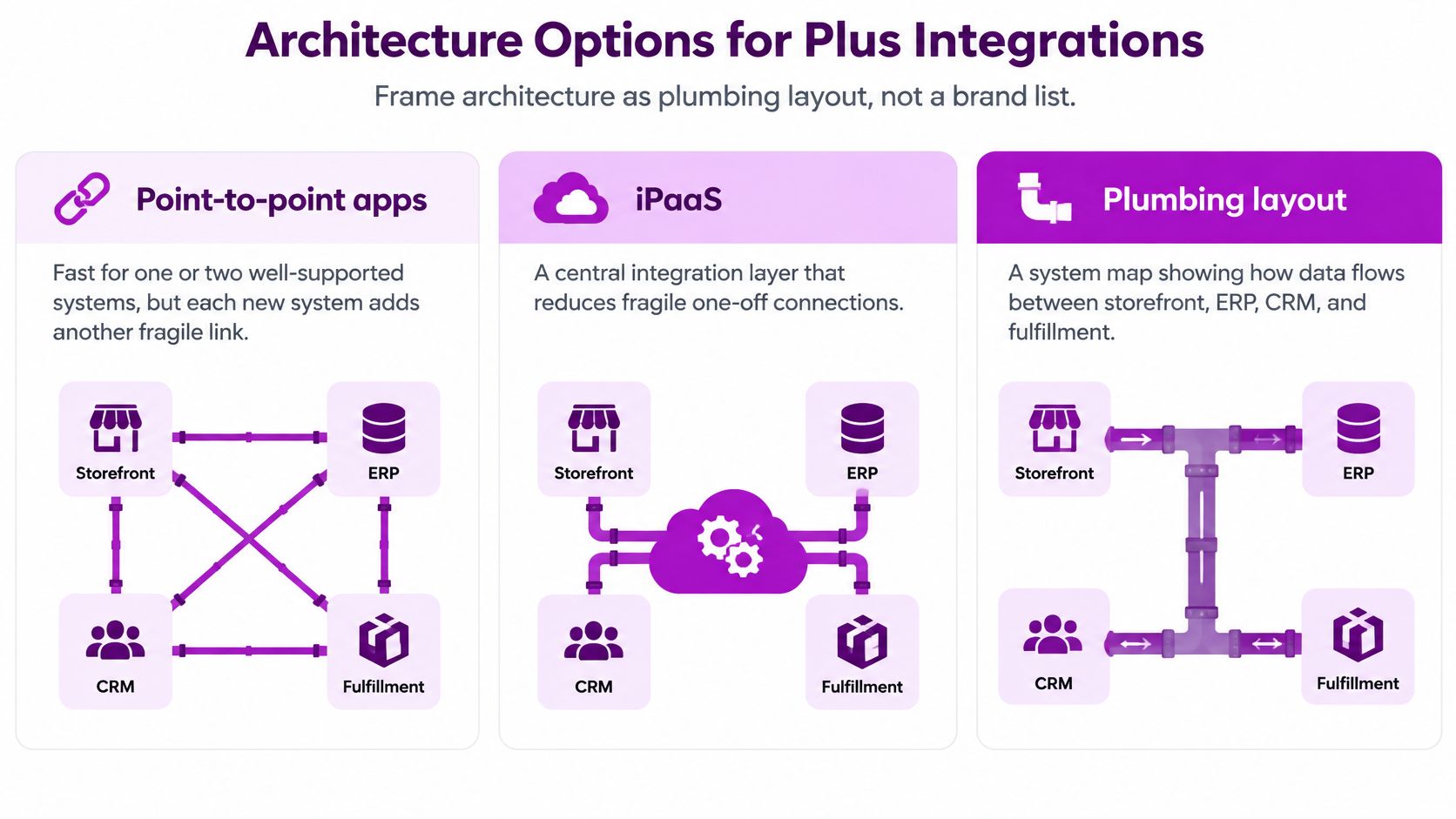
Four plumbing layouts
Point-to-point apps feel fast because there's nothing between Shopify and the other system. That works for one or two well supported tools. Each new system adds another direct link, another set of credentials, and another place where a field change can break without warning.
An iPaaS such as Celigo or Boomi puts a managed layer in the middle. It suits a standard ERP connector when your mappings stay inside what the product exposes. You trade build effort for a subscription and a person who maintains mappings when fields change.
Custom middleware is a small service you own, usually with queues between Shopify and the ERP. Choose it for several Plus stores, custom pricing, or rules no connector exposes. You gain control over retries and transformations, and you accept that someone must monitor it.
Headless keeps Shopify as commerce and checkout while a separate front end owns the experience. Our Shopify development covers everything from minor theme adjustments to custom theme development, built on Shopify, React, Node and Liquid, so theme level work and a custom storefront can sit in one scope when the front end is part of the project.
The video below walks through how these API choices play out in a real build.
Capacity and the governance bottleneck
Capacity favors modern builds. Shopify's GraphQL Admin API rate limits documentation states Shopify Plus stores receive a GraphQL restore rate of 1,000 cost points per second, while REST is limited to 20 requests per second with a 400-request-per-app/store bucket. GraphQL cost depends on query complexity, so narrow queries that select fewer fields cost less than nested product or order queries. Read the returned throttle status, pace work with queues and exponential backoff, and use Bulk Operations for large product, inventory, customer, and order jobs. Our guide to Shopify API integration patterns goes deeper on that pacing.
Throughput isn't the usual failure point, though. A request can succeed and still write the wrong price, tax rule, translation, or stock owner across markets. Use one organization with markets when catalog and brand are shared, separate stores when legal entities or catalogs diverge, and middleware when more than two systems must agree. Past that point, a mesh of point-to-point links costs more to run than it saved to build.
Stopping Silent Data Corruption
Real-time is not a safety guarantee. A webhook that arrives in one second and writes the wrong stock number is worse than a scheduled sync that arrives in fifteen minutes and writes the right one. Speed tells you how fast data moves. It tells you nothing about whether the data survived the trip.
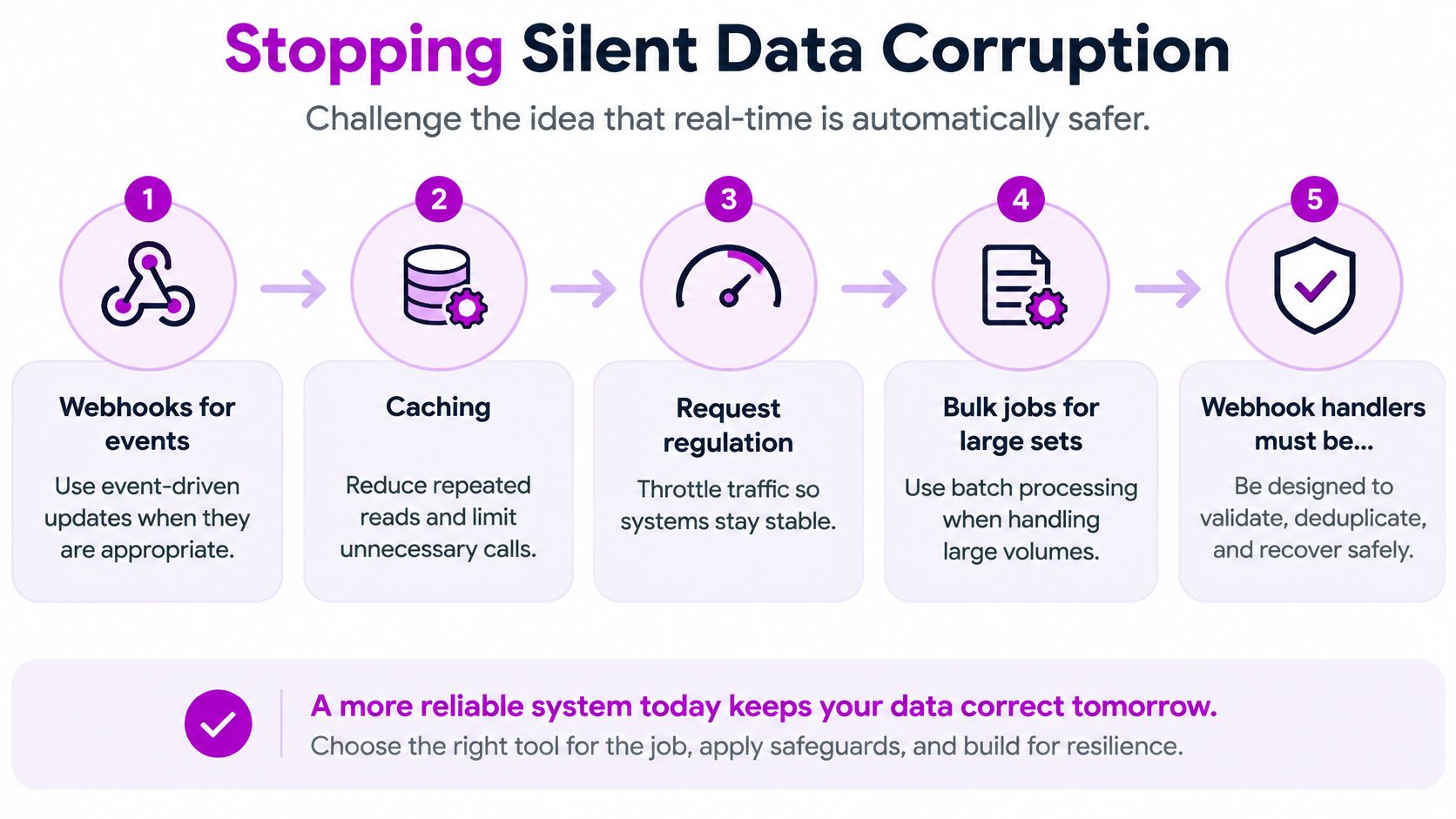
Shopify's API usage limits guidance recommends webhooks for event-driven workflows and also emphasizes caching, request regulation, and bulk operations for large data sets, and it notes webhook handlers should be idempotent because failed deliveries may be resent. That last point is where most merchant content stops, and where your design should start.
The checklist below frames the pieces as a reliability sequence rather than a race.
How an order actually fails
Follow one order. Shopify fires an order created webhook. Your endpoint times out, Shopify retries, and now the same event arrives twice. Without protection, the ERP creates two orders, the warehouse picks twice, and finance invoices twice. Or the event never lands at all, and the warehouse sees nothing while the customer sees a confirmation email.
Five pieces stop that chain. An idempotency key based on the Shopify order ID means the same order is written once, however many times the event arrives. Deduplication drops replayed events you've already processed. A replayable queue holds events so you can rerun them after a downstream outage instead of losing them. A dead-letter queue parks poison messages that fail repeatedly, so one bad record doesn't block every order behind it. A scheduled reconciliation job compares Shopify orders and inventory against the ERP or OMS and repairs drift.
Pair the two speeds deliberately. Use webhooks for low latency on new orders, then reconcile stock and financial totals hourly or nightly. Our notes on implementing data governance cover how to assign ownership for those checks.
Name the owner, then test the failure
Before build, write down the system of record per domain. Shopify or the OMS owns available-to-sell, the ERP owns invoices, the PIM owns attributes, and Shopify owns checkout payment status. When two systems disagree, staff shouldn't vote. The map decides.
Practical rule: If you can't say which system wins an argument about stock, your integration will decide for you, usually at peak trading.
Then decide which records need care. Order creation and payment status need synchronous confirmation before the customer or warehouse treats them as done. Catalog copy and marketing events can run on eventual consistency and be fixed by the next reconciliation. Write that split into the system-of-record map so the team knows which failures block a transaction.
Test it before launch. Duplicate a webhook, delay one by 15 minutes, drop one entirely, and measure the time until the stock figure is correct again. A pre-launch reliability pass with those simulations, alerts, and a one-page recovery playbook is worth more than another demo of a successful sync.
Security and Data Rules That Matter
Security on a Plus integration isn't a badge on a proposal. It's a set of answers to one question. Who may touch which record, and what proof do you have when they do?
Limit what each connection can reach
Give custom apps the smallest Admin API scopes that let them do their job. An app that reads orders doesn't need to write products. Don't let staff or contractors share one all-powerful token across systems, because you can't revoke one person's access without breaking everyone else's work.
Verify Shopify's HMAC signature on every webhook endpoint before you process the payload. That check confirms the event came from Shopify and wasn't altered in transit. Without it, anyone who finds your endpoint URL can post a fake order event.
Store secrets in a vault with rotation, not in a theme file or a shared spreadsheet. When a contractor leaves, you rotate the keys they could see. If you can't list where a secret lives, you can't rotate it.
Keep card and customer data in bounds
Card data stays inside Shopify Checkout and the payment gateway. Your middleware should store order IDs and payment status, never PAN or CVV. That boundary keeps PCI scope out of the ERP pipe, which saves you an audit surface you don't want.
Apply the same restraint to customer records. Sync the fields the warehouse or CRM uses, and keep consent flags attached to the profile so a market opt-out isn't overwritten by a later sync from another system. Every extra field you copy is a field you must protect, correct, and delete on request.
Multi-market brands need two more decisions in writing. First, residency and retention, for when EU or UK customer data lands in a US ERP. Second, who approves the subprocessors list when a connector vendor adds a new one. Name a person, not a team inbox.
Logging should show which system changed a price, stock level, or address, with a timestamp and record ID. It shouldn't dump full customer payloads into a tool the whole company can open. Log enough to debug, not enough to leak.
A launch check for IT
Hand this list to whoever signs off access. It's short on purpose.
- Scopes reviewed: Each app holds only the permissions its job needs.
- HMAC on: Every webhook endpoint verifies signatures before processing.
- Secrets rotated: Vault storage confirmed and old shared keys retired.
- No card data in logs: Middleware stores status and IDs only.
- System of record signed off: One owner named per data domain.
- Access removal owner: A named person revokes access when someone leaves.
How to Choose an Integration Partner
The expensive part of Shopify Plus integration services is rarely the first API call. Shopify's enterprise guide to ecommerce APIs describes GraphQL's cost-based limits, recommends Bulk Operations for large product, inventory, customer, and order jobs, and stresses deliberately defining authoritative sources when syncing across ERP, CRM, and PIM systems. Conflicting prices, tax rules, translations, inventory ownership, and customer identities still cost money after requests succeed, and someone must own schema changes, monitoring, and reconciliation after go-live.
Score any partner on six checks before you discuss price.
- Partner status: Current Shopify Partner status verified in Shopify's partner directory. We're an official Shopify Partner Agency, and you should confirm that the same way you'd confirm any firm.
- Modern stack: Proof they build on GraphQL and Bulk Operations rather than legacy REST.
- Your ERP: A named connector or prior project for your exact ERP.
- Written ownership map: A system-of-record document, not a verbal assurance.
- Monitoring and recovery: Alerts plus a playbook, not just a launch date.
- Comparable references: Similar order volume and store count to yours.
Commercials come in two useful shapes. Single-project work on Shopify and Shopify Plus costs $69 per hour, with no minimum or maximum project size, which suits a bounded connector or a discovery sprint. The Shopify pack costs $6,400 per month and includes 160 hours of the eCommerce team, and it's best for scaling brands ($100k/mo) on Shopify Plus or with multiple storefronts that need development, design, and fixes after launch.
Ask one question before signing. Who owns the middleware after go-live? If nobody does, the cheap build becomes the outage. Run the same six checks on us that you'd run on anyone else.
Run One Domain Before You Scale
A single integration domain is easier to test and troubleshoot than several changing at once. Start with the business task that creates the most manual work, then keep the first release narrow enough for operators to check.
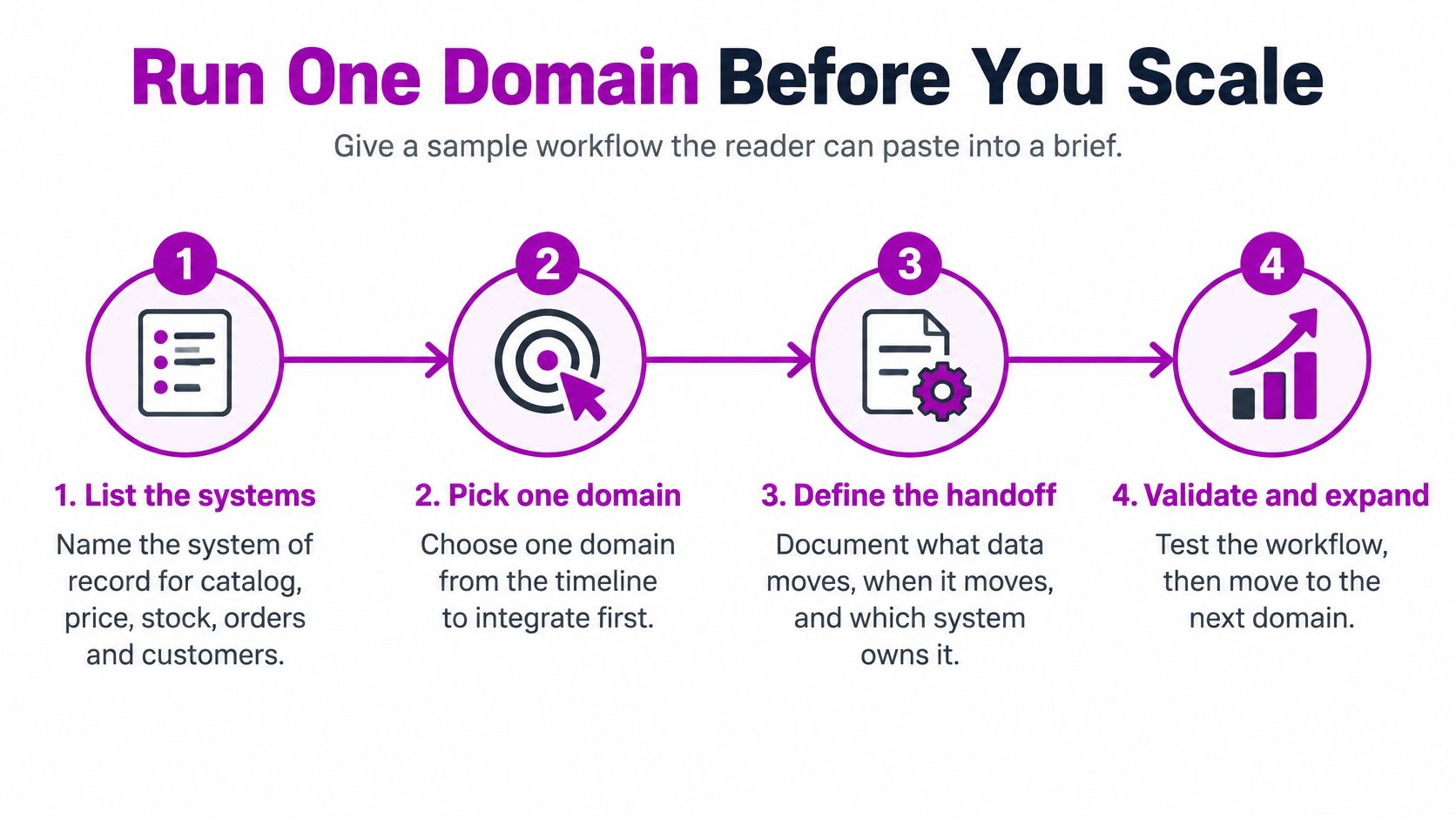
- List the systems: Name the system of record for catalog, price, stock, orders, and customers.
- Pick one domain: Choose the first area to connect, often ERP orders or inventory, and leave other domains unchanged.
- Choose the layout: Select point-to-point, iPaaS, or middleware based on the architecture needs.
- Map before code: Define fields, error states, and idempotency keys so retries do not create duplicate updates.
- Build on a development store: Test the integration away from the live storefront. GraphQL and Bulk Operations can support large data sets.
- Simulate failure: Test duplicate, delayed, and dropped webhook events, then record how each case is recovered.
- Run UAT with operators: Have finance and warehouse staff test a real order, partial refund, and stock adjustment.
- Cut over in a calm window: After launch, reconcile data daily for two weeks while the integration settles.
A single-domain ERP integration typically takes 8 to 16 weeks. Headless commerce or a second region adds scope and should be treated as a later project. Connecting everything at once makes it harder to isolate the cause when data does not match.
Start with the domain that creates the most manual work each morning. That queue of fixes is a practical first scope, even if it was not in the original plan.
For a scoping conversation, bring your systems list and the domain you want to connect first. The ECORN contact form asks you to choose a service: All-in-one ecommerce, Shopify Development, Shopify App, Design and Marketing. Select the closest fit and include those details in your message.
Bring us your systems list and the first domain you want connected, and we can discuss a phased Shopify Plus integration scope and timeline. You can start with a single project or choose a monthly pack for ongoing development across storefronts. Visit ECORN to start the conversation.


Shopify Customer Experience: A 2026 Guide
Shopify Plus Expansion Stores: Limits and Setup
Shopify Theme Update: Safe Steps, Backups and Rollback

Shopify Website Design Packages: What You Actually Get

How to Choose a Shopify Plus Web Design Agency in 2026
Shopify Plus Ecommerce Agency: How to Pick the Right One

Shopify Themes Retina: How to Serve 2x Images

How to Cross Sell on Shopify Without Friction

Best Shopify Theme for Custom Products Compared
Multi Store Inventory Management: A Practical Guide

SEO Consulting for Ecommerce: A Practical Guide
Shopify Theme Updater App: A Safe Update Playbook
Shopify Git Integration: A Developer's Guide to 2026
Headless Ecommerce Development Services Explained

How to Build a Shopify Clothing Website That Converts

How to Launch a Box Subscription Business in 2026

Luxury Skincare Branding Playbook That Converters
10 Best Podcast Ecommerce Shows for Store Growth in 2026
Shopify Developer Hourly Rate: What to Pay in 2026
Critical Shopify Setup Errors That Are Secretly Sabotaging Your Store

Ecommerce Conversion Tracking: The Complete How-To Guide

Shopify Design Agency: How to Pick the Right Partner

Mastering Multi Store Management on Shopify

Scale Shopify Store

10 Shopify App Ideas Worth Building in 2026

Conversion Rate Optimization for Landing Pages: The Playbook

Shopify Plus Automation: A Guide for 2026

10 Social Selling Platforms for Shopify Merchants

Shopify Website Design Examples: 7 Stores Worth Studying

7 Ecommerce Newsletter Examples for Shopify Brands

One Product Shopify Store: Build and Scale

Mobile Pop Up Strategy for Shopify Stores That Converts

Sitemap for Shopify: How to Find, Optimize, and Submit It

7 Single Product Websites Worth Emulating

Product Variants Shopify: The Complete 2026 Guide

Ecommerce Analytics Consulting for Growth

What Is AI Integration for eCommerce

How to Choose the Right eCommerce Website Development Firm

E Business Strategy Implementation

Conversion Tracking Setup for Shopify Stores

BigCommerce vs Shopify Plus Which Enterprise Wins in 2026

Shopify Theme Kit: Setup, Commands, and Migration Guide

Shopify Extension Development: A Practical 2026 Guide

Shopify Speed Score Explained and How to Improve It

Shopify Mobile Optimization: The 2026 Playbook

How to Add Subcategory in Shopify for Better UX

How to Implement Structured Data for Ecommerce in 2026

SEO App Mobile: Shopify Store Optimization Guide

Shopify Plus Support: What It Includes and How to Choose

Google Ads for Shopify: The Complete 2026 Playbook

Shopify New York: How to Find and Hire the Right Agency

Google Search Console for Shopify: The Complete Setup

First Party Data Collection for eCommerce Growth

FAQ Online Store Guide: Build and Measure It Right

Do FB Ads Work for eCommerce in 2026?

One Page Checkout for Shopify: Design and Implementation

Shopify GraphQL vs REST: The 2026 Developer Decision

Shopify Ecommerce Consulting: Strategy, Pricing &

Are Reddit Ads Worth It for eCommerce Brands

Shopify Title and Meta Description: A Practical 2026 Guide

Product Video Best Practices for Shopify Brands

Real-Time Inventory Management: A 2026 Guide

AI Chatbot Integration for Shopify Stores

Affiliate Program Management: A Shopify Guide

10 Best Performance Monitoring Tools for Shopify in 2026

Digital Asset Management for eCommerce Brands in 2026

Every Type of Facebook Ads Explained for eCommerce Growth

Product Information Management Explained for Shopify Brands

Support Ticket System: A Guide for Shopify Stores

10 Best Customer Service Tools for Shopify in 2026

Can I Start a Business with No Money? a 2026 Blueprint

What Sells Good on Etsy: Best Niches for 2026

Shopify Add to Cart Button: A Practical 2026 Guide

Customer Feedback Automation: A Practical eCommerce Guide

Critical Rendering Path: A Guide for Shopify Stores

How to Promote on TikTok for eCommerce in 2026

B2B eCommerce Consulting That Drives Real Revenue

10 Best Practices for Site Navigation in 2026

Return vs Refund for Shopify Stores: A Practical Guide

What Is Customer Lifetime Value and Why It Matters

What Is Voice of Customer Research for eCommerce

SMS Marketing for Ecommerce That Actually Converts

Master How to Improve Email Deliverability in 2026

Top 8 eCommerce Partners NYC for Shopify Brands in 2026

Machine Learning for Ecommerce: Boost Your Shopify Store

Beauty Market Research: Your 2026 Growth Guide

Shopify International Expansion: A 2026 Roadmap

What Does CRO Stand for in Business: Understanding CRO

Shopify Visual Merchandising: A Playbook for Higher Sales

Shopify Landing Page Design: Master Conversion in 2026

10 Best AI SEO Optimization Tools for Shopify in 2026

Agentic AI for Ecommerce: Boost Your Sales in 2026
Mastering Email Marketing Data for eCommerce Growth

Conversion Rate Optimisation Australia: Boost Your Sales

Conversion Rate Optimization AI: Your Shopify Store Guide

10 Product Bundling Strategies for Shopify in 2026

How to Increase Customer Lifetime Value: A Shopify Playbook

AI Customer Service Automation: Shopify Guide 2026

Clean Website Design: A Shopify Conversion Playbook

Omnichannel Retail Strategy: A Shopify Playbook


newsletter in your inbox